Atlassian did the thing everyone else is still promising
I build AI agents at eesel, which in practice means I read other people's tool specs for a living. The "can I point Claude at our helpdesk" question has been far and away the most common one in my inbox this year. The answer is usually some flavour of no.
When I checked Claude for Zendesk, what Zendesk had shipped was an MCP client, not a server. Freshdesk sits behind an early access programme. Gorgias has no marketplace listing for it at all. Help Scout did ship a real server, then made it read-only on purpose.
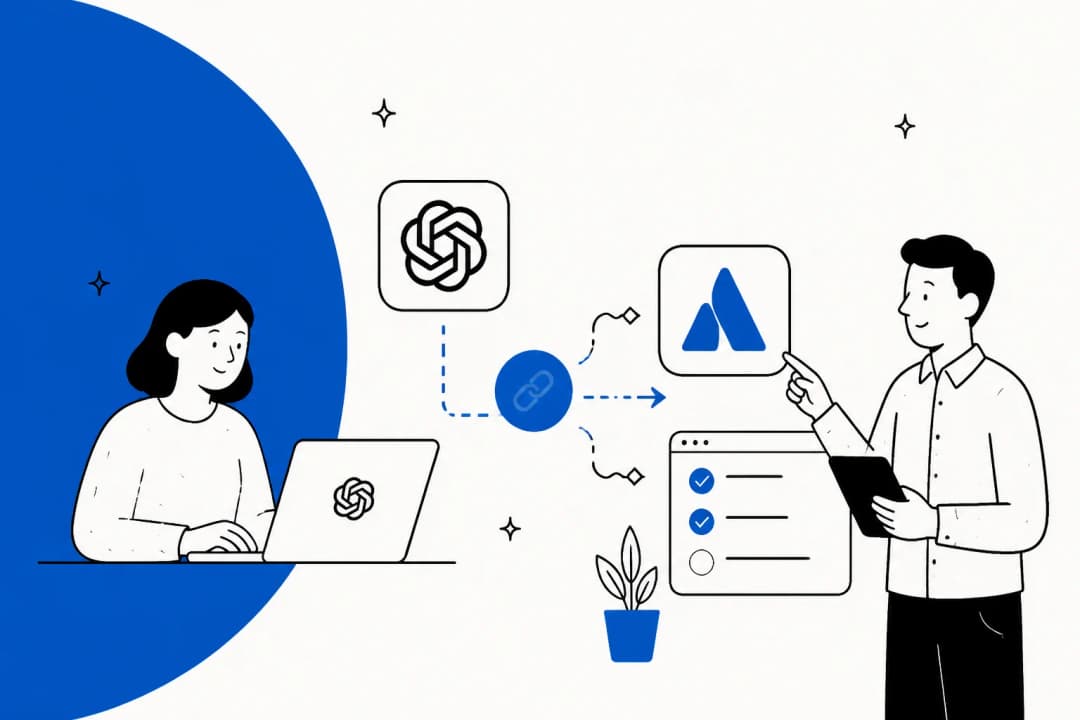
Atlassian just built it. On the Rovo MCP page there is a tile grid of AI clients, and Claude is one of four, sitting next to Cursor and VS Code and ChatGPT. The body copy names it directly: stay in the flow "whether you need context from Atlassian in Claude". A vendor pointing its own customers at somebody else's model, on purpose, on its own marketing page.
The access model is unusually generous too. Atlassian's own FAQ says "All Atlassian Cloud customers have access". Your plan only changes throughput: Free sites get 500 calls per hour, Standard 1,000, and Premium or Enterprise get 1,000 plus 20 more per user, up to a 10,000 ceiling. There is no Rovo subscription required either, because as Atlassian puts it, the server "is not an AI model, it's an integration layer".
So, this post is not a takedown. It is the thing I wish somebody had told me before I spent an afternoon expecting a service desk and getting a work item tracker instead.
The four ways to connect Claude to Jira Service Management
There are four routes. They sort along one axis that matters more than all the others put together: whether the thing can put words in front of the person who raised the ticket.
| Route | Who runs it | Setup time | Reads | Replies to the requester | Cost |
|---|---|---|---|---|---|
| Rovo MCP server | Atlassian | ~2 minutes | Jira work items, Confluence, JSM Ops alerts | No | Free, plus Claude tokens |
| Same server, API token | Atlassian, admin-enabled | ~20 minutes | Adds the 4 JSM Ops tools | No | Free, plus Claude tokens |
| Service desk REST API | You | Weeks | Everything JSM has | Yes | Engineering time, plus tokens |
| Purpose-built agent | Vendor | ~30 minutes | Requests, KB, past history | Yes | Per request handled |
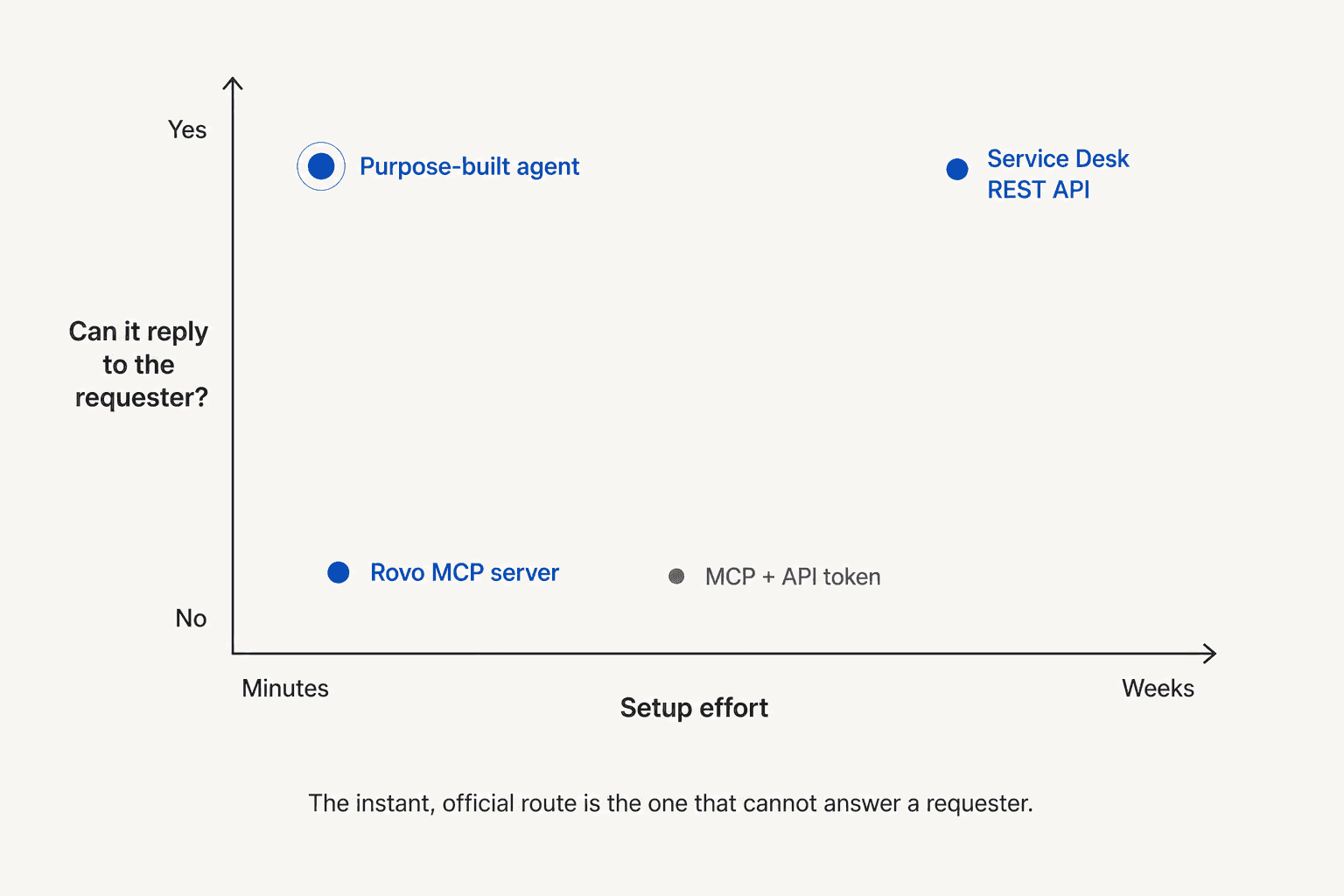
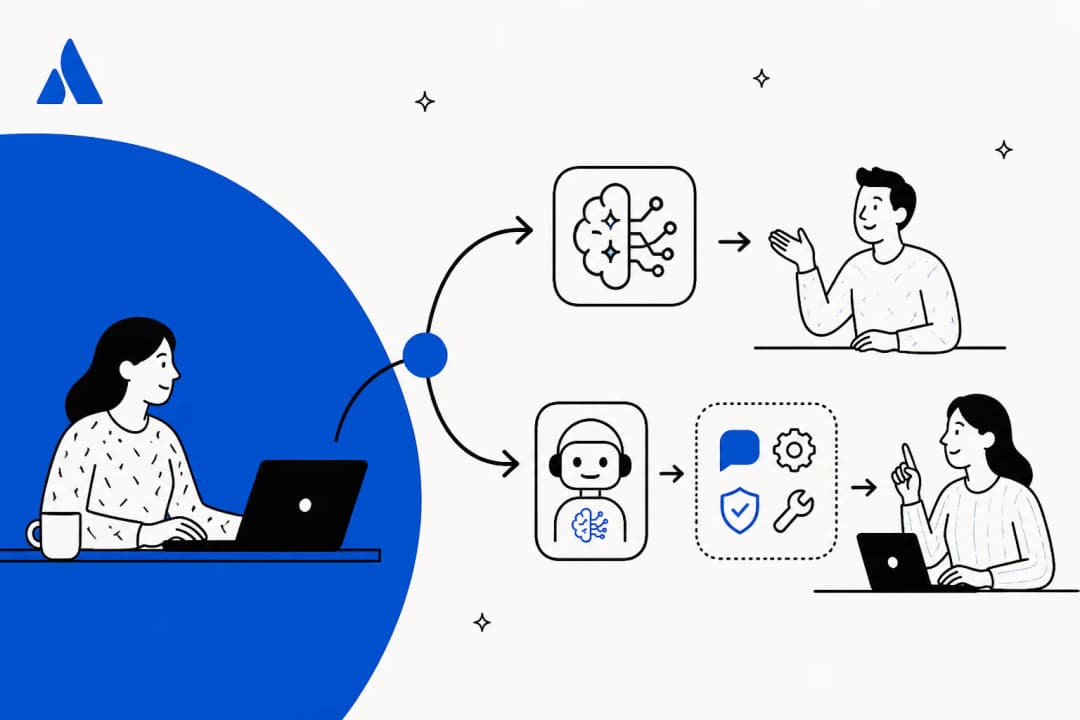
The shape of that chart is the whole argument. The instant, official, free route is the one that cannot answer a requester. Same trade I found on Help Scout, though Atlassian arrives at it from a different direction. Help Scout deliberately shipped read-only. Atlassian shipped writes, and then never pointed them at the service desk.
Route 1: the official server, start to finish
The endpoint is a single string:
https://mcp.atlassian.com/v1/mcp/authv2
One warning, before you copy an older config in from somewhere. Atlassian killed the legacy SSE transport: after 30 June 2026, https://mcp.atlassian.com/v1/sse is no longer supported. That date has passed already. So if you inherited a config from a colleague's blog post back in spring, it is dead, and the symptom will look like an auth failure rather than a deprecation.
For Claude Code it is a single command:
claude mcp add --transport http atlassian https://mcp.atlassian.com/v1/mcp/authv2
Then /mcp to run the OAuth flow. In Claude Desktop the path is Settings, Extensions, Browse extensions, Plugins, search Atlassian. And on claude.ai, the Atlassian listing sits in the connector directory, described as read and write, built by Atlassian.
One implementation detail trips people up on the very first call. Every tool wants a cloudId, and the way you get one is getAccessibleAtlassianResources, which Atlassian describes as a required first call for any tool. Skip it, let Claude fire straight at searchJiraIssuesUsingJql, and the error coming back reads like a permissions problem. It is not one.
The other thing worth knowing on day one: Claude reaches your MCP server from Anthropic's infrastructure, never from your laptop. True even in Claude Desktop. So if your Atlassian site sits behind an IP allowlist, the tool calls fail while the OAuth consent screen still appears quite happily, which is about the most confusing failure mode on offer.
Route 2: the four JSM tools, and the token gate in front of them
Now, the part that made me stop and read the page twice over.
Atlassian publishes around 46 tools, spread across 13 permission groups. Jira gets 14. Confluence gets 12, Bitbucket also 12, Compass 10. Jira Service Management gets four:
| Tool | Read or write | What it does |
|---|---|---|
getJsmOpsAlerts | Read | Get an operations alert by ID, alias, or search query |
getJsmOpsScheduleInfo | Read | List on-call schedules, or current and next responders |
getJsmOpsTeamInfo | Read | List operations teams and team details |
updateJsmOpsAlert | Write | Acknowledge, unacknowledge, close, or escalate an alert |
Every one of those lives on the operations side, the part of JSM that descends from on-call alerting. Not one of them touches the service desk. There is no published tool for requests, request types, queues, SLAs, approvals, portal customers, or portal configuration.
And there is a second gate standing in front of even those four. Atlassian's supported tools page states that JSM tools "only support authentication via API token" and are "only available if authentication via API token is enabled by your organization admin". Meanwhile OAuth is the default flow, and the recommended one. The practical outcome for most people, then: a normal Claude login surfaces none of the JSM tools, and nothing in the interface explains why.
Compass, incidentally, runs the opposite rule: OAuth only, no API token. Bitbucket wants an API token and a linked workspace. Three products, three different auth rules, all inside one server.
What you can actually reach in a service desk
None of this means Claude is blind to your tickets. A JSM project is a Jira project underneath, so the generic Jira tools work on it. getVisibleJiraProjects, getJiraIssue, searchJiraIssuesUsingJql, getTransitionsForJiraIssue, transitionJiraIssue, editJiraIssue, and addCommentToJiraIssue all operate on JSM work items quite happily.
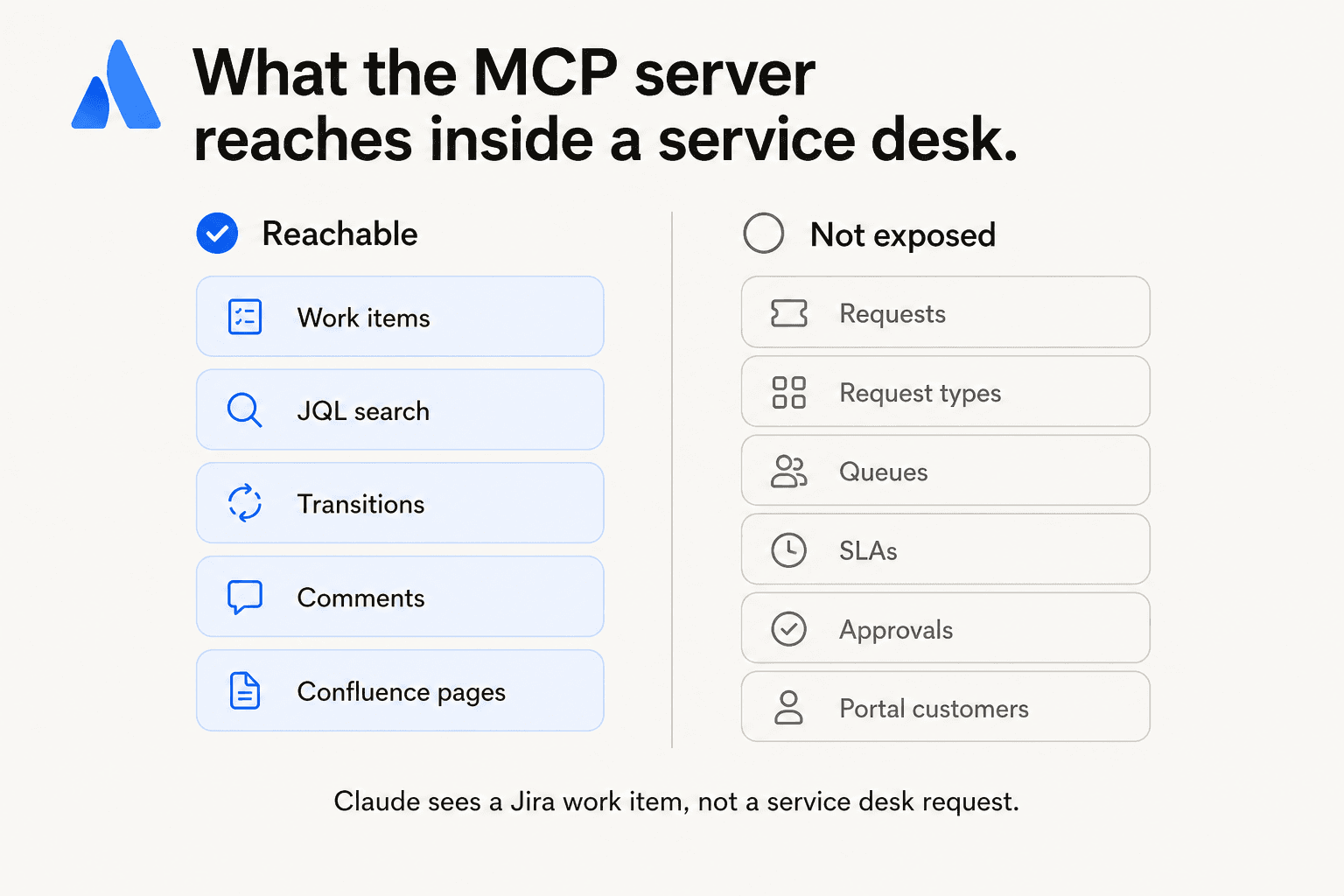
That distinction matters more than it sounds like it should. Atlassian's own documentation is blunt about what a request type buys you: "If you create a work item without a request type, your requests won't have access to all Jira Service Management features." Claude is looking at the Jira layer underneath the service desk, not the service desk. Where your agents see a request with an SLA clock, a queue, a portal, and a customer attached to it, Claude sees a work item.
The sharpest version of that gap is comments. Over in the service desk API, customer visibility comes down to exactly one boolean on the comment body:
POST /rest/servicedeskapi/request/{issueIdOrKey}/comment
{ "body": "Hello there", "public": true }
public: true is a reply the requester sees on the portal. public: false is an internal note, agents only. No separate endpoint, no visibility object, just the flag. And the MCP tool addCommentToJiraIssue carries no equivalent parameter in its published description, which means Claude has no way to state whether the words it writes are meant for the requester. On an IT desk that is not a missing nicety. It is the difference between a note to your colleague and an email to a director.
Worth knowing if you do take the API route later on: the service desk comment resource exposes only GET and POST. No PUT, no DELETE. Retracting a comment means dropping down to the Jira platform API at /rest/api/3/issue/{id}/comment/{id}, while holding either the Edit own comments or the Delete own comments permission. Plan the undo before you need the undo.
Route 3: the service desk REST API, if you are building it yourself
If you want the queue-aware, SLA-aware, customer-visible behaviour, you write it against /rest/servicedeskapi/ yourself. That is a real project rather than a weekend, and there are three things that will shape the design more than you expect them to.
Rate limits are three systems at once, and Atlassian says your integration "must handle all three". A points-based hourly quota, per-second burst limits, then per-issue write limits on top. The default Global Pool is 65,000 points per hour shared across tenants; a per-tenant pool runs from 65,000 on Free up to 150,000 plus 30 per user on Enterprise, capped at 500,000. Burst defaults sit at 100 requests per second on GET and POST, and 50 on PUT and DELETE. Per-issue writes cap out at 20 in two seconds and 100 in thirty. Then one endpoint is dramatically tighter than all the rest: GET /servicedeskapi/servicedesk/{id}/customer is throttled to 5 requests per second, and it will be the first wall you hit on any customer backfill.
Silent permission failures. Atlassian documents that on GET /request/{id}/comment, "No permissions error is provided if, for example, the user doesn't have access to the service desk or request, the method simply returns an empty response." So an agent that reads no comments, then concludes there were none, goes on to answer the wrong question with total confidence.
Knowledge base access is search-only. GET /rest/servicedeskapi/knowledgebase/article gives you articles matching a query, per service desk or across all of them, and query is required. Nothing in that namespace fetches an article's full body, so grounding on your knowledge base means a second trip out to the Confluence API. The plus side: both KB endpoints are marked exempt from app access rules, unlike every request and comment endpoint.
What one JSM reply actually costs
Here is where the read-only limit gets financially interesting. Tokens are cheap, and what they buy is narrow.
A grounded reply runs to roughly 12,000 input tokens once you have pulled the ticket, the transitions and two Confluence pages, plus about 700 output tokens on the way back. On Claude Sonnet 5 at $2 and $10 per million, that is about 3.1 cents. Closer to 1.3 cents once prompt caching is doing its job at $0.20 per million cached read. On Claude Opus 5 at $5 and $25, the same reply lands nearer 7.8 cents.
Now the comparisons. Atlassian's own virtual agent includes 1,000 assisted conversations a month, then bills from $0.30 each after that, and a conversation that gets matched to an intent and then escalated to a human still bills. Rovo credits are a separate meter again: Standard gets 25 per user per month, Premium 70, Enterprise 150. The beta Teamwork Graph tools in the MCP server are free today, but Atlassian has said they "will be billed at a minimum of 1 Rovo credit per call" at general availability, with 90 days' notice.
One caveat before you take any per-conversation figure at face value, from an IT manager who took the issue to the product team directly:
"One example: virtual agent will count a ticket as "successfully deflected" if the user gives up responding and it auto closes. That's not a successful deflection, that's an awful user experience."

That is worth checking against whatever tool you pick, ours included. A deflection rate that counts abandonment as a win is measuring the wrong thing, and it is the number most likely to be quoted back at you in a renewal meeting.
Plug your own numbers in:
The honest reading of those three numbers: the token column is cheapest because it buys the least. No reply pipeline, no visibility flag, no queue routing, no SLA awareness, and no way at all to test itself before it meets a real requester. Comparing that to a per-request price is comparing a research assistant to an agent. Useful. Not the same job.
The admin side, and why it will say access denied
Four separate things all have to be true before a single tool call lands. Each of them fails differently.
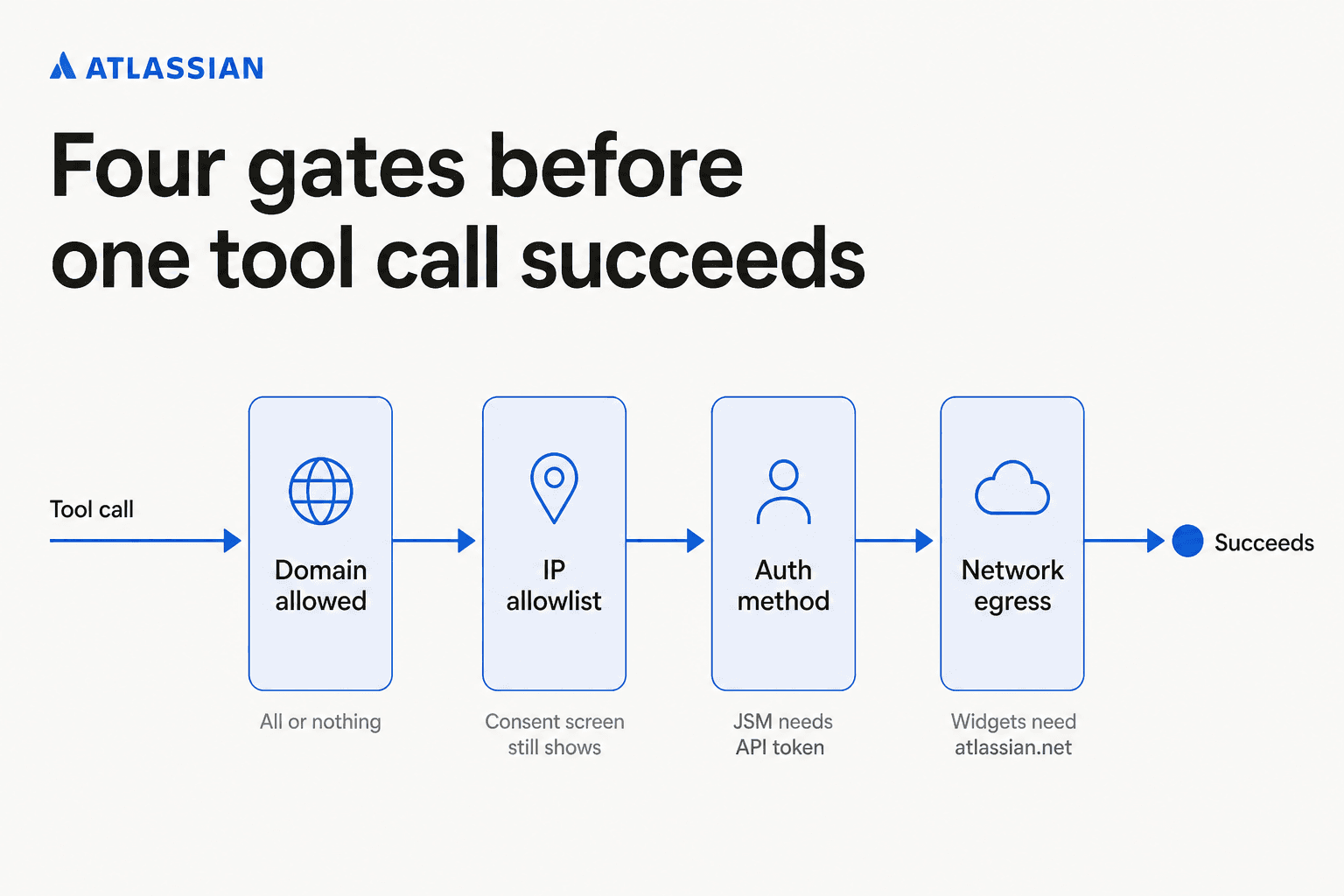
- The AI domain has to be allowed. Atlassian ships a default list of AI partner domains, Claude and ChatGPT included. Admins can allow it or block it, but Atlassian is explicit that "You cannot block individual domains. You can only allow or block the entire domain list." Which leaves no way to permit Claude and refuse everything else.
- The IP has to pass the allowlist, and this one is nasty, because "the OAuth 2.1 consent screen may still appear for users connecting from blocked IPs, but tool calls will fail". The connection looks successful right up to the moment it does nothing.
- The auth method has to be permitted. API-token auth is an org-wide switch, and that switch is what decides whether the JSM tools exist for you at all. Domain blocking, notably, does not apply to API-token connections.
- Network egress has to reach
*.atlassian.net, since the server renders interactive Jira and Confluence widgets inside the AI client via iframes.
On top of all that, a Permissions tab now lets org admins allow or block Read, Write, and Search independently per app, and Atlassian says it "will take precedence over settings in Connected Apps". There is also an "Apply to future additions" toggle. Which quietly means newly-added permissions can inherit an allow, with nobody reviewing them. If you happen to be the person signing off on access reviews, that toggle is worth a look.
Two compliance facts to hand your security team before they think to ask. The server stores and caches no Jira or Confluence content, and it runs strictly inside the signed-in user's permissions, which is a better default than most connectors ship with. But Atlassian states it "does not currently support FedRAMP or HIPAA requirements", and it is Cloud-only, no Data Center or Server path published. For plenty of regulated IT service desks, those two sentences end the evaluation there and then.
What people are actually running into
The loudest complaint is not about tools or credits. It is that the token keeps expiring. One Atlassian Community thread titled "The MCP Auth expires too fast" runs from October 2025 to March 2026 with roughly 16,500 views and no resolution, and it is full of Claude Code users:
"Bump! I need to reauthenticate sometimes once an hour, sometimes once every 10-20 minutes. This morning I authenticated the MCP connection then sent my prompt, 12 minutes later claude code was getting a 401 response and I only had a single terminal session open. This is basically unusable, I guess I'll just need to build some custom tools to utilize the API."
A Community Champion in the same thread put the cause plainly: the server issues short-lived OAuth tokens, external clients cannot refresh them automatically, and long-lived tokens have not shipped. Two things follow from that if you are running agents rather than chatting.
Parallel sessions fight each other. Several people report that authenticating in one window silently de-authenticates the others, which makes any multi-agent workflow painful. And the newer /mcp endpoint fails more quietly than the old one: one user noted that /sse at least threw a 401 you could catch, where the replacement "just silently fails". If you are wiring up retries, catch the empty result, not just the error code.
Tool quality has its own thread, and this is the part I did not expect. An Atlassian PM working on the MCP server replied on Reddit, on the record:
"Tool quality - the problem you mention where the Jira create tool doesn't respect required fields is something we just need to fix. We've been moving quickly to release a broad range of tools, and now we need to go back and fix some of those pain points. Tool descriptions included. You'll see some improvements here soon Context bloat - we acknowledge this is a problem as well. There are many more tools we want to provide but the current design is already at it's limit."
Credit anxiety is the other big theme, and it is mostly about Rovo rather than MCP. One Bitbucket user reported a single pull request review eating almost half of a monthly allowance:
"Rovo had a look at the PR and made a few suggestions and in doing so appeared to use 965 of my 2000 credits with 760 being marked as 'Code review in Bitbucket', I'm not sure where the other 205 went?? Either I'm doing something amazingly wrong or that's not value for money at all."
An Atlassian product manager replied in that thread and agreed the maths was heavy, which is fair, and unusually candid. The same worry turns up on Reddit, where a Standard-plan user did the comparison out loud:
"advertised ($0.01 per credit after the initial 2000), copilot is a mere $10 for 300 claude 4.5 requests why is it so expensive? the free tier..."
That same poster described burning three quarters of 2,000 credits inside a couple of hours, across no more than 30 requests.
That context is exactly why the MCP server's pricing model reads as a relief today rather than a worry. It is also why the Teamwork Graph billing note deserves a calendar reminder. Free-with-your-plan is a very different product from metered-in-credits, and Atlassian has already told you which way two of those tools are heading.
How I would actually decide
If your goal is analysis, QA, incident writeups, or asking questions across Jira and Confluence in one place, install the connector today. It is the best free Jira AI plugin I have tested this year. Free, official, the permission model is sound, and read-only-in-practice is a feature the first time you point an AI at a production desk. Strongest free thing in the category, and I would not talk anyone out of it.
If your goal is on-call, the four JSM tools earn their keep, and they are worth having the conversation with your admin about enabling API-token auth. Acknowledging and escalating alerts straight from a chat window is a real workflow.
If your goal is clearing tier-1 requests so your team stops answering the same VPN question, the connector is not that tool, and no amount of prompting is going to make it one. What you need is something that speaks /rest/servicedeskapi/, knows the difference between a public reply and an internal note, respects the queue and the SLA policy you already configured, handles escalation cleanly, and can be tested against requests that already happened before it ever meets one that has not. My roundup of the best AI for ITSM covers the field if you want to shop it properly.
eesel AI for Jira Service Management
That last job is the one we build for. eesel joins your service desk as a real AI agent, not a widget bolted on the side. It reads requests, drafts and sends replies, adds internal notes, updates request fields, sets priority and routes to teams, all inside the assignment rules and SLA policies you already have.
The part I would care about most, evaluating this on a live desk, is the simulation. You replay your past requests before anything goes near a real one, get coverage percentages broken out by theme, fill whatever gaps the run exposes, then launch once the number is good enough. We built that because we have watched confident-sounding bots give wrong answers on other people's queues, and a dry run over your own history is the only honest way to find that out first.
For a sense of what that looks like on an internal support desk: InDebted runs JSM for a 5 to 10 person IT team supporting hundreds of employees across five markets. Their knowledge comes in from Confluence and from a Slack bot:
"We use it to be the first responder to our Helpdesk tickets in Jira. It essentially acts just like an agent would."
Jason Loyola, IT Team, InDebted, eesel case study
Today they are at 15% of incoming Jira tickets deflected, with 55% as the target once the knowledge base fills out. A real number from a real desk, not a demo figure. And the honest part is that it started at 15%, not at 55%.
Pricing is $0.40 per request handled. Billed per request rather than per reply, so a fifteen-message back and forth still counts as one charge. To start there is $50 of free usage with no card, which works out at 125 requests, every feature unlocked.
If your service desk lives somewhere other than JSM, the same agent runs on Zendesk and six other helpdesks.
Use the Atlassian connector for the thinking. For the answering, use something that speaks the service desk API. Different jobs, and the good news is that in 2026 you no longer have to pick just one.
Frequently Asked Questions
Is there an official Claude integration for Jira Service Management?
https://mcp.atlassian.com/v1/mcp/authv2. For the wider picture see our Jira Service Management AI breakdown and the Claude overview.Can Claude reply to a Jira Service Management request?
addCommentToJiraIssue tool carries no public flag, which is the single boolean the service desk API uses to decide whether a comment reaches the requester. Sending real replies means the REST API or a purpose-built AI helpdesk agent like our JSM integration.How much does Claude for Jira Service Management cost?
Do the Jira Service Management MCP tools work on the normal Claude login?
Does the Atlassian MCP server work with Jira Service Management Data Center?
Is the Claude connector safe to point at a production service desk?
What is the best AI for Jira Service Management if the connector cannot reply?
Can Claude read our Confluence knowledge base through the same connector?
searchConfluenceUsingCql cover spaces, pages, descendants, and comments, so a JSM ticket and the runbook that answers it can sit in one conversation. Our Atlassian knowledge base and knowledge base chatbot guides go deeper.

Article by
Alicia Kirana Utomo
Kira is a writer at eesel AI with a Computer Science background and over a year of hands-on experience evaluating AI-powered customer service tools. She focuses on breaking down how helpdesk platforms and AI agents actually work so that support teams can make better buying decisions.