
What AGENTS.md is, and why it exists
For a while, every coding tool invented its own instructions file. Cursor had .cursorrules, Claude Code had CLAUDE.md, Aider had .aider.conf.yml, Gemini had GEMINI.md, and on it went. Annotate your repo for one agent and you got to do it all again for the next.
AGENTS.md is the fix: one open format for guiding coding agents, a single plain-Markdown file at the repo root that many agents read. The project calls it a "README for agents", which is the clearest one-liner I've seen. Your README.md is for humans (quick start, contribution guide); AGENTS.md holds the extra context an agent needs (build steps, tests, conventions) that would clutter a README.
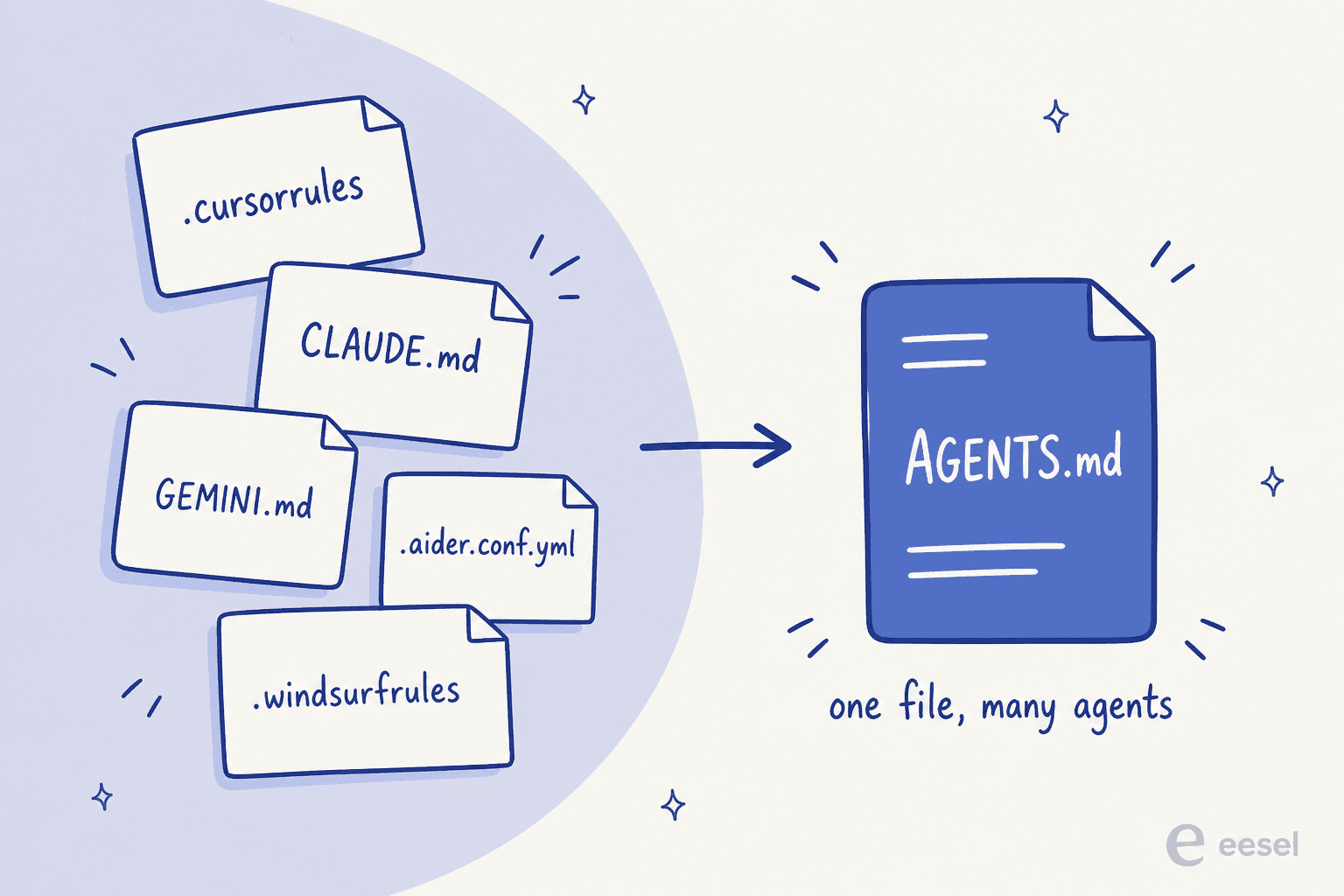
There are no required fields. It's just Markdown: use whatever headings you like and the agent parses the text. It came out of a collaboration across the ecosystem, including OpenAI Codex, Amp, Google's Jules, Cursor, and Factory, with the first commit landing on August 19, 2025. It has since moved to a neutral home and is now stewarded by the Agentic AI Foundation under the Linux Foundation, with the repo living at agentsmd/agents.md under an MIT license.
This isn't a niche experiment. The repo sits at 24.5k stars, a GitHub code search turns up 60k+ example files, and even OpenAI's own repo carries 88 of them. If you've been ignoring it as hype, this is the point where I'd stop.
Which agents actually read it
The homepage lists 24 compatible tools, and the roster is a good chunk of the category: Zed, OpenAI Codex, Gemini CLI, Cursor, Jules, Devin, Warp, Windsurf, VS Code, GitHub Copilot's coding agent, Aider, goose, Amp, and more. And as of this month, Claude Code too. When that many competing vendors quietly settle on the same plain file, the format has basically won.
Does Claude Code read AGENTS.md? Yes, natively now
This is the actual question most people arrive with, so here's the direct answer: Claude Code reads AGENTS.md natively, requiring v2.1.277 or later (shipped September 18, 2026, when Anthropic adopted the cross-tool spec). A repo that other agents already understand works with Claude Code without you adding a CLAUDE.md, an import line, or a setting.
The catch is what happens when both files exist. The default behavior:
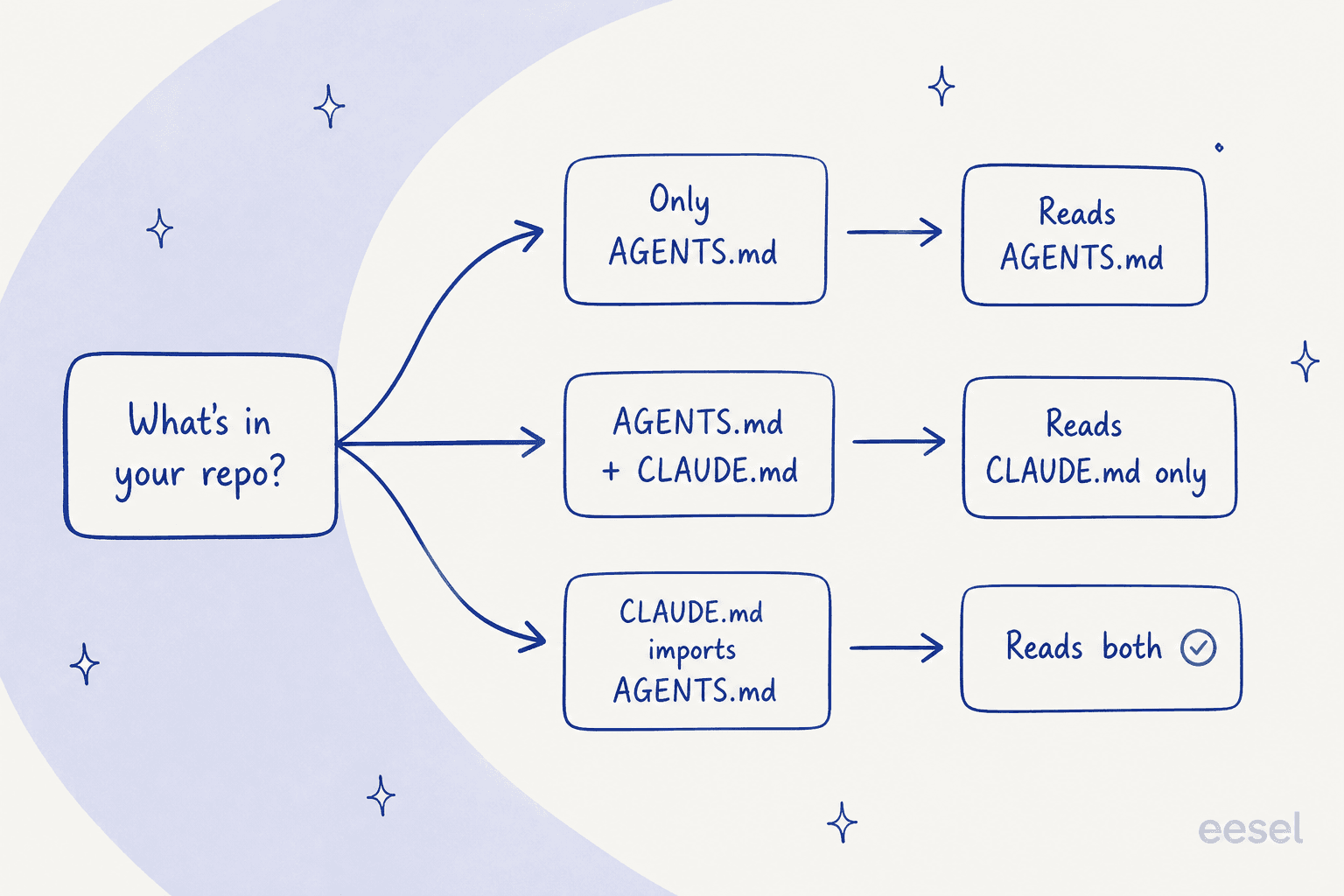
| Your repo has | Claude Code reads |
|---|---|
An AGENTS.md, no CLAUDE.md | The AGENTS.md |
Both AGENTS.md and CLAUDE.md | The CLAUDE.md files only |
A CLAUDE.md that imports AGENTS.md | Both (the import pulls AGENTS.md in) |
So the trap is a stale CLAUDE.md silently winning over a carefully maintained AGENTS.md. If you want both, the Project instructions setting (/config) has values claude-md-or-agents-md (the default), claude-md-and-agents-md (both, CLAUDE first), claude-md (CLAUDE only), and managed-only. Worth knowing: a CLAUDE.local.md counts as a CLAUDE-family file too, so dropping one in stops Claude from reading the AGENTS.md until you flip that setting. Your ~/.claude/CLAUDE.md, managed policy files, and .claude/rules/ don't count toward the "has a CLAUDE.md" check, so they keep loading alongside AGENTS.md.
One more quirk to file away: an AGENTS.md read directly won't show up in /memory or /context, and InstructionsLoaded hooks don't fire for it. You confirm it loaded from the AGENTS.md loaded line at the start of the session. If you're new to the tool, our getting started guide and CLI reference cover the basics.
CLAUDE.md vs AGENTS.md: the honest difference
People frame this as a rivalry. It isn't, really. AGENTS.md is the cross-tool standard; CLAUDE.md is Claude Code's own richer instruction system. They're both plain Markdown, and Claude now reads either.
| AGENTS.md | CLAUDE.md | |
|---|---|---|
| Read by | 24+ agents (Codex, Cursor, Gemini CLI, Claude Code…) | Claude Code |
| Format | Plain Markdown, no required fields | Plain Markdown |
@path imports | No | Yes, 4 hops deep |
| Scope hierarchy | Nested files, closest wins | Four-scope hierarchy |
| Best for | One file that every tool reads | Claude-specific setup, imports, path-scoped rules |
The practical read: if your team uses a mix of coding agents, keep the source of truth in AGENTS.md. If you're Claude Code only and want imports or per-path rules, CLAUDE.md gives you more machinery. And you can have both, if you wire them up on purpose rather than by accident.
Worth saying plainly: CLAUDE.md isn't going anywhere, and it isn't "worse." It has features AGENTS.md deliberately leaves out (the spec stays minimal on purpose). Picking one over the other is about how many tools you run, not which is better built.
How Claude Code loads instruction files
CLAUDE.md files load from broadest scope to most specific, and everything discovered is concatenated rather than overriding, so instructions closer to where you launched are read last. There are four scopes:
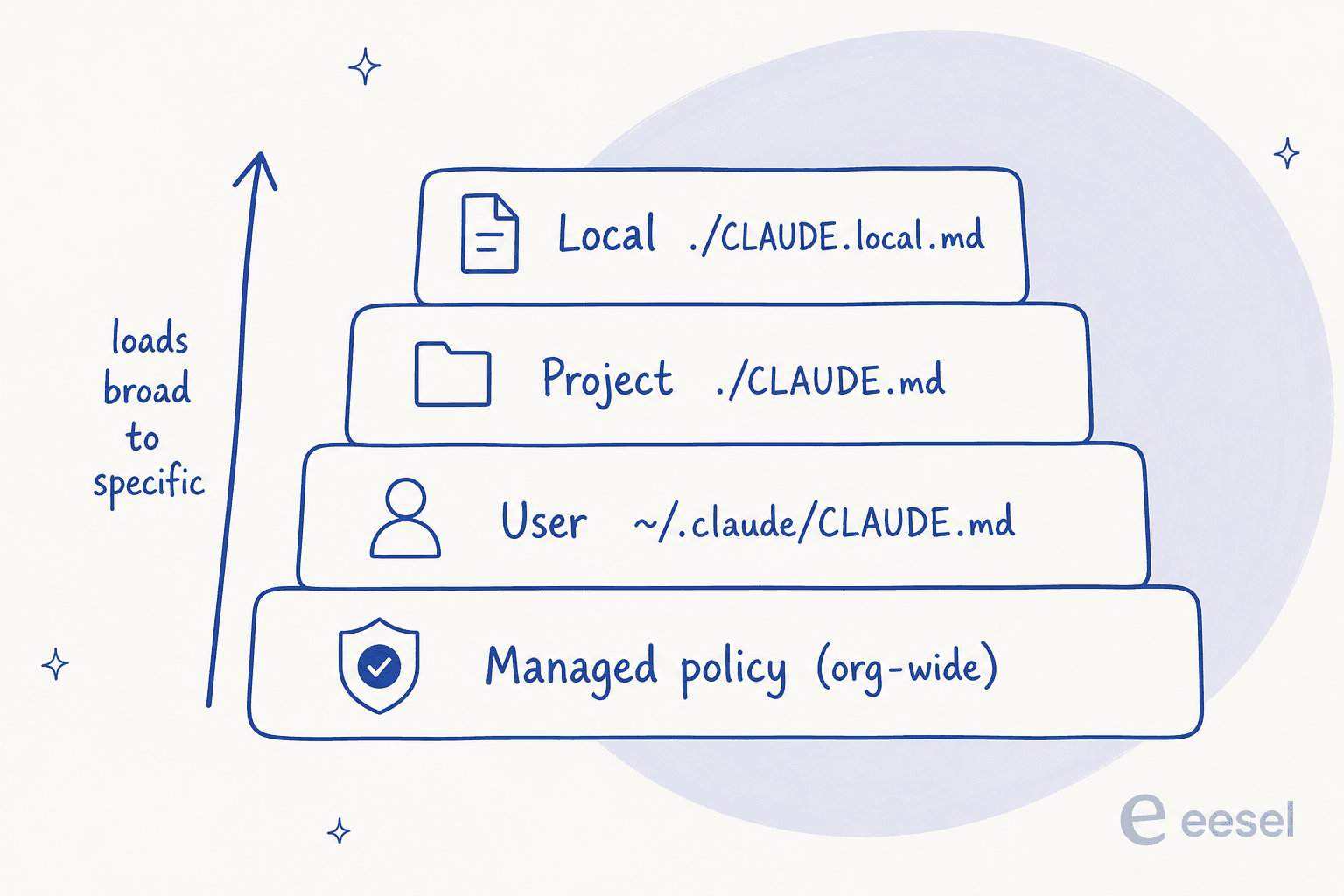
- Managed policy (organization-wide, loads first, can't be excluded). Lives at OS-specific paths like
/Library/Application Support/ClaudeCode/CLAUDE.mdon macOS. - User (
~/.claude/CLAUDE.md), your personal preferences across every project. - Project (
./CLAUDE.mdor./.claude/CLAUDE.md), shared with the team through source control. - Local (
./CLAUDE.local.md), your private per-project notes that you add to.gitignore.
Discovery is recursive: Claude loads CLAUDE.md files from your working directory and every directory above it. Files in subdirectories below you aren't loaded at launch; they're pulled in on demand when Claude reads files in those folders. That subtree behavior is exactly how monorepos stay sane, and it mirrors how AGENTS.md works: the closest file wins, and an explicit chat instruction overrides everything. For scale, OpenAI's main repo ships 88 separate AGENTS.md files, one per package.
That per-package split matters more than it looks, because a single root file hits a ceiling on a big codebase. It's the most common complaint I see from people running these tools at scale:
"AGENTS dot md files don't scale beyond modest codebases. Lots of discussions on this lately. If you're building serious software with Claude Code or any agentic tool, a single AGENTS dot md will eventually fail you."
The fix isn't a bigger file, it's more of them: a short root file plus a nested one in each package, so the agent always reads instructions scoped to what it's touching.
Imports and the 4-hop limit
CLAUDE.md can pull in other files with @path/to/import syntax. Relative and absolute paths both work, imported files can import others up to a maximum depth of four hops, and wrapping a path in backticks stops it from importing (handy when you just want to mention a file). One gotcha that catches people trying to shrink their context: splitting into imports doesn't reduce token usage, because imported files still load at launch. It helps organization, not size.
What to put in a good AGENTS.md (or CLAUDE.md)
There are no required sections, but the popular ones are project overview, build and test commands, code style, testing instructions, security notes, and PR or commit rules. The canonical example on the spec looks like this:
# AGENTS.md

## Dev environment tips
- Use `pnpm dlx turbo run where <project_name>` to jump to a package.
- Run `pnpm install --filter <project_name>` to add a package to your workspace.

## Testing instructions
- Find the CI plan in the .github/workflows folder.
- Run `pnpm turbo run test --filter <project_name>` to run every check.
- Fix any test or type errors until the whole suite is green.
- Add or update tests for the code you change, even if nobody asked.

## PR instructions
- Title format: [<project_name>] <Title>
- Always run `pnpm lint` and `pnpm test` before committing.
The detail that makes this more than documentation: the test commands you list get run automatically. The agent will try to execute the relevant checks and fix failures before it finishes. So a precise pnpm test line isn't a note, it's an instruction the agent acts on.
For the writing itself, Anthropic's guidance for CLAUDE.md applies just as well to AGENTS.md, because both are loaded into the context window and treated as context rather than enforced config:
- Keep it short. Target under 200 lines; longer files eat context and, per the docs, actually reduce how well the agent follows them.
- Be specific. Per the writing guidance, "Use 2-space indentation" beats "Format code properly"; "Run
npm testbefore committing" beats "Test your changes." Write rules concrete enough to verify. - Structure it. Markdown headers and bullets to group related instructions.
- Stay consistent. If two rules contradict, Claude may pick one arbitrarily, so review nested files periodically.
Done well, this pays off more than most people expect. As one developer put it in an Ask HN thread on maintaining these files:
"AGENTS.md is extremely important - it's probably the highest leverage thing you can give your agent. It's injected into every turn, and the agents are trained to follow instructions. If anything, I think people are under-investing into AGENTS.md and going purely based on vibes."

The fastest way to a first draft is /init, which analyzes your codebase for build commands, tests, and conventions and writes a starting file (it can also migrate a Cursor or Copilot file). Then edit with /memory and confirm what actually loaded with /context. And because a CLAUDE.md is delivered as a user message after the system prompt, there's no guarantee of strict compliance; if you need a rule enforced no matter what, the docs point you at a PreToolUse hook instead of the instructions file.
How to share one file across every agent
If you're running Claude Code alongside Codex, Cursor, or Gemini, the goal is one source of truth. With native support, that's now the default: put everything in AGENTS.md and don't add a CLAUDE.md.
If you're on an older version, or a setup where native reading isn't available (Amazon Bedrock, other third-party providers, or telemetry disabled), the fallback is to import it from a CLAUDE.md:
# CLAUDE.md
@AGENTS.md
There's also the classic symlink, though the docs now treat it as the last resort:
ln -s AGENTS.md CLAUDE.md
The symlink route has real caveats: Claude's Edit and Write tools refuse to write through the symlink (they redirect edits to the target AGENTS.md), and on Windows a committed symlink checks out as plain text unless core.symlinks is enabled. That's why the import is the cleaner move today. The official migration one-liner for consolidating an old file is:
mv AGENT.md AGENTS.md && ln -s AGENTS.md AGENT.md
Common mistakes to avoid
A few traps I keep seeing, most of which come straight from the precedence rules:
- A forgotten
CLAUDE.mdsilently overriding yourAGENTS.md. If both exist, Claude reads the CLAUDE.md. Delete the stale one or import the other. - Treating imports as a diet. Splitting a huge file into
@imports doesn't cut context; it all still loads. Trim content instead. - Vague rules. "Write clean code" does nothing. Give the exact command, the exact indentation, the exact PR title format.
- A 600-line file. Past ~200 lines, adherence drops. Move multi-step procedures into skills or subagents, and partial-codebase rules into path-scoped
.claude/rules/files. - Assuming it's enforced. Instruction files are context, not a hard gate. For a real block, reach for a hook.
For the setup around your instruction files, it's worth skimming the settings.json guide and permissions, since both interact with how rules actually get applied.
Try eesel: the same idea, for the agents doing your support
Here's the connective tissue. AGENTS.md and CLAUDE.md are how you hand a coding agent its standing instructions in a file. That coding agent is infrastructure you configure. eesel is the other half of the picture: instead of a tool you instruct, it's a ready-to-work AI teammate you hire for a defined job, today an AI helpdesk agent that works your support queue and an AI blog writer.
And it runs on the same "instructions live in one place" philosophy. An eesel agent's standing rules aren't scattered across settings screens; they're one editable set of instructions, plus your real knowledge (past tickets, help center, docs). It's the AGENTS.md mental model applied to a support teammate.
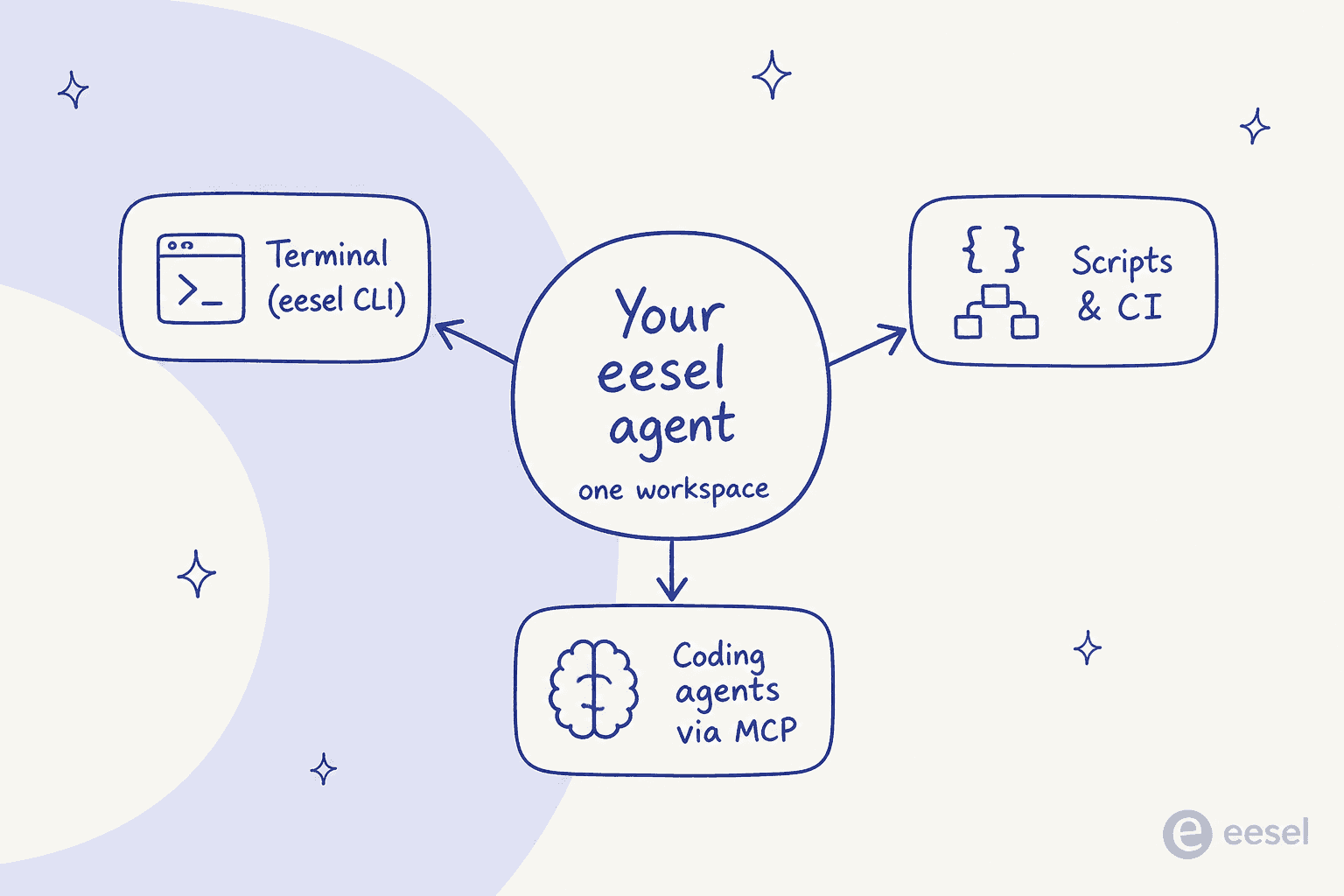
If you already live in the terminal, this will feel familiar. eesel ships a real CLI (@eesel/cli), and its docs are blunt about the intent: everything you can do in the dashboard, you can do from the terminal, including letting an AI coding agent do your setup. You can run it with no install (npx @eesel/cli init), chat with the agent (eesel chat), edit its standing rules (eesel instructions), and watch what it did (eesel activity). Every command prints JSON and supports --dry-run, which is exactly what makes it drivable by a script or an agent rather than a human clicking around.
Better still, every eesel workspace is also an MCP server. Run eesel mcp token and it prints a ready-to-paste claude mcp add line, so Claude Code (or Cursor, or Codex) can manage your support agent's instructions, check its activity, and approve held actions without leaving your editor. Same agent, three surfaces: terminal, scripts, and coding agents over MCP.
Pricing is usage-based: $0.40 per ticket handled, dashboard and setup actions are free, and there's a $50 free trial with no card. If you're already writing AGENTS.md files, you'll be right at home. Try eesel or point Claude Code at it and let it do the wiring.
Frequently Asked Questions
Does Claude Code read AGENTS.md?
AGENTS.md as project instructions natively, with no CLAUDE.md, import, or setting required. If the repo also has a CLAUDE.md, Claude reads the CLAUDE.md files instead.What is the difference between AGENTS.md and CLAUDE.md?
@path imports and a four-scope hierarchy. Both are plain Markdown, and Claude Code now reads either one.Which file does Claude Code use if I have both AGENTS.md and CLAUDE.md?
@AGENTS.md line. You can change this with the Project instructions setting (/config) to load both. See the memory docs for the full precedence table.How do I create an AGENTS.md for Claude Code?
/init to generate a starting file from your codebase, then trim it to under 200 lines with concrete build and test commands. Or write plain Markdown by hand: there are no required fields. Anything you'd tell a new teammate belongs there.Do other tools besides Claude Code read AGENTS.md?


Article by
Rama Adi Nugraha
Rama is a software engineer at eesel AI with two years of experience writing about B2B SaaS, AI tools, and customer support technology. Based in Bali, Indonesia, he brings a developer's perspective to product comparisons — cutting through marketing copy to what the integrations and APIs actually do.