Why I care about this one more than most
I build AI agents at eesel, and Salesforce is the integration I got asked for before I ever shipped it. Two of the clearest losses in our sales history were mid-market support teams who liked the product and walked anyway, because at the time we could not join their Service Cloud org. One of them was running about 900 cases a month and told us plainly that no native Salesforce support was a dealbreaker. You do not forget the deals you lose on a missing connector.
So when I say the routes below stop short of sending a reply, that is not a competitive jab. It is the same wall I spent months on. Getting an AI to read Salesforce is a Tuesday. Getting it to close the loop on a customer-facing email, inside the Salesforce ticketing system and its governor limits, is the hard part, and it is the part almost every "connect Claude to your CRM" write-up skips.
First, the thing none of these routes do
Start here, because it reframes everything below.
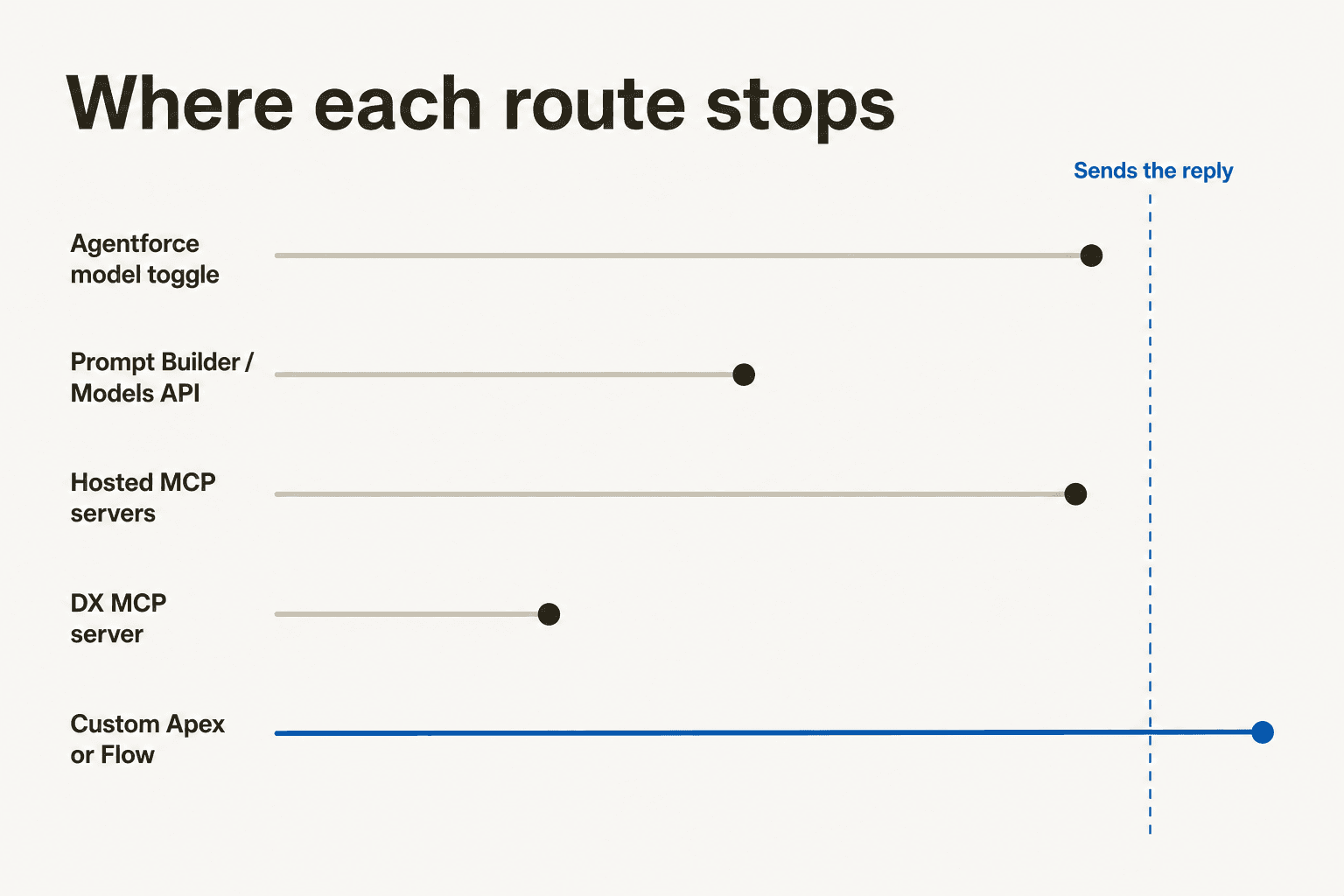
Salesforce's hosted MCP catalog is well built. The SObject Reads server ships six tools, the SObject All server ships eleven, and cases are explicitly in scope: Salesforce's own example prompts include "Give me a summary of all cases opened in the last 7 days for accounts in the Financial Services industry."
Search that catalog for a way to answer the customer, though, and you find nothing purpose-built. No sendEmail. No postCaseComment. No replyToCase. What you get is the generic createSobjectRecord, which takes any object name and a bag of field values. So the reply path is: create a CaseComment or an EmailMessage record, and hope your org's own automation picks it up and dispatches something.
It usually will not, and the reason is a quirk of the EmailMessage object that catches people out constantly.
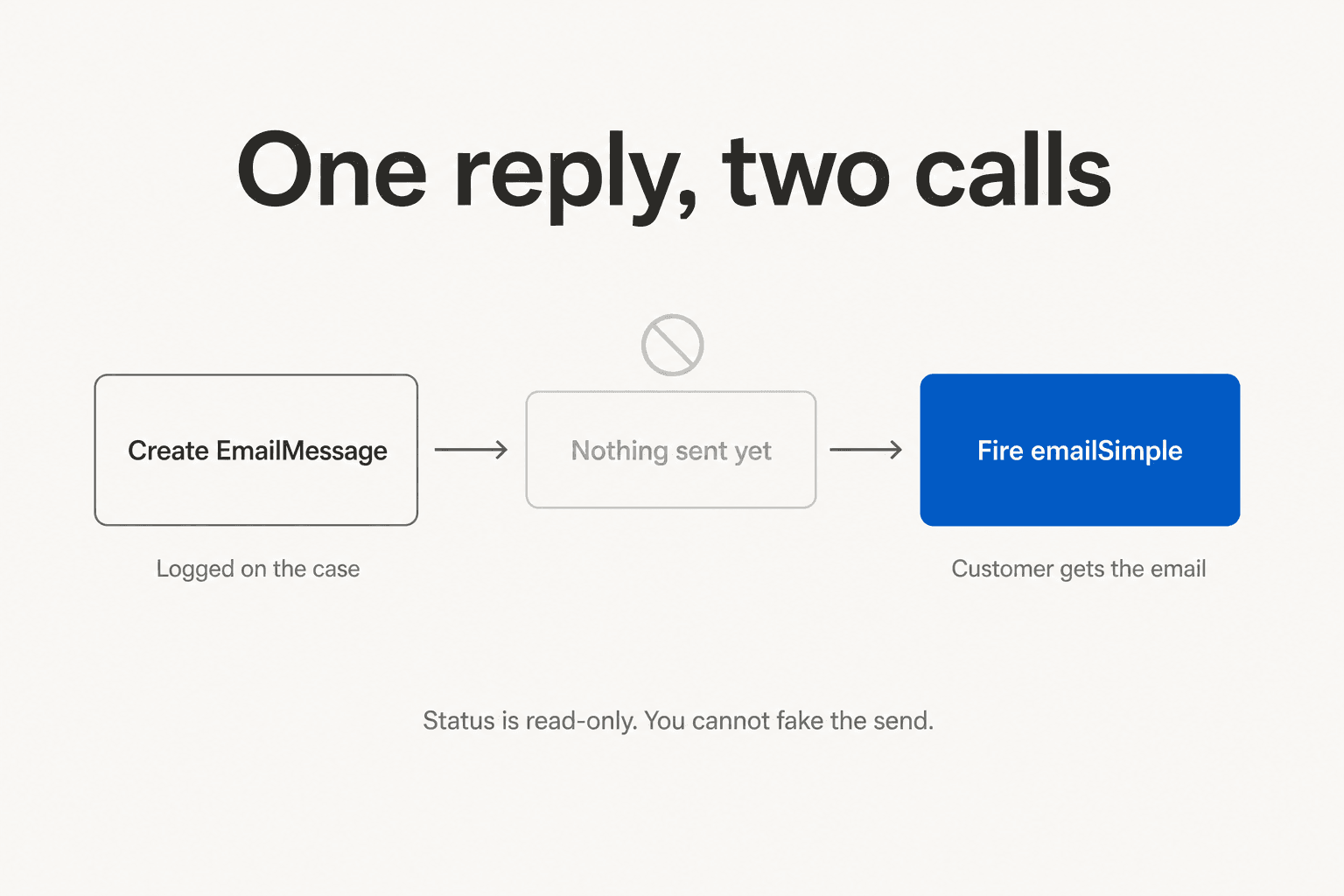
Creating an EmailMessage records that an email exists. It does not send one. The Status field is read-only except for a New to Read transition, so you cannot flip it to "sent" and call it done. The actual send is a second, separate call: the emailSimple standard action over REST, or Messaging.SingleEmailMessage in Apex. Two calls, two failure modes, and logEmailOnSend defaults to false so the thing you just sent may not even appear on the case.
Every route below stops on the left side of that gap. Only custom Apex or a Flow you write yourself crosses it.
The five routes, side by side
| Route | What Claude can do | Reaches production cases | Edition gate | Status |
|---|---|---|---|---|
| Agentforce AWS-Hosted model option | Powers the Agentforce reasoning engine org-wide, currently on Haiku 4.5 | Yes, through Agentforce actions | Enterprise / Performance / Unlimited with Foundations or Agentforce 1 | GA |
| Prompt Builder, Apex, Models API | Any of 8 Claude models, callable by API name | Yes, inside prompt templates and custom actions | Same as above | GA |
| Salesforce Hosted MCP Servers | Read, query, search, create, update, delete SObjects incl. Case | Yes, full CRUD under user permissions | Developer / Enterprise / Performance / Unlimited | GA Apr 29, 2026 |
| Salesforce DX MCP Server | One read-only SOQL tool, plus dev and metadata tooling | Read-only, and only if you point it at prod | Any org you can authorise locally | Beta |
| REST API and Apex, built yourself | Anything you code, including the actual send | Yes | Any org with API access | Your problem |
None of these is a "Claude for Service Cloud" product, because Salesforce has never shipped one. Claude reaches your cases through one of these five doors, and picking the wrong one costs you a quarter. If you are still deciding whether to use the native stack at all, our roundup of the best AI for Service Cloud covers the non-Salesforce options alongside these.
Route 1: flip Agentforce onto Claude
This is the one people mean when they say "we're running Claude in Salesforce," and it is a single org-wide setting.
You find it in Setup, under Quick Find for Audit, Analytics, and Monitoring, then Einstein Audit, Analytics, and Monitoring Setup, then "Select the Model for Agentforce." Salesforce's Select Agentforce Model Option page lists exactly three choices:
- Salesforce Default, which Salesforce recommends, running GPT-4.1 for agents built in the new Agentforce Builder and GPT-4o for legacy ones
- AWS-Hosted, which is Anthropic Claude Haiku 4.5 on Amazon Bedrock
- Google Gemini, which is Gemini 3.5 Flash on Vertex AI
Three things about that list are worth sitting with. Claude is an option, not the default, and Salesforce's own recommendation is still the OpenAI-backed one. The choice is org-wide, so it applies to every one of your Agentforce agents, Service and otherwise, unless you override it per agent in Agent Script. And the model behind that toggle is the small one: the AWS-Hosted option moved from Claude Sonnet 4 to Haiku 4.5 the week of May 18, 2026.
Salesforce is refreshingly direct about the migration cost of switching. From the same page: "Compared to OpenAI, Anthropic tends to be more sensitive to the nuances in the input payload. Anthropic returns more accurate and reliable responses if the prompts are clear, concise, and thorough." It even links out to Anthropic's prompt engineering docs. Read that as what it is: your existing prompt templates will need re-testing, and a model swap is not a config change you make on a Friday.
One more caveat from Salesforce's own text, which matters if you are switching for compliance reasons: even after you pick a model option, specific tasks such as subagent classification or citations may still use Salesforce-owned models. The toggle is not a hermetic seal, and it is one of the Service Cloud AI limitations worth raising in a security review rather than discovering later.
What you actually gain
The honest case for this route is not model quality, it is the trust boundary. Anthropic says it is the first LLM provider fully integrated within the Salesforce trust boundary, and Salesforce's own docs back that up: on the Supported Models page, only Anthropic and Amazon Nova models carry that flag. Every OpenAI and Google model on the list does not.
Concretely, Salesforce states that traffic stays inside its own virtual private cloud, is encrypted at TLS 1.2 minimum, connects to Bedrock over AWS PrivateLink, and that model providers cannot access customer data and nothing is stored in Bedrock. If your security review is the reason AI is stalled in your org, that paragraph is the reason to look at Claude. It is a much stronger argument than any benchmark, and it does more for an AI governance sign-off than a model leaderboard ever will.
And what it costs you
Government Cloud orgs should stop reading here: the Government Cloud availability table lists Claude Haiku 4.5 and Claude Opus 4.5 as not available.
Route 2: pick a specific Claude model in Prompt Builder, Apex, or the Models API
The Agentforce toggle gives you one model. This route gives you eight, and it is the one to use when a particular case-handling task deserves a bigger brain than Haiku.
Salesforce's note on the setup page spells out the escape hatch: although Agentforce is limited to a few model options, a custom action using a prompt template, Apex, or the Models API can reference any Salesforce-managed or BYO model.
So a template in Prompt Builder can run Opus while the agent itself runs Haiku. That is the sane way to spend a bigger model: on the handful of tasks where reasoning quality shows up in the output, rather than on every turn of every conversation. Writing case summaries is the obvious candidate.
| Model | Salesforce API name | Billing class |
|---|---|---|
| Claude Haiku 4.5 | sfdc_ai__DefaultBedrockAnthropicClaude45Haiku | Standard Prompts |
| Claude Sonnet 4.5 | sfdc_ai__DefaultBedrockAnthropicClaude45Sonnet | Standard Prompts |
| Claude Sonnet 4.6 | sfdc_ai__DefaultBedrockAnthropicClaude46Sonnet | Standard Prompts |
| Claude Sonnet 5 | sfdc_ai__DefaultBedrockAnthropicClaude5Sonnet | Standard Prompts |
| Claude Opus 4.5 | sfdc_ai__DefaultBedrockAnthropicClaude45Opus | Advanced Prompts |
| Claude Opus 4.6 | sfdc_ai__DefaultBedrockAnthropicClaude46Opus | Advanced Prompts |
| Claude Opus 4.7 | sfdc_ai__DefaultBedrockAnthropicClaude47Opus | Advanced Prompts |
| Claude Opus 4.8 | sfdc_ai__DefaultBedrockAnthropicClaude48Opus | Advanced Prompts |
Three older names have been rerouted rather than removed. Claude3Haiku now lands on Haiku 4.5, Claude37Sonnet on Sonnet 4.5 as of February 26, 2026, and Claude4Sonnet on Sonnet 4.6. If you hardcoded an API name a year ago, you are quietly running a different model today.
There is also a bring-your-own path, gated on Enterprise, Performance or Unlimited with an Einstein for Sales, Platform or Service add-on. It supports exactly four providers: Amazon Bedrock, Azure OpenAI, OpenAI, and Vertex AI. There is no direct Anthropic connector, so bringing your own Claude means bringing your own Bedrock account. The incentive to do it is real, though: Salesforce says BYO models consume 30% fewer Einstein Requests than managed ones.
The limit that catches everyone
Here is the one I would put on a sticky note before anyone in your org promises a Claude-powered case summariser.
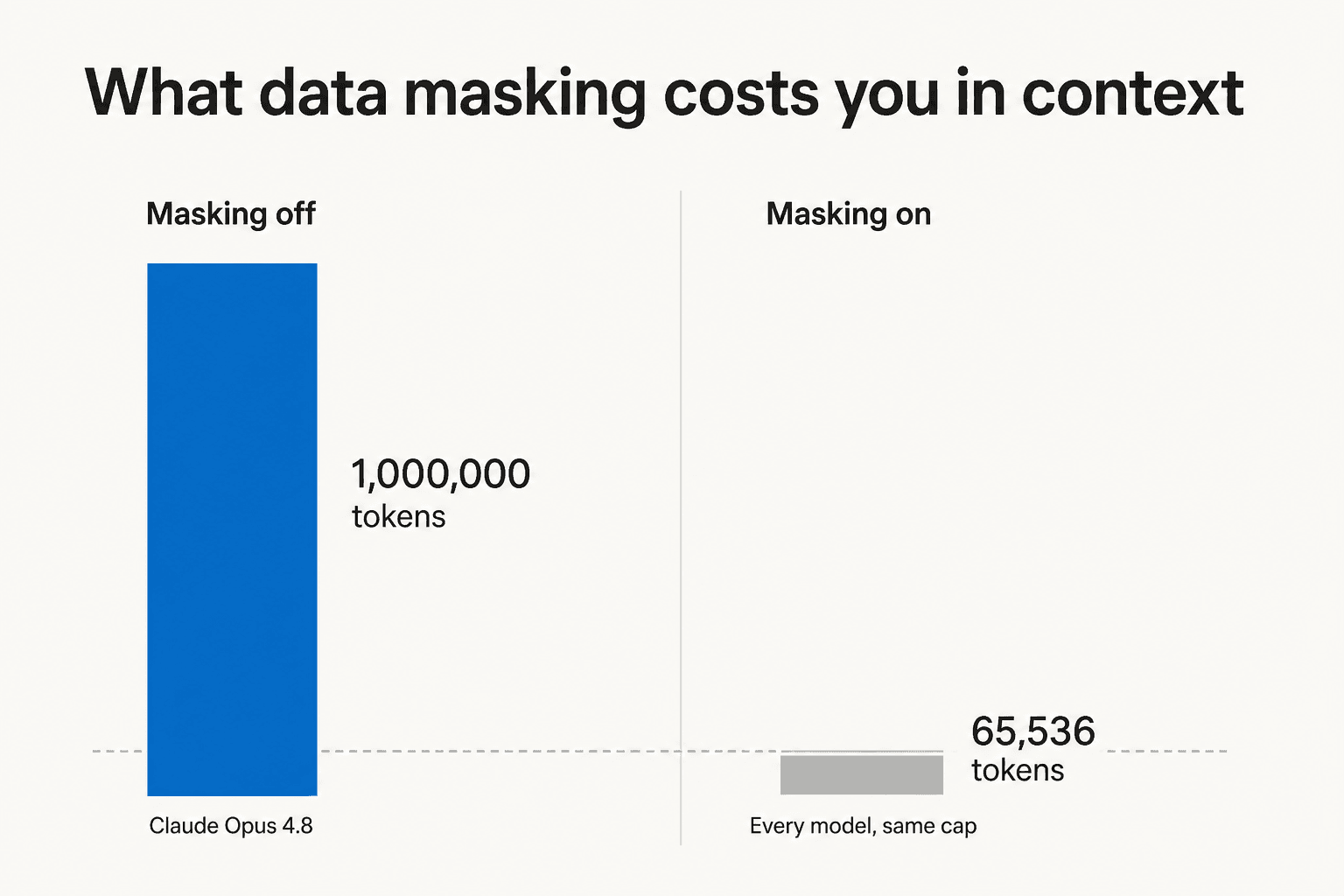
With data masking on in the Einstein Trust Layer, every model is capped at 65,536 tokens of context. Opus 4.8's million-token window collapses to roughly six percent of itself. To get the full window back you have to turn masking off, which is the exact feature you turned Claude on for in the first place.
For a support workload that is a real bite. A long escalated case with a dozen email exchanges, quoted history and a couple of attachments will run past 65k tokens, and the model silently sees less of the thread than you think it does. Per-model rate limits are worth checking too: Haiku 4.5 is the tightest at 250 requests per minute, while the Sonnets and Opus 4.6 and up get 1,000. For the wider model line-up and what each tier costs outside Salesforce, see our Claude pricing breakdown.
Route 3: hosted MCP servers, the route Salesforce wrote a Claude guide for
This is the newest route and the one I would actually start with, because Salesforce did the integration work for you and then wrote the instructions.
Hosted MCP Servers hit GA on April 29, 2026, available to Developer, Enterprise, Performance and Unlimited orgs. The framing in the GA post names Claude directly: "Whether your users live in Slack, Claude, ChatGPT, or something else entirely, MCP means they can work with Salesforce without switching contexts." Five weeks later Salesforce published its own Claude setup guide, a real step-by-step for Claude Desktop and Claude Code.
There are four standard SObject servers, all disabled by default, and an admin has to switch one on:
| Server | API name | Tools | What it can do |
|---|---|---|---|
| SObject Reads | platform/sobject-reads | 6 | Schema, SOQL, search, related records. Cannot mutate anything |
| SObject Mutations | platform/sobject-mutations | 6 | Adds create and update, no delete |
| SObject Deletes | platform/sobject-deletes | - | Delete only |
| SObject All | platform/sobject-all | 11 | Full CRUD |
The read server's tools are getObjectSchema, soqlQuery, find, getUserInfo, listRecentSobjectRecords and getRelatedRecords. The mutation server swaps in createSobjectRecord, updateSobjectRecord and updateRelatedRecord. Salesforce's own advice, which I would follow, is to start on the read-only server in a sandbox: "It's read-only, risk-free, and immediately useful."
That read-only server is already enough to do useful work. Ask Claude which accounts have the most open cases this week, have it pull the related contacts and opportunities, have it spot the pattern behind a spike. It is the same shape of value as a Claude integration with any other system of record, except the permission model is Salesforce's own.
The security model is the best part
Every transaction runs as the authenticated user, with no anonymous service accounts. CRUD, field-level security and sharing rules all apply, and as the GA post puts it, if the agent updates a record, that person's name appears in the audit trail. There is a dedicated mcp_api OAuth scope that grants MCP access without granting the existing REST APIs.
Salesforce is also honest about where the guardrails end. Platform tools ship readOnlyHint and destructiveHint annotations, but the best practices page says plainly: "Annotations are hints, not enforcement. Not all clients read or respect them." Custom Flow and Apex tools default to potentially destructive unless you set the annotations yourself. That is the kind of caveat most vendors bury, and I appreciate it being in the docs.
Setting it up
The whole checklist, from Salesforce's Configure Claude guide:
- Activate the server. Setup, search MCP Servers, Salesforce Servers tab, pick a server, Activate. Copy the API name and server URL.
- Create an External Client App. Salesforce is blunt here: "Connected Apps aren't supported." This trips people who have been building on the platform for a decade.
- Set the callback URL to
https://claude.ai/api/mcp/auth_callbackfor Claude web and Desktop, orhttp://localhost:38000/callbackfor Claude Code. - Set OAuth scopes to
mcp_apiplusrefresh_tokenoroffline_access. The genericapiscope is the wrong one. - Check Require PKCE and "Issue JWT-based access tokens for named users." Uncheck the two "require secret" boxes.
- Wait up to 30 minutes for the app to propagate. This is documented and it is real.
Sandbox and production differ only by a URL segment, /v1/<server> versus /v1/sandbox/<server>.
On the Claude side there is no first-party Salesforce card in the connector directory to click. Salesforce shows up there only inside third-party aggregators, so the documented path is Add custom connector, paste the server URL, paste the External Client App consumer key into OAuth Client ID under Advanced settings, connect. Slack, by contrast, does have a first-party card, which tells you something about where the two integrations are in their lifecycle. The desktop-app side of this is covered in our Claude Cowork Salesforce integration writeup.
Expect some friction on the first attempt. An open issue on Anthropic's MCP repo tracks a failure where OAuth completes, Salesforce confirms the token was issued, and the first tool call still returns "Authorization with the MCP server failed." Several commenters reproduce it against production Enterprise orgs. The community fix is to strip the External Client App's security section back to only PKCE plus JWT for named users, and to check that the server was actually Activated in API Catalog rather than merely present. As one commenter puts it, "not a bug, it's a missing setting."
Agentforce agents as Claude tools
There is a further step Salesforce documents: exposing Agentforce agents as MCP tools, so Claude can delegate to an agent that already knows your org. The doc's own example is a support triage agent that analyses a case description, determines severity, suggests troubleshooting steps and identifies the routing team. That is a very good fit for ticket triage work, and it is close to what native bot routing already tries to do.
Two things temper my enthusiasm. Only agents built with the new Agent Script Builder are supported, so legacy agents need upgrading first, which is its own project on top of your Agentforce implementation. And the tense is inconsistent across Salesforce's own pages: the April GA post says "soon, you'll be able to open up even more possibilities by invoking Agentforce agents via MCP," while the tool doc reads as live. Treat this route as newer and shakier than the SObject servers.
Route 4: the DX MCP server, which is not the one you want
Search for "Salesforce MCP server" and you will land on @salesforce/mcp on GitHub first, because it is older and has stars. It is not the route for a Service Cloud project.
It runs locally over stdio against orgs you have already authorised on your laptop, ships over 60 tools, and Claude Code is a documented first-class client with a copy-paste config block in the README. All good. The catch is what those 60 tools are.
The entire data toolset is one tool, run_soql_query, and it is read-only. There is no create-record tool, no update-record tool, no Case tool anywhere. The rest is deploy and retrieve metadata, run Apex tests, assign permission sets, twelve DevOps Center tools, and a long tail of LWC, Aura and mobile guidance tools that return documentation rather than org data.
So the DX server can read production data with SOQL if you point --orgs at production, and that is the ceiling. It cannot create a case, post a comment or send anything. It is developer tooling that happens to speak MCP, and it is still marked Beta. One sharp edge worth knowing if you do use it: DEFAULT_TARGET_ORG is resolved on every tool call rather than pinned at startup, so switching your default org silently changes which org the server can touch.
Route 5: build it yourself on the API
If none of the above fits, you write it. This is the only route that crosses the send line, and it is worth understanding the shape of the wall before you commit an engineer to it.
The pattern is: subscribe to new cases, read the case, call Claude, write the reply, send it. Four of those five steps have a limit attached.
Reading and triggering. Case reads count against your daily API allocation. Enterprise gets 100,000 calls plus 1,000 per licence, so Salesforce's own worked example of a 15-seat Enterprise org lands at 115,000 per day. Unlimited and Performance get 5,000 per licence instead. For the trigger, Platform Events and Change Data Capture share one delivery pool: 25,000 events per 24 hours on Enterprise, 50,000 on Unlimited.
And Change Data Capture caps you at five selectable entities org-wide. Case, EmailMessage, CaseComment, Contact and Account is the entire allocation, with nothing left for anything else your business wants to stream. If you were also planning case automation on top of the same event stream, that budget is already spent.
Calling Claude. From Apex you get 100 callouts per transaction and a cumulative 120-second callout budget, additive across every call in the transaction. Multi-step agentic reasoning does not fit inside one synchronous transaction, so you are into queueable or future methods immediately.
The one that bites hardest is the ordering rule. You cannot make a callout after a pending DML operation. The obvious design, mark the case in progress, call Claude, write the reply, is illegal in Apex. You restructure around it, but only after you have hit it.
Sending. Back to the two-call problem from the top of this post. Create the EmailMessage for the record, then fire emailSimple to actually send, capped at 150 recipients and 4,000 bytes per recipient field. Threading is opt-in through addThreadingTokenToSubject and addThreadingTokenToBody, and without it the customer's reply opens a brand new case rather than continuing the old one. That one is a support-team-morale bug, not a technical one.
There is a no-code version. Flow HTTP Callout plus External Services plus a Named Credential lets an admin call Claude's API without Apex, and it works. Its ceiling is that async callbacks are Apex-only, so anything long-running drops you back into code.
What it actually costs
Claude has no separate line item in Salesforce, because it is billed through the Agentforce meter. And the Agentforce meter has two settings that are nowhere near each other.
Salesforce publishes both: $2 per conversation, flat regardless of complexity, or Flex Credits at 20 credits per action, which works out to $0.10 an action, sold in packs of 100,000 credits for $500. Salesforce's own comparison chart puts a case-management interaction at three actions.
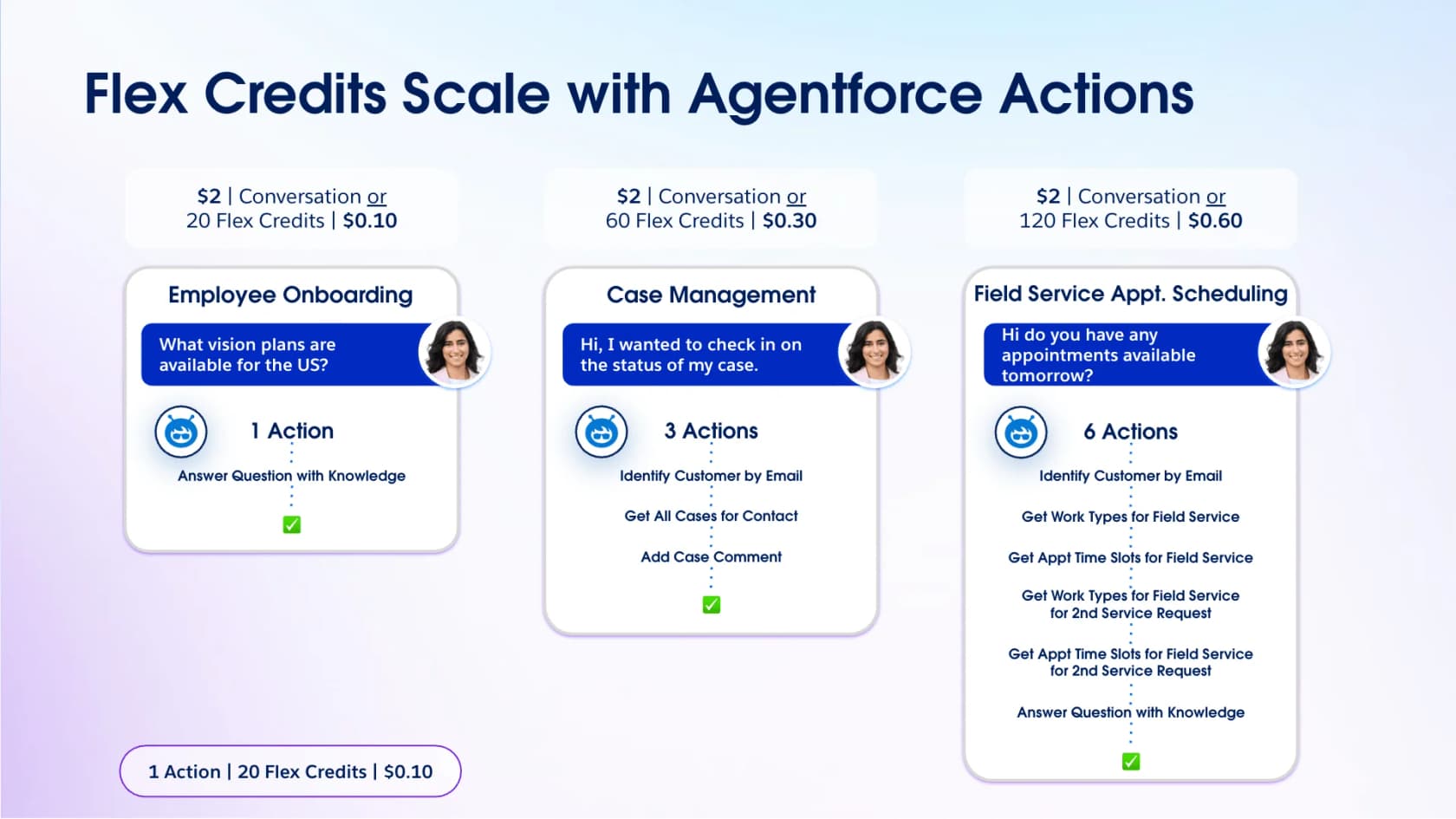
Read that chart carefully, because it is Salesforce arguing against its own conversation pricing. A case-management exchange is $2.00 on one meter and $0.30 on the other. If you are on conversation billing for support work, you are paying roughly seven times what the same work costs on credits.
Plug your real numbers in:
Two numbers the widget assumes that you should pressure-test in your own contract. Actions per case is the whole ballgame, and three is Salesforce's illustration, not a promise about your org. And the 2.5M Flex Credits bundled with Agentforce 1 Service at $550 per user per month work out to 125,000 actions per year, which at 1,200 cases a month and three actions each is a little under three years of runway. At six actions each it is under a year and a half.
If you are building the business case rather than just the integration, our Agentforce pricing breakdown and the longer piece on whether Agentforce is worth it go further into the seat-plus-consumption maths than I will here.
Seat prices sit underneath all of it
| Service Cloud edition | Price per user / month | AI included |
|---|---|---|
| Starter Suite | $25 | Built-in AI only |
| Pro Suite | $100 | Built-in AI, AgentExchange access |
| Enterprise | $175 | AI for customer service (assistive) |
| Unlimited | $350 | Adds chat and bots |
| Agentforce 1 Service | $550 | Full AI suite, unmetered employee agents, 2.5M Flex Credits per org per year |
Every line reads "starting price, transaction fees apply," and everything from Pro Suite up is billed annually. The Claude option needs Enterprise or above with Foundations or Agentforce 1, so the cheapest real entry point for Claude in Agentforce is $175 per user per month before a single AI action is metered. The full edition ladder is in our Salesforce pricing post, and the setup side in Agentforce setup cost.
What operators actually run into
The docs tell you what is possible. The forums tell you what happens.
On the pricing, the reaction to conversation billing has been consistent since it launched:
"I just cannot stomach the pricing model. Sure, $2.40 for agent might beat $15 for a human interaction, but it's much, much more expensive than the $.05 - $.10 you'd pay to make the API calls to OpenAI to do the same thing."

That comment predates the Flex Credits switch, and credits are Salesforce's answer to exactly that objection. But credits brought their own problem, which is that consumption has no ceiling:
"There are currently no native hard caps, circuit breakers, or real-time consumption alerts to automatically halt credit drain. The system prioritizes operational continuity for their servers, leaving the customer exposed to un-capped financial liability."
Worth knowing the mechanics before you sign: one commenter with production experience explains that "1 action = 20 flex credits in production. Sandboxes are 80% consumption, so in sandboxes, 1 action = 16 flex credits," which is a nice detail for anyone budgeting from a sandbox pilot.
On reliability, the sharpest thread I found is one where an Agentforce agent in a live queue did the wrong thing confidently:
"The Agent accessed a internal only knowledge article and shared internal instructions on how to cancel the service. Instead of passing to a real human agent to attempt to resolve the issue, and prevent churn."
The root cause was a prompt template using the default retriever with access to every Knowledge article. That is not a Claude problem or an OpenAI problem, it is a knowledge scoping problem, and it is the single most common way an AI support rollout goes wrong. It is also why I will not ship an agent to a live queue without dry-running it against real historical cases first, the same discipline that makes ticket classification safe to automate.
The build cost shows up in the reviews too, and it is fair rather than damning:
"The learning curve is definitely real. It's a powerful platform, but getting a new agent or admin fully comfortable takes time, and the deeper configuration really benefits from someone who already knows the system well. Licensing costs can climb quickly once you start layering on additional features."

And from a developer who spent five years in the ecosystem, on the platform constraints that make Route 5 painful: "platform limits are silly in 2025 - 6 meg max heap size for a backend transaction?????" (zdware, Hacker News). He is describing the same governor limits that make a multi-step AI callout awkward inside Apex.
How I would actually decide
Four situations, four answers.
You already own Agentforce licences and want Claude for compliance reasons. Flip the AWS-Hosted toggle and re-test your prompt templates. The trust boundary claim is real and specific, and it is the strongest argument in the whole partnership. Budget a sprint for prompt re-testing, not an afternoon.
You want Claude to help your team work cases, not answer customers. Hosted MCP servers, platform/sobject-reads, in a sandbox. Under 30 minutes of setup, no metered actions, and every call carries the user's own permissions. This is the highest value per hour of any route here, and it is the one I would try first on a Friday afternoon. It will also tell you more about your queue's real intent mix than a dashboard will.
You want an autonomous agent that closes tier-one cases end to end. None of these routes gets you there on their own, because none of them sends the reply. You are either building custom Apex behind an MCP tool, or you are buying something that already crossed that wall. The Agentforce alternatives piece is the honest survey of that second option, ours included.
You are a Government Cloud org. Claude Haiku 4.5 and Opus 4.5 are not available to you. Plan around the Salesforce Default option, or look at what the native Salesforce chatbot surface already covers.
One pattern I would push on regardless of route: start in draft mode. Across the demo calls I sit in on, the teams that succeed almost always run the AI as a co-pilot writing suggested replies for a few weeks, watch what it gets wrong, then graduate to full automation once they trust it. The ones that flip everything on at once are the ones who end up in a Reddit thread about an agent pasting internal cancellation instructions to a customer.
eesel AI for Salesforce Service Cloud
I will be straightforward about why this section exists. eesel used to lose Service Cloud deals for the simplest possible reason, which is that we could not connect. Building the Salesforce integration was the fix, and it was built specifically to cross the wall this whole post is about.
eesel joins Service Cloud, reads cases, contacts and accounts, trains on your closed case history and knowledge articles, and then does the thing no standard MCP tool does: drafts and sends the customer-facing reply, adds internal notes, updates status and priority, and routes to the right queue. Setup runs in under 30 minutes, and there is no Agentforce licence in the chain. It is the same AI in Service Cloud job, minus the metered action count.

Two differences that matter against the meters above. Billing is $0.40 per case handled, and a case is a case: every reply, every follow-up, every clarifying question is inside that one charge, so a hard conversation does not cost more than an easy one. And every rollout starts by simulating against your own historical cases, so you see what the agent would have said on real tickets before a customer ever does. Start free with $50 of usage and no card, on eesel's pricing.
If you are already deep in Agentforce and happy, keep going. If you are staring at a $175 seat, a metered action count and a reply path you still have to write in Apex, that is the moment eesel is worth twenty minutes of your afternoon.
Frequently Asked Questions
Can I use Claude for Salesforce Service Cloud today?
Is Claude the default model in Agentforce?
How much does Claude in Salesforce cost on top of Service Cloud pricing?
Can Claude reply to a Salesforce case by itself?
What Salesforce data can Claude see through MCP?
platform/sobject-reads server ships six tools and cannot mutate anything, which is the sane place to start. Our Salesforce AI governance post goes deeper on the permission model.Does the Einstein Trust Layer limit what Claude can read on a case?
Is there an official Salesforce connector in Claude's directory?
What is the fastest way to get AI answering Salesforce cases?


Article by
Alicia Kirana Utomo
Kira is a writer at eesel AI with a Computer Science background and over a year of hands-on experience evaluating AI-powered customer service tools. She focuses on breaking down how helpdesk platforms and AI agents actually work so that support teams can make better buying decisions.