

What a Claude AI integration actually is
A Claude integration connects Claude to a service outside the chat itself: a document store, issue tracker, CRM, or a tool your team built. That connection can give Claude two different kinds of capability:
- Context: Claude can retrieve information, such as a policy in a knowledge base or the status of an engineering issue.
- Actions: Claude can ask the connected service to do something, such as create a ticket or update a record.
Those are not the same risk. Reading a document can still expose sensitive information. Writing a tag can still alter a customer workflow. Treat an integration as a set of explicit permissions, not as a harmless switch labelled “connected.”
The useful framing is simple: an integration should shorten a real decision or handoff. “Connect everything” is how teams end up with a clever demo and no clear owner when it does the wrong thing.
Connectors, MCP, and the API solve different jobs
These terms get used as if they mean the same thing. They do not.
Claude connectors are the ready-made route
A connector is a connection you can add in Claude to use a service in a conversation. Claude’s connector directory includes services such as Atlassian Rovo, which can access Jira and Confluence. This is usually the fastest option when the service already exposes the information or tool you need.
For an individual, check the connector's supported surface and plan. For Team and Enterprise, also check who may add it and which tools the organization allows. Use actual access controls, not only a “please do not edit anything” prompt. Review Anthropic's current connector guidance and the service's own permissions before enabling it.
MCP is the connection standard
Model Context Protocol is an open standard for connecting AI applications to external systems. A remote MCP server describes tools or resources that an AI client can use. Claude can use remote MCP connectors, and its API also has an MCP connector for developers building with those servers.
MCP does not make a connection safe by itself. A remote server can expose read-only search or destructive writes. For a user-authenticated connector, check the connected user's source-system access as well as Claude's controls. For a custom server, check which credentials its implementation actually uses; the protocol alone does not guarantee per-user isolation.
One operational catch matters for internal tools: Anthropic says a remote MCP connection comes from its cloud infrastructure, not from the employee’s laptop. A server hidden behind a corporate VPN or firewall will not connect just because it works locally. Resolve the network design before promising the workflow to a team.
The API is for a workflow you own
Use the Claude API when the integration is part of your own application or a repeatable workflow that needs your UI, authentication, logging, retry logic, and business rules. You decide what context to send, when tools can run, and how the user sees the result.
That freedom comes with responsibility. You own the service accounts, data handling, error cases, and ongoing maintenance. API pricing is separate from a chat subscription and measured by usage, so model choice and prompt size are product decisions, not just engineering details. A connector can be enough for a one-person research task; a customer-facing workflow usually needs the extra controls of a purpose-built product or a carefully designed API integration.
The permission review most teams skip
No-code automation is another option
If the job starts with an event in another app, a workflow builder may fit better than an interactive connector. Zapier's Anthropic integration supports connecting Claude with other applications. For example, design a workflow that takes an approved survey response, asks Claude for a summary, and saves a draft for a reviewer. Verify the available trigger and actions, credentials, duplicate handling, and failure behavior before enabling it. A workflow-builder subscription and model usage can be separate costs.
Review access before enabling the workflow
Before connecting Claude to a business system, write down four answers:
- Which person or service identity will the connection use?
- What information can it read, including attachments and historical records?
- Which actions can it request, and are they disabled, approval-gated, or automatic?
- What is the human review path when the answer is uncertain or an action fails?
Anthropic’s custom connector guidance warns that custom connectors can connect Claude to services Anthropic has not verified. That does not make custom MCP unusable. It means the remote server, OAuth scope, and tool list are part of the vendor review.
For Team and Enterprise plans, an owner adds a custom remote connector before individual users authenticate it. That distinction is useful: the organization can decide which connector exists, while each user still accesses only what their source-system account permits. Start with a small read-only use case, then earn broader access from observed results.
A concrete Claude AI integration job: check a missing knowledge source
Suppose a support team has published a help site, but its teammate cannot explain the documented lost-parcel escalation process. The integration owner needs to distinguish three causes: the site is not connected, its content is not downloaded, or a standing instruction conflicts with the policy. Simply connecting another app does not answer that question.
An engineer can ask Claude Code to inspect the setup through the eesel CLI. A person, script, Codex, or Cursor can use the same commands and read their JSON results. They operate the same eesel teammate and workspace as the support owner in the dashboard, so the investigation and any approved correction remain visible to both roles.
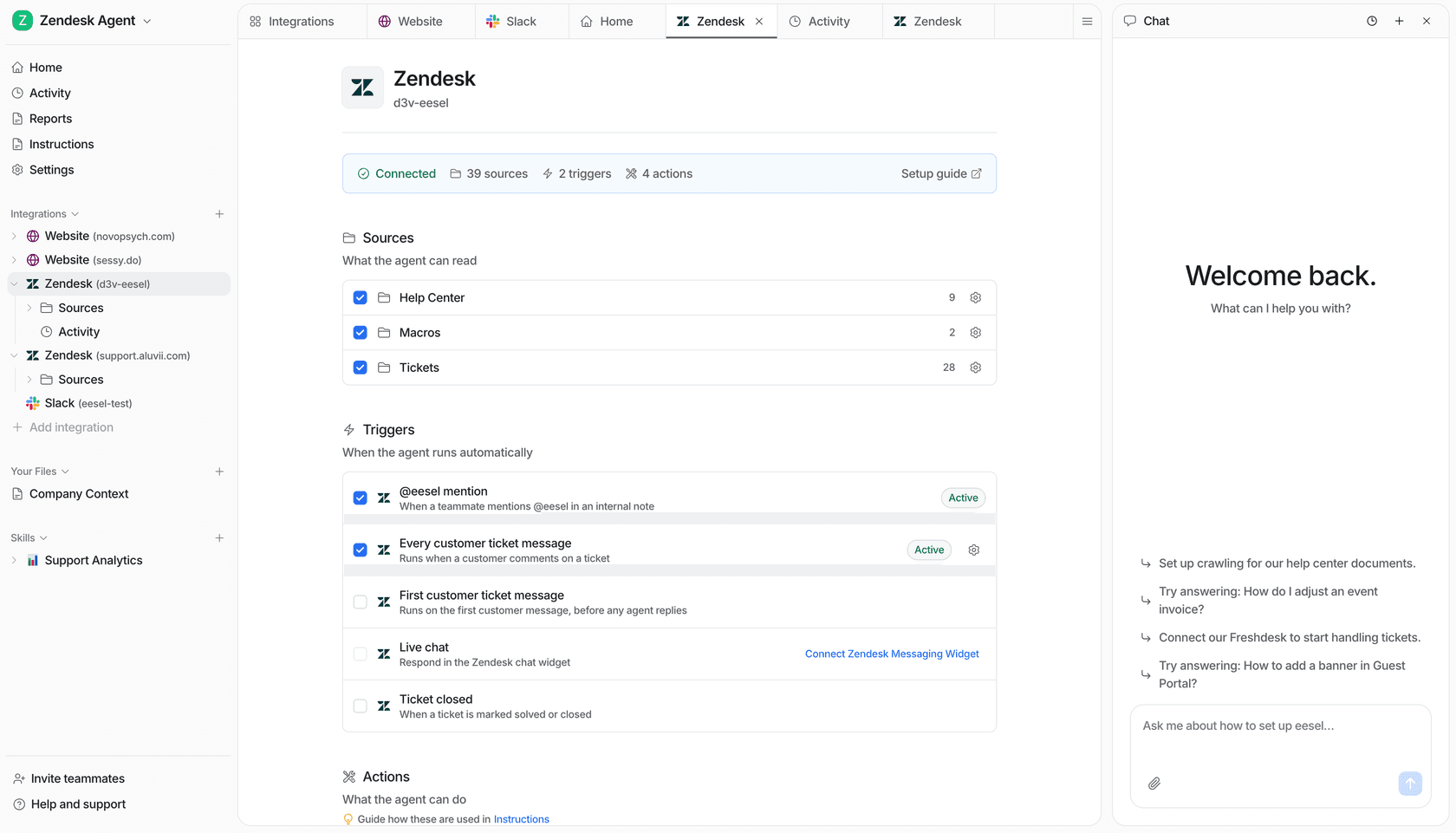
A connected Zendesk source shows the knowledge sources and ticket triggers an owner can review before a change.
With Node.js 18.17 or newer, npx @eesel/cli outputs JSON. First, the owner signs into the existing workspace, identifies the actual teammate, and turns customer-facing actions off for this review on the dashboard’s Actions page. Disabled is a per-action setting: it means the agent cannot use that action. It is not a blanket claim that every possible action is held.
TARGET_EESEL_AGENT="SUPPORT_REVIEW_TEAMMATE"
npx @eesel/cli login
npx @eesel/cli whoami
npx @eesel/cli agents
npx @eesel/cli status --agent "$TARGET_EESEL_AGENT"
npx @eesel/cli integrations --agent "$TARGET_EESEL_AGENT"
npx @eesel/cli integrations download list --agent "$TARGET_EESEL_AGENT"
npx @eesel/cli instructions --agent "$TARGET_EESEL_AGENT"
Replace SUPPORT_REVIEW_TEAMMATE with the intended existing, non-production agent's name or ID from agents. These reads let the owner compare the actual connection and download state with the instructions. If the site is already connected, investigate its readiness instead of adding it again. If it is missing, the owner first approves the exact public help-site URL and the pages it may expose. Replace the example URL below before previewing the write.
npx @eesel/cli integrations connect website --url https://help.example.com --agent "$TARGET_EESEL_AGENT" --dry-run

# Run only after the owner approves this exact workspace write.
npx @eesel/cli integrations connect website --url https://help.example.com --agent "$TARGET_EESEL_AGENT"
npx @eesel/cli status --agent "$TARGET_EESEL_AGENT"
npx @eesel/cli integrations download list --agent "$TARGET_EESEL_AGENT"
A dry run previews the write request; prerequisite reads can still execute. After an approved connection, inspect download status rather than assuming all pages became knowledge immediately. If further download setup is needed, consult integrations download --help. A connection also does not overwrite a contradictory instruction: the owner must review and approve that correction separately.
Once the source is ready, test the actual policy with three cases: a parcel still inside the stated delivery window, one beyond it, and a request missing the order identifier. Compare each answer with the approved policy; do not invent a delivery guarantee or refund. If the owner uses eesel chat, they first check billing and authorize paid work. Customer-facing actions remain Disabled for this test; a new conversation alone does not change permissions. The useful result is an evidence-backed explanation of the missing knowledge and a checked correction, not merely a successful connection response.
npx @eesel/cli billing --agent "$TARGET_EESEL_AGENT"
# Only after the owner authorizes paid chat and verifies action settings.
npx @eesel/cli chat "Using our connected lost-parcel policy, draft answers for a parcel inside its delivery window, one beyond it, and one with no order ID. Identify missing information and cite the policy. Do not contact customers or perform external actions." --agent "$TARGET_EESEL_AGENT"
The request describes the test; the actual action settings enforce the permission boundary. Check the cited policy and all three answers before changing production settings.
Costs to check before choosing an integration
Do not use an old plan matrix that says Free has no connectors. Anthropic currently documents one custom remote MCP connector for Free, with custom connectors also available on Pro, Max, Team, and Enterprise. Individual services can have different access requirements. Check the specific connector, then separate the Claude subscription, API usage, and any workflow-builder or connected-service bill. A paid chat plan does not make API requests free.
When a ready-made teammate beats an integration project
Claude connectors and MCP are useful infrastructure. They let a technical team assemble many workflows. But a support manager who needs correct, reviewable customer help does not usually want to own a connector catalog, a tool schema, and a collection of ad hoc prompts.
eesel’s AI helpdesk teammate is built for that focused job: it works with the existing helpdesk and knowledge sources, while the owner controls the instructions and actions. Its CLI gives engineers a way to take part in the review without asking them to operate a separate support system. eesel also offers an AI blog writer for content work; neither product is a substitute for a custom API integration when you are building a new product capability.
Sources
- Claude connectors
- Custom remote MCP connectors
- Claude API MCP connector
- Model Context Protocol introduction
- eesel CLI documentation
- eesel actions and approvals
Use eesel CLI to review a Claude AI integration
Use eesel CLI to trace a support knowledge gap from the connected source through download readiness and standing instructions. An engineer or coding agent can make an approved configuration change from the terminal, while the support owner checks the same teammate in the dashboard and signs off on representative answers.

The dashboard gives the support owner a visual place to review the teammate that engineers operate through eesel CLI.
Try eesel with a bounded support job, an approved knowledge source, and clear permission settings.
Frequently asked questions
What is a Claude AI integration?
A Claude AI integration connects Claude to a data source or tool so it can retrieve context or request an allowed action. The important question is not only whether it connects, but which identity, data, and actions the connection grants.
What is the difference between a Claude connector and MCP?
A connector is a ready-made connection offered through Claude. MCP is the open protocol that can let an AI application talk to external tools and data. A connector may use MCP, but the terms are not interchangeable.
When should I use the Claude API instead of a connector?
Use a connector when the existing experience and permissions fit the job. Use the Claude API when you need to build the user experience, orchestration, authentication, and controls into your own product or workflow.
Can a Claude AI integration write to another system?
It can only write when the connected service and its permissions allow it. On Team and Enterprise plans, owners can restrict connector actions, including allowing reads while blocking writes.
Do remote MCP connectors work with private networks?
Not automatically. Anthropic says remote MCP connections originate from its cloud infrastructure, so a server behind a VPN or firewall needs a supported network path before it can connect.