The five routes, and what each one is for
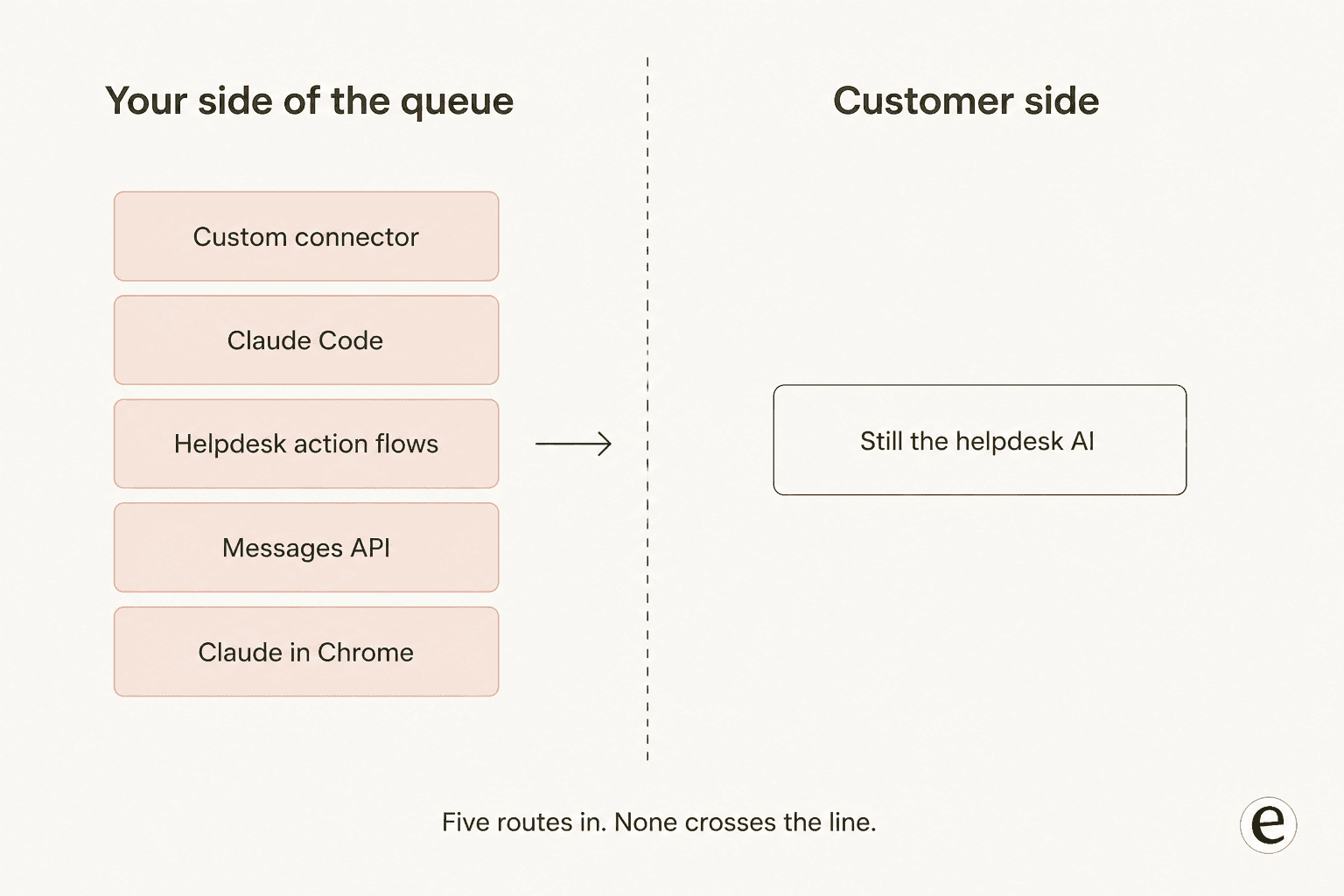
The most common mistake I see is treating "use Claude for customer support" as one decision. It is five, and they suit different teams, and which ones are even open to you depends on the customer support software you already run. Here is the whole map before the how.
| Route | Who it fits | Setup time | Can it send a reply? | Plan gate |
|---|---|---|---|---|
| Custom connector in Claude | Any support lead, no code | ~10 min | Only if the vendor's MCP server has a send tool | Free and up, Free capped at 1 |
| Claude Code | Teams already in a terminal | ~2 min per tool | Same as above | Any plan with Claude Code |
| Helpdesk action flows | Zendesk admins who want AI inside automation | ~30 min | Not directly, no send action shipped | Zendesk Guide Professional or above |
| Messages API MCP connector | Engineers building a backend | Days | Yes, if you build it | API key, beta header |
| Claude in Chrome | Nobody, for a support queue | ~5 min | Yes, by clicking Send | Paid plans only |
The honest summary of that table: routes one and two are excellent and I would set one up today. Route three is the most interesting and least known. Route four is a real project. Route five is technically possible and Anthropic's own safety guidance tells you not to.
Pick your helpdesk below and the widget gives you the exact route, endpoint and gate for it.
Which Claude route does your helpdesk actually have?
Verified against vendor documentation in August 2026.
<div class="pane" id="p1">
  <p class="name">Zendesk: two routes, one of them first-party</p>
  <div class="row"><div class="k">Official</div><div class="v">Zendesk's own <strong>Claude Anthropic connector</strong> inside action flows. Four actions: send prompt, summarize, analyze sentiment, extract keywords.</div></div>
  <div class="row"><div class="k">Also</div><div class="v">Free third-party <strong>MCP Server</strong> app by Swifteq, bridging Zendesk to any MCP client.</div></div>
  <div class="row"><div class="k">Gate</div><div class="v">Guide Professional or above, plus your own Anthropic API key.</div></div>
  <div class="row"><div class="k">Models</div><div class="v">Opus 4.6, Sonnet 4.6, Haiku 4.5. One generation behind the current family.</div></div>
  <p class="flag"><strong>The catch:</strong> none of the four actions is "send a public reply". You still wire the output into a separate Zendesk action.</p>
</div>

<div class="pane" id="p2">
  <p class="name">Freshdesk: official, but heavily gated</p>
  <div class="row"><div class="k">Official</div><div class="v">Freshworks' own MCP server, naming Claude Code and Claude Desktop as supported clients.</div></div>
  <div class="row"><div class="k">Gate</div><div class="v">Beta EAP, <strong>Enterprise plan only</strong>, requested through your account manager. API-key auth only.</div></div>
  <div class="row"><div class="k">Limits</div><div class="v">During the EAP, 100 tool calls/min and 5,000 actions/month. From 1 September 2026 it is metered instead: 100 included actions on Growth, 500 on Pro, 1,000 on Enterprise, then <code>$15 per 1,000</code>.</div></div>
  <div class="row"><div class="k">Community</div><div class="v"><code>effytech/freshdesk_mcp</code>, MIT, 66 stars, the de facto unofficial default.</div></div>
  <p class="flag"><strong>The catch:</strong> Freddy AI runs on Azure OpenAI models. There is no model selector and no API-key field, so Claude cannot be your Freshdesk AI.</p>
</div>

<div class="pane" id="p3">
  <p class="name">Front: the best-designed route of the lot</p>
  <div class="row"><div class="k">Official</div><div class="v">First-party remote MCP server at <code>mcp.frontapp.com/mcp</code>, 23 tools, streamable HTTP.</div></div>
  <div class="row"><div class="k">Gate</div><div class="v">Open beta, everyone has access. No Enterprise gate, no per-action charge.</div></div>
  <div class="row"><div class="k">Design</div><div class="v">Every token is bound to one teammate and checked against their live role. <code>send_message</code> is separate from <code>create_draft</code> and needs a draft ID.</div></div>
  <div class="row"><div class="k">Limits</div><div class="v">Per teammate: 120 light reads/min, 30 heavy reads/min, 20 writes/min, 20 sends/min.</div></div>
  <p class="flag"><strong>The catch:</strong> deliberate, not accidental. Sends carry a destructive hint so the client confirms each one. Excellent assistant, structurally unable to work the queue alone.</p>
</div>

<div class="pane" id="p4">
  <p class="name">Gorgias: free MCP, Claude in the docs</p>
  <div class="row"><div class="k">Official</div><div class="v">First-party server at <code>mcp.gorgias.com/mcp</code>. Gorgias's setup doc walks Claude Desktop and Claude Code as the primary path.</div></div>
  <div class="row"><div class="k">Gate</div><div class="v">Free on every Helpdesk plan. AI Agent add-on not required.</div></div>
  <div class="row"><div class="k">Can do</div><div class="v">Reply to customers, post internal notes, update status and priority, manage rules, edit help center articles.</div></div>
  <div class="row"><div class="k">Beta limits</div><div class="v">Macro edits and AI Agent config writes are gated during the open beta.</div></div>
  <p class="flag"><strong>The reframe:</strong> Gorgias's security FAQ says AI Agent already uses "OpenAI, Anthropic, and internally fine-tuned LLMs". Claude may already be answering your tickets. You just cannot pick it.</p>
</div>

<div class="pane" id="p5">
  <p class="name">Zoho Desk: the only one-click listing</p>
  <div class="row"><div class="k">Official</div><div class="v">The single mainstream helpdesk with its own listing in Anthropic's remote MCP directory.</div></div>
  <div class="row"><div class="k">Shape</div><div class="v">Zoho MCP is a server <em>builder</em>, not one fixed endpoint. The manual counts 61 services and 12,543 tools.</div></div>
  <div class="row"><div class="k">Price</div><div class="v">Free as of now. MCP calls draw on the service's normal API quota, no separate allowance.</div></div>
  <div class="row"><div class="k">Setup</div><div class="v">Claude is listed first of five clients, but unlike Cursor and VS Code it is not auto-configured. You paste the URL yourself.</div></div>
  <p class="flag"><strong>The catch:</strong> Zoho Desk's own generative AI takes an OpenAI or DeepSeek key. Anthropic is not an accepted provider, and Zia has no model selector.</p>
</div>

<div class="pane" id="p6">
  <p class="name">HubSpot: first CRM connector, awkward split</p>
  <div class="row"><div class="k">Official</div><div class="v">One-click connector plus remote MCP at <code>mcp.hubspot.com</code>, 16 tools, GA on all hubs and tiers with no add-on.</div></div>
  <div class="row"><div class="k">Gate</div><div class="v">Works on free HubSpot, but needs a paid Anthropic plan and a Super Admin to connect first.</div></div>
  <div class="row"><div class="k">Asymmetry</div><div class="v">Tickets and contacts are read, create and update. <strong>Conversations are read-only.</strong> So Claude drafts but cannot send through MCP.</div></div>
  <div class="row"><div class="k">Workaround</div><div class="v">The raw Conversations API can send. One field, <code>type</code>, decides public reply versus internal note.</div></div>
  <p class="flag"><strong>The twist:</strong> Claude Sonnet 4 already powers Service Hub's embedded AI, while the ticket-resolving Breeze customer agent is documented as fully OpenAI. The reverse of what most people assume.</p>
</div>

<div class="pane" id="p7">
  <p class="name">ServiceNow: official, and metered oddly</p>
  <div class="row"><div class="k">Official</div><div class="v">MCP Server Console. The Quickstart server ships exactly <strong>four tools</strong>: look up incidents, look up cases, summarize incidents, summarize cases.</div></div>
  <div class="row"><div class="k">Gate</div><div class="v">Included in every Now Assist and AI Native SKU. Plain ITSM does not include it.</div></div>
  <div class="row"><div class="k">Cost quirk</div><div class="v">A Now Assist skill called as an MCP tool consumes its usual assists <strong>plus 1</strong>. On a 1-assist summarization that is 100% overhead.</div></div>
  <div class="row"><div class="k">Limits</div><div class="v">Streamable HTTP and SSE only. No stdio, no local servers, not available on GCC.</div></div>
  <p class="flag"><strong>The catch:</strong> read and summarize only out of the box. No write or act tool ships with Quickstart, so you build tools before Claude changes anything.</p>
</div>

<div class="pane" id="p8">
  <p class="name">Jira Service Management: thinnest coverage</p>
  <div class="row"><div class="k">Official</div><div class="v">Atlassian Rovo, a first-party listing in Anthropic's directory covering Jira and Confluence.</div></div>
  <div class="row"><div class="k">Reality</div><div class="v">There is no JSM-specific listing. The JSM tool group is <strong>4 on-call tools</strong>, and it is API-token auth only, not OAuth.</div></div>
  <div class="row"><div class="k">Contrast</div><div class="v">Confluence gets 12 tools with both OAuth and API token. The inverse of JSM.</div></div>
  <div class="row"><div class="k">Credits</div><div class="v">Rovo credits are 25/70/150 per user per month by tier. A chat answer costs 10, so a Premium seat is about 7 answers a month.</div></div>
  <p class="flag"><strong>The catch:</strong> OAuth tokens expire in roughly 30 minutes in Claude Code with no personal-access-token path. It is the single most-complained-about operational detail.</p>
</div>
Before you start: three things that will bite you
None of these is difficult. All three are easy to walk straight into, and the third one in particular will look like a broken connector rather than a network rule, so clear them first.
Your plan is probably fine. Custom connectors using remote MCP work on Free, Pro, Max, Team and Enterprise, and the custom connectors article states the only numeric cap is that Free users get one custom connector. If you are on Free and you want both your helpdesk and your docs tool, that is the wall you will hit.
On Team or Enterprise, you are not the one who adds it. Only Owners can add a connector to a Team or Enterprise organisation, per the same article. Members then individually authenticate against it afterwards, which is the right design because Claude inherits each person's permissions from the connected service. If you are a support lead on a company plan, your first step is a message to whoever owns the workspace, not a settings page.
The network gotcha nobody expects. This one is worth reading twice, because it silently breaks self-hosted setups:
"When you add a custom connector, Claude connects to your remote MCP server from Anthropic's cloud infrastructure, rather than from your local device. This is true across every Claude client, including claude.ai, Claude Desktop, Cowork, and the mobile apps."
Which means a server behind your VPN or corporate firewall will not connect, even though you can reach it perfectly from your own laptop. The fix is allowlisting Anthropic's published IP ranges. If your helpdesk is cloud-hosted this never comes up, and if you run anything on-prem it is the first thing to check.
Route 1: add your helpdesk as a custom connector
This is the one to do first. It takes about ten minutes and it is where most of the value lives.
- Find your helpdesk's MCP endpoint. Front publishes
mcp.frontapp.com/mcp, Gorgias publishesmcp.gorgias.com/mcp, HubSpot publishesmcp.hubspot.com. For Zoho Desk you generate your own URL in Zoho's MCP console, and note that Zoho's URL embeds its own API key, so treat it exactly like a password. - Add it. On Pro or Max, go to Customize, then Connectors, then the plus, then Add custom connector, and paste the URL. On Team or Enterprise, an Owner does this from Organisation settings instead.
- Authenticate. Most vendors use OAuth 2.1, so you approve a consent screen and Claude never sees your password.
- Start read-only. Before you ask Claude to change anything, ask it questions. "Summarise every open ticket about failed payments from the last fortnight, grouped by root cause" is a good first prompt, because it is something your reporting tab cannot answer at all.
- Then scope the writes. More on this below, and it matters more than any other step here.
For a one-click install rather than a pasted URL, the pickings are thin. Zoho Desk is the only mainstream helpdesk with its own listing in Anthropic's remote MCP directory. Zendesk, Freshdesk, Front, Help Scout, Gorgias, Kustomer, Gladly and Dixa are all absent from it, and their slugs do not appear anywhere in Anthropic's sitemap. Atlassian is the near-miss: there is an Atlassian Rovo listing covering Jira and Confluence, but no Jira Service Management entry of its own, so how much of your service desk it reaches depends on Atlassian's server rather than on anything Anthropic publishes. Everything else being absent is a not-yet-listed state rather than a policy exclusion, since Anthropic accepts connector submissions openly.
One limit to know before you connect six things at once. Anthropic's guidance in Manage Claude's tool access is that each connector eats conversation space, and with 10 or more connectors active you should switch tool access from Auto to On demand. Past about 30 tools, the practical constraint stops being what Claude can reach and becomes whether it can still find the right tool.
That is not a theoretical worry. In a test run by Arcade.dev across a 4,000-tool catalogue, disclosed as vendor-run, tool retrieval hit 56% with regex search and 64% with BM25, and Zendesk_CreateTicket was among the common tools not retrieved reliably. Fewer connectors, better prompts.
Route 2: Claude Code, if your team already lives in a terminal
If anyone on your team uses Claude Code, this is a one-line install:
claude mcp add --transport http gorgias https://mcp.gorgias.com/mcp
Then /mcp to authenticate. Swap the name and URL for whatever your helpdesk publishes.
The reason I rate this route highly is that the strongest real-world account I found of Claude helping a support org was not about drafting replies at all. It was about search:
"We have just connected up our internal zendesk, Jira, confluence, and github in Claude Code and it's incredible how useful it is to find information spread across different services in 1 minute instead of it personally taking me 15 minutes of manual search."

Fifteen minutes to one. That is the win nobody puts on a pricing page, and it lands the day you connect it. The same commenter later described the build: CLIs for Confluence, Jira and Zendesk with skills to match, a simple OAuth login flow per tool, and "only took a couple days to set these up".
Which brings up the packaging layer. Agent Skills are where your procedure lives, as distinct from your connection. A skill is a SKILL.md of instructions that loads only when it is needed, and for support work the split is clean: skills hold your triage rules, macro conventions and escalation policy, and MCP holds the pipe to the queue. If you have ever written a 40-line onboarding doc explaining when to escalate a billing dispute, that document is already most of a skill.
One caveat for anyone using Cowork or cloud sessions: they do not read ~/.claude/skills/ from your machine. They load the skills enabled on your account, synced at session start.
Route 3: put Claude inside the helpdesk's own automation
This is the route I found most interesting, because it is the only one where Claude runs inside the helpdesk's own engine rather than beside it, and almost nobody is talking about it.
Zendesk ships a first-party Claude Anthropic connector in its marketplace, badged New, with Zendesk itself as the listed developer. In its own words, it "connects Zendesk action flows to Anthropic's Claude AI models". Four actions are available inside the action builder: send prompt, summarize text, analyze sentiment, extract keywords.
This matters because it is a direct answer to the most-asked question on this topic anywhere. Here is the ask, from a Zendesk admin:
"I'm constantly looking for an AI agent that can handle most email tickets automatically, but I'm struggling to find a setup that actually makes sense financially. Is there any way to connect existing Claude, ChatGPT, or Gemini accounts to Zendesk, either directly, through something native in Zendesk, or via a third-party app?"

The connector is the closest thing to a yes that exists. It runs on your own Anthropic API key, so you pay Anthropic directly at API rates instead of paying per automated resolution.
Three caveats I would want to know before building on it, and none of them is hidden, just easy to skim past.
First, the gate: Guide Professional or above, plus a Suite on Team, Growth, Professional, Enterprise or Enterprise Plus. If you are on a lower Zendesk plan, this route is not open to you, and that gate is one of the quieter reasons teams start reading about alternatives.
Second, the model list. The connector offers Opus 4.6, Sonnet 4.6 and Haiku 4.5. Anthropic's current pricing puts Opus 5 at $5/$25 per million tokens and Sonnet 5 at $2/$10, with Sonnet 4.6 sitting in the legacy block at $3/$15. So you are running a legacy model at legacy rates: Sonnet 4.6 costs 50% more per input token than the newer Sonnet 5 you cannot select. That is a fair trade for the convenience, and worth knowing you are making it.
Third, and most important: none of the four actions is "send a public reply". They are text-processing primitives. Getting from an analysed sentiment to a customer seeing a reply still means chaining the output into a separate Zendesk action yourself.
There is also a free third-party option in the same marketplace, the MCP Server app by Swifteq, which bridges Zendesk to any MCP-compatible assistant. It is the Zendesk equivalent of the community servers that exist for Freshdesk and ServiceNow.
Route 4: build it on the API, and meet the last mile
If you want Claude to actually resolve tickets, this is the only route that gets you there, and it is a real project rather than an afternoon.
The mechanics are the easy half. Anthropic's MCP connector lets you reach a remote MCP server straight from the Messages API without running your own client: an mcp_servers array, a beta header, per-tool allowlists and defer_loading for big tool sets. Only tool calls are supported, and the server has to be publicly reachable over HTTPS. For a full agent loop with hooks, subagents and permissions, the Agent SDK gives you what powers Claude Code, in Python or TypeScript.
Then you hit the last mile, and it is not the part you budgeted for.
The clearest illustration of this I have seen is a support lead who built precisely the thing this post is about, and got stopped by a UI detail:
"I built a 'ticket response drafter' with Claude that uses my knowledge base to draft responses to every customer ticket that comes in. I want my agents to be able to edit and then send that response to the customer instead of drafting each one from scratch... but is there a way to acutally make the drafted response a DRAFT sitting in the ticket, so they don't have to copy/paste the draft response every time?"
The answer in that thread is that a Zendesk draft is stored locally and never written to the ticket, so an external drafter can only post an internal note or build a sidebar app. The model wrote a perfect reply. The last two inches into the agent's composer were the blocker. A different admin hit exactly the same wall building on a custom GPT and summed it up as "works great at answering tickets but you've got to copy paste back".
This is the shape of the whole problem, and the sharpest statement of it comes from the founder of My AskAI, a competing vendor, so read it with that disclosed:
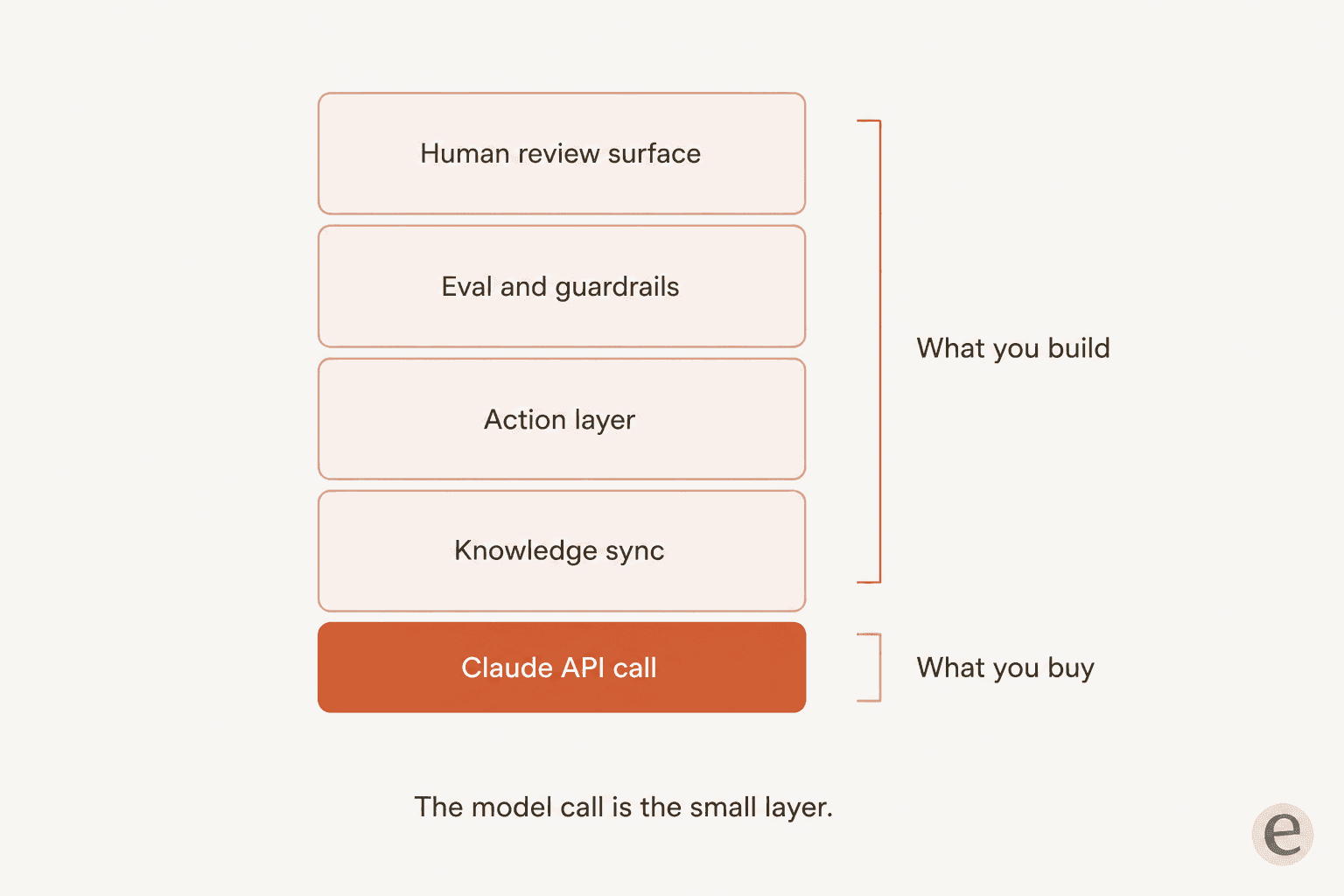
"Direct Claude/ChatGPT API connection is doable but you're then maintaining your own evals, prompt engineering, KB sync, and the action layer (writing back to Shopify, processing refunds etc), which eats more time than the per-resolution charge would have cost."
I think that is roughly right, with one correction. It is not that building is always wrong. It is that you are not buying a model, you are taking on four systems: an internal knowledge base that stays in sync, an action layer, an eval loop, and a review surface for humans. Building ticket automation means owning all four, forever, including the week the vendor changes an API.
Worth adding the counterweight too, from someone who states in the same thread that they have spent almost ten years developing on the Zendesk platform and do not work there:
"if you built your own integration I would suggest taking a look at MCP servers, building an MCP server that enables AI agents to interact with your products API is pretty easy when you've already got the API ready to go... Overall it's actually quite easy to get this set up but I have yet to see many companies actually leveraging this kind of MCP server AI integration."
Both are true. The pipe is easy. The system around the pipe is the job.
Route 5: Claude in Chrome, and why I would not point it at a queue
Claude in Chrome reads, clicks and navigates pages alongside you, and it can record a workflow you perform once and replay it on a schedule. On paper that describes queue triage perfectly. It is available on all paid plans and rides your subscription with no separate charge.
I still would not use it here, and my reason is Anthropic's own documentation rather than caution on principle. Its safety guidance states plainly that "Claude can't filter sensitive content out of what it sees", lists "accessing work accounts with sensitive company data" and "interacting with sites containing personal information of others" under what to avoid, and notes it is not available to organisations covered by HIPAA. A support inbox is a screen full of other people's personal information by definition.
The same page puts prompt-injection attack success under 0.08% in internal testing while saying the risk is not zero and a successful attack could lead to data exfiltration. In a support queue, the untrusted text arrives by design, hundreds of times a day, written by strangers. That is the one environment where I would want the number to be zero.
The step most people skip: scoping what Claude may do
If you read one section here, read this one. It is the difference between a useful assistant and an incident.
Owners on Team and Enterprise can restrict what a connected service is allowed to do, org-wide, with each permission category set to Always allow, Needs approval, or Blocked, and individual users cannot override it. Restricting in Claude never grants more access than the source system permits, it only narrows it. So the correct opening posture is reads on Always allow and every write on Needs approval.
Here is why that is not paranoia. On 30 May 2026, an Atlassian community member reported a critical defect: Claude sent title-only page-update calls, the API read the missing body as an instruction to clear it, and the body of every renamed page was silently deleted. An Atlassian developer confirmed it the next day and shipped granular edits in a V2 preview on 1 July 2026. The tool was doing exactly what it was told. Nobody had scoped it.
Two more settings worth knowing about:
- Research mode bypasses your approvals. During Research, Claude can invoke connector tools automatically without further approval, and Anthropic's own advice is to disable any tools that take write actions in external applications before using it.
- Connectors are private-project only on Team and Enterprise, and chats with synced content cannot be shared. If your plan was to paste an AI-summarised backlog into a shared channel, that path is closed.
And a note on attribution that matters for audits: Zendesk's connector states all actions are performed through external API calls and attributed to the user who established the connection. Whoever clicks Connect owns every action in the log. Pick a service account, not a person who might leave.
What this actually costs
Here is the number that starts most of these projects, stated by an evaluator rather than a vendor:
"raw api cost on a typical zendesk ticket (3-4k tokens in, 500 out) lands between $0.005 and $0.02 across the major models, two orders of magnitude under vendor pricing. what you're paying the rest for is the action layer (writing back to shopify, refunds, address changes), inbox plumbing, and the eval/guardrail loop."
That checks out against the rate card. At $2 in and $10 out per million tokens, Sonnet 5 on a 3,500-token ticket with a 500-token reply is about $0.012. Opus 5 at $5/$25 is about $0.030. Batch processing halves it, and prompt caching drops cached reads to $0.20 per million.
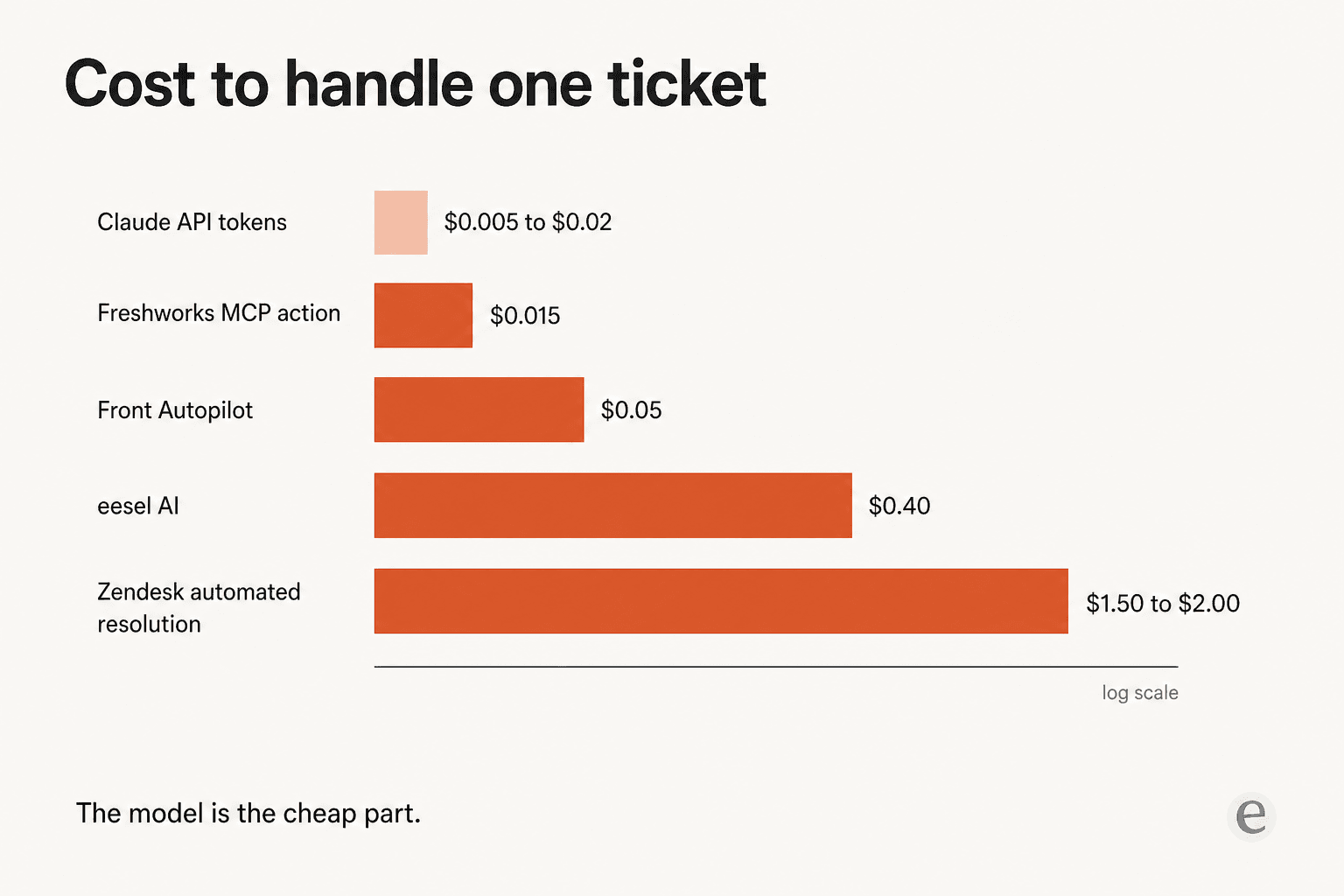
| What you pay for | Rate | Unit |
|---|---|---|
| Claude Sonnet 5 tokens | ~$0.012 | one drafted reply |
| Claude Opus 5 tokens | ~$0.030 | one drafted reply |
| Freshworks MCP action, over allowance | $0.015 | one successful tool call |
| Front Autopilot | $0.05 | one conversation |
| eesel AI | $0.40 | one ticket, reply included |
| Zendesk automated resolution | $1.50 to $2.00 | one resolution |
Read that table carefully, because the rows are not comparable, and the difference is the entire point. The top rows buy you a model call. The bottom rows buy you a resolution: the knowledge, the actions, the guardrails and someone else's problem when it breaks. Set against eesel's $0.40, the tokens are 3% to 8% of the bill. Set against a $2.00 automated resolution, under 2%. Either way the model is a rounding error on the finished cost, which is exactly why the token-price argument feels stronger than it is.
Three billing details that catch people out, all worth checking against your own contract:
- ServiceNow adds a flat surcharge. A Now Assist skill invoked as an MCP tool consumes its usual assists plus 1. On a one-assist summarization that is 100% overhead, and on a 250-assist skill it is noise. Pricing depends on which SKU you are on.
- Freshworks starts metering in September 2026. Growth gets 100 included actions a month, Pro 500, Enterprise 1,000, then $15 per 1,000. Compare against Freshdesk's plan prices before assuming it is free, and against the automation apps that do the same job for less.
- Rovo credits are tighter than they look. 25, 70 and 150 per user per month by tier, with a chat answer costing 10 and Deep Research costing 100. A Premium seat is roughly seven chat answers a month, which reframes Jira Service Management pricing considerably, and the full JSM route has more on the four on-call tools.
Where this approach runs out
I would rather say this plainly than let you discover it in week three. Everything above makes your agents faster. None of it is customer service automation in the sense that takes tickets off the queue.
The clearest statement of the gap came from someone who had already turned on their helpdesk's native AI:
"The replies it sends are honestly fine, sometimes better than what a tired agent would write at 6pm, but the problem is that is literally all it does. The ticket still needs tagging, the CRM still needs updating, the summary still needs writing, and half the time someone has to re categorise it anyway because the bot picked the wrong macro. So my team's hours did not really go down. They just shifted to cleanup work"
A Claude connector on its own lands in the same place, one step earlier. Tagging, field updates and routing are their own category of tooling, which is why ticket classification apps exist separately from reply generation. And there is a more basic version of the problem, put well in a two-line exchange on r/sysadmin. One person said that if they were going to use an AI helpdesk they would just go to ChatGPT or Gemini. The reply was that those tools will not have your internal knowledge base. Connecting the model is what fixes that, and it is also only the first of the four layers.
Across three years of putting AI agents on live support queues, the adoption pattern I see almost every time is the same: teams start with AI drafting replies for agents, then graduate to full automation once trust is established. Every route in this post is the first half of that arc. There is no setting in any of them that gets you to the second half, which is the honest reason a dedicated tool exists.
Try eesel for the half Claude leaves you
If what you want is Claude reading your queue and helping your agents think, do Route 1 today. Genuinely. It costs almost nothing and the cross-tool search alone earns its keep.
If what you want is tickets closed, that is what I work on eesel for. It plugs into the helpdesk you already run, learns from your past tickets and help docs rather than just your public articles, drafts or replies depending on how much rope you have given it, and takes the actions on the other side. The part I would actually point at is simulation mode: before a single customer sees anything, you run the agent against your own historical tickets and see coverage by theme, find the gaps, fill them, and re-run. That is the step that turns "the replies look fine" into a number you can take to your manager.

Pricing is $0.40 per ticket with no platform fee, no per-seat charge and no minimum, and you only pay for the tickets you actually route to it. There is $50 of free usage to start, no card needed, which at 125 tickets is enough to see whether it holds up on your queue.

Setup is the boring kind. There are one-click integrations for Zendesk, Freshdesk and Front, among a hundred or so others, and the agent reads your help centre and ticket history rather than waiting for you to write a knowledge base from scratch.
If you are weighing the wider field first, my roundups of AI helpdesk chatbots and customer service agents are the fair comparisons. The cost breakdown has the maths at different volumes, and the wider software category sits alongside it. For platform specifics there are deeper write-ups on Zendesk, Front, Gorgias, HubSpot, Salesforce, Shopify and Confluence. And if it turns out Claude is not the right model for your queue at all, the alternatives are worth a look.
Frequently Asked Questions
How do I use Claude for customer support without writing any code?
Can Claude reply to customers automatically in my helpdesk?
What does Claude for customer support actually cost per ticket?
Do I need a paid Claude plan to connect my helpdesk?
Can I bring my own Anthropic API key into my helpdesk's AI?
Is it safe to give Claude write access to my ticket queue?
Should I build my own Claude support agent or buy an AI helpdesk agent?



Article by
Rama Adi Nugraha
Rama is a software engineer at eesel AI with two years of experience writing about B2B SaaS, AI tools, and customer support technology. Based in Bali, Indonesia, he brings a developer's perspective to product comparisons — cutting through marketing copy to what the integrations and APIs actually do.