Claude for Gorgias: 4 real ways to connect them in 2026

Alicia Kirana Utomo

Katelin Teen
Last edited August 12, 2026

Claude is probably already in your Gorgias account
I build AI agents at eesel, which means I spend most of my week on the unglamorous half of this problem: retrieval, tool calls, and the handover logic that decides when a model should shut up and fetch a human. Across thousands of live support queues, the single most reliable lesson is that the model is rarely the thing that breaks. The plumbing around it is.
That is worth holding onto here, because the honest answer to "which model does Gorgias use" is buried in a security document rather than a marketing page. The Gorgias security FAQ states it plainly:
"AI Agent uses a combination of multiple secure LLM providers, including OpenAI, Anthropic, and internally fine-tuned LLMs."
The AI Agent product page tells a narrower story, naming only an OpenAI partnership and carrying only an OpenAI logo. Both are true. Anthropic is in the mix; OpenAI is the badge on the door.
What matters for anyone searching for Claude here is the thing neither page mentions: Gorgias publishes no model name, no model version, and no switch. You cannot route your refund tickets to Claude and your product questions to something cheaper. So the practical question is not "can I use Claude with Gorgias" but "where exactly does Claude get to sit."
That question has a near-identical answer on other helpdesks, incidentally. I walked the same ground for Claude for Zendesk, and the shape of the problem barely changes: the model vendors build directories, the helpdesk vendors build agents, and nobody builds the bridge you actually wanted.
The four routes, and which ones run without you
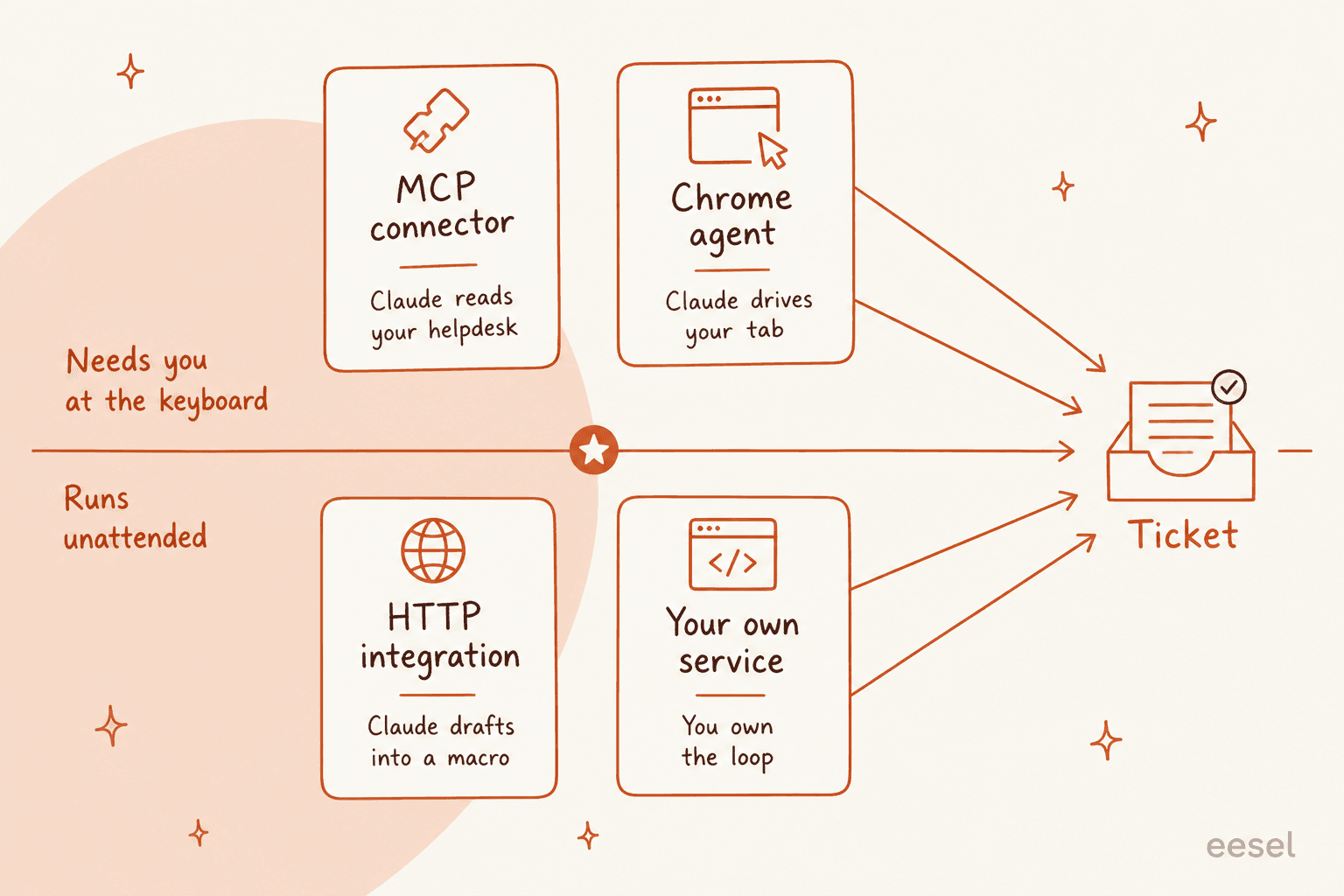
There are exactly four ways to put Claude near a Gorgias queue in 2026. Two are operator tools that only move when a person drives them. Two can run against the queue unattended, and both make you build the loop yourself.
| Route | Who it serves | Setup | Can it reply to a customer? | Cost on top of Gorgias |
|---|---|---|---|---|
| Gorgias MCP connector | Your ops and CX leads | ~5 minutes, no code | Only when a human drives it | Your Claude subscription |
| HTTP integration and macros | Agents applying a macro | Days, needs a service | Indirectly, through variables | Claude API tokens |
| Gorgias API and your own service | Whoever you assign to maintain it | Weeks, then forever | Yes | Tokens plus engineering time |
| Claude in Chrome | One person at a time | Minutes | Yes, by driving the UI | Paid Claude plan |
The rest of this post walks each one, with the limits that decide whether it survives contact with a real queue.
Route 1: the Gorgias MCP connector
This is the official Claude story, and it is very good at what it does. Gorgias runs a first-party remote MCP server at https://mcp.gorgias.com/mcp, and its own setup guide walks you through adding it in Claude Desktop under Customize, then Connectors, then Add custom connector. Claude Code users get a one-liner instead: claude mcp add --transport http gorgias https://mcp.gorgias.com/mcp.
The open beta announcement is refreshingly direct about the deal: it is included at no extra cost on any plan, AI Agent is not required, and you bring your own model subscription. Setup is quoted at around five minutes, and Gorgias maintains a public MCP cookbook of prompt recipes.
Gorgias also draws the line between its two AI products more clearly than most vendors bother to. AI Agent "lives inside your helpdesk and replies to customers on your behalf," while MCP "lets you operate your Gorgias account from an external AI tool."
What it can actually touch
Reads are live and broad. Writes are partly fenced off while the beta runs.
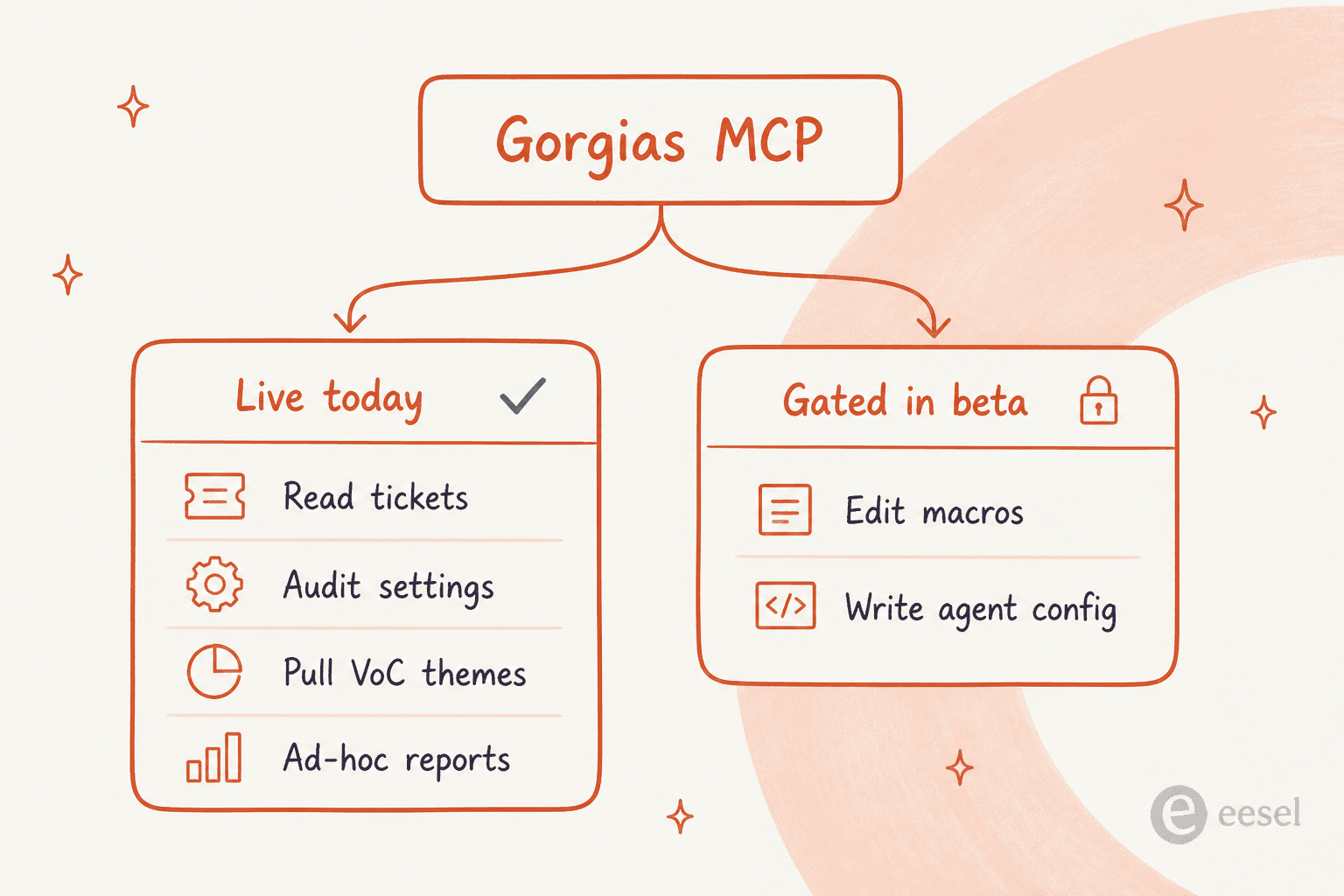
Per the docs, the connection can read and analyse tickets, audit and update settings, review AI Agent handovers, edit product information, surface voice-of-customer patterns, query analytics, reply to customers, post internal notes, update ticket status and priority, manage Gorgias rules, and view and update help center articles. The beta announcement adds the caveat: macro edits and AI Agent config writes are gated and roll out over the coming months.
Plan gating sits on the Claude side, not the Gorgias side. On Free, Pro and Max a user adds the connector themselves; on Team and Enterprise an Owner has to add it at the org level first. Free accounts are capped at one custom connector.
Where it shines. Ask it which Gorgias tags are dead weight, why your first response time slipped last week, or which handovers your agent config keeps getting wrong. That is real work, and it is work no dashboard does well.
It is also the fastest way I know to audit an existing setup. Point it at your guidance entries and ask which ones have never been retrieved, or have it read your Gorgias analytics and explain a CSAT dip in plain language.
Where it stops. It is a person-in-the-loop tool. Nobody is running a Tuesday-night refund queue by leaving a Claude Desktop window open, and Gorgias does not pretend otherwise.
Route 2: HTTP integrations and macro variables
This is the route most people picture when they say "wire Claude into Gorgias," and it is the one where the documentation quietly closes the door.
HTTP Integrations let Gorgias POST to your endpoint on ticket events, and they are available on every Helpdesk plan. The catch is a number: each request gets a 5-second timeout. A cold-start model call with any real context in front of it does not reliably fit in five seconds, and the retry rules make the first attempt matter more than you would like.
- Connection accepted but no response inside 5 seconds: Gorgias retries only if the integration uses OAuth2. Header-auth integrations get exactly one shot.
- An error status like 429 or 500: no retry, either way.
- When retries do apply, it is 3 attempts with 10, 20 and 40 second backoff.
- After 500 consecutive failures, Gorgias disables the integration. The counter resets on any success.
There are three more constraints that shape the design more than the timeout does. First, the Rules builder has no HTTP action anywhere in its 21 THEN options, so you cannot write "if intent is refund, call my model." Second, macro HTTP hooks fire when an agent applies the macro and are one-way, with no documented path from the response back into the reply. Third, the Customer Data and Customer Other Integrations rule conditions are both marked temporarily decommissioned, so branching a rule on whatever your model returned is not currently on the menu.
The response can still reach a reply, but only through back-office variables, with syntax like {{ticket.customer.integrations[9141].data.delivery_cost}} where the number is the integration ID from its settings URL. And here is the failure mode I would lose sleep over: a missing variable renders as a blank space, not an error. A broken path does not fail loudly. It ships a reply to a customer with a hole in it.
The honest read is that HTTP integrations are a great way to pull an order lookup into the sidebar and a poor way to put a language model in front of a customer. Anyone using them for the former should read our guide to Gorgias automation first, and the Shopify side panel walkthrough second.
Worth noting the same walls apply if you were planning to swap in a different model vendor rather than Claude. The Gorgias and ChatGPT route hits an identical 5-second ceiling, because the constraint is the helpdesk, not the model.
Route 3: the API and your own service
If you want Claude actually writing replies in Gorgias, this is the route that works, and it is a real project rather than a weekend.
The shape is: acknowledge the HTTP integration immediately, queue the model call, then write the answer back with POST /api/tickets/{ticket_id}/messages. Or skip the push side entirely and poll GET /api/events, which has no 5-second cliff and no auto-disable risk, at the cost of latency.
The Gorgias API authenticates over HTTP Basic with your email and an API key, though public apps must use OAuth2. Rate limits are worth checking twice, because Gorgias publishes two different figures: the pricing page lists 2 requests per second as a plan feature (4 on Enterprise), while the developer reference gives 80 requests per 20 seconds on OAuth2 and 40 per 20 seconds on an API key, with Enterprise getting those same counts on a tighter 10-second window. Budget against the lower number. There is also no webhook subscription API at all, which surprises people migrating from other helpdesks.
Two operational details worth flagging before you scope this. Gorgias now retains events for only 12 months, with older IDs returning 404. And API keys are per-user with full account access, which means a departing admin's key is a live production dependency. Check your roles and permissions before anyone hands in a laptop.
On the Claude side, you have three ways in. The Messages API MCP connector lets your backend call Gorgias tools directly, with per-tool allowlists, though only tool calls from the MCP spec are supported. The Claude Agent SDK hands you Claude Code's agent loop in Python or TypeScript. Or you write the loop yourself against the raw API.
Our Claude integration guide covers how those three differ in practice, and Claude managed agents covers the hosted option if you would rather not run the loop at all.
One licensing line matters if you were planning to hand this to customers: third-party developers may not offer claude.ai logins or rate limits to their users without prior approval. You pay API rates.
This is the point in every build-versus-buy conversation where somebody says the quiet part. A customer of ours put it better than I could:
"We could try to write our own LLM application but we didn't want to invest our time into that. We wanted something that we would not have to maintain."
Route 4: Claude in Chrome driving the Gorgias tab
Technically this works. Claude in Chrome is available on any paid plan at no extra charge, it operates the browser from screenshots, and a Gorgias tab is just a web page.
I would not put it on a support queue, and neither would Anthropic. Its own safety guidance advises against using it with work accounts holding sensitive company data, and against sites holding other people's personal information. A support inbox is both of those things at once, wearing a hat. It is also Chrome-only, beta, blocked for HIPAA organisations, and single-seat by nature.
Use it to explore an unfamiliar Gorgias view or reverse-engineer a reporting screen. Do not use it to answer customers. Our Claude for Chrome piece goes deeper on what the extension is good for.
What this actually costs per ticket
Here is where the ecommerce math gets interesting, because the token bill is almost irrelevant next to the helpdesk bill.
Current Claude pricing puts Sonnet 5 at $2 per million input tokens and $10 per million output. A ticket-sized call, generously sized, lands around a cent. Opus 5 at $5 and $25 is a few cents. Prompt caching reads bill at a tenth of base input, so a static knowledge block gets cheap fast. There is no long-context premium in the Claude 5 line, so a fat ticket thread costs the same per token as a short one.
Now the Gorgias side. The pricing page runs two meters against the same inbox, and this is the part I see teams misread most often.
| Starter | Basic | Pro | Advanced | |
|---|---|---|---|---|
| Monthly billing | $40 | $90 | $550 | $1,430 |
| Annual billing | not offered | $77/mo | $471/mo | $1,227/mo |
| Tickets included | 50 | 300 | 2,000 | 5,000 |
| Automated interactions included | 30 | 30 | 190 | 530 |
| Extra ticket | $0.40 | $0.40 | $0.36 | $0.36 |
| Extra automated interaction | $1.50 | $1.50 | $1.50 | $1.50 |
| Seats | 3 | 500 | 500 | 500 |
| BigCommerce / Magento | no / no | yes / no | yes / yes | yes / yes |
If you want the tier-by-tier reading rather than the summary, our Gorgias plans comparison breaks each one down, and the ticket limit guide explains what counts as billable.
Two things in that table do real damage if you miss them.
The first is that a fully automated ticket is billed twice. Per the billing docs, a ticket fee applies to any ticket with at least one message sent from Gorgias, whether a human, AI Agent or a rule sent it. The automation fee stacks on top when no human touches it within 72 hours. Hand the ticket to a person and you pay the ticket fee only.
The second is that $1.50 is the overage rate, not the rate. Inside your allowance the effective price works out at roughly $0.90 per resolved interaction on annual plans and about $1.00 on Starter, which matches Gorgias's own framing. Cross the line and the same interaction jumps by half on Starter and by two thirds everywhere else.
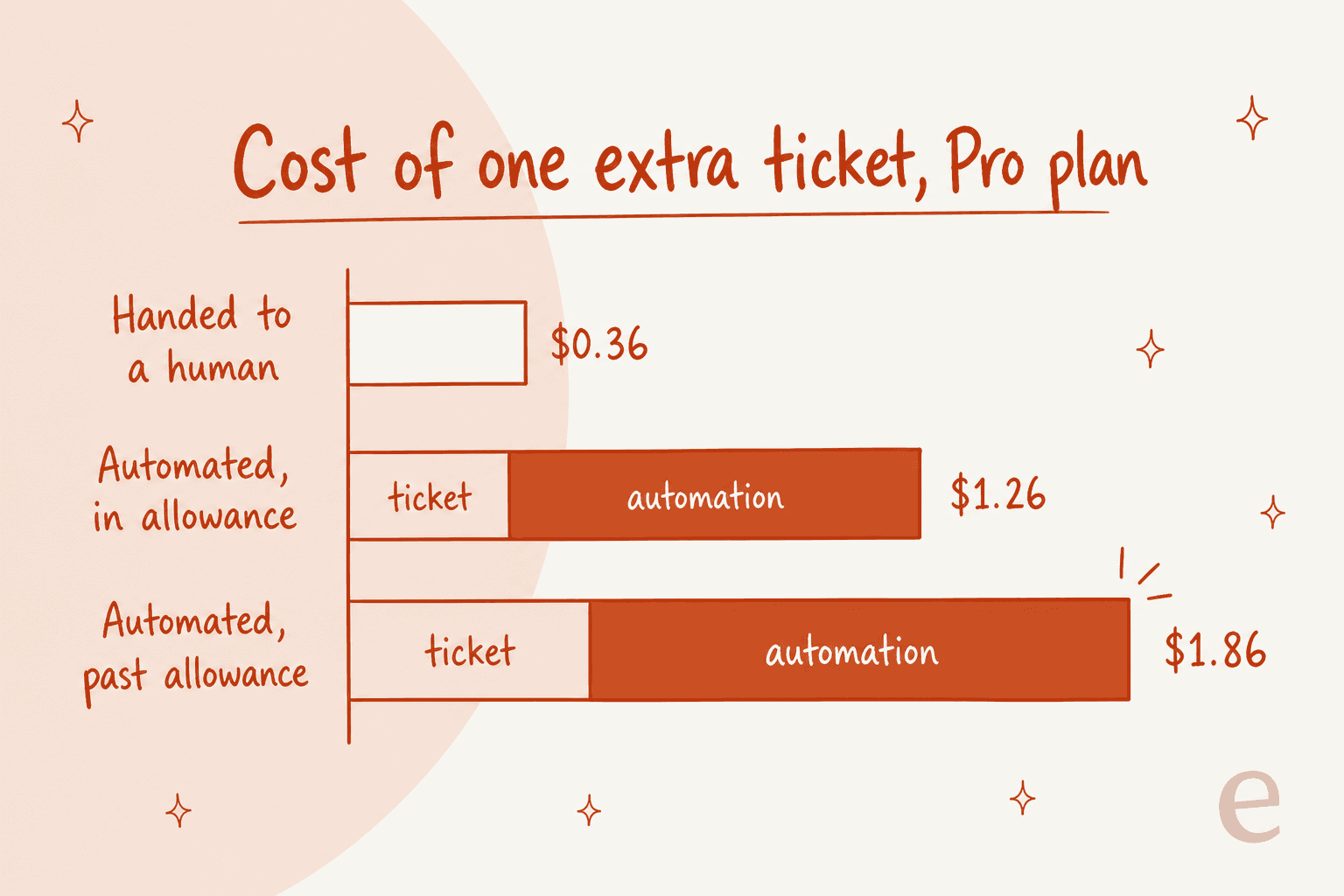
There is a backwards consequence here, and it is the strongest argument for routes 2 and 3 that nobody makes out loud. The automated-interaction meter counts AI Agent, Flows, Order Management and Article Recommendations. A reply your own service posts through the API is a billable ticket, not an automated interaction. Build it yourself and you skip the expensive meter entirely. You just pick up an engineering bill instead.
Plug your own numbers in:
What none of the four routes fixes
Underneath all four routes sit the same constraints, and they are the reason I would not call any of them a finished answer.
Your ticket archive is not a knowledge source. Gorgias AI Agent draws on guidance entries (100 per store, 30,000 characters each), help center articles, a public-website sync that takes one page at a time with no subpages and no login, uploaded files, and Shopify data. Macros are an explicit no. Past resolved tickets are not on the list. That is a shame, because the archive is the only place your actual brand voice lives, and it is why so many Gorgias auto reply setups sound like a help center instead of your team.
You cannot dry-run it against your own history. The Playground replays one existing ticket at a time. There is no documented batch or historical simulation anywhere, and actions are off by default in tests but hit real data once enabled. Going live is therefore a judgement call rather than a measurement, which is exactly the moment support leads get nervous. A reviewer on G2 put the configuration burden fairly:
"The AI Agent is powerful, but the training and knowledge base configuration can be complex. There are a lot of rule nuances and automation layers that require careful setup, and the learning curve can be steep when optimizing for more advanced use cases."

None of this means the agent is bad. A 5-star reviewer conceded both sides in one sentence, which is about the fairest summary available:
"While we still have quite a few snags with the AI agent who does give the wrong answers sometimes, it is still faster and more efficient than Zendesk."
And to be fair to the product, actions are the half of it that works well: six Shopify ones covering cancel, address edit, item removal, replacement, free reship and order notes, plus Recharge, Loop and several 3PLs. The order management flows guide covers how they chain together. The published limits are specific enough to plan around, though: cancellations do not propagate to 3PLs, address edits cannot reconcile tax or shipping, and replacements handle one item at a time.
There is one more gate that catches non-Shopify merchants late. AI Agent requires Shopify and is unsupported on BigCommerce, Magento and WooCommerce, even though the helpdesk itself supports them. A long-time paying customer described the pattern precisely:
"The AI Agent follows the same pattern, offering full functionality only for Shopify and requiring an awkward email-per-store setup that doesn't fit every business."

And on cost, the most common complaint is the one the two-meter model creates:
"The main frustration with Gorgias is the pricing model, which is based on ticket volume rather than a flat monthly fee. As our order volume grows and customer inquiries increase, the cost scales up quickly in ways that can be difficult to predict and budget for. During peak seasons like the holidays when support volume spikes, the costs can increase significantly in a short period."
Worth saying that the per-ticket model has real defenders too. The same Capterra reviewer who flagged the Shopify ceiling praised charging per ticket rather than per user, because it let everyone in the company use the tool without seat anxiety. Which model is better depends entirely on whether your headcount or your order volume grows faster.
What I would actually do
If you want Claude reading your helpdesk, install the MCP connector today. It costs nothing, takes five minutes, and it is the best analysis tool Gorgias has shipped in a while. Point it at your handovers and your Gorgias reports and let it tell you what is broken.
If you want Claude answering your customers, be honest about what route 3 is. It is a service you now own, with a 5-second timeout upstream, a 12-month event retention window, and an on-call rotation. Teams with a spare backend engineer and unusual requirements should absolutely build it. Most ecommerce teams do not have that engineer spare, and the ones who try usually rediscover why in month two.
If you are earlier than that and still deciding whether to automate at all, start with the Gorgias AI setup guide and the honest verdict in is Gorgias AI worth it.
If what you actually wanted was a model that answers in your voice with your history behind it, none of these four routes is the shortest line to it, which brings me to the obvious bias in this post.
eesel AI for Gorgias
I work on this, so weigh it accordingly, but it is built for exactly the gap described above.
eesel AI connects to Gorgias over OAuth and trains on the three sources the native agent will not touch: your past resolved tickets, your macros, and your help center. That is what makes the replies sound like your team rather than your documentation. It adds Notion, Google Drive, Confluence and Slack on top, and reads live Shopify data for orders, tracking and returns.
The part I would care about most as a buyer is the simulation. Before anything goes to a customer, you run the agent over your past tickets, compare its answers to what your team actually sent, and get a scored gap report. You can run that during the free trial, before you spend anything. Setup is quoted at under 30 minutes, and the connection is to Gorgias itself over OAuth rather than through a store platform, so it is not gated behind Shopify.
Pricing is usage-based at $0.40 per ticket, with no platform fee and no per-seat charge. Against $1.50 per automated interaction past your Gorgias allowance, that gap compounds fast at peak season, which is precisely when it hurts. There is $50 of free usage to start, no card required.
If you are weighing it against the native agent, our Gorgias AI breakdown and the Gorgias alternatives roundup both go deeper, and Try eesel takes about as long as reading them.
Frequently Asked Questions
Is there an official Claude app for Gorgias?
https://mcp.gorgias.com/mcp that you add inside Claude as a custom connector. If you want a model answering customers instead, that is a job for an AI agent for Gorgias.Does Gorgias AI Agent already use Claude?
How much does Claude for Gorgias cost per ticket?
Can Claude read my past Gorgias tickets?
Do I need a developer to connect Claude to Gorgias?
Is Claude better than Gorgias AI Agent for ecommerce support?
Does Gorgias AI Agent work without Shopify?



Article by
Alicia Kirana Utomo
Kira is a writer at eesel AI with a Computer Science background and over a year of hands-on experience evaluating AI-powered customer service tools. She focuses on breaking down how helpdesk platforms and AI agents actually work so that support teams can make better buying decisions.