What "the best AI for Gorgias" actually means
Gorgias is the Shopify-native helpdesk: it powers 40% of the top Shopify brands and 17,000+ stores, and its whole pitch is that order history, refunds, and subscription data live right inside the ticket. That deep Shopify integration is genuinely best-in-class, and it's the reason people pick Gorgias in the first place. As one Reddit user put it in an ecommerce helpdesk thread:
"As far as I know, Gorgias is the only option that specializes in ecommerce and the Shopify integration is great."
u/TiegeManley, r/ecommerce

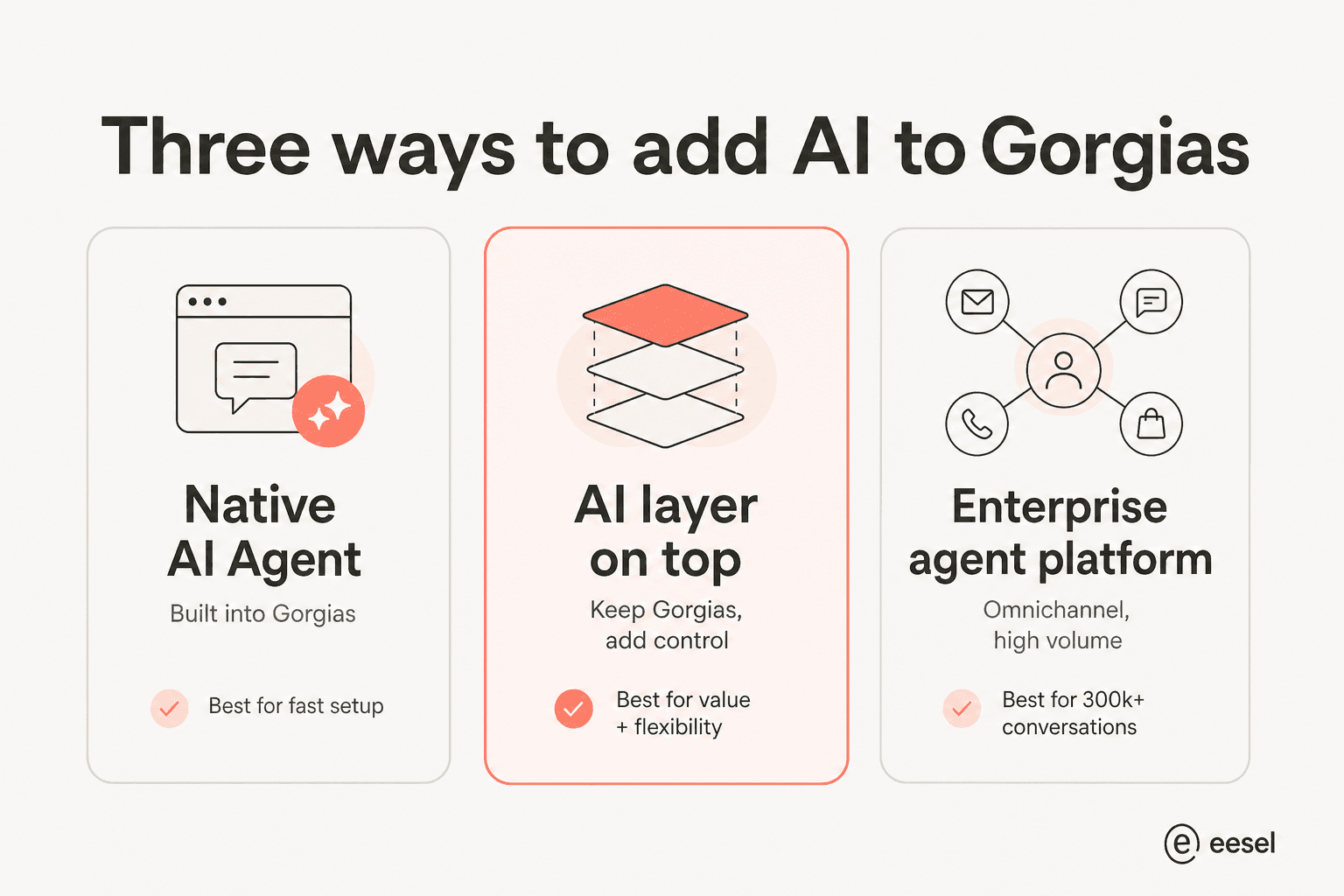
But Gorgias is a helpdesk, not an AI company. The AI you run on top of it is a separate decision, and it's where the money and the results actually move. There are three shapes that decision can take.
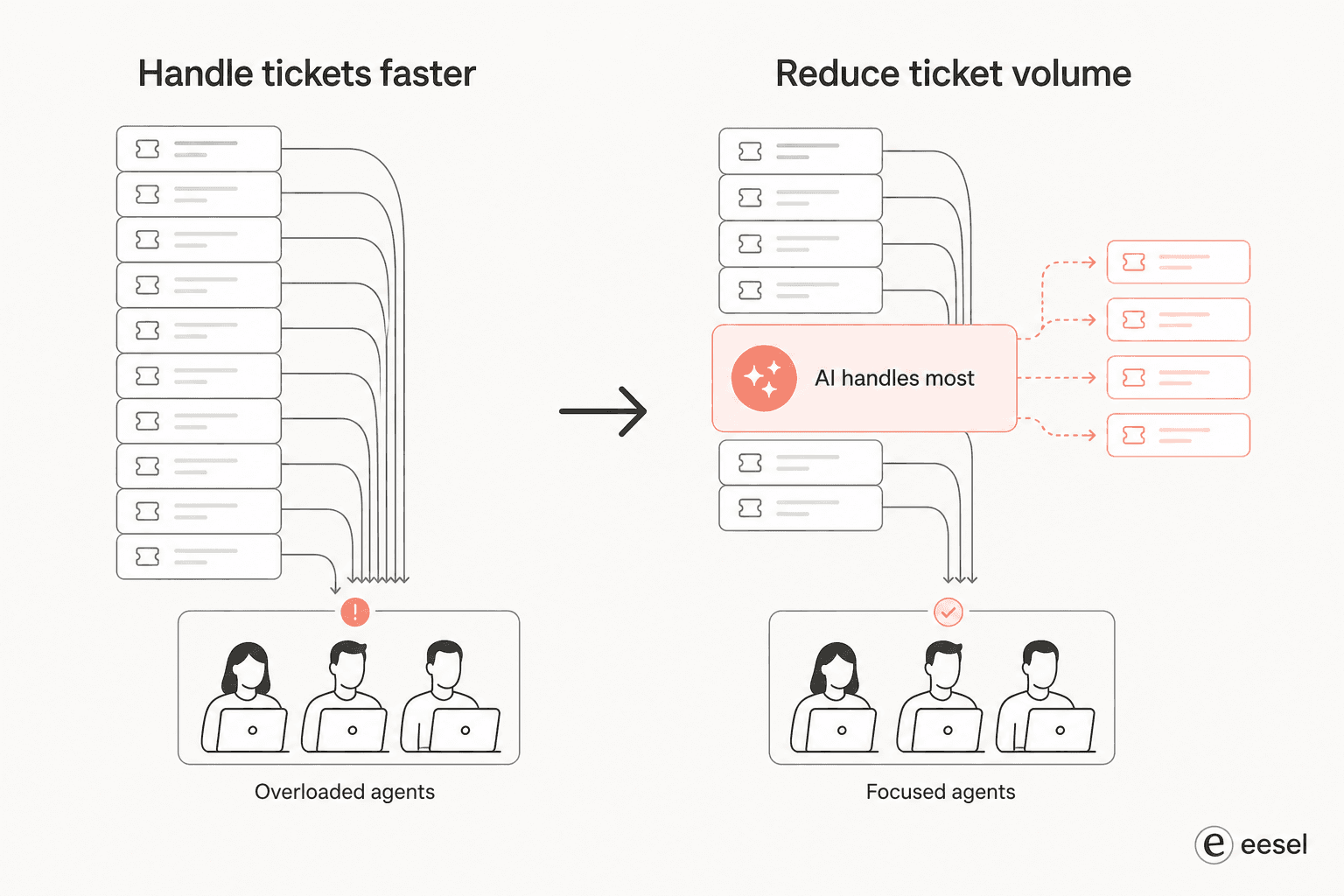
Here's the part most buyers miss. When teams shop for AI, they almost always frame it as "help my agents reply quicker." A commenter in a Gorgias vs Zendesk vs Gladly thread nailed the better frame:
"What's usually overlooked is that most teams optimize for handling tickets faster, not for reducing them."
u/Andrutex, r/ecommerce
That distinction is the whole game. A good AI layer should make a real chunk of your tickets never reach a human at all, not just help a human close them two minutes faster.
How I picked and tested
I looked at each tool through the eyes of a Shopify brand already running Gorgias, and weighed them on: how it connects to Gorgias, what it can actually do (answer FAQs vs take order actions), the billing unit and real cost, channel coverage, and what size of team it fits. Where a tool publishes a product UI, pricing page, or docs, I worked from those; where it's sales-only, I've said so plainly. Every claim links to its source so you can check it.
The best AI for Gorgias at a glance
| Tool | Best for | How it works with Gorgias | Pricing model | Starting cost | Channels | Team size |
|---|---|---|---|---|---|---|
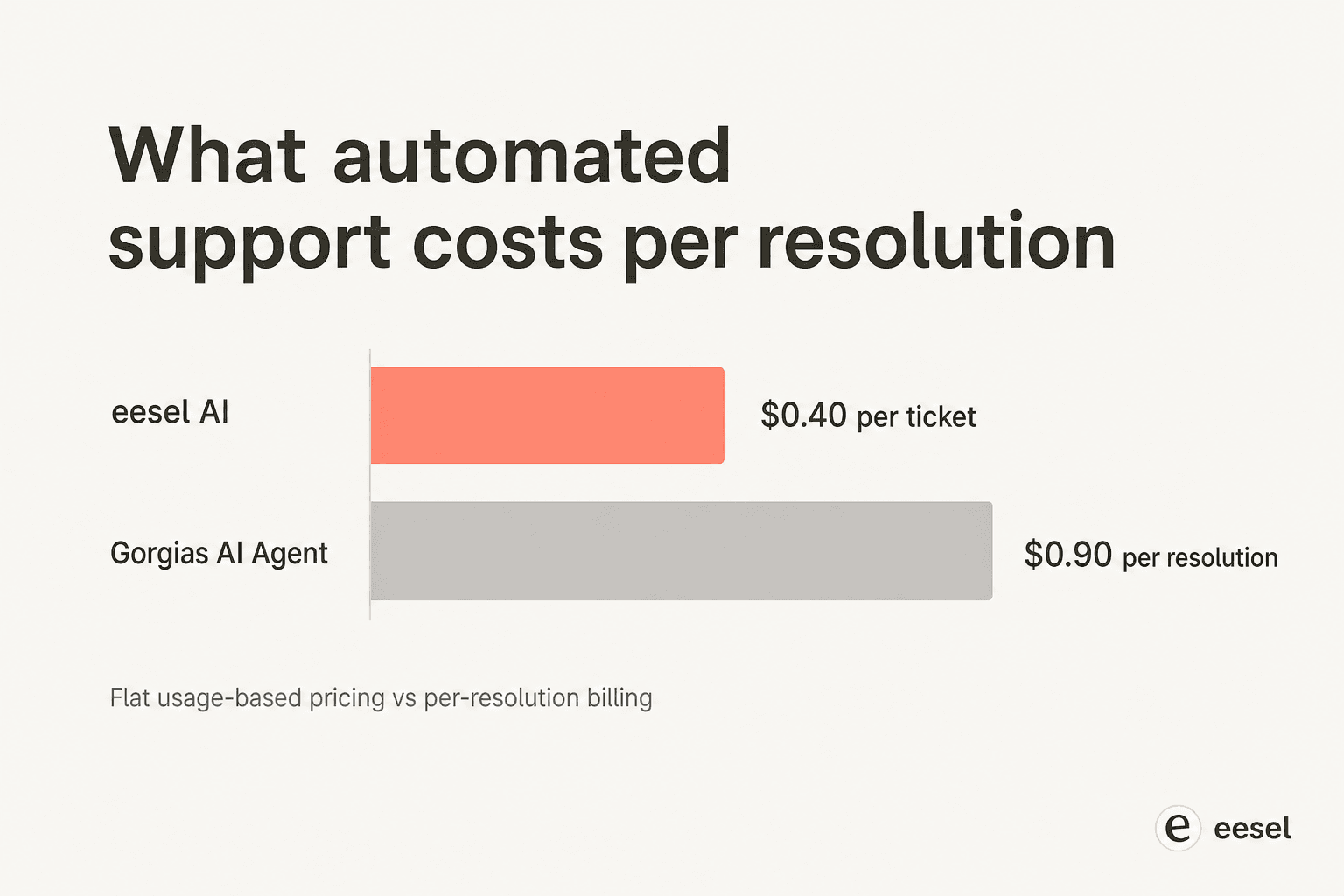
| eesel AI | Most teams that want to keep Gorgias | Third-party layer, plugs into your Gorgias account | Usage-based, per ticket | $0.40 / ticket, free $50 credit | Email, chat, social, SMS | SMB → mid-market |
| Gorgias AI Agent | Fastest native start | Built in | Per resolved conversation | $0.90–$1.00 / resolution | Email, chat | SMB → mid-market |
| Forethought | Keeping your stack, agentic actions | Sits on top of your helpdesk | Quote-only, platform + outcomes | Custom (~5-6 figures/yr) | Chat, email, voice, SMS, Slack | Mid-market → enterprise |
| Decagon | Enterprise omnichannel | Fronts / integrates with helpdesk | Annual contract, volume-bracketed | Custom (no public price) | Chat, voice, email, SMS, API | Mid-market → enterprise |
| Ada | Enterprise-only, very high volume | Standalone layer above helpdesk | Annual contract, conversation-based | Custom (300k+ conv./yr floor) | Voice, chat, email, social, in-app | Enterprise |
| Sierra | Outcome-based pricing at scale | Standalone agent runtime | Outcomes-based | Custom (pay per resolved outcome) | Chat, voice, SMS, WhatsApp, email | Enterprise |
A quick note on that pricing column: the billing unit matters more than the sticker. "Per ticket," "per resolution," and "per outcome" are not the same thing, and a vague definition of "resolution" is the classic place a contract gets expensive. More on that under each tool.
1. eesel AI - best AI layer for most Gorgias teams
Best for: Shopify brands who like Gorgias as a helpdesk but want a more controllable, better-value AI layer on top of it.
Full disclosure, this is our product, so take the framing with the grain of salt it deserves. But the reason eesel AI opens this list is structural: it's the option that doesn't ask you to leave Gorgias. It plugs into your existing Gorgias account, learns from your historical tickets and macros, and starts drafting and resolving from day one.
Where eesel differs from a pure deflection bot is control and reach. It can pull knowledge from 100+ sources beyond the helpdesk (Google Docs, Confluence, Notion, your Shopify catalog), and a workflow engine lets you set exactly when it answers, when it escalates, and what actions it takes, like tagging a ticket or leaving an internal note. It replies across any Gorgias channel: email, live chat, Instagram, Facebook, and SMS.

The bit teams tend to appreciate most is the simulation mode: you can replay thousands of your past Gorgias tickets against the AI before it ever touches a live customer, so you know your resolution rate going in rather than guessing.
Standout features: learns from past Gorgias tickets and macros; 100+ knowledge sources; customisable escalation and actions; a simulation mode that tests on real historical tickets; runs the same way inside Zendesk and Freshdesk if you ever switch helpdesks.
Pricing: usage-based at $0.40 per ticket, with a free $50 credit and no per-seat or platform fee on self-serve. A team doing 1,000 tickets a month pays around $400; partial rollouts (route only some tickets) are supported, so you can scale spend with confidence. Spend caps mean no surprise bills.
Pros: keeps your Gorgias setup intact; transparent usage pricing; test-before-you-launch simulation; broad knowledge sources. Cons: it's an automation layer, not a full helpdesk replacement, so you still pay for Gorgias underneath; very large enterprises with custom voice needs may want a dedicated platform.
Our take: if you already like Gorgias and just want AI that's more controllable and easier to budget than the native add-on, this is the one to try first. It's the lowest-risk way to find out how much of your queue is actually automatable, and the cost-per-ticket maths usually works out in its favour.
2. Gorgias AI Agent - best native, zero-integration start
Best for: Shopify stores that want AI live this week with nothing new to connect.
The Gorgias AI Agent is the obvious first stop, because it's already sitting in your account. It runs in two modes: a pre-purchase Shopping Assistant that answers product and sizing questions and upsells, and a post-purchase Support Agent that handles returns, order management, and subscription edits fully automated.
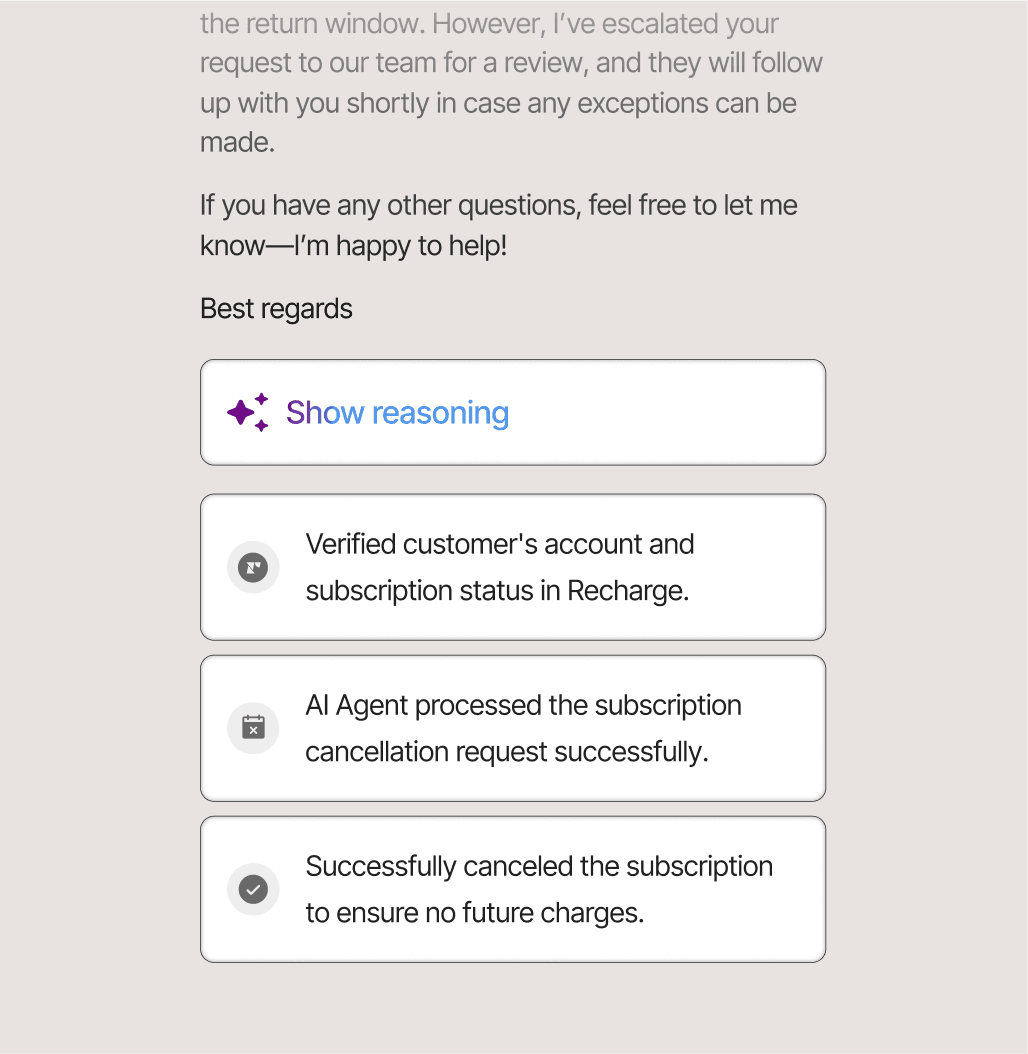
Because it's native, it inherits Gorgias's biggest strength: real-time Shopify data and 100+ ecommerce integrations (Recharge, Klaviyo, Loop, Yotpo) mean it can take genuine actions, not just deflect. You can see that in the agent's reasoning trail, where it verifies a subscription in Recharge and processes the cancellation itself.
The results brands report are real: Orthofeet hit 56% automation in under two months, and Gorgias's standard target is 60% of support automated. You shape behaviour through plain-language Guidance, backed by the same rules and flows engine that power users already rely on.
Standout features: native Shopify and 100+ ecommerce integrations; pre- and post-purchase modes; order/return/subscription actions out of the box; reasoning transparency and auto-QA.
Pricing: an add-on to your helpdesk plan, billed per fully resolved conversation: $1.00 on Starter, $0.90 on Basic and above. That's on top of the helpdesk plan itself, which runs $10 (Starter) to $360 (Pro) to $900 (Advanced) by ticket volume. Our full Gorgias pricing breakdown and pricing calculator show how it stacks up at different volumes.
Pros: nothing to integrate; deepest Shopify data access of anything here; strong action-taking for ecommerce. Cons: per-resolution billing adds up on top of an already volume-priced plan; less control over knowledge sources and escalation logic than a dedicated layer; the cost creeps as volume grows.
Our take: the fastest way to prove AI can dent your queue, and for a pure-Shopify store it's a legitimately good agent. Just keep an eye on the per-resolution meter, and compare it against a usage-based layer once you know your real volume. Our Gorgias AI review goes deeper if you're weighing native vs third-party.
3. Forethought - best if you want agentic actions without switching helpdesks
Best for: teams committed to their current helpdesk that want an enterprise-grade agent layered on top.
Forethought is a standalone, helpdesk-agnostic AI platform, which is exactly its pitch: you keep Gorgias (or whatever you're on) and add Forethought's multi-agent system over it. It brands its AI as "agentic," meaning it reasons and takes actions rather than running decision trees.
The platform is built as four coordinated agents: Discover (finds knowledge gaps and contact drivers), Solve (the customer-facing agent that resolves across chat, email, voice, SMS, and Slack), Triage (classification and routing), and Assist (an agent copilot). A Browser Agent can even operate legacy tools that have no API.
Standout features: helpdesk-agnostic; Autoflows and Custom Actions for real resolutions; a Browser Agent for systems without APIs; automated QA across 100% of interactions.
Pricing: quote-only. Forethought's pricing page lists Team, Professional, and Enterprise tiers with "Get a Quote" as the only CTA, and describes the model as "a blend of platform access fees and an outcome-based pricing cost." There's no free trial, just a proof-of-value engagement on your own data. We dig into the numbers in our Forethought pricing guide.
Pros: doesn't force a helpdesk migration; strong action-taking and QA; up to 98% resolution and 15x average ROI claimed in its 2025 benchmark report. Cons: enterprise sales motion and pricing; overkill for a small Shopify store; less Shopify-specific than the native or ecommerce-focused options.
Our take: a strong fit for a maturing support org on Gorgias that wants agentic AI but isn't ready to rip anything out. If price transparency matters to you, weigh it against the alternatives first.
4. Decagon - best for enterprise omnichannel
Best for: larger brands that need one agent across chat, voice, email, and SMS, with engineering in the loop.
Decagon is an AI-native platform (founded 2023, reportedly valued around $1.5B after its 2025 Series C) built around one idea: a single agent runtime that deploys to every channel. Its technical wedge is Agent Operating Procedures (AOPs), natural-language instructions that compile into executable code, so CX ops can author agent logic while engineers keep the guardrails.
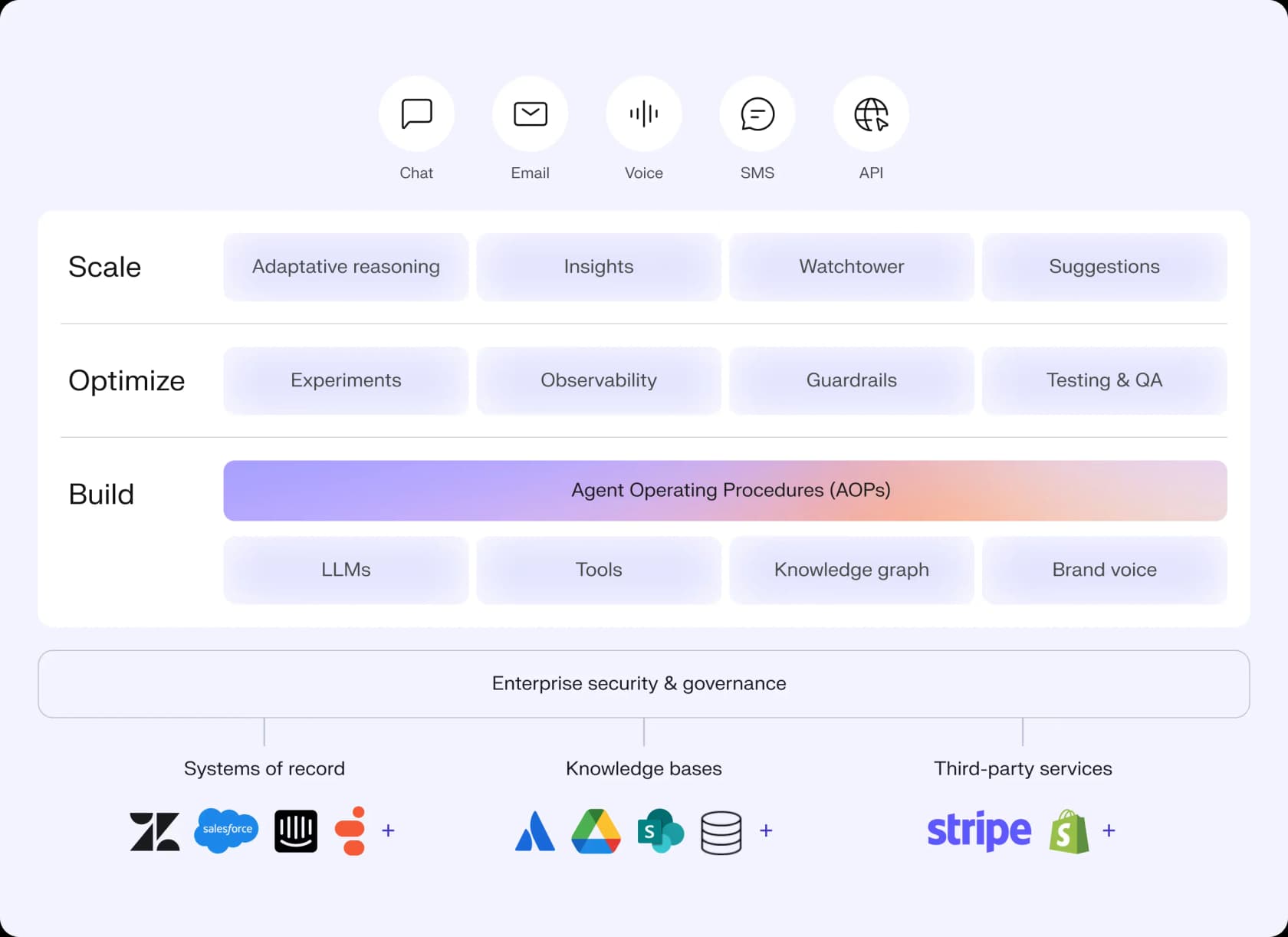
It integrates with systems of record and third-party services (Shopify and Stripe both appear on its architecture diagram), so it can front a Gorgias-style stack rather than replace the data layer. The case studies are heavy: Duolingo reports an 80% deflection rate and ClassPass a 95% cost reduction.
Standout features: one agent across chat, voice, email, SMS, and API; AOPs for natural-language logic; observability and live A/B testing across agent versions; Watchtower for real-time response auditing.
Pricing: sales-led, with no public pricing. The demo form gates by monthly ticket volume, which tells you the shape: a mid-market-to-enterprise annual contract bracketed by volume. Our Decagon pricing guide covers what buyers report.
Pros: genuine omnichannel parity (voice is first-class); strong enterprise tooling; impressive deflection numbers. Cons: no self-serve or public pricing; engineering-flavoured; far more than a single Shopify store needs. See how it compares in our Decagon ticket deflection guide.
Our take: the right call when you're a large brand with real omnichannel volume and an engineering team to drive it. For a typical Gorgias store, it's aiming above the target.
5. Ada - best for enterprise-only, very high volume
Best for: large consumer brands doing hundreds of thousands of conversations a year.
Ada (Toronto-based, ~$190M raised) is unusually upfront about who it's not for. Its pricing page states the floor: "We are a great fit for companies with at least 300,000 annual customer service conversations." If you're under that, this isn't your tool.
For brands at that scale, Ada is a serious standalone AI layer that sits on top of your helpdesk. Its Reasoning Engine orchestrates across multiple LLMs, it's strongly multilingual and omnichannel (including voice), and it leans hard into AI-specific compliance, surfacing AIUC-1 and zero data retention with LLM providers, which most competitors don't. IPSY reports a 943% ROI in four months and Monday.com a 42% cut in agent handle time.
Standout features: multi-LLM Reasoning Engine; Playbooks for multi-step SOPs; Coaching (review the AI, it learns); MCP-native developer toolkit; AIUC-1 and zero data retention.
Pricing: no public pricing at all, sales-qualified only, gated by the 300k-conversation floor. Conversation-based annual contracts are the implied model.
Pros: built for genuinely huge volume; standout AI compliance posture; strong voice roadmap. Cons: explicitly excludes SMB and mid-market; no public pricing; not a Shopify-specific tool. We list lighter-weight options in our best Ada alternatives roundup.
Our take: excellent if you're an enterprise clearing 300k+ conversations and want a compliance-first agent platform. For most Gorgias stores, it's out of scope by Ada's own admission, which is at least refreshingly honest.
6. Sierra - best for outcome-based pricing at scale
Best for: enterprises that want to pay only when the AI actually resolves something.
Sierra is the high-end, AI-first platform from Bret Taylor (former co-CEO of Salesforce and current chair of OpenAI's board) and Clay Bavor, and it's raised aggressively, reportedly hitting a ~$10B valuation by late 2025. The differentiator most relevant to buyers is commercial: Sierra champions outcomes-based pricing.
"Pay for a job well done. Ensure you only pay for the value Sierra delivers with outcome-based pricing."
Its product wedge, Ghostwriter, is an agent that builds agents from SOPs, transcripts, or plain-English goals, which compresses the usual multi-week implementation. Sierra also ships both a code-first Agent SDK and a no-code Agent Studio, and carries a heavy compliance footprint (SOC 2, ISO 27001, and the rarer ISO 42001 AI management standard).
Standout features: outcomes-based pricing; Ghostwriter agent-builder; both SDK and no-code surfaces; omnichannel including a ChatGPT channel; deep enterprise compliance.
Pricing: no published rate card, no self-serve, everything via sales. Outcomes are defined per use case. Our Sierra pricing and Sierra reviews write-ups have the detail.
Pros: pricing aligns vendor incentives with your results; fast implementation via Ghostwriter; serious founder and compliance credibility. Cons: enterprise-only; opaque pricing until you define outcomes; not ecommerce-specific. See how it lines up in Decagon vs Sierra.
Our take: the most interesting pricing model on this list, and a strong pick for a large brand that wants risk shifted onto the vendor. For a Shopify store on Gorgias, though, it's built for a different weight class.
So which AI should you actually run on Gorgias?
Strip away the funding rounds and it comes down to your size and how much control you want.
- Small-to-mid Shopify store, want value and control: start with eesel AI as a layer on top of Gorgias, or the native Gorgias AI Agent if you want zero setup. Run both against your real ticket history and compare resolution rate and cost per ticket before committing.
- Maturing support org, keeping your stack: Forethought gives you agentic actions without a migration.
- Enterprise, very high volume or omnichannel voice: Decagon, Ada, or Sierra, depending on whether you care most about channels, scale, or pricing model.
Whatever you choose, judge it on the right metric. Don't measure how fast your team closes tickets; measure how many tickets your team never has to touch. That's where the savings actually live.
Try eesel AI on your Gorgias account
eesel AI is the AI layer built to sit on top of the helpdesk you already use. It connects to Gorgias in minutes, learns from your past tickets and macros, and resolves across email, chat, and social, with a simulation mode that shows your projected resolution rate on real historical tickets before a single customer sees it. Pricing is usage-based at $0.40 per ticket with a free $50 credit, so you can find out exactly how much of your Gorgias queue is automatable without a sales call or a contract.
Start free and run a simulation on your own tickets, or book a demo if you'd rather we walk you through it.
Frequently Asked Questions
What is the best AI for Gorgias?
Does Gorgias have its own AI agent?
How much does the Gorgias AI Agent cost?
Can I add a third-party AI tool to Gorgias?
What's the best AI for a small Shopify store using Gorgias?


Article by
Alicia Kirana Utomo
Kira is a writer at eesel AI with a Computer Science background and over a year of hands-on experience evaluating AI-powered customer service tools. She focuses on breaking down how helpdesk platforms and AI agents actually work so that support teams can make better buying decisions.