Claude for Shopify: every way to connect it in 2026

Rama Adi Nugraha

Katelin Teen
Last edited August 12, 2026

Why I keep getting asked this one
I build integrations at eesel, so the Shopify pipe is code I have actually shipped rather than a docs page I skimmed. That is the lens here: what the connectors do under the marketing copy, and where they stop.
The number that reframed this for me came out of a real trial we ran on a German jewelry brand's inbox, roughly 1,000 tickets a month across eight languages, running Zendesk on top of Shopify. Cross-validated against their live traffic, our agent hit 93% triage accuracy and caught 100% of the spam, which mattered more than it sounds because spam was 22% of that inbox. Product inquiries and refund-status questions came back useful 100% of the time.
Here is the part I did not expect: agents only sent 12% of drafts as-is. They read an eight-sentence draft and rewrote it as two. When we dug into why, roughly 65% of the rewrites were length and tone, about 20% needed data we had not connected yet, and only about 5% were us being factually wrong.
I bring that up because it is the same shape as the Claude question. The model is rarely the bottleneck. The bottleneck is where the model sits and what it can reach.
The four routes, side by side
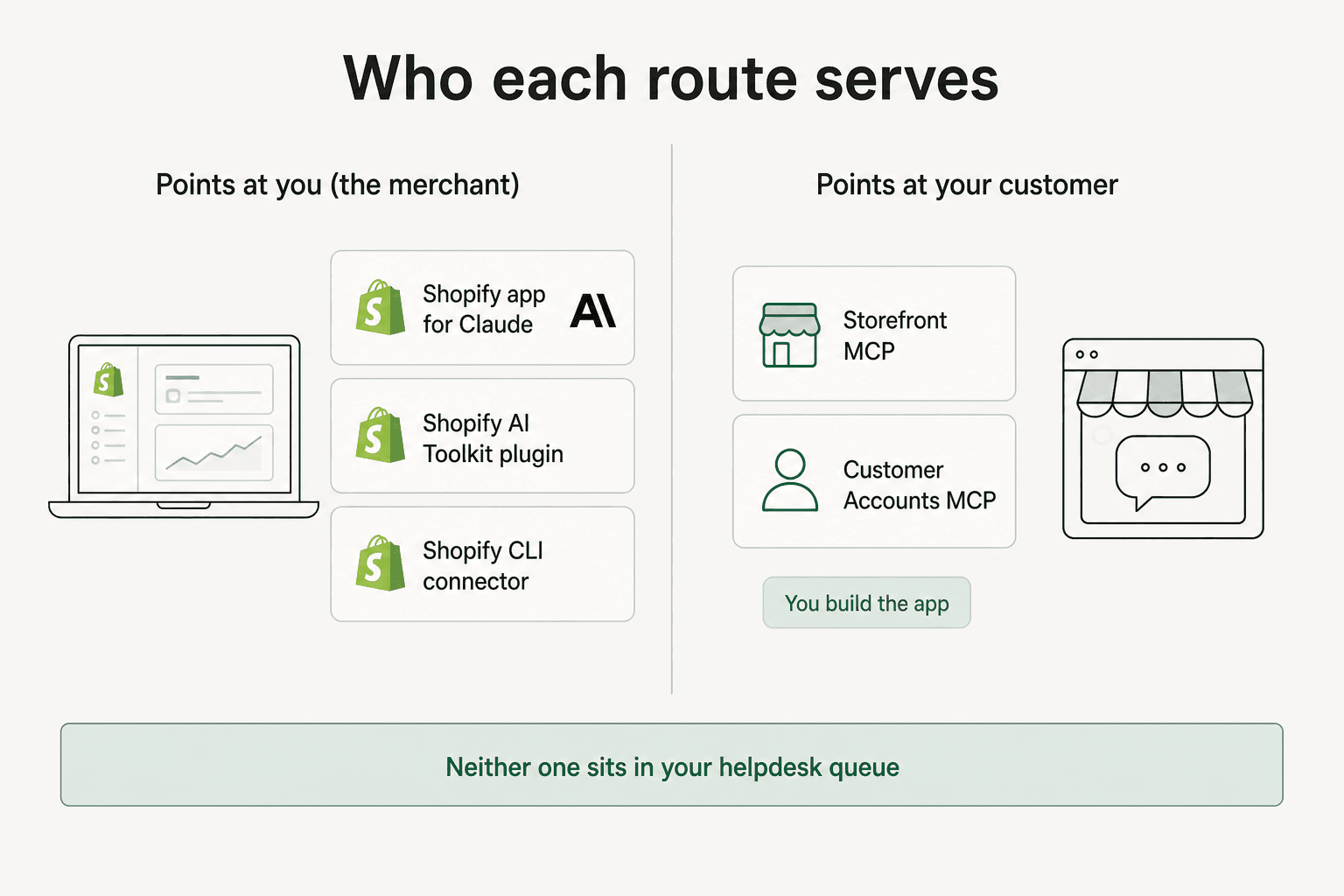
| Route | Who it serves | Setup effort | Code required | Reaches your helpdesk |
|---|---|---|---|---|
| Shopify app for Claude | You, in the admin | Minutes | None | No |
| Shopify AI Toolkit | You, in the terminal | One command | Some | No |
| Storefront + Customer Accounts MCP | Your customer | Days to weeks | Yes, a full app | No |
| Direct on the Anthropic API | Whoever you point it at | Weeks | Yes, everything | Only if you build it |
Two things worth noticing before we go route by route. First, Shopify's own docs tell you to use the official app for each AI tool rather than rolling a custom connector, which is unusually direct guidance from a platform that normally stays neutral. Second, the customer-facing route is the only one that touches a shopper, and it is also the only one that requires you to ship an application.
Worth saying early, since the question comes up constantly: yes, Shopify allows AI tools to reach your store data, and it has built the plumbing itself. The constraint is never permission. It is scope.
Route 1: the official Shopify app for Claude
This is the one most people mean when they search for this. It is a first-party connector, made by Shopify, sitting in Anthropic's directory under Productivity, and it works across Claude on web, desktop, mobile, Claude Code, and the API.
Shopify's own pitch is that it "makes store management as easy as having a conversation," and the connector page lists the prompts it expects you to type. They are refreshingly concrete rather than aspirational:
- "Create a new product called 'Linen Throw Blanket' at $89, upload this image, and add it to the Home Goods collection."
- "Set inventory for SKU LTB-001 to 40 units at the Warehouse location and 12 at the Retail store."
- "Create a 15% off discount code SPRING15 that applies to the Spring collection and expires May 31."
- "List today's unfulfilled orders over $100 and show the customer name and shipping city for each."
- "Run an analytics query for total sales and conversion rate by week over the last 30 days."
Read that list again and notice who is talking. Every one of those is a merchant instruction. This is a Shopify admin copilot, not a support agent, and it is very good at being that. If you have used Shopify Magic for product copy, this is the same category of help with a much wider reach and a far better model behind it.
Merchants seem to agree. One r/shopify thread announcing the launch put it plainly:
"Shopify has officially shipped connectors for Claude and ChatGPT. Ive been using the Claude one for a couple weeks and it is pretty nice."

Setting it up
Three steps, each with its own confirmation. You install the app from inside Claude, get redirected to your Shopify admin to authenticate, and then approve a data access level. After that the tool reads and edits your store, capped by two separate ceilings: what the app was granted, and what the individual user's own permissions allow. A staff member who can read products but not edit them cannot hand Claude edit rights they do not have.
One detail that trips people up: these apps are not on the Shopify App Store. You install each one from the AI tool itself, which is why it never shows up when you go hunting through Shopify AI apps the normal way.
The limit multi-store operators hit first
You connect one store at a time, and Shopify says this holds even when the stores sit in the same organization. To switch, you ask Claude to connect to a different store, it disconnects the current one, and a fresh authorization starts.
For a single-brand merchant that is a non-issue. For anyone running three storefronts across two regions, it means Claude is a per-store tool and you are re-authorizing all day. That is one of the quieter arguments for consolidating into an ecommerce help desk where every brand's data lives in one place already, which is also how most Shopify automation survives contact with a second storefront.
The permission ratchet
This is the paragraph I would print out and stick on a wall.
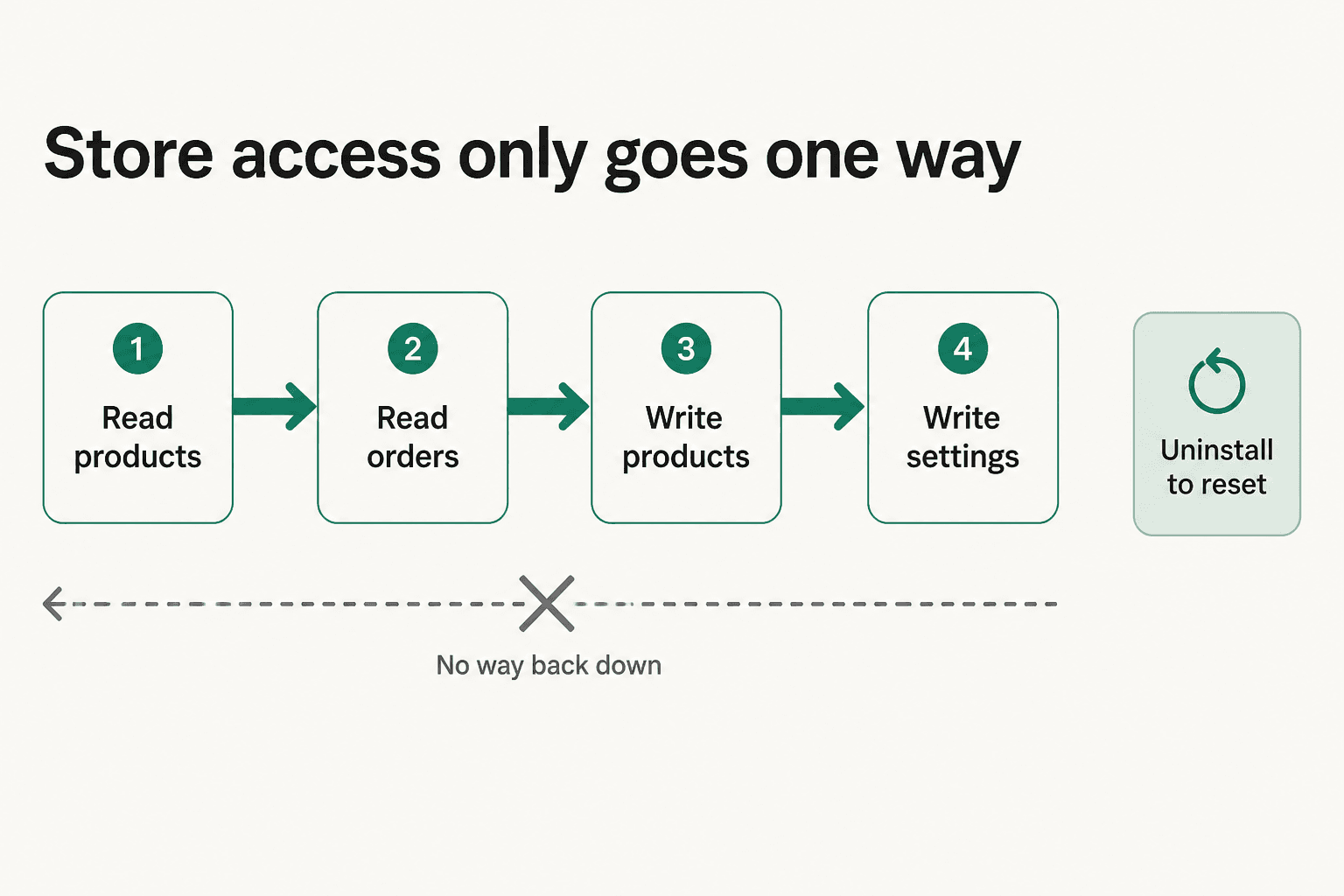
Shopify's docs state that you cannot decrease the data access scope after you approve it without uninstalling the app entirely. Access escalates on request and never walks back down. If Claude later needs a higher tier for something, you get asked to approve the increase, and that increase is then permanent for the life of the install.
So start read-only. Live with it for a week. Escalate deliberately, not because a prompt asked you to mid-task.
Who is responsible when it goes wrong
Shopify is unambiguous here, and I respect them for putting it in plain language rather than burying it: if a connected AI tool makes an incorrect change to your store, you are responsible for that change. Shopify does not review or approve actions that connected tools take on your behalf. Once you authorize, your data leaves the Shopify environment and is governed by the AI provider's terms, and Section 9.9 of Shopify's terms puts your obligations to your own customers, GDPR and CCPA included, squarely back on you.
They also list "monitoring your store for any changes that a connected AI tool makes" as one of your responsibilities. That is a real operational cost, and it is worth budgeting for before you hand over write access to Shopify pricing fields.
My take: install it, keep it read-only for the first fortnight, and treat write access to prices and settings as a decision rather than a default.
Route 2: the Shopify AI Toolkit, for anyone who lives in a terminal
If you write code against Shopify, this is the better route and it is one command:
claude plugin install shopify-ai-toolkit@claude-plugins-official
The AI Toolkit needs Node 18 or higher and works with Claude Code, Codex, Antigravity CLI, Cursor, Hermes, and VS Code. It does three jobs that matter more than they sound:
- Developer docs and API schemas get pulled in live, so the agent works from current reference material instead of model memory or a web search that lands on a three-year-old blog post.
- Code validation for GraphQL queries, Liquid templates, and Shopify Extensions, checked against real Shopify schemas.
- Store management through the Shopify CLI's authenticated context, with the docs noting you choose when to execute.
That last clause is the interesting one. The Toolkit prepares store-management tasks and then waits for you, which is a meaningfully different safety posture from the directory connector's approve-once-then-act model. If you are nervous about the permission ratchet above, the CLI route gives you a manual gate on every action.
The tradeoff is obvious: this lives in a terminal. It is a fantastic way to wire up order webhooks or audit a theme, and a poor way to run daily merchandising if you are not a developer. If you have already set up MCP servers in Claude Code, it will feel familiar within a minute.
My take: if you already have Claude Code open, install this over the directory connector. Same store access, better guardrails, plus schema-aware code help you would otherwise be doing by hand.
Route 3: Storefront MCP, the only route that faces your customer
Here is where the framing flips. Everything above serves the merchant. Storefront MCP is Shopify's answer for connecting an AI assistant to a shopper, and it is split across two servers.

The Storefront MCP server covers a store's catalog, cart, and policies. The Customer accounts MCP server covers the authenticated side: order status, order details, returns, account preferences. Between them you get natural-language product discovery, cart creation and checkout, policy and shipping answers, and order tracking, which is a fair description of most of what an ecommerce inbox actually asks about. It is also the surface underneath Shopify's wider agentic commerce push.
Shopify even publishes a reference implementation, shop-chat-agent, so you are not starting from a blank file.
What it actually takes to ship
The architecture is a Shopify app acting as the MCP client, the MCP servers as the API surface, and a theme app extension rendering the chat bubble on your storefront. Three moving parts, all yours to maintain.
The customer-accounts half carries the real weight. Shopify's docs list the prerequisites and they are not trivial:
- A custom domain configured on the store.
- Compliance with Shopify's protected customer data requirements.
- Level 2 protected customer data (PII) access, requested and approved through the Partner dashboard.
- OAuth 2.0 with the PKCE authorization code flow, using the
customer-account-mcp-api:fullscope.
The endpoint is not even a fixed URL. You discover it per shop by fetching /.well-known/customer-account-api, which resolves to https://{shopDomain}/customer/api/mcp. Then you handle the 401, run the authorization redirect, exchange the code with the verifier, store the token securely, and retry.
I have written that flow. It is a couple of days of work when everything goes right, plus whatever the PII approval queue costs you, plus token refresh and rate-limit handling forever after. It is completely doable and it is completely a project.
Developers who have walked it describe the same shape:
"The basic setup is that Claude acts as the agent, my MCP server exposes the tools, and that server talks to the Shopify Admin API."
My take: worth it if a conversational storefront is a strategic bet and you have engineering to spare. If you just want customers to stop emailing about tracking numbers, this is an enormous amount of scaffolding for an outcome you can buy off the shelf from any decent Shopify chatbot.
Route 4: straight onto the Anthropic API
The last route is the one with no rails. You call the Anthropic API, define your own tools against the Shopify Admin API, and own every piece: auth, retries, rate limits, prompt design, evaluation, and the escalation path when the model is unsure.
This is the right answer for a narrow, high-volume, deterministic job. Rewriting 4,000 product descriptions to a house style, classifying a returns backlog, generating localized collection copy: batch work with a clear input and a checkable output, where you want full control over cost and no per-seat pricing in the way. It is the same reasoning that makes people build custom Claude workflow automation instead of buying a tool.
It is the wrong answer for conversational support, and the reason is not the model. It is that everything around the model, the knowledge base sync, the tone control, the handover rules, the reporting, the dry run against past tickets, is the actual product, and you would be building all of it.
What each route costs
Nobody publishes a "Claude for Shopify" price, because the cost is always a stack of two or three subscriptions.
| Layer | What you pay | Notes |
|---|---|---|
| Shopify Basic | $29/mo annual, $39 monthly | Any plan supports the connector |
| Shopify Grow | $79/mo annual, $105 monthly | Where most growing stores sit |
| Shopify Advanced | $299/mo annual, $399 monthly | Adds third-party carrier rates |
| Shopify Plus | From $2,300/mo | Enterprise tier |
| Claude Pro | $17/mo annual ($200 up front), $20 monthly | Connectors live on the paid tiers |
| Claude Max | From $100/mo | 5x or 20x Pro's usage |
| Claude Team | Per seat, 2 to 150 people | Central billing and admin controls |
| Anthropic API | Per token | Only if you build route 4 |
So the realistic floor for a merchant who wants route 1 is a Shopify plan plus roughly $17 to $20 a month for Claude. Community consensus lines up:
"No you can connect over API or MCP with any Shopify plan. You'd need the $20 a month base sub to use the MCP or API directly."
For a solo merchant, that is a very good deal for what you get, and cheaper than most single-purpose Shopify AI tools. The cost that does not appear on any invoice is the monitoring Shopify tells you to do, and, on route 3, the engineering weeks. We keep a fuller breakdown in our Claude pricing post.
One nice wrinkle if you are starting fresh: a store created through an AI tool starts on a free trial, currently four months. You can genuinely stand up a store from a Claude conversation and not pay Shopify until spring.
Which route fits you
The gap none of these routes close
Now the part that made me want to write this.
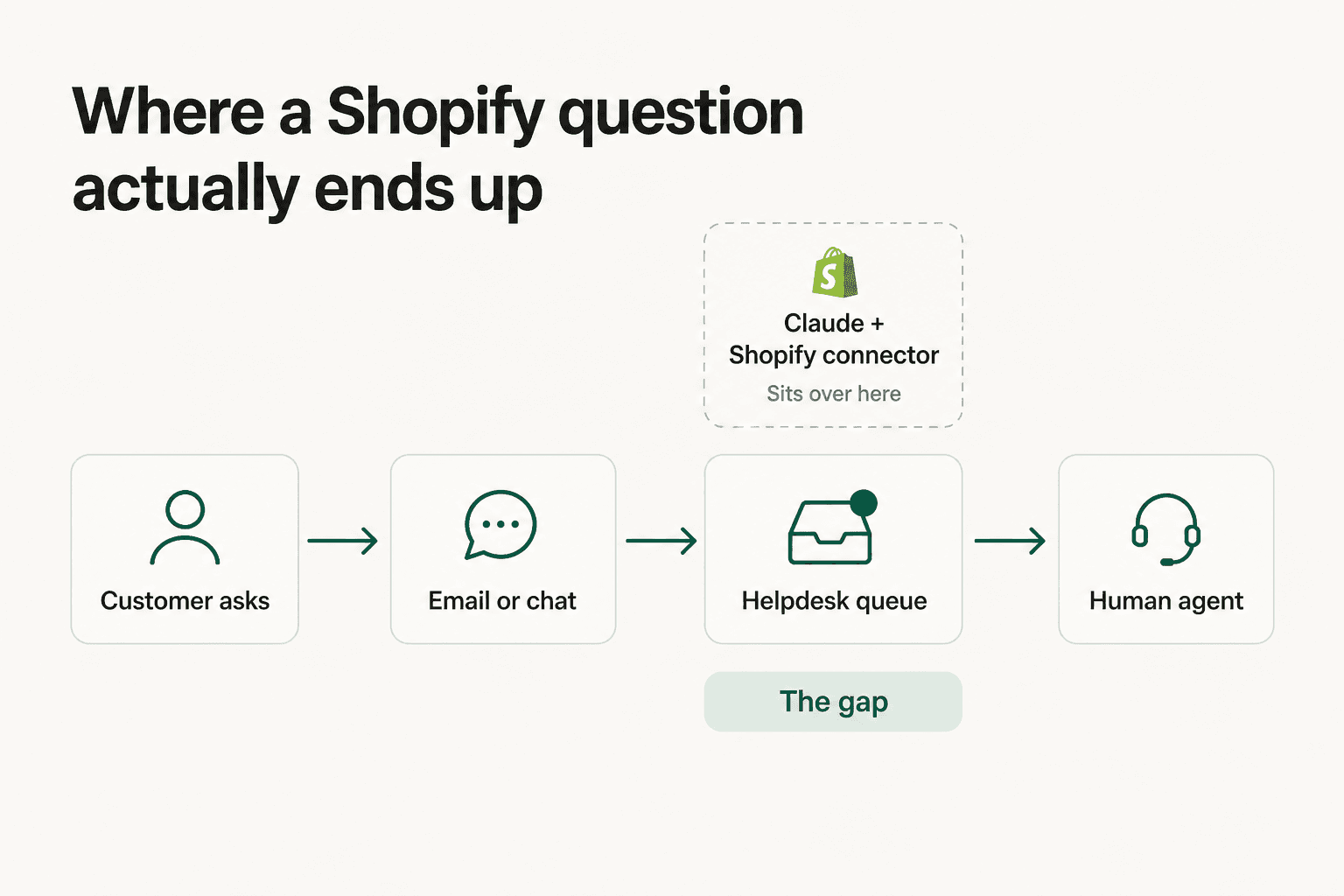
Trace an actual Shopify support question. A customer emails asking where order #8294 is. That email lands in Gorgias, or Zendesk, or Shopify Inbox, or a shared Gmail. An agent opens it, tabs into the admin, finds the order, copies the tracking link, writes two sentences, sends. Multiply that by the order status and returns volume a mid-size store carries and you have a full-time job.
The Claude connector is nowhere in that sequence. It is in a browser tab where you work. It will happily tell you where order #8294 is when you ask, and it will never see the email.
That distinction is easy to lose because both things get called "AI for Shopify." They are different products. One makes a merchant faster at admin work. The other removes the ticket.
From the real customer calls I work from, a multi-brand operator running 500-plus tickets a day told us their volume was dominated by exactly three things: refund requests, unsubscribes, and order tracking. An ops lead at a DTC supplements brand doing roughly 7,000 Gorgias tickets a month came in wanting a copilot and left the call realizing they needed something autonomous on at least half their email.
Neither of those problems is solved by a merchant-side connector, however good it is. And the sentiment shows up in public too:
"If a bot can handle all of the 'where is my order' queries, you reduce headcount and dumb tickets."
There is a second gap worth naming, and it is the one that burned us before we fixed it. A connector answers from whatever it can reach right now. It does not know how your team has answered this question 4,000 times before. That history, sitting in your past tickets and macros, is the single richest training source a Shopify store owns, and none of the four routes above reads it. It is also the difference between a demo and a Shopify AI assistant you would let near a customer.
How I would actually decide
Short version, in the order I would run it.
- Solo or small merchant, want admin leverage. Install the Shopify app for Claude. Read-only for two weeks. It is the best $17 a month in this post, and it beats bolting on three separate Shopify AI apps.
- You write code against Shopify. Skip the directory connector and run
claude plugin install shopify-ai-toolkit@claude-plugins-official. Same reach, per-action approval, schema-aware help. - Conversational storefront is a real strategic bet. Build on Storefront MCP, start from shop-chat-agent, and get the Level 2 PII request in early because approval is the long pole. Look at the best Shopify chatbot apps first, though, because buying is usually cheaper than building here.
- You are drowning in tickets. None of the above. You need an agent inside the helpdesk where the tickets already are.
The honest caveat on all of this: I work at eesel, and point 4 is our business. So take the specific claim rather than the framing. Go look at where your last 100 support emails landed. If the answer is not "in a Claude window," a Claude connector is not the tool that empties that queue, and that would be true whoever wrote this post. Our Shopify support AI roundup names the competition too, not just us.
eesel AI for Shopify
If your Shopify questions arrive as tickets rather than prompts, that is the job eesel AI does.
You connect your store and it syncs the catalog, orders, policies, and FAQs on its own, no manual training. Then it answers inside the tool your team already uses: Zendesk, Gorgias, Freshdesk, Slack, or a live chat widget on the store itself. Teams report going live in under 30 minutes, and it costs $0.40 a chat rather than per seat.
The two differences that matter against everything above. First, it trains on your past tickets, so it learns how your team actually answers rather than only what your help center says. Second, you can simulate it against your historical tickets before it replies to a single customer, which is exactly the check we built after watching a confident-sounding bot give a wrong answer on live traffic. Over 500 stores run it, across 80-plus languages out of the box.
Nothing here replaces the Claude connector. Keep that for merchandising. This is for the queue.
Try eesel free, or book a demo if you would rather see it against your own tickets first.
Frequently Asked Questions
How do I connect Claude to my Shopify store?
Is the Shopify Claude connector free?
Can Claude for Shopify answer my customers' support tickets?
Can Claude connect to more than one Shopify store at once?
What is Shopify Storefront MCP and how is it different?
Is it safe to give Claude write access to my Shopify store?
What is the best AI for Shopify customer support in 2026?
Does Shopify Sidekick do the same thing as Claude?



Article by
Rama Adi Nugraha
Rama is a software engineer at eesel AI with two years of experience writing about B2B SaaS, AI tools, and customer support technology. Based in Bali, Indonesia, he brings a developer's perspective to product comparisons — cutting through marketing copy to what the integrations and APIs actually do.