Claude for HubSpot: every way to connect them in 2026

Rama Adi Nugraha

Katelin Teen
Last edited August 12, 2026

Claude is already inside Service Hub, just not where you would look
I build integrations for a living, so the first thing I do with a question like this is go read the model cards rather than the marketing page. HubSpot publishes a good one at trust.hubspot.com/ai, with a per-feature data-flow diagram for every AI surface in the product. It is more disclosure than most vendors offer, and it answers the "which model is this" question in a way no blog post can argue with, ours on what AI HubSpot uses included.
Here is what it says. Across the whole platform, HubSpot names exactly two third-party model vendors: OpenAI, on everything, and Anthropic, on two surfaces out of three. And the split is not the one you would guess.
| Surface | Models HubSpot documents |
|---|---|
| Customer agent (resolves tickets) | GPT 4.1, GPT 4.1 mini, GPT 5.1, GPT-4o, GPT-4o Mini |
| Service Hub AI features (embedded) | Includes Claude Sonnet 4 |
| Breeze Assistant | OpenAI only, no Anthropic model |
| Prospecting agent | Includes Claude Opus 4.5 |
Read that table again, because it is the whole reason this post exists. The customer agent, the thing HubSpot describes as automating ticket resolution, is documented as fully OpenAI-served. Claude Opus 4.5 is in the Agents product, but it is routed to the prospecting agent. Meanwhile the embedded AI features inside Service Hub, whose declared outputs include help desk replies and call summaries, do list Claude Sonnet 4.
So Claude is on the reply-drafting path and OpenAI is on the autonomous-answering path, which is close to the exact inverse of what most people assume when they search for this. Worth noting too that Sonnet 4 is a 2025-era model, not the current frontier one, and you have no way to move it forward. There is a small "Model Protection Layer" step in each diagram, powered by Llama, acting as a safety filter around whichever model is generating.
One honest wrinkle I will flag rather than paper over: Anthropic does not appear anywhere on HubSpot's subprocessor list as of its April 2026 revision, which names AWS, Google, and OpenAI under the AI service provider purpose. The model cards say Claude; the subprocessor page does not. AWS Bedrock is the obvious reconciliation, but HubSpot does not say so, so I am not going to say it for them.
First, the thing no route does
Before the four routes, the ceiling, because it will save you an afternoon.
HubSpot's remote MCP server is the plumbing under every Claude connection, official or hand-built. Its access table is asymmetric in one specific way. Tickets are read, create, and update. Contacts, companies, deals, custom objects, products, line items, and all five engagement types are read, create, and update. But conversations, meaning the actual messages and threads from live chat, team email, WhatsApp, SMS, and Facebook Messenger, appear only in the read list.
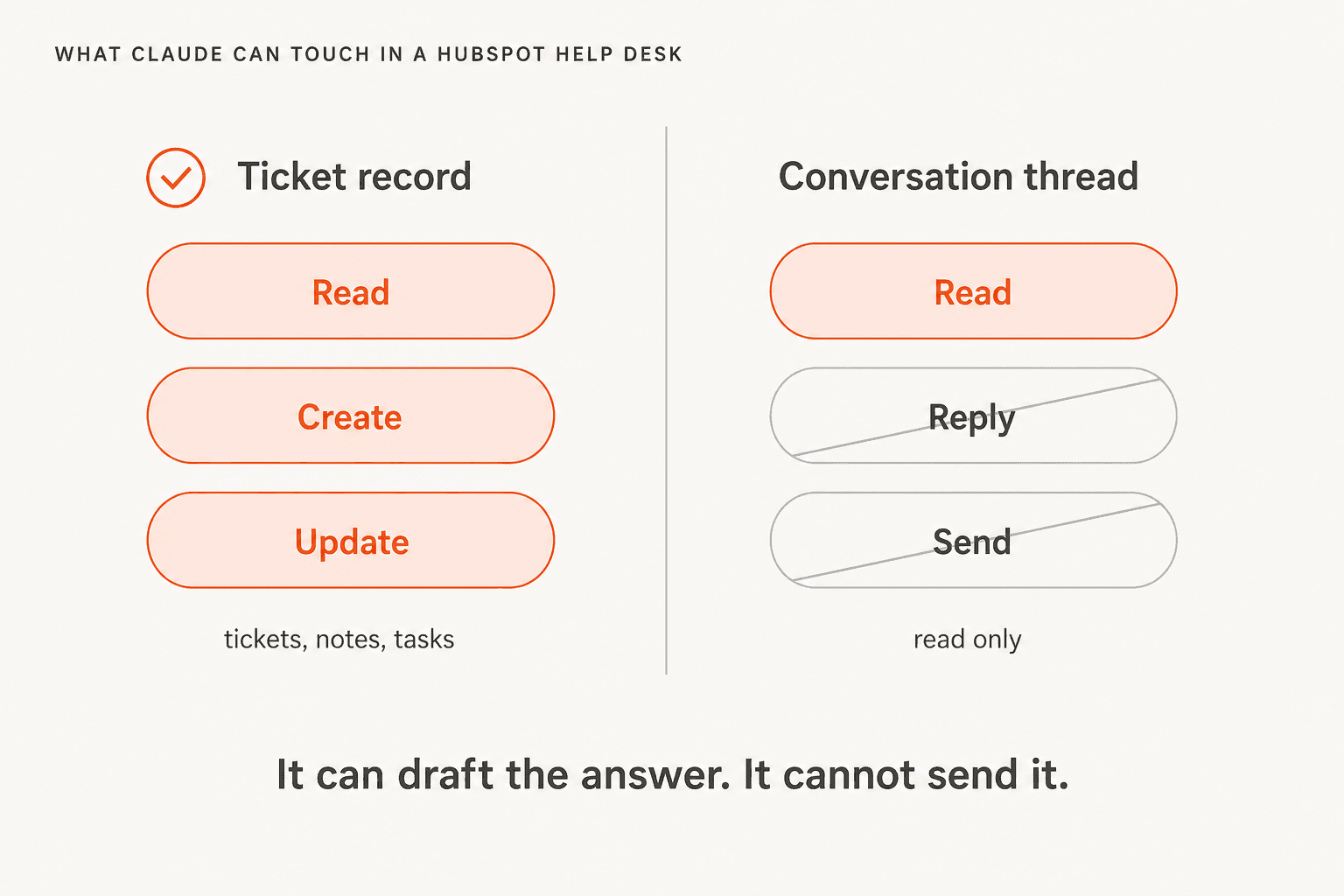
Practically, that means through the connector or the MCP server, Claude will happily read a 40-message thread, work out what the customer needs, write a reply that is better than the one your tired Friday-afternoon self would have written, update the ticket's properties, and log the whole thing as a note. Then it stops. A human copies the text into the reply box and presses send.
There is no delete either, on any object, which is a sensible default rather than a limitation. And if your account has Sensitive Data switched on, activities and conversation data get blocked through MCP specifically in a way that does not apply to the standard CRM APIs, so the useful half of a support use case disappears for regulated teams.
The send restriction is a property of MCP, not of HubSpot's platform. Route 4 below lifts it, at the cost of building something. That is the trade the rest of this post is about.
Route 1: the official HubSpot connector for Claude
This is the one to start with, and honestly for most support teams it is the one to stop with too.
HubSpot launched the connector in July 2025 and claims it was the first CRM to ship one for Claude. It sits in Anthropic's directory at claude.com/connectors, built and maintained by HubSpot, and it works in Claude on web, desktop, and mobile as well as in Claude Code and through the API.

For context on how unusual that is: I went looking for the equivalent pages for other help desks and came up empty. There is no directory listing at that path for Zendesk, Freshdesk, Salesforce, Front, or Gorgias. If you already run Service Hub, you have a first-party bridge that most of the category does not, which is a real reason to try this before you try anything else. If you are comparing stacks, we covered the neighbouring cases in Claude for Zendesk. The Claude for Freshdesk writeup is the closest parallel, since Freshdesk has no directory listing at all.
What it costs and who can turn it on
The connector is free. The requirements are the interesting part:
- A paid Claude plan. Pro, Max, Team, or Enterprise. Free Claude does not get it, per the KB article. Pro is $17 per month on annual billing, $20 monthly; Team is $20 per seat annually.
- Any HubSpot tier. The KB article is badged for all products and plans. You do not need Service Hub Professional, which is the tier that gates the native customer agent.
- A Super Admin, or App Marketplace permissions. One admin connects it, then grants users access. Nobody else can wire it up first.
The setup, which really is four minutes
In Claude: profile icon, Settings, Connectors, Browse connectors, Web tab, HubSpot, then Add to your team. Back on the connectors screen, hit Connect next to HubSpot, log into the HubSpot account, pick permissions, Connect app. Then in HubSpot: Settings, Integrations, Connected Apps, HubSpot connector for Claude, Give users access. To use it in a chat, open Search and tools and toggle HubSpot on.
Do one non-obvious thing while you are in there: set Write tools to Needs Approval. HubSpot recommends it explicitly and warns that on Always allow, edits may occur without asking you first. Claude's own admin controls let an Owner set every tool to Always allow, Needs approval, or Blocked, grouped by read versus write, and on Team or Enterprise that setting is org-wide and cannot be overridden by members. If you want the "Claude may read my help desk but must never touch it" posture, that is the lever, and it is a good one.
What it is actually good at
HubSpot publishes its own support-shaped example prompts, and they are a fair guide to where this route shines. Summarise the most common questions across inbox or help desk channels this month to spot trending issues. List all open tickets by rep, sorted by priority. Log a resolution note on a ticket. It is a very good analyst sitting next to your queue.
That is not nothing. Trending-issue detection is real work, and doing it by hand means exporting a CSV and squinting. If you have been meaning to get serious about ticket classification, this route gets you a usable answer in one conversation. It also does a decent job of the summarising work that HubSpot charges for elsewhere, which our conversation summaries post covers.
Every write goes to HubSpot's audit log attributed to both you and the connector, and Super Admins can see who connected and when. Requests route through HubSpot servers respecting your data centre location, so an EU account routes via HubSpot's EU data centre, after which Anthropic's terms apply. Anthropic does not use data shared through the connector to train models.
The gotchas worth knowing before you commit
Some of these are small; two are not.
- Bulk writes cap at 10 records. Fine for tickets, painful for cleanup.
- Custom validation rules are bypassed on writes, including pipeline stage validation and association label validation. Your carefully-built guardrails do not apply to connector edits.
- One HubSpot account per Claude account at a time. Agencies, plan accordingly.
- Permission grants are close to one-way. Once a Super Admin gives users access, the action cannot be undone; uninstalling at the account level does not remove user-level access, and narrowing permissions later means an uninstall and reinstall by the admin and by every user.
- The directory badge undersells it. Anthropic's listing carries a "Read only" capability badge, while HubSpot's own object matrix documents create and update on tickets. Trust the HubSpot docs on this one.
- Connections originate from Anthropic's cloud, not your machine, so a firewalled or VPN-only MCP server will not work without allowlisting.
That last bullet catches people out often enough that r/hubspot has a whole thread where the original poster assumed the connector was read-only and got corrected:
"You'll be happy to know they updated the connector a whole back and it now has write access. With Breze it's capabilities and access to tools are strictly inside hubspot ecosystem. With claude the sky's the limit."

Route 2: the same MCP server, wired up yourself
If you want Claude reading HubSpot from inside your own code rather than the chat window, you point at the same server directly.
The endpoint is https://mcp.hubspot.com over Streamable HTTP, and it has been generally available since 13 April 2026 across all hubs and all tiers with no add-on. Auth is OAuth 2.1 with PKCE and it is mandatory. If your client does not handle PKCE for you, you generate a 43 to 128 character code_verifier, derive the challenge with S256, and pass code_challenge_method=S256.
You create an "MCP auth app" in HubSpot under Development, MCP Auth Apps, Create MCP auth app, and HubSpot generates the OAuth credentials. Note that the private-app-token path is dead: the May 2025 beta shipped as an npm package where you pasted a private app access token into Claude Desktop's config, and the remote server replaced it.
Scopes work backwards from how you would expect. You do not declare them. They are derived from the tools available at install time plus whatever the user granted, which means when HubSpot ships new tools, already-installed users must reinstall. The failure signature is a REQUIRES_REAUTHORIZATION status on new object types, fixed by disconnect and reconnect. Calling get_user_details at the start of a session is HubSpot's own suggestion for checking what you actually have.
The 16 tools, and the two that matter for support
The server exposes 16 tools. For a help desk, four do the work:
| Tool | What it gets you | Stated limit |
|---|---|---|
search_crm_objects | Filter, query, sort, paginate tickets | 5 filter groups by 6 filters, 200 per page |
get_crm_objects | Fetch records by ID in one call | 100 IDs per request |
manage_crm_objects | Create or update tickets and activities | Bulk writes capped in the connector |
search_conversations | Search inbox and help desk messages, aggregate by channel or status | Call channel metadata first |
Two things to plan around. search_conversations needs get_conversation_channel_metadata called first to know your inboxes. And there is no vector search: the server is built on the CRM search API, so this is keyword and filter retrieval, not semantic retrieval. If you were picturing Claude semantically finding the three tickets most similar to this one, that is a thing you build yourself on top.
Visibility splits between the two inbox products in a way that catches people out. Help desk conversations are visible to all users, but for the conversations inbox, if access is restricted to particular users or teams, only those users can query them through MCP.
From the API rather than the app
The Messages API can call a remote MCP server directly, which is how you get Claude reading HubSpot inside your own product. Pricing for that route is per token rather than per seat, and our Sonnet 5 pricing post has the current rates. It is behind the beta header mcp-client-2025-11-20, configured via mcp_servers plus an mcp_toolset entry in tools, and it is available on the Claude API, AWS, and Microsoft Foundry. Tool calls only, no MCP resources or prompts, HTTPS only, no local stdio, and you handle the OAuth dance. Our Claude AI integration post goes deeper on the client side. For the CLI equivalent, see Claude Code MCP tools.
Rate limits are where this route gets real. There is no MCP-specific published limit, so the platform ceilings apply: marketplace-distributed OAuth apps get 110 requests every 10 seconds per installing account, and the API limit increase add-on does not raise it for them. Underneath, the CRM Search API is capped at five requests per second per account, 200 objects per page, and 10,000 total results per query.
Five per second is the number to design around. An agent that fires a search per ticket across a busy queue will hit it. The 100-record fetch cap bites sooner than you would think, too:
"Yep — we tested it with an internal assistant and the permission model is the part that matters most. What worked: - Separate private app for MCP (don't reuse your main integration) - Read scopes only to start"
That thread's own author, who started out asking how to keep users read-only, hit the ceiling almost immediately: the per-call record cap "instantly makes it problematic to try and ask questions that summarise e.g. what's our total pipeline currently."
Route 3: HubSpot's own AI, which you cannot point at Claude
Every few weeks someone asks me where the model dropdown is in HubSpot. There isn't one, and I want to be precise about how thoroughly there isn't one, because the absence is a design decision rather than a missing feature.
Agent Builder offers four things: Instructions, Actions, Knowledge, Inputs. The words "model", "LLM", and "API key" appear nowhere in the doc. AI settings is six on-off toggles. There is no provider selector, no bring-your-own-key field, and no way to swap the customer agent's OpenAI models for Claude ones. Whatever HubSpot picks is what runs.
What HubSpot does have, and what causes most of the confusion in this space, is a second MCP product pointing the opposite way.
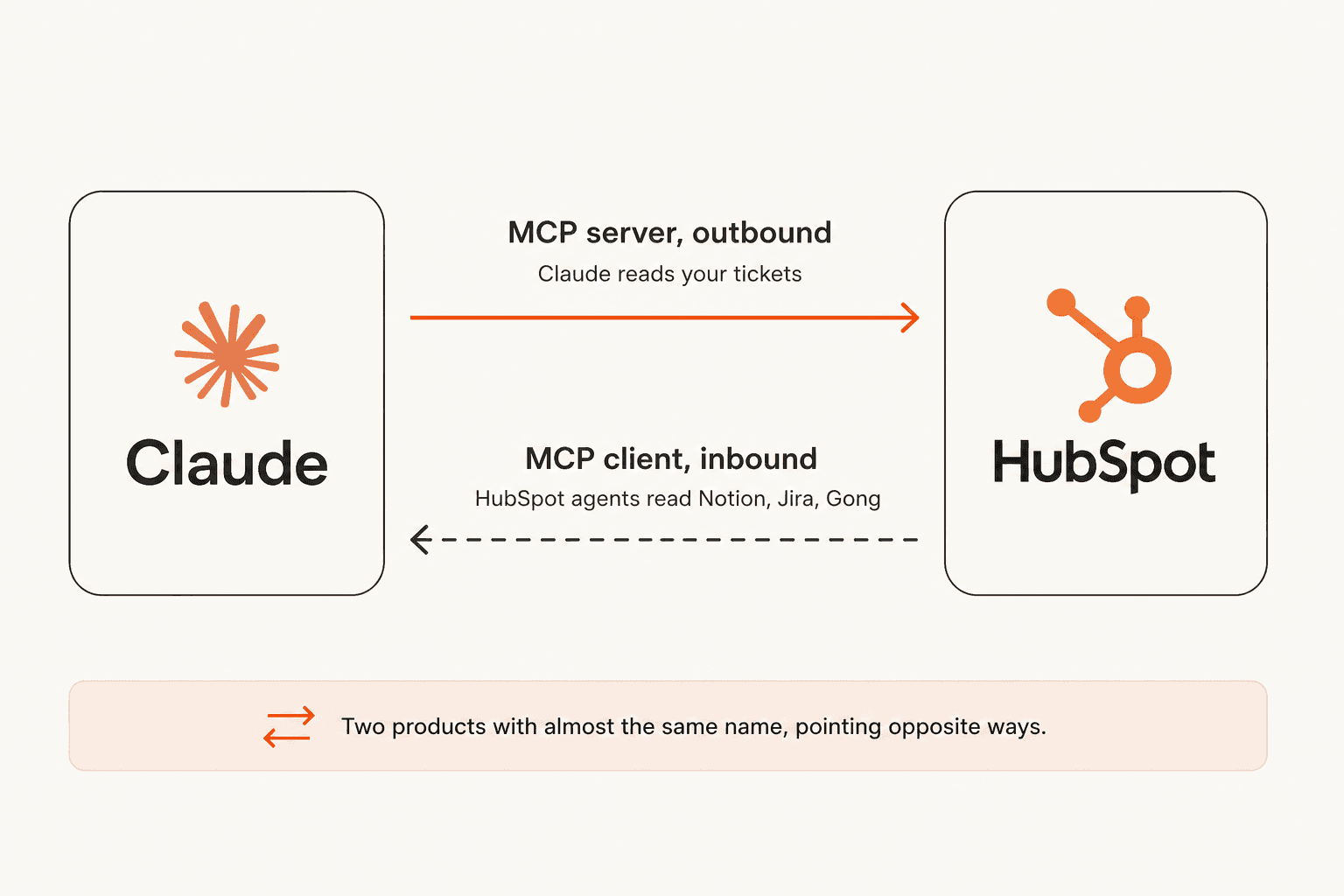
The MCP server is outbound: your AI reads HubSpot. The MCP client is inbound: HubSpot's agents read your other systems. The client is real and it is better than HubSpot's reputation suggests, reaching Notion, Atlassian, Asana, Zapier, G2, Linear, Gong, and Amplitude through first-party connectors, and it is available from Starter up.
There is one catch, and it is the catch. Every documented path to those connectors runs through Agent Builder, and the customer agent has no Connectors tab. So "HubSpot AI can read Confluence" is true of the back-office agents you build yourself and false of the agent that answers your customers. If someone tells you HubSpot is a walled garden, they are wrong; if they tell you your support bot can read your Confluence space, they are also wrong. The naming does nobody any favours. Our what is HubSpot Breeze AI explainer untangles the rest of the vocabulary, and is Breeze worth it has the verdict. and yes, "Breeze" is quietly on its way out. HubSpot's own product page now calls the umbrella Agent Hub, "formerly Breeze Agents".
Route 4: build it on the tickets and conversations APIs
This is the route that can actually hit send, and the reason it exists as a route at all.
Reading is straightforward. GET /crm/v3/objects/tickets/{id} with the tickets scope gets the record, and GET /conversations/v3/conversations/threads/{threadId}/messages with conversations.read gets the thread. The join between them is explicit: pass ?associatedTicketId= or ?association=TICKET. So far, so ordinary.
Sending is the part the MCP route cannot do. POST to that same messages endpoint with conversations.write, and the type field decides everything: "MESSAGE" goes to the customer, "COMMENT" is an internal note. There is no send-only scope, so that single field is your entire safety boundary between a draft and an email in a customer's inbox. senderActorId has to map to a real HubSpot user, so budget a seat for your bot. WhatsApp is explicitly excluded from API sending.
If you are building this, four things will bite you, and they are the difference between a demo and production:
- Truncated email bodies. Messages carry a
truncationStatus, and a truncated body needs a separate original-content call. An agent that ignores it reasons confidently over half a thread, which is worse than failing. - The webhook timeout.
conversation.newMessageand theticket.*events cover your triggers, but HubSpot retries after five seconds, up to ten times over 24 hours, in batches of up to 100 events at 10 concurrent. Five seconds does not fit an LLM call. Acknowledge immediately, process asynchronously, and make it idempotent or you will double-reply to someone. - The daily rate limit is shared. Private apps get 100 requests per 10 seconds on Free and Starter, 190 on Professional and Enterprise, with daily caps of 250,000, 625,000, and 1,000,000. The burst limit is per app, but the daily cap is shared across every app on the account, so another integration can starve your agent.
- Offboarding can take you down. Private apps need a super admin to create, cap at 20 per account, and removing the creating user breaks the token with
USER_DOES_NOT_HAVE_PERMISSIONS.
One pleasant surprise: no paid tier gates any of this. Tickets and the Conversations Inbox are both available on HubSpot's free tier. Paid tiers buy you rate limits, not access. Also plan for a migration, because HubSpot names 2026-09-beta as the recommended version for new integrations while the only fully-documented endpoint set is labelled legacy.
Which brings me to the thing I actually want to say about this route.
"We could try to write our own LLM application but we didn't want to invest our time into that. We wanted something that we would not have to maintain."
I have watched customers leave to build exactly this. Two of them, an AR construction-tech firm and a direct-to-consumer beauty brand, churned to build on the Claude API directly, and "we'll just build it ourselves on the LLM API" is the single most common competitive alternative we run into with technical teams. I am not going to pretend it never works, because sometimes it does. What I will say is that the token bill is the cheap part. The expensive part is the truncation handling, the idempotency, the retry queue, the seat for the sender, and the person who owns it eighteen months from now.
What one AI reply actually costs
The three routes meter completely differently, which makes them almost impossible to compare until you put your own numbers in. HubSpot bills credits per resolution. Claude bills tokens. eesel bills per ticket. Same job, three different units, and our ticket automation review walks through what each one buys.
Where the credits actually run out
The widget above is doing one piece of arithmetic that deserves saying in plain text, because it is the single most useful number in this entire post.
HubSpot's legal catalog prices the customer agent at 50 credits to resolve one conversation on text-based channels, and credits at $10 per 1,000-credit capacity pack, or $0.010 each pay-as-you-go. The pricing page's own estimator says $9.00 per 1,000 on an annual commit. Either way you land at roughly 45 to 50 cents per resolved conversation, and note that this per-resolution figure is not on the pricing page at all. It is in the legal catalog.
Now apply it to the included credits.
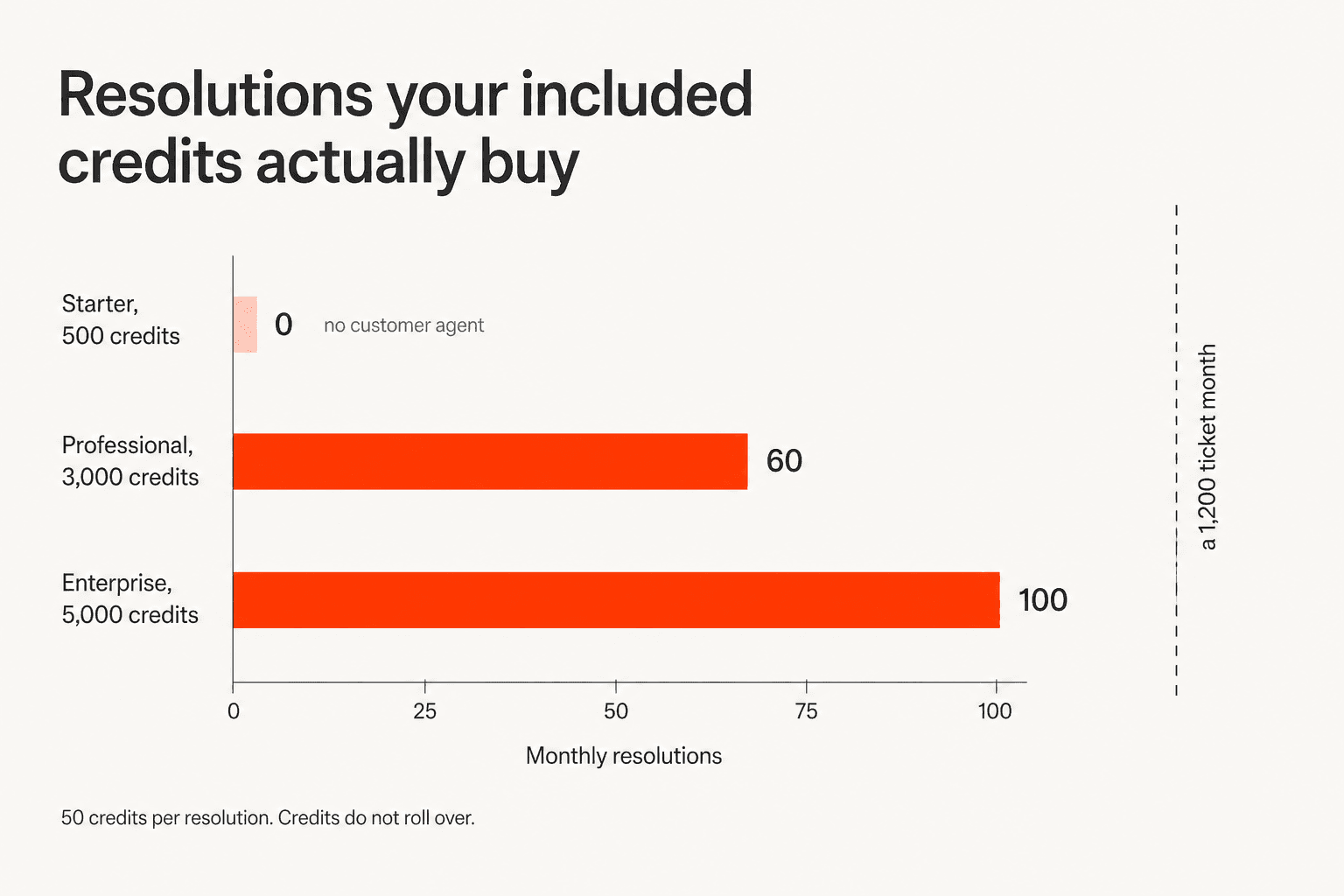
Service Hub Professional includes 3,000 credits a month, which is 60 resolutions, about two a day. Enterprise includes 5,000, so 100. Starter's 500 credits do not matter because Starter has no customer agent. Those credits are account-wide, they do not scale with seats, and they do not roll over. They are also shared with everything else Agent Hub does, so a data agent run costs 10 and a content agent piece costs 1,000.
Two more things about the meter that I would want to know before signing:
The definition of "resolution" has a sharp edge. A conversation counts as resolved when the agent replies citing a content source or performs an action and no qualifying handoff happens within 72 hours of the last visitor response. HubSpot states plainly that manual agent assignment, including assignment through workflows, is not a qualifying handoff. So a rep quietly taking over a bad AI answer still bills as a resolution. Status locks at 72 hours and later transfers or negative feedback will not undo it. If an email thread reopens after that window, the clock resets and it can bill again.
That caveat matters when you read HubSpot's headline numbers. The pricing page claims 70% or more auto-resolved; the customer agent page frames it as 70% with top teams hitting 90%. Neither publishes a methodology, and the resolution definition above is doing some of that work. Model the lower figure, and cross-check it against the real-world numbers in our Service Hub ticket deflection writeup and our wider Service Hub AI review.
Running out is a hard stop, and the recovery is a ratchet. When credits are gone, the agent stops being assigned new conversations across every channel until reset or top-up. And once you have bought a pack, the default behaviour is an automatic upgrade to a bigger pack for the rest of the contract term, cancellable only at renewal, unless you switch on pay-as-you-go.
That mechanic is the single most-discussed thing about HubSpot AI in r/hubspot, and the accounts are specific:
"when you go over that limit, the limit automatically raises. In the case of the AI credits, we went from 3K credits to 362K, without even asking for it. Then we could not set a lower limit (the system prevents it)...and then the real billing started. Pretty messed up approach..."
To be fair to HubSpot, most of those threads are about bulk enrichment rather than the customer agent, which meters far more slowly. But the mechanic is the same one, and the second-order effect is what I would actually worry about:
"I don't know how many credits I'll need, so I'm less likely to test things, not more."
That is the real cost of a credit meter, and it has nothing to do with the total. It makes people afraid to experiment. Our HubSpot credits breakdown has the full ladder, and our HubSpot AI cost breakdown puts it next to the seat bill.
One free lever most people miss: reply recommendations in the help desk consume no credits and do not require deploying the agent at all. Testing and configuring actions are free too, and first-time setups can opt into 14 days of free access. If you want a copilot for your agents rather than an autonomous bot, that costs nothing.
What the native agent already does, and the one thing it will not do
It would be easy to write this section as a list of HubSpot's shortcomings. That would also be unfair, because the customer agent is a decent product and the setup flow is one of the more thoughtful ones in the category.
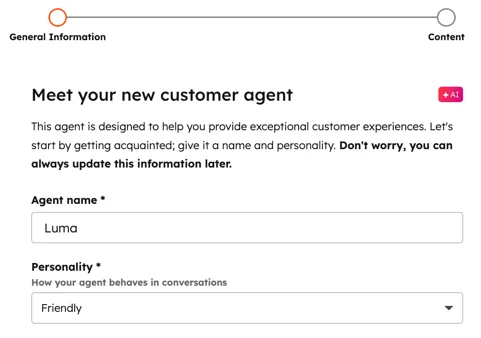
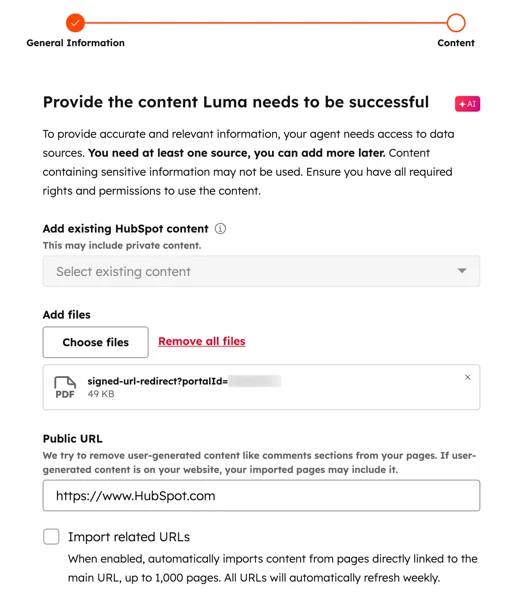
You name it, pick a personality, and then feed it content. On knowledge, HubSpot is more open than its reputation suggests: it crawls up to 5,000 public URLs per domain, accepts around 22 file types at 25 MB for HTML and 500 MB for other files, and syncs your knowledge base articles, website pages, landing pages, and blogs.
If you are setting the knowledge side up properly, our HubSpot AI knowledge base guide and the knowledge base software overview are the two to read first.
Where the walls actually are, each stated by HubSpot rather than inferred:
- The crawler is unauthenticated. Login-gated pages return a 401 or 403 and HubSpot's own documented workaround is to upload the content as a PDF or DOCX, per the error docs.
noindextags, restrictive robots.txt, and heavy JavaScript also block it. Its user agent is "HubSpot Crawler" from IP range 54.174.58.224/27. - Only knowledge base articles live-sync. Everything else refreshes weekly.
- The help-center import is a one-time copy, capped at 400 articles per import from Freshdesk, Help Scout, or Zendesk, with tables unsupported and no ongoing sync back to the source.
- CRM writes are contact properties only, with a maximum of 10 properties total. No ticket, deal, company, or custom-object properties, which also caps what it can do for ticket routing.
- It cannot be deleted, only paused, and the off switch lives under Account and Billing, Usage and Limits rather than in the agent UI.
It does have a real testing console, and I want to be accurate about it because overstating this gap would be wrong. You can preview in Email or Live Chat, test as a real CRM contact or as a whole segment so property access is really exercised, attach a file up to 10 MB, and read a Testing Insights panel showing which triggers fired and which sources it cited. All free.
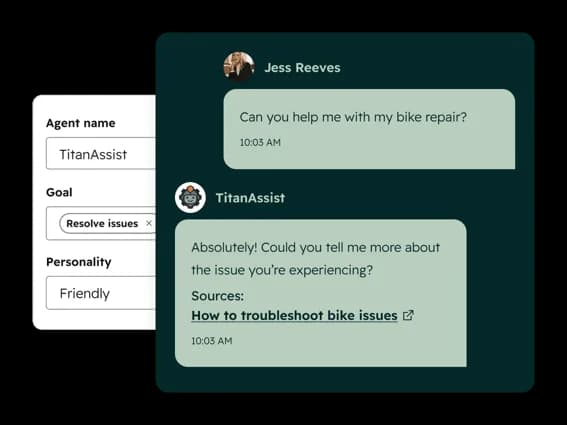
What it does not have is any documented way to replay a batch of your historical tickets through the agent and score the result before go-live. Every input in the flow is a question you type or a prepared test question. HubSpot's own de-risking path is a live-traffic ramp: deploy to one channel, or cap the agent at a small percentage of conversations, then analyse and expand. The Conversation coverage field on deployment is literally a percentage dial.
That is the difference I care about most, and it is not a small one. A coverage ramp builds confidence using real customers as the test set. A backtest builds it before anyone is affected. Having watched a confident-sounding bot give a wrong answer in production, I would rather find that out against last quarter's tickets than against this morning's.
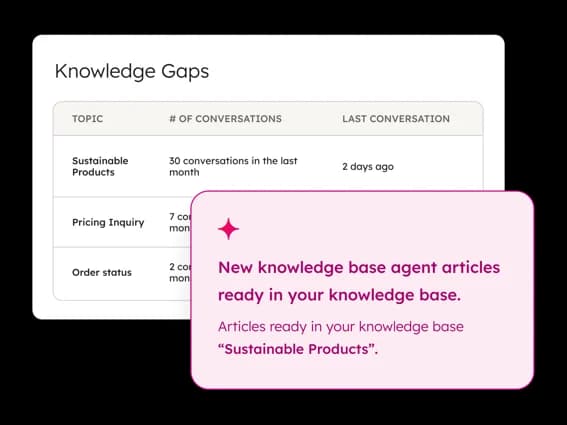
Credit where it is due, though: the Knowledge Gaps report is a nice touch, surfacing topics people keep asking about that your knowledge base does not cover, and offering to draft the missing articles.
One last thing worth knowing, filed under data rather than features. HubSpot's AI mode training setting is on by default, and past training data cannot be retroactively removed. It commits to not letting third-party providers train on your data and to zero retention "wherever possible", which is a goal rather than a guarantee. If your account sits in the Australian or Canadian data centre, AI processing still happens in the United States.
What operators actually run into
Docs tell you what is possible. Threads tell you what happens on a Tuesday. The clearest structural summary I found came from an admin who has run all three surfaces:
"The in-app connector is fine for basic end user stuff like querying HubSpot. However it has tons of limitations and gotchas, for example you can't access campaigns. The MCP client calls the API and is much more robust but requires some basic dev skills to work with."
That is the same three-way split I laid out above, arrived at independently. Worth noting this particular admin runs the Gemini connector rather than Claude, so read it as a point about connectors versus MCP versus native rather than about Claude specifically.
The most useful account in the set comes from someone who spent three weeks driving HubSpot from the Claude Code CLI instead of the MCP server, and had two concrete reasons for the switch:
"The MCP, from all my experience, has always been problematic because it overloads context on your initial tasks. Also causes rate limits because of the amount of tokens you have to pull in just from the server. The private app with CLI is like the new move."
That second clause is the one I would underline. A 16-tool server's definitions land in context on every turn, and at 5 requests per second underneath, the token overhead and the rate ceiling compound. The same practitioner flags a failure mode I have hit myself: the MCP tools authenticate against whichever portal the config points at, and when that is the wrong portal, the symptom is an empty response rather than an error. Debugging "zero results" is much harder than debugging a 403.
The honest verdict on the Claude path, in three words, came from a non-coder running a legacy-heavy portal:
"Claude connector or mcp helps drive changes and is good at looking at your portal - but there can be drift. Side quests. Loss of context."
And the fairest thing I can say about HubSpot's native agent is that when people give it the runway, it works. This is the most quantified report in the whole corpus:
"Customer agent handled 40% of our support inbounds last month and took our overall average first response time to hardly anything. We average over 15k inbounds per month."
40% deflection at 15,000 inbounds a month is a real result, and notice the two preconditions this operator names himself: four months of running the agent before the meter mattered, and a knowledge base already tuned for AI to read. Both of those are the work, and neither is a feature you can buy.
How I would actually decide
Four routes, and the choice is less about capability than about which job you are hiring for.
| Route | Can it send a reply? | Setup | What you pay | Pick it when |
|---|---|---|---|---|
| Official Claude connector | No | ~4 minutes | Free, plus a paid Claude seat | You want the best read-only analyst on your help desk, today |
| MCP server yourself | No | OAuth 2.1 with PKCE, half a day | Free, plus Claude API tokens | Claude needs HubSpot context inside your own product |
| HubSpot's native agent | Yes | Hours, Professional tier | 50 credits per resolution | You want autonomous replies and can live with the credit ceiling |
| Build on the APIs | Yes | Weeks, then forever | Tokens, a seat, and an owner | You have engineers and a reason the packaged options do not fit |
My honest read: start with the official connector this afternoon. It is free, it takes four minutes, and asking Claude "what are the ten most common questions in my help desk this month" will teach you more about your queue than a week of dashboards. Set write tools to Needs Approval and leave them there.
Then be clear-eyed about what you have. You have a brilliant assistant that reads. You do not have an agent that resolves. If you want the second thing, you are choosing between HubSpot's customer agent, which bills 50 credits a resolution and cannot rehearse against your history, and something purpose-built. We line the field up in Service Hub AI alternatives.
Route 4 is the one I would push back on hardest, and I say that as someone who would enjoy building it. The API really does support a full autonomous loop, and the token cost is startlingly low. But every one of the four gotchas above is a production incident waiting for a quiet week, and the maintenance never ends. If you want the reasoning laid out properly, our AI customer service cost breakdown does the build-versus-buy maths, and AI agent versus rule-based chatbot covers the design decisions you would be making from scratch. If you would rather skip to the shortlist, start with the best AI agent roundup.
eesel AI for HubSpot Service Hub
Want an AI that can actually hit send in Service Hub? eesel joins your HubSpot help desk as a real agent rather than a connector: it reads tickets, drafts and sends replies, updates ticket properties, moves pipelines, and uses live CRM contact data while it does it. No 10-property ceiling, no credit cliff, and no type: "MESSAGE" field for you to get wrong at two in the morning. Our guide to adding AI to HubSpot has the step-by-step.

The difference that matters most given everything above is the rehearsal. Before eesel answers a single live customer, you run it against your own closed tickets and see exactly what it would have said, which tickets it would have handled, and which it would have left alone. That is the thing HubSpot's coverage-percentage dial cannot give you, and it is why teams get to a real tier-1 deflection number instead of a hoped-for one. Kim Simpson at Gridwise put it plainly in a public review: in the first month, eesel was resolving 73% of their tier-1 requests, with results visible during a seven-day trial.
Billing is 40 cents per ticket or chat handled, with no per-seat fee and no platform minimum, and there is a hard spend cap if you want one. On the 1,200-ticket month in the calculator above that is $480, against a HubSpot bill that has already burned through 3,000 credits by day two. There is $50 of free usage to start with and no credit card, so you can put your own tickets through it before deciding anything. Try eesel and put a week of your own tickets through it.
Frequently Asked Questions
Is there an official Claude integration for HubSpot?
Can I make HubSpot's customer agent run on Claude?
How much does Claude for HubSpot cost on top of Service Hub?
Can Claude reply to a HubSpot ticket by itself?
What HubSpot data can Claude actually see?
Is the HubSpot MCP server safe to give an AI write access to?
What is the best AI for HubSpot Service Hub tickets?
Do I need Service Hub Professional to connect Claude?



Article by
Rama Adi Nugraha
Rama is a software engineer at eesel AI with two years of experience writing about B2B SaaS, AI tools, and customer support technology. Based in Bali, Indonesia, he brings a developer's perspective to product comparisons — cutting through marketing copy to what the integrations and APIs actually do.