HubSpot translation for support tickets: what Service Hub covers in 2026

Riellvriany Indriawan

Katelin Teen
Last edited October 22, 2026

Why HubSpot translation is confusing
I work the support queue every day, and the most common foreign-language moment isn't dramatic. It's a Tuesday morning ticket in Portuguese, a teammate who doesn't read Portuguese, and a browser tab open to a translator. The question I hear from HubSpot teams is simple: does HubSpot do this for me?
The honest answer is "partly", and HubSpot's own pages don't line up. The help desk product page says "automated translation tools help agents communicate effectively". But when I went through HubSpot's knowledge base articles on responding to tickets, managing tickets and the help desk workspace, none of them describe a translate action on a ticket. The documented translation lives in other places.
This post is the sibling of my broader guides on customer service translation and multilingual customer support. Here I'm zooming into HubSpot's customer service software specifically: what each piece translates, which plan it needs, and what to do about the gap.
What HubSpot translation covers today
Here's every language feature I could find in HubSpot's own docs, mapped to the support job it does.
| Feature | What it does | Plan needed | Extra cost |
|---|---|---|---|
| Customer Agent language | AI agent replies in the languages you pick, or the one it detects | Professional or Enterprise | 50 credits per resolution |
| Language ticket property | AI fills in the ticket's language from customer messages | Service Hub Enterprise | None listed |
| Skill-based routing | Sends tickets to agents with a main or secondary language skill | Service Hub Enterprise | None listed |
| Knowledge base languages | Article language variants, AI-translated categories | Service Hub Professional or Enterprise | Service Hub seat |
| Page and blog translation | AI translation "powered by DeepL" into 32 languages | Content Hub Professional or Enterprise | None listed |
| Chatflow language | Sets the language of bot messages and widget text | All plans | None |
| Inbox AI assistant | Rewrites or expands text in the language you type | All plans | None listed |
| Incoming ticket translation | Not described in HubSpot's help desk docs | n/a | Marketplace app |
Two details from that table are easy to miss. The inbox AI assistant carries a warning that its model "tends to produce inconsistent results in non-English languages", so HubSpot asks you to check non-English output with extra care. And the chatflow doc notes that rule-based bots can't fully parse dates, names or yes/no answers in languages other than English.
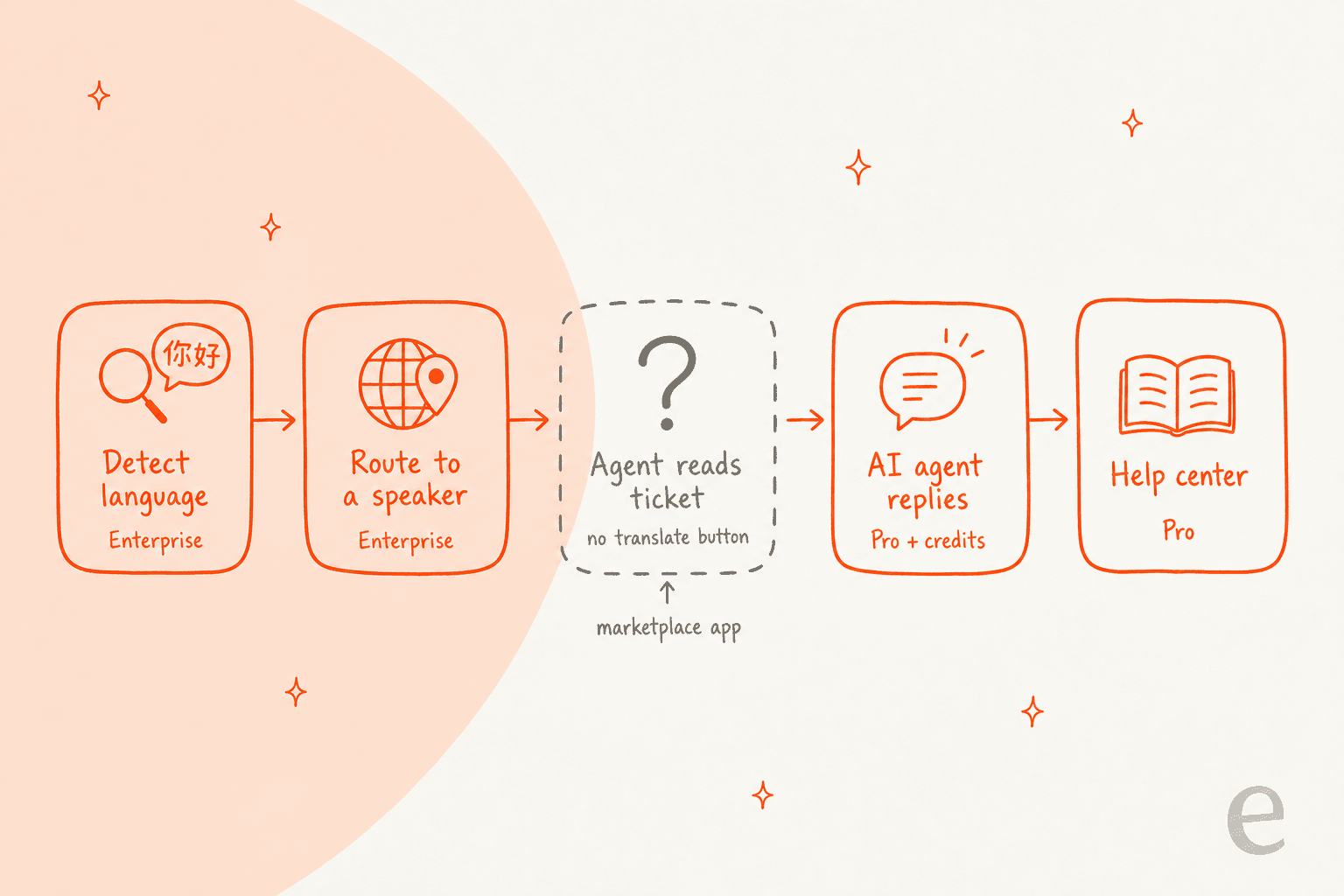
The pattern in that picture is the whole story. HubSpot covers the steps before and after a person reads the ticket. The step where your human agent needs to understand the customer is the one without a native tool.
Where translation stops in the HubSpot help desk
HubSpot's Ideas forum is where its own users ask for features, and translation shows up again and again. The most-voted thread, Real time translation in live chats, was opened in December 2019 and sits at 57 votes and 11.7k views with the status "Idea Submitted". A separate request to translate ticket contents from 2020 describes the exact workflow I see on our queue:
"This would help me save time from opening a new tab and using google translate."
An Elite Partner raised it again in 2023 under Translation for Service hub tickets, pointing out that competing helpdesks offer it. That's fair: Zendesk can auto-translate incoming messages, and Front has AI translate in the composer. If two-way ticket translation is your main requirement, it belongs on your HubSpot vs Zendesk checklist.
None of this makes HubSpot a bad support tool. It means you should plan the translation piece yourself instead of assuming it's switched on.
Option 1: let the Customer Agent answer in the customer's language
This is the most "HubSpot-native" form of translation, and for routine questions it's the strongest one. The Customer Agent doesn't translate your English answer word for word; it writes the reply in the customer's language from your knowledge sources.
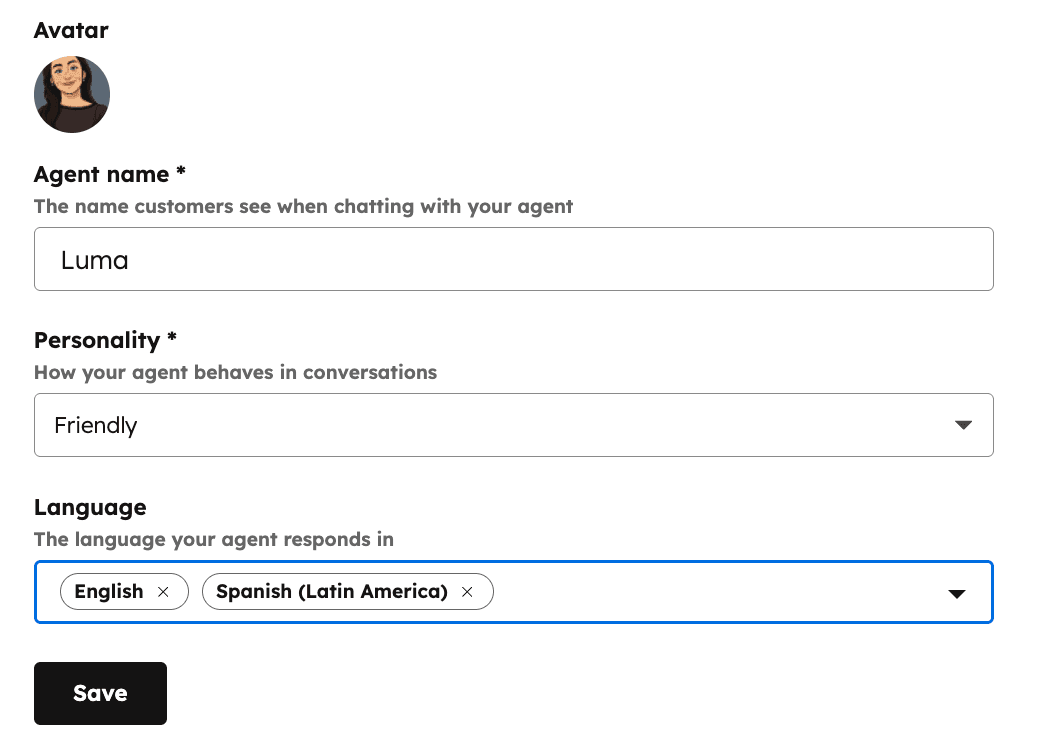
How the language setting works, per HubSpot's identity settings doc:
- You choose the languages the agent responds in from a Language dropdown.
- If you leave it empty, the agent replies in the language it detects from the customer's first message.
- The product page FAQ says the agent "is available in all HubSpot-supported languages".
That auto-detect behavior surprises some teams. A UK user on HubSpot Ideas described the agent switching languages on them:
"As the Customer Agent automatically detects a visitor's browser language and replies in that language, we cannot understand what it is saying."
The fix today is to set the Language dropdown explicitly to the languages your team can review.
What the Customer Agent costs
The agent itself isn't priced as a translation feature. You pay per resolution, in HubSpot Credits:
| Service Hub plan | Seat price (billed annually) | Credits included each month | Customer Agent |
|---|---|---|---|
| Free | $0, up to 2 users | None listed | No |
| Starter | See pricing page | 500 | No |
| Professional | $90 per seat per month | 3,000 | Yes |
| Enterprise | $150 per seat per month | 5,000 | Yes |
Professional also carries a one-time $1,500 onboarding fee and Enterprise $3,500, per the Service Hub pricing page. HubSpot's product catalog prices one resolved text conversation at 50 credits, and extra credits at $0.010 each. That's the $0.50 per resolution HubSpot advertises, and it means Professional's 3,000 credits cover about 60 resolutions a month if nothing else uses them. My HubSpot AI pricing post runs bigger scenarios.
The good news, from the Customer Agent overview: credits are only used when the agent delivers a resolution, previews are free, there's a 14-day free access period on first setup, and reply recommendations inside the help desk don't use credits at all.
My take: turn this on if your foreign-language volume is mostly repeat questions. It handles the language for those tickets without anyone translating anything. It does nothing for the tickets it hands off, which land in your team's queue in the original language. If you're weighing it against other agents, I compared them in Breeze Customer Agent alternatives.
Option 2: route tickets to someone who speaks the language
The cheapest translation is the one you don't need. On Service Hub Enterprise, HubSpot gives you two pieces that work together:
- The Language ticket property. Per HubSpot's default ticket properties doc, it's "automatically populated using AI, based on the language of customer messages", and HubSpot notes the value "may be incorrect and can be manually edited". It requires Service Hub Enterprise.
- Language skills on agents. In skill-based routing, HubSpot's supported languages are listed as skills by default. You set each agent's main language (high fluency, fine for industry terms) and secondary language (conversational, not for legal or technical copy).
Then you build a ruleset per channel: if Language is German, send it to agents with German as a main language. Rules run in priority order, and if no rule matches, the default routing rule takes over. I covered the setup in more depth in HubSpot AI ticket routing.
The main-versus-secondary split is a nice touch. A secondary German speaker can handle "where's my order" but shouldn't be the one replying to a contract dispute, and HubSpot lets you encode exactly that.
My take: if you're already on Enterprise and have bilingual people, set this up before buying anything. It fails when no one on shift speaks the language, which is usually the ticket you were worried about in the first place.
Option 3: add a translation app from the HubSpot marketplace
For human agents on any plan, a marketplace app fills the gap HubSpot leaves. The one I'd look at first is Lokalise Messages, listed as "real-time, two-way chat, messaging and ticket translation". Per its marketplace listing:
- Translates HubSpot inbox conversations in
100+languages with neural machine translation - Includes a glossary so product names and company terms translate correctly, or not at all
- Has a per-language analytics dashboard
- Requires a Lokalise Messages subscription, with a freemium plan listed, and shows
100+installs - States that message content "is not stored or logged" and isn't used to train its engine
Other vendors pitch the same job from their own sites. Lingpad says it helps agents "chat, email, and resolve tickets in 120+ languages" inside HubSpot. A glossary matters more than the engine, in my experience: the fastest way to embarrass yourself in another language is to translate your own product name. I wrote a separate guide on building a support translation glossary.
What about DeepL?
HubSpot already uses DeepL. The "Translate using AI" option for website pages and blog posts says "Powered by DeepL" right in the dialog.
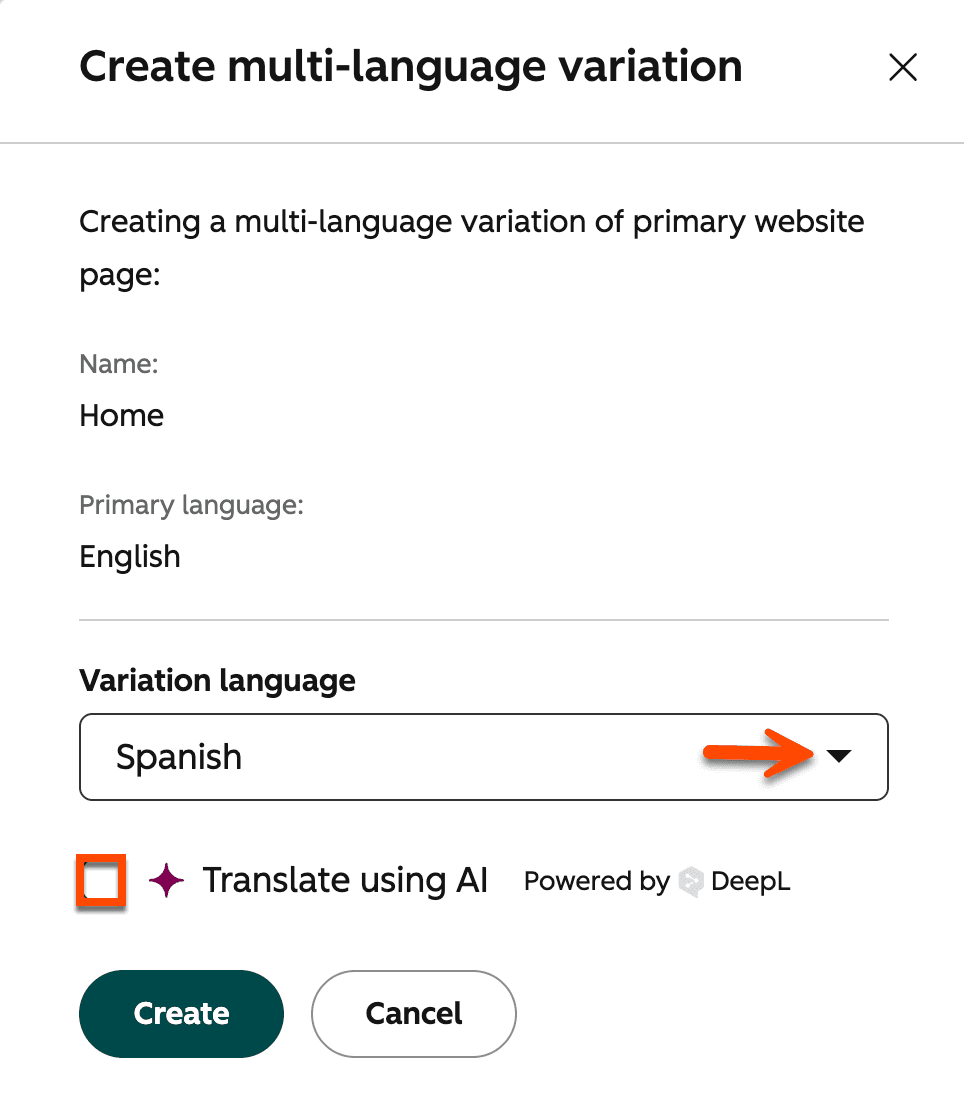
That integration is limited to pages and blog posts on Content Hub Professional and Enterprise, though, and isn't documented for tickets. If you want DeepL on support conversations, it's copy-paste or a custom build on the API. DeepL's API plans start with a free Developer tier (a one-time 1 million character credit), then Growth at $26 a month billed annually with 12 million characters a year and $27.50 per extra million. My DeepL pricing post has the full table, and DeepL review covers translation quality.
My take: DeepL is excellent when a person controls the reply, which is exactly the copy-paste case. It translates; it doesn't resolve. Your agent still has to research the answer and write it.
Option 4: translate the knowledge base
This one helps customers before they ever open a ticket, and it feeds the Customer Agent too. On Service Hub Professional and Enterprise, the multi-language knowledge base works in three steps:
- Add language variations in your knowledge base settings and pick a primary language.
- Translate categories and subcategories. HubSpot has a Translate all supported button that fills them in with its AI, and untranslated ones show a "Needs translation" label.
- Create a language variant of each article from the Actions menu, then enter or review the translated text.
It's tidy, and HubSpot's knowledge base software handles language groups well. The cost is upkeep: every English update now has to be mirrored in each language. I compared how other tools handle that in multilingual knowledge base software.
One more limit worth knowing. HubSpot's AI page translation covers a fixed list of 32 languages, and a Barcelona company asked on HubSpot Ideas for Catalan support because it isn't on the list. Check yours before you plan around it.
Which HubSpot translation path fits your setup?
Pick your plan and who answers foreign-language tickets today. The answer is based only on what HubSpot documents for each tier.
Translating a ticket isn't resolving it
Every option above solves the same narrow problem: the words. After translation, a person still has to read the customer's account, find the right policy, decide what to do and write a reply someone will trust. On our side we've run AI on live support queues for years, and the language part is rarely what slows a team down. The research is.
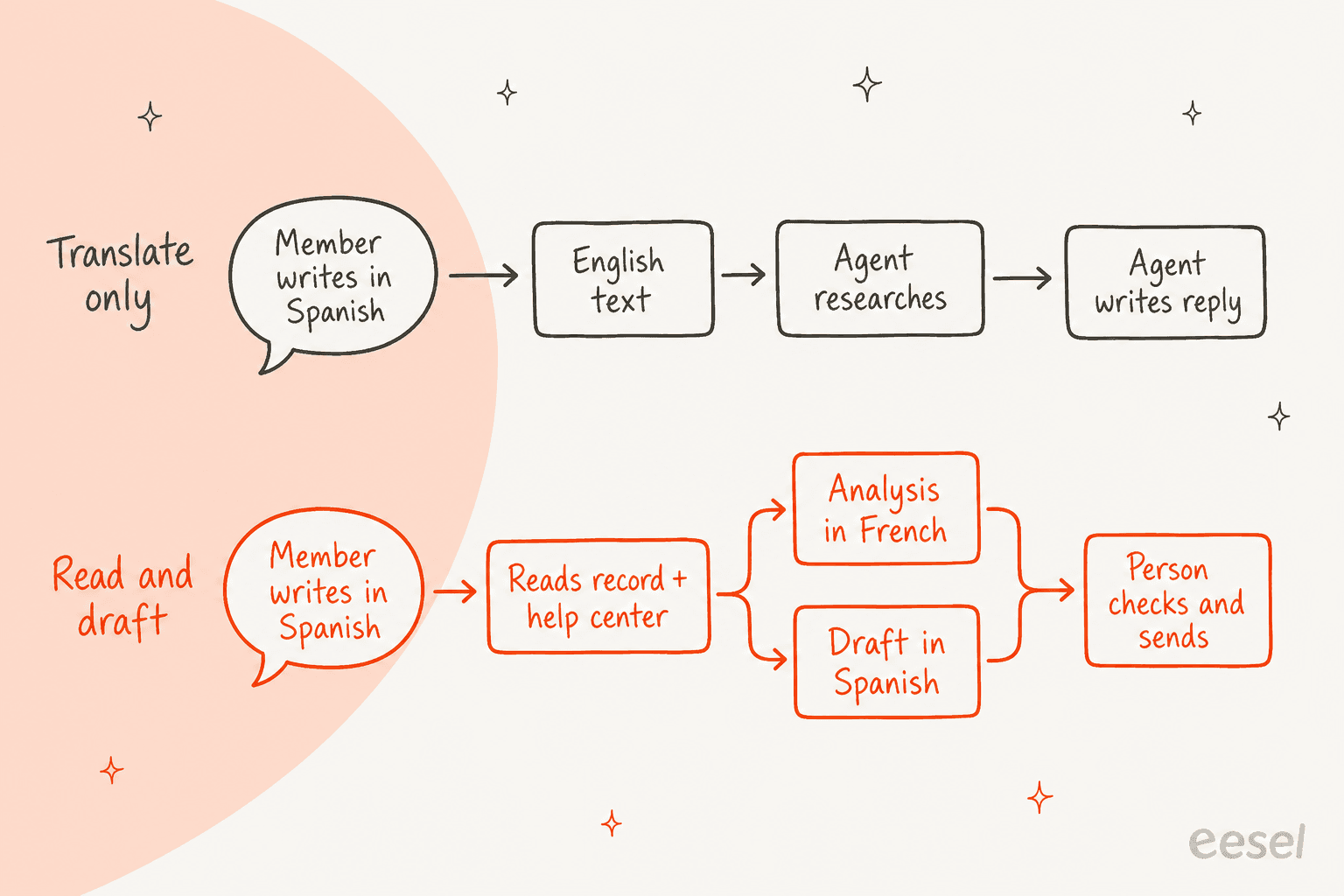
MentorShow is the clearest example I can point to, and it runs entirely on HubSpot Service Hub. It's a French online learning platform whose members write in French, English and Spanish, and it told us it gets between 5,000 and 13,000 tickets a month. Its condition was that the team keeps working entirely from HubSpot, with no second interface.
So eesel works inside HubSpot. On each new conversation or ticket it:
- Skips the noise on purpose: PayPal notices, out-of-office replies, survey responses, Trustpilot reviews and thank-you messages.
- Reads the whole thread and the member's HubSpot record, including subscription status, next renewal date and past tickets.
- Searches MentorShow's HubSpot knowledge base (
123articles) and5uploaded files, one of which lists which masterclasses are dubbed into which languages. - Leaves an internal note with an analysis in French for the team and a draft reply in the member's language, which a person reads, edits and sends.
- Hands refunds, billing checks and account changes straight to a person.
Between 8 August and 8 September 2026, that came to about 1,200 HubSpot conversations and tickets read, 837 knowledge base searches and 432 reply drafts. Nobody translated anything, and the help center stayed in the languages it was already in.
The same pattern works on other helpdesks. Innr gets drafts in Dutch, German, English or French on Freshdesk, with the formal "Sie" for German customers, and Koffer.ch drafts from its own macros in German, French, English and Italian. If you want the general case, I covered whether AI can handle multilingual support and how to check language quality before you trust it.
Where eesel isn't the right fit: if your team wants to read every ticket in English and write every reply themselves, a translation app like Lokalise Messages is the simpler tool. eesel is for teams who want the research and the draft done, not just the words.
Try eesel on your HubSpot tickets
If you're running HubSpot and foreign-language tickets keep landing with whoever happens to be online, eesel works like a new AI helpdesk teammate in Service Hub. It reads each ticket in the language it arrived in, checks the contact record and your existing knowledge base, and drafts the reply in that language, per the eesel helpdesk docs. You write the rules once in plain language, like "always use vous" or "never translate the product name", and correct it the same way.

It connects through the HubSpot integration, runs as drafts first so your team stays in control, and bills one credit per ticket however many languages are involved. eesel pricing starts free with 100 credits, then $299 a month for 500 credits. If you're comparing it with HubSpot's own agent, my eesel vs HubSpot Breeze post lays out the differences, and my Service Hub AI roundup covers the wider field.
Try eesel on a week of your HubSpot tickets and read the drafts before you decide.
Frequently Asked Questions
Does HubSpot have built-in ticket translation?
Not for human agents, as far as HubSpot's own help docs go. The help desk articles describe no button that translates an incoming ticket, and the feature has been an open request on HubSpot Ideas since 2019. HubSpot translation today covers the Customer Agent's replies, knowledge base language variants and AI-translated website pages. My customer service translation guide compares how other helpdesks handle it.
Can the HubSpot Customer Agent reply in other languages?
Yes. In the agent's identity settings you pick the languages it responds in, and if you leave that empty it replies in the language it detects from the customer's first message. It needs a Professional or Enterprise plan and HubSpot Credits. The Breeze Customer Agent guide covers the full setup.
How much does HubSpot translation cost?
There's no separate translation fee. The Customer Agent costs 50 HubSpot Credits per resolved conversation, which is $0.50 at the $0.010 credit rate, on top of Service Hub Professional at $90 per seat per month billed annually. Knowledge base language variants come with Professional, and page translation needs Content Hub Professional. See HubSpot Credits for how the pool works.
Can HubSpot route tickets by language?
On Service Hub Enterprise, yes. HubSpot fills a Language ticket property with AI from the customer's messages, and skill-based routing can send tickets to agents with a matching main or secondary language. My post on HubSpot AI ticket routing walks through the rules.
Is there a DeepL app for HubSpot?
HubSpot uses DeepL itself for AI translation of website pages and blog posts on Content Hub Professional and Enterprise, but that doesn't reach help desk tickets. For conversations, marketplace apps such as Lokalise Messages add two-way translation. My DeepL pricing breakdown covers the API plans if you want to wire it in yourself.
Can I translate my HubSpot knowledge base?
Yes, on Service Hub Professional and Enterprise. You add language variations in settings, translate categories with HubSpot's AI, and create a language variant of each article. It's worth doing for self-service, though an AI agent can also answer in the customer's language from English articles. See HubSpot knowledge base software for the wider feature set.
What's the best HubSpot translation option for a small support team?
If foreign-language tickets are a few a week, copy-paste into a translator is fine. Once they're daily, either add a translation app to the inbox or use an AI teammate that drafts in the customer's language. eesel plugs into HubSpot through its HubSpot integration and starts at $299 a month for 500 credits.