

Why customer service translation is harder than it looks
I build eesel's helpdesk integrations, which means I spend a lot of time inside other vendors' translate features, reading what they actually do under the marketing copy. Multilingual tickets are not an edge case for the teams I work with. In one trial, a German jewelry brand running about 1,000 tickets a month on Zendesk and Shopify watched the agent handle German, English, French, Dutch, Spanish, Polish, Croatian and Turkish without anyone setting it up per language.
Translating a support conversation is really four jobs, and most tools only do one or two of them:
- Read the incoming message in a language you can follow.
- Write the reply in the customer's language, in the right tone.
- Keep your terms straight, so a product name or a plan name doesn't get "translated" into something else.
- Decide who checks it, because a wrong word in a refund email costs more than a wrong word in a shipping update.
Here is what that looks like when you don't have a system. This is a support lead describing the queue before they fixed it:
"We receive tickets in about 13 languages, and our process for translating them so the mostly English-speaking staff can respond is painfully slow."

The four options below map onto those four jobs differently. I've ordered them from least to most setup, and from most to least manual work per ticket.
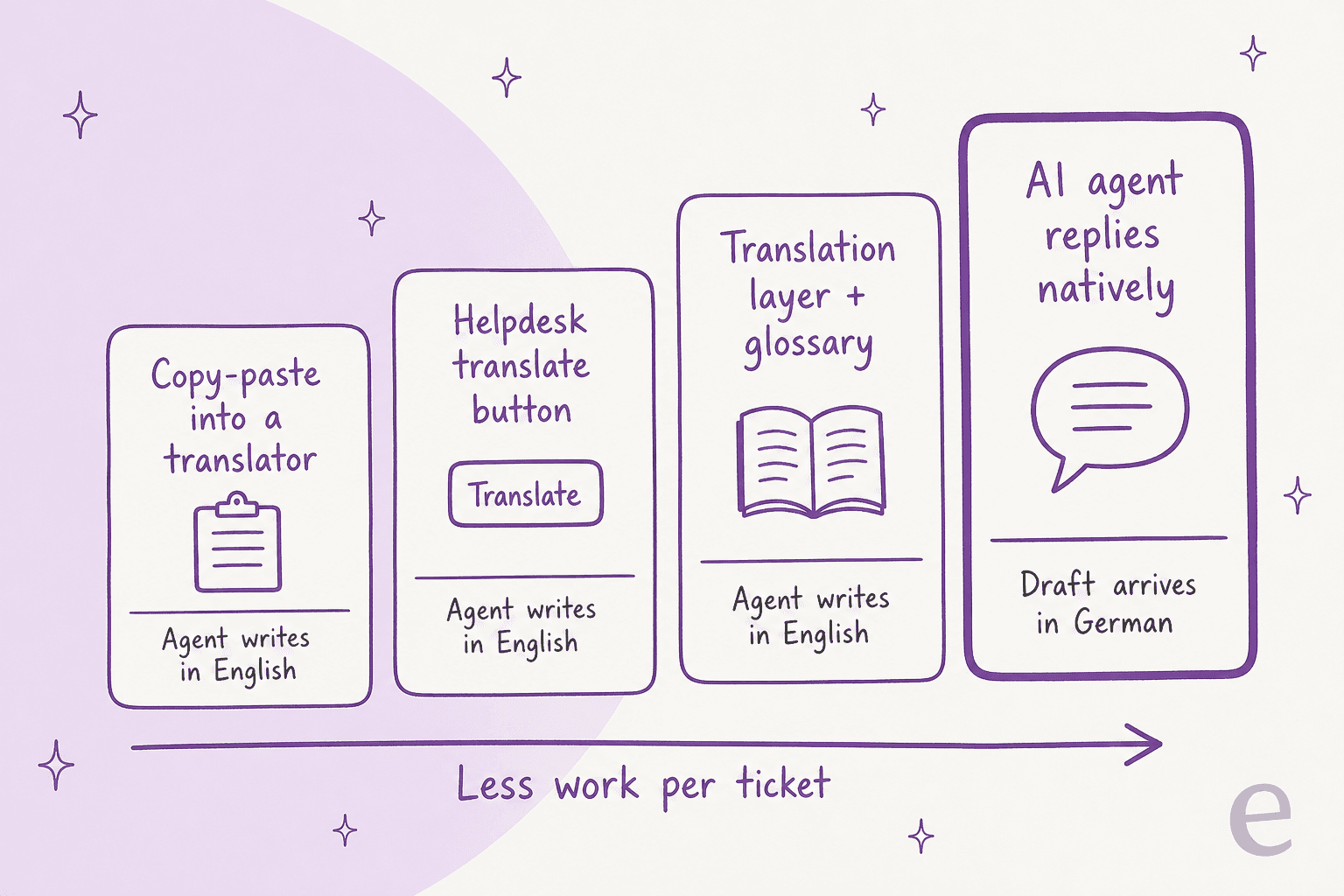
Option 1: agents copy-paste into DeepL or Google Translate
This is where nearly every team starts. An agent opens DeepL or Google Translate in another tab, pastes the customer's message, reads the English, writes a reply, pastes that back, and sends the result.
It works, and the translation quality from DeepL in particular is good. What it costs you is everything around the translation:
- Two manual hops per ticket. On a busy queue that's a lot of tab-switching, and it's where agents start skimming.
- No record on the ticket. The next agent, or your QA reviewer, sees the German message and the German reply, not the English the agent actually read and wrote.
- No terminology control unless you're on a plan with glossaries. DeepL's API Developer plan is free with
1glossary, while Growth is$26a month billed annually plus usage, with2,000glossaries and12 millioncharacters a year. - Data terms. DeepL lists "No data training" as a Growth plan feature, not a Developer plan one. If agents paste customer emails into a free consumer tool, that's a conversation to have with whoever owns your privacy policy.
Product names are where copy-paste translation bites hardest. One Danish developer remembered Windows being rendered as the Danish word for an actual window:
"Back in Windows 2000 days, I found instances where "Windows" the product name was translated to "vinduer", the danish word for an actual window."

My take: fine for a handful of tickets a week. Once foreign-language tickets are a daily thing, move to option 2 at minimum. If you're weighing DeepL against other engines, I compared them in my DeepL alternatives roundup.
Option 2: turn on your helpdesk's built-in translation
Every major helpdesk now ships some form of translation, but they differ a lot in what gets translated, whether it happens automatically, and which plan you need. I went through each vendor's own help docs and pricing page in October 2026. Pick yours:
Pick your helpdesk to see what it translates, what triggers it, which plan you need and how much control you get over terms. Facts from each vendor's own docs and pricing pages, October 2026.
A few things stand out once you line them up.
Zendesk and Front are the most hands-off. Zendesk's conversation translation covers every channel except voice and is listed from Support Team up. Front's Translate feature is no longer email-only; it now covers SMS, WhatsApp and Front Chat too. Seat prices are in my Front pricing guide.
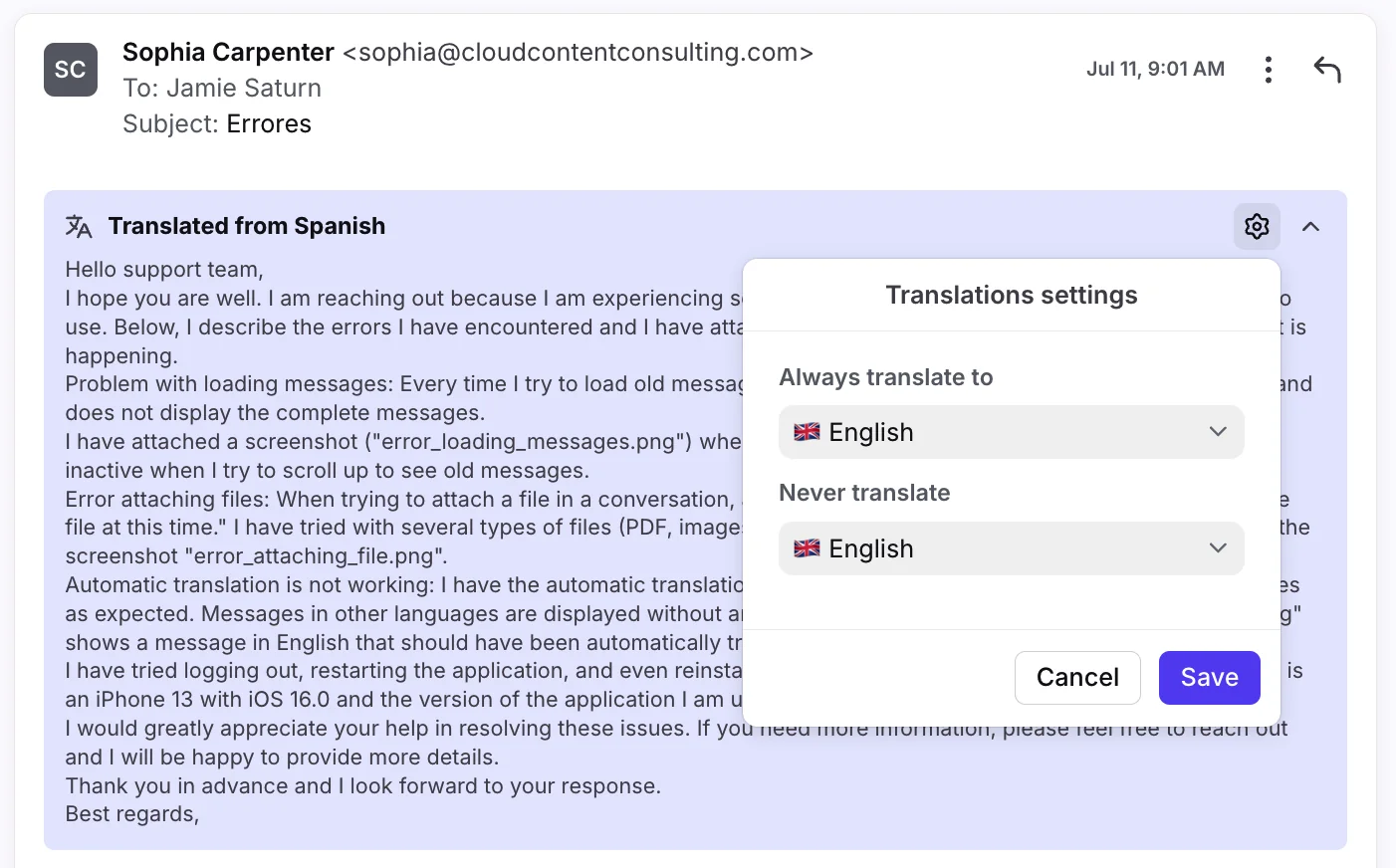
Gorgias is the best value. Ticket translation is on all helpdesk plans with no add-on, which matters a lot for small ecommerce teams. The one quirk is that each agent sets their own translation language in their profile. My Gorgias review covers the rest of the plan.
Freshdesk makes you click, and meters it. Live Translation sits behind the Freddy AI Copilot add-on, and the account gets 100 translated tickets per Copilot license per month. A 5-agent team on Copilot gets 500 a month, then the button greys out until the next billing cycle. My Freshdesk pricing breakdown has the full add-on maths.
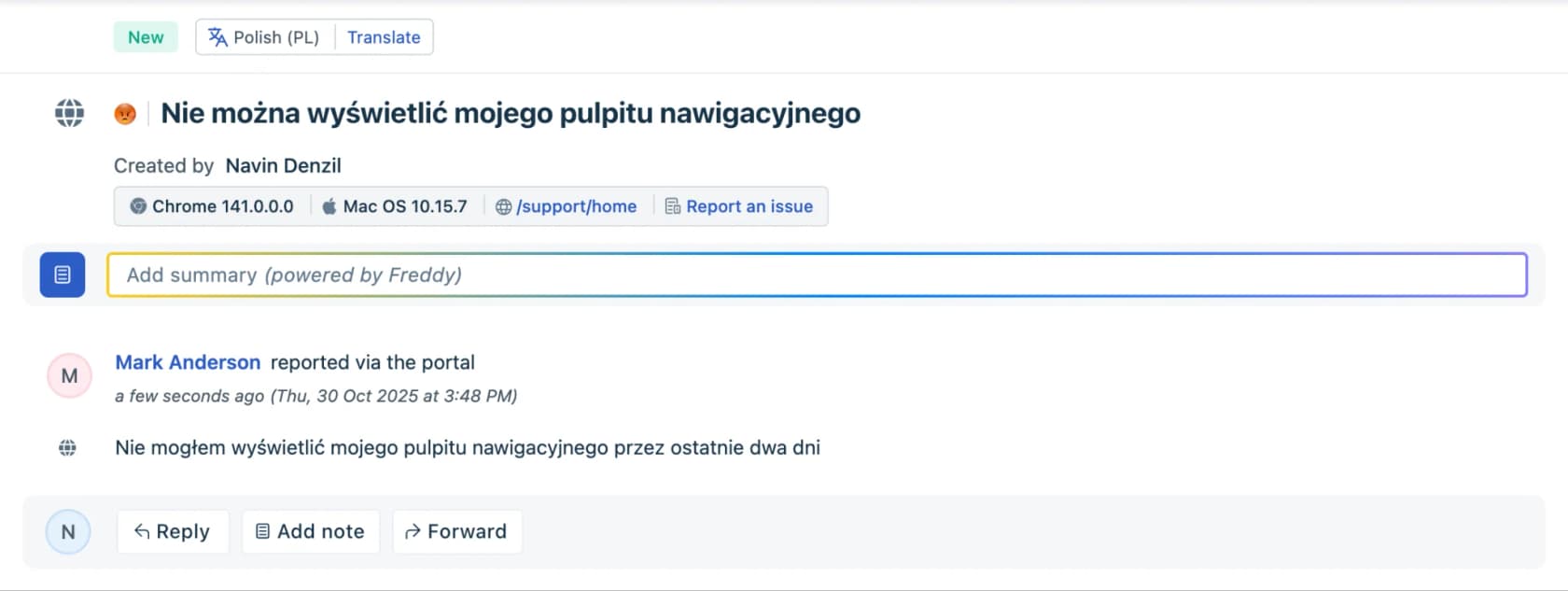
Help Scout and HubSpot translate what you write, not what you receive. Help Scout's AI Assist translates text you highlight, which helps on the outbound side and is included from Plus up on Help Scout pricing. HubSpot's documented AI translation is for knowledge base articles on Service Hub Professional and Enterprise.
Salesforce's Real-Time Translations covers Service Email on the editions that support Email-to-Case; the bigger cost question there is the seat price, which I broke down in Salesforce Service Cloud pricing.
My take: if your helpdesk translates automatically, turn it on today. It costs nothing on Gorgias, little on Zendesk, and every translation stays on the ticket where your QA can see it. The limit is that a person still reads in English and writes in English for every single ticket. If you're deciding between native features and an add-on, I laid out the trade-off in helpdesk AI vs a layer.
Option 3: add a translation layer like Unbabel or Language I/O
Translation layers sit between your helpdesk and the customer and run every message through their own engine, with your glossary and style rules applied. They're built for large support operations, usually on Salesforce, Zendesk or ServiceNow.
- Language I/O says it covers 150+ languages across chat, tickets, email and knowledge articles, integrates with Salesforce, Zendesk, ServiceNow and Oracle Service Cloud, and runs a self-improving glossary that picks up new terms from your conversations. It also says it doesn't store ticket content once the translation is pushed back, and holds ISO 27001.
- Unbabel integrates with Zendesk, Salesforce, Freshdesk, Kustomer and Helpshift, and builds its translations around a customer-supplied glossary.
Neither publishes prices; both are demo-led. My take: this is the right call if you're in a regulated industry, you have tens of thousands of foreign-language tickets a month, and you need a term base that legal has signed off on. For a 10-person team, it's more machinery than the problem needs. If you're on Zendesk and stuck between these and the native tools, I compared both routes in Zendesk translation options.
Option 4: an AI agent that replies in the customer's language
The first three options all share one shape: the customer writes in German, software turns it into English, a person writes in English, and software turns that back into German. That's two translation hops with a human draft in the middle, and meaning can slip at both.
An AI agent skips the hops. It reads the German ticket, searches your help center (which can stay in English), and writes the reply in German from the start. A person checks the draft and sends it, or for simple questions, the agent sends it.
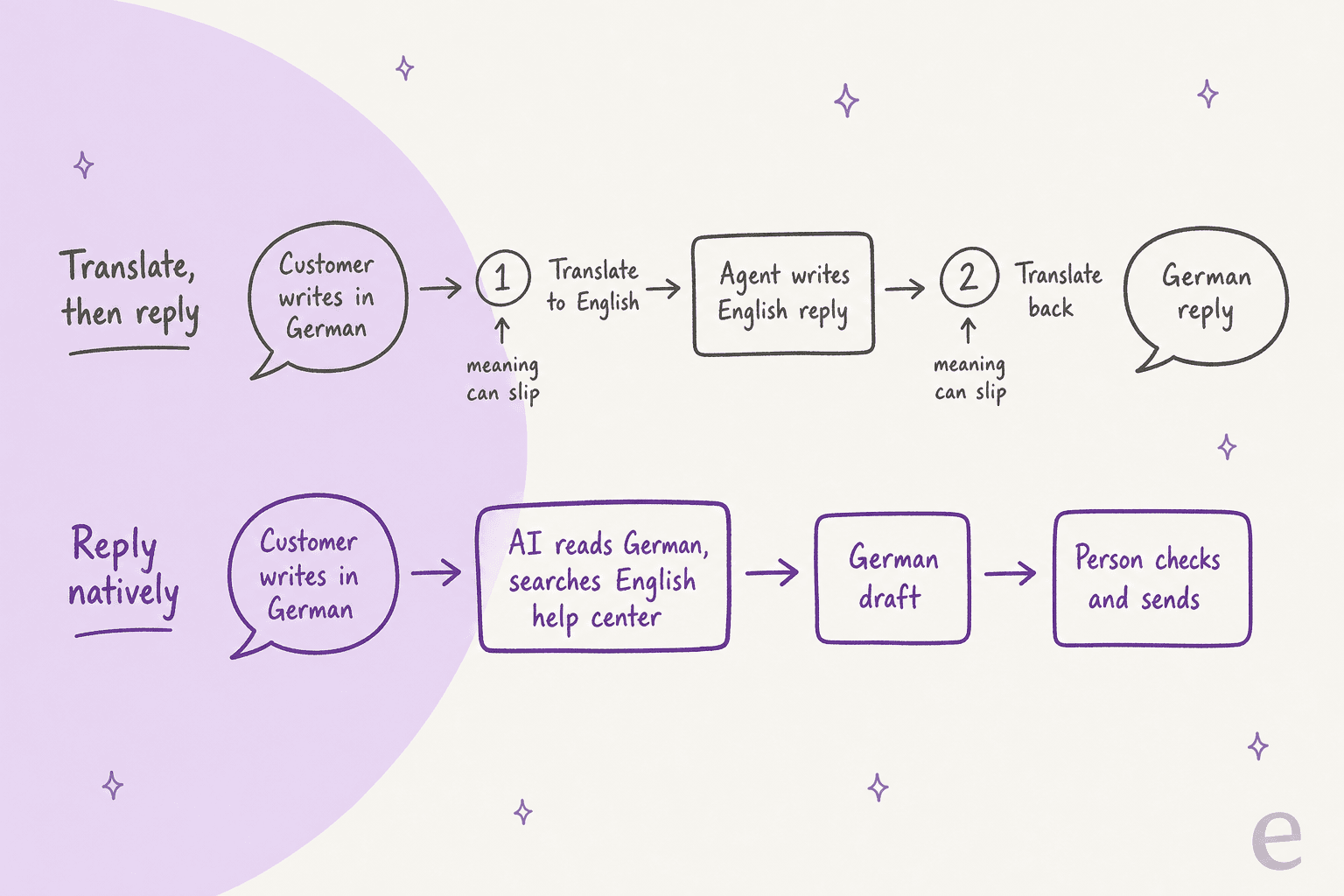
This is how eesel's AI helpdesk teammate works. It supports 80+ languages, and the helpdesk docs say it answers in the customer's language without you translating your help center. On a full connection it also learns from your past tickets, including the ones your team already answered in other languages.
What that looks like in practice, from teams running it today:
- Innr, a smart lighting brand in the Netherlands, runs eesel on Freshdesk. Customers write in Dutch, German, English or French, and eesel leaves a draft reply as an internal note in that language:
180drafts in a month, with German customers addressed with the formal "Sie" throughout. - Koffer.ch, a Swiss luggage shop, gets Freshdesk drafts in German, French, English or Italian, in Swiss spelling, from its own macros and policy pages.
- MentorShow runs it on HubSpot:
432reply drafts in a month, in French, English or Spanish, whichever the member wrote in.
Notice that none of these teams translated their help center first, and none of them added a translate button. The draft arrives in the right language, and the person on the ticket reviews it rather than writing it.
To be fair about the limits: an agent is only as good as what it can read. If your help center is thin, it will be thin in eight languages. In early trials I've also seen a Dutch draft come back with an unfilled "[Employee Name]" placeholder, which is the kind of thing you catch in the review step, not after it ships. That's why most teams start with drafts as internal notes, which is how eesel rolls out by default.
My take: for routine tickets (order status, how-to questions, returns policy), this is the option that takes work off the queue instead of just translating it. My roundup of the best AI for multilingual support compares the agents that do this.
Keep your terms straight: glossaries and tone
Whichever option you pick, two things go wrong in translated support more than anything else: product names and formality.
Product names. The fix is a do-not-translate list, or better, a glossary that says "this term, in this language, is always this." Here's what each route gives you:
| Route | Term control | Where it lives |
|---|---|---|
| DeepL API | Glossaries: 1 on Developer, 2,000 on Growth | DeepL account, applied per request |
| Zendesk | Up to 300 excluded terms (do-not-translate only) | Admin Center, Copilot add-on |
| Freshdesk, Gorgias, Front, Help Scout | None documented | n/a |
| Unbabel, Language I/O | Customer glossaries, Language I/O's self-improving | Inside the translation layer |
| eesel | A rule in its instructions, plus a glossary file it reads | Instructions and uploaded files |
eesel has no dedicated glossary screen. The documented way to get the same result is a plain-language rule in the agent's instructions ("never translate our product names; use the approved terms in our glossary file") and the term list itself as an uploaded file, such as a CSV. When you correct a draft in chat, the agent saves that correction as a rule, so you fix a mistranslated term once.
I went much deeper on this in my support translation glossary guide, including what to put in the term list.
Formality. German, French, Spanish and Japanese all force a choice between formal and informal address, and machine translation tends to flip between them. One writer put the rule simply:
"You must choose formal or informal pronouns (tu/vous, du/Sie) and use them consistently."
The right answer depends on your brand, which is why it has to be a setting you control. Two eesel customers made opposite calls: Innr's German drafts always use the formal "Sie", while Original Bootcamp, a German outdoor fitness company, answers Freshdesk tickets in the informal "du", four sentences at most. Both are a line in the agent's instructions.
Which tickets should a machine translate, and which need a person?
Not every translated ticket carries the same risk. A slightly odd word in a shipping update is harmless. The same slip in a refund dispute or a legal complaint is a real problem. I sort tickets by what one wrong word would cost:
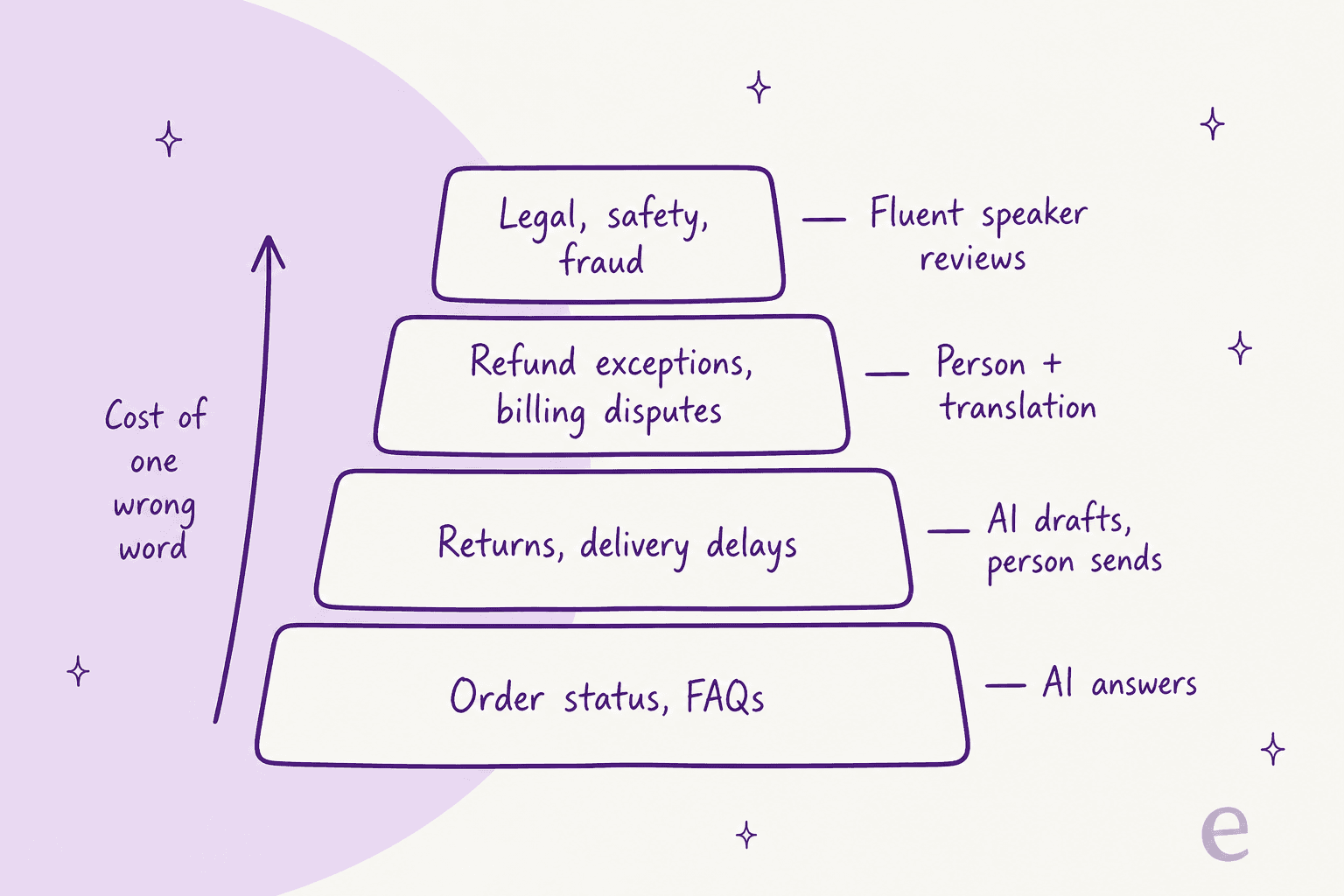
The hard part is checking quality in a language nobody on the team reads. This is how it often goes in practice:
"I was responsible for QA on a team taking Spanish calls. Don't speak a word myself. Yea, plenty of 100's were given."
Three habits make that better:
- Keep the original next to the translation. Zendesk, Freshdesk and Front all show both, which is a quiet advantage over copy-paste.
- Sample per language, not across the queue. If 5% of tickets are Portuguese, a random sample of 20 tickets contains none of them about a third of the time. My multilingual support QA guide shows how to set this up.
- Pay a fluent reviewer for a monthly spot-check. A freelancer reading 30 tickets in each of your top languages gives you a real quality number instead of a guess, without a full-time hire. Track reopen rate and CSAT per language alongside it, using the support metrics you already report on.
How I'd roll this out in a month
If I were starting from a queue with German, Portuguese and Japanese tickets and no plan, this is the order I'd go in:
- Week 1: turn on native translation. Use the widget above to see what your helpdesk already includes. On Zendesk, Gorgias or Front, it's a settings toggle. Tag tickets by language so you can measure each one.
- Week 2: write the term list. Product names, plan names, and the formal or informal rule per language. Load it wherever your route supports it, such as Zendesk's excluded terms list.
- Week 3: pilot an AI agent on routine tickets in one language. Start with drafts as internal notes. eesel can run a simulation on past tickets first, so you see how it would have answered real German tickets before it touches a live one.
- Week 4: compare and widen. Look at how often agents edited the drafts, reopen rate and CSAT by language, then add the next language or let the agent send the simplest ticket types itself.
You probably don't need a native German, Portuguese or Japanese hire until the volume or complexity of those tickets justifies it. One telematics team on an eesel sales call, expanding into German, Spanish and Italian markets, was worried that technical terms like "wiring harness" have no clean equivalent in some languages. That's exactly the case for a term list plus a person on the review step, not for skipping AI altogether.
Try eesel for multilingual tickets
If your team keeps opening tickets it can't read, eesel's AI helpdesk teammate plugs into Zendesk, Freshdesk, Gorgias, HubSpot and Front, reads each ticket in the customer's language, and drafts the reply in that language from your existing help center, macros and past tickets. You set the tone rules once (formal "Sie", Swiss spelling, never translate the product name) and correct it in plain language when it gets something wrong.

It starts free with 100 credits, and a ticket is 1 credit however long the conversation runs; paid plans start at $299 a month for 500 credits on the pricing page. Connect your helpdesk, let it draft on a week of real foreign-language tickets as internal notes, and judge it on those.
Frequently Asked Questions
What is customer service translation?
Customer service translation is how a support team reads and answers tickets, chats and emails written in a language the agent doesn't speak. It covers the inbound message, the outbound reply, and the terms that must stay consistent, such as product names. My support translation glossary guide covers the terminology side.
What is the best way to translate customer support tickets?
If your helpdesk already has a translate feature, turn it on first, since it keeps the original and the translation on the ticket. Zendesk, Gorgias and Front translate automatically, and Freshdesk translates when an agent clicks. For routine questions, an AI multilingual support agent that drafts the reply in the customer's language removes the translation step entirely.
Can I use DeepL or Google Translate for customer service translation?
Yes, and plenty of teams start there, but copy-pasting adds two manual steps per ticket and leaves no record on the ticket. Check the data terms too: DeepL lists "No data training" on its paid Growth API plan, not on the free Developer plan. My DeepL review covers the plans.
Does Zendesk translate tickets automatically?
Yes. Zendesk's conversation translation works on every channel except voice and is listed on Support Team and Suite Team plans and up. Copilot customers can also exclude up to 300 terms from AI translations. My Zendesk auto-translate guide walks through the setup.
How much does customer service translation cost?
It ranges from free to enterprise contracts. Gorgias includes ticket translation on all helpdesk plans, Freshdesk puts it behind the Freddy AI Copilot add-on at $29 per agent per month, and Unbabel and Language I/O quote on request. The DeepL API Growth plan is $26 a month billed annually plus usage. See DeepL pricing for the full table.
Should an AI agent translate replies or write them in the customer's language?
Writing in the customer's language is better for routine tickets, because the message goes through one model instead of two translation hops with an English draft in the middle. eesel, for example, answers in the customer's language from your existing help center without you translating it first. Keep a person on refunds, disputes and anything legal. My multilingual AI support post goes deeper.
How do I check translation quality if nobody on the team speaks the language?
Keep the original message next to the translation, sample tickets per language rather than across the whole queue, and pay a fluent reviewer to spot-check a small batch each month. Track reopen rate and CSAT by language. My guide to multilingual support QA sets up the scorecard.
How do I stop product names from being translated?
Use a do-not-translate list or glossary. Zendesk Copilot has a 300-term excluded list, DeepL supports glossaries on its API plans, and Unbabel and Language I/O are built around customer glossaries. In an AI agent like eesel, put the rule in its instructions and the term list in a file. See my translation glossary guide.