Why multilingual support QA fails quietly
Most support QA programs are built in English and then stretched. The scorecard gets copied, the reviewer pool stays the same, and someone turns on a translate button so the English-speaking reviewers can "read" the German queue. Scores come back looking fine. That's the problem.
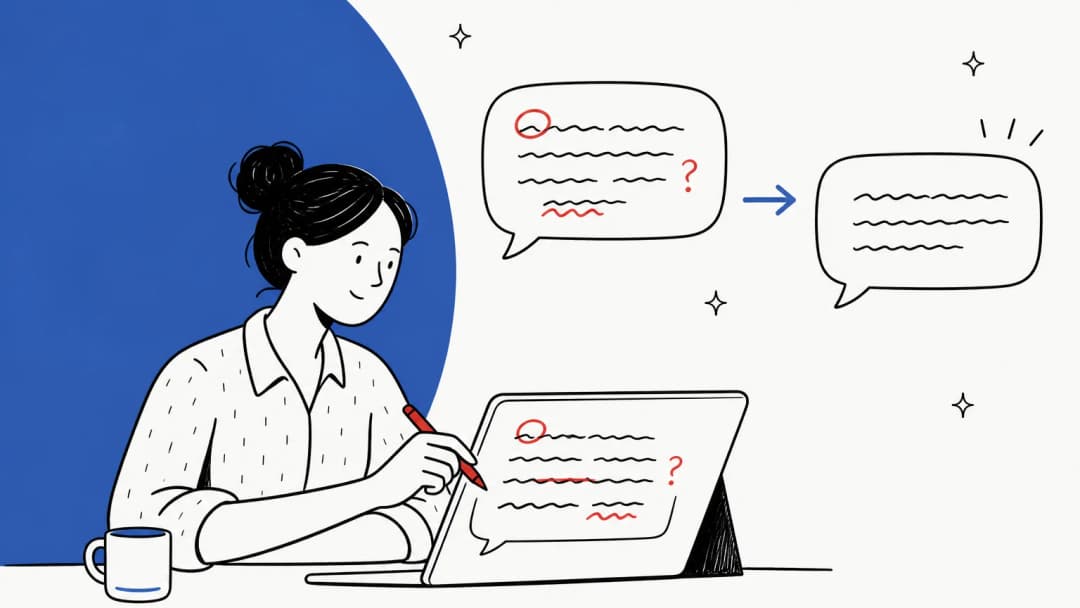
I've watched this go wrong from the inside. eesel has run AI on live helpdesks in German, Dutch, French, Spanish, Romanian and more for years, and the worst multilingual bug I've seen eesel ship wasn't a bad translation. In early 2026, German and Dutch draft replies went out with raw placeholders like {{ticket.requester.first_name}} and [Employee Name] still in them, on Belgian, German and Dutch helpdesks. A grammar checker would have scored those drafts fine. A native speaker reading the reply once would have caught it in two seconds.
That's the pattern. The errors that matter in a second language are mostly not spelling errors.
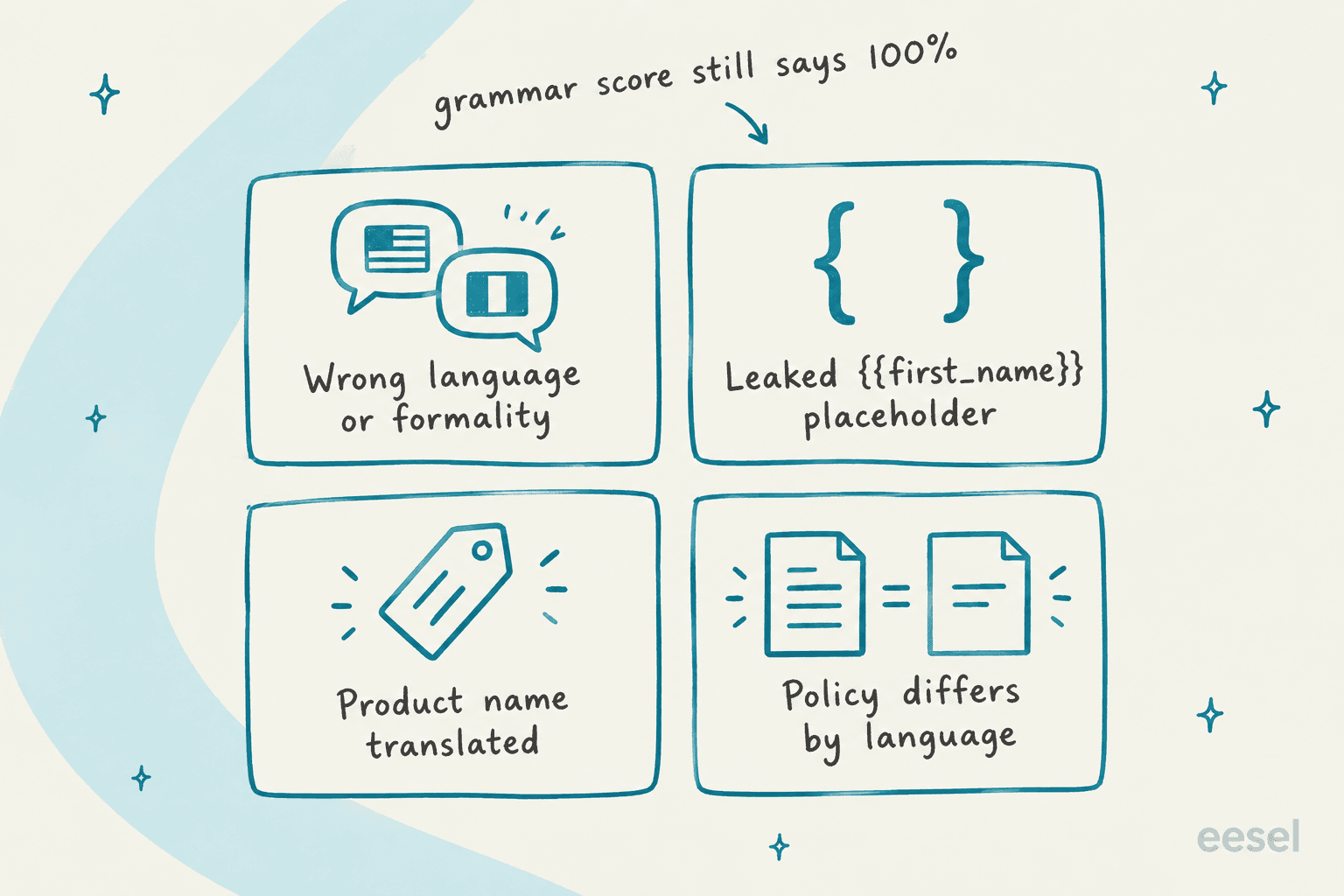
Here's what slips through when non-English QA is just English QA with a translate button:
- Register and formality. German du versus Sie, French tu versus vous, Japanese politeness levels. Machine translation flattens these, so a reviewer reading the English version never sees that the agent addressed a 60-year-old B2B customer like a teenager.
- Mechanics leaks. Placeholders, English fragments left in a macro, an English sign-off on a Spanish reply. These read as "nobody here speaks my language."
- Terminology. Your product name translated into a common noun, or three different words for the same feature across one reply. I wrote a whole guide on support translation glossaries because no helpdesk ships a ticket-level glossary today.
- Policy drift. The English macro says 30-day returns, the French macro was translated two years ago and still says 14. Each reply is grammatically perfect and one of them is wrong.
What to score in a non-English reply
Keep one scorecard for every language. Splitting into a "German scorecard" and an "English scorecard" is how scores stop being comparable. What changes per language is who can grade each line and what the examples look like.
I split the categories by one question: does this survive translation? If a reviewer reading a machine translation can grade it reliably, any trained reviewer can score it. If the signal lives in the original wording, only someone who reads the language should score it.
| Scorecard line | What it checks | Safe to grade from a translation? |
|---|---|---|
| Solution and accuracy | Right answer, right policy, right next step | Yes, if the translation is faithful |
| Process | Tagged, linked, escalated correctly | Yes |
| Comprehension | Did the agent understand the actual question | Mostly |
| Language match | Replied in the customer's language, no English fragments | Partly (needs the original view) |
| Spelling and grammar | Mechanics in the original language | No |
| Formality and tone | Sie vs du, politeness level, warmth | No |
| Terminology | Product names untouched, approved terms used | No |
| Placeholders and leaks | No {{ }} tokens, no internal notes, no wrong-language sign-off | Yes, but only in the original |
The four "No" rows are where your native-speaker review hours should go. Everything else can be graded by your existing reviewers with a translation, which keeps the program affordable. For the general rubric behind those rows, my guide to customer support language quality breaks down grammar, clarity and tone, and the customer service tone guide covers how to write tone rules people can actually grade against.
One more rule for the scorecard: make "policy differs from the English source" a critical error. MQM, the framework professional translation teams use to score quality, treats a single critical error as an automatic fail no matter how good the rest is (MQM values and scores). Support QA should borrow that. A beautifully written wrong refund policy is still a wrong refund policy.
Borrow the error types translators already use
You don't have to invent categories. MQM sorts translation errors into seven groups: terminology, accuracy, linguistic conventions, style, locale conventions, audience appropriateness, and design and markup (MQM error typology). Its default penalties are 0 for neutral, 1 for minor, 5 for major and 25 for critical errors (MQM values and scores). ISO 5060:2024 is the formal standard built on the same error-type-plus-penalty approach.
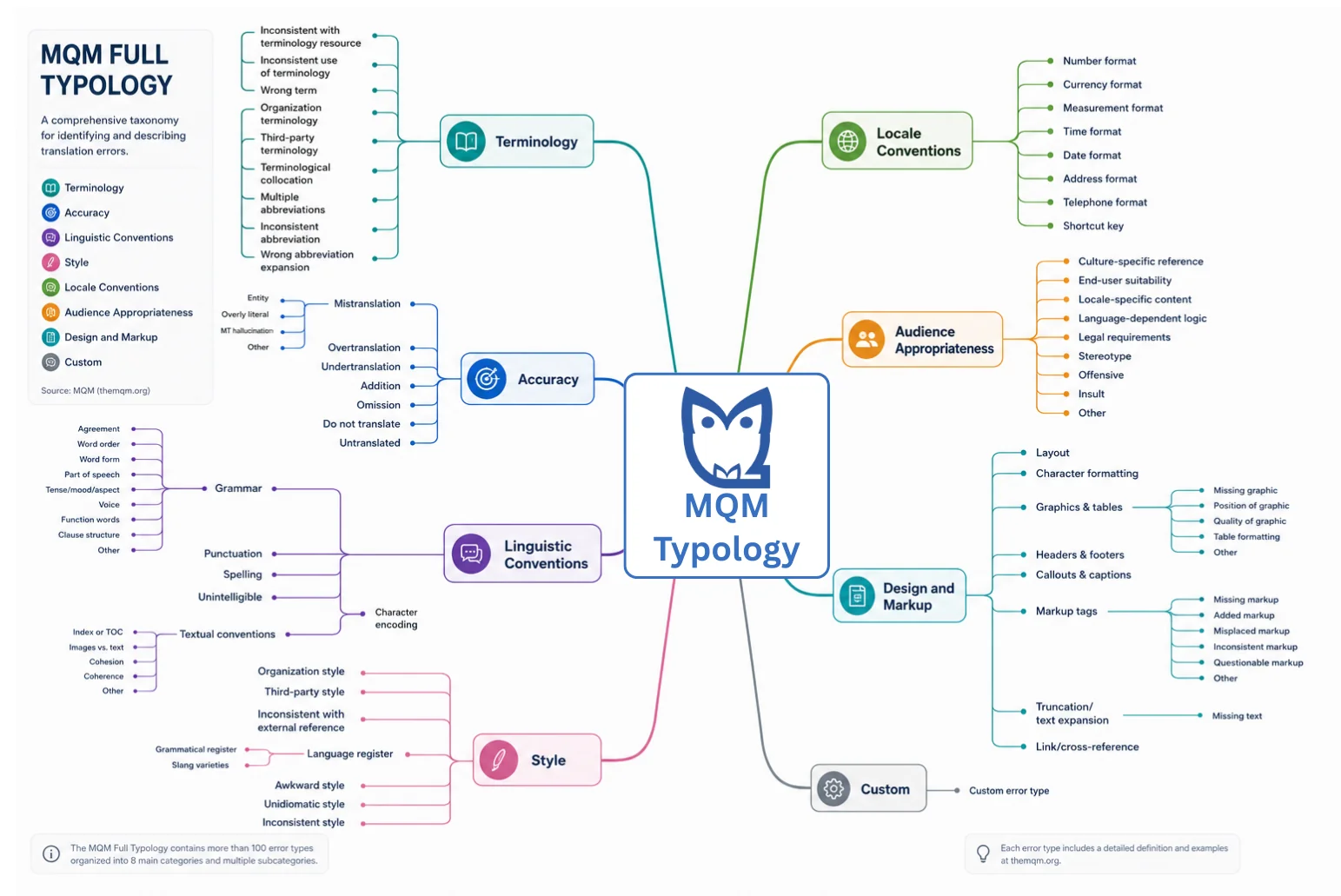
Two branches map neatly onto support work. "Locale conventions" covers date, currency, number and address formats, which is exactly where a US-trained agent writes 10/05 to a German customer who reads it as May 10. "Design and markup" covers missing or broken markup, which is the family the placeholder leak belongs to. I wouldn't run full MQM scoring on support tickets (it's built for translated documents and counts errors per 1,000 words), but using its category names as your error tags makes your QA data far easier to act on.
How to sample tickets when one language is 84% of volume
Random sampling is fair across tickets and unfair across languages. If English is 84% of your volume, German 12% and Dutch 4%, a random 50 reviews a week lands 42 in English, 6 in German and 2 in Dutch. Two reviews can't tell you whether your Dutch agent has a habit or had a bad Tuesday. Phone teams have the same problem, which is why call center QA programs usually stratify samples too.
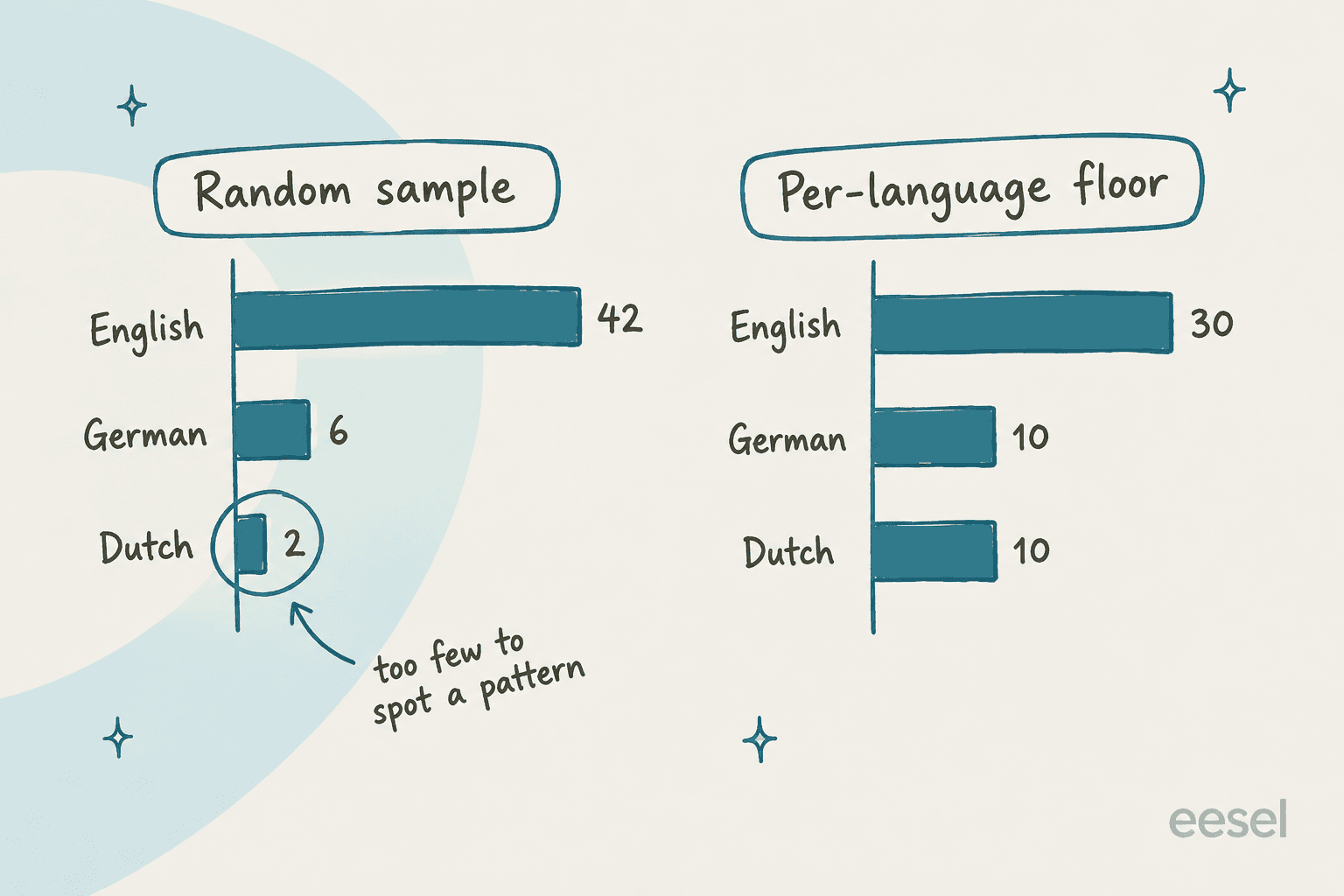
The fix is a floor: every language gets at least N reviews per week, and whatever budget is left goes to the big languages in proportion to volume. With a floor of 10, the same 50 reviews become 30 English, 10 German and 10 Dutch. English still gets the most attention. Dutch finally gets enough to see a pattern.
Plug your own numbers in here:
A floor of around 10 per language per week is the smallest number where I'd trust a trend. If your budget can't cover that for every language, review the small languages every other week at 20 instead of every week at 5. Fewer, bigger batches beat a trickle.
Two filters make the sample smarter, not just bigger:
- Oversample new agents and new languages. The first month of a new market or a new hire is when the errors are cheapest to fix. My agent onboarding guide covers how to front-load review for new starters.
- Oversample low CSAT in small languages. One angry Dutch customer is 1 in 25 Dutch tickets, not 1 in 625 overall. Pull those every time. AI CSAT tools can surface them automatically.
Who reviews what: native reviewers versus translated review
There are three ways to staff non-English QA, and most teams end up using all three.
1. Native reviewers in each language. The gold standard and the most expensive. Usually a senior agent on that language team, given a few hours a week of review time. For offshore teams, this is often the team lead in that hub. They own the four "No" rows on the scorecard.
2. Translated review by your core QA team. Your existing reviewers grade solution, process and comprehension through an in-tool translation. Cheap, and it keeps one set of eyes on accuracy across every market. Teams running follow-the-sun support lean on this most.
3. Native spot checks on translated reviews. Once a month, a native speaker re-grades a handful of conversations the core team already scored through translation. If the scores drift apart, the translated review is missing something and you move more volume to option 1. It's also where you find knowledge gaps that only exist in one language.
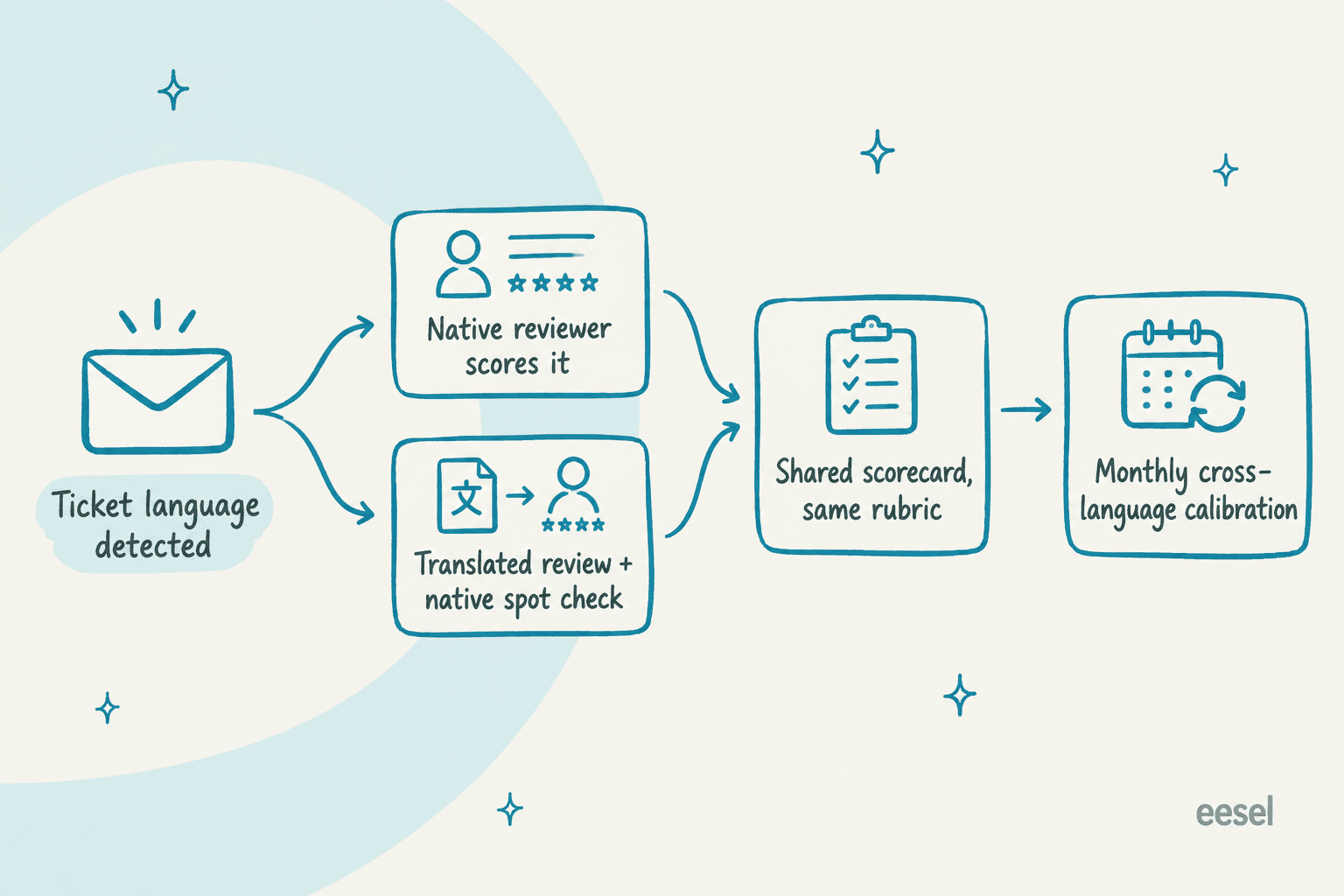
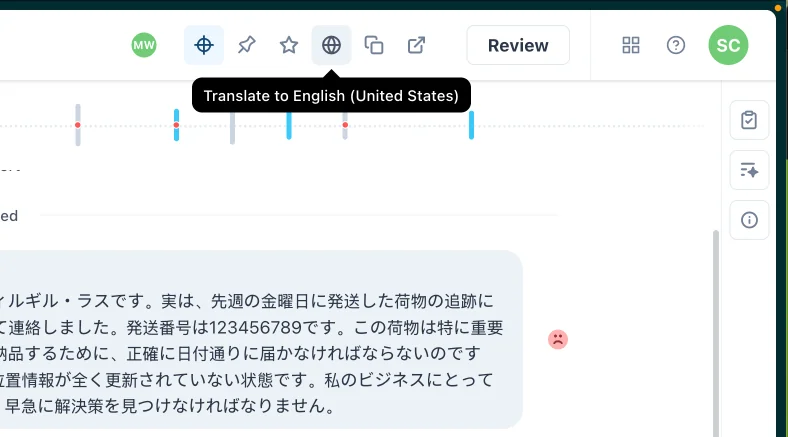
The routing is the part tools now handle well. In Zendesk QA, reviewers can translate a conversation into their own profile language by clicking a globe icon and toggle back to the original (Using the Conversations view). That covers 29 main languages, and Arabic, Hebrew and Ukrainian aren't on the QA list even though Support's live translation covers them (Zendesk language support by product).
For routing, Zendesk QA has a Language (AI) conversation filter with is / is not conditions (conversation filter types), and groups can organize reviewers "based on characteristics such as language" for use in assignments (groups in Zendesk QA). There's no single "sample N per language" switch I could find. You build the floor by creating one assignment per language with a Language (AI) condition and a fixed count.
One gotcha on the Zendesk Support side: the intelligent triage Language field is read from the subject and first public comment and "isn't updated on each end user reply" (intelligent triage). A customer who opens in English and switches to German stays an "English" ticket. Using triage values in workflows also needs the Copilot add-on (triage workflows). More on that setup in my Zendesk intelligent triage guide.
This is what happens without it. One call-center QA lead put it bluntly on Reddit:
"I was responsible for QA on a team taking Spanish calls. Don't speak a word myself. Yea, plenty of 100's were given."

Perfect scores from a reviewer who can't read the conversation aren't quality data. They're a blind spot with a number on it.
What automated QA can and can't score in other languages
Automated QA closes the coverage gap, but its language list is shorter than most teams assume. Here's Zendesk QA's AutoQA coverage, which needs the QA or Workforce Engagement add-on (autoscoring categories):
| AutoQA category | Languages with the LLM option on | With it off |
|---|---|---|
| Spelling and grammar | 9 variants: English (US, UK), German, French, Polish, Spanish, Portuguese (BR, PT), Dutch | Same 9 |
| Readability | English, Spanish | English, Spanish |
| Greeting, Closing | All | 8 languages |
| Tone, Empathy, Comprehension, Solution offered | All | Not available |
Read that first row again. An Italian, Japanese or Swedish agent gets no automated spelling and grammar score at all, even with the LLM option on. If half your team writes in those languages, your "100% coverage" dashboard is grading them on everything except the thing a native customer notices first.
Per-language settings matter too. Spelling exemptions (up to 300) and approved greetings (up to 200) are each tagged to a language, and "greetings are not translated" (customizing AutoQA). Zendesk's own example: approve "Bom dia" for all languages and an agent who writes "Buenos días" on a Spanish conversation gets a downvote.
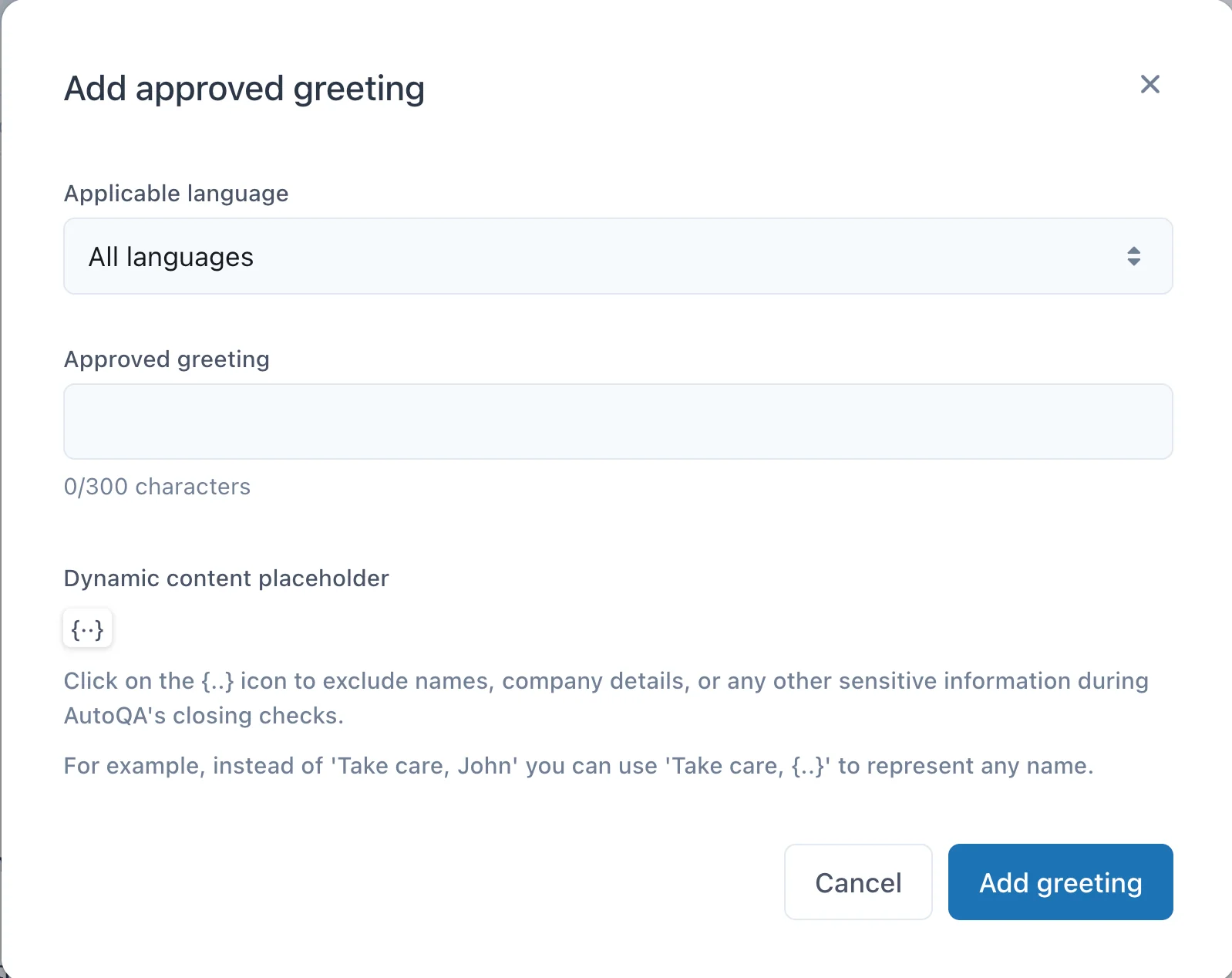
So set greetings and closings per language on day one, or your automated scores will punish exactly the agents who are doing the localized thing right. Zendesk also says its automated evaluations are "for guidance only" and shouldn't drive performance decisions on their own (Zendesk QA account settings), which is the right posture for any language where the auto-score has gaps.
Other QA platforms document less. evaluagent lets you write generative AI QA line items in your own language and auto-detects the spoken language on calls. Rippit (the renamed MaestroQA) scores 100% of conversations with plain-language agents (Rippit announcement), but I couldn't find documented translation or language-filter features. If language coverage matters to you, ask for the list in writing before you buy.
The AI QA tools I've compared vary a lot here, and my roundup of QA tools covers the wider field.
What your helpdesk gives reviewers out of the box
The QA tool is only half of it. Reviewers often work inside the helpdesk, and what they can see there depends on the translation feature your agents use.
| Helpdesk | Language detection | Translation a reviewer can see | Plan or limit |
|---|---|---|---|
| Zendesk | Triage Language field, ~150 languages, first message only | Conversation translation on all channels except voice; incoming chat translations aren't saved and re-run on reload | Ticket translation on Team+; triage in workflows needs Copilot |
| Freshdesk | Detected per ticket, agents can override | Live Translate with "See original", 43 languages | Pro/Enterprise, 100 translated tickets per Copilot license per month |
| Gorgias | Up to 54 languages, message body only | Inbound and outbound translation, hover to see original | All helpdesk plans |
| Front | Auto-detected on inbound and outbound | Translation stays visible to every teammate on the thread | Starter+, 1,500 requests per teammate per day |
| Help Scout | Not documented for inbound | AI Assist translates outgoing text only | Plus/Pro, or contact-based plans |
Two lines in that table cause real QA headaches. Zendesk's incoming chat translations "run again each time a ticket is updated or reloaded, so translation results may vary" (Zendesk), so the English a reviewer reads may not be the English the agent saw. And Freshdesk counts a ticket again when a different agent translates it (Freshdesk), so a QA reviewer opening the translation can eat into the agents' monthly cap. On Freshdesk, have reviewers use the QA tool's translation, not the agent one.
For deeper dives per tool, see Zendesk's native translation options, Front AI Translate and Freddy AI Copilot.
If you use a translation layer, read its quality report
Teams on Unbabel or Language I/O already have a second QA signal and often ignore it. Unbabel runs quality estimation on every translation, predicting the MQM score a human reviewer would give. Its reports sort translations into five bands, from Best (98 and up) to Weak (under 60), and a language pair fails its threshold when more than 10% lands in the red (Unbabel quality reporting).
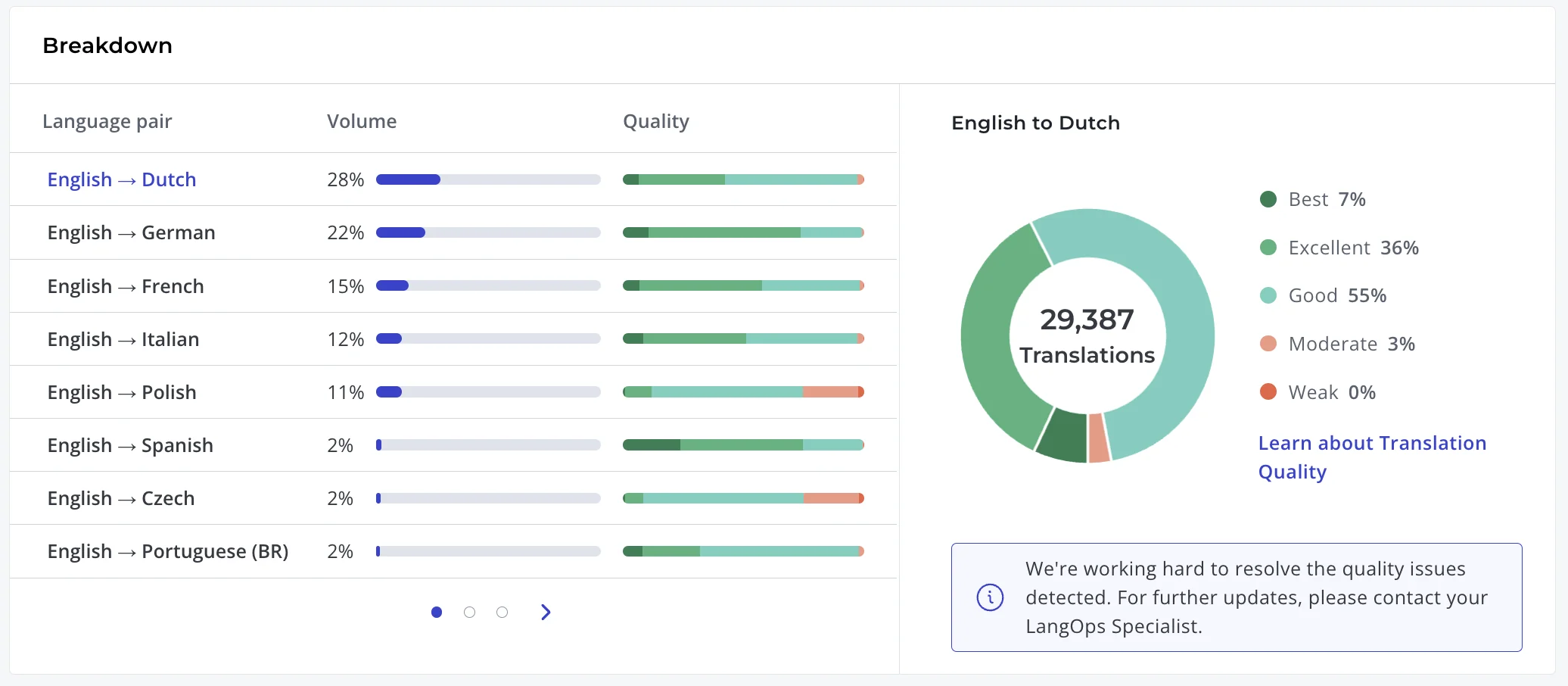
That per-pair view is useful for sampling. If English to Polish has noticeably more Moderate translations than English to German, put more of your native review hours on Polish next month. Language I/O describes real-time quality monitoring against past results and glossary rules, and lets agents flag and regenerate a bad translation, though it doesn't publish a scoring scale.
What these reports can't tell you: whether the source reply was right. A perfect translation of a wrong answer scores Best. Translation quality and support quality are two different checks, and you need both.
How to calibrate across language teams
Calibration is where multilingual QA programs either hold together or split into islands. The goal is simple: a "4 out of 5" from your Spanish reviewer has to mean the same thing as a "4" from your English reviewer.
What works, in my experience:
- Pick 5 to 8 conversations a month, at least one per language. Use a mix: one clean reply, one with a policy error, one with a tone problem.
- Everyone scores the same conversations independently, through translation if needed. Native reviewers also score the language-only rows for their language.
- Compare scores line by line, not totals. A matching total can hide a reviewer who's strict on tone and loose on accuracy.
- Write down every disagreement that gets resolved as an example in the rubric, and feed repeat issues into coaching. "Using du with a B2B customer = tone fail, see ticket 4821" is worth more than a paragraph of definition.
- Track the spread per language over time. If one language team's scores keep drifting, that team needs its own session.
Zendesk QA's accuracy score is a useful model here: it measures agreement between AutoQA and human reviewers, and Zendesk treats anything above 75% as high agreement (AutoQA dashboard). Run the same idea between your human reviewers. For giving the resulting feedback to agents, my guides to QA feedback examples and support agent feedback cover the wording.
The opposite failure is just as common: grading a non-English conversation against the English wording. A bilingual agent described exactly that:
"I got QA-ed that my Spanish questions were not close enough to the English script, deducted 7 points."
There was no Spanish script. Calibration sessions are where that kind of rule gets caught and rewritten as "matches the intent of the script, in natural Spanish."
QA for AI replies in other languages
If an AI agent drafts or sends replies in other languages, everything above still applies, plus one more rule: test every language before launch, not just English.
AI is very good at multilingual support. In one eesel trial, a German jewelry brand running about 1,000 tickets a month on Zendesk and Shopify watched its agent handle German, English, French, Dutch, Spanish, Polish, Croatian and Turkish without anyone configuring a single language. That's the upside. The downside is that every language becomes a live surface you're responsible for, including the ones nobody on your team reads.
The flip side shows up when nobody reviews the non-English output. One Zendesk admin described their old multilingual answer bot:
"the translations were often times wrong and our customers got mixed languages during their chat with the bot, ID customers will sometimes get Portuguese, IN customers would sometimes get Indonesian, and so on and so forth."
What I'd check per language before turning on autopilot:
- Answers come from your knowledge, not general knowledge. The same help center article should produce the same policy in French as in English. If your multilingual knowledge base has gaps, the AI inherits them.
- Formality matches your brand per market. Write it as a rule ("use Sie with all German customers") rather than hoping.
- Product names stay untranslated. A do-not-translate list belongs in your instructions. My translation glossary guide shows how.
- No placeholders, no English fragments, no wrong-language sign-offs. This is the one I'd check first, for the reasons I gave at the top.
Then run it against history. eesel's simulation replays real past tickets, scores each answer and suggests fixes (eesel skills). Filter that run to your German and Dutch tickets and you get a per-language read before a single customer sees a draft. Zendesk QA also scores Zendesk AI agents automatically and lets you flag other bots for review (AI agents in Zendesk QA), which covers the after-launch side. My guide to Zendesk QA for AI agents goes deeper.
Common mistakes in multilingual support QA
- Reviewing only through translation. It catches wrong answers and misses everything a native customer reacts to first.
- One English reviewer "owning" all small languages. Fine for accuracy, blind to tone. Give each language a native spot checker, even a part-time one.
- Copying English greetings into every language. Your automated scores then punish the agents who localize properly.
- Trusting the detected language field. It's often set from the first message only. Mixed-language tickets end up in the wrong bucket.
- Treating translation quality as support quality. A flawless translation of the wrong policy still fails the customer.
- Not versioning macros across languages. Policy drift starts the day someone updates the English macro and forgets the other five. A support SOP with an owner per language stops it.
Try eesel for multilingual support
If you're running support in three or four languages, QA load grows with every market you add. It's why I put eesel on my list of the best AI for multilingual support.
eesel's AI helpdesk teammate plugs into Zendesk, Freshdesk and the rest of your stack, answers in the customer's language without you translating your help center, and takes plain-language rules like "use Sie with German customers" or "never translate our product names." Before it goes live, you replay your own past tickets in each language and see where it would have gone wrong.

Most teams start with drafts as internal notes, so your native reviewers see every non-English reply before a customer does, and move to auto-send per language once the scores hold. Plans start at $299 a month for 500 credits, with a free trial (eesel pricing). Try eesel on one language queue first and see how it scores.
Frequently Asked Questions
What is multilingual support QA?
How do you QA support tickets in a language your reviewers don't speak?
How many tickets should I review per language?
Does Zendesk QA work in other languages?
What should a multilingual QA scorecard include?
How do you calibrate QA scores across language teams?
How do you QA an AI agent that replies in multiple languages?



Article by
Kurnia Kharisma
Kurnia is a software engineer and writer at eesel AI with two years of SEO experience, writing about AI tools, helpdesk software, and customer support. He pairs a developer's understanding of how these products are built with search-driven research into what actually ranks and resonates with the people searching for them.