What customer support quality assurance tools actually do
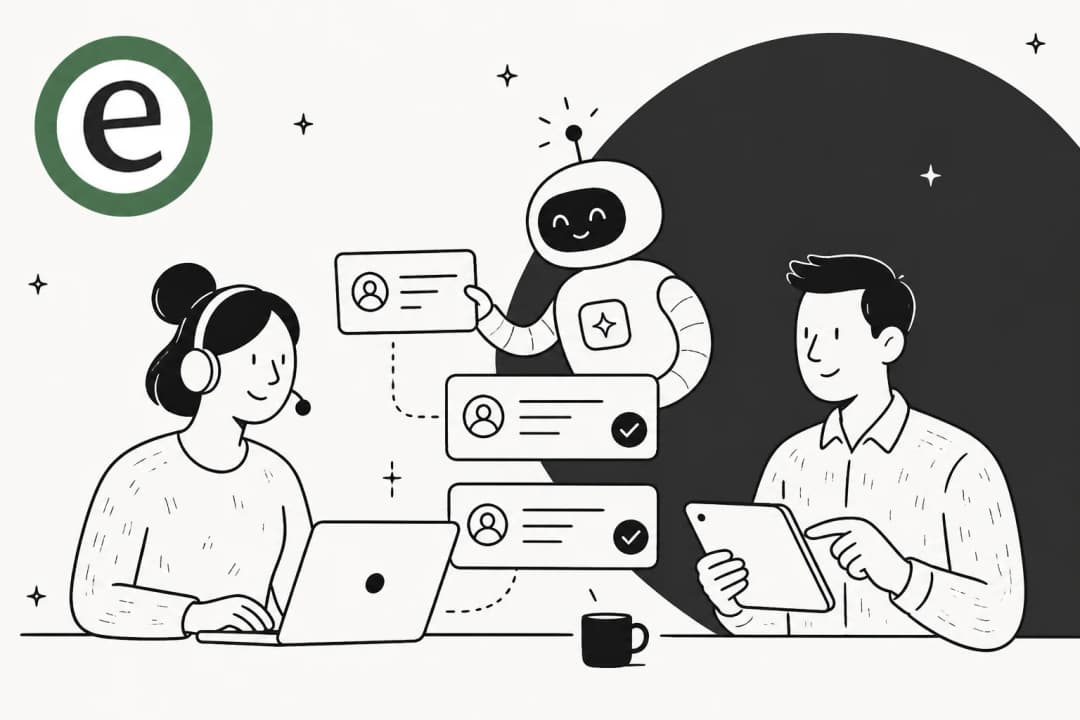
Quality assurance in support is the practice of reviewing conversations against a rubric, a scorecard, so you can measure whether agents are accurate, on-brand, empathetic, and actually resolving the issue. Traditionally a QA lead pulled a random sample of tickets each week, graded them by hand, and ran a coaching session off the results.
The math never worked. A senior QA analyst can review maybe a few dozen tickets a week. If your team handles thousands, you are sampling a rounding error and calling it a quality program. One support lead put it bluntly on Reddit: "Random QA on ~5-10% per agent/queue... Biggest misses usually don't show up in CSAT, they show up in repeat contacts and tone drift."
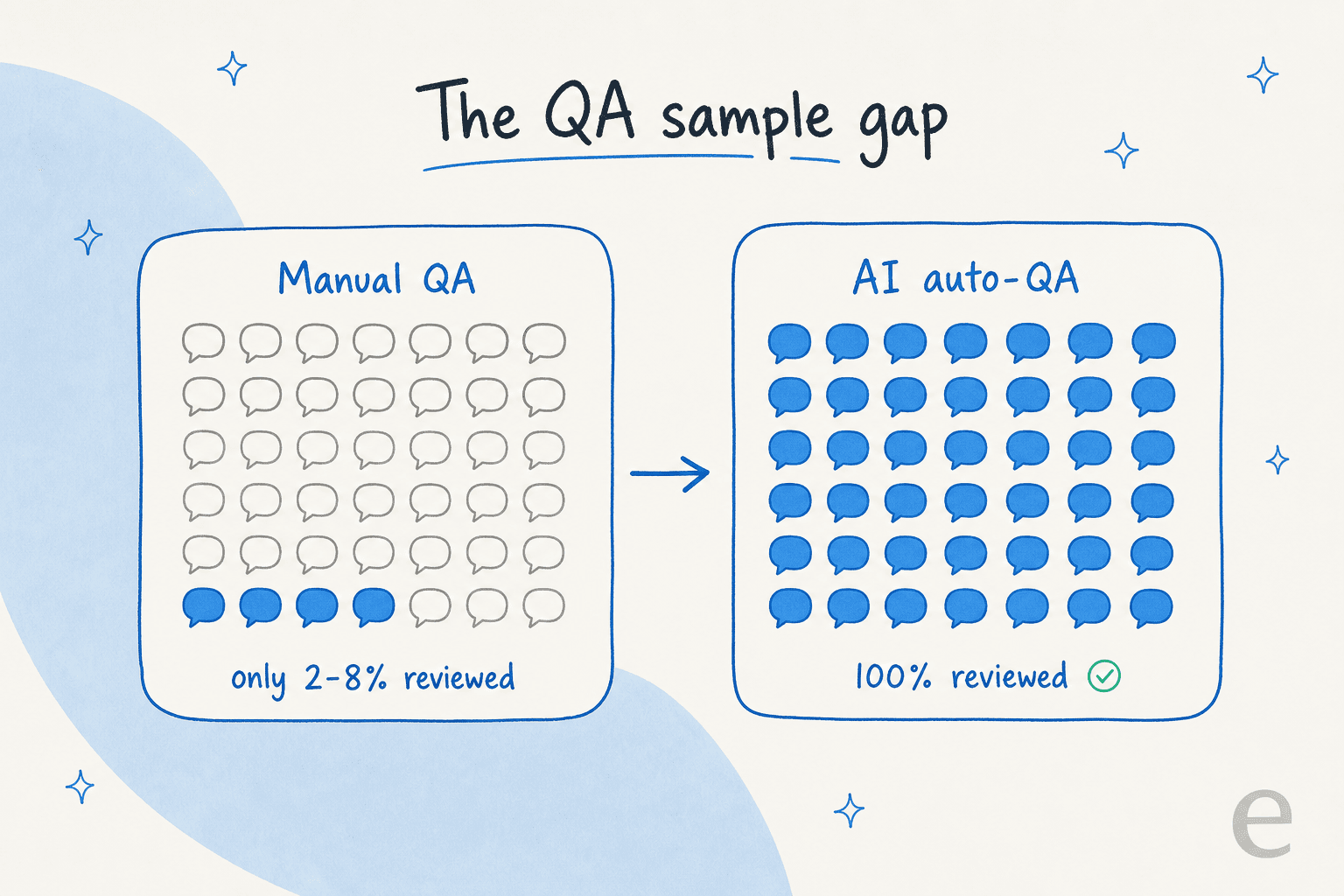
The whole category has reoriented around closing that gap. Every serious tool now leads with some version of "AutoQA" or "AutoQM": AI that scores 100% of conversations against your scorecard, then uses filters to surface the risky ones. The human stops being a random grader and becomes a reviewer of the conversations that matter, the churn risks, the escalations, the ones where tone drifted. If you are new to running a program like this, our primer on support QA with AI walks through the setup.
What to look for when choosing a tool
After looking at the current crop, these are the dimensions I would actually weigh:
- Auto-QA coverage. Does it genuinely score every conversation, or is the AI just a summarization helper bolted onto manual scorecards? This is the single biggest differentiator now.
- Channel and helpdesk fit. Voice, chat, and email, and does it connect to your stack rather than forcing a migration.
- AI-agent QA. If you run (or plan to run) a bot, can the tool grade the bot's conversations too, and can you prevent hallucinations before they ship?
- Coaching loop. Scoring is worthless if it does not turn into agent coaching. Calibration, 1:1s, and disputes matter here.
- Pricing transparency. Most of this category hides pricing behind a demo. A published starting price is a small act of respect.
- Setup weight. A BPO-grade platform with a 3-month implementation is overkill for a 10-person team.
There are now two kinds of QA
Here is the reframe that changes the shortlist. For years, QA meant one thing: reviewing what your human agents did. In 2026, AI agents are handling tier-1 tickets directly, and a bot needs quality checks just as badly as a person does, arguably worse, because it can be confidently wrong at scale.
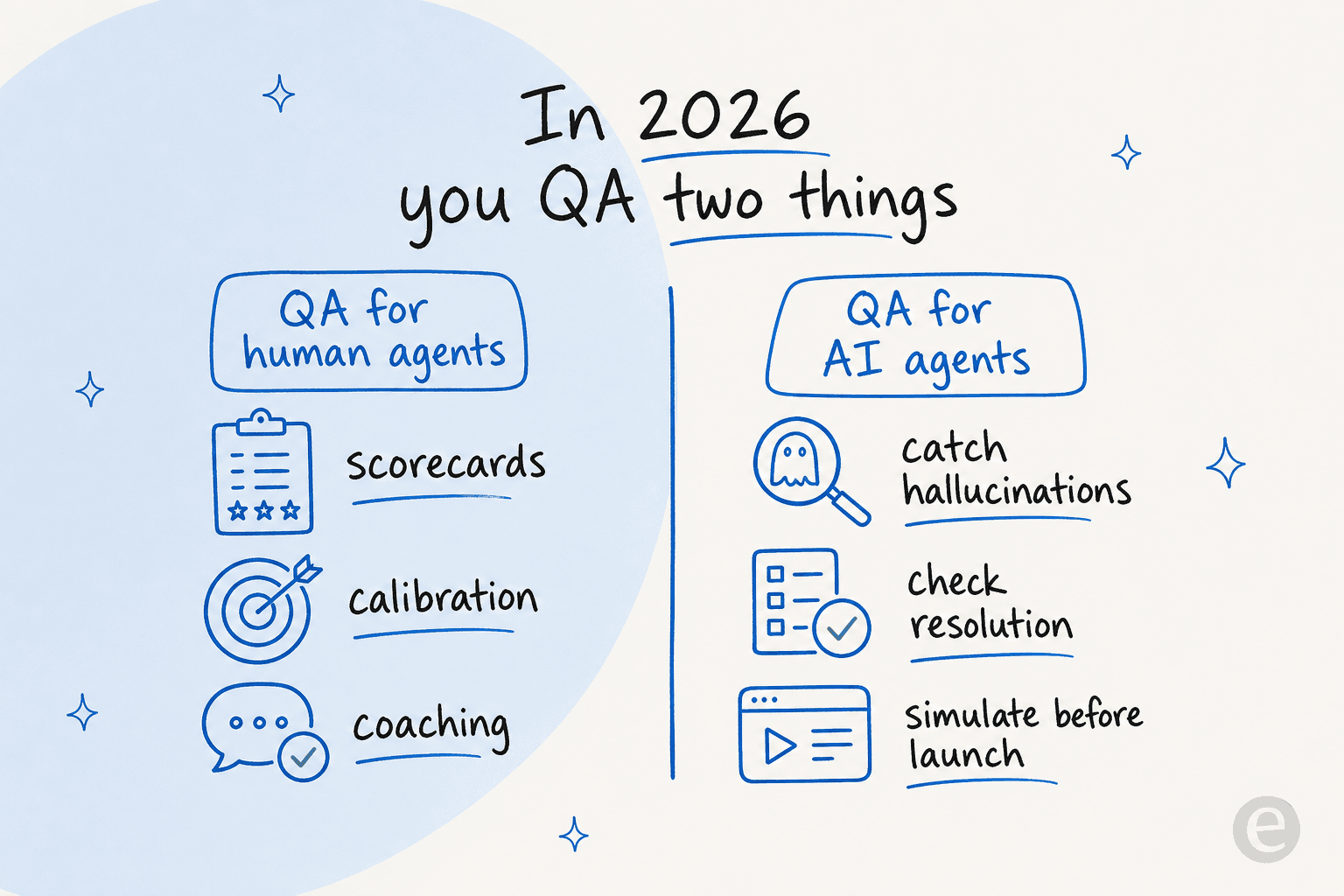
The traditional tools below (MaestroQA, Zendesk QA, EvaluAgent, Playvox) are adding "AI agent QA" as a feature: grade the bot's conversations after the fact, the same way you grade a human's. That is useful, and if you want to see what a well-run bot looks like first, our collection of AI agent examples is a good tour. But the most valuable QA happens before the AI answers anyone, which is why I am starting this list with a tool that approaches the problem from the other end.
The 6 best customer support quality assurance tools
Here is how the six compare at a glance before I dig into each one.
| Tool | Best for | Auto-QA coverage | AI-agent QA | Public starting price | Free trial | SOC 2 |
|---|---|---|---|---|---|---|
| eesel AI | QA-ing your AI agent before launch | Simulation on past tickets | Native (it is the agent) | $0.40 / ticket, usage-based | Yes ($50 free) | In progress |
| MaestroQA | Enterprise conversation analytics | 100% via Auto QA | Chatbot monitoring | Demo only | Demo only | Yes |
| Zendesk QA | Zendesk-native teams | 100% via AutoQA | AI Agent QA | ~$50 / agent/mo bundle | Contact sales | Yes (Type 2) |
| EvaluAgent | Regulated / BPO contact centers | 100% via AutoQM | AI Agent Observability | $35 / user/mo | POC only | Yes (Type II) |
| Playvox by NiCE | Full WEM at contact-center scale | AI assist on scorecards | Via NiCE suite | Demo only | Demo only | Yes |
| Loris (Contentsquare) | Conversation intelligence + QA | 100% auto-QA | AI Agent Analytics | Demo only | Demo only | Yes |
A quick note on scope: this list is about tools that help you assure the quality of support conversations. If what you actually want is to automate the replies themselves, that is a different (overlapping) category, and our roundup of AI for Zendesk is the better starting point.
1. eesel AI
Best for: teams deploying an AI support agent who want to QA the bot before it touches a real customer.
I am putting eesel first not because it is a classic scorecard tool, it is not, but because it answers the QA question most of this list ignores. If you are about to let AI handle tier-1 tickets, the scariest moment is go-live. eesel's AI helpdesk agent is built around a simulation step that is, effectively, QA for your AI.

Here is the workflow that sold me on the approach. Instead of turning a bot loose and finding out in production whether it hallucinates, you run it against thousands of your real historical tickets first. eesel shows you the predicted resolution rate, breaks coverage down by theme, and flags exactly where the AI would have fumbled so you can fill the knowledge gap and re-run before anything goes live.
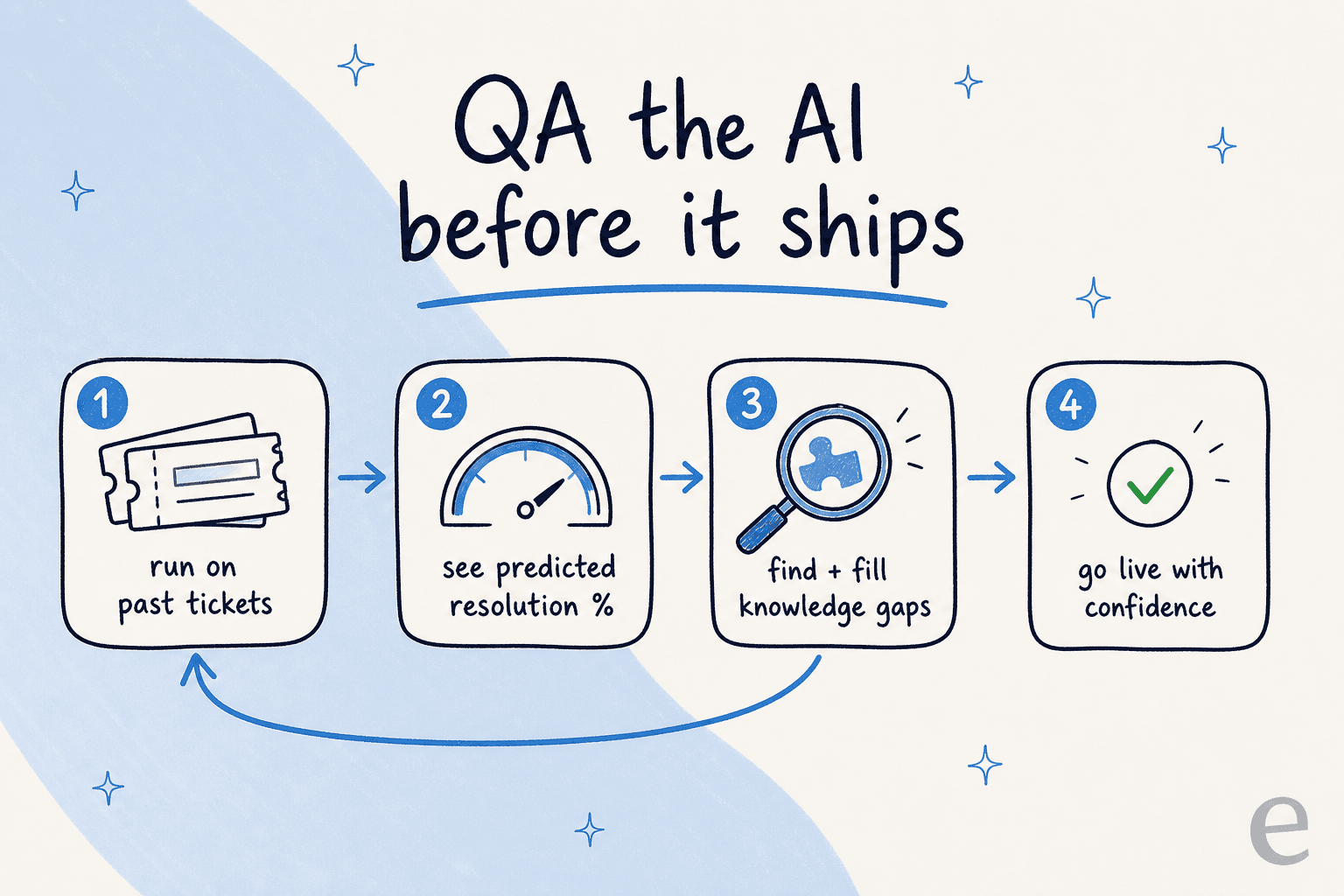
Once it is live, the QA does not stop. eesel keeps confidence-based routing in place (low-confidence answers get drafted for a human rather than sent), learns from every correction, and surfaces recurring ticket themes and gaps in your knowledge base. It is the quality loop, just applied to the AI instead of a roster of agents. Instead of the usual grind of training a support agent over weeks, the feedback lands in one place.
The proof is in the deployments: eesel resolved 73% of tier-1 requests in the first month for Gridwise, and Smava runs a fully automated Zendesk agent handling 100,000+ German-language tickets a month. You do not hit numbers like that without QA-ing the agent hard before and during rollout.
Pros:
- Simulation on real ticket history means you QA the AI before customers see it, not after.
- Usage-based pricing with no per-seat fees, so QA-ing and running the agent scales with volume, not headcount.
- Plugs into Zendesk, Freshdesk, HubSpot, Gorgias, Front and 100+ tools in minutes, no migration.
- Confidence routing and learning-from-corrections keep quality improving in production.
Cons:
- It is not a traditional human-agent scorecard tool. If your job is grading 40 human agents with calibration sessions, pair it with one of the tools below.
- SOC 2 is in progress rather than certified (a BAA and EU data residency are available for enterprise).
Pricing: usage-based at $0.40 per ticket with no platform or seat fees, a free tier with $50 of usage, and a $1,000/month enterprise plan for SSO, HIPAA and a BAA.
Verdict: if you are standing up an AI agent, eesel is the QA step you should not skip. It is the difference between hoping the bot behaves and knowing its resolution rate before it answers a soul.
2. MaestroQA
Best for: mid-market and enterprise teams that want deep conversation analytics on top of QA.
MaestroQA started life as a contact-center QA tool (manual scorecards, agent reviews) and has since repositioned as a "conversation data platform" that ingests calls, chats, emails, bots, and surveys, then analyzes 100% of them with AI. It is the name that keeps coming up when support leads ask each other for a QA vendor: as one put it, "MaestroQA seems to be the usual Zendesk QA tool everywhere I've worked."
The toolkit is broad: a scorecard builder, calibrations so reviewers grade consistently, coaching workflows, screen capture, auto QA, plus ticket summarization and an AskAI layer for prompting your way into performance insights. Customers like DraftKings, Etsy, and Oura use it, and Oura's line captures the appeal: "We're now evaluating 100% of interactions, not just the 8% that get a CSAT response."
Pros:
- Deep, flexible analytics and reporting, well beyond a simple scorecard.
- Coaching is a consistent standout; reviewers say it turns QA from pass/fail into real improvement.
- Strong compliance posture (HIPAA, SOC 2, PCI, ISO, GDPR).
Cons:
- Pricing is entirely demo-gated; no public plan or per-seat number, which frustrates buyers who just want to budget.
- It is an analytics platform, so it is more than a small team needs if you only want ticket QA.
Pricing: not public. The pricing page is a lead form only, so you will need a sales conversation for a quote.
Verdict: pick MaestroQA if QA is part of a broader conversation-analytics ambition and you have the volume (and budget) to justify an enterprise platform. If you just want tickets graded, it is heavier than necessary.
3. Zendesk QA (formerly Klaus)
Best for: teams already living in Zendesk who want QA without adding another vendor.
Zendesk QA is the product that used to be the standalone startup Klaus, which Zendesk acquired in 2024 and folded into its Workforce Engagement Management suite. The Klaus name still shows up in older reviews, but the product is now Zendesk-native.
The core is AutoQA, which scores 100% of conversations across channels using out-of-the-box categories (tone, empathy, solution) plus custom prompt-based criteria you describe in plain language. Spotlight automatically flags high-risk conversations, churn signals, escalations, dead air on calls, and knowledge gaps, so reviewers skip straight to what matters. There is also a dedicated AI Agent QA that applies the same quality standards to bot conversations and compares human versus bot scores side by side.
The acquisition itself is a reason buyers pick it. One vendor-shopping thread landed on: "ZD are buying Klaus. That would be my first choice." Another praised the coverage: "+1 for Klaus... they work with everything, so chats, emails, calls etc."
Pros:
- Native to Zendesk, so setup is trivial if you already run it.
- Real-time QA and AI Agent QA are included in the add-on.
- SOC 2 Type 2, GDPR, and HIPAA-enabled.
Cons:
- It is an add-on, not standalone. You need a paid Zendesk plan underneath it.
- Only the bundle price is public; finer QA tiering is sales-gated.
- Sampling can still miss tone drift unless you configure it well, a pain point users flag.
Pricing: sold as a Workforce Engagement bundle at roughly $50 per agent/month (billed yearly), on top of a Support or Suite base plan ($19 to $115 per agent/month).
Verdict: if you are on Zendesk, this is the obvious, low-friction choice. If you are on Freshdesk or another stack, there is no reason to adopt Zendesk just to get its QA; a portable AI layer for Freshdesk or another helpdesk makes more sense. Weighing a move? Our take on Zendesk alternatives is a fair place to start.
4. EvaluAgent
Best for: regulated industries and BPOs that want a full QA-to-coaching program with a published starting price.
EvaluAgent (stylized "evaluagent") is a UK-rooted contact-center QA and performance platform built around AutoQM, automated AI scoring of 100% of voice, chat, and email conversations. It sells hard into regulated sectors (banking, insurance, gambling), with customers like Vitality, Samsung, and Jet2.
What I like here is the completeness of the loop: bespoke and blended scorecards, AI-scored line items with visible reasoning, calibration and agent disputes, smart routing of high-risk contacts to reviewers, sentiment analysis through the whole conversation, and structured coaching with HR-ready improvement plans. It also has a proper AI Agent Observability layer that grades bots (Cognigy, Sierra, in-house) against the same engine, catching hallucinations and off-policy answers. The results teams report are concrete: The Share Centre cut audit time from 24 minutes to just over 6 and lifted its pass rate from 73% to 85%.
Pros:
- Publishes a transparent starting price, rare in this category.
- Genuinely complete QA-to-coaching workflow with strong calibration and disputes.
- Heavy compliance framing (SOC 2 Type II, ISO 27001, HIPAA, "EU AI Act Ready").
- Holds 4.5 stars across 437 G2 reviews, with ease of use the recurring praise.
Cons:
- No self-serve free trial, evaluation runs through a proof of concept after a demo.
- Per-conversation AI-agent pricing stacks on top of seat licenses, so a high-volume bot's cost is hard to forecast.
- Ops-heavy; likely more process weight than a small team wants.
Pricing: from $35 per user/month for AutoQM & Improvement, $65 for the Conversation Intelligence tier, plus $0.05 to $0.13 per conversation for AI-agent QA on top.
Verdict: for a formal QA program in a regulated contact center, EvaluAgent is one of the strongest picks here, and the transparent floor price makes it easy to sanity-check budget. Small teams will find it heavier than they need.
5. Playvox by NiCE
Best for: larger contact centers that want quality management and workforce management in one suite.
Playvox is a quality management and workforce engagement platform that goes past basic QA into the full lifecycle: evaluate, calibrate, coach, train, and gamify. It was acquired by NiCE in 2024 and is now marketed as "Playvox by NiCE," which is worth knowing before you buy, because you are really evaluating a NiCE WEM module now.
The strengths are consistent in reviews: customizable scorecards, calibration to keep reviewers aligned, agent dispute/appeal, coaching tied to identified issues, a lightweight LMS, and a genuinely fun motivation layer (Karma Points, badges, a rewards store). It rates a strong 4.8 out of 5 across ~1,163 G2 reviews, with "everything in one place" the dominant positive.
Pros:
- Full quality-management lifecycle plus workforce management in one suite.
- Excellent gamification and coaching; agents genuinely engage with it.
- Very highly rated by a large, international review base.
Cons:
- No public pricing, and post-acquisition roadmap questions are real; operators openly ask "what that means for future product."
- Reporting flexibility is the most consistent named weak spot.
- Playvox's own AI is more text-gen assist than a first-class auto-QA engine; the turnkey "auto-score 100%" messaging belongs to NiCE's adjacent product line.
- Built for scale; 3-month implementation and ~15-month ROI averages make it overkill for small teams.
Pricing: not public, demo and sales-gated. G2's crowd-sourced data suggests a ~17% average discount and ~15-month ROI, directional only.
Verdict: a strong choice for an enterprise contact center that wants QM and WFM under one roof and values coaching and gamification. Smaller support teams and anyone wanting transparent AI auto-QA should look elsewhere.
6. Loris (now Contentsquare Conversation Intelligence)
Best for: CX orgs that want conversation intelligence and QA in the same platform.
Loris is a conversation intelligence platform whose QA is one pillar alongside contact-driver insights, sentiment analysis, and AI agent analytics. A status note that matters: Loris was acquired by Contentsquare in October 2025, and loris.ai now redirects to Contentsquare's Conversation Intelligence page. The product lives on, but under a new roof.
It has an interesting origin: Loris grew out of Crisis Text Line, where the team first built models to read high-stakes, emotionally charged conversations, which is why its roots are in sentiment and empathy detection rather than generic analytics. The QA pitch is standard-modern: move from reactive audits to automatic evaluation of every conversation for policy adherence, resolution, and agent performance, with an AI Agent Analytics layer tracking containment and transfers for bots.
Pros:
- Combines QA, sentiment, and conversation insights in one platform.
- Reviewers find it easy to use and quick to set up, with strong onboarding support.
- Genuine pedigree in sentiment analysis.
Cons:
- The most common criticism is that sentiment scoring is not always accurate, which undercuts a headline feature.
- No public pricing; fully sales-gated.
- QA is one module in a broader CX suite, not a dedicated agent-QA point tool, and the brand is mid-transition into Contentsquare.
Pricing: not public. Expect an annual contract quoted on conversation volume; the "start for free" path leads to Contentsquare's lite analytics, not a free QA tier.
Verdict: worth a look if you want conversation intelligence and QA together and the sentiment lineage appeals. If pure scorecard QA is the goal, MaestroQA or Zendesk QA are more focused, and the ongoing rebrand adds uncertainty.
A quick word on cost
Because so much of this category hides pricing, here is a rough real-world read. A 25-agent team on Zendesk QA's bundle is looking at around $1,250 a month for QA alone, on top of their Zendesk seats. EvaluAgent at $35 per user lands near $875 a month at the same size, before per-conversation AI-agent charges. The demo-gated tools (MaestroQA, Playvox, Loris) will typically quote higher once you add the platform layer.
That framing matters because QA budget competes with the thing that actually reduces the volume you need to QA: automating the tickets in the first place. If half your tier-1 tickets are handled by an AI agent, you have fewer human conversations to grade and a bot to QA instead, which shifts where your quality spend should go. It is also worth being deliberate about how you measure ROI once QA and automation start overlapping.
Try eesel for QA-ing your AI agent
Most of the tools on this list assume a human is answering the ticket and your job is to grade them afterward. If you are moving tier-1 work to AI, the higher-leverage move is to QA the agent itself, and that is exactly what eesel is built for.
You connect your helpdesk, eesel learns from your past tickets and help docs, and then, crucially, you run it in simulation against thousands of your real historical conversations. You see the predicted resolution rate, the coverage by theme, and the exact gaps, so you fix them before a single customer is affected. Once live, confidence-based routing and learning-from-corrections keep the quality bar high, and you are still preventing hallucinations by design rather than catching them after the fact.

It plugs into your existing helpdesk in minutes, there is no migration, and it is free to try with $50 of usage to start. If you are about to put AI on your front line, that simulation step is the single best piece of quality assurance you can do.
Frequently Asked Questions
What are customer support quality assurance tools?
How much do customer support QA tools cost?
Can AI do customer support quality assurance?
Do I need to QA my AI support agent too?
What is the best customer support quality assurance tool for a small team?
How do QA tools help you coach support agents?


Article by
Riellvriany Indriawan
Riell is a designer and writer at eesel AI with about two years of experience researching CX platforms, AI chatbots, and helpdesk software. She combines her design background with a sharp eye for how these tools actually look and feel in practice — making her comparisons unusually visual and user-focused.