What a help desk chatbot actually is
A help desk chatbot is software that sits in a chat interface and answers support questions, so a person doesn't have to. That's the whole idea. It can live on your website, inside your helpdesk, in Slack for internal IT questions, or in a messaging app.
Where it gets interesting is the "how." There are really two generations of these things, and they behave nothing alike.
The first generation is rule-based: a human builds a decision tree ("Did your order ship? Yes / No"), and the bot walks the customer down branches. It's predictable and cheap, and it works fine for a handful of dead-simple flows. It also breaks the instant a customer phrases something the builder didn't anticipate, which is most of the time. If you've ever rage-typed "TALK TO A HUMAN" at a chat widget, you've met one.
The second generation is the AI help desk chatbot. Instead of a script, it uses a large language model grounded in your own content, so it can read a question written in any phrasing and answer from your knowledge base. This is the version people mean in 2026 when they say "chatbot," and it's what the rest of this guide focuses on.
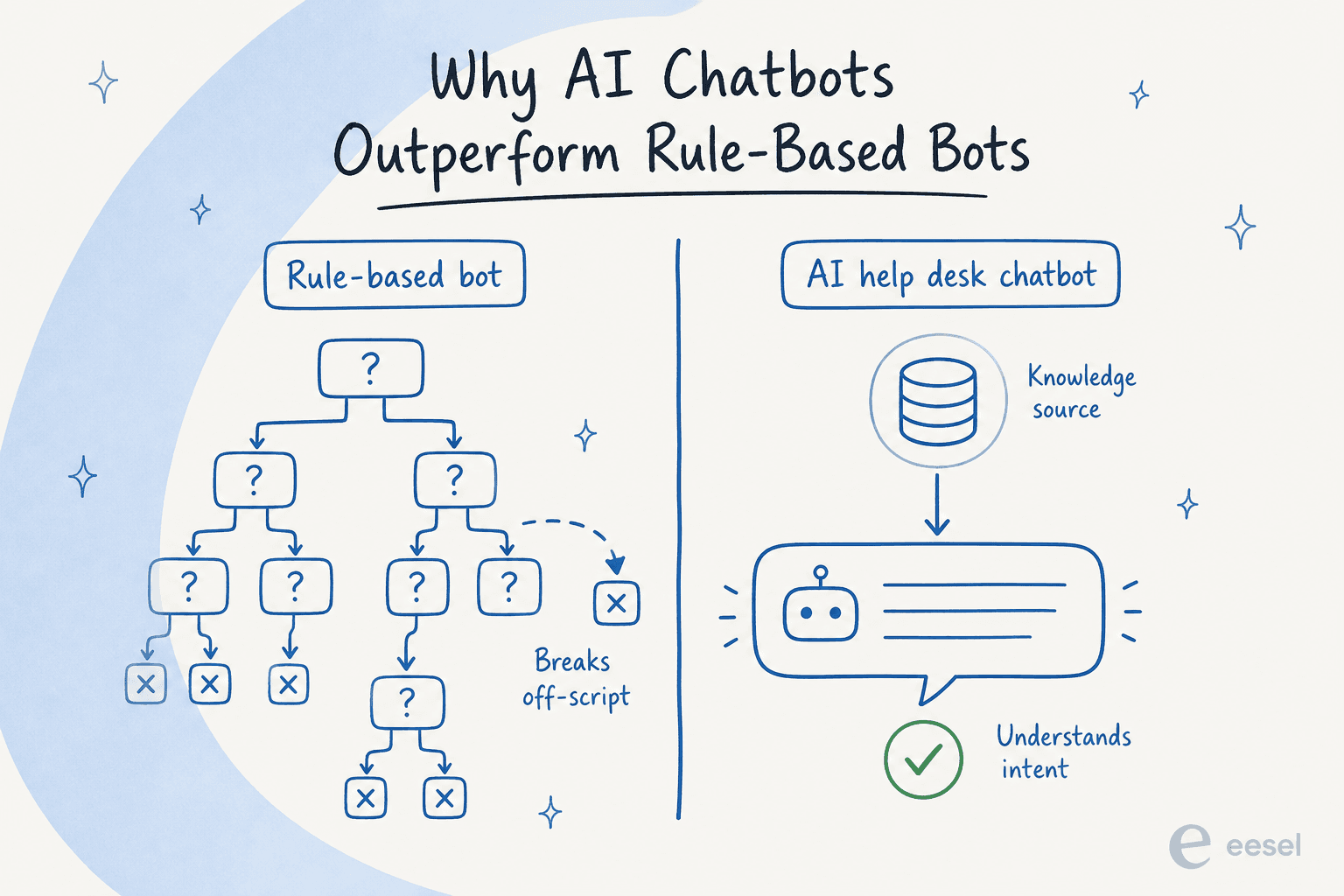
The distinction matters because a lot of "AI chatbot" marketing is still selling a dressed-up decision tree. If a tool asks you to map out conversation flows by hand, it's closer to the first generation than the second. We pull that thread further in AI agent vs rule-based chatbot.
How an AI help desk chatbot works
Under the hood, a modern AI customer service chatbot runs the same loop on every incoming message, and it's worth understanding because it explains both the magic and the failure modes.
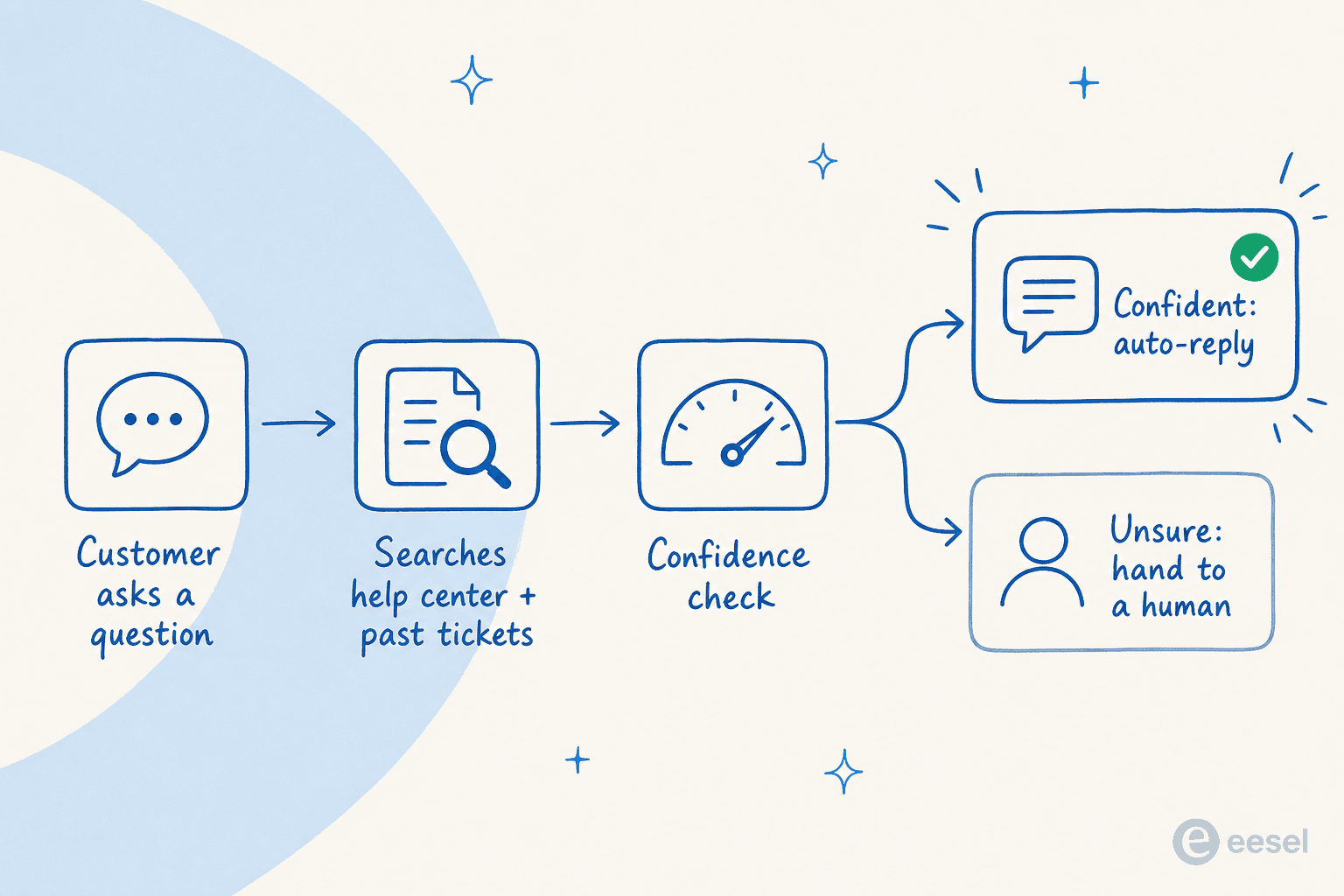
- A question comes in. A customer asks something in plain language: "my discount code isn't working."
- It searches your knowledge. The bot pulls the most relevant passages from your help center, docs, and (the good ones) your history of resolved tickets. This retrieval step is why grounding matters: an AI chatbot with no connection to your content is just guessing.
- It checks its confidence. A well-built bot scores how sure it is before it says anything.
- It acts. If it's confident, it writes and sends an answer. If it's not, it escalates to a human, ideally with a suggested draft attached so the agent isn't starting from zero.
That third step is the one most buyers underrate. The whole trust problem in AI support lives there. As one DTC supplements CX lead put it to me, "the AI will never be able to answer 100% of the questions... I need an AI who is only handling the tickets that it's confident to handle and all the other ones, leave them alone." A bot that answers everything at 60% confidence is worse than no bot, because now every confident-sounding wrong answer is a support ticket and a trust problem.
This is also where I've watched deployments go sideways. Early on, we saw confident-sounding bots quietly give wrong answers on edge cases nobody tested. The fix that stuck was refusing to go live blind: simulate the bot against thousands of your own historical tickets first, so you can see its real resolution rate and exactly where it would have been wrong, before a single customer sees it.
What a good help desk chatbot can do
Beyond answering FAQs, the useful ones do a few things that a scripted widget never could.
- Resolve, not just deflect. There's a real difference between a bot that shows a customer a help article and one that actually completes the request. The best chatbots can take actions, like looking up an order status or triaging and tagging a ticket, not just link to a doc.
- Draft for agents. Not everything should be fully automated. A copilot for customer service drafts a reply grounded in your docs and leaves the send button to a human, which is the safest way to start.
- Work across channels. A single bot that handles live chat, email tickets, and internal Slack questions beats three disconnected tools.
- Speak your customers' languages. Modern bots answer in the language the customer wrote in, often without any extra setup.
Here's what that looks like in practice: a chat conversation where the bot answers from real documentation and cites its sources.

The teams that get the most out of this treat the chatbot as a first responder rather than a wall. Jason Loyola, Head of IT at InDebted, described their setup simply: it acts like an agent would, being the first responder to their Jira Service Management tickets.
The three ways to deploy one
You don't have to choose between "no bot" and "the bot runs everything." There's a spectrum, and picking the right point on it is most of the battle.
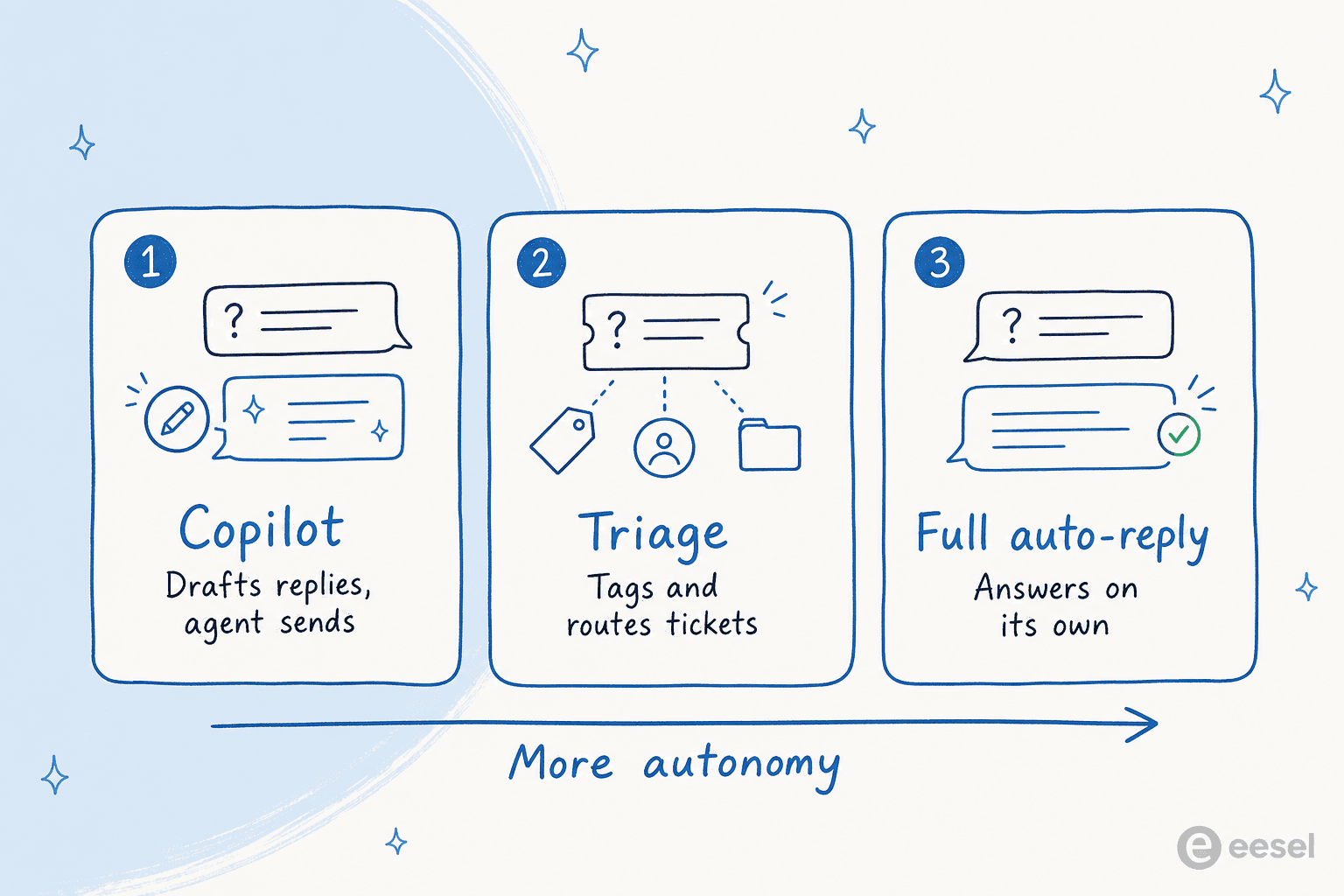
- Copilot. The bot drafts replies; agents review and send. Zero risk of a bad answer reaching a customer, and it's the fastest way to build trust with a skeptical team.
- Triage. The bot reads every incoming ticket, tags and routes it, and leaves a suggested reply as an internal note. Great for high-volume queues where sorting is half the work.
- Full auto-reply. The bot answers on its own, but only for the ticket types you've explicitly allowed and only above a confidence threshold.
Most successful rollouts I've seen start at copilot, prove the answers are good, then graduate specific ticket types to full auto-reply. The mistake is skipping straight to the end.
How much could a chatbot actually deflect?
Before you price anything, it helps to sanity-check the upside. Roughly 30-50% of most support queues is repetitive, answerable-from-docs volume, which is the part a chatbot can realistically take off your plate. Plug in your own numbers:
Numbers like these are exactly why teams look at this. Kim Simpson at Gridwise reported that in the first month, eesel resolved 73% of their tier-1 requests, and Global Pay saw up to 80% time savings onboarding staff against their docs. Your mileage depends heavily on how clean your knowledge base is.
What a help desk chatbot costs
Pricing is where the category gets slippery, because vendors bill on different units and the sticker price rarely tells the whole story. The unit matters more than the number:
| Billing model | How you're charged | The catch |
|---|---|---|
| Per seat / agent | Flat fee per human agent | Punishes you for growing the team; the AI's value isn't tied to headcount |
| Per resolution | Each resolved ticket | Can spike unpredictably in a busy month; incentivizes the vendor to "resolve" loosely |
| Per conversation | Each chat session | A single back-and-forth can rack up multiple charges |
| Usage-based, per ticket | Volume of tickets handled | Predictable if the vendor doesn't charge for internal steps or follow-ups |
| Free / scripted | $0 | It's a decision tree, not an AI agent |
The gotcha nobody flags up front: many tools charge extra every time you add an integration, a new bot, or a new use case, so the real bill creeps well past the headline number. When you compare options, price the whole first year at your actual volume, not the demo. Our fuller chatbot cost guide walks through worked examples.
eesel prices this as one fixed monthly price with no per-seat fee: 1 credit per ticket or chat, however long, from $299/month for 500 credits (with a free plan of 100 credits, no card), so adding teammates or a second channel doesn't change what you pay. The reasoning is boring on purpose: predictable bills are the ones support leaders can actually get approved.
Common mistakes that make customers hate your bot
Having watched a lot of these launches, the failures cluster into a short list:
- Turning on full automation everywhere, day one. Start as a copilot or on a narrow ticket type. Earn the trust before you widen the scope.
- Feeding it a stale knowledge base. A chatbot is only as good as what it reads. If your docs are wrong, the bot is confidently wrong. Clean the knowledge base first.
- Hiding the "talk to a human" option. The fastest way to torch trust is trapping people. Make escalation obvious and instant.
- Not measuring anything. Track resolution rate, escalation rate, and CSAT from day one. If you can't see the numbers, you can't tune the bot.
- Buying on the demo instead of your data. A demo is the vendor's happy path. Insist on testing against your own tickets before you commit, which the better AI chatbot platforms let you do.
Try eesel
If you want an AI help desk chatbot that trains on your existing help center and past tickets rather than a generic model, eesel is built for exactly this. It plugs into Zendesk, Freshdesk, Help Scout, Slack and more in a few minutes, works as a copilot or a fully automated agent, and lets you simulate the whole thing against your historical tickets so you see the resolution rate before you flip it on.

That "see it before you trust it" step is the piece most tools skip, and it's why teams like Gridwise hit real resolution numbers in their trial week rather than hoping for the best in production. It's free to try, no sales call required.
Frequently Asked Questions
What is a help desk chatbot?
How much does a help desk chatbot cost?
What's the difference between a help desk chatbot and a rule-based bot?
Can a help desk chatbot work with Zendesk or Freshdesk?
Will a help desk chatbot replace my support team?


Article by
Kira
Kira is a writer at eesel AI with a Computer Science background and over a year of hands-on experience evaluating AI-powered customer service tools. She focuses on breaking down how helpdesk platforms and AI agents actually work so that support teams can make better buying decisions.