What an insurance chatbot actually is
Strip away the marketing and there are two very different things wearing the same name.
The old kind is a rule-based bot: a decision tree of buttons and keyword triggers. "Press 1 for claims, press 2 for billing." It never says anything wrong because it never says anything it wasn't scripted to, but it also can't answer "is water damage from a burst pipe covered under my policy?" It just loops you back to a menu. These are the classic customer service chatbots most people picture. Most first-generation insurance bots were this, and they're why so many customers reflexively type "agent" the second a chat window opens.
The new kind is an AI agent built on a large language model. Instead of a script, it reads your actual knowledge: policy wordings, help-center articles, past ticket resolutions, billing FAQs. When a customer asks a question, it retrieves the relevant passages and writes a natural-language answer grounded in them. This is the AI knowledge base chatbot pattern, the same conversational AI shift happening across finance and healthcare, and it's the only kind worth discussing for real insurance support in 2026.

The distinction matters because the two fail in opposite ways. A rule-based bot frustrates people but is safe. An LLM bot delights people but, left unchecked, can confidently invent a coverage detail that doesn't exist in the policy. The rest of this post is really about getting the delight without the invention.
What insurance chatbots handle well (and what they shouldn't touch)
Here's the single most useful mental model I can give you: sort every insurance conversation into "the answer already exists in a document" versus "the answer requires a judgment call." Bots own the first bucket, which is also where most of the benefits of conversational AI come from. Humans own the second.
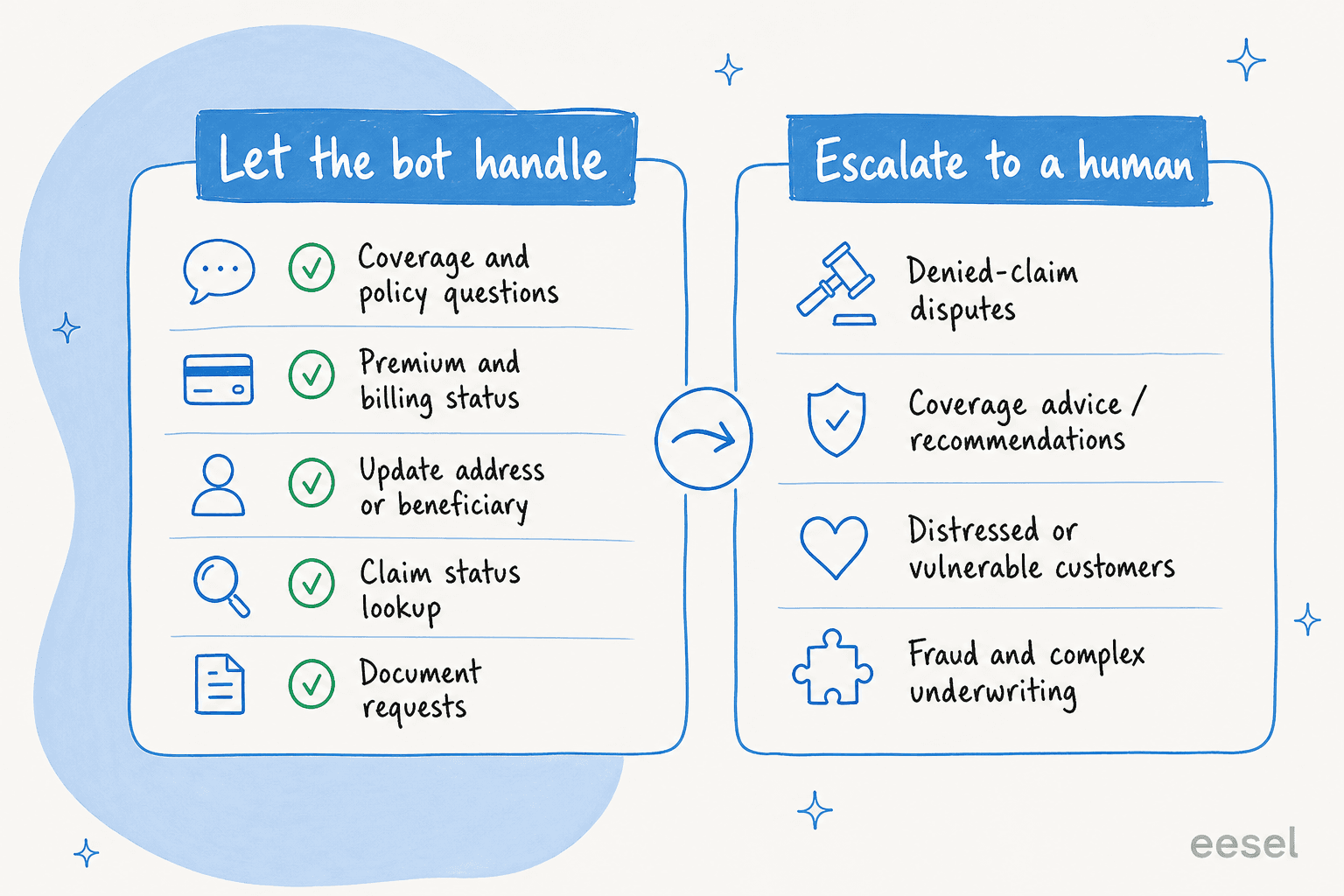
The left column is where an insurance chatbot earns its keep, because these questions are high-volume, low-nuance, and answerable straight from your knowledge base:
| Query type | Why the bot handles it well |
|---|---|
| Policy and coverage lookups | The answer is written in the policy document; the bot retrieves and quotes it. |
| Premium and billing status | A factual lookup, often via an integration to your billing system. |
| Update details (address, beneficiary) | A structured, form-like action with a clear success state. |
| Claim status | "Where is my claim?" is a database read, not a decision. |
| Document requests | Fetching a certificate or policy copy is instant and safe. |
| First-notice-of-loss intake | Collecting the structured facts of an incident before a human adjuster picks it up. |
The right column is where you want a hard stop: denied-claim disputes, coverage recommendations ("which policy should I buy?"), anything involving a distressed or vulnerable customer, and complex underwriting or fraud signals. These aren't retrieval problems, they're judgment problems, and in insurance the wrong judgment is a regulatory and reputational event. It's the clearest case for keeping humans in the loop.
A colleague who runs a legal-tech workflow on our tools put the stakes in a way that stuck with me: in a regulated field, there's a fine line between being helpful and overstepping into advice you're not allowed to give. Insurance sits on exactly that line. The bot's job isn't to walk the line carefully, it's to not walk up to it at all, and to hand those conversations to a person with the full context attached. A clean chatbot escalation path, backed by sensible ticket automation, is what makes the difference between a helpful assistant and a compliance incident.
How an AI insurance chatbot works under the hood
When I explain this to insurance teams, the part that reassures them most is that a well-built bot isn't guessing. There's a specific pipeline, and confidence is a gate inside it, not an afterthought.
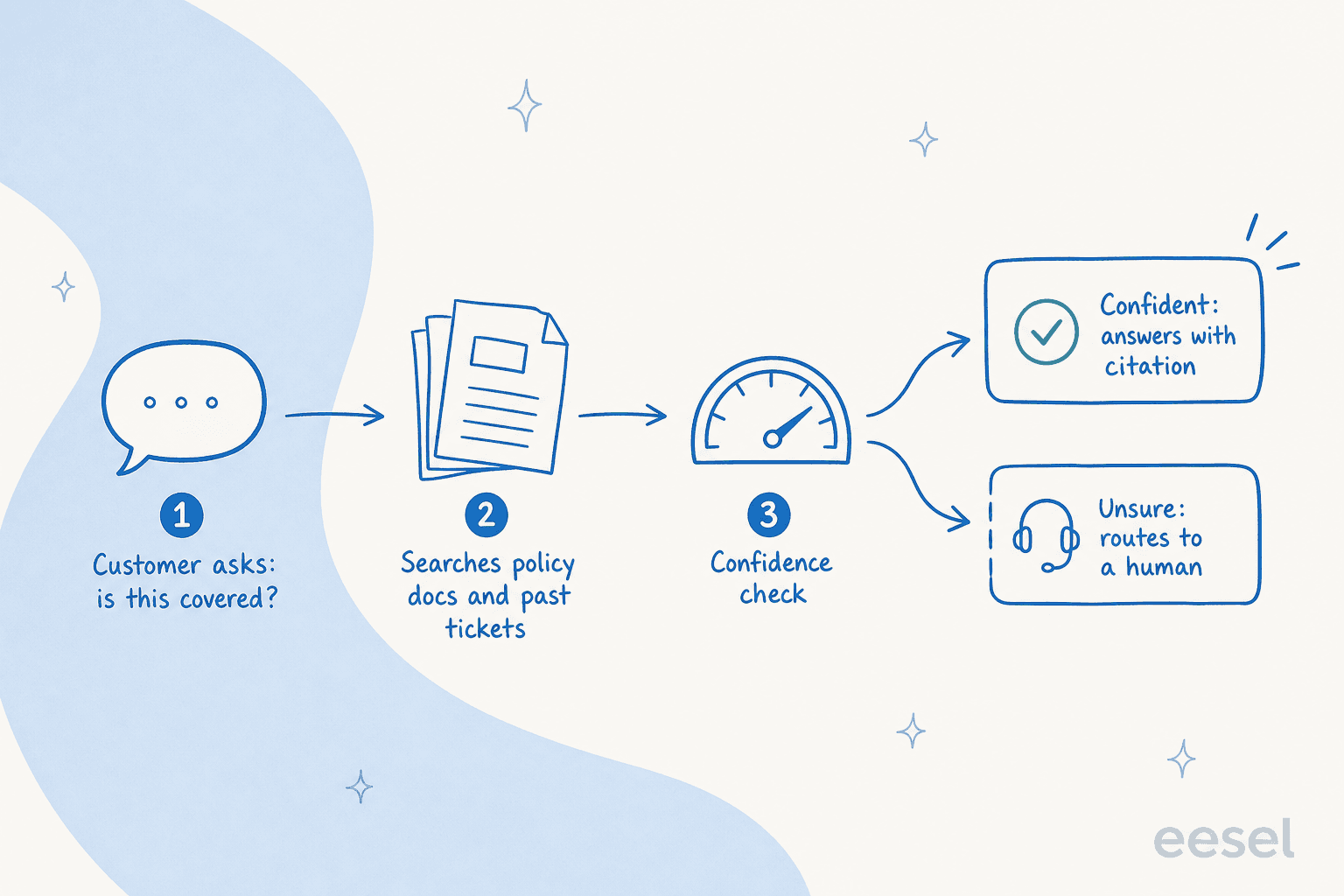
The flow, step by step:
- The customer asks a question in your chat widget, email, or helpdesk. No menu, just natural language.
- The agent retrieves grounding. It searches your policy documents, help center, past resolved tickets, and any connected systems for the passages most relevant to the question. This retrieval step (often called RAG) is what keeps the answer tied to your real content instead of the model's general training.
- It scores its own confidence. Based on how well the retrieved content actually answers the question, the agent decides whether it's sure enough to reply.
- It either answers or routes. High confidence: it sends a grounded answer, ideally with a citation the customer or agent can check. Low confidence: it stays quiet and hands the ticket to a human rather than guessing.
That third step is the one that separates a tool you can trust in insurance from one you can't. I once heard a CX lead running about 7,000 tickets a month describe the deal-breaker perfectly: the AI will never answer 100% of questions, but if it just replies "sorry, I don't know" to everything it's unsure about, someone still has to check all 7,000 tickets to catch the bad answers, and the point is gone. What they wanted was an AI that only handles the tickets it's confident about and quietly leaves the rest alone. In insurance, that's not a preference, it's the requirement.
The numbers move fast because insurance support is so weighted toward repetitive questions. On a real support queue we measured, an agent resolved 73% of tier-1 requests in its first month. That's the cost-savings shape of the opportunity, but only if the accuracy holds up. If you want to sanity-check the math against vendor sticker prices, our chatbot cost breakdown is a good next read.
The accuracy problem nobody warns you about
Here's the failure mode that keeps insurance leaders up at night, and it's a real one. An LLM asked a question it can't answer from your documents will sometimes answer anyway, fluently and confidently. We've watched a bot that had no matching knowledge fabricate a plausible-sounding answer and send it to a real customer. In a low-stakes context that's embarrassing. In insurance, "your policy covers that" when it doesn't is a promise your company may have to honor, or a complaint to a regulator.
This is worth understanding before you shop, because it's also why so many teams find their AI chatbot isn't answering correctly. Two design choices prevent it, and you should treat both as non-negotiable when you evaluate any AI customer service chatbot for insurance:
- Grounded answers with citations. Every reply should trace back to a specific source document, powered by solid retrieval over your knowledge. If the bot can't point to where an answer came from, it shouldn't send it. This also makes auditing trivial, which regulators like.
- A confidence threshold you control. You decide how sure the bot has to be before it replies autonomously versus drafting for a human. Set it high on coverage topics, lower on "where's my document."
The reassuring part is you don't have to take accuracy on faith. The right way to buy an insurance chatbot is to run it against your last few thousand real tickets in a simulation and read the actual answers before anything goes live. In one real-traffic trial we ran, that pre-launch pass showed 93% triage accuracy and caught the handful of categories where drafts weren't ready yet, so those never reached a customer. If a vendor can't show you how the bot would have answered your own historical questions, that's the answer to whether you should trust it live.
Compliance and customer data: the part legal will ask about
Insurance data is some of the most sensitive there is: health details, financial records, personal identifiers. Before any chatbot touches it, your security and legal teams will (rightly) want answers. I've sat through enough of these reviews to know the questions come in a predictable order.
- Where does the data live and go? Look for data residency options (EU hosting if you need it) and clarity on subprocessors.
- Is our data used to train shared models? The answer you want is no. A serious vendor keeps your data yours.
- PII handling and redaction. One security-conscious team I worked with, handling sensitive vehicle and customer records, wanted to know exactly what the AI sees. The reassuring answer was that the agent keys off question type and response patterns rather than hoovering up raw PII, with custom retention and redaction available for regulated clients. That's the bar.
- The paper trail. GDPR compliance, DPAs, and for the higher tiers, signed agreements and enterprise controls like SSO. If you're in a strict jurisdiction, ask about it on the first call, because it's often a hard gate before any trial.
None of this is exotic anymore, but it does separate tools built for regulated buyers from consumer-grade widgets. If a vendor gets visibly uncomfortable when you ask where the data goes, you have your answer.
How to roll one out without torching customer trust
The temptation is to flip the bot on for everything and watch the deflection numbers climb. In insurance, that's how you end up with a wrong coverage answer in a customer's inbox on day two. The teams that succeed do the opposite: they start narrow and let the bot earn its autonomy.
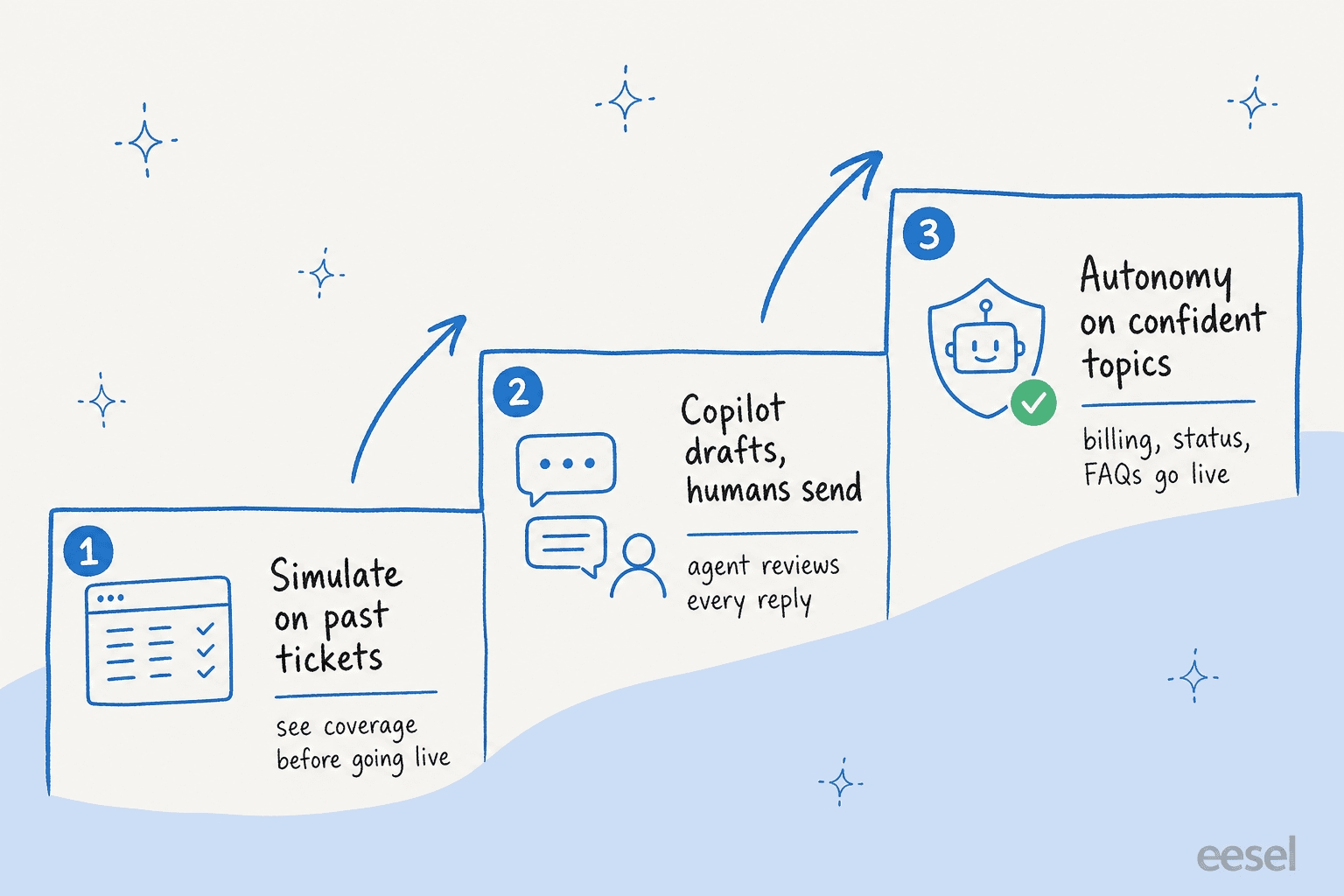
- Simulate on past tickets. Before it's live, run the agent over thousands of your historical conversations. You'll see exactly which topics it nails and which it fumbles, by category, with no customer exposure.
- Start in copilot mode. Let the AI draft replies that a human agent reviews and sends. Your team gets faster, customers get human-checked answers, and you build a record of where the bot is reliable. This copilot pattern is the safest on-ramp in a regulated vertical.
- Grant autonomy topic by topic. Once the data shows the bot handles billing status or document requests cleanly, let it go fully autonomous on just those, while everything else still routes to a human. Widen the circle as the evidence grows.
This staged approach is slower to reach full automation, and that's the point. You're trading a few weeks of ramp for the guarantee that no untested answer ever reaches a policyholder. I've never seen a regulated-industry rollout regret going this way, and I've seen plenty regret the "turn it all on" approach. It's the same discipline behind good SLA management and ticket triage: control first, scale second.

Once it's live, watch the right metrics: resolution rate on the topics you automated, deflection rate, escalation rate, and answer quality on a sampled basis. A little chatbot analytics discipline here goes a long way. If quality dips on a category, pull it back to copilot mode and re-simulate. The whole system should feel like a dial you control, not a switch you hope you got right.
Try eesel for insurance support
If you're weighing an insurance chatbot, eesel AI is built around exactly the safety model this post argues for. It plugs into your existing helpdesk (Zendesk, Freshdesk, HubSpot, Front, and 100+ others), learns from your policy docs and past tickets, and, crucially, lets you simulate on thousands of historical tickets before it ever replies to a customer. You set the confidence threshold, exclude the ticket types you want kept human, and expand autonomy topic by topic as the evidence comes in.

Pricing is one fixed monthly price from $299/month for 500 credits (1 credit per ticket or chat, no per-seat fee), which keeps costs predictable at insurance-scale volumes. It's free to try, and the simulation runs before you ever go live, so you can see how it'd answer your real questions with zero risk to a policyholder. Book a demo or start with your own tickets.
Frequently Asked Questions
What is an insurance chatbot?
How much does an insurance chatbot cost?
Are insurance chatbots safe with sensitive customer data?
Can an insurance chatbot handle claims?
How do I stop an insurance chatbot from giving wrong answers?


Article by
Kira
Kira is a writer at eesel AI with a Computer Science background and over a year of hands-on experience evaluating AI-powered customer service tools. She focuses on breaking down how helpdesk platforms and AI agents actually work so that support teams can make better buying decisions.