Customer support has always been a balancing act. You need to keep costs under control while delivering the kind of service that keeps customers coming back. Lately, that balance has gotten harder to strike.
Ticket volumes keep climbing. Customer expectations for fast, 24/7 responses keep rising. And the old playbook (hire more agents) has stopped working for many teams.
This is where AI customer support cost savings enter the picture. The data suggests companies can reduce support costs by 30% or more with the right AI implementation. But getting there requires more than just turning on a chatbot. You need a clear understanding of where costs actually come from, what AI can realistically handle, and how to roll it out without breaking the customer experience.
Let's break it down.
The real cost of customer support today
Before you can cut costs, you need to know where your money goes. For most support teams, the breakdown looks something like this:
Labor typically swallows around 70% of the total support budget. That includes salaries, benefits, training, and the constant churn of agents leaving and needing replacement. When you add in operational costs (software licenses, telephony, office space) and hidden expenses like seasonal scaling and overtime, the numbers add up fast.
Here's what that means per interaction. A single chat or email handled by a human agent costs between $8 and $15. Multiply that by thousands of tickets per month, and you see why support is often one of the largest line items in a company's budget.
The scaling problem makes this worse. SaaS companies routinely see ticket volumes grow 20% year over year. The traditional response (hire more agents) means costs climb alongside growth. That model breaks down eventually.
This is why we built eesel AI as a teammate, not just another tool to configure. You connect it to your help desk, and it learns your business from past tickets, help center articles, and macros. What takes a human weeks to learn, eesel picks up in minutes.
What the data says about AI customer support cost savings
The research on AI cost savings is surprisingly consistent across sources. Here's what the numbers tell us.
30% cost reduction is the most commonly cited figure, appearing in reports from ISG and multiple industry analyses. IBM research suggests chatbots can handle up to 80% of routine inquiries, cutting customer support costs by roughly 30%.
The per-interaction economics are striking. Where a human agent costs $8-15 per interaction, an AI chatbot handles similar queries for $0.50 to $0.70. That is a 10-20x difference.
Adoption is accelerating. 43% of contact centers have already adopted AI technologies according to Statista data.
But there is a counter-narrative worth acknowledging. Gartner predicts that by 2030, the cost per resolution for generative AI will exceed $3, potentially making it more expensive than offshore human agents. Rising data center costs and AI providers shifting from subsidized workloads to profit motives are driving this projection.
Here is the reality check that matters: 75% of consumers still prefer talking to a human for complex issues, according to Five9 research. Only 20% of customer service leaders have actually reduced headcount due to AI. Most are using AI to handle growth rather than cut staff.
The takeaway? AI customer support cost savings are real, but they come from handling routine work at scale, not replacing humans entirely. The teams seeing the best results use AI to augment their workforce, not eliminate it.
How AI reduces costs across your operation
AI drives cost savings through several mechanisms working together. Here is how it breaks down.
Automating routine inquiries
Password resets. Order status checks. Account balance lookups. FAQ responses. These consume enormous agent bandwidth despite being straightforward to resolve.
AI agents handle these interactions at a fraction of the cost, freeing human agents for issues requiring judgment and empathy. Unlike human agents, AI works 24/7 without overtime, sick days, or timezone constraints.
The key is connecting AI systems directly to your operational data. When a customer asks about a delayed shipment, the AI should access order data, check carrier status, and offer solutions like refunds or expedited replacements, all within seconds.
Augmenting human agents with AI Copilot
Even when human agents handle complex issues, AI can dramatically improve their efficiency. An AI Copilot surfaces relevant knowledge articles, suggests responses, and auto-populates case summaries as conversations unfold.

Agents spend less time searching for information and more time solving problems. AI drafts email responses, compiles after-call summaries, and translates conversations in real-time for multilingual support.
Agents who previously spent 10-15 minutes on post-call documentation can complete wrap-ups in under two minutes. Multiply those time savings across thousands of daily interactions, and the cost impact becomes substantial.
Intelligent triage and routing
Speed matters in customer support. Long response times frustrate customers, increase handling costs as issues compound, and drive churn.
AI-powered triage systems analyze incoming requests instantly, categorizing by urgency, complexity, and required expertise, then route to the optimal resolution path. What once took hours can happen in minutes or even seconds.
Smart routing ensures urgent issues reach agents immediately while routine queries flow to self-service channels. The AI pre-populates ticket fields and suggests solutions before agents even open the case, reducing handle time from the first moment of engagement.
Self-service deflection
Every issue customers resolve themselves represents a ticket that never enters the support queue. AI-enhanced self-service portals guide users through troubleshooting flows, surface relevant knowledge articles, and complete transactions without agent involvement.
Modern self-service goes far beyond static FAQ pages. Conversational AI interfaces understand natural language queries, personalize responses based on customer history, and handle complex multi-step processes.
Done well, self-service can head off 30-60% of potential support tickets.
Calculating your potential AI customer support cost savings
You cannot optimize what you do not measure. Here is a practical framework for calculating ROI on AI customer support investments.
The basic formula is straightforward:
ROI (%) = (Total Cost Avoided ÷ Total Implementation Cost) × 100
Cost Avoided is the money you did not spend thanks to the new solution. For a chatbot, it is mainly the cost of the human agent interactions it now handles.
Calculate it like this: (Number of Interactions Handled by AI) × (Cost Per Human Interaction - Cost Per AI Interaction).
Here is what a typical scenario looks like for a mid-sized support team:
| Cost Component | Calculation | Monthly Value |
|---|---|---|
| Interactions handled by AI | 10,000 tickets | |
| Cost per human interaction | $10.00 average | |
| Cost per AI interaction | $0.60 average | |
| Monthly agent cost avoided | 10,000 × ($10.00 - $0.60) | $94,000 |
| AI platform fee | Monthly subscription | $2,000 |
| Maintenance and tuning | Ongoing optimization | $500 |
| Amortized setup costs | $12,000 ÷ 12 months | $1,000 |
| Total monthly cost | $3,500 | |
| Net monthly savings | $94,000 - $3,500 | $90,500 |
Your numbers will vary based on ticket volume, current costs, and the complexity of your AI implementation. But the math is compelling for most teams handling significant ticket volumes.
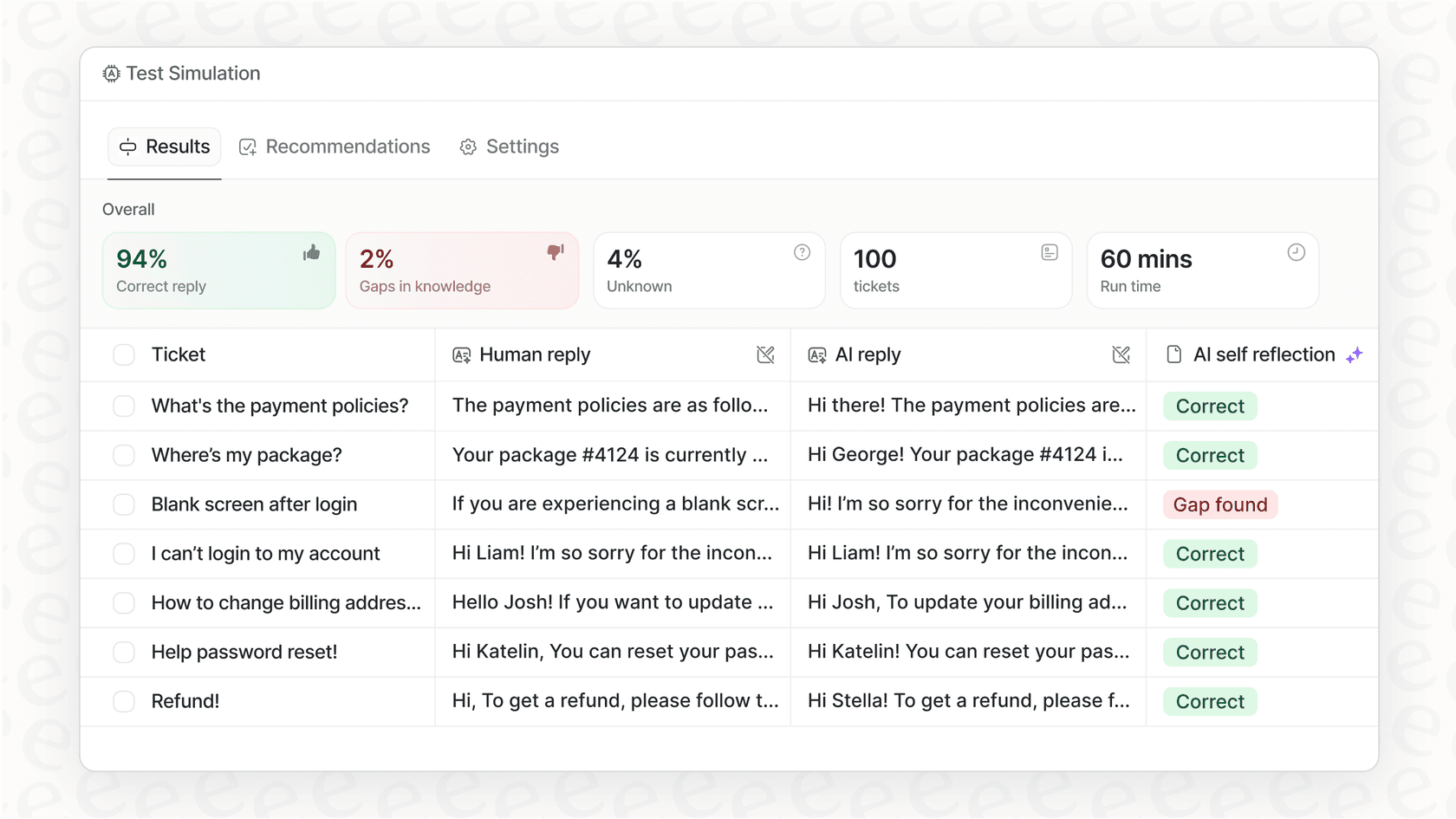
The payback period is typically under two months for mature deployments. That is why we built simulation into eesel AI. You can run eesel on thousands of past tickets before going live, see exactly how it would respond, measure resolution rates, and gain confidence before touching real customers.
Implementation framework: From pilot to full deployment
The teams seeing the best AI customer support cost savings follow a phased approach. Here is a practical framework.
Phase 1: Start with guidance (Weeks 1-4)
Like any new hire, eesel begins with oversight. You choose how:
- Have eesel draft replies that agents review before sending
- Limit eesel to specific ticket types or queues
- Set business hours when eesel can respond
This is not a limitation. It is how you verify eesel understands your business before expanding its role. Run simulations on past tickets to measure quality before going live.
Phase 2: Expand scope (Months 2-3)
As eesel proves itself, you expand its scope:
- Increase the percentage of tickets handled autonomously
- Add more ticket types and complexity levels
- Monitor escalation patterns and adjust accordingly
Track metrics closely: resolution rate, CSAT scores, escalation percentage. Use this data to guide expansion decisions.
Phase 3: Full autonomy (Months 4-6)
Mature deployments achieve up to 81% autonomous resolution. At this stage:
- Eesel handles full frontline support directly
- Works 24/7 without business hour restrictions
- Escalates only edge cases you define
The path from "new hire" to "top-performing agent" is explicit and controlled. You decide when to promote eesel based on actual performance.
eesel AI: A smarter approach to AI customer support cost savings
Most AI support tools are black boxes: you turn them on, hope for the best, and discover problems through customer complaints. Our teammate model means something different.
You see how eesel performs before it is customer-facing. Run simulations on past tickets to measure quality. No guesswork.
You control the pace of adoption. Expand scope only when confident. Start with drafts for review, progress to autonomous responses when ready.
You keep improving eesel over time. Correct mistakes, update policies, eesel learns continuously. No retraining cycles. No re-uploads.
Define exactly what eesel handles and when it escalates in plain English:
- "If the refund request is over 30 days, politely decline and offer store credit."
- "Always escalate billing disputes to a human."
- "For VIP customers, CC the account manager."
No code. No rigid decision trees. Natural language instructions that eesel follows.
Our pricing reflects this philosophy. You pay per interaction, not per seat. No per-agent or per-user fees. The Team plan starts at $299/month ($239 on annual billing) for up to 3 bots and 1,000 interactions. The Business plan at $799/month ($639 annual) includes unlimited bots and 3,000 interactions, plus past ticket training and bulk simulation.

The typical payback period is under two months. That is not a projection. That is what mature deployments actually achieve.