What "chatbot design" actually means in 2026
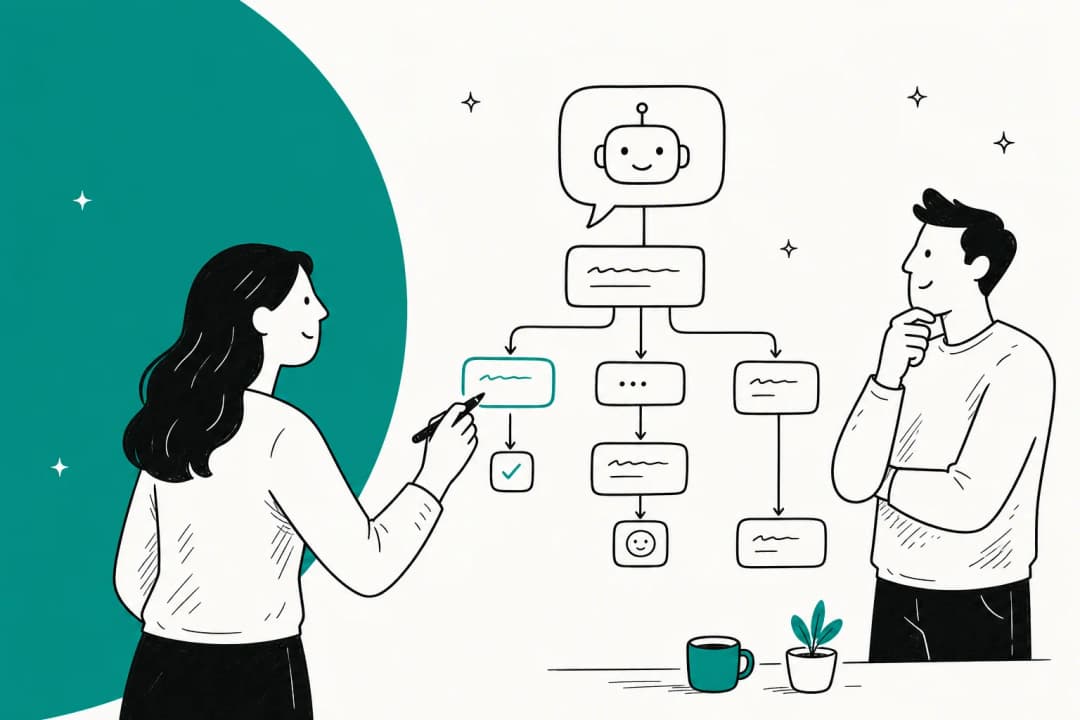
For years, designing a chatbot meant scripting conversation: if the customer says X, reply Y; if they click this button, branch there. That's still how a lot of tools work, and it's why so many bots feel like a phone tree you can't escape.
An AI agent changes the job. You no longer script the words. The model handles the language. What you design instead is the system around the model: the knowledge it draws from, the limits on what it's allowed to say, the moment it steps back and calls a human. The design has moved up a layer, from words to judgement.
That's good news, because scripting was never the hard part of support. The hard part is that customers ask the same question forty different ways, they ask about edge cases your flowchart never anticipated, and they get angrier every time the bot loops them back to the main menu. A well-designed AI customer service chatbot handles the forty phrasings for free; your job is to design what happens at the edges.
So the rest of this guide is about those edges. Not "how do I write a greeting message," but the decisions that actually determine whether the bot helps or hurts.
The anatomy of a support chatbot
Before the principles, it helps to see the whole machine. Every modern support bot, under the hood, is the same five-stage pipeline. Design happens at each stage, but not all stages are equal.
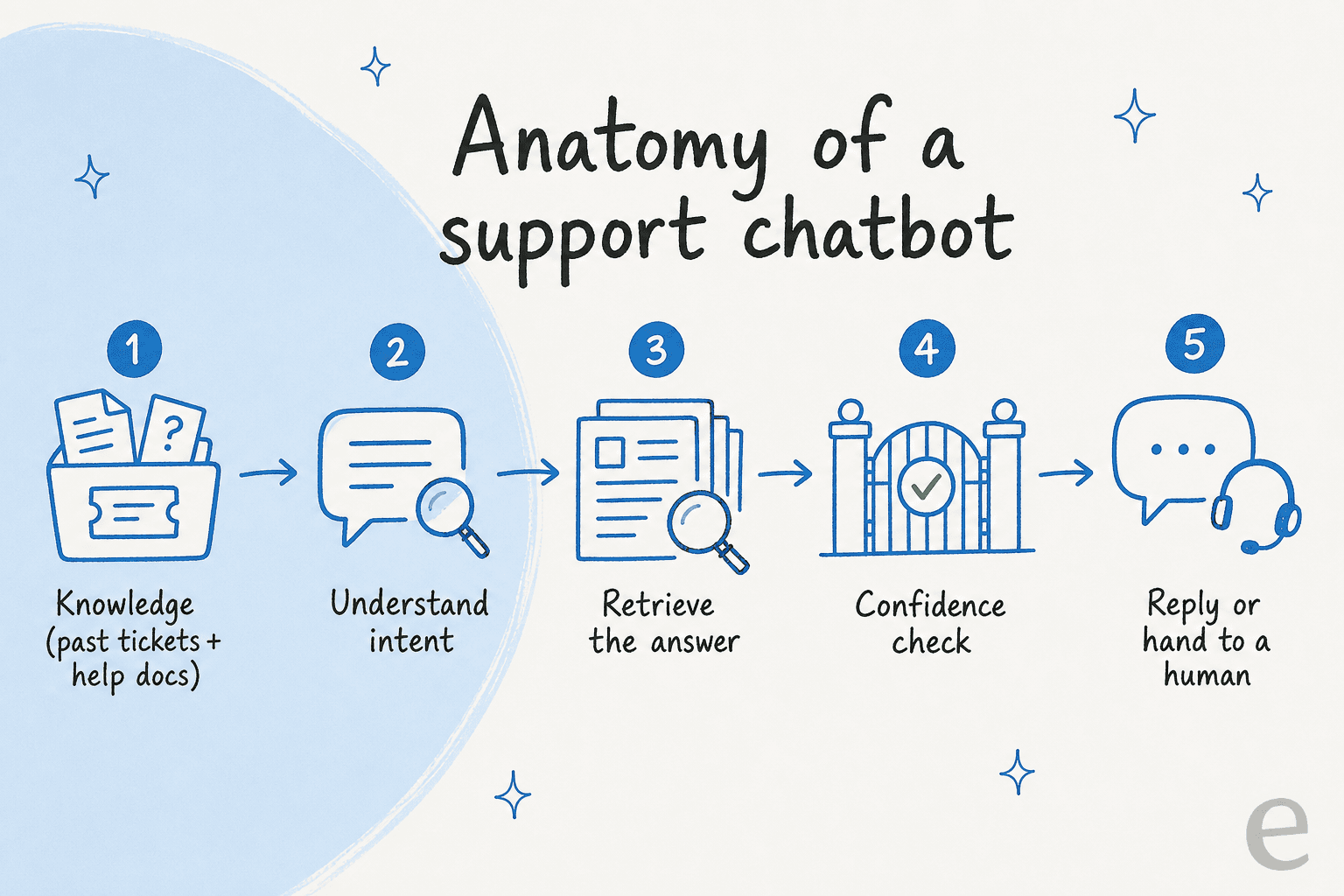
The model handles stages two and three (understanding intent, retrieving an answer) almost entirely on its own now. That's the part people used to obsess over, and it's the part you barely touch. Your leverage is at the two ends: what knowledge goes in at stage one, and what the confidence check does at stage four. Get those right and the middle takes care of itself.
Let's take the design decisions in the order they actually matter.
Design from your real tickets, not a blank flowchart
The instinct is to open a builder and start mapping conversations you imagine customers having. Skip it. Your customers have already told you exactly what they ask, thousands of times, and it's sitting in your helpdesk.
Start there. Pull your resolved tickets and read what people actually contact you about, in what proportion. You'll almost always find that a small number of topics (order status, password resets, refund policy, "where's my thing") make up the bulk of volume. Those are what the bot should nail first. Designing for the rare, exotic question before you've covered the top ten is a classic waste.
This is also where knowledge design happens. A bot is only as good as what it can see, so the design question is: which sources are trustworthy enough to answer from? Your knowledge base and help center are the obvious ones, but the richest source is usually your history of solved tickets, because that's where the real answers live, phrased the way your team actually phrases them. One eesel customer, Alton Ong at EntryLevel, told us the reason our bot outperformed the native helpdesk AI was that it learned from solved tickets, not just the help-center articles.
The practical version of this principle: don't design a bot on a whiteboard. Design it on your own data. Tools that learn from your past tickets give you a running start that no hand-built flow can match, and it's the most consistently-requested capability I hear from teams evaluating AI for customer service.
Design the confidence gate before the personality
Here's the decision most chatbot design guides bury and I'd put first. Decide what your bot does when it isn't sure.
Every question that reaches the bot lands somewhere on a confidence spectrum. A password reset it has answered ten thousand times: high confidence. A billing dispute involving a specific account and a policy exception: low confidence. The worst thing a bot can do is treat both the same and answer with equal swagger. That's how you get a confident-sounding wrong answer, which is worse than no answer at all, because the customer believes it.
So design three lanes, not one.
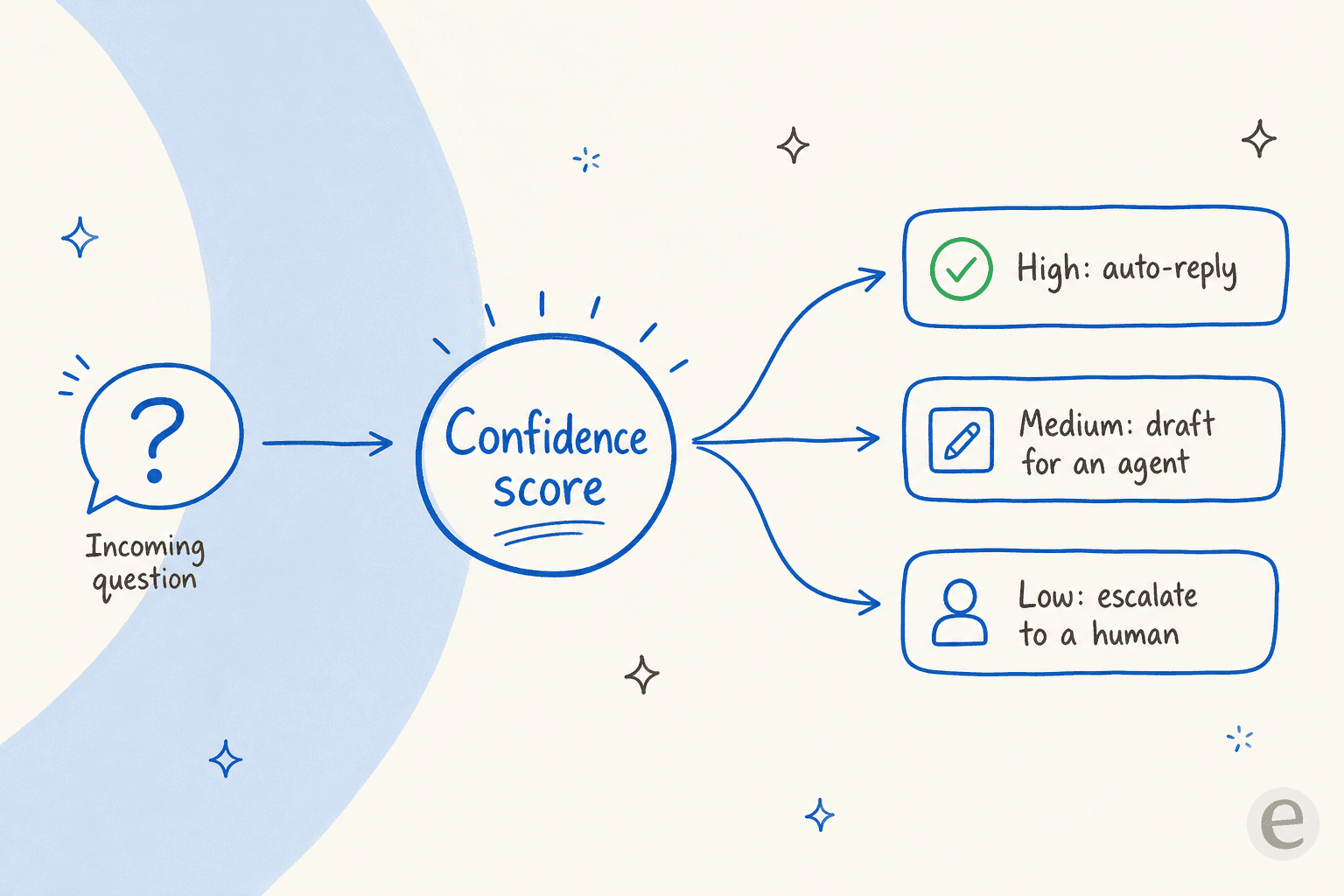
This is the whole ballgame for trust. A CX lead at a DTC supplements brand put it to us more bluntly than I ever could:
"The AI will never be able to answer 100% of the questions... I need an AI who is only handling the tickets that it's confident to handle and all the other ones, leave them alone."
That's the design brief in one sentence. Build the bot that leaves the hard ones alone. Confidence-based routing is what separates a tool you'd actually put in front of customers from a demo, and it's the front line of preventing hallucinations in support. Notice that "personality" and "tone" didn't come up yet. They matter, but they matter after you've decided when the bot speaks at all. A charming bot that confidently misquotes your refund policy is not a win.
Design the handoff, not just the answer
The moment the confidence gate says "not this one," you're in handoff territory, and this is the second most under-designed part of a support bot.
A bad handoff is the customer's most common complaint about chatbots, and it's always a design failure, not a model failure. The bot decides it can't help, then either dead-ends ("I'm sorry, I didn't understand that") or dumps the customer into a queue with none of the context they just typed. The customer re-explains everything to a human. Every ounce of goodwill the bot earned evaporates.
Design the escalation path as carefully as the answer path:
- Trigger clearly. Low confidence, an explicit "talk to a human" request, an angry-sounding message, or a topic you've flagged as always-human (cancellations, legal, anything sensitive) should all route out.
- Carry the context. The human who picks up should see the full conversation and, ideally, a summary of what the customer wants, so nobody has to repeat themselves. Good conversation design for handoff flows treats the transcript as a handrail, not a throwaway.
- Set expectations. "I'm connecting you with someone who can help, it's about a two-minute wait" beats silence every time.
There's a whole discipline of human handoff best practices worth reading, but the design principle is simple: the handoff is part of the product, not the bot's failure state. A bot that hands off gracefully feels better than one that answers 5% more questions and botches the rest.
Design for the channels and languages you actually serve
A bot designed for a website chat widget is not automatically a bot that works in email, WhatsApp, or Slack. The information is the same; the shape of the interaction isn't. Chat wants short, fast turns. Email tolerates a longer, complete answer. A multichannel chatbot has to flex its format to the channel, and that's a design decision you make up front, not a setting you flip later.
Language is the same story. If a meaningful slice of your customers write in Spanish, German, or French, a bot that only answers in English isn't 80% designed, it's designed for the wrong audience. The good news is that a modern agent can answer in 80+ languages out of the box, often matching the customer's language without you configuring anything. Design the coverage in from the start rather than bolting on translation later.

Give it a voice, but keep it honest
Now, personality. Once the bot knows when to speak and when to escalate, tone is what makes it feel like your company instead of a generic assistant.
Brand voice is a real design input, and it's more than "be friendly." Should the bot use contractions? Emoji? Does it apologise formally or casually? Does it match the reader's energy or stay calm and neutral? The best approach I've seen is to train the voice on examples of your own best support replies rather than writing a style doc no model reads carefully. Show it how your team already sounds.
But hold one rule above tone: honesty beats charm. A bot should never invent a policy to sound helpful, never guess at a tracking number, never paper over "I don't know" with confident filler. This ties straight back to the confidence gate. Personality decorates the answer; it never manufactures one. Get that priority backwards and you've designed a bot that's pleasant right up until it lies to a customer.
How to test a design before it goes live
This is the step that separates teams who trust their bot from teams who cross their fingers. You would never ship code to production without testing it. A chatbot design is no different, and yet most launches are effectively a live experiment on real customers.
There's a better way, and it's the reason simulation exists. Before the bot answers a single live ticket, run your design against thousands of your historical tickets and see exactly what it would have said.
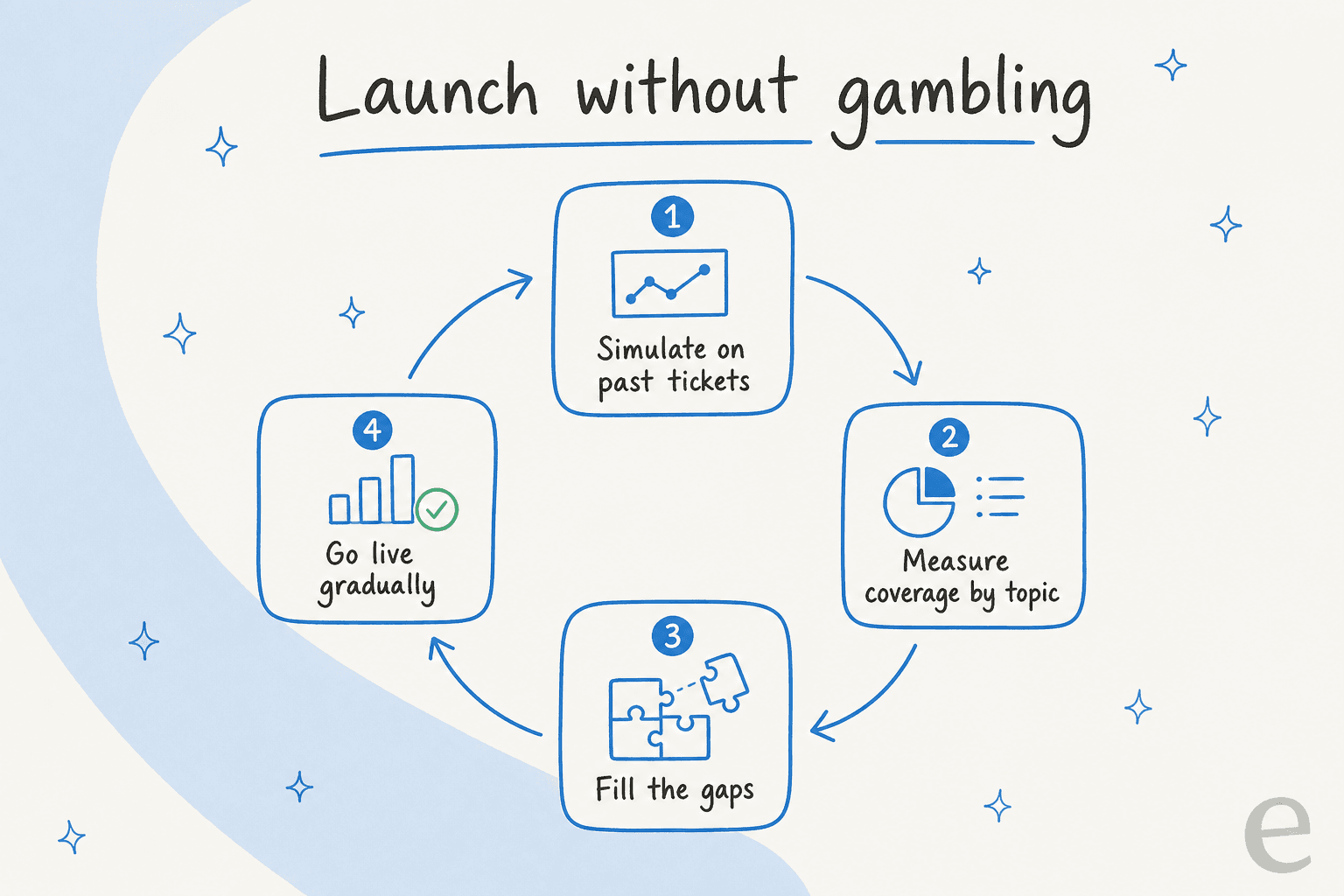
A good simulation tells you, before launch: what percentage of tickets the design would have resolved, which topics it's strong on, where the gaps are, and what it would have replied word for word. You read the weak answers, fix the knowledge or tighten the confidence rules, and re-run. It turns "let's hope this works" into a number you can act on.

Then roll out gradually. Start the bot in a copilot mode where it drafts replies your team reviews before sending. Watch the drafts. As the drafts get consistently good on a topic, promote that topic to auto-reply. Expand the confidence band as trust builds. This staged approach is how one customer, Gridwise, saw eesel resolve 73% of tier-1 requests in the first month, with the first results showing up during a seven-day trial. You don't get numbers like that from a big-bang launch; you get them from a design you tested and tuned.
The mistake to avoid: measuring the wrong thing. Deflection (tickets the bot kept away from humans) is easy to game by simply refusing to escalate. Resolution (customers who actually got helped) is the number that matters. Design for resolution and track it honestly in your customer service metrics.
Common chatbot design mistakes
The failure modes repeat across almost every bad bot I've seen, and every one of them is a design decision, not a technology limit:
- Hand-scripting every path. You'll never cover the long tail, and maintenance becomes a second job. Let the model handle language; you design the guardrails.
- No escalation route. A bot with no exit is a trap. Design the handoff first, not last.
- Optimising for deflection over resolution. A bot that "deflects" by stonewalling customers looks great on a dashboard and terrible in your reviews.
- Launching untested. If you haven't simulated the design against real tickets, your customers are the test.
- Building from scratch when you don't need to. Plenty of teams reach for the raw OpenAI or Claude API and end up maintaining an app instead of running support. As Karel at GENERAL BYTES put it, "we could try to write our own LLM application but we didn't want to invest our time into that. We wanted something that we would not have to maintain." For most teams, buying beats building.
- Treating tone as the whole design. Personality is the last 10%. If the confidence gate and handoff aren't designed, a charming bot is just a confident one.
Try eesel for your support chatbot
If you've read this far, you already know the hard parts of chatbot design aren't the greeting message, they're the confidence gate, the handoff, and the testing. eesel AI is built around exactly those. It learns from your past tickets and help docs on day one, so you're not designing on a blank canvas; you set when it answers, drafts, or escalates in plain language instead of flowcharts; and it lets you simulate the entire design against thousands of your real tickets before a single customer sees it.

It plugs into Zendesk, Freshdesk, and a hundred other tools, answers in 80+ languages, and is usage-based at around $0.40 per resolved conversation with no per-seat fee. You can design, simulate, and go live in an afternoon. Try eesel free, no credit card needed.
Frequently Asked Questions
What is chatbot design in customer support?
How do you design a chatbot that doesn't give wrong answers?
What are the most common chatbot design mistakes?
How much does it cost to design and run a support chatbot?
Can I design a support chatbot without code?


Article by
Kira
Kira is a writer at eesel AI with a Computer Science background and over a year of hands-on experience evaluating AI-powered customer service tools. She focuses on breaking down how helpdesk platforms and AI agents actually work so that support teams can make better buying decisions.