


Why travel support breaks in ways other industries don't
I work on eesel's support queue, and I've spent the last few years watching AI go live on real support queues across a lot of industries. Travel has a shape all its own, and it's worth naming before you automate anything.
First, the spike. Most support volume is fairly steady. Travel volume is not: it sits calm for weeks, then a single weather system or a mass cancellation sends it through the roof. One leading US airline handled 30 million voice calls in one year, with volumes spiking up to fivefold during disruptions. You cannot staff for that peak, and you shouldn't try. The spike is the reason travel reaches for automation, more than any other industry I've seen.
Second, the clock. A traveler stranded at 2am with a missed connection doesn't wait until morning, and their patience is already gone. That pressure is why bad automation lands so hard here. One passenger on Hacker News put the frustration better than any survey could:
"Even Frontier has humans you can talk to. Being stranded by one of Spirit's constant delayed flights with no recourse but an automated chatbot should have been illegal."

Third, trust is already thin. In Ada's survey, 32% of travelers said they've lost trust in airlines to manage disruptions well, and their top frustration is plain old long wait times (46%). Here's the hopeful part of the same data: 50% of travelers don't care whether a resolution comes from a human or an AI, as long as it actually resolves. Speed and correctness beat the human-or-bot question. So the goal isn't "answer everything." It's answer the routine things instantly and get the hard ones to a human fast, and the routine things are most of your volume.
Step 1: Sort your tickets before you automate anything
Before you connect a single tool, pull your last few thousand tickets and sort them into three buckets: safe to automate, automate with review, and always human.
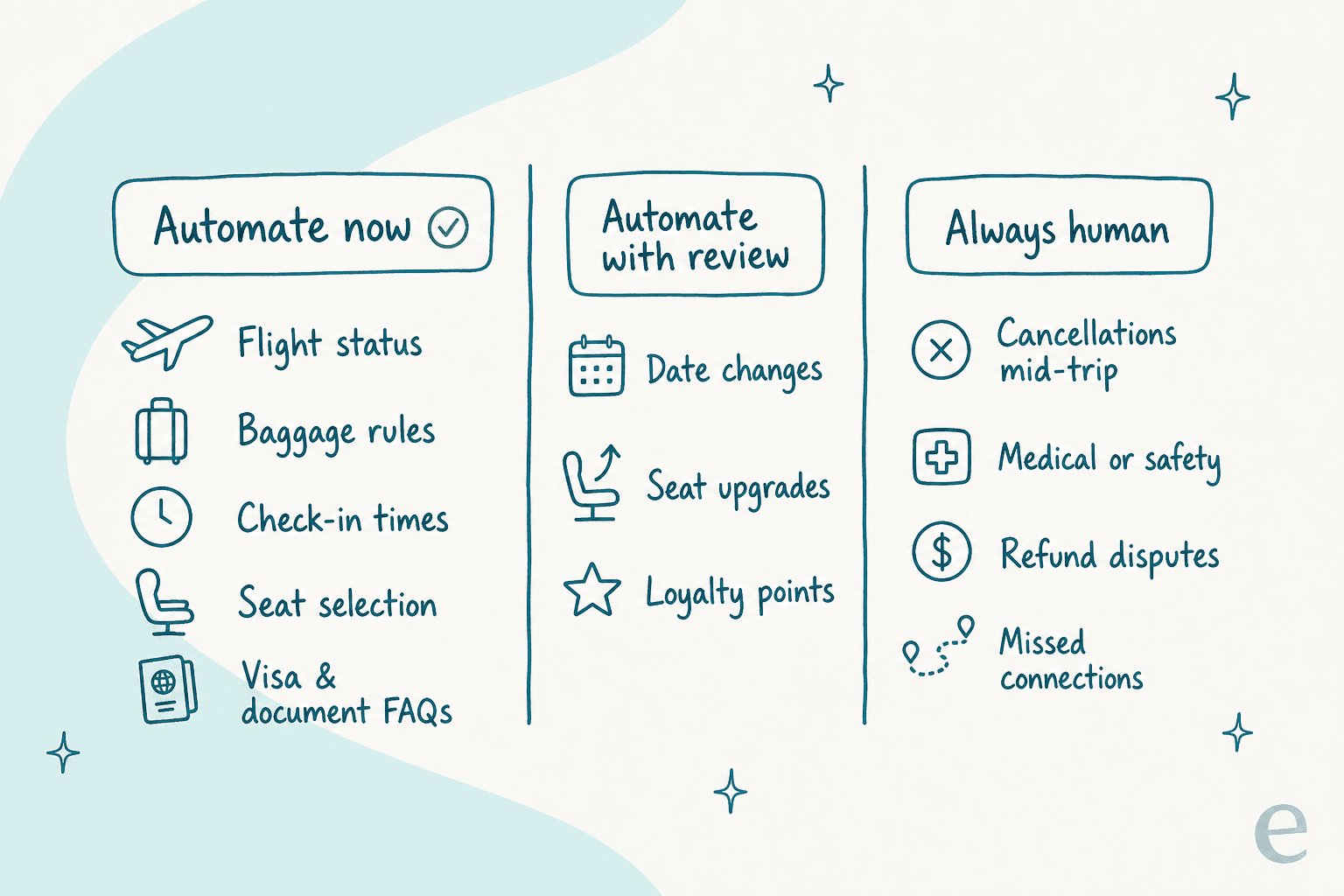
Safe to automate is the repetitive, factual, single-answer stuff: flight status, baggage allowance, check-in windows, seat selection, and visa or document questions. These already live in your help center and fare rules, which makes them ideal for FAQ deflection. That's your starting scope, and it's usually the majority of your ticket count even though it's the minority of the effort.
The "always human" bucket is where travel teams get burned, so name it explicitly: mid-trip cancellations, refund disputes, medical or safety issues, and missed connections. The AI's only job on these is to recognise them and route to a person fast, with the full conversation attached. Getting this split right up front is the single most important decision you'll make, and it's the difference between an AI agent that helps and a bot that makes the news.
Step 2: Connect your knowledge, and clean it first
An AI support agent is only as good as what it's allowed to read. For a travel brand that means three sources: your public help center, your internal policies (fare rules, change and cancellation terms, baggage and visa rules), and your own past tickets showing how your team actually answers.
That last one matters more than people expect. Your history is where the real phrasing lives, the exact way your team explains a change fee or a rebooking. Training on past conversations is what makes the AI sound like your brand instead of a generic bot.
But connect with a warning: the AI will happily repeat a wrong or outdated policy if that's what's in the docs. In travel, a wrong answer isn't a typo, it's a liability. A passenger on Hacker News summed up the stakes after an airline chatbot invented a refund policy:
"I expect something that's presented as customer service not to lie to me about the rebate policy. As long as what it says is plausible, I expect the company to be prepared to cover the cost of any mistakes."
So before go-live, clean the source. Kill the outdated fare rule. Delete the article that still lists last season's baggage fees. A tidy knowledge base is a prerequisite, not a nice-to-have.

Step 3: Build for the disruption spike
This is the step that's unique to travel, and the one most guides skip. Steady-state automation is easy. The question that actually matters is what happens the night a storm cancels every flight out of a hub.
Here's the shape of the problem. Your human team is a flat line: you have the agents you have. Incoming tickets are not flat, they surge. During disruptions that surge can hit five times normal volume. AI is what fills the gap between the flat line and the spike, because it doesn't care whether it's answering 100 tickets or 10,000.
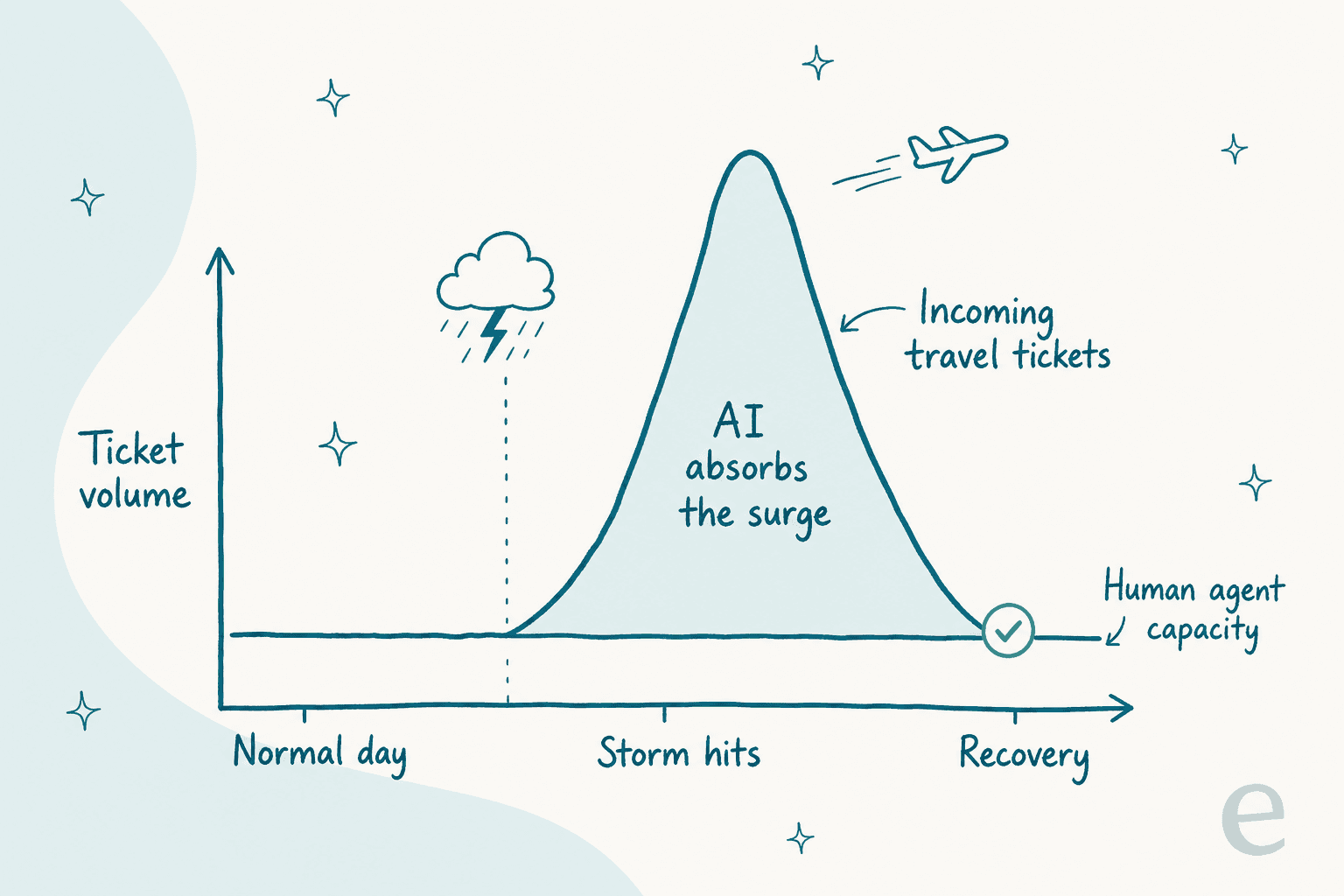
And it works on the exact tickets a spike produces. One US airline automated 31% of its cancellation calls with multimodal AI while holding CSAT between 82 and 90%. That's the meat of a disruption queue (rebooking, status, "where's my bag") handled without a war room. The teams that survive a bad-weather weekend are the ones that automated the surge before the surge arrived, and it shows up in retention: 81% of passengers who rated their journey "perfect" fly the same airline again, versus 4% who had a poor one (Wipro). If you want the general version of this math, our take on reducing ticket volume with AI covers it.
Step 4: Make it a filter, not a wall
Every horror story you've read about travel chatbots is really about a wall: a bot that answers what it wants and traps the traveler when it can't. The fix is a filter. Make the AI answer only the messages it's confident about, and quietly pass the rest to a person.
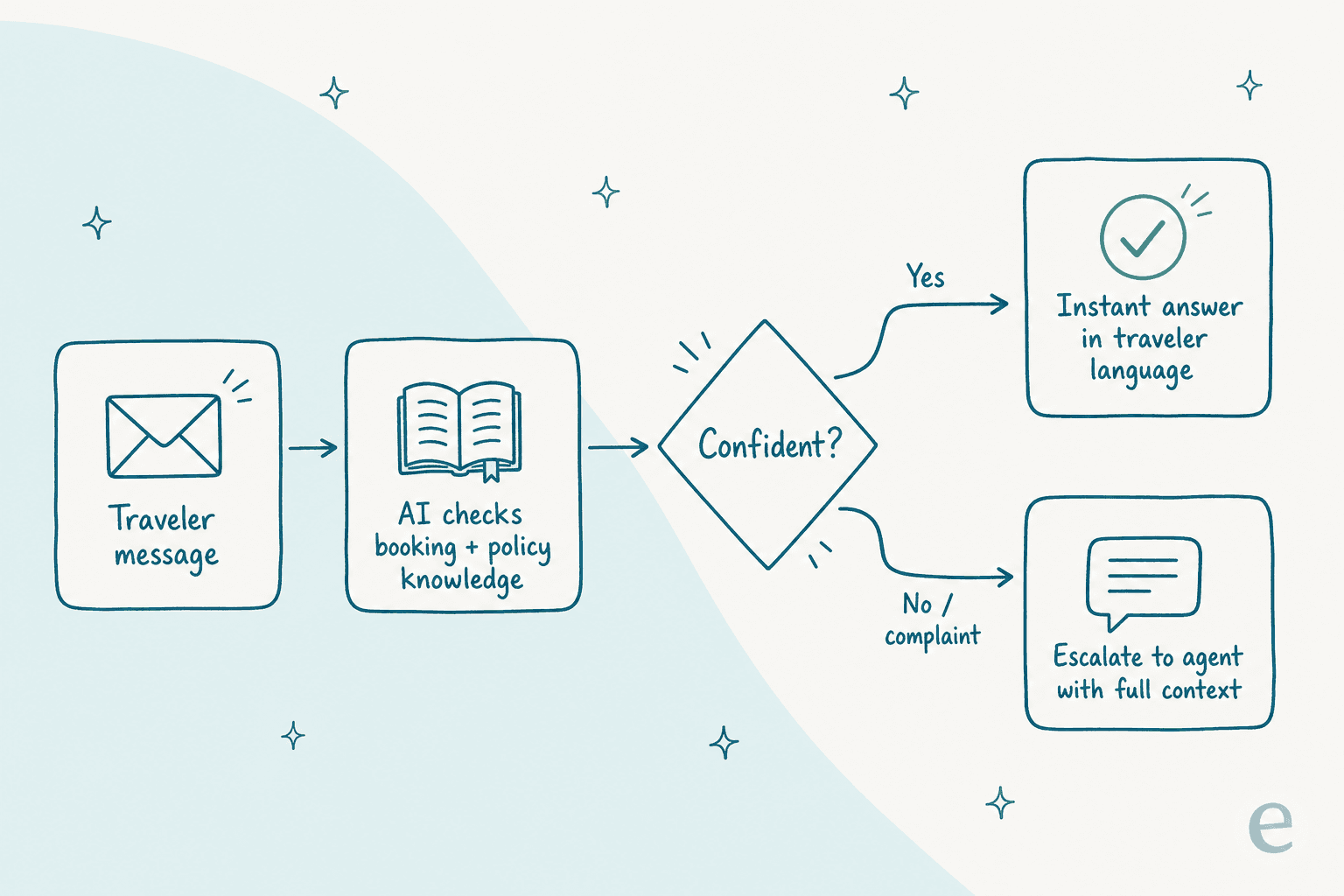
You set a confidence threshold, and below it the ticket goes straight to staff with full context, a clean handoff instead of a dead end. You also hard-exclude whole categories, so anything tagged "cancellation" or "complaint" never touches the AI at all. That's the ticket escalation process doing its job, just faster. This isn't a nice-to-have, it's what travelers explicitly ask for: 53% say human support should always be available even when AI is used.
The failure mode is a bot that refuses to let go. It's all over travel reviews:
"Virtual chat agents are useless and won't escalate even if you demand it."

The test for any vendor is simple: can a traveler always reach a human in one step? If the demo can't show you confidence-based routing and category exclusion, keep looking. Done right, this is also why the AI chatbot versus live chat debate is a false choice, you want both, wired together.
Step 5: Go multilingual and meet travelers on their channel
Two settings do a lot of quiet work in travel: language and channel.
Language first. Your passengers don't all think in English, and your team can't speak forty languages. Auto-translation lets one AI reply fluently in a traveler's own language, which turns an international passenger list into a non-issue. Berlin's BER Airport runs an AI agent 24/7 in four languages at 85% CSAT with zero wait times. If a chunk of your inbound is non-English, multilingual support alone can justify the rollout.
Channel second. Travelers message where they already are: WhatsApp, SMS, web chat, in-app, and email. The AI should answer in all of them from the same brain, so a passenger gets the same accurate rebooking answer whether they text or open the app. One AI, every channel, one source of truth, and real-time answers on the channel where the traveler is already panicking.
Step 6: Simulate on your real past tickets before go-live
This is the step that separates a safe rollout from a public mistake, and it's the one I feel strongest about after watching confident-sounding bots quietly give wrong answers.
Before a single traveler sees an automated reply, run the AI against a big batch of your historical, already-answered tickets and compare what it would have said to what your team actually said. You get three things out of that dry run: a real resolution-rate number, a list of the exact questions it gets wrong, and the confidence to set your threshold with data instead of a guess.
Don't go live on vibes. In a business where one wrong refund answer can end up in front of a tribunal, "we think it's about right" is not a launch criterion. The simulation is your evidence, and it's how Cebu Pacific pushed its automated resolution rate up 34% with wait times dropping under a minute.

Step 7: Go live narrow, then widen
Launch on the smallest safe slice: one channel, FAQ questions only, maybe even copilot mode first where the AI drafts replies for a human to approve before anything sends. Watch it for a week or two. Then widen the scope one category at a time as the numbers hold.
The teams that expand smoothly are the ones that expand slowly. The ones that get burned flip everything to full auto on day one and spend the next month apologising to stranded passengers. There's no prize for going live fast, especially in a business where a bad weekend is public.
Common mistakes I see
- Building a wall. The most expensive mistake in travel. If a stranded traveler can't reach a human in one step, you've made things worse.
- Automating cancellations and refunds. These are high-stakes and often emotional. Route them to a person with context.
- Feeding the AI stale fare rules. An outdated knowledge base means outdated answers, and in travel that's a liability, not a typo.
- Ignoring the spike. If your automation only works on a calm Tuesday, it fails on the exact day you need it.
- Skipping the languages. International passengers and an English-only bot means you've automated half your queue and annoyed the other half.
- Going live without a simulation. You're testing on travelers instead of your history. Don't.
- Chasing a vanity deflection rate. The metric that matters is resolved-correctly, not touched-by-AI. Think about the real ROI, not the dashboard number.
Try eesel for travel support
If you want to automate travel customer support without betting your reviews on it, this is the exact workflow eesel AI is built for. It plugs into your existing helpdesk and channels, trains on your fare rules and past tickets, and runs a simulation on your history so you see the resolution rate before go-live, not after.
The parts travel teams care about are the defaults, not add-ons: confidence-based routing so the AI only answers what it's sure about, category exclusion so cancellations and refunds always reach a person, multilingual replies across every channel, and the elastic capacity to eat a disruption spike without a hiring scramble. Pricing is one fixed monthly price, from $299/month for 500 credits (1 credit per ticket, however long), with no platform fee, so the cost is sized to your ticket volume, which usually beats the AI vs human agent cost math. If you're still comparing options, our roundup of the best AI chatbots puts it in context. It's free to try, and you can run the whole simulation before you decide anything.
