The chatbot ROI formula (and why it's this simple)
Every ROI calculator you'll find is a dressed-up version of one equation:
ROI % = (annual savings − annual chatbot cost) ÷ annual chatbot cost × 100
The cost side is whatever the vendor charges you in a year. The savings side is where all the action is, and it breaks into two parts:
- Tickets fully resolved by the bot. Each one is a ticket a human never touched. Multiply the number of resolved tickets by your fully-loaded cost per ticket (agent salary, tooling, overhead, divided by tickets handled) and that's pure, bankable saving.
- Faster handling on the rest. Even when a human sends the reply, an AI that drafts the answer or summarises the conversation shaves minutes off each ticket. That's softer, but it's real.
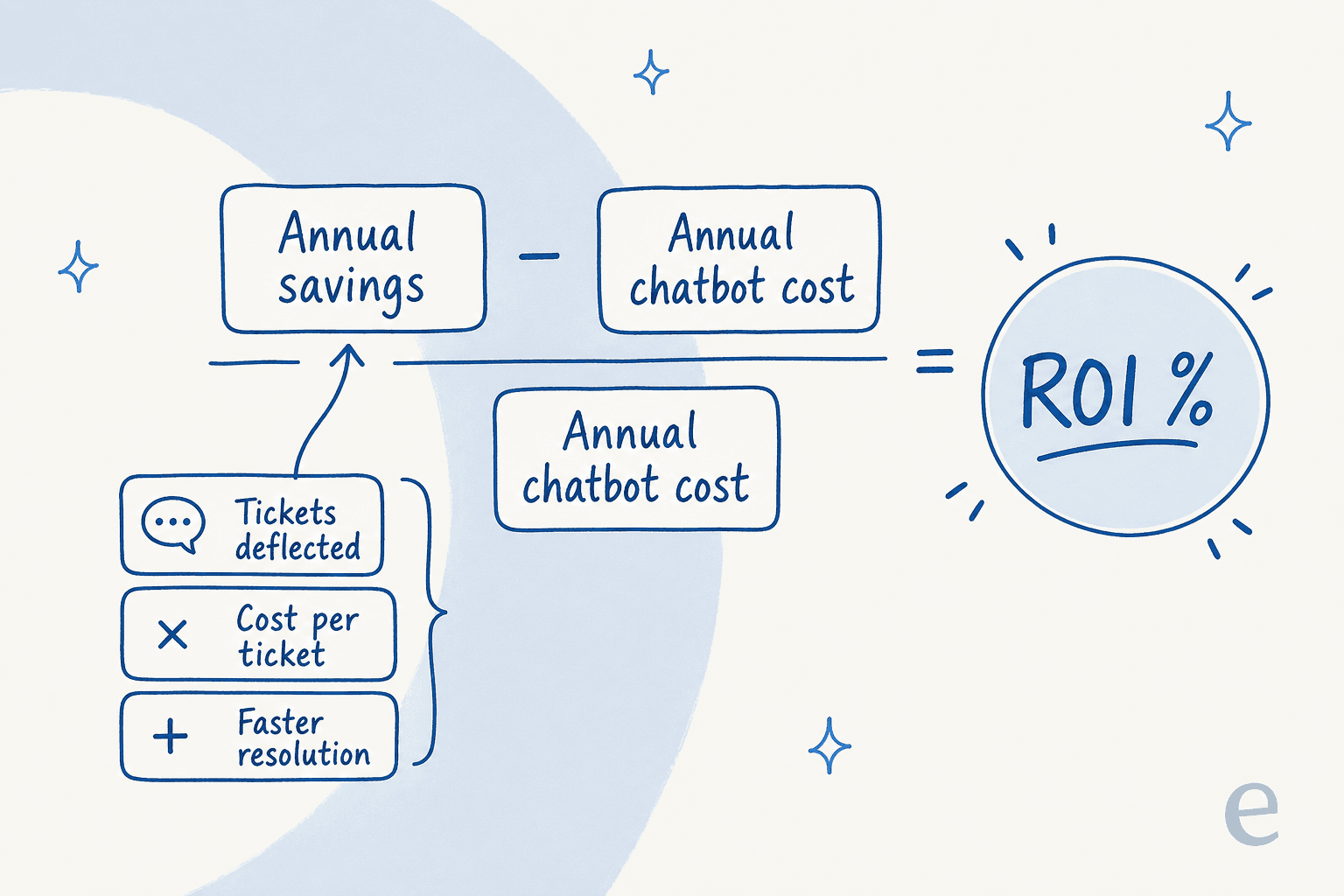
Notice what the formula doesn't care about: the number of features, the demo polish, or the vendor's slide about "transforming your CX." ROI lives and dies on resolution rate and price model. Everything else is noise. That's why the rest of this guide spends its time there.
The one number that decides everything: resolution rate
If you take one thing away, it's this. A chatbot's ROI is almost linear in the share of tickets it actually resolves. Double the resolution rate and you roughly double the savings, while the cost barely moves.
This is also the number that projections get most wrong, because teams guess it from a vendor's best-case slide instead of measuring it. The gap between "the vendor says 70%" and "our bot actually resolves 30% of our tickets" is the gap between a great investment and a disappointing one.
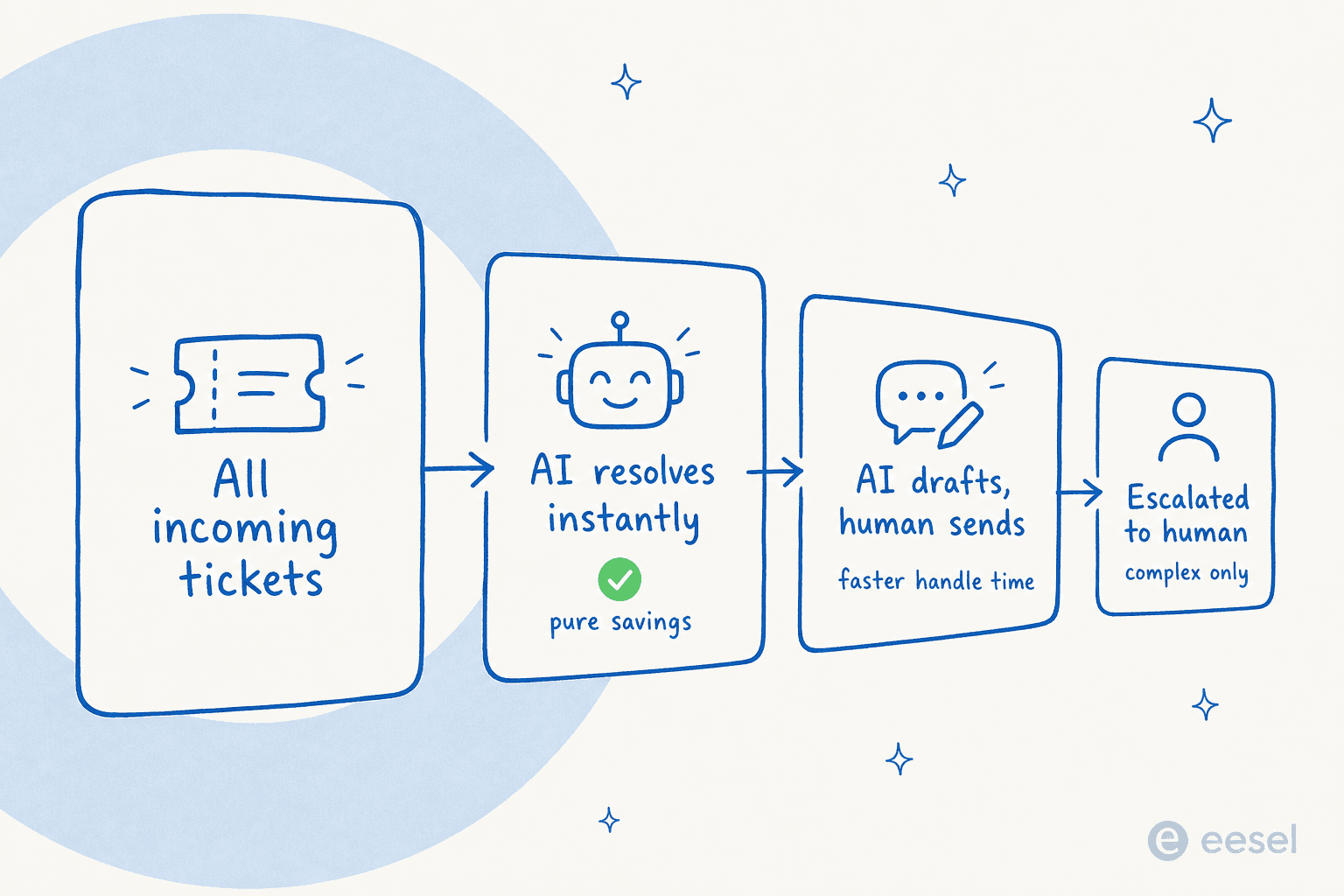
Here's what realistic looks like, from numbers I'd actually stand behind:
- A gig-economy driver-analytics app on Zendesk resolved 73% of tier-1 requests in its first month, after a 7-day trial. Tier-1 is the sweet spot: high volume, repetitive, well-documented.
- An internal IT helpdesk on Jira Service Management started at 15% deflection and set a 55% target as it trained the AI on more of its docs. Deflection climbs as the knowledge base fills in.
- In one week-long trial cohort, AI chats hit 96% quality across 581 conversations, with the bulk answered correctly and cited. Quality and resolution aren't the same thing, but low quality caps how far you can safely push resolution.
The pattern: start with tier-1 deflection, measure the real rate, and grow it deliberately. A bot pointed at your gnarliest edge cases on day one will post a bad resolution rate and a worse ROI. For the fuller picture on which numbers to watch, our guide to AI customer service metrics and chatbot KPIs breaks them down.
Plug in your own numbers
Rather than hand you a fictional case study, here's a calculator. Enter your volume, your costs, and a resolution rate you can defend, and it does the formula above. The defaults are deliberately conservative.
Play with the resolution field and watch the ROI swing. That sensitivity is the whole point: the resolution rate is the lever, and it's the one thing you should measure rather than assume.
Pricing model: the trap that eats the savings
Two chatbots can quote the "same" price and land in wildly different places on your invoice, because of how they charge. This is the second thing that quietly wrecks ROI, and it's the one buyers notice too late.
The models you'll see:
| Pricing model | How it's billed | ROI risk |
|---|---|---|
| Per resolution | You pay each time the bot "resolves" a ticket | Your bill rises as the bot gets better, and spikes on busy months |
| Per interaction / message | Every message, follow-up, or bot turn is metered | A single conversation can rack up several charges; back-and-forth gets expensive |
| Per seat | Flat fee per human agent | Doesn't reflect automation at all; you pay for humans you're trying to free up |
| Usage-based per ticket | One predictable price per ticket handled | Predictable; the bill tracks real volume, not clever definitions |
The nasty one is per resolution. It sounds fair ("only pay for what works") but it inverts your incentive: the better the bot performs, the more you pay, and a seasonal spike detonates the bill. I've seen the math run like this on a 1,000-ticket month at 80% resolution: about $792/month. Come Black Friday at 4,000 tickets and the same 80% rate, it jumps to roughly $3,168/month for the same service. A flat or per-ticket model keeps November's bill looking like March's.
This is exactly the objection I hear most from teams evaluating support AI. One ops lead at a payouts fintech doing 7,000-8,000 escalated tickets a month told us per-interaction pricing was a flat non-starter, because at roughly four exchanges per ticket he'd blow any interaction cap in a day and a half. Another operator scaling toward 150,000 tickets a month found the interaction-versus-ticket distinction so confusing mid-call that he projected a $30k monthly bill and nearly walked.
The lesson for your ROI model: pin down the billable unit before you trust any projection. "Per resolution" and "per ticket" produce completely different annual costs on the same volume. For a deeper look at what teams actually pay, see AI customer support cost savings and the breakdown of AI agent vs human agent cost.
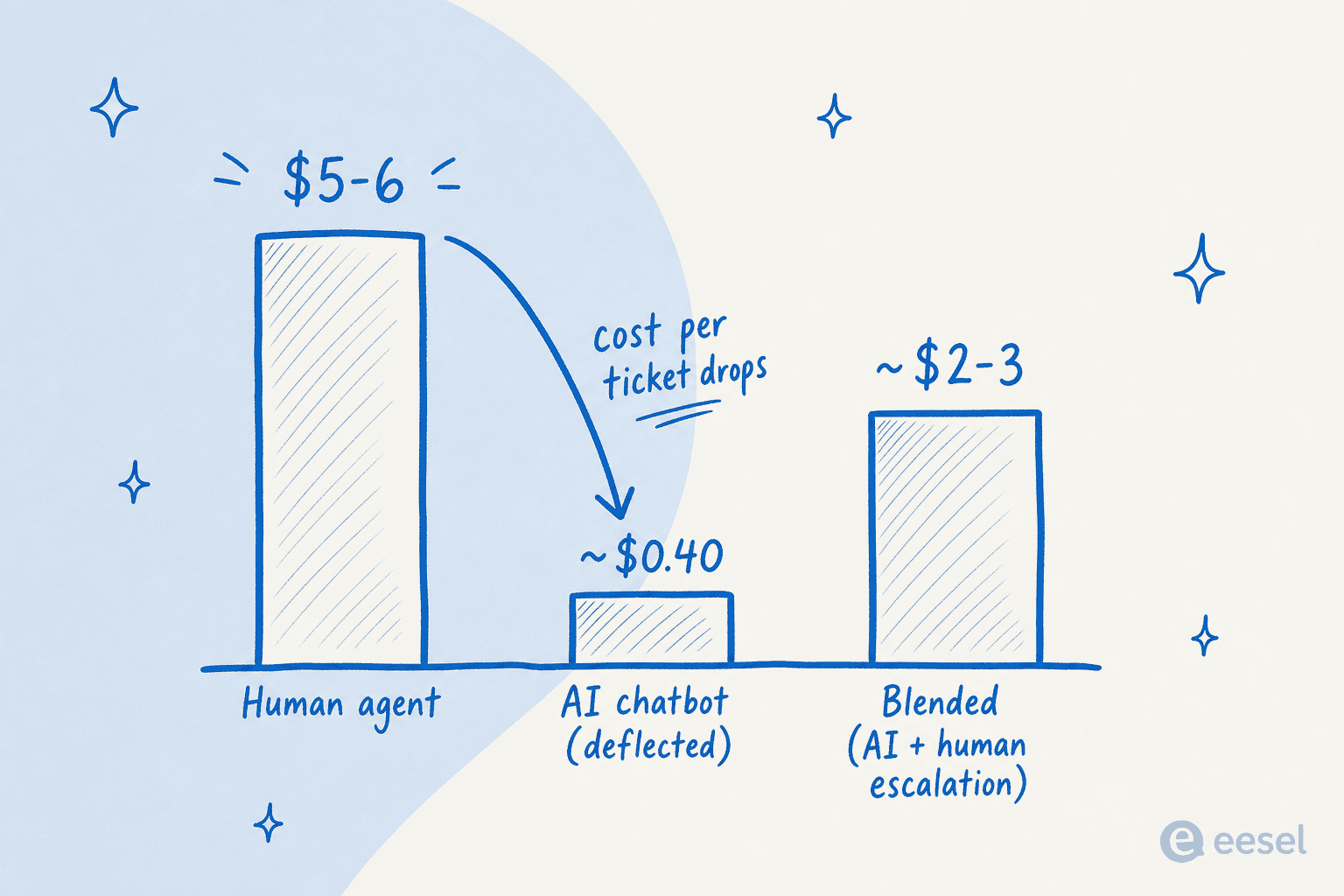
For reference, eesel prices at $0.40 per ticket with no seat fees and no platform fee. On the calculator above, that's the "AI cost per resolved ticket" default. Whatever tool you pick, run its real pricing through the same formula, don't take the "starts at $X" line at face value.
The soft returns that don't show up in the formula
The calculator above is deliberately a floor. It only counts deflected tickets. In practice, a good customer service chatbot returns value the formula understates:
- Faster resolution on the tickets a human still handles. A payments company reported up to 80% time savings on finding answers and onboarding new agents once AI could surface the right doc instantly. That's handle-time saved on every ticket, not just deflected ones.
- 24/7 coverage without night-shift headcount. The bot answers at 3am for the cost of the API call, not an overtime rate.
- Consistency and first-contact resolution. Fewer re-opens and escalations because the answer was right and complete the first time.
- Agents doing better work. When tier-1 deflection clears the repetitive volume, your humans spend their time on the complex, high-value tickets, which is where they actually move CSAT.
None of these are in the calculator, and that's intentional. If your deflection-only ROI already clears the bar, the soft returns are upside. If it doesn't, don't rescue the projection with hard-to-verify soft numbers, fix the resolution rate instead.
How to get an ROI number you can actually trust
Here's the part most guides skip. You don't have to guess the resolution rate. The fastest way to a defensible ROI is to measure the one variable everything hinges on, before you commit budget.
- Pick the right first use case. Tier-1, high-volume, well-documented ticket types. Not your hardest edge cases. This is where resolution rates are highest and ROI shows up fastest.
- Point the AI at your real knowledge. Help center, past tickets, macros, internal docs. A bot is only as good as what it's trained on; thin knowledge means low resolution means bad ROI.
- Simulate on historical tickets before go-live. This is the step that turns a guess into a number. Run the AI against thousands of your past tickets and see exactly what it would have resolved, and where it would have been wrong, without touching a live customer.
- Roll out gradually and watch the real rate. Start the bot on a slice of volume, confirm the resolution and quality numbers hold, then expand.
That simulation step is the difference between a business case built on a vendor's slide and one built on your own data. We built eesel's rollout around it precisely because we've watched confident-sounding bots quietly give wrong answers, and the only way to catch that before it costs you is to test on history first. It's also the reason I distrust any ROI projection that can't tell me the resolution rate it's assuming and where that number came from.

Try eesel for your ROI case
If you want the ROI number for your queue rather than a generic one, that's exactly what eesel is built to show you. You connect your helpdesk (Zendesk, Freshdesk, Gorgias, and more) plus your existing docs, and eesel simulates the AI against your historical tickets, so you see the real resolution rate and projected savings before going live. Pricing is $0.40 per ticket with no seat fees, which means the ROI math stays predictable even when volume spikes.
It works like a new support hire that plugs in during a 7-day trial and already knows your help center, and you get to check its homework on real tickets first. Free to try.

Frequently Asked Questions
How do you calculate chatbot ROI?
What is a good ROI for a customer service chatbot?
How much does an AI chatbot cost?
How long until a chatbot pays for itself?
Why do chatbot ROI projections often miss?


Article by
Kurnia Kharisma
Kurnia is a software engineer and writer at eesel AI with two years of SEO experience, writing about AI tools, helpdesk software, and customer support. He pairs a developer's understanding of how these products are built with search-driven research into what actually ranks and resonates with the people searching for them.