What are AI response suggestions?
An AI response suggestion is a reply the AI writes for a ticket, which a human then approves. The customer asks "where's my order?", and before your agent starts typing, a complete, on-brand draft is already sitting in the reply box, with the order status filled in.
That's the whole idea, but it's worth separating it from two neighbours it often gets confused with, because they sit on a spectrum of how much the human stays in the loop:
- Canned responses and macros are static. You write the text once, save it, and an agent pastes it in. Great for replies that never change ("here's how to reset your password"), useless for anything that needs the specifics of this ticket.
- AI response suggestions are generated fresh per ticket. They read the conversation, pull the relevant answer from your knowledge, and draft a reply a human reviews before sending. This is the agent assist layer.
- Autonomous AI agents skip the human on tickets they're confident about, sending the reply directly and escalating the rest.
Response suggestions are the middle rung, and for most teams they're the right place to start. They give you the speed of automation with a human still holding the send button.

How AI response suggestions actually work
Under the hood, a good suggestion is not the AI "knowing" your business. It's retrieval. When a ticket arrives, the AI searches a body of knowledge you've connected (past resolved tickets, help center articles, internal docs, even old macros), finds the passages that match the question, and writes a reply grounded in them. The technical name is retrieval-augmented generation, and the practical upshot is simple: the quality of the suggestion is capped by the quality of what you feed it.
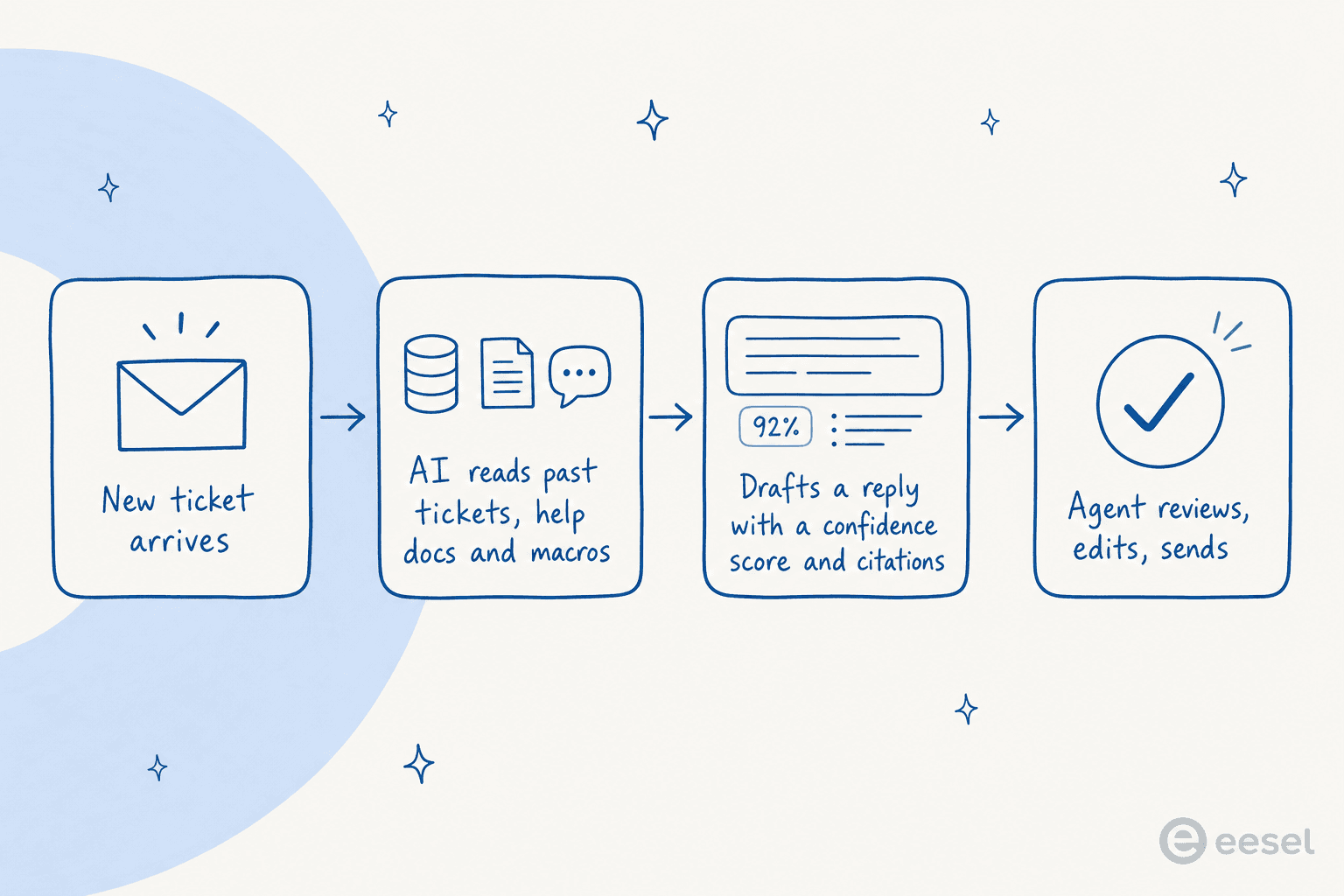
The piece most people miss is training on solved tickets, not just help-center content. Your help center says what the policy is; your closed tickets show how your team actually phrases the answer, including the edge cases and the apologies and the "let me check that for you" that never make it into documentation. A team I'd anonymize as a records and data-governance SaaS running on Zendesk put it this way after moving their drafting onto past-ticket data:
"Eesel has greatly improved our speed and interactions with Zendesk and customers by providing accurate draft responses on all cases using the awesome training model via past ticket data."
Two things separate a suggestion you can trust from one you can't, and both happen at this step. First, citations: the draft should tell you which article or ticket it pulled from, so the agent can verify in two seconds instead of re-researching. Second, a confidence signal: the AI should know when it's guessing. The ones that don't are the ones that hallucinate a refund policy that doesn't exist.
AI response suggestions vs canned responses
Here's the honest comparison. Macros aren't dead; they're just narrower than people remember.
| Canned responses / macros | AI response suggestions | |
|---|---|---|
| How the reply is made | Written once, reused verbatim | Generated fresh per ticket |
| Handles ticket specifics | No, you edit by hand | Yes, pulls the order, plan, or policy that applies |
| Setup effort | Manual: write and maintain each one | Connect your knowledge base and past tickets |
| Stays current | Goes stale silently | Reflects whatever your docs and tickets currently say |
| Best for | Truly standardized replies | The long tail of real questions |
| Risk | Agent pastes the wrong macro | A wrong draft, if confidence and citations aren't enforced |
My take: keep your best macros for the genuinely fixed stuff, and let suggestions cover everything a template can't predict. If you find your team editing the same macro every time before sending it, that's a ticket type that should be an AI suggestion instead.
Copilot or autopilot: where suggestions fit
This is the decision that actually determines whether AI response suggestions work for you, and it's less about the tool than about how you roll it out.
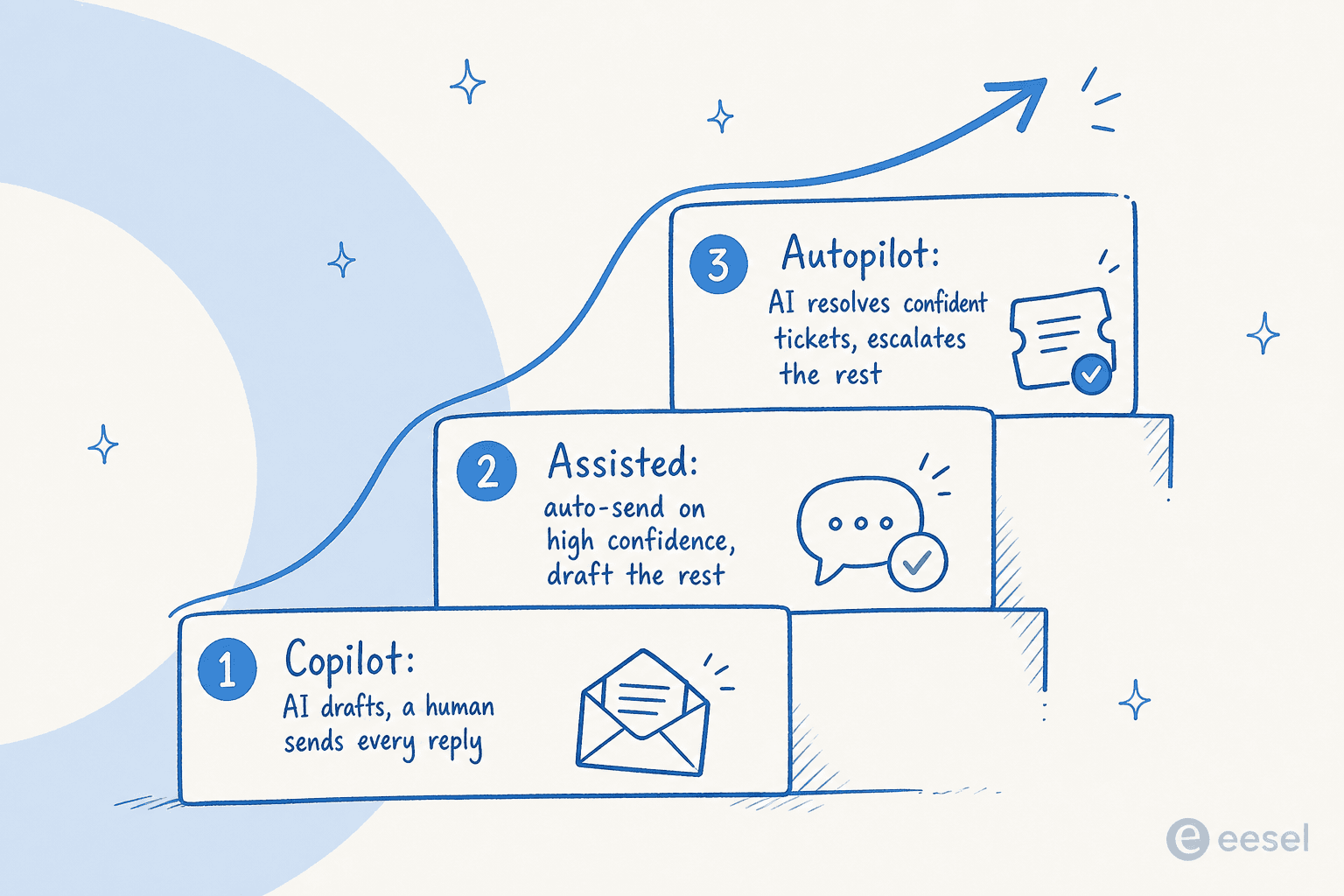
The pattern I'd push almost every team toward is to start in copilot mode, where the AI drafts and a human approves every reply. It's low-risk, it builds trust, and it quietly does something valuable: every edit your agents make is feedback that improves the next suggestion. Once you can see the AI is consistently right on, say, order-status and password questions, you move those specific ticket types to autopilot and leave the rest in draft mode.
What you should not do is flip a switch to "AI answers everything" on day one. The biggest objection I hear from buyers isn't "will the AI be smart enough", it's "I don't want it replying to things it shouldn't". One CX lead, running support for a DTC supplements brand, framed it perfectly to us: the AI will never answer 100% of questions, so they only want it handling the tickets it's confident about and leaving everything else alone.
That instinct is correct, and it's exactly what confidence-based routing is for. Suggestions let you honour it, because a human is reading every draft until you decide otherwise.
What separates a good suggestion from a risky one
Not all AI response suggestions are built the same, and the gap shows up the moment a tricky ticket lands. After building and watching these systems run across thousands of live tickets, four traits reliably separate the suggestions agents actually send from the ones they delete and rewrite.
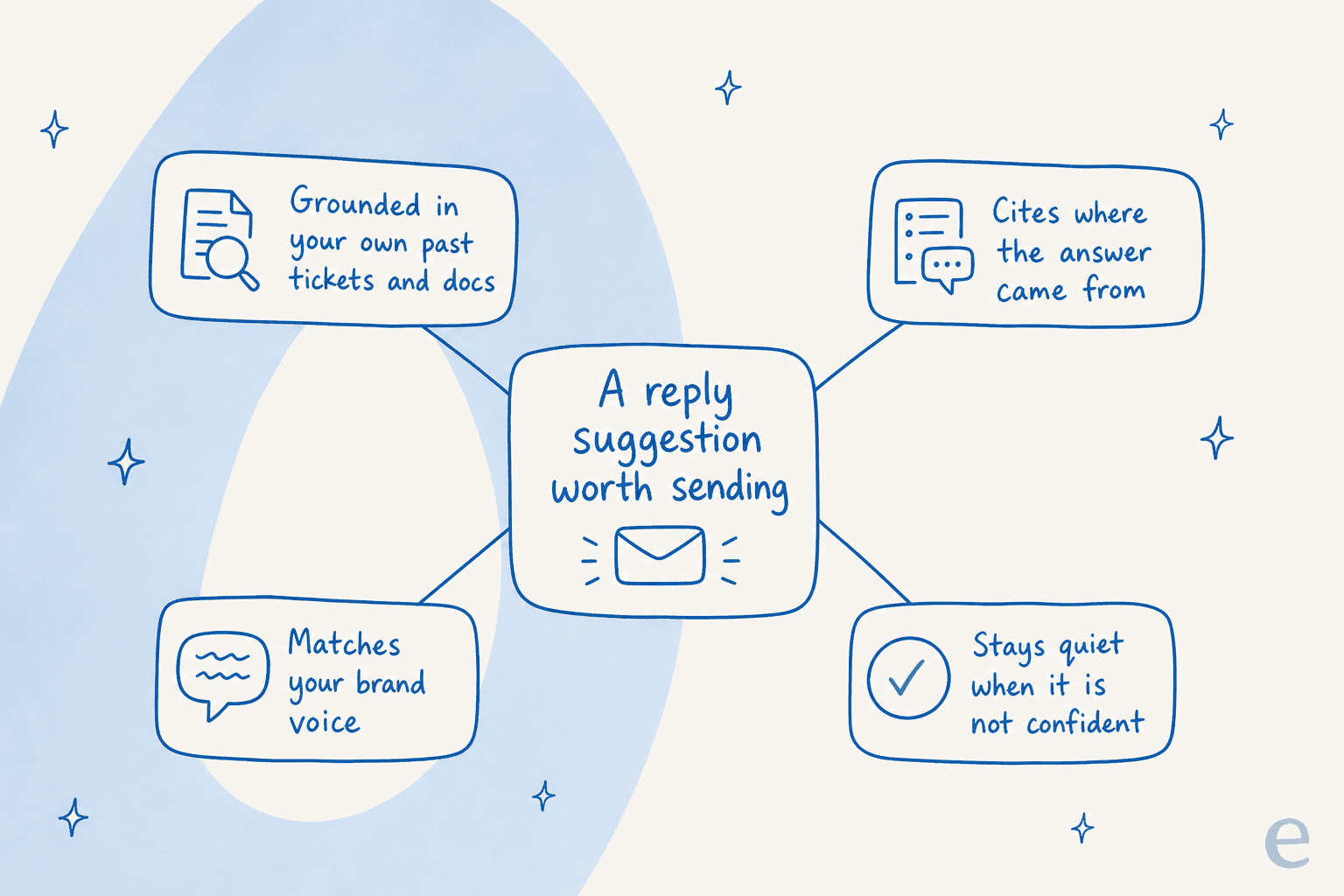
- Grounded in your real answers. A suggestion built from your closed tickets and docs beats a generic model every time. It's the difference between "here's how returns generally work" and "here's how your 30-day return window works".
- It cites its sources. Without a citation, your agent has to re-verify the whole answer, which kills the time saving. With one, they glance and send.
- It matches your brand voice. A draft that sounds like a robot gets rewritten, which defeats the point. A service desk lead at a logistics SaaS told us their drafts were "curating well-formed responses with consistent, on-brand tone, still keeping our own style and still keeping that human touch" (CartonCloud case study).
- It knows when to stay quiet. The best suggestion on a question the AI can't answer is no suggestion at all, plus a clean handoff to a human.
If a tool can't do these four things, what you have isn't a copilot, it's autocomplete with a confidence problem.
How to roll out AI response suggestions without breaking trust
You don't need a six-month project. The sequence that works:
- Connect your knowledge. Point the AI at your help center, your internal docs, and ideally your past resolved tickets. This is where the answers come from, so be generous here. eesel pulls from 100+ integrations including Notion, Confluence, Google Docs, and your helpdesk's own ticket history.
- Simulate before you go live. This is the step teams skip and regret. Run the AI against your last few thousand tickets and look at what it would have drafted, by ticket theme, before any of it touches a customer. You see your real coverage and your real gaps up front.
- Start in copilot mode. Drafts only, humans approve. Let your agents' edits train the system.
- Promote ticket types to autopilot as they earn it. Move the confident, repetitive categories (order tracking, password resets, ticket triage) to auto-send, and keep the rest as suggestions.
- Measure the right thing. Track edit rate (how often agents change the draft) and resolution time, not just deflection. Our guide to AI customer service metrics goes deeper on what to watch.

When teams follow this arc, the results show up fast. Gridwise saw eesel resolve 73% of tier-1 requests in the first month, with signal appearing during a 7-day trial. The speed comes precisely from not skipping the trust-building part.
Try eesel for AI response suggestions
If you want AI response suggestions that draft from your own ticket history and live inside the helpdesk you already use, that's what I work on at eesel. It connects to Zendesk, Freshdesk, Gorgias, Front, and HubSpot, drafts replies a human can approve, cites its sources, and lets you simulate against your past tickets before going live, so you know your coverage before you trust it. Pricing is usage-based at about $0.40 per ticket with no per-agent fee, and the free trial doesn't need a credit card.
Frequently Asked Questions
What are AI response suggestions?
How are AI response suggestions different from canned responses or macros?
Are AI response suggestions accurate enough to send without editing?
How much do AI response suggestions cost?


Article by
Kira
Kira is a writer at eesel AI with a Computer Science background and over a year of hands-on experience evaluating AI-powered customer service tools. She focuses on breaking down how helpdesk platforms and AI agents actually work so that support teams can make better buying decisions.