Front already built this, which is the part nobody expects
I build AI agents at eesel, which means I spend most of my week on the gap between a model that reasons well and a helpdesk full of real customers. Front is the integration I know best, and not for a flattering reason. It is also an unusual one to build against, because a shared inbox is not a ticketing system and the difference shows up everywhere in the API.
Through early 2026, Front was the single most common reason a mid-market deal stalled on us. Teams would get through evaluation, like the answers, and then say the same thing: Front is our helpdesk, and until you support it we cannot really test this. We heard it from a B2B SaaS team running around 200 to 300 tickets a month in English and French across roughly 300 technical docs, and we heard it again from a data company the same month. So we built it. That is the entire origin story of our Front integration, and it is why I went into this research expecting to find nothing on the Claude side.
I was wrong, and pleasantly. Front shipped its own MCP server, then shipped a second version of it three weeks later after deprecating the first. That is not a marketing page. That is a team iterating on something in production.
What that same B2B team asked for, though, is the thing worth holding onto while you read the rest of this. They did not want a chat window. They wanted an AI that could cross-reference the user guide, Slack, the internal knowledge base, and past tickets in one answer, then tell them which questions it could not answer so they could write the missing article. That is a system, not a model. Keep that gap in mind, because every route below hands you a different slice of it.
First, the thing you cannot do
Search intent for "Claude for Front" usually assumes a dropdown exists. Open Front AI, pick your model, choose Claude, done.
It does not exist, and Front is unusually direct about why. Front's AI product page answers the model question in its own FAQ: it uses OpenAI and Azure OpenAI's GPT models, plus Mistral models hosted on AWS. The help center's AI FAQ names the same three partners twice and never mentions Anthropic.
Here is the detail I enjoyed finding. Anthropic is on Front's subprocessor list, effective July 2026. Its listed processing activity is "Customer support," the same bucket as Zapier, while AWS, Azure, Google, and OpenAI all sit under "AI-enabled functionality." Front does not publish what that means, so I will not overclaim it. But the plain reading is that Front's own support team gets to use Claude and your Autopilot does not.
I went looking for a model selector properly, not just skimming for its absence. The Autopilot Resolve setup docs walk through Build, Customize, Deploy, Analytics, Routing, and Channel settings. You get knowledge sources, playbooks, reply-time messaging, prompts, appearance, and routing rules. No provider toggle, no key field. The company-level Front AI settings page tells the same story at a glance.
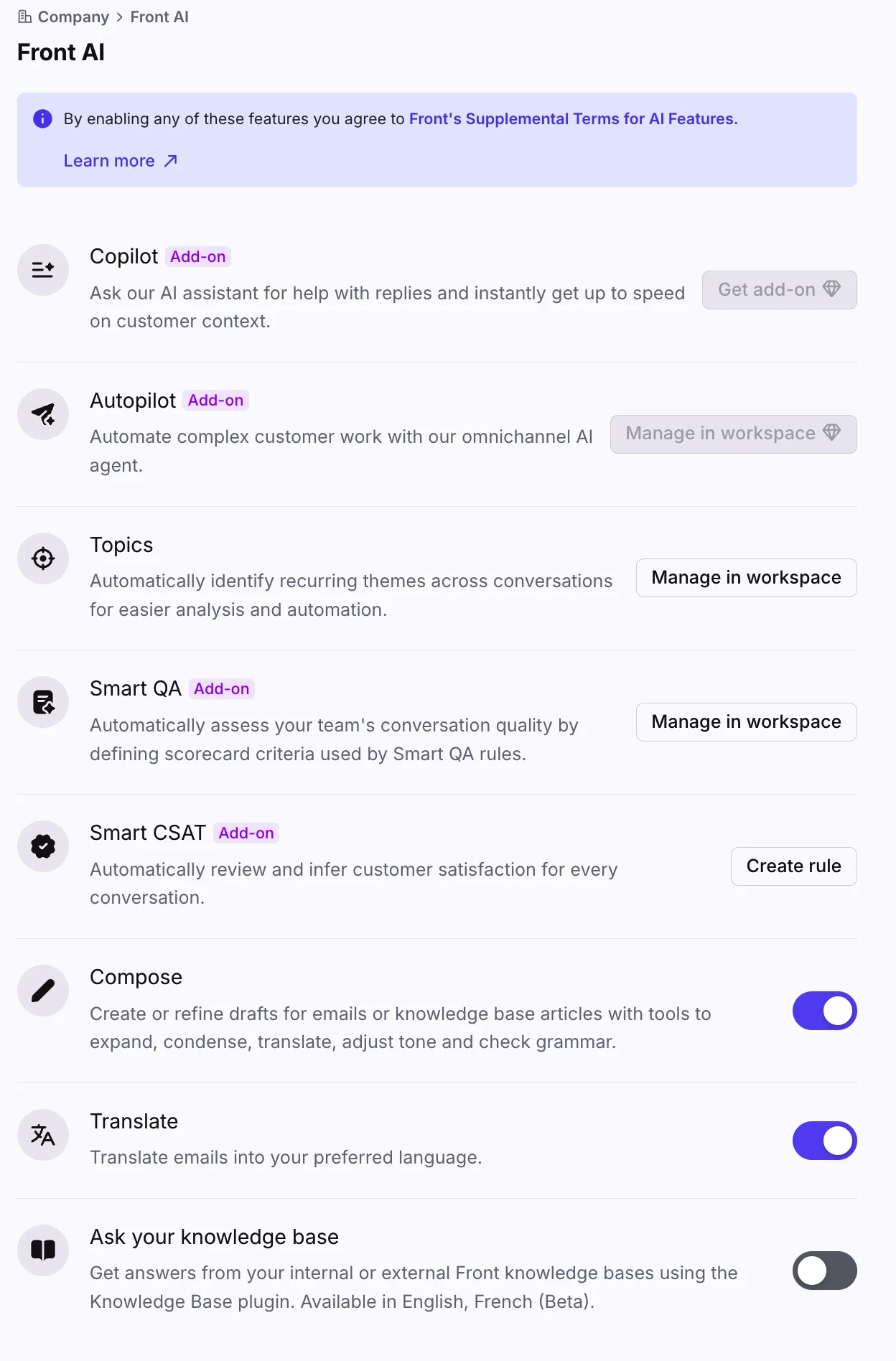
None of this is a knock on Front. Picking two or three providers and tuning hard against them is a defensible product decision, and Front AI Copilot is legitimately good in the agent workspace. The same goes for the smaller features in that panel: Analyze Topics is a genuinely useful read on why people are writing in, and Front AI Translate earns its keep on a multilingual queue. It just means the question changes shape. You are not asking how to make Autopilot use Claude. You are asking how to get Claude to see your Front data, and that has four real answers.
Route 1: Front's own MCP server
This is the one that surprised me, and it is the one most readers should start with.
Front lists MCP Server as one of seven first-party integration surfaces on its developer portal, described in Front's own words as a way for AI agents like Claude and ChatGPT to read and reply to conversations. The spec page was last touched six days before I checked it on 12 August 2026.
The shape of it:
| Detail | What Front documents |
|---|---|
| Endpoint | mcp.frontapp.com/mcp, streamable HTTP |
| Auth | OAuth 2.1 with PKCE, no dynamic client registration |
| Scopes | read, write, send |
| Tools | 23, across conversations, messages, comments, tags, contacts, org lookups |
| Identity | Every token bound to one Front teammate |
| Cost | No published per-action charge |
| Status | Open beta, tool names "subject to change" |
Two of those rows do more work than the rest.
The first is identity. The agent's effective permissions are exactly the permissions of the human who authorised it, checked live against Front on every call. If that person cannot see the billing inbox, neither can Claude. Under a centrally managed Claude Enterprise rollout, IT can allow the connection, but each individual still completes their own consent. It is the least surprising security model you could ask for, and it is the reason this thing can be in open beta without anyone panicking.
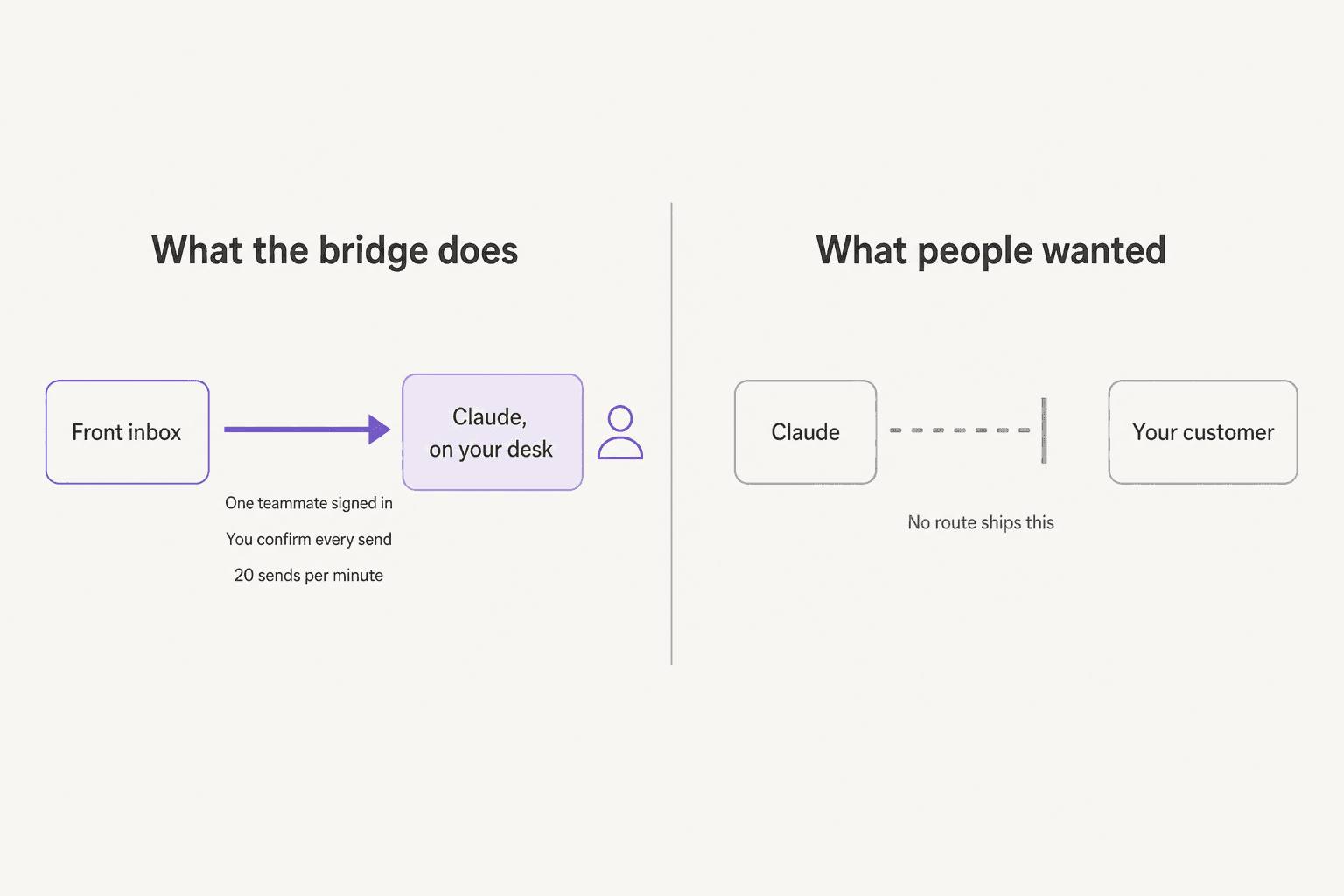
The second is the send gate. send_message is a separate tool from create_draft, it requires a draft ID, and it carries destructiveHint: true, which prompts Claude to ask for confirmation before every single send. So the loop is: Claude drafts, you look, you approve. Per message.
Connecting is genuinely quick. Front's getting-started article confirms open beta ("Everyone has access") and gives two paths. The first is the connector listing in Claude's own directory, which Front says is live now. The second is a custom connection, where a Front admin creates a private developer app, sets the OAuth scopes, and points any MCP client at the endpoint. Front names Claude Code, Cursor, and ChatGPT's developer mode for that path.
Rate limits are per teammate and sit in their own pool, separate from the Core API budget:
| Tier | Limit |
|---|---|
Light reads (list_*, get_*) | 120/min |
Heavy reads (search_conversations, read_conversation) | 30/min |
| Writes (drafts, comments, tags, assignment) | 20/min |
| Sends | 20/min |
| Ceilings | 1,000/hour per teammate, 10,000/hour per workspace |
My take: if you are on any Front plan, connect this today. It is free, it is first-party, and asking Claude "what did this account complain about last quarter" against your real inbox is the most immediately useful thing in this entire post. It sits closer to a Claude productivity assistant than to ticket deflection, so budget it as a tool for your team. And read the beta warning literally: tool names are still moving, so do not hard-wire a business process to them yet.
Route 2: the same server, wired up yourself
Worth separating out, because the constraint is real and it will bite a specific group of people.
Front does not support dynamic client registration, so the connecting client has to hold a confidential connection with a client ID and secret. Any MCP client that only does DCR is out. Front names Codex as an example of one that will not work.
For Claude Code and Cursor, this is a config file and a few minutes of OAuth. The upside over the directory listing is control: you choose the scopes on the app, so you can create a read-only connection for an analyst and a read-plus-write connection for a lead, without either of them able to send. If you have wired up any Claude AI integration before, none of this will be unfamiliar, and the pattern is the same one behind the Claude Jira integration and the Claude Slack integration.
My take: do this instead of the directory connector when you want scopes tighter than the default, or when the people using it live in an editor rather than in the Claude app. Otherwise the directory listing is fewer moving parts.
Route 3: the community servers, now mostly historical
Before Front shipped its own, the community filled the gap. Two Frontapp-specific repos are real, with figures pulled from the GitHub API on 12 August 2026:
| Repo | Stars | Last push | License |
|---|---|---|---|
| zqushair/Frontapp-MCP | 19 | 2026-04-29 | MIT |
| iktakahiro/frontapp-mcp-server | 1 | 2025-04-12 | MIT |
The first supports Front webhooks for real-time events, which is more than the official beta advertises. The second describes itself as experimental and only retrieves messages.
One trap worth naming: searching "front mcp" surfaces a 146-star repo called frontmcp, which is a generic framework for building MCP servers and has nothing to do with Front the helpdesk. I nearly cited it. Do not.
The security posture here is the ordinary one for any self-hosted MCP server: you hand a Front API token to a locally running process, and that token carries whatever permissions you gave it. Front's own server avoids this by binding to a teammate's live OAuth session instead.
My take: these were the right answer in March and they are not the right answer now. Front's official server is better scoped, better rate-limited, and maintained by the company whose API it wraps. Reach for a community repo only if you need webhook-driven events that the official beta does not yet expose.
Route 4: build it on the Core API
This is where most engineers end up when the answer has to be unattended, and it is where the real design decisions live. I read through the Front Core API docs properly for this, and three things shape everything else.
Drafts are reversible, sent messages are not
This is the single most useful thing in Front's API design, and I wish more helpdesks copied it.
Drafts are a first-class resource. You can create one, edit it, delete it. Sending is a different endpoint with a different permission tier entirely: messages:send, distinct from drafts:write. And once a message is sent, that is it. There is no edit endpoint, no unsend, no recall anywhere in Front's API surface.
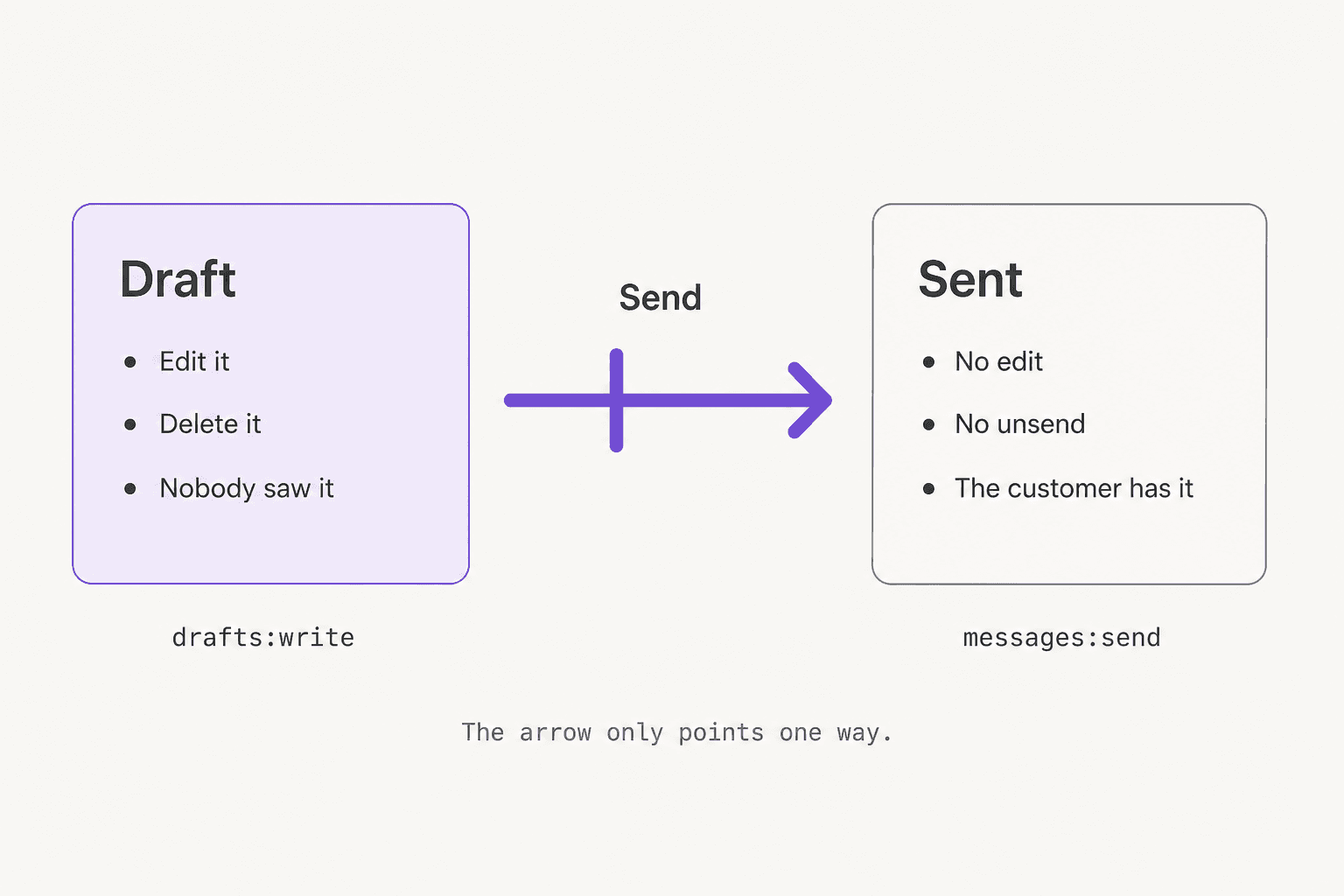
The practical consequence is the best safety feature you get for free. Mint a token with drafts:write and comments:write but not messages:send, and your agent physically cannot email a customer, regardless of what the model decides at 3am. Not a prompt instruction, not a guardrail you maintain. A permission the API enforces.
I would ship version one exactly that way, writing internal comments only, which are teammate-visible, editable after posting, and never leave Front. That is the same shape as any decent AI copilot for support, and it is the difference between a bad answer being a private embarrassment and a bad answer being an email your customer now owns.
Someone on Hacker News described what the other version of that costs:
"LLM chatbots are a step forward for customer support. Well, ours started hallucinating a support phone number that while is a real number is not our number. Lots of people started calling which was a bad time for everyone. Especially the person's number it actually is. So maybe two steps forward and occasionally one back."

Your history is reachable, you just pay for it by the minute
Good news first: there is no rolling window and no cap on how far back you can page. List conversations walks the whole history with cursor pagination.
The constraint is throughput, and it is plan-shaped:
| Plan | Requests per minute |
|---|---|
| Starter | 50 |
| Professional | 100 |
| Enterprise | 200 |
Pages cap at 100 conversations. Burst allowance is half your plan limit, and blowing through it costs a 10-minute replenish. Conversation search is separately capped at 40% of your global budget, which matters a lot if your agent's main loop is search-then-act. Front sells more headroom at $200 per 100 extra requests per minute per month on its pricing page.
Do the arithmetic before you promise anyone a backfill. Two years of conversations at 100 per page on Professional is a scheduled job with resumable state, not an afternoon. That is the same reality behind every Front chatbot project I have watched get scoped optimistically.
One more limit worth knowing, because it shapes what you can ground on. Front AI's own external knowledge sources are website crawls, capped at 3,000 pages, and a Front user in r/CustomerSuccess flagged that they were English-only when the feature landed:
"Front recently added the ability to include external knowledge sources as well as previous conversations in the AI knowledge (go to Settings/Gear icon -> your workspace -> FrontAI -> Knowledge sources -> Add source -> External Sources). It currently only works for English pages."

The settings panel makes the ceiling concrete. Two source types, and that is the list.
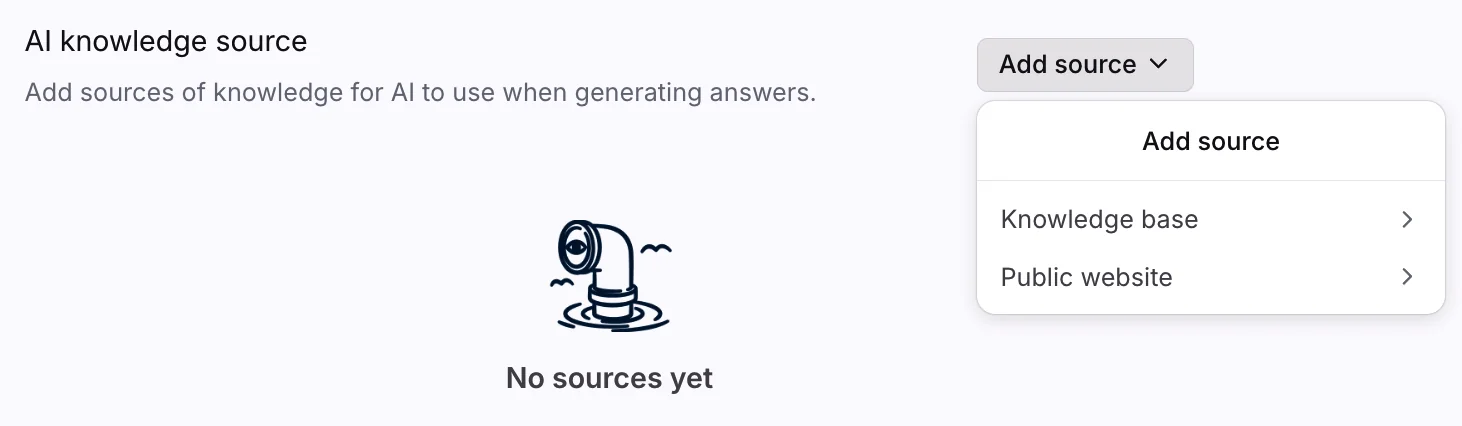
Building on the API is exactly how you get past that, since your retrieval layer can read whatever you can authenticate against. That is the upside of route 4, and it is a real one. It is also the whole reason an AI-powered knowledge base is worth setting up properly before you point any model at it.
Webhooks work, and they fail closed
Front gives you two kinds. Rule webhooks are configured in the UI and are the fast way to test something. Application webhooks are the code-managed path: declared as a feature on a developer app, HMAC-signed, subscribing to a fixed event list that includes inbound_received, outbound_sent, assignee_changed, and new_comment_added.
Three operational details that will decide your architecture:
- Your endpoint has 5 seconds to respond. Acknowledge fast and process async, always.
- Three failures in a row and Front disables the webhook and emails the app creator. There is no backfill of what you missed, so you reconcile against the API yourself.
- Bulk actions and historical imports never fire webhooks at all. Poll the events endpoint if you need those.
You can also ship a sidebar plugin, an iframed app that renders next to a conversation, if you want Claude's output to live inside Front's UI rather than somewhere else.
My take: the API is good. The scopes are thoughtful, the draft-versus-send split is exactly the boundary you want, and the docs are honest about the sharp edges. Building on it is very doable. The question was never whether you can, it is whether this is the thing you want to still be maintaining in eighteen months, every time Front ships a change.
What one reply actually costs
Here is where my expectations were most wrong, and where Front differs sharply from its peers.
Claude Sonnet 5 runs $2 per million input tokens and $10 per million output. A grounded support reply is roughly 6,000 tokens in once you include the thread, a system prompt, and a few help-centre articles, plus about 250 out. Call it $0.015. Claude Opus 5 at $5 and $25 lands the same reply near $0.036. Prompt caching reads cached input at a tenth of the rate, so both drop further.
Front Autopilot starts at $0.05 per conversation.
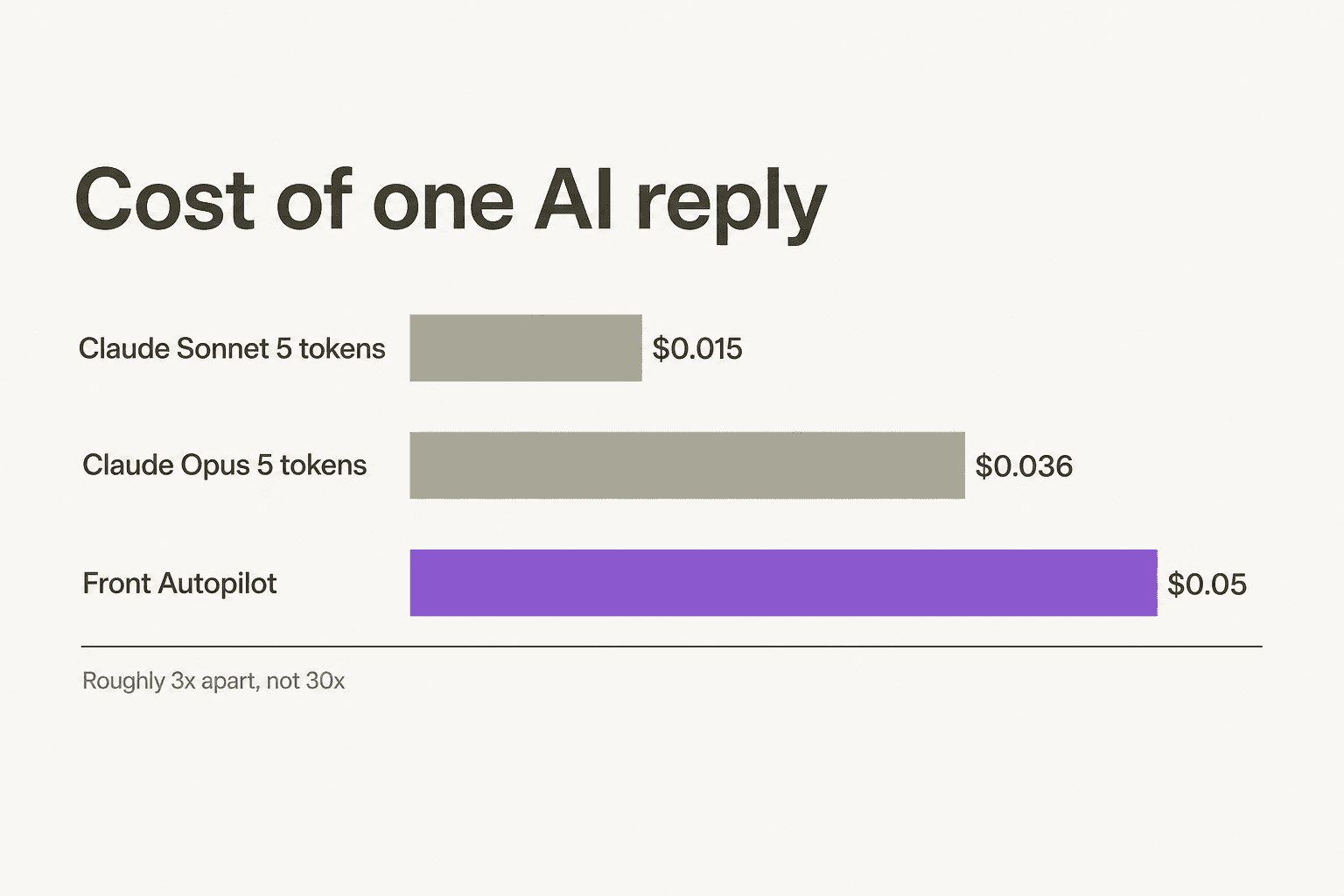
Sit with that for a second. When I did this exercise for other helpdesks, the native AI came in 30x above raw tokens and the build-it-yourself case wrote itself. Front's native rate is about 3x the token cost, and Opus is within a rounding error of it. Front also charges nothing per action for the MCP server, where the comparable first-party bridge elsewhere meters at 1.5 cents an action.
So the cheap-tokens argument mostly evaporates here, and what is left is the platform bill. That is where Front actually gets expensive, and its own users are blunt about it:
"Front is so expensive. We're up to 55 users now. Spending like 35k a year on it, just to make comments on emails. It's insane."
There is also a pricing trap worth checking before you buy anything. Professional is $65 per seat. Copilot is $20, Smart QA is $20, Smart CSAT is $10. Stack all three on Professional and you are at $115 per seat, while Enterprise is $105 and includes all three. If you plan to adopt the assistive AI properly, price Enterprise first. Autopilot stays a separate usage charge either way.
Put your own numbers in:
Run it at almost any realistic team size and the same thing happens: the seat bill dwarfs the AI bill. Which means optimising your AI spend by building a Claude pipeline is optimising the small number, while the large number sits untouched. That is the argument I would make to anyone reaching for route 4 purely on cost, and it is the same trap we unpick in our breakdown of AI customer service cost.
The counterweight, honestly stated, is that API spend is real and people do get caught by it:
"The problem with AI at this time is the API cost. It's so expensive and having them replace existing worker requires tools. You add cost snd tools, turns out not worth the savings overtime."
Where the money actually goes
Fifteen engineer days is my honest estimate for a version one that reads a conversation, retrieves from your knowledge base, drafts a reply as a comment, and logs what it did. That part is not hard. I have built roughly this thing more than once.
The hard part starts in week four, and it is never the model. It is knowing when the agent should stay quiet. An engineer on Hacker News described the whole architecture, including the fix, better than most design docs I have read:
"[...] On my side I now search for the most relevant Q&A pair based on the embedding of user's input and QA and jam as much as I can into the token limit. It provides accurate answers 99% of the time. If it can't find a suitable answer, it may create a plausible response on the spot, but that's getting rarer as training set grows. To prevent the bot from providing incomplete information, you can instruct it to ask users to contact support via email if it doesn't have enough information."
Read the middle sentence again. "It may create a plausible response on the spot" is the entire risk in nine words, and the mitigation offered is an instruction in a prompt. That works until it does not, and the failure is silent by design, because a confident wrong answer looks exactly like a confident right one.
Confidence routing is not a prompt. It is retrieval scoring, a threshold you tune against real outcomes, and an abstain path that leaves the conversation looking untouched so a human picks it up normally. That is week six, not week two, and it is why ticket triage exists as its own category rather than as a sentence someone added to a system prompt. If you are scoping that work, our guide on how to automate ticket triage covers the classification layer, and AI for ticket triage covers who has already built it.
The cost of getting it wrong is not theoretical either:
"I'm reminded of the Air Canada customer service chatbot. It completely made up a refund policy (and there are still people on HN who insist LLMs don't hallucinate) and a court ruled the company had to honor it [1]."
For what it is worth, Front's Autopilot already does the escalation half of this, and a Front user described it plainly: the agent reads the shared inboxes and documentation, and if it is stumped, the problem is escalated. You can see the handoff in the product, where the bot offers a repair, then creates a real conversation and tells the customer when a human will reply.
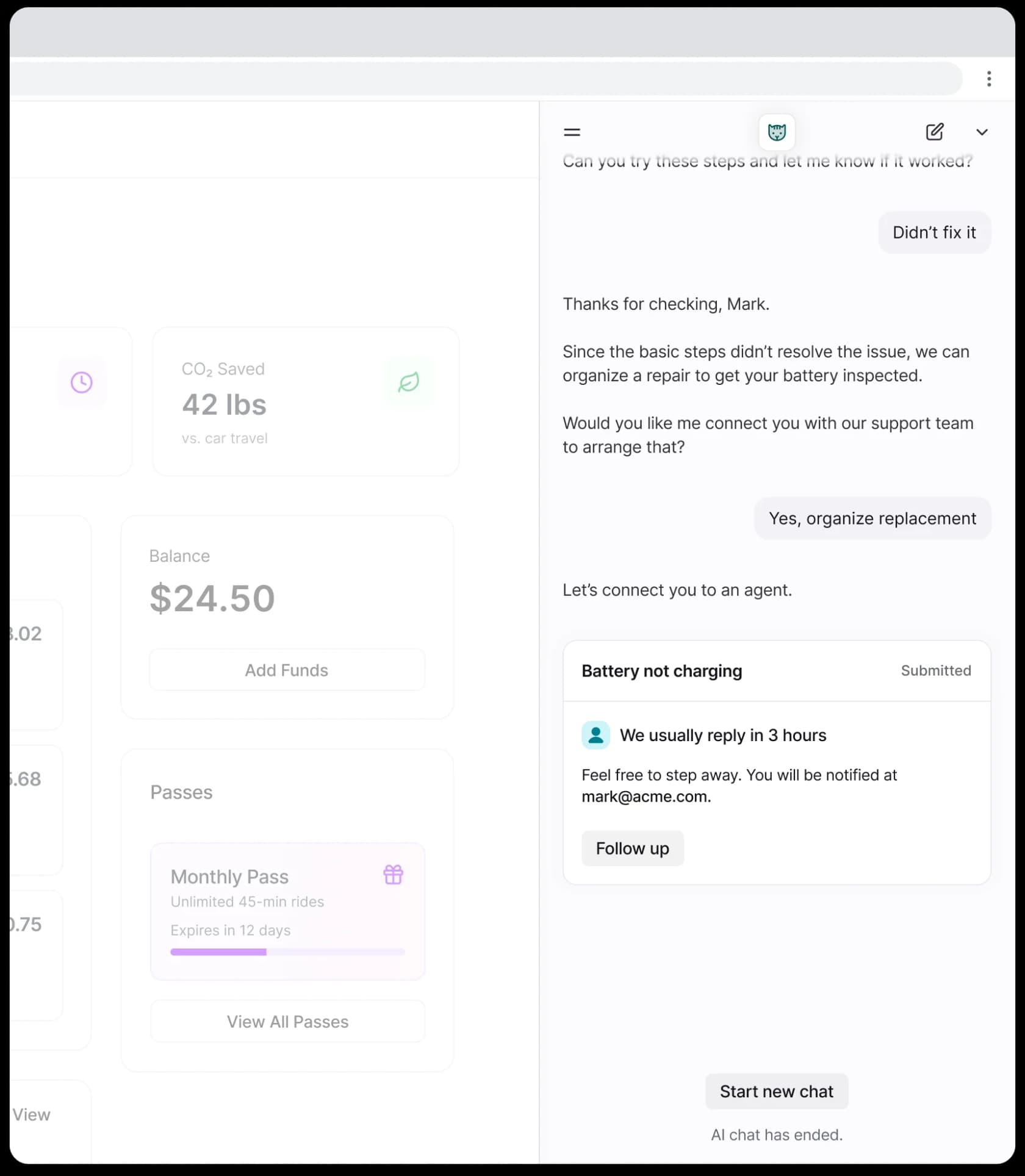
Worth knowing what Front's testing story actually covers, since this is the bit people assume. Front's simulation is a Test button on a playbook: you type one hypothetical message and preview whether the playbook triggers and what it says. That is useful, and it is not a replay against your own resolved conversations. Those are different guarantees, and the second one is what tells you the agent would have got last month right.
How I would actually decide
| If you want | Take this route | The real gate |
|---|---|---|
| To interrogate your inbox in Claude | Front's MCP server, directory connector | Open beta, tool names still moving |
| Tighter scopes or an editor workflow | Custom OAuth to the same endpoint | No dynamic client registration |
| Webhook-driven events today | A community MCP server | 19 stars, you hold the token |
| Total control over the pipeline | Core API plus the Claude API | Rate limits, confidence routing, upkeep |
| Autonomous customer-facing resolution | None of the four | Every route is agent-side |
That last row held across all four, and it is not an accident of the beta. Front's connector is designed to keep a human in the loop: one teammate's identity, confirmation on every send, 20 sends a minute. Those are the properties of a good assistant and the disqualifying properties of an autonomous agent. The bridge is excellent and it points at your team, not at your queue.
If what you wanted was tier-1 conversations resolving themselves, the model was never the missing piece. That is the gap the AI agent category exists to fill, and it is worth understanding how that differs from a rule-based chatbot before you pick.
For the wider field, our roundup of best AI helpdesk software covers who has already built that stack, and best AI for Front narrows it to this inbox specifically.
eesel AI for Front
So here is the honest pitch, given all of the above.
eesel installs from the Front App Store and joins your shared inbox as a real AI agent. Not a widget, not a second inbox. It reads conversations, drafts and sends replies, adds private comments, routes to teammates, updates tags, and manages SLA timelines, across email, web chat, and SMS, replying on whichever channel the customer used. It respects the Front rules, assignment logic, and SLA policies you already built. Setup is under 30 minutes.
Three things matter most given what this post is about.
First, the model question stops being your problem. Anthropic is one of eesel's named providers, so if your instinct was "I want Claude-grade reasoning on my Front conversations," you can have the outcome without owning the OAuth app, the retrieval layer, or the escalation logic.
Second, the knowledge ceiling moves. Remember that B2B team who wanted answers drawn from the user guide, Slack, the internal knowledge base, and past tickets at once? eesel imports your past Front conversations, canned responses, and knowledge base articles automatically, and it is not limited to public website crawls. That is the difference between two source types and all of them.
Third, on the thing this whole post keeps circling. You start in draft-for-review, with a human approving every reply, then flip to autonomous on the easy conversations once you trust it. And you can see exactly what it did, per tool, including which actions were approved and which were rejected.

Pricing is $0.40 per Front conversation handled, where one conversation is one task including every reply and follow-up inside it. No platform fee, no per-seat charge, no minimum, and you start with $50 of free usage. Route 200 of your 1,000 monthly conversations to it and you pay for 200. Being straight about it: you are billed per conversation handled regardless of outcome, because the compute runs either way, and there is a $250 default monthly cap that pauses the agents so a bad week cannot become a bad invoice.
That is the comparison I would want a buyer to actually make: $0.40 a conversation with the escalation, grounding, and reporting already built, against $0.05 a conversation for Autopilot plus whatever the seats cost you, against fifteen engineer days and indefinite upkeep for the version you own.
Try eesel free on your own Front conversations. If you want the native side first, our Front review is fair about where it wins, and Front alternatives is there if the seat bill is the actual problem you came to solve.
Worth one footnote if you are reading older documentation: Front AI Answers is the legacy feature name you may still see referenced, and it is no longer purchasable.
One last practical note. Nothing in this post requires you to choose today. Connect Front's MCP server this afternoon, because it is free and it will immediately make your own shared inbox more useful to you. Then decide separately whether you want an agent on the queue, which is a different question with a different answer.
Frequently Asked Questions
Is there an official Claude integration for Front?
mcp.frontapp.com/mcp, currently in open beta, and Front's help docs say Claude is available in Claude's connector directory. It is a real first-party bridge, not a workaround. For the wider set of options, see our Front AI breakdown or the Claude overview.Can I make Front AI or Autopilot run on Claude?
How much does Claude for Front cost compared to Front Autopilot?
Can Claude reply to Front conversations automatically?
send_message as destructive, which makes the client ask you to confirm every send, and each token is bound to one teammate. Unattended replies mean building on the Core API yourself, or using a purpose-built AI helpdesk agent. Our Front integration sends replies and adds private comments as a native agent.Can I train Claude on my Front conversation history?
What is the safest way to test Claude on real Front conversations?
Is Claude or ChatGPT better for Front support?


Article by
Alicia Kirana Utomo
Kira is a writer at eesel AI with a Computer Science background and over a year of hands-on experience evaluating AI-powered customer service tools. She focuses on breaking down how helpdesk platforms and AI agents actually work so that support teams can make better buying decisions.