What ticket triage actually is (and why the manual version breaks)
In a hospital, triage is the nurse at the door deciding who's bleeding out and who can wait. In support, it's the same idea minus the drama: someone looks at each incoming ticket and decides what it's about, how urgent it is, and who should handle it. Only then does the real work, replying, begin.
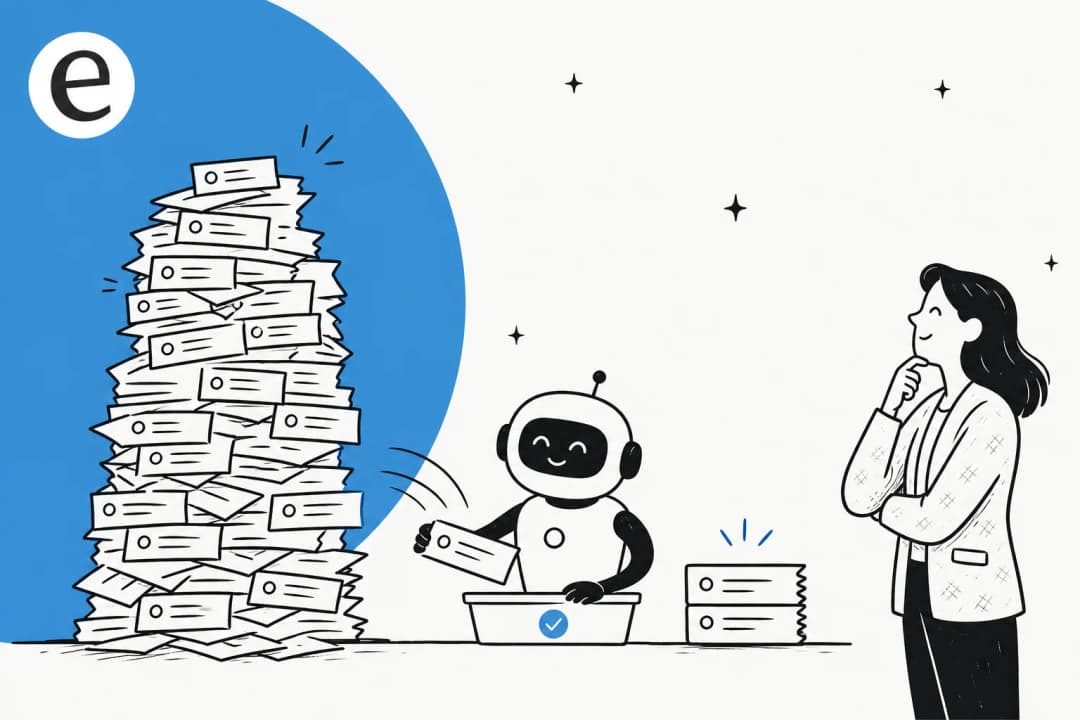
Manual triage works fine when ten tickets trickle in a day. It breaks the moment volume spikes. A human sorting a queue gets slower as the backlog grows, applies tags differently depending on who's on shift, and quietly deprioritizes the boring-but-urgent stuff. Worse, the clock on your first response time is already running while a ticket sits unsorted. Every minute a refund request waits in the general queue is a minute closer to a missed SLA and a churned customer.
That's the gap automation closes. Instead of a person eyeballing the queue every few minutes, an AI reads each ticket the instant it lands and applies your sorting logic consistently, at 3am, in a language nobody on your team speaks, on the thousandth ticket of the day just like the first.
The four jobs of automated triage
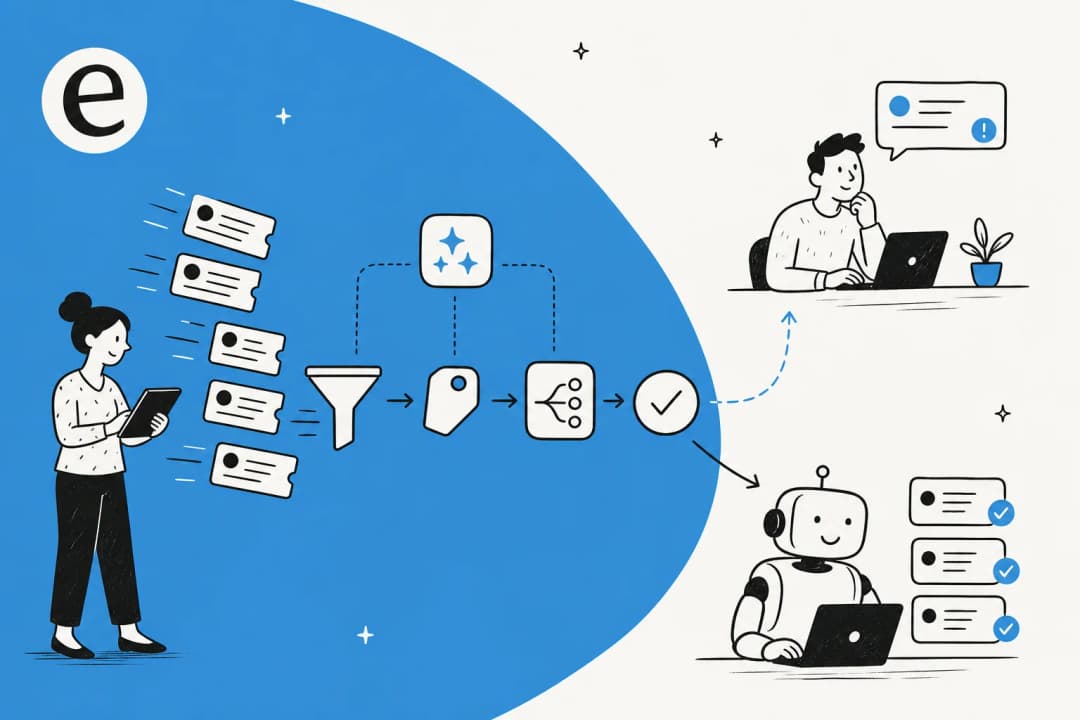
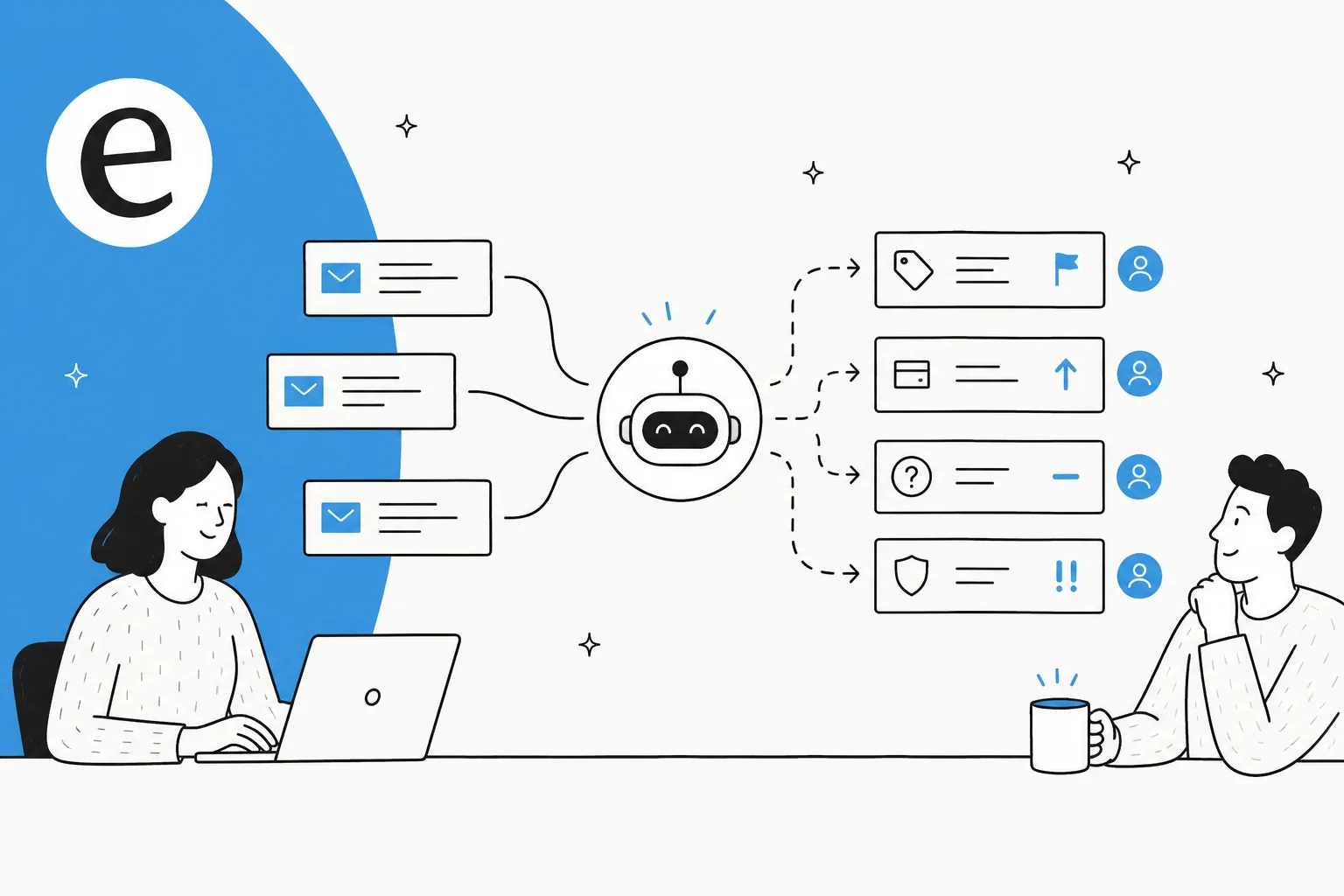
"Automate triage" sounds like one thing. It's really four distinct jobs, and a good setup does all of them on every ticket:
- Tagging: classify what the ticket is about (billing, bug, return, login issue) so it's reportable and routable. This is the foundation everything else stands on, which is why automating ticket tagging is usually the first thing teams turn on.
- Prioritization: decide how urgent it is. A VIP customer threatening to cancel outranks a "how do I change my avatar" question, and the AI should read that from the message, not just a fixed field.
- Routing: send it to the right queue or team, by topic, product line, language, or storefront and brand.
- Assignment: hand it to a specific owner based on skill or workload, the way you'd auto-assign tickets by skill rules.
Here's the whole flow end to end:
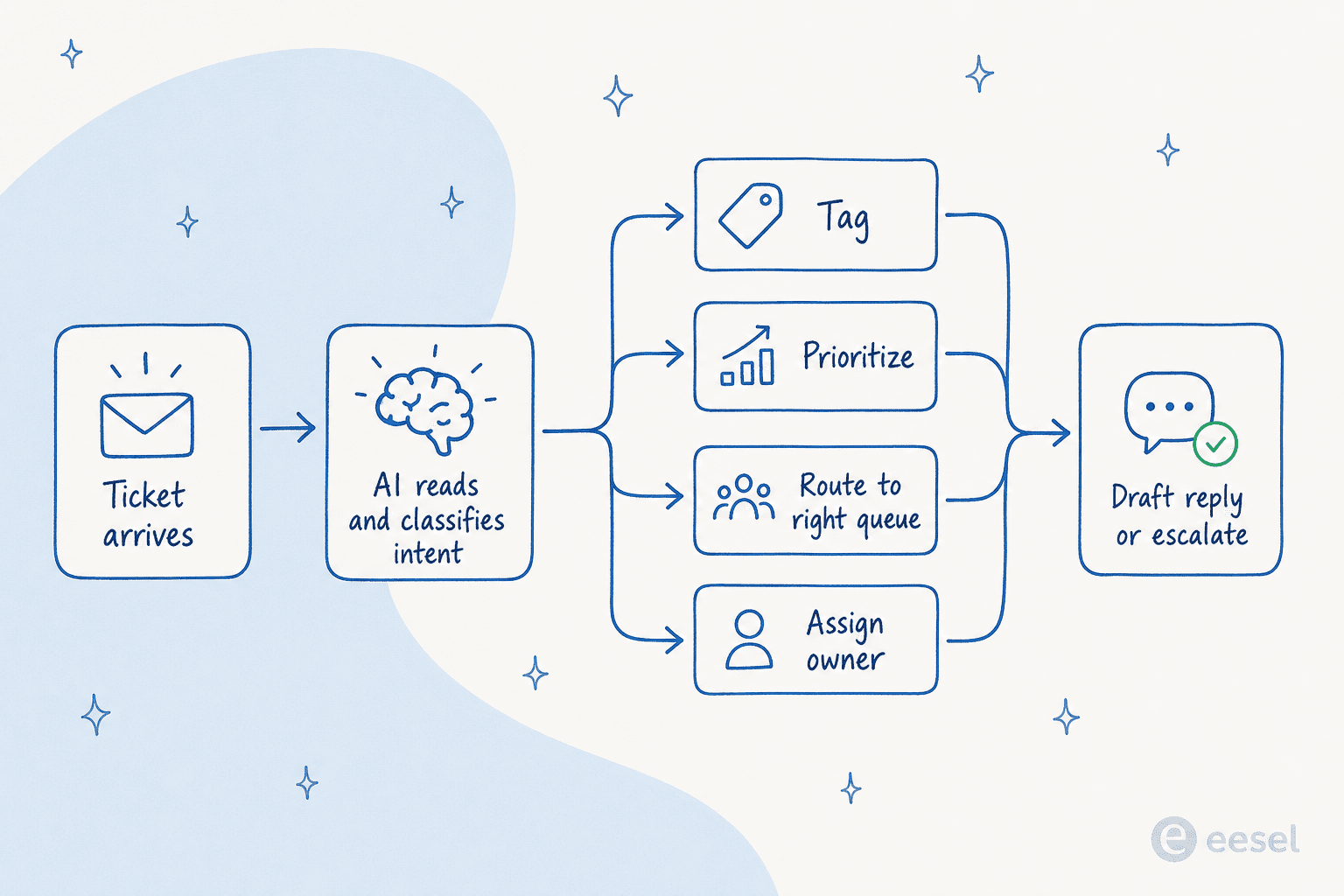
The reason AI does this better than the old keyword rules is that it reads meaning. A rule looking for the word "refund" misses "I want my money back," "this charge is wrong," and "cancel and reimburse me." An AI catches all three because it understands intent, which is the core reason an AI agent beats a rule-based bot at this. You can even have it detect refund-versus-exchange intent from the message text alone, a distinction keyword rules will never reliably make.
The one decision that makes or breaks it: confidence-based routing
Before any of the steps, internalize this, because it's where most triage rollouts go wrong. The instinct is to point the AI at the whole queue and let it run. That's exactly the wrong move.
The most common objection we hear from support leaders isn't "will it work" - it's "what happens on the tickets it gets wrong." One CX lead at a DTC supplements brand running about 7,000 tickets a month put the fear plainly: the AI will never answer 100% of questions, but if it guesses on the hard ones, "I cannot go and check all my 7,000 tickets to see if the AI actually made a good answer." What they wanted was an AI that only handles the tickets it's confident about and leaves the rest alone.
That's confidence-based routing, and it's the difference between an assistant and a liability:
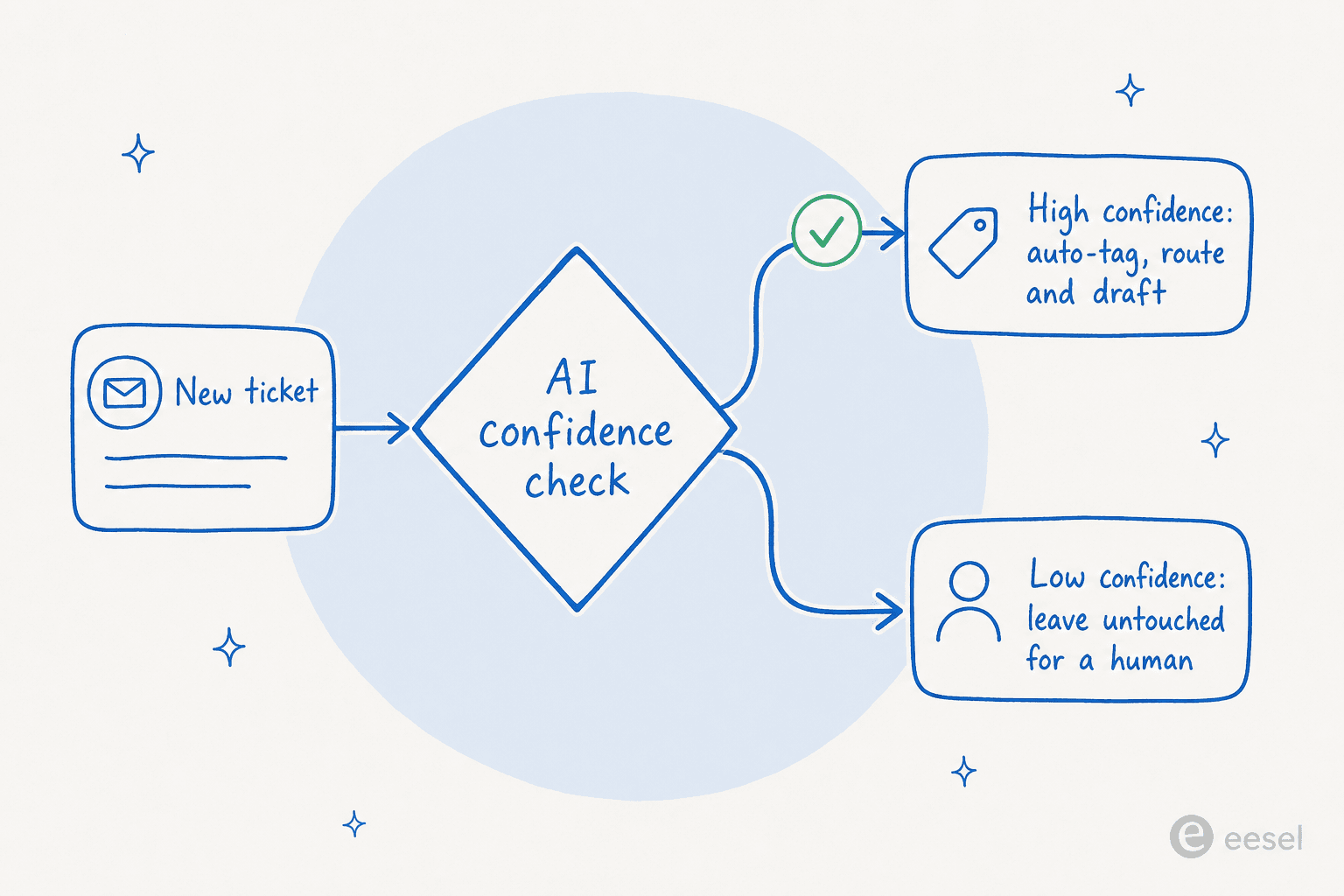
When you set it up this way, a wrong tag on a confusing ticket never happens, because the AI simply doesn't act on tickets it can't read clearly. It hands those straight to a human, untouched. That's what makes the accurate-most-of-the-time reality of AI safe to deploy: the failure mode is "a human sorts it like they always did," not "a customer gets a wrong answer." Keep this principle in your pocket for every step below.
How to automate ticket triage with AI, step by step
1. Write down your current triage logic
You can't automate a decision you can't articulate. Before touching any tool, spend an hour documenting how triage works today: what tags you use, what "urgent" actually means, which team owns what, and the edge cases everyone just knows. If your tag list has grown to 80 overlapping labels, prune it now. A tight, unambiguous tag list is the single biggest lever you have to reduce false positives in tagging once the AI takes over.
2. Connect your helpdesk and your knowledge
The AI needs two things: a live connection to your helpdesk so it can read incoming tickets and write tags, priorities, and assignments back; and access to your knowledge so it understands context. The strongest signal here is your own ticket history. Past tickets teach the AI how your team actually categorizes things, which beats any generic model.

This is why setup is faster than people expect. With a tool that lives inside your existing ticketing system, there's no new interface to migrate to, you connect Zendesk, Freshdesk, Gorgias, or your helpdesk of choice and the AI starts reading from where your tickets already are. One UK team drove 56 resolved tasks from just 9 synced macros, mostly because the AI could lean on knowledge they'd already written.
3. Scope exactly what the AI is allowed to touch
This is confidence-based routing made concrete. Decide which ticket types the AI handles and which it never sees. Plenty of teams have categories they deliberately keep human, legal threats, billing disputes, anything regulated. As one support lead told us flatly, "there are certain tickets I don't want to go through AI." That's not a limitation to work around; it's a setting you should expect to configure on day one.
The best way to brief the AI on this is in plain language, the same way you'd onboard a new hire, rather than wiring up a flowchart of rules.

Something like "tag and route everything except tickets mentioning chargebacks or legal action; loop me in on anything over $500 in refunds" should be enough. If it isn't, that's a sign the tool is too rigid for real support work.
4. Configure tagging, fields, and priority
Now wire up the four jobs. Map the AI's output to your actual tag taxonomy and ticket fields, the AI tags by intent, fills custom fields, and sets a priority. For prioritization, lean on what the AI can read that a fixed rule can't: sentiment and urgency in the language itself. A furious message from a long-time customer can jump the queue automatically, similar to how you'd prioritize VIP customers, except the AI infers urgency from tone, not just a customer tag. Pulling in sentiment analysis here is what separates smart prioritization from a glorified keyword filter.
5. Set routing and assignment rules
With tags and priority in place, routing becomes mostly automatic, the topic decides the queue. Layer assignment on top: by skill (send API questions to the technical team), by workload (round-robin within a queue), or by language. A nice side effect of intent-aware routing is that it catches things rules can't, like spam. In one real deployment, a cold sales pitch arrived dressed as a support ticket; the AI recognized it against past tickets, classified it as spam, and drafted a polite decline instead of routing it to a human at all.
6. Add a drafted reply or a clean escalation
Triage doesn't have to stop at sorting. The highest-leverage setups also leave a suggested reply as an internal note the moment they triage, so the assigned agent opens the ticket to find it already categorized, prioritized, and half-answered. This is the copilot pattern, and it's where triage automation quietly turns into deflection. On tickets the AI is confident about, that draft can go out on its own; on everything else, it escalates cleanly to the right human. It's the same model an AI helpdesk agent uses to act as a first responder:
"We use it to be the first responder to our Helpdesk tickets in Jira. It essentially acts just like an agent would."
Jason Loyola, Head of IT at InDebted
7. Test on your real past tickets before going live
This is the step everyone skips and everyone regrets. Don't trust triage on live customers until you've watched it triage tickets you already know the answers to. Run the AI over a sample of historical tickets and compare its tags, priorities, and routing against what your team actually did. It's the same discipline as evaluating AI agent performance with QA, just done before the AI ever touches a real customer.
The numbers from this kind of validation are reassuring when the setup is right. In a cross-validated trial on real Zendesk traffic for a jewelry retailer running about 1,000 tickets a month, the AI hit 93% triage accuracy and 100% spam detection with zero false positives on the 22% of the inbox that was spam:
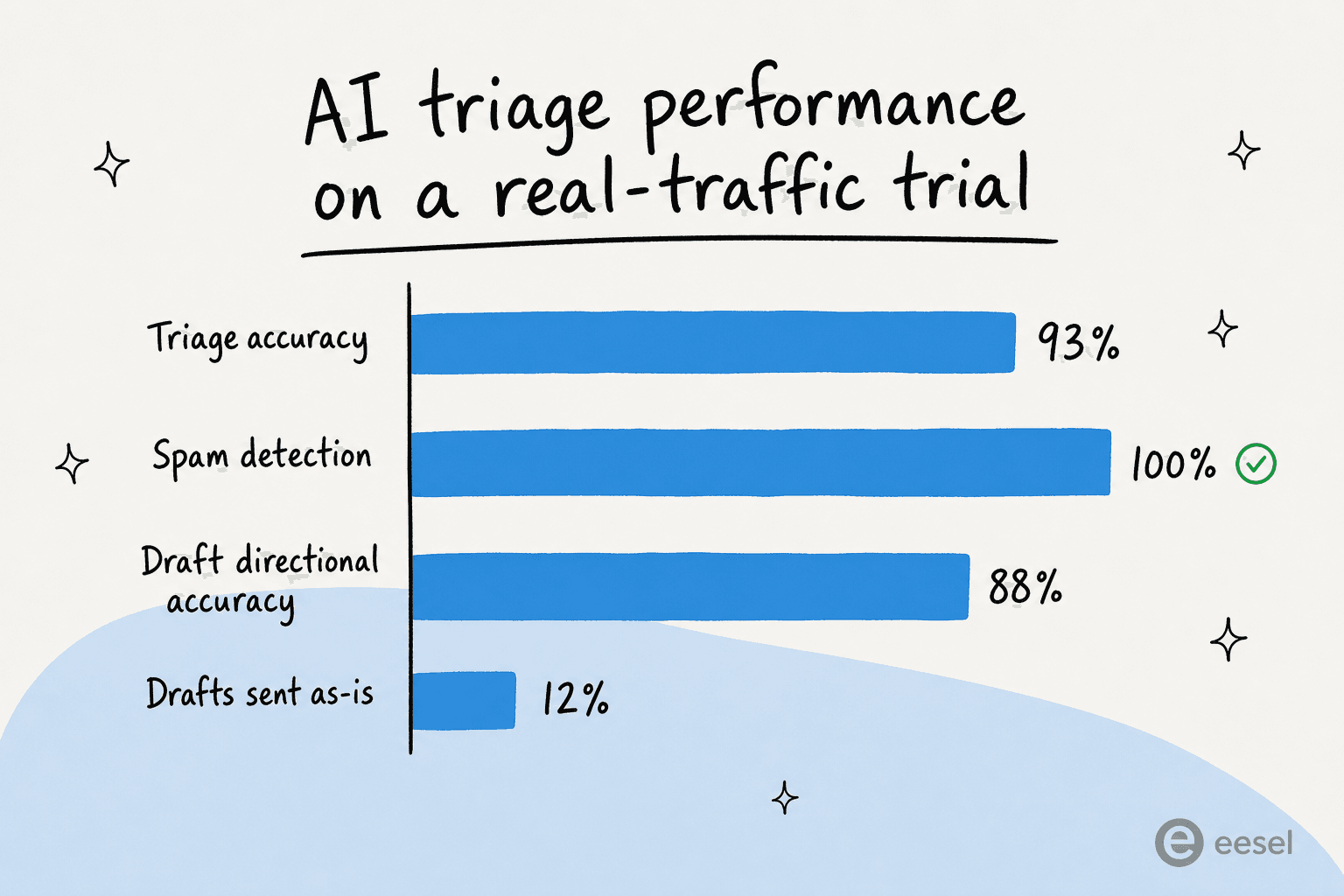
Note the honest part of that chart: only 12% of drafts went out as-is, and there was a 7% factual error rate on drafting. That's exactly why you separate the triage decision (which was 93% accurate) from the reply decision, and why confidence routing matters. Triage is the safe, high-accuracy job to automate first.
8. Roll out gradually and keep tuning
Start with one ticket type or a slice of volume, partial rollouts are normal, route 200 of your 1,000 monthly tickets through the AI and watch. As confidence builds, widen the scope. Keep the feedback loop tight: when an agent corrects a tag or rejects a draft, that correction should teach the AI, not vanish. Buyers ask us about this constantly ("do you track if I approve or reject answers?"), and the answer should always be yes. Triage automation isn't a set-and-forget switch; it's a hire that gets better the more you coach it.
Rules-based vs AI triage: when to use which
You don't have to throw out your existing automations. The two approaches are complementary, and the best setups run both:
| Dimension | Rules-based triage | AI triage |
|---|---|---|
| How it decides | Exact keyword and field matches | Reads intent and meaning |
| Handles new phrasing | No, misses anything off-script | Yes, understands paraphrases |
| Setup | Hand-write every rule | Brief in plain language |
| Sentiment / urgency | Only via fixed fields | Inferred from the message |
| Languages | One per rule set | Many, often without extra config |
| Best for | High-volume, obvious cases | Messy, varied, real-world tickets |
| Maintenance | Grows brittle as rules pile up | Improves as you coach it |
Keep your dead-simple rules for the unambiguous stuff ("password reset" → self-serve flow). Let AI take the long tail of tickets that don't match any clean keyword, which is where the bulk of your ticket volume and your triage pain actually live. For the bigger picture on blending the two, our guide to mastering AI and automation in support goes deeper.
Common mistakes to avoid
A few traps we see again and again:
- Automating replies before triage. Sorting is the safe, high-accuracy win. Auto-replying is the risky one. Get triage solid first, then expand into drafting and tier-1 deflection.
- Skipping the historical test. Going live blind is how you end up with 80 mis-tagged tickets and a team that distrusts the tool forever.
- A bloated tag list. If a human can't decide between two tags, neither can the AI. Prune first.
- No exclusion list. Decide what the AI never touches before launch, not after an incident.
- Treating it as set-and-forget. Without a feedback loop, accuracy plateaus. Coach it.
Try eesel for ticket triage
If you want to put this into practice, eesel is built exactly around the confidence-first approach above. It drops into Zendesk, Freshdesk, Gorgias and 100+ other tools without a migration, learns your categories from your own past tickets, and triages every incoming ticket, tagging, prioritizing, assignment, and a drafted reply as an internal note, while leaving anything it isn't sure about for a human.
The differentiator most teams care about is the pricing model: eesel charges per task, $0.40 a ticket, with no per-seat fees, so a 1,000-ticket month is about $400 and you can route just a slice of volume while you build trust. One gig-economy team on Zendesk reported the practical upshot after a 7-day trial:
"In the first month, eesel is resolving 73% of our tier 1 requests... The platform even includes automations for ticket tagging, assignment, and status updates."
Kim Simpson, Gridwise, via their G2 review
You can start free with a $50 credit, point it at your real tickets, and watch how it would triage them before it ever touches a live customer. That's the test from step 7, built in.
Frequently Asked Questions
What does it mean to automate ticket triage?
How do I automate ticket triage without the AI making mistakes?
Can AI route and assign tickets, not just tag them?
How much does automating ticket triage with AI cost?
What is the difference between rules-based and AI ticket triage?
Will automated triage reduce my first response time?
How do I test AI ticket triage before trusting it on live tickets?


Article by
Kira
Kira is a writer at eesel AI with a Computer Science background and over a year of hands-on experience evaluating AI-powered customer service tools. She focuses on breaking down how helpdesk platforms and AI agents actually work so that support teams can make better buying decisions.