
If you work in support, you know the feeling. The ticket queue is always full, customers want answers yesterday, and your team is stuck answering the same questions over and over again. It's a classic case of trying to do more with less.
This is why AI copilots are suddenly everywhere. They promise to give agents a hand, drafting replies and summarizing long conversations without completely taking over. Nearly every major platform has one, and Front is no exception with its Front AI Copilot.
But is it the right tool for your team? Let's take an honest look at what it can do, how much it costs, where it falls short, and how it compares to other, more flexible tools out there.
What is Front AI Copilot?
Front AI Copilot is an AI assistant that lives right inside the Front customer service platform. Its main job is to help your agents get through conversations faster by suggesting replies to customer questions. It's just one part of Front's bigger AI toolkit, which also includes features for tagging messages and fully automating some responses.
Think of it as a "human-in-control" tool. It’s not meant to fly solo. The AI drafts a response, but an agent always gets the final say. They can edit the draft or send it as is. The idea is to speed things up while making sure your team stays in the driver's seat.
So where do these suggestions come from? Copilot learns from your team's past conversations, your official Front knowledge base, and any external help docs you connect. Basically, it tries to bottle up your team's best answers and have them ready for the next time a similar question pops up.
Key features of Front AI Copilot
Alright, let's get into the nitty-gritty. What does Front AI Copilot actually do for an agent trying to get through their queue?
AI-powered suggested replies
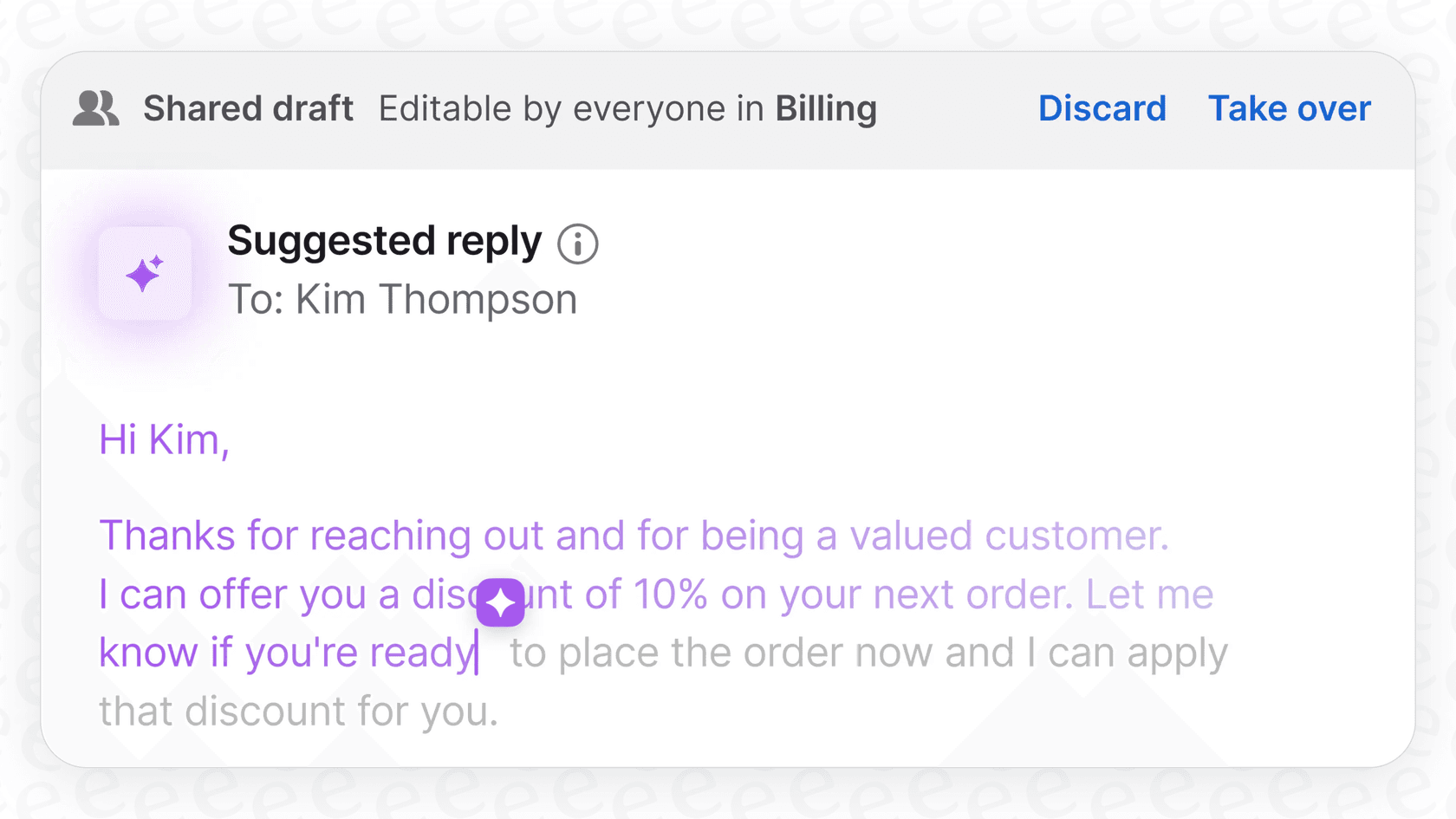
This is the main attraction. When an agent opens a ticket, Copilot can pop a ready-made draft right into the reply box. For all those common questions your team answers a dozen times a day, this can be a real time-saver. It helps new agents get up to speed without having to write every single response from scratch, and it keeps your brand's voice consistent across the board.
The workflow is simple. Agents can either click "Take over" to tweak the message or "Discard" it and start fresh. It keeps the agent in control, using the AI as a helpful starting point, not a final answer.
Conversation summaries and outlines
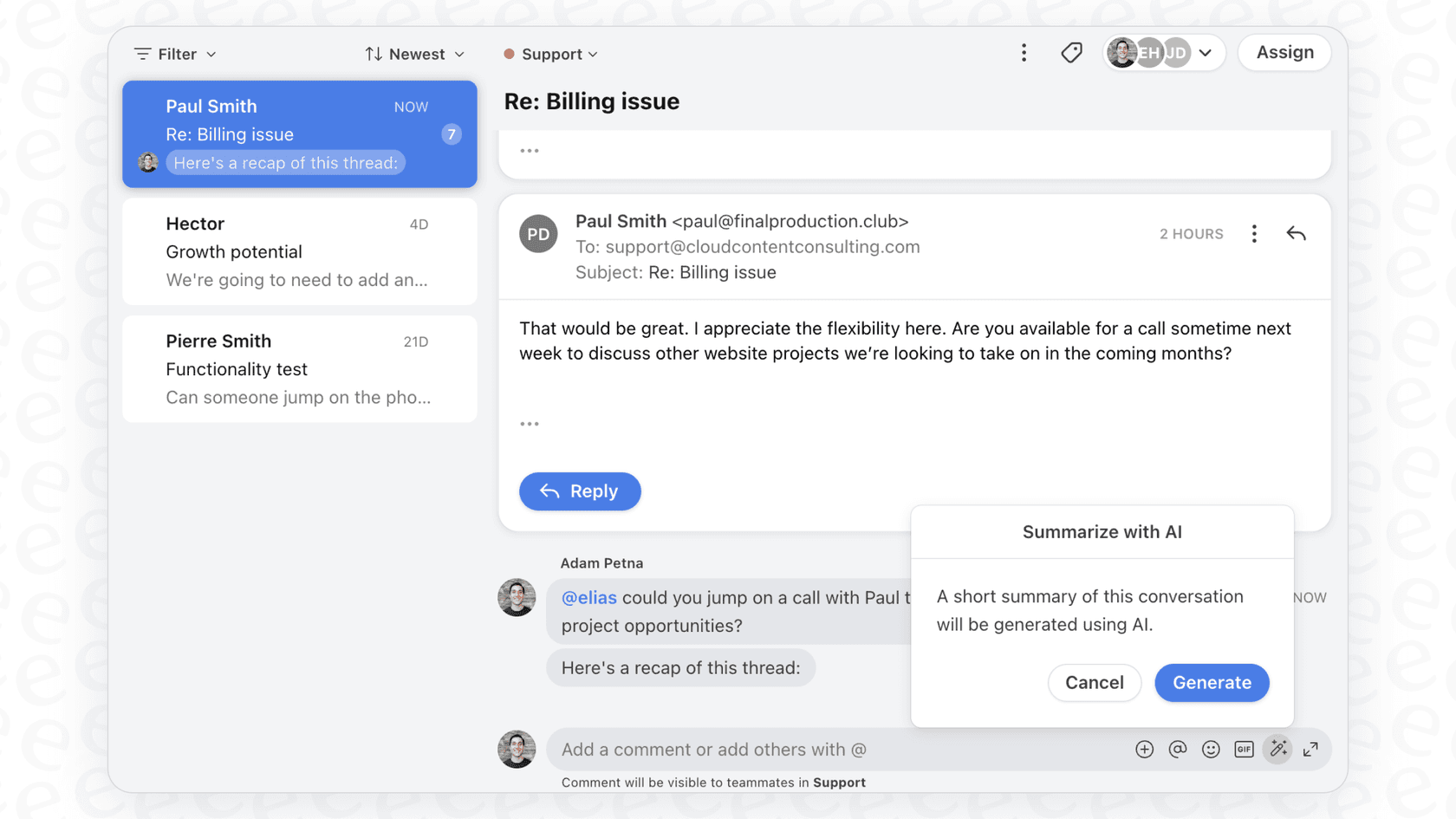
We've all been there, scrolling through a massive ticket thread trying to figure out what's going on. Copilot has a neat summary feature for that. It puts a quick, high-level overview at the top of a conversation so you can get the context without reading every single message.
It also gives you an "outline" view, which breaks the conversation down into the main questions and actions. This comes in handy when you're passing a ticket to a teammate or a manager needs to jump in on a tricky issue. It helps make sure important details don't get buried.
How Front AI Copilot pulls from knowledge bases and past conversations
Any AI is only as good as the information it learns from. Front AI Copilot pulls its knowledge from a few different spots:
-
Past Conversations: The AI looks at your historical support tickets to see how your team has handled similar problems before. It learns your tone, phrasing, and go-to solutions.
-
Front Knowledge Base: If you use Front to host your help center, Copilot can pull answers directly from your articles.
-
External Knowledge Sources: You can also point it to external websites, like a public FAQ or documentation page, to use as another source of information.
One of its better features is transparency. When Copilot suggests a reply, it shows the agent which sources it used to come up with the answer. Seeing that a draft came from a specific help article or a past ticket helps agents trust the suggestion and double-check the info if they need to.
Setting up Front AI Copilot: The process and its downsides
Getting Front AI Copilot up and running is fairly simple, but it has some limitations that might be deal-breakers for some teams.
How to configure Front AI Copilot
An admin can switch on Copilot in the workspace settings. From there, you just pick which shared inboxes you want it to work in and connect your knowledge sources. After you save the settings, it can take up to 24 hours for the AI to warm up and start generating suggestions.
Where the setup can get frustrating
While the process isn't rocket science, you might hit a few walls depending on how your team is set up.
-
It only works in shared inboxes. Front AI Copilot can't be used in individual agent inboxes. This is a pretty big drawback if your agents manage personal follow-ups or have dedicated relationships with certain clients. Any conversation happening outside a shared queue means your agents are back to flying solo.
-
Your knowledge is siloed. The tool can connect to external websites, but it's missing deep integrations with the places your team's real knowledge is stored. Most of us rely on internal wikis like Confluence or collaborative docs in Google Docs for the important stuff. Without a direct line into those sources, the AI is working with one hand tied behind its back, which can lead to less accurate suggestions.
-
You're locked into their system. Because Copilot is built into Front, you have to play by their rules. If you want more control over when and how the AI kicks in, or if your support process involves more than just Front, your options are limited. You have to fit your workflow to the tool, not the other way around.
Front AI Copilot pricing: How much does it actually cost?
Let's talk money. The cost of Front AI Copilot is tied directly to your Front subscription, and for most people, it's a pricey add-on.
The pricing is per seat, which can add up fast as you hire more people. Here’s a quick look based on Front's pricing page:
| Plan | Base Cost (per seat/mo) | Copilot Cost | Total Cost with Copilot (per seat/mo) |
|---|---|---|---|
| Starter | $25 | +$20/seat/mo (add-on) | $45 |
| Professional | $65 | +$20/seat/mo (add-on) | $85 |
| Enterprise | $105 | Included | $105 |
Copilot is technically "included" in the Enterprise plan, but that plan starts at a steep $105 per seat, per month. If you're on the Starter or Professional plan, the add-on is an extra $20 per seat. For a team on the Starter plan, that almost doubles your monthly bill just for AI assistance. It’s a serious investment, especially for smaller teams.
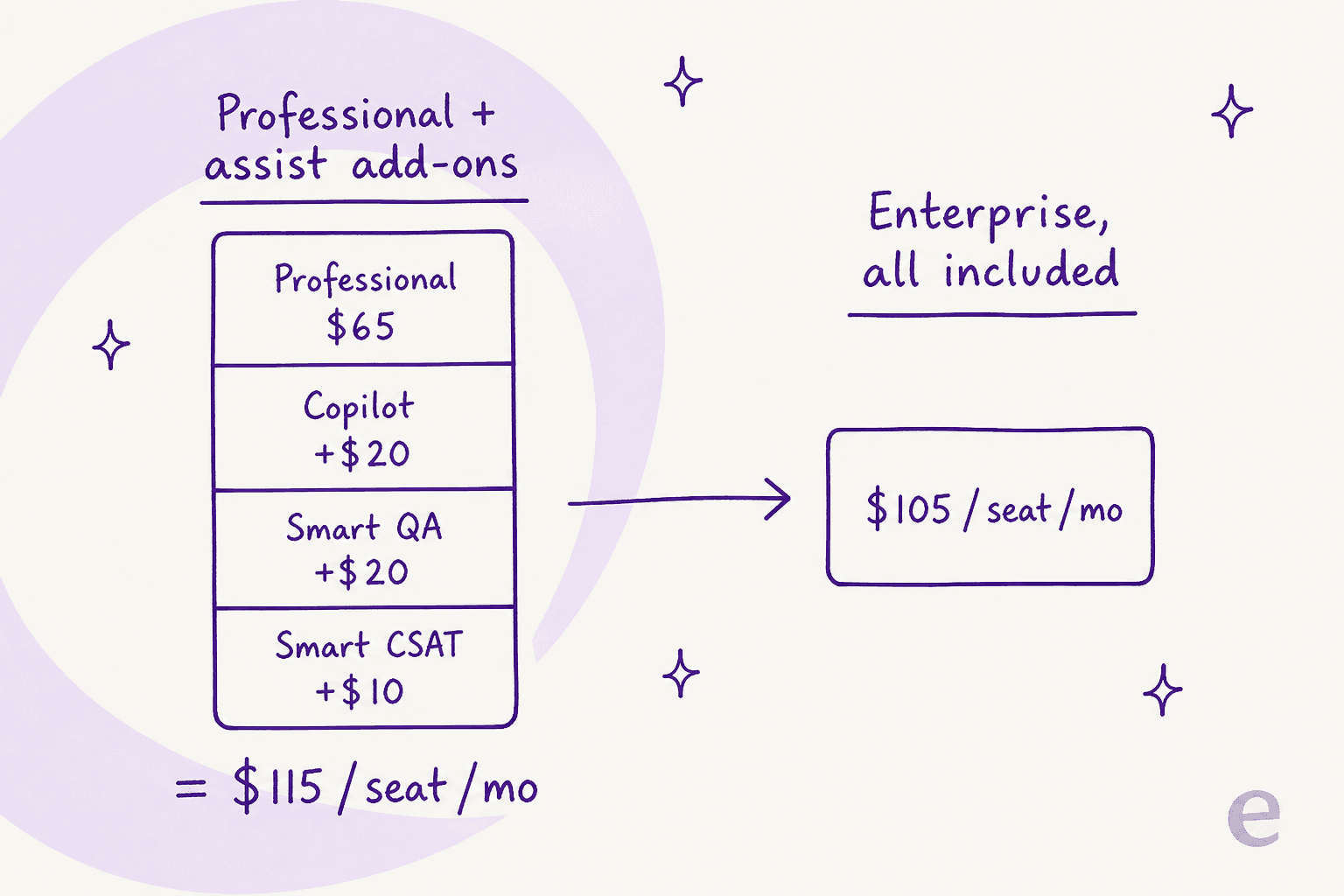
One thing worth flagging before you buy the add-ons one by one: on Professional, stacking Copilot ($20), Smart QA ($20), and Smart CSAT ($10) on top of the $65 base works out to $115 per seat, which is more than the $105 Enterprise plan where all three are already bundled in. If you plan to lean on Front's assistive AI across the board, it's worth pricing Enterprise first.
A more flexible Front AI Copilot alternative: Why teams choose eesel AI
Those limitations around setup, knowledge sources, and pricing are exactly why many teams start looking for something more flexible. This is where eesel AI comes in. It's designed to be a smart layer that plugs into the tools you already use, giving you better results without making you change your entire workflow.
Go live in minutes, not days
Forget about waiting 24 hours for the AI to warm up. With eesel AI, you can be up and running in minutes. The platform is completely self-serve, so you can connect your helpdesk and all your knowledge sources with a few clicks, no sales calls or mandatory demos required.
eesel AI also has a powerful simulation mode. Before the AI sends a single reply to a real customer, you can test it on thousands of your past tickets. This gives you a data-backed preview of how it will perform and lets you fine-tune its behavior in a totally safe environment.

Connect all your knowledge, not just a few websites
Remember that siloed knowledge problem? eesel AI fixes it by connecting directly to the tools your team actually uses. It has native integrations for internal hubs like Confluence and Notion, document repositories like Google Docs, and even your team's internal conversations in Slack.
This gives your AI a complete picture of your company's knowledge. It can pull answers from anywhere, making sure its suggestions are accurate and based on your entire knowledge base, not just a few public help articles.

Pricing that doesn't punish you for growing
eesel AI's pricing is simple and predictable. Instead of charging per agent (which penalizes you for growing your team), plans are based on usage, like the number of AI interactions per month. This model is much easier to forecast and scales with your business needs, not your headcount.
You also get more flexibility. You can choose a monthly plan and cancel anytime, so you aren't locked into a long-term contract just to get access to the tool.

| Feature | Front AI Copilot | eesel AI |
|---|---|---|
| Setup Speed | Hours to days, requires admin config | Minutes, completely self-serve |
| Integrations | Helpdesk, KB, some external sites | 100+ native integrations (Confluence, GDocs, Slack) |
| Pre-launch Testing | Limited, tests in a live environment | Powerful simulation on historical tickets |
| Pricing Model | Per-seat add-on ($20/seat) or high-tier plan | Usage-based, no per-seat fees |
| Platform Lock-in | Works only within Front | Plugs into your existing helpdesk (Zendesk, etc.) |
Is Front AI Copilot the right choice for you?
If your team is already all-in on the Front ecosystem, Front AI Copilot can be a decent tool for basic reply suggestions. It's built-in, so it's familiar, and it can definitely help cut down on time spent answering repetitive questions.
But the downsides are pretty clear. The restrictive per-seat pricing, the clunky setup, and its inability to tap into all your company's knowledge make it a tough sell for teams that need more power and flexibility.
For teams looking for a smarter, more adaptable AI that works with the tools they already have, eesel AI is a much stronger option. It’s faster to set up, connects to all your knowledge, and has a pricing model that actually makes sense for a growing business.
Get started with a smarter AI copilot today
Ready for an AI copilot that connects to all your knowledge and is ready to go in minutes? Try eesel AI for free.
Frequently asked questions
What is the primary function of Front AI Copilot within a customer support setting?
The main job of Front AI Copilot is to assist agents by suggesting replies to common customer questions and summarizing conversations. It acts as a "human-in-control" tool, speeding up response times while keeping agents in charge of the final message.
How does Front AI Copilot learn and generate its suggested replies?
Front AI Copilot learns from your team's historical support conversations, your official Front knowledge base, and any external help documentation you connect. It uses these sources to draft relevant and consistent responses for agents.
What are the main features that Front AI Copilot provides to support agents?
Its core features include AI-powered suggested replies, which draft responses for agents, and conversation summaries/outlines to quickly provide context. It also offers transparency by showing agents the sources used for its suggestions.
What are some limitations to be aware of when implementing Front AI Copilot?
Key limitations include its restriction to shared inboxes only, meaning it can't be used for individual agent follow-ups. It also has limited deep integrations with common internal knowledge sources like Confluence or Google Docs, potentially leading to siloed information.
How is Front AI Copilot typically priced, and what are the cost implications for different Front plans?
Front AI Copilot is usually an add-on priced at $20 per seat per month for Starter and Professional plans. It's included in the Enterprise plan, which starts at a higher base cost of $105 per seat per month.


Article by
Rama Adi Nugraha
Rama is a software engineer at eesel AI with two years of experience writing about B2B SaaS, AI tools, and customer support technology. Based in Bali, Indonesia, he brings a developer's perspective to product comparisons — cutting through marketing copy to what the integrations and APIs actually do.