
By 2028, Gartner predicts that 75% of customer service interactions will involve AI, up from just 10% in 2023. If you're running Salesforce Service Cloud, you're probably wondering how to bring that AI advantage to your support team without breaking your existing workflows.
The challenge isn't finding AI for Service Cloud. It's finding the right AI. Salesforce offers powerful native options, but they come with complexity. Third-party tools promise speed, but how do they actually compare?
We tested and compared six top AI tools for Salesforce Service Cloud, looking at real setup times, pricing transparency, and what each actually delivers. Whether you want native integration or a faster alternative, this guide'll help you choose.
What is Salesforce Service Cloud AI?
Salesforce Service Cloud is a comprehensive customer service platform. AI layers on top to automate routine work, surface insights, and help agents respond faster.
There are three types of AI you'll encounter:
- Predictive AI uses historical data to forecast outcomes. Think lead scoring, case classification, and predicting which tickets might escalate.
- Generative AI creates content. This includes drafting reply suggestions, summarizing cases, and writing knowledge articles.
- Agentic AI (the newest category) acts autonomously. These agents can plan multi-step workflows, make decisions, and execute tasks without human intervention.
Common use cases include automatically classifying incoming cases, routing tickets to the right agent, suggesting replies based on case context, and deploying chatbots for 24/7 self-service.
The goal is simple: faster response times, less manual work, and coverage outside business hours. But the path you take to get there depends heavily on which tool you choose.
How we evaluated these tools
We looked at four criteria that matter most for Service Cloud teams:
- Setup time How long from signup to handling real tickets?
- Integration depth Does it work natively or require connectors?
- Pricing transparency Can you see costs upfront or is everything "contact sales"?
- Use case fit Who is this actually built for?
These factors determine whether an AI tool becomes a productivity multiplier or an abandoned project. Let's look at how each tool stacks up.
Quick comparison
| Tool | Best For | Setup Time | Pricing Model |
|---|---|---|---|
| eesel AI | Fast deployment, cross-platform | Minutes | Flat subscription |
| Salesforce Einstein | Native predictive analytics | Weeks-Months | Add-on/Included |
| Salesforce Agentforce | Enterprise automation | Months | Usage-based |
| Jotform Salesforce Agent | Lead capture, forms | Hours | Freemium |
| Gong | Conversation intelligence | Days-Weeks | Contact sales |
| Tableau AI | Data visualization | Weeks | Per user/month |
1. eesel AI

eesel AI is an AI teammate that connects to Service Cloud alongside other help desks and knowledge sources. Unlike tools that require you to configure complex rules, you "hire" eesel and we learn your business from existing data.
Key features:
- AI Agent Handles tickets autonomously, from reading to responding to closing
- AI Copilot Drafts replies for agents to review and send
- AI Triage Auto-tags, routes, merges, and closes tickets based on content
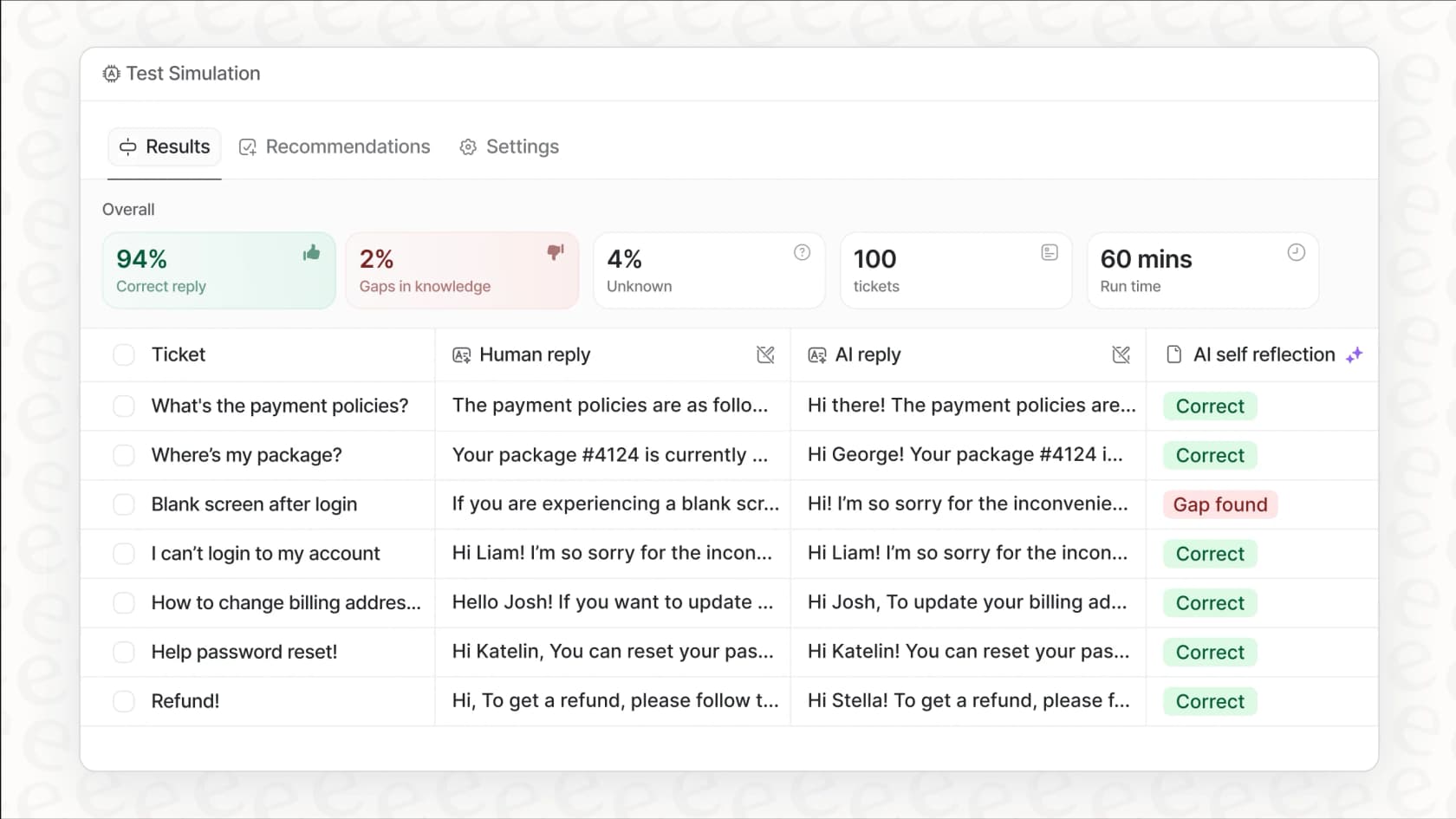
- Simulation mode Test how the AI would handle past tickets before going live
Setup takes minutes, not weeks. We learn from your past tickets, help center articles, macros, and connected docs (Confluence, Google Docs, Notion) automatically. No manual training or documentation uploads required.
Integrations: Service Cloud, Zendesk, Freshdesk, Intercom, Gorgias, Jira, ServiceNow, Slack, Microsoft Teams, Confluence, Google Docs, Notion, Shopify, and 100+ more.
Pricing:
| Plan | Monthly | Annual | Bots | Interactions |
|---|---|---|---|---|
| Team | $299 | $239/mo | Up to 3 | 1,000/mo |
| Business | $799 | $639/mo | Unlimited | 3,000/mo |
| Custom | Contact | Custom | Unlimited | Unlimited |
Pros: Fastest time-to-value of any tool on this list, works across multiple platforms (not locked to Salesforce), simulation testing lets you verify quality before customers see it, plain-English rules for escalation and handling. We're the only one that lets you test on past tickets before going live.
Cons: Not native to Salesforce (requires connection layer), though this also means you can use it with other tools.
Verdict: If you want AI handling tickets this week, not next quarter, we're your fastest path. Our simulation mode alone saves weeks of guesswork.
2. Salesforce Einstein

Einstein is Salesforce's native AI layer, built directly into the platform. It's been evolving since 2016, starting with predictive capabilities and expanding to generative AI.
Key features:
- Einstein Bots Conversational AI for handling routine customer inquiries
- Case Classification Automatically categorizes incoming cases based on content
- Reply Recommendations Suggests responses to agents based on case context
- Article Recommendations Surfaces relevant knowledge articles to agents
- Activity Capture Automatically syncs email and calendar data to Salesforce
Setup typically takes weeks to months. Einstein requires clean, well-organized data to work effectively. You'll need to configure models, set up data flows, and ensure your Salesforce instance is properly structured. It's a significant investment of time and resources.
Pricing: Basic Einstein features are included in higher-tier Salesforce plans (Enterprise and above). Advanced features and Einstein GPT capabilities require add-on pricing. You'll need to contact Salesforce for specific quotes.
Pros: Deep CRM integration with no external tools needed, uses your existing Salesforce data, trust layer provides data masking and zero-retention policies.
Cons: Complex setup requiring data hygiene and configuration, many advanced features locked behind expensive add-ons, limited to the Salesforce ecosystem.
Verdict: Einstein makes sense if you're already deeply invested in Salesforce and have the IT resources to configure it properly. The integration's seamless once it's running, but getting there requires significant effort.
3. Salesforce Agentforce
Agentforce is Salesforce's agentic AI platform (formerly Einstein Copilot). It represents the evolution from predictive and generative AI to autonomous agents that can plan, reason, and execute multi-step tasks.
Key features:
- Atlas Reasoning Engine Plans and executes complex tasks autonomously
- Agent Builder Low-code tool for building custom agents
- Agent Script Combines deterministic workflows with flexible LLM reasoning
- Agentforce Voice AI-powered voice capabilities across phone, web, and mobile
Setup takes months, not weeks. Agentforce requires technical expertise, clean data, strong governance planning, and significant configuration. This is an enterprise-grade platform, not a quick add-on.
Pricing: Usage-based through Flex Credits, per-conversation pricing, or per-user licensing. Agentforce is available for free with Salesforce Foundations, but production deployments will incur costs based on usage.
Pros: Highly customizable for specific use cases, enterprise-grade security and guardrails, works across all Salesforce clouds (not just Service), powerful reasoning capabilities for complex workflows.
Cons: Long implementation timeline, requires clean data and strong governance, complex pricing that can be difficult to predict, overkill for teams wanting simple automation.
Verdict: Agentforce is built for large enterprises with dedicated AI teams and complex requirements. If you need fully autonomous agents handling sophisticated workflows, this is the most capable option. For simpler needs, it's likely more than you'll need.
4. Jotform Salesforce Agent

Jotform Salesforce Agent is a no-code AI assistant that connects to Salesforce for lead capture, case management, and form-based workflows. Unlike native Salesforce AI, it lives outside the platform (on your website or forms) and syncs data in.
Key features:
- Lead capturing Collects prospect details and creates leads automatically
- Ticket/case automation Provides real-time order and account updates from Salesforce
- 24/7 customer support Always available for customer questions
- Prebuilt skills Ready-made actions for leads, cases, appointments
- Experience Cloud integration Embeds directly into Salesforce Experience Cloud
Setup takes hours, not days. It's genuinely no-code: connect your Salesforce account, select objects and fields, and customize your data flow. You can connect to production or sandbox environments for testing.
Pricing:
| Plan | Price |
|---|---|
| Free | $0 |
| Paid | From $34/month |
Pros: Easy no-code setup, works outside Salesforce (good for external lead capture), free plan available, supports both sales and support use cases.
Cons: Limited to form-based workflows, not a full replacement for Service Cloud automation, lives outside Salesforce rather than inside the agent workspace.
Verdict: Jotform Salesforce Agent is a solid choice if your primary need is capturing leads or handling simple cases through forms. It's not designed for complex support workflows inside Service Cloud, but it fills a specific niche well.
5. Gong
Gong is a Revenue AI OS focused on conversation intelligence. It captures and analyzes customer interactions to provide insights for sales and support teams. While it integrates with Salesforce, it's not a case management tool.
Key features:
- Call transcription Detailed transcripts of sales and support calls
- Deal risk analysis Identifies potential risks in ongoing deals
- Coaching insights Provides feedback for rep improvement
- Revenue Graph Living network of data from all customer interactions
Setup takes days to weeks, depending on your call system integration. Gong needs to connect to your phone or video conferencing system to capture conversations.
Pricing: Enterprise pricing model. Gong does not publish pricing; you'll need to contact sales for a quote. Based on their positioning and customer base (60% of the Fortune 10), expect significant investment.
Pros: Best-in-class conversation analysis, helps with coaching and quality assurance, strong integration with Salesforce for revenue intelligence.
Cons: Focused exclusively on conversations, not case management or ticket handling, no published pricing, complements rather than replaces Service Cloud AI.
Verdict: Gong is excellent if conversation intelligence is your priority. It won't handle your Service Cloud tickets, but it'll help your team improve how they handle calls. Think of it as a complement to your support platform, not a replacement.
6. Tableau AI

Tableau is Salesforce's data visualization and analytics platform. Tableau AI adds AI-powered capabilities including natural language queries, predictive analytics, and agentic analytics through Tableau Next.
Key features:
- Natural language queries Ask questions about your data in plain English
- Tableau Pulse Automated insights and analytics
- Tableau Agent AI assistant for data analysis
- Predictive analytics Forecasting and scenario modeling
Setup takes weeks and requires data configuration expertise. You'll need to connect Tableau to your Salesforce data sources, build dashboards, and configure the AI features.
Pricing:
| Edition | Viewer | Explorer | Creator |
|---|---|---|---|
| Standard | $15/user/mo | $42/user/mo | $75/user/mo |
| Enterprise | $35/user/mo | $70/user/mo | $115/user/mo |
| Tableau+ Bundle | Contact Sales | Contact Sales | Contact Sales |
Every deployment requires at least one Creator license. Tableau Next (agentic analytics) starts at $40/user/month for Consumers and $150/user/month for Creators.
Pros: Powerful visualizations, integrates natively with Salesforce data, AI-assisted insights for data-driven decisions.
Cons: Requires analytics expertise, not for real-time case handling, per-user pricing scales quickly with team size.
Verdict: Tableau AI is for teams that want to analyze Service Cloud data and predict trends. It's an analytics tool, not an operational support tool. If your goal is better reporting and insights, Tableau delivers. If you want AI handling tickets, you'll need to look elsewhere.
How to choose the right AI for your Service Cloud
Here's a simple framework to help you decide:
Choose native Salesforce AI (Einstein or Agentforce) if:
- You're deeply embedded in the Salesforce ecosystem with no plans to change
- You have dedicated IT resources for implementation
- You need the tightest possible integration with your CRM data
- You have the time and budget for a multi-month rollout
Choose a third-party tool like eesel AI if:
- You want to deploy AI this week, not next quarter
- You use multiple platforms (Zendesk, Freshdesk, etc.) alongside Salesforce
- You need cross-tool AI that learns from all your data sources
- You prefer predictable flat-fee pricing over usage-based models
Choose specialized tools (Gong, Tableau) if:
- You have a specific need (conversation analysis or data visualization)
- You understand these complement rather than replace Service Cloud
- You have budget for multiple tools serving different purposes
Timeline considerations: The difference between "minutes" and "months" of setup time isn't just about convenience. It affects when you start seeing ROI, how quickly your team adopts the tool, and whether the project survives budget reviews.
Budget considerations: Flat subscriptions (eesel AI, Jotform) give you predictable costs. Usage-based pricing (Agentforce) can work if your volume is steady but gets expensive if you scale unexpectedly. Per-user pricing (Tableau) adds up fast with larger teams.
Getting started with AI-powered Service Cloud support
AI can transform Service Cloud from a reactive ticket queue into a proactive support operation. The key is choosing a tool your team'll actually use.
Our recommendation: Start with simulation and testing before any full deployment. The best AI tools let you see how they'd handle your actual tickets before customers see them in action.
If you want to see how AI would handle your Service Cloud tickets without the months-long implementation, try eesel AI's simulation mode. You can test us on past tickets in minutes and see exactly how we perform before making any commitment.
The best AI is the one your team actually uses. Start simple, prove value quickly, and expand from there.