
What EasyAgentForYou charges, in one table
Here is the whole rate card. Monthly figures come straight off the pricing page, and the annual ones are hiding behind the Monthly/Yearly toggle on that same page.
| Basic | Starter | Growth | Enterprise | |
|---|---|---|---|---|
| Monthly | $10/mo | $25/mo | $70/mo | Quote |
| Annual | $100/yr ($8.33/mo) | $250/yr ($20.83/mo) | $700/yr ($58.33/mo) | Quote |
| Agents | 5 | 10 | 30 | Custom |
| KB storage | 500 MB | 1 GB | 5 GB | Unlimited |
| Extra storage | $0.25/GB | $0.20/GB | $0.18/GB | Custom |
| Team members | 1 | 3 | 10 | Custom |
| Usage allowance | Baseline | "≈3× more than Basic" | "≈8× more than Basic" | Custom |
| API rate limit | 150 req/min | 300 req/min | 600 req/min | Custom |
| Scheduling | Not included | Basic | Full | Full |
| Webhooks | No | No | Yes | Yes |
| Support | Email + chat | Priority | Dedicated | |
| Helpdesk connectors | None | None | None | None |
Two rows in there deserve a pause.
The annual discount is real, it just is not stated anywhere. $100 against $120 is two months free, so 16.67% off, and the arithmetic is left to you. I grepped every asset on the pricing page for "save", "discount" and "months free". Nothing came back. Small thing. But printing the discount costs a vendor nothing, and the ones chasing an annual commitment normally shout about it.
The usage row is the one that matters. "≈3× more usage than Basic" is the only description you get of the thing you are actually buying, and three times an unstated baseline is, still, unstated.
Three meters, one invoice
I build AI agents for a living. So on any pricing page, the first thing I go looking for is the unit. Not the tier. The unit. A tier tells you what you are allowed to have; a unit tells you what happens the moment you use it. On EasyAgent those turn out to be three separate systems, and the pricing page carries exactly one of them.
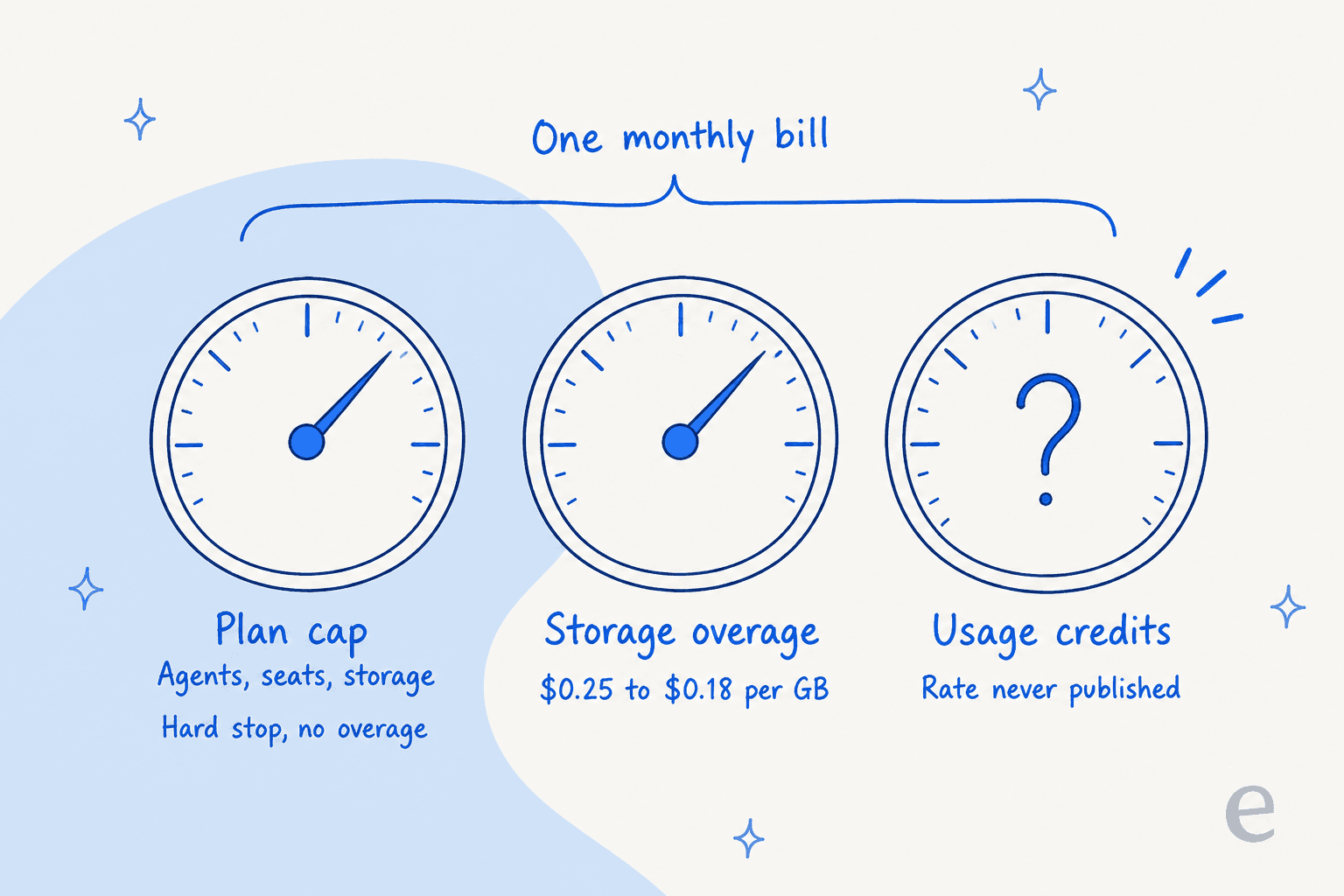
Meter one is the plan cap, and it is a hard stop. Agents, seats and storage behave as ceilings rather than as soft limits you can quietly overspend. Ask for agent number six on Basic and the API hands back a 403 with agent_limit_reached. Overrun your storage and it is storage_limit_exceeded. Both are listed in the error reference. This part of the model is honest. You cannot accidentally spend your way past a tier; you get told no, and then you upgrade on purpose.
Meter two is storage overage, at $0.25, $0.20 or $0.18 per gigabyte, depending on the tier. Cheap on its own. I will come back to why the ceiling ends up mattering more than the rate does.
Meter three is credits. This is the point where a pricing post stops being a table.
The meter that isn't on the pricing page
The word credit appears nowhere on /pricing. I found the meter over in the rate limits documentation, which draws the distinction cleanly:
"Rate limits govern request volume; credits govern spend. They are independent, you can be well inside your rate limit and still run out of credits."
Credits are also not some abstract points currency. Every agent run returns its own cost in the response body, currency spelled out:
"usage": { "credits": 0.0031, "currency": "USD" }
So a credit is a dollar. Which beats the arbitrary point systems a lot of AI tools ship, the ones where you lose an afternoon working out that 155 credits means 38 cents. Here 0.0031 credits means 0.31 of a cent. GET /me reports your credits_remaining as a plain number. As runtime accounting design, I like it a lot.
The gap is that no page tells you the rate before you spend it. You learn what a run costs by making the run and reading the response. A developer wiring up an integration can live with that, you instrument the field and you watch it. A support lead who has to put a figure into next quarter's budget request cannot, because the only route to a forecast is build first, measure after. Asking what an AI support agent costs is a question you want answered before the building starts.
None of this is a complaint specific to EasyAgent, it is well worn. A commenter on a Hacker News thread about side projects put the buyer's half of it about as plainly as it can be put:
"I can't find the pricing of the product on the site, I only find that I get '10 free credits', but I don't know how much a credit is and what can I do with it."

They went on to sketch out the funnel this produces. Some people skip when they cannot find a price. Others sign up, burn the free credits, meet the rate, and walk anyway. A vendor wants neither of those.
Not a hypothetical worry, either. The sharpest pricing moment I have on file is an email-security company on Freshdesk that expected to run about 9,000 interactions a month. A single day of testing burned through 200 API calls, and they immediately started asking what that meant at their real volume. The rate was never what upset them. They just could not do the multiplication.
Bring your own key and the meter reads zero
This next fork is what makes two identical-looking invoices impossible to compare.
Agents can be configured with your own provider API key, and the docs are explicit about what that does to billing. Those runs report credits: 0, and "you are billed by that provider directly." The model list is long for the money: 13 OpenAI models, 9 on Azure, 6 Anthropic and 6 Gemini, any of which you can point at a key of your own.
So, two teams on the same $25 Starter plan:
- Team A runs EasyAgent's hosted models. The bill is $25 plus whatever credits got consumed, at a rate they only ever observe after the fact.
- Team B brings an OpenAI key. Their EasyAgent bill is exactly $25, forever. The real AI spend lands on a separate OpenAI API invoice, one they control and can forecast properly.
Team B's setup is the one I would pick. It is a real strength of the product rather than a workaround: model choice at this price point is unusually good, and BYO key means you pay EasyAgent for scaffolding instead of a margin on inference. It also means the $25 sticker is only the whole bill for the people who moved their spend somewhere else.
The trade: you now run two billing relationships and reconcile them yourself. Anyone who has lined an Anthropic API invoice up against a platform subscription and tried to attribute cost per workflow already knows that job is an afternoon, not a glance.
Three ways this bill surprises you
I read the API docs hunting specifically for billing edge cases, since that is usually where the gap between a sticker price and a real one lives. Three of them are worth knowing before you commit.
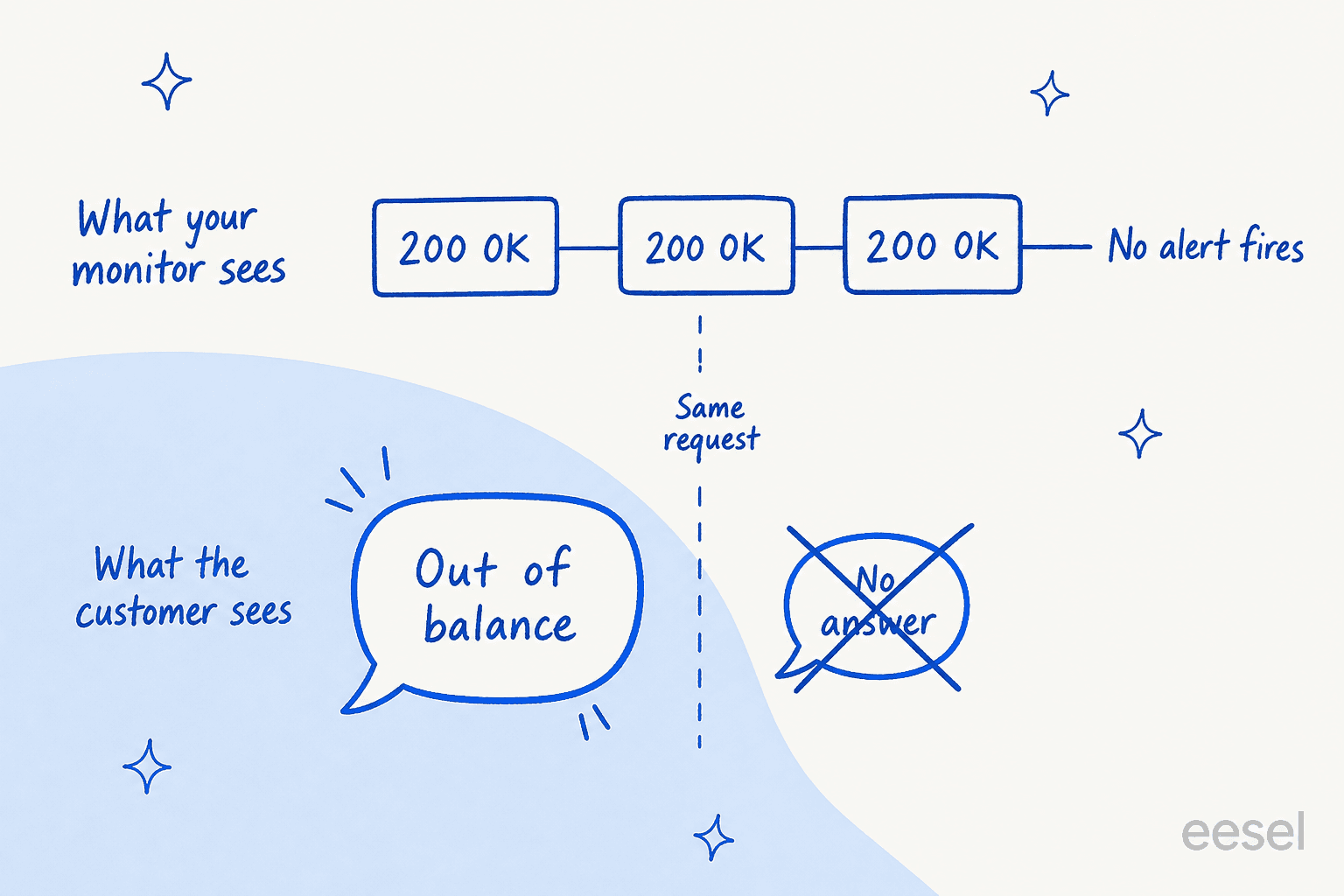
Running out of credits is a silent failure. Straight from the run documentation: "When your balance is exhausted the run returns a message saying so rather than an error status." A 200 carrying a billing apology. Your users get a non-answer. Meanwhile any monitor watching for HTTP errors, which is most monitors, sees a perfectly healthy endpoint and pages nobody. The vendor's own mitigation is to switch on auto-recharge, which cures the outage by taking the ceiling off your spend.
Retries spend real credits. The error reference tells integrators to cap total retries, because "a runaway retry loop spends real credits." The responses docs add that a run is abandoned only after 600 seconds, so a flaky network path on your side can turn into a line item, and the ceiling on one wasted run is not small.
Loading your knowledge base costs credits too. Document objects carry a cost field, and ingestion has its own dedicated 403 for credit_spending_not_allowed. So the meter runs when you feed the thing. Not only when it answers. Nobody flags this on the way in, and it is exactly the sort of detail that turns a migration weekend into a charge you did not plan for.
None of these are traps, in the sense that nothing is hidden from the docs. Every one is written down plainly in the API reference, which is more than plenty of vendors manage. They are just written down in a place no buyer comparing subscription prices will ever open.
Storage: the ceiling matters more than the rate
The per-gigabyte rates are the least interesting numbers on the whole page. What matters is what fits inside the ceiling.
Knowledge-base ingestion takes .txt and .pdf only, 50 MB per file maximum, with filenames unique inside a given knowledge base. The Basic plan card also mentions links, but the API documents only .txt and .pdf uploads. There is no help-center crawl and no Confluence connector, and past tickets cannot be imported at all. So the 500 MB on Basic is 500 MB of text and PDFs that you assembled and uploaded by hand.
| Knowledge source | EasyAgent | Support-grade agent |
|---|---|---|
Uploaded .txt / .pdf | Yes, 50 MB per file | Yes |
| Help-centre crawl | No | Standard |
| Past resolved tickets | No | The primary source |
| Confluence / authenticated wikis | No | Common |
| Storage ceiling | 500 MB to 5 GB | Not usually metered |
For a support use case the binding constraint is that list, not the price. The most valuable input a support agent can have is the archive of tickets your team already answered correctly, and here there is no path for it. Weighing this against tools built for the job? My notes on building an AI knowledge base and on AI knowledge base chatbot setups cover what a support-grade source list usually holds. A vendor like Chatbase does take support tickets as a source, though only on its $500 Pro tier.
One more storage detail, flagged fairly: a 202 on upload means ingestion has started, not that it finished. You poll until the document reads COMPLETED or FAILED. Sensible API design. It will still bite anyone who assumes an upload is live the second it returns.
What the same money buys elsewhere
This is the comparison that reframed the post for me. Against anything support-shaped, EasyAgent's subscription is cheap. Its per-answer cost is unknowable. Those are two different kinds of cheap.
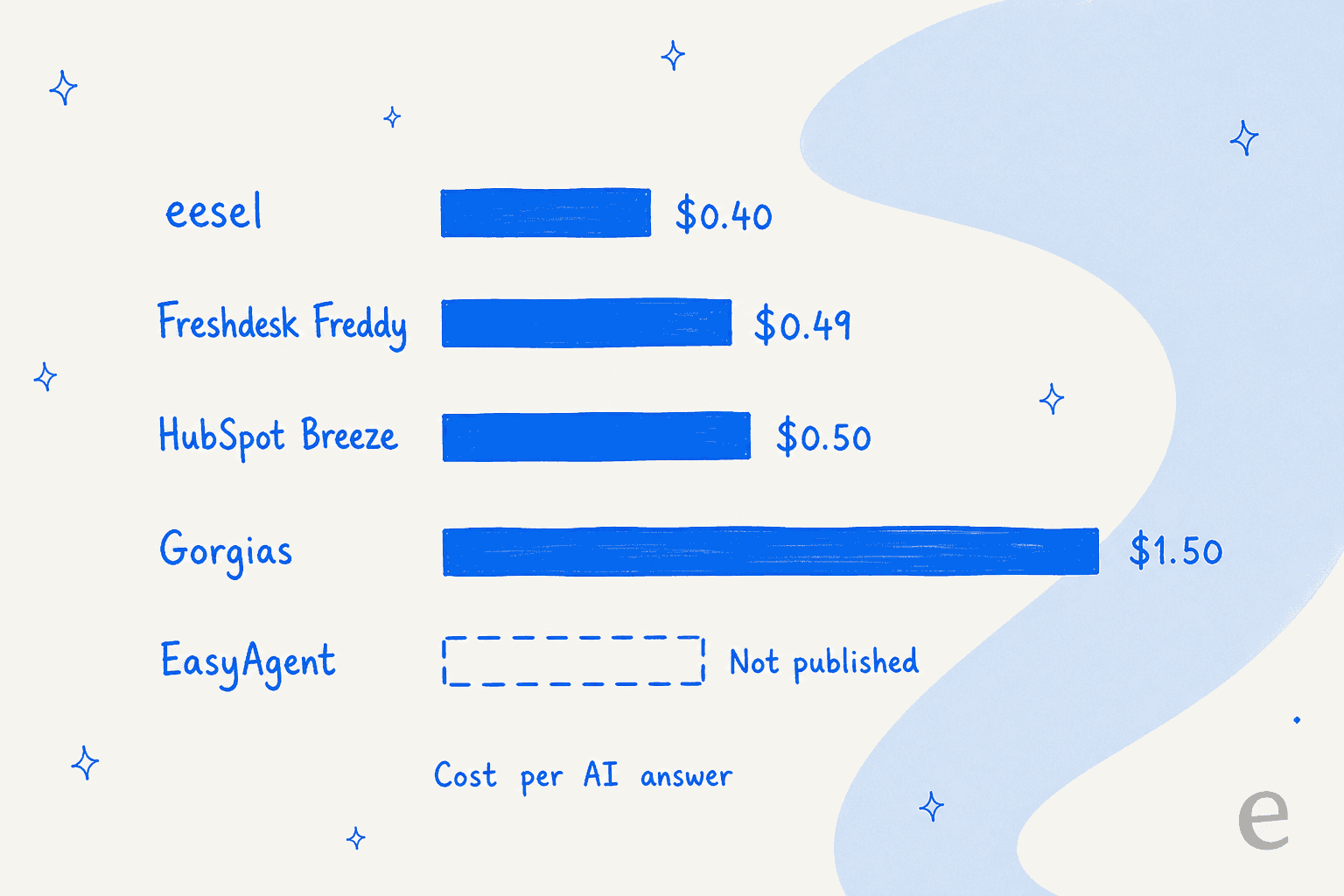
| Tool | Platform cost | AI unit | Published rate |
|---|---|---|---|
| EasyAgent | $10 to $70/mo | Credit (USD) | Not published |
| eesel | From $299/mo (500 credits) | Credit (1 per ticket or chat) | Fixed monthly plan |
| Freshdesk Freddy | $19 to $89/agent/mo | Session (72 hours) | $0.49 |
| HubSpot Breeze | Pro or Enterprise | Resolved conversation | $0.50 |
| Gorgias AI Agent | $40 to $1,430/mo | Automated interaction | $0.85 to $1.00 on plans, $1.50 extra |
| Zendesk AI agents | $19 to $115/agent/mo | Automated resolution | $1.50 committed, $2.00 pay-as-you-go |
| Tidio Lyro | From $300/mo | Resolution | Calculator only |
The pattern in that table is the takeaway. Every vendor whose product is aimed at a support queue publishes a per-unit price, because their buyers demand one. EasyAgent does not, and the reason is its buyer: an individual automating personal work, who never asks. Coherent position for the market it serves. Just a different market from the one a support lead is shopping in.
Zendesk is the row I had to correct on my own table. It prints $1.50 per committed automated resolution and $2.00 pay-as-you-go, but only in the compare table on its pricing page, not on the plan cards. Tidio keeps its numbers behind an on-page calculator. Nobody in the list is perfect. There is still a difference between a rate you have to ask for and a rate that appears nowhere at all.
Work out your own number
EasyAgent will not hand you a per-answer rate, so the useful exercise is a different one. Price the volume you actually have against the rates that are published, then decide what the unknown is worth to you. Plug your numbers in.
The empty row does not cost you money. It costs you the ability to defend a number internally. A HubSpot customer in a thread about credit burn described that failure exactly:
"I can't with a straight face say “that gets us 60,000 credits” as I've no idea what we get FROM that 60,000 credits."

Same commenter, sitting on a six-figure annual line item, said the uncertainty made them test less rather than more. That is the quiet cost of an unpublished rate. Budgeting gets harder, yes. People also end up using the product more cautiously than they otherwise would, which is the worse half.
At 1,000 conversations a month the published rates span $490 to $1,500. Drag the slider wherever you like and EasyAgent's row stays empty. That empty row is the whole argument of this post. EasyAgent is not expensive. The problem is that you cannot put it on the same axis as anything else.
The two site defects I have to mention
Careful here, because being unkind about a small product is easy and unkindness helps no buyer. Two things on the pricing page do change how much weight it can carry, though, and a reader deciding where to send money deserves to know about them.
The Enterprise tier's "Contact Sales" button points at mailto:sales@easyagent.example. .example is a reserved domain, and by design it cannot receive mail. Which means the enterprise path on the pricing page currently reaches nobody. If Enterprise is the tier you need, treat it as unbuilt and go find another route in.
The three testimonials sitting directly under the pricing table are attributed to Gillette, Louis Vuitton and Ferrari, under names that are the standard placeholder set shipped with commercial design templates. I am not going to read intent into it. The practical consequence is narrower: the social proof on this page should count for nothing in your evaluation, in either direction.
Both are the sort of thing that gets fixed on a Tuesday afternoon. I would want them fixed before I signed an annual commitment.
There is also nothing external to check that social proof against. No G2 or Capterra profile, no Trustpilot page, and no operator discussion I could find on any community platform. For a product this young that is normal rather than damning. It does mean the pricing page and the docs are the only evidence you have, so read the docs.
Who this pricing is actually right for
Verdict time, and a fair one, because "the rate is not published" does not translate to "do not buy this."
Buy it if you are one person or a small team automating your own work. Most AI agents for small business roundups are written for this buyer whether they say so or not. At $10 a month for five agents, with a strong model list and BYO key support, EasyAgent is a cheap way to get real agents running against Slack, Gmail, Google Calendar and Google Sheets. Bring your own provider key and the bill flattens to $10 to $70, with the inference spend sitting somewhere you already understand. For that buyer the missing credit rate barely registers. They set it to zero.
Do not buy it as a support tool, and the vendor agrees. EasyAgent's own alternatives page, written by their senior AI engineer, tells you to choose a dedicated support platform when customer support is the primary need. There are no helpdesk or ticketing connectors at all, on any tier. The six listed integrations run as Slack, Gmail, Google Calendar and Google Sheets active, with Google Docs and Asana marked available. The API docs add Google Stitch on top, so seven app types in total, plus custom API tools you point at your own endpoints. "Unlimited app integrations" sits on every tier, and the unlimited part is your use of a catalogue of seven.
That gap is the whole subject of my EasyAgentForYou alternatives piece, so I will not relitigate it here. The pricing consequence is simple. If the agent cannot post its reply into your helpdesk, then whatever you paid for that answer, a person is still walking the last leg. You bought a draft. Drafts do not close tickets, and the handoff is where the labour actually sits.
In fairness to every vendor doing this, from the inside it is a hard problem too. A builder on Hacker News, on usage-based billing:
"Built credit pricing into my SaaS for AI features and the hardest part wasn't the math, it was that customers can't easily predict their own usage."
True, and it is why I do not read the missing rate here as cynical. The buyer still has to carry it.
Do not buy it if a number has to go into a budget. I have watched this exact failure mode from the vendor side. A US swimwear brand on Gorgias ran twelve successful test chats with an AI agent, liked what they saw, opened the billing page, and filed two cancellation requests inside the hour. The product worked fine. The pricing page is what lost them. When the answer to "what will this cost me at my volume" is "build it and find out", a meaningful share of buyers stop right there, and whether the number would have been good never enters into it.
eesel, if the work is support
I build eesel, so weigh what follows accordingly, and check the numbers on the pricing page instead of taking mine on trust.
It goes into a post about someone else's pricing because it is the same decision, seen from the other side. eesel uses 1 credit per ticket or chat handled, printed on the page, one credit no matter how many replies that ticket ends up taking. Plans are one fixed monthly price, from $299 for 500 credits, with no platform fee and no per-seat licence. If you run out, agents pause until credits reset, or you can turn on overage with a monthly cap you set, at $0.80 per extra credit. That is the direct answer to the auto-recharge problem above. New accounts get a free plan of 100 credits, no card.

It connects to the helpdesk you already run and learns from the tickets your team has already answered. You can also dry-run it over your own history before it replies to a live customer. That simulation exists for an unglamorous reason: I have watched a confident-sounding agent hand out wrong answers, and the only cure that held up was running it against tickets where the correct answer was already known, which is still the most reliable way to prevent hallucinations in production. Same instinct as wanting a published rate. See the number before it costs you something.
Where eesel is the wrong pick, plainly. There is no self-hosted option. There is no Enterprise tier (HIPAA is a talk-to-us add-on), and the whole thing is built for support and content work. If what you want is a general research assistant roaming Notion and Asana, an agent builder is the right shape, and eesel is not it.
Pricing an AI agent for a real support queue? eesel is a fixed monthly plan from $299, published, with an optional overage cap you set yourself and no seat licence underneath it. It plugs into Zendesk, Freshdesk, Gorgias or HubSpot in minutes and you can run it against your last few thousand tickets before a customer sees a single reply. 100 free credits, no card. Try eesel.

The one question to ask before you pay
Whatever you end up buying: ask the vendor for the per-unit rate in writing, ask for the definition of the unit, and treat both answers as part of the price.
The second half matters more than people expect. Roughly the same sticker, materially different bills, and your escalation rules decide which one you land in.
| Vendor | The billable unit | What that does to your bill |
|---|---|---|
| Freshdesk | A 72-hour session | A customer who replies nine times across two days gets billed once |
| Gorgias | An automated interaction | Each exchange counts, so a long thread multiplies |
| HubSpot | A resolved conversation, priced at 50 credits | $0.45 on annual credit pricing, $0.50 at the standard rate |
| eesel | A ticket or chat handled (1 credit) | One credit no matter how many replies it takes |
| EasyAgent | A credit, which is a dollar | Simple unit, unpublished quantity per task |
EasyAgent's unit is admirably simple: a credit is a dollar. What it does not tell you is how many of them a given piece of work takes, and for a buyer who has to forecast, that turns a $10 plan into an open question. The total cost of an AI agent is a rate multiplied by a volume you can predict, and both halves have to be real numbers. Miss either one and you cannot measure AI support ROI either. The denominator is not there.
Frequently Asked Questions
How much does EasyAgentForYou cost?
What is the cheapest EasyAgentForYou plan?
Does EasyAgentForYou have a free plan?
What are EasyAgent credits and what does a credit cost?
Is EasyAgentForYou pricing good for customer support teams?
How does EasyAgentForYou pricing compare to per-resolution AI pricing?
What happens if I run out of EasyAgent credits?
Does using my own OpenAI key change EasyAgentForYou pricing?


Article by
Kira
Kira is a writer at eesel AI with a Computer Science background and over a year of hands-on experience evaluating AI-powered customer service tools. She focuses on breaking down how helpdesk platforms and AI agents actually work so that support teams can make better buying decisions.