Work out what you would actually pay
The $1 headline is never the number you pay per ticket the AI resolves, and it is not always the number you pay per ticket either. Two things bend it: the 250-ticket floor at the bottom, and your automation rate everywhere else.
Put your real volume in and see both.
The number to sit with is the third one. At the 30% automation rate Helply uses in its own worked example, a $1 ticket costs about $3.33 for every ticket the AI actually closes, and you are still paying humans to handle the other 70%. That is not a gotcha, it is just what a volume meter does. It only becomes a problem if you bought it believing you were paying for outcomes.
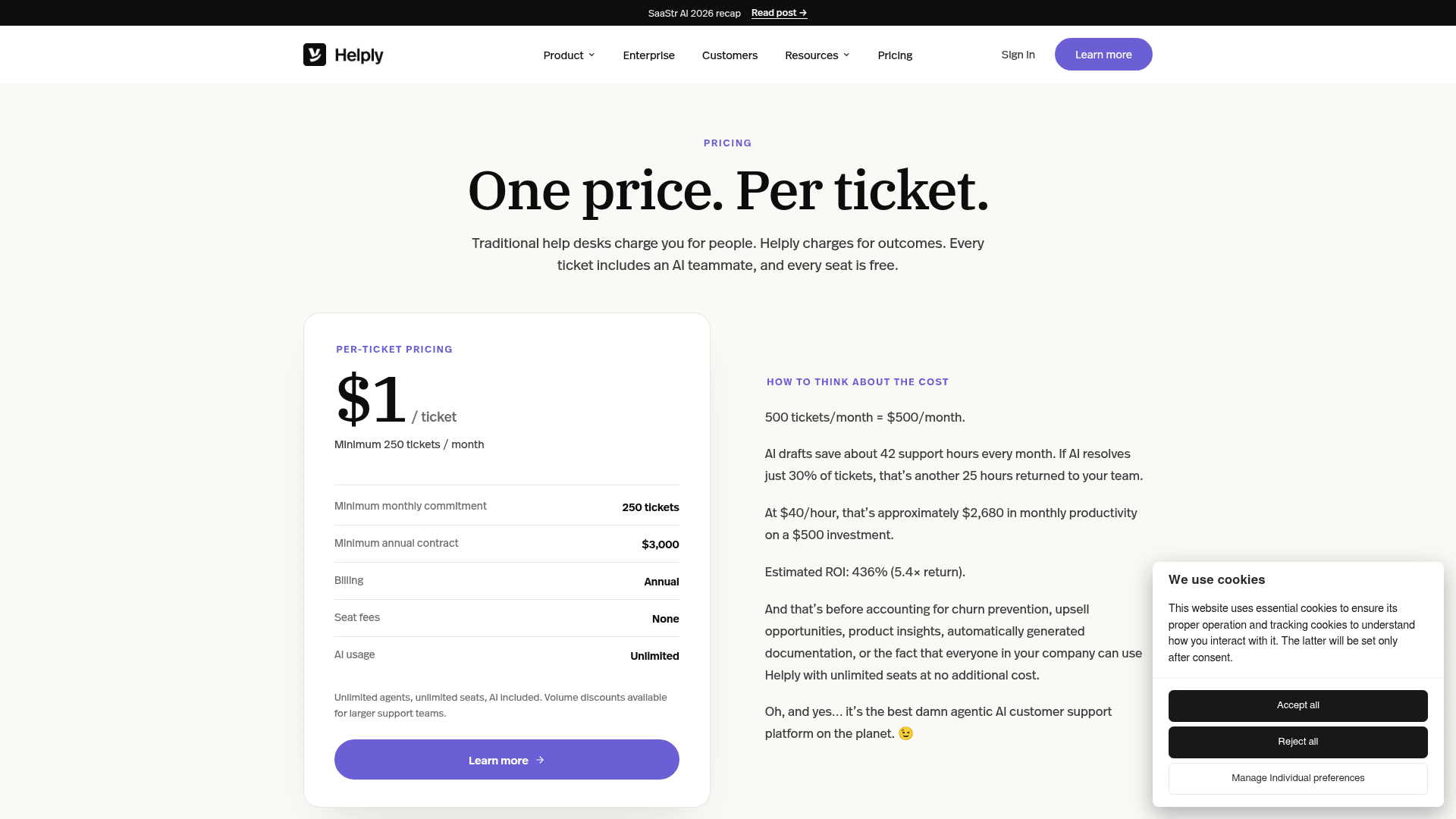
The published rate card
Everything Helply publishes about price sits on one page, and to its credit there is no tier ladder to decode.
| Line item | What Helply publishes |
|---|---|
| Rate | $1 per ticket |
| Minimum monthly commitment | 250 tickets |
| Minimum annual contract | $3,000 |
| Billing | Annual |
| Seat fees | None |
| AI usage | Unlimited |
| Volume discounts | Available, not published |
| Free trial | None |
| Self-serve signup | None |
| Onboarding | Most customers live within two weeks |
The arithmetic is internally consistent, which is more than I can say for a lot of rate cards: 250 tickets at $1, twelve times over, is exactly the $3,000 annual minimum. No rounding games.
What the table does not show is the shape of the curve. Above 250 tickets the price is linear at $1, so 500 tickets is $500 and 2,000 tickets is $2,000. Below 250 it flattens into a floor, and the effective rate climbs: at 200 tickets a month you pay $250, or $1.25 a ticket. At 100 tickets you pay $2.50 a ticket.
That floor collides with something Helply published elsewhere, and I will come back to it.
The one word that decides your bill
Here is the contradiction, and I want to lay it out with the sources attached rather than characterise it, because it is the single most consequential thing on the site.
Helply's pricing page opens with "Traditional help desks charge you for people. Helply charges for outcomes." Its FAQ on the same page then defines the unit: a ticket is "any customer conversation processed through Helply."
The per-ticket explainer is more explicit, and it goes out of its way to reject the outcome meter:
Other support platforms bill per seat the AI sits behind, per resolution, per add-on. We bill per ticket, whatever it takes to handle it.
That is unambiguous. The charge attaches to the conversation arriving, not to anything the AI achieves. "Whatever it takes to handle it" includes a ticket the AI never touches.
Now the about page, describing the same model:
We give you the support platform free and only charge when AI delivers a result.
And Turnbull's rebrand announcement from 2 June 2026, explaining who Helply is for:
Helply is an AI-first platform sold only to B2B software companies that want to pay for successful AI outcomes and run support with a smaller human team.
So the pricing page and the per-ticket page describe a volume meter. The about page and the CEO's announcement describe a success meter. These are not two framings of one model, they are two different products commercially. On a volume meter, a month where the AI resolves 5% of your queue costs exactly the same as a month where it resolves 90%. On a success meter, it costs almost nothing.
My read, and I want to be fair about it: the volume meter is the real one. It is on the page where the price lives, it is stated twice, and it is the version the cost calculator implements. The outcome language on the other pages looks like positioning that outlived a pricing change, and the URL is the tell, since the page arguing that the meter is volume still lives at /outcome-pricing.
But my read is not your contract. Ask sales to state in writing what happens to the charge on a ticket the AI does not resolve, and get the answer in the order form. If the answer is "you pay $1," that is a perfectly defensible model, just not the one two of their pages promised.
What counts as a ticket, and the spam question
"Any customer conversation processed" is a broad definition, and on a per-ticket meter breadth is cost.
The gap worth probing is junk. Nothing Helply publishes says whether an auto-closed spam message, a bounce, an out-of-office reply or a duplicate thread counts as a processed conversation. On a per-seat plan nobody cares, because junk does not have a price. On a $1-per-conversation plan, it does.
This is not hypothetical. When my team built a cost comparison for a mid-market customer weighing usage-based AI vendors, the thing that reframed the whole model was not the rate at all:
Per-resolution pricing penalises the buyer for higher resolution rates and for uncontrollable volume spikes, while a flat rate keeps November's bill identical to March's. Worth asking competitors whether their quoted resolution rate counts auto-closing spam, because 22% of this customer's inbox was spam.
an eesel cost analysis showing per-resolution pricing penalises higher resolution and seasonal spikes versus flat-rate, March 2026
Twenty-two percent of that inbox was spam. Run that against a $1-per-conversation meter at 1,000 tickets a month and you are looking at roughly $220 a month, $2,640 a year, spent processing garbage, unless Helply excludes it. I do not know that they don't. That is precisely why it belongs on the pre-signature list rather than in a verdict.
Three questions I would put in writing before signing:
- Does an auto-closed or filtered spam conversation count as a billable ticket?
- Does a duplicate or merged thread bill once or twice, before any ticket triage rules run?
- If a customer replies six weeks later and reopens a closed conversation, is that a new ticket?
None of these are exotic. All three change the invoice, and none are answered on the pricing page.
The 250-ticket floor sits below Helply's own customer profile
This is the finding I did not expect, and it comes entirely from putting two of Helply's own pages side by side.
The B2B page is unusually specific about who Helply is built for: software companies at $1M to $50M ARR, running 2 to 10 agents and 200 to 2,000 tickets a month. That is a tight, admirable piece of positioning, and the page is blunt about the exclusions, stating the company does not build for e-commerce, consumer apps or retail.
Now hold that against the 250-ticket monthly minimum.
The bottom of Helply's own declared customer profile is 200 tickets a month, well inside the range served by tools built for small teams. The contract floor is 250. So a company that fits Helply's stated ideal customer exactly, at the low end, is billed for 50 tickets a month it does not have. That is $250 a month against 200 real tickets, an effective $1.25 per ticket, and $600 a year for volume that never arrived.
It is a small amount of money in absolute terms. I flag it because of what it says about where the model is aimed. The floor tells you the economics really want you at 500 tickets and up, even though the marketing invites you in at 200. If you are at the bottom of that band, you are subsidising the top of it.
At the other end, the ceiling is worth stating too. 2,000 tickets a month at $1 is $24,000 a year, which is the top of the publishable range before volume discounts start. For a two-to-ten agent team, that is real money, and it is the point where the seat comparison stops being flattering.
Two products, two rate cards, one search term
If you searched "Helply pricing" and landed here, there is a decent chance you actually want the other product.
On 2 June 2026, Turnbull published a note to Groove customers explaining that Helply had become the parent brand over two products. The framing was reassurance, and it was refreshingly plain about it:
Your account, your data, your team, your workflows. All exactly as they were last month. No migration coming.
The structure now looks like this:
| Groove Classic | Helply | |
|---|---|---|
| What it is | Traditional helpdesk and shared inbox | AI-first B2B support platform |
| Pricing model | Per user, per month | $1 per ticket |
| Published rates | $15 / $25 / $40 per user/mo | $1/ticket, 250-ticket minimum |
| Minimum commitment | Seat count | $3,000 annually |
| Who it is sold to | Anyone | B2B software, $1M to $50M ARR |
| Customer base | 2,000+ companies | 250 B2B teams |
| Migration required | None | It is a separate purchase |
The Groove Classic rates above come from the vendor-supplied G2 card, because Groove Classic no longer has a public pricing page of its own since groovehq.com began redirecting to helply.com. Treat them as indicative rather than a live quote, and confirm with sales. I will not repeat the numbers floating around third-party software directories, which disagree with each other by a factor of three.
A few practical notes from the announcement that affect a buying decision:
- Existing Groove customers keep logging in at
yourcompany.groovehq.com, and that URL is stated to keep working. - Groove Classic does not require AI for anything, and prepaid annual plans on either product run their full term.
- InstantDocs stays included where it already was, with knowledge bases, custom domains and AI credits unchanged.
- Moving from Groove Classic to Helply is available only if you run a B2B software business, with no deadline and no scheduled push.
If the older product is what you were pricing, my breakdown of Groove pricing is the page you want. The seat-by-seat figures live in what Groove cost.
For the feature side rather than the rate card, there is Groove AI. Smaller teams should start with my Groove review, and the head-to-head sits in Groove vs Zendesk.
The product being reviewed on G2 is mostly the classic one, and the shape of that review base is informative: 4.6 out of 5 across 195 reviews, with 151 of them from companies of 50 employees or fewer. It reads as a well-liked small business AI helpdesk contender, which is a different animal from a B2B AI platform with a $3,000 floor. A recent review from April 2026 captures the trade cleanly:
It's glitchy a lot. We'll sign in and it looks like we're responding to tickets, but they'll be open or they'll be out of order.

She rated it 4 out of 5 and called it a game changer for team transparency in the same review, which is the useful kind of feedback: enthusiastic about the core job, specific about the rough edges.
What the ticket price includes
Credit where it is due, because this part is well done. There is no AI add-on, no credit pack, no per-resolution surcharge sitting on top of the $1.
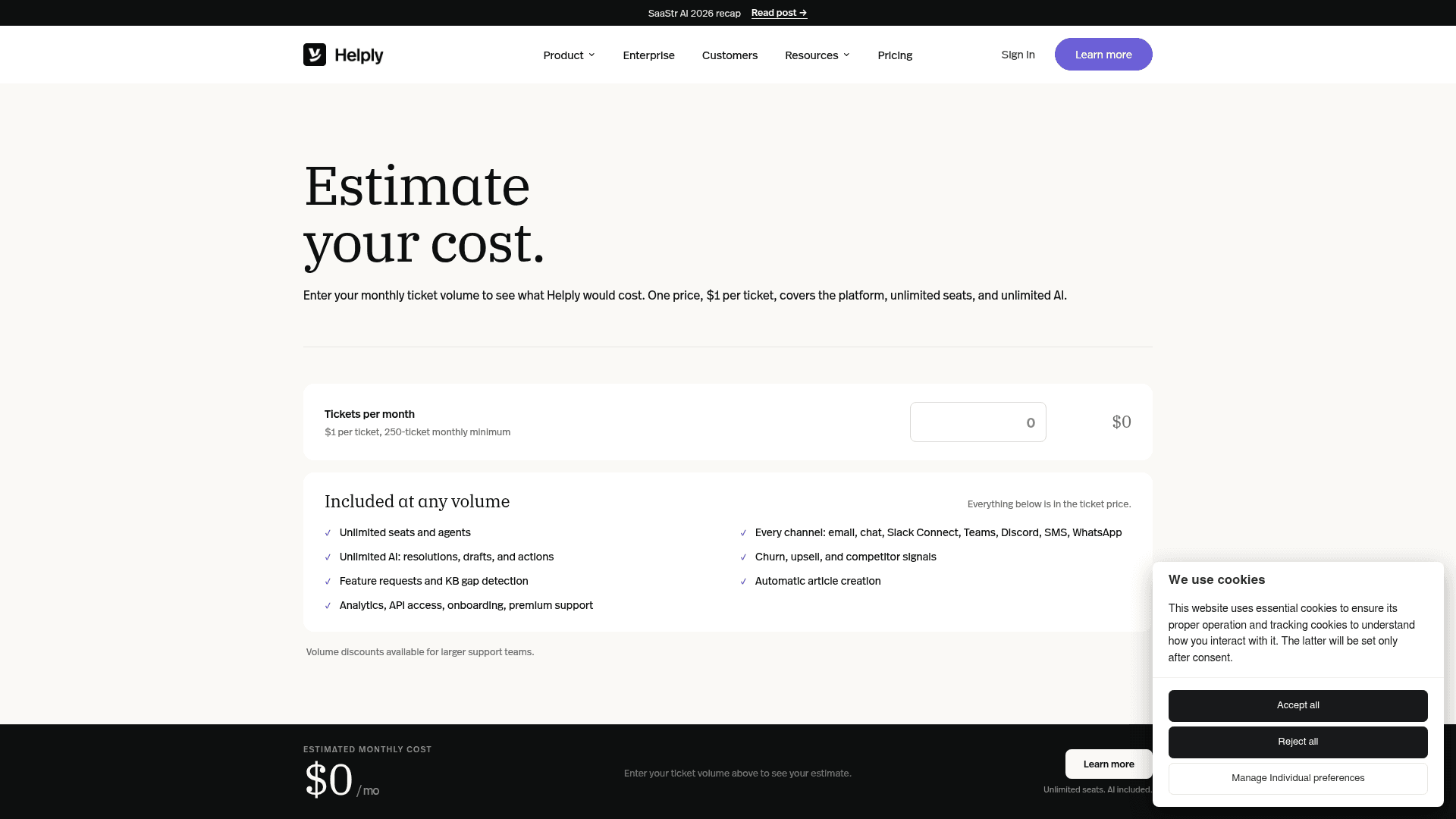
Inside the ticket price, at any volume:
- Unlimited seats and agents, across every channel: email, chat, Slack Connect, Teams, Discord, SMS and WhatsApp
- Unlimited AI resolutions, drafts and actions, with no usage caps and no credit pools
- Churn, upsell and competitor signals, plus feature requests and knowledge base gap detection
- Automatic article creation, which feeds the knowledge base benefits loop
- Analytics, API access, onboarding and premium support
The "no metered AI" position is the part I would actually defend on a buyer's behalf. Decoding credit pools is where most AI helpdesk rate cards turn into a spreadsheet exercise, and Helply has removed that whole category of work. Its reasoning on the knowledge base is also sound: every published article deflects tickets that then never get created, so a better knowledge base chatbot makes the bill smaller rather than larger. That incentive does point the right way, and it is the opposite of how per-resolution billing behaves.
On security, the trust page is specific enough to check: SOC 2 Type II, GDPR documented, 80+ controls monitored continuously through Vanta, and a public trust centre at trust.helply.com with no login required. On AI data handling it commits to tenant isolation, states that model-provider API calls are not used for training, keeps quality-improvement opt-in with the default off, and logs every AI action with its source data. For a buyer who has to clear procurement, that is a short path, and it compares well to chasing a SOC 2 report through a sales cycle.
Enterprise adds published volume discounts and a migration team, the kind of cutover support that separates real enterprise helpdesk software from a self-serve tool, described as a named solutions architect, a former B2B support lead and a data engineer who rebuild macros, port history and map your CRM.
Where per-ticket billing helps, and where it hurts
I do not think per-ticket is a bad model. I think it is a model with a specific risk profile that the marketing does not describe, so here is the honest split.
It works in your favour when:
- You are adding headcount faster than tickets. Thirty new hires in the inbox cost nothing, which is the licence maths behind most helpdesk software for startups decisions. Against a per-agent plan, that is a straightforward win, and the same logic that makes shared inbox vs ticketing decisions turn on licence count.
- Your automation rate is high. At the 91%+ resolution rate Helply reports for one customer, $1 a ticket is about $1.10 per AI resolution, which is cheap. Crucially, the rate does not rise as the AI improves, unlike a per-resolution meter.
- Your product is getting better. Ship a fix that cuts ticket volume 40% and the bill drops 40%. Very few support contracts reward you for needing them less.
It works against you when:
- Your volume is spiky. This is the trap for anyone running high volume ticket desks. A four-times seasonal month is a four-times bill. On the customer analysis I quoted above, a 1,000-ticket month at 80% resolution modelled at $792, and the same account at 4,000 Black Friday tickets modelled at $3,168. The unit was different, the exposure is identical: volume meters transmit seasonality straight to the invoice.
- Your inbox carries junk. See the 22% spam figure above.
- You are below 250 tickets. The floor makes the real rate $1.25 or worse.
- Your automation rate is mediocre. At 30%, you pay $3.33 per AI resolution and still staff the rest.
And the thing nobody can model, because it is not published: the in-year overage rate. Helply says it sizes the annual contract to expected volume and adjusts at renewal. It never says what a ticket above your commitment costs before that renewal. On a volume meter that is the single most important unpublished number, and it is the one I would insist on having in writing.
The general point, which is not specific to Helply: on any usage-based support contract, the resolution rate you assume during procurement is the number that determines whether the deal was good. Assume the vendor's example rate and you are assuming their best case. Track it as a first-class metric alongside the rest of your customer service metrics.
How the $1 unit compares
Rate cards across the category do not share a unit, which is exactly why comparing headline numbers misleads. Here is the same information normalised as far as it honestly can be.
| Vendor | Unit | Rate | Monthly minimum | Free entry | Seats |
|---|---|---|---|---|---|
| Helply | Per ticket processed | $1 | 250 tickets / $250 | None | Free, unlimited |
| Groove Classic | Per user | $15 to $40 | Seat count | Trial | Paid per seat |
| eesel AI | Per ticket handled | $0.40 | None | $50 free usage | Free, unlimited |
| Zendesk | Per AI resolution | $1.50 to $2.00 | Plan dependent | Trial | Paid per seat |
| Gorgias | Per AI resolution | $1.50 overage | Plan dependent | Trial | Paid per seat |
| Freshdesk | Seat plus AI session | Model it yourself | Plan dependent | Free plan | Paid per seat |
| Help Scout | Contact volume plus seats | Tiered | Plan dependent | Trial | Paid per seat |
| HubSpot | Seat plus resolution cap | Tiered | Plan dependent | Free tools | Paid per seat |
Read that table as a map of units, not a league table. Helply's $1 buys a whole platform with free seats; Zendesk's and Gorgias's per-resolution charges sit on top of a seat licence you are already paying. A per-resolution meter at $2.00 can beat a per-ticket meter at $1.00 whenever automation is below 50%, and lose to it whenever automation is high. Neither is cheaper in the abstract.
The honest comparison points for Helply are the floor, the commitment and the trial. Against the field in my AI for ticket automation roundup, it is the only tool in that table with a hard monthly minimum, annual-only billing and no way to test it on a card first.
If you want the wider field, my roundup of AI helpdesk software covers the alternatives in depth. The closest thing to a like-for-like on capability is my list of the best AI agent options.
Sanity-checking Helply's own ROI maths
The pricing page carries a worked ROI example, which I appreciate, since most vendors assert a multiple without showing the sum. Theirs: 500 tickets a month is $500; AI drafts save about 42 support hours; if AI resolves 30% of tickets that is another 25 hours; at $40 an hour that is roughly $2,680 of monthly productivity on a $500 spend, an estimated 436% ROI or 5.4 times return.
I checked the arithmetic and it holds. 42 plus 25 is 67 hours, 67 at $40 is $2,680, and $2,180 of net gain on $500 is 436%. No thumb on the scale.
The assumptions are where the weight sits, and two are worth naming. The 42 hours saved by drafting is an estimate, not a measured output, and $40 an hour is a chosen loaded labour rate that will be wrong in both directions depending on where your team sits. Swap in $25 an hour and the return roughly halves.
The most useful disclosure is buried in it: Helply's own ROI model assumes the AI resolves 30% of tickets. That lines up with the resolution rates it publishes from customers, around 30% of total volume for one and 30 to 35% of conversations for another. So 30% is the vendor's own expectation, not a pessimistic outside estimate, and 30% is what my calculator above defaults to for that reason. Plan your business case on 30% and you are planning on Helply's numbers. Plan it on the 91% figure from their strongest case study and you are planning on an outlier.
This is the discipline I wish more buyers applied, and it is why every rollout we run at eesel gets simulated against a customer's own historical tickets before anyone signs anything. We have watched a confident-sounding bot quietly give wrong answers often enough that a vendor's average resolution rate stopped being interesting to us. The only number that predicts your bill is the one your own back-catalogue produces.
Should you buy it
If you run a B2B software company between $1M and $50M ARR, handle 500 to 2,000 tickets a month, have a stable volume curve and a clean inbox, and you want one forecastable line item with free seats and no AI meter to decode, Helply's model is coherent and fairly priced. The no-metered-AI position and the SOC 2 posture are real strengths, and the KB-shrinks-your-bill incentive is pointed the right way round.
If you are below 250 tickets, if your volume triples in November, if a fifth of your inbox is spam, or if you need to prove the AI works before committing $3,000, or if a free ticketing system still covers you, the model asks you to carry risk that the pricing page does not mention.
And whatever you conclude, get the outcome question answered in writing. Two Helply pages and its CEO say you pay for successful AI outcomes. The pricing page says you pay for every conversation processed. Only one of those will be in your contract.
Want a per-ticket meter without the floor?
If per-ticket billing is the model you want, the thing worth shopping is the terms around the unit rather than the unit itself.
eesel AI bills 40c per ticket handled, with no platform fee, no seat fees and no monthly minimum. You start free with $50 of usage and no credit card, and if you route only 200 of your 1,000 monthly tickets to the AI during a gradual rollout, you pay for 200. Every rollout gets simulated against your own historical tickets first, so you see your real resolution rate before you commit to a number, rather than inheriting a vendor's 30% assumption. I will be straight about the trade in the other direction: like Helply, we bill per ticket regardless of outcome, and our Enterprise tier adds a $1,000 monthly platform fee for SSO, HIPAA and a BAA.

For a team that wants to find out what its automation rate actually is before signing an annual commitment, that is the difference that matters. Try eesel.
Whichever way you go, do four things before you sign. Get the in-year overage rate written into the order form, because it is the one number a volume meter cannot work without and Helply does not publish it. Ask in writing whether auto-closed spam, duplicates and reopened threads each bill as tickets. Model the bill at your busiest month rather than your average, since a $1 unit transmits seasonality straight through. And settle the outcome question on paper, because two Helply pages promise you pay only for results and the pricing page does not.
If the answer to all four is acceptable, this is a clear, honest rate card with fewer moving parts than most of the category. If sales will not put them in writing, the $3,000 floor is buying you less certainty than the page suggests.
Frequently Asked Questions
How much does Helply cost in 2026?
What is Helply's pricing per ticket, and what counts as a ticket?
Does Helply charge per seat?
Is there a Helply free trial?
Is Groove pricing the same as Helply pricing?
Who can actually buy Helply?
Does Helply pricing include AI, or is it an add-on?
What happens to Helply pricing if my ticket volume spikes?


Article by
Kurnia Kharisma
Kurnia is a software engineer and writer at eesel AI with two years of SEO experience, writing about AI tools, helpdesk software, and customer support. He pairs a developer's understanding of how these products are built with search-driven research into what actually ranks and resonates with the people searching for them.