
Searching for Groove pricing can be surprisingly confusing. Type "Groove" into Google and you'll find three completely different products, all with different pricing models and use cases. Let's clear that up.
This guide breaks down exactly what you'll pay for GrooveHQ (the customer support help desk), Groove.cm (the all-in-one marketing platform), and when each one makes sense for your business.
Which Groove are you looking for?
Before we dive into numbers, let's make sure we're talking about the right product.
- GrooveHQ is a customer support help desk built for growing teams. If you need a shared inbox for support emails and live chat, this is what you're looking for.
- Groove.cm (formerly GrooveFunnels) is an all-in-one marketing platform with website builders, sales funnels, email marketing, and e-commerce. It's for online businesses, marketers, and course creators.
- Groove by Clari is a sales engagement platform for Salesforce users with enterprise pricing (roughly $5,000-$70,000 annually).
This guide focuses primarily on GrooveHQ since that's what most people mean when they search for Groove pricing in a customer service context. But we'll cover Groove.cm briefly so you know what you're not looking at.
GrooveHQ pricing and plans
GrooveHQ uses per-user pricing with three tiers. You can pay monthly or annually, with annual billing saving you around 20%.
All plans come with a 30-day free trial, so you can test before committing.
| Plan | Monthly Price | Annual Price | Key Features | Best For |
|---|---|---|---|---|
| Standard | $29/user/month | ~$24/user/month (annual) | 2 shared inboxes, 1 knowledge base, 40+ integrations, standard reporting | Small teams leaving Gmail |
| Plus | $45/user/month | ~$36/user/month (annual) | 5 inboxes, AI features, premium integrations (HubSpot, Jira, Salesforce), SLA management | Growing teams |
| Pro | $70/user/month | ~$56/user/month (annual) | 25 inboxes, 50 lite users, enterprise security, dedicated account manager | Larger teams |
Standard plan: The basics done well
The Standard plan gives you the essentials: a shared inbox that combines email, live chat, and social channels into one place. You get 2 shared inboxes, 1 knowledge base, and access to 40+ integrations.
It's a solid step up from managing support through a shared Gmail account. You get collision detection (so two agents don't reply to the same ticket), internal notes for team collaboration, and basic automation rules.
The catch? You won't get AI features or premium integrations like Salesforce and HubSpot. For teams just getting organized, that's often fine. But if you expect to grow quickly, you'll likely outgrow this plan.
Plus plan: Where AI enters the picture
The Plus plan is GrooveHQ's most popular option, and for good reason. You get everything in Standard plus 5 shared inboxes and, crucially, AI-powered features.
Groove's AI can summarize long ticket threads, detect customer sentiment, suggest tags, and help agents write faster responses. You also get SLA management and premium integrations with HubSpot, Jira, and Salesforce.
But here's the catch: Groove's AI is strictly assistive. It helps your agents work faster, but it doesn't resolve tickets on its own. Every response still comes from a human agent.
Pro plan: For established teams
The Pro plan is built for larger organizations with more complex needs. You get 25 shared inboxes, 50 "lite" users (colleagues who can view tickets but don't need full agent seats), and enterprise-grade security features.
You also get white-glove treatment: a dedicated account manager, quarterly training sessions, and callback support from engineers.
What you actually get with GrooveHQ
Let's break down the core features that make up Groove's value proposition.
Shared inbox and ticketing
Groove's main appeal is bringing all customer conversations into one clean interface. Emails, live chat messages, and social media inquiries land in a single inbox where teams can collaborate.
Features like ticket assignments, collision detection, and internal notes keep everyone aligned. The interface feels email-like, which reduces the learning curve for teams transitioning from Gmail or Outlook.
AI-powered features (Plus and Pro only)
Groove's AI features focus on making agents more efficient:
- AI Summarize condenses long email threads into digestible summaries
- AI Sentiment & Tagging automatically categorizes tickets and flags urgent issues
- AI Writing Assist suggests phrases and helps agents draft faster responses
These are genuinely useful time-savers. But it's important to understand the limitation: Groove's AI assists agents. It doesn't independently resolve tickets or deflect common questions before they reach your team.
If your goal is to actually automate support, not just speed up agents, Groove's AI won't get you there.
Knowledge base
All plans include a knowledge base where you can publish help articles for customers. A well-maintained knowledge base can deflect simple questions before they become tickets.
Groove's knowledge base supports custom domains, restricted access (on Plus and Pro), and integrates with their live chat widget so customers can self-serve before starting a conversation.
Reporting and analytics
Standard plans get basic reporting on ticket volume and response times. Plus and Pro plans add advanced analytics, custom reporting, and SLA tracking.
You can monitor agent performance, track customer satisfaction scores, and identify trends in your support volume.
Groove.cm pricing (the other Groove)
Just so you're not confused if you stumble across it, here's what Groove.cm costs according to their pricing page.
Groove.cm is a completely different product, an all-in-one marketing platform for building websites, sales funnels, and online stores. It's not a help desk.
| Plan | Price | What's Included |
|---|---|---|
| Free | $0/month | Unlimited pages, funnels, affiliate management, blog, store. Limited email (1,000/month). |
| Promotional | $1 one-time for 1 year | Full Premium+ Enterprise access, 15,000 emails/month |
Groove.cm's main appeal is their "free for life" tier with no credit card required. You get access to their core tools (website builder, funnel builder, e-commerce) without paying a monthly fee.
The platform makes money when users upgrade for more email sends, webinar hosting, or native video hosting.
If you're looking for customer support software, Groove.cm isn't what you need. But if you're a marketer or course creator, it's worth knowing this exists so you don't confuse it with GrooveHQ.
Is GrooveHQ worth the price?
GrooveHQ scores well with users. It holds a 4.6-star rating on G2 with over 193 reviews and a 4.5-star rating on Capterra.
What users like:
- Clean, intuitive interface that feels like email
- Easy setup and onboarding
- Responsive customer support team
- Good value compared to enterprise tools like Zendesk
My favorite thing about GrooveHQ is the way my whole team is able to collaborate and tackle emails and responses crazy quick because of the way the ticketing system works
Common concerns:
- Per-user pricing gets expensive as teams scale
- No live phone support (email and chat only)
- AI features are assistive, not autonomous
Groove is a little on the expensive side; in the world of AI, we found we didn't need all of the extra features that came with a bigger price tag
When GrooveHQ makes sense
GrooveHQ is a solid choice if:
- You're a small-to-medium team graduating from shared email
- You want a simple, focused ticketing system without enterprise bloat
- You need human agents handling every ticket with AI assistance
- Your budget is $20-45 per agent per month
When to look elsewhere
Consider alternatives if:
- You want AI to actually resolve tickets, not just assist agents
- Your knowledge lives in multiple places (Confluence, Google Docs, Notion) and you want a tool that can pull from all of them
- Per-seat pricing doesn't work for your budget model
- You need to test automation before going live with customers
A modern alternative to per-seat pricing
If GrooveHQ's per-user model feels limiting, eesel AI takes a different approach.

Instead of charging per agent seat, eesel AI uses interaction-based pricing. You pay for the work the AI actually handles, not how many people are on your team.
Key differences
| Feature | GrooveHQ | eesel AI |
|---|---|---|
| Pricing model | Per-user/month | Per-interaction |
| AI role | Assists agents | Resolves tickets autonomously |
| Knowledge sources | Built-in knowledge base | 100+ integrations (Confluence, Google Docs, Notion, etc.) |
| Testing | Go live to see results | Simulation mode on past tickets |
| Entry price | $29/user/month ($290 for 10 users) | $299/month (1,000 interactions) |
With eesel AI, you're not just managing tickets more efficiently. You're actually deflecting common questions before they reach your team.
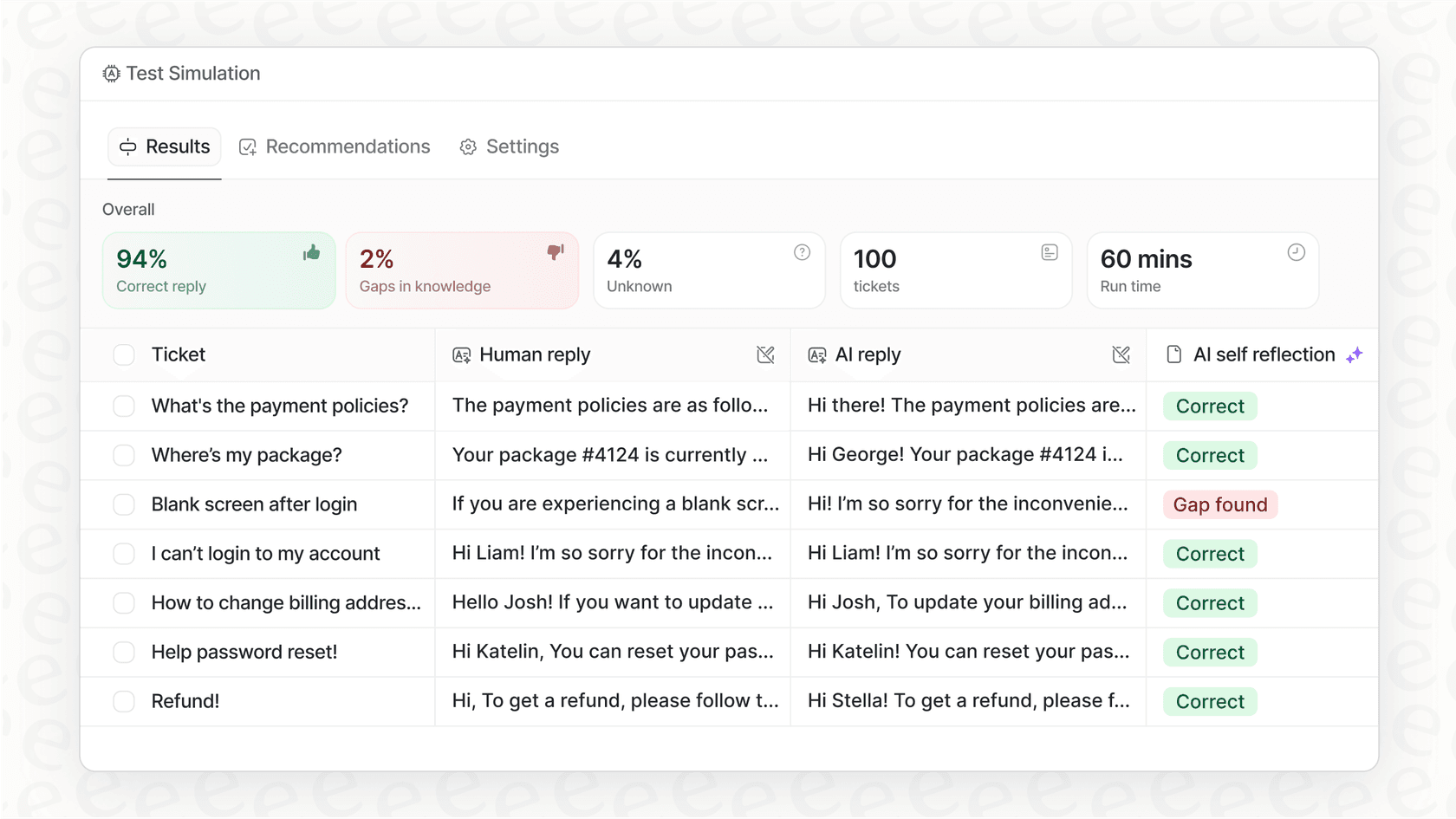
eesel AI learns from your past tickets, help center articles, and connected documentation to resolve frontline support autonomously. Complex issues still escalate to humans, but routine questions get handled instantly.
When to choose eesel AI over GrooveHQ:
- You want to reduce ticket volume, not just manage it faster
- Your team knowledge is scattered across multiple tools
- You prefer predictable costs tied to actual usage, not headcount
- You want to test performance on historical data before going live
You can try eesel AI free and use the simulation mode to see exactly how it would perform on your past tickets.
Making your choice
GrooveHQ offers straightforward per-user pricing for teams that want a clean, simple help desk. At $24-56 per user per month (annual billing), it's competitively priced against alternatives like Zendesk and Freshdesk.
The platform delivers on its promise: simple, efficient ticketing without enterprise complexity. The AI features on Plus and Pro plans genuinely help agents work faster.
Just be clear about the trade-off. GrooveHQ is a traditional help desk with AI assistance. If you're looking for true automation that reduces your ticket queue, you'll want to explore AI-native alternatives like eesel AI.
Either way, start with a trial. Both GrooveHQ and eesel AI offer free trials, so you can test which approach fits your team's workflow before committing.
Frequently Asked Questions
Can you explain how much does Groove cost for a team of 10 agents?
Is there a way to reduce how much does Groove cost for larger teams?


Article by
Kira
Kira is a writer at eesel AI with a Computer Science background and over a year of hands-on experience evaluating AI-powered customer service tools. She focuses on breaking down how helpdesk platforms and AI agents actually work so that support teams can make better buying decisions.

