HelpDesk.com pricing at a glance
Here is every published number on the HelpDesk.com pricing page, re-checked on 5 October 2026. HelpDesk.com is a product of Text S.A., the company behind LiveChat, and the pricing page is in the middle of a rebrand right now, which shows: the plan cards say HelpDesk.com, while the comparison table sitting below them is headed "Text pricing plans".
| Dimension | Essential | Growth | Enterprise |
|---|---|---|---|
| Per user / month, billed yearly | $19 | $79 | Custom |
| Per user / month, billed monthly | $25 | $99 | Custom |
| Tickets | Unlimited | Unlimited | Unlimited |
| AI resolutions included | 10 / month | 200 / month | Custom |
| AI resolution top-up | $49.50 per 50 | $49.50 per 50 | Custom |
| AI agents you can build | 1 | 10 | Custom |
| Custom skills per agent | 10 | 10 | Custom |
| Reply suggestions | 5 / month per user | 50 / month per user | Custom |
| AI text edits | 5 / month per user | 100 / month per user | Custom |
| Ticket and chat summaries | No | Yes | Yes |
| Automated tag suggestions | No | Yes | Yes |
| Multilingual AI | 48 languages | 48 languages | 48 languages |
| Ticketing rules | 3 | 10 | Custom |
| Workflow rules | 3 | 10 | Custom |
| Workflow executions | 300 / month | 1,000 / month | Custom |
| Custom fields | 5 | 20 | Custom |
| Teams | 1 | 10 | Custom |
| Forwarding addresses | 1 | 10 | Custom |
| Email templates | 1 | 10 | Custom |
| Live visitors tracked | 50 | 400 | Custom |
| Proactive campaigns | 3 | 30 | Custom |
| Campaign impressions | 1,000 | 10,000 | Custom |
| Conversation and file history | 60 days | Unlimited | Unlimited |
| Storage | 2 GB + 50 MB per user | 15 GB + 100 MB per user | Custom |
| API calls | 10,000 / month | 20,000 / month | Custom |
| API top-up: 100,000 calls | $29.50 | $29.50 | Custom |
| Chat routing rules | No | Yes | Yes |
| Shared canned responses | No | Yes | Yes |
| Agent activity and performance reports | No | Yes | Yes |
| Scheduled reporting exports | No | No | Yes |
| White label | No | No | Yes |
| Custom roles and multiple brands | No | No | Yes |
| SSO (SAML 2.0) and audit logs | No | No | Yes |
| SOC 2 Type 2 | Not itemised in the table | Not itemised | Listed on the Enterprise card |
| Free trial | 14 days, no card | 14 days, no card | 14 days, no card |
Three things that is worth to flag before we go further.
The annual discount is not 24% on both plans. The page's strapline says "Pay yearly. Save up to 24%." That is exact on Essential, where $25 drops to $19. On Growth it is $99 to $79, which comes to 20.2%, and the FAQ still presents both of them under the same headline. Annual is also billed 12 months upfront, so the discount arrives with a cash-flow cost attached.
HIPAA is listed twice with opposite answers. The Enterprise plan card names HIPAA compliance as an included feature. But the comparison table's row reads "HIPAA compliance coming soon" and shows a dash in all three columns, Enterprise one included. So if HIPAA is a hard requirement for you, get it in the writing instead of reading it off the card. Multi-brand support gets the same doubled and contradictory treatment.
Ignore the help center's price list. HelpDesk.com's own help center page still publishes a Team and Business ladder at $29 and $50 per agent, and that ladder does not exist anywhere on the live pricing page any more. I checked the both of them again today, the stale one is still up. Cite the pricing page.
Two meters, and only one of them is a seat
Almost every helpdesk pricing question comes down to the same thing, which is what the vendor actually counts. HelpDesk.com answers that unusually clear, and the answer has two halves to it.
The first half is a generous one. Tickets are unlimited on every plan, and the FAQ says it flatly: you never pay per ticket or per visitor. There is no seat minimum and no seat maximum either, plus no setup fee and no platform fee. If you are buying a shared inbox and a ticketing system, the price on the card is the price. That is a real advantage over the per-ticket vendors covered in my guide to automated ticketing systems.
The second half of it is a usage meter, and that is where the money sits. The pricing page defines the AI unit inside a tooltip: "One resolution = the AI directly solved a customer question. Multiple questions in the same chat still count as one." That is a fair definition, honestly, and it is better than the vendors who bill you per message. It is also the only meter that matters, because it is the one with a rate attached, and it is the unit your whole AI resolution rate calculation will hang off.
The thing that makes this shape awkward is that the meters does not all scale in the same way.
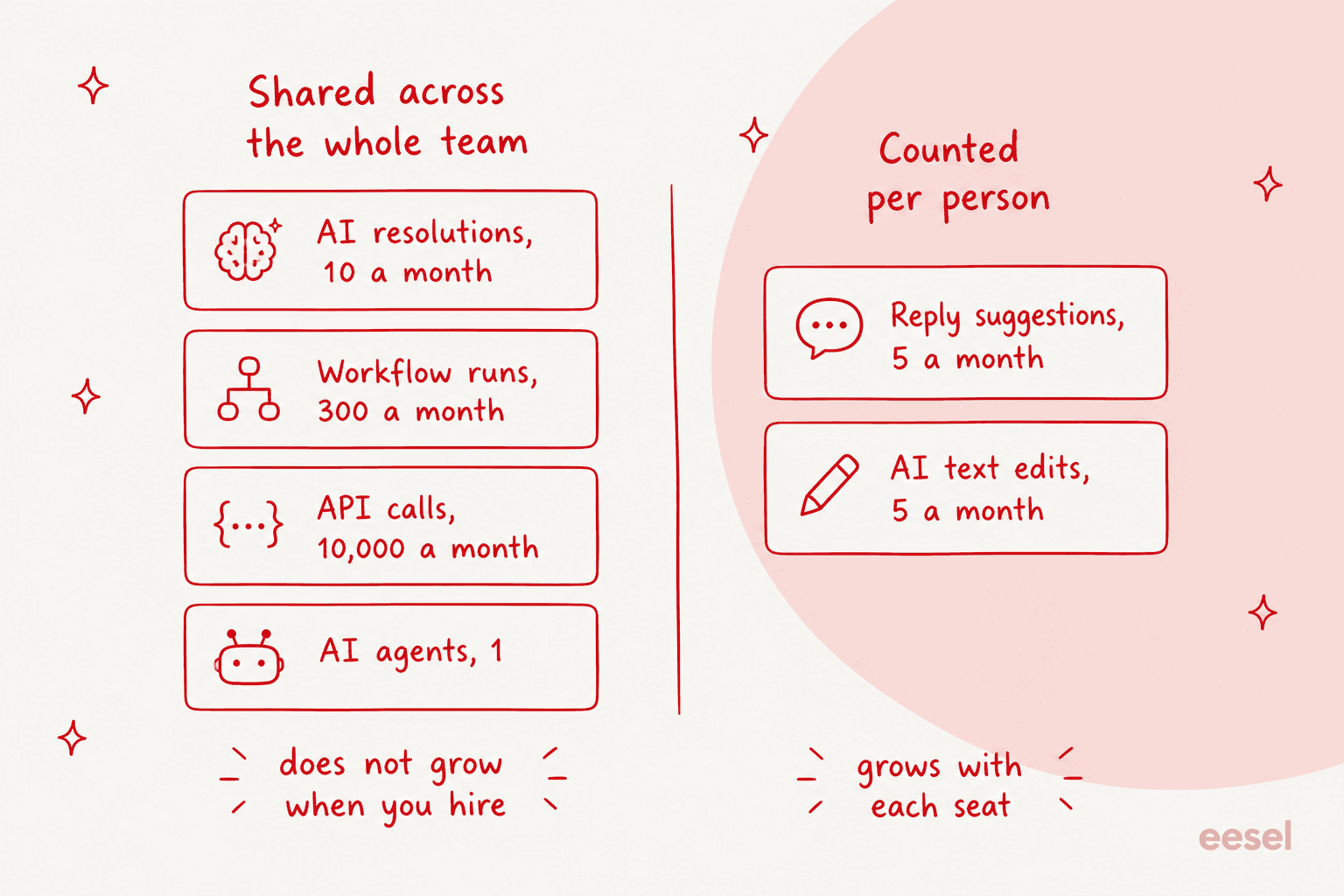
AI resolutions, workflow runs, API calls and the number of AI agents are all workspace-level. They do not grow when you hire. Reply suggestions and AI text edits are per user, so they do. That sounds like a small detail until you run the numbers on a team that is growing. A five-person shop on Essential still shares 10 AI resolutions a month across the whole company, while the reply-suggestion allowance quietly climbs up to 25.
What one AI resolution actually costs
The rate card says $0.99. The purchasing mechanics is telling you something else.
Overage is sold as a 50-resolution pack for $49.50, and it is an auto-refill. The page's wording is unambiguous: "When you hit your monthly limit, Text automatically adds 50 more resolutions for $49.50 so the AI keeps working. Anything used gets billed at your next renewal." There is no approval step in there. The AI does not pause and ask you first.
Which makes $49.50 the smallest amount of AI that you can buy, and in a light month that is the number which actually decides your bill.
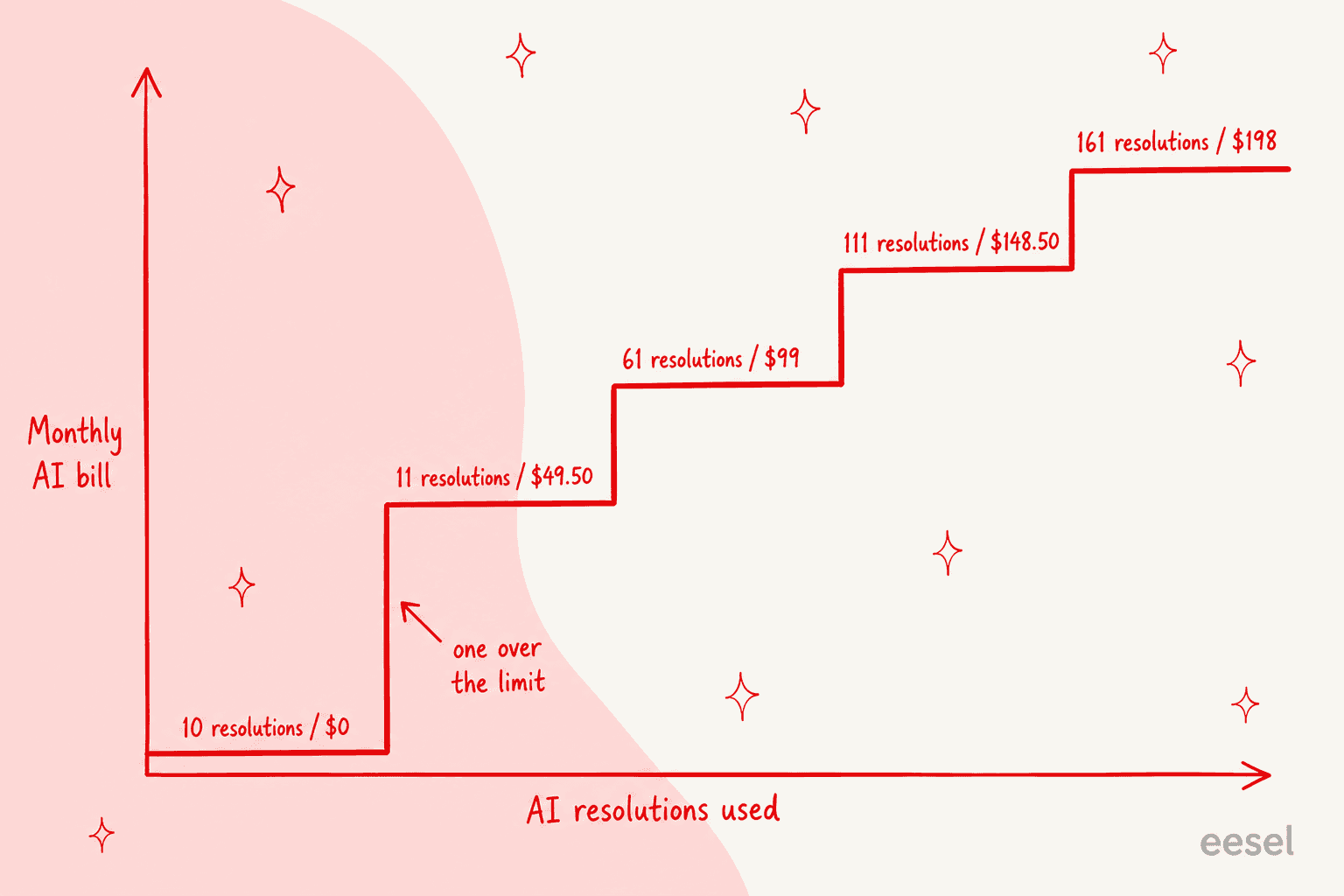
On Essential, ten resolutions cost you nothing at all. Eleven cost $49.50. Sixty-one cost $99. Across a busy month the average does converge on $0.99, but on a low volume the effective rate is nowhere near that, and a single extra resolution can cost more than two seats.
Ten a month is also a very small number. In the three-plus years of putting AI agents onto live support queues, I have watched what a first test week really looks like, and it is not ten. One buyer in our own sales notes hit 200 interactions in a single day of testing and then went straight to the billing page to work out what that meant at scale. Another ran twelve clean tests, liked the answers, opened the pricing page and immediately asked to cancel. Neither of those people had a bad experience with the product. What they had was an arithmetic experience.
So it is better to treat Essential's AI allowance like a demo budget instead of a working one. If you want a baseline for what deflection should cost before you shop, my breakdown of AI customer service cost and the agent versus human comparison both start from the ticket rather than the seat. It is enough for seeing whether the agent answers well. It is not enough to run a month on.
Work out your own bill
Plug in your seat count and the number of AI resolutions that you expect, and this prices the both plans including top-up packs. The pack arithmetic is the part which catches people out, so it is broken apart below.
The upgrade stops paying for itself at four seats
This is the part which I did not expect when I first laid the two plans beside each other.
Growth costs $60 more per user per month than Essential does on annual billing. What that buys you on the AI meter is 190 extra included resolutions. Those 190 resolutions are worth about $198 a month in top-up packs you would otherwise buy, since four packs is what covers them.
Now notice the thing that is missing here: the overage rate is identical on the both plans. Growth does not give you cheaper resolutions, only more of the free ones. So the AI value of that upgrade sits at a fixed roughly $198 a month whether you resolve 200 tickets or you resolve 2,000, while the cost of the upgrade keeps growing with every person that you hire.
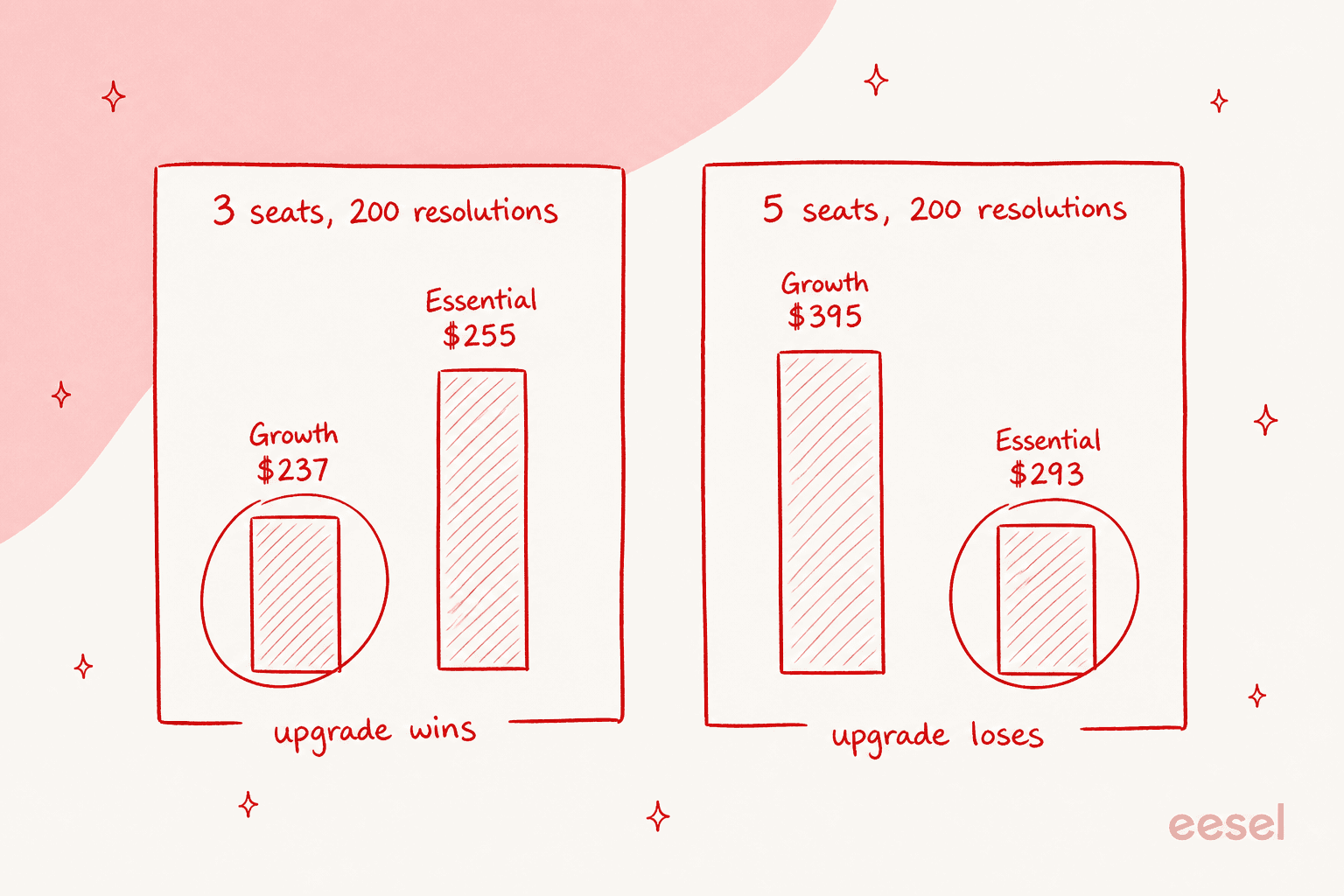
At three seats and 200 resolutions a month, Growth costs $237, and Essential plus four top-up packs comes to $255. So Growth wins there, by $18.
At five seats and the same 200 resolutions, Growth costs $395 and Essential costs $293. Essential wins by $102 a month, and the gap widens with every hire.
The crossover sits between three and four seats on annual billing, and between two and three on the monthly one, where the seat premium is $74 instead. Past that point, the honest way to describe Growth is that you are buying unlimited conversation history and chat routing, agent performance reports, ten AI agents in place of one, plus much larger per-user sub-meters. Those are real things, and some teams do need them. Just do not tell yourself that you are upgrading for the resolution allowance, because at four seats and up you are paying $60 a head for $198 of resolutions.
To be fair on the plan, two of Growth's meters really do scale with your team. Reply suggestions go from 5 up to 50 per user per month, and AI text edits from 5 to 100. At ten agents that works out as 450 extra suggestions and 950 extra edits in a month. They carry no published price, so I cannot put them in the table, but they are not nothing. Whether they are worth $60 a head depends entirely on how much of your queue you expect the agent to absorb, which is the core question in my ticket deflection guide.
The four meters nobody quotes you
The resolution meter is the one that gets a tooltip. Four others sit down in the comparison table, and they will shape your experience of the entry plan more than the seat price ever does.
Workflow executions: 300 a month on Essential. Every automation run counts against it. Three hundred sounds ample, right up until you look at how automation rules gets used in a real live queue.
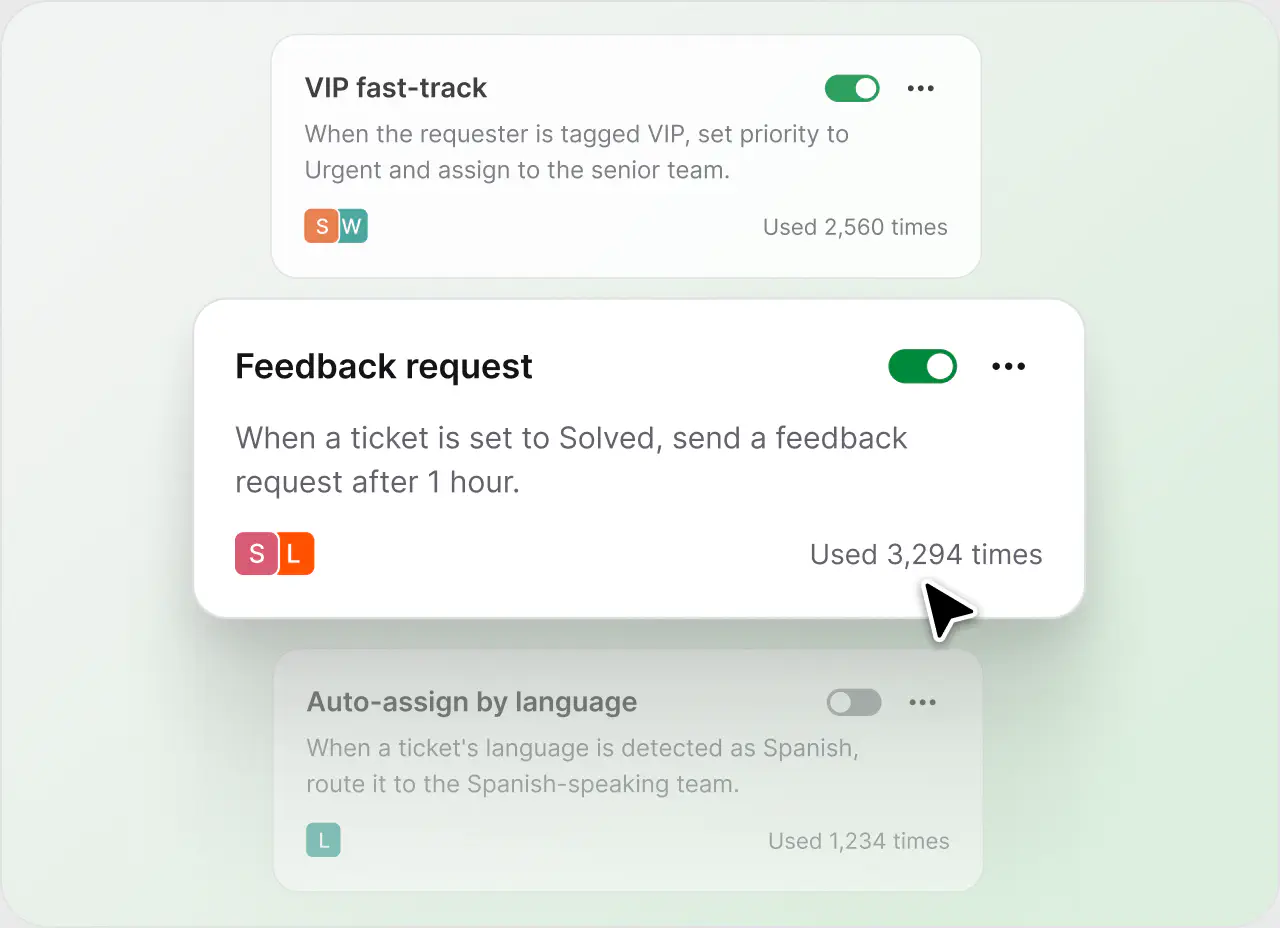
That is HelpDesk.com's own marketing screenshot, and the rules on it are showing 2,560 runs, 3,294 runs, and 1,234. A single feedback-request rule of the kind pictured there would exhaust Essential's monthly workflow budget in under four days at that pace. You also only get three workflow rules to begin with, which is a tight budget for the kind of customer service automation most teams want on day one.
Reply suggestions: 5 per user per month on Essential. This is the feature which most agents will touch every day, and it carries the smallest allowance on the whole plan.
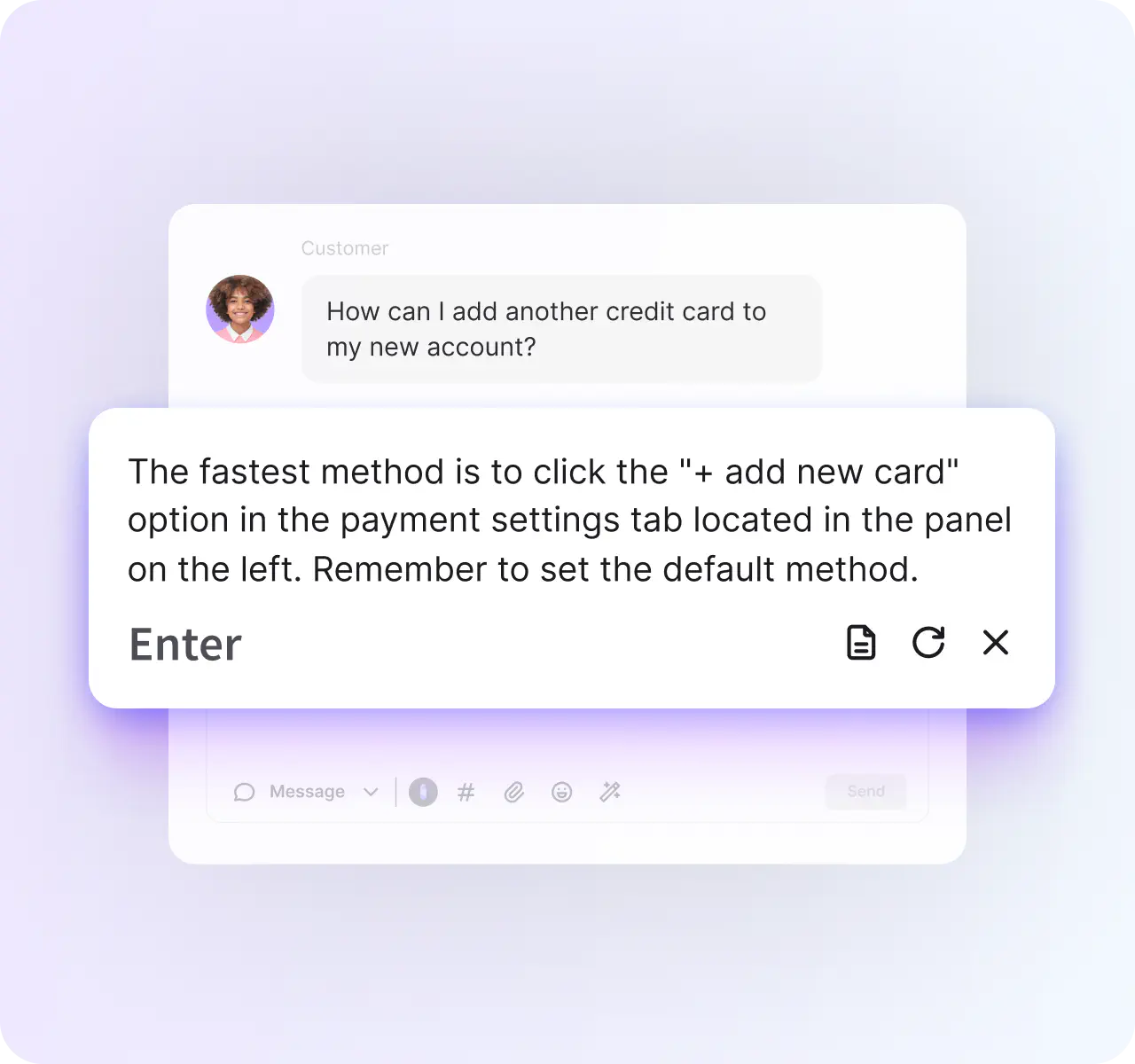
Each press of that Enter key is spending one of the five. An agent working a normal queue runs out by the Tuesday morning of week one. There is no published top-up for this meter, so the only way to buy more is the plan upgrade. Agent-side assist is the feature teams underestimate when budgeting, as I found writing about the helpdesk copilot category.
AI text edits: 5 per user per month on Essential. Same shape and the same ceiling, and again there is no top-up for it.
API calls: 10,000 a month on Essential. This one is a generous one by comparison, and the top-up is reasonable at $29.50 for 100,000. Worth to know about if you are planning to sync HelpDesk.com into anything else, which brings us onto the constraint that costs the most and carries no price at all.
The limits that are not priced but still cost you
Three of them, in the order that I would worry about them.
HelpDesk.com does not integrate with another helpdesk. Its integration list is Shopify, WooCommerce, HubSpot, Salesforce, Klaviyo, WordPress and Webflow, with Slack notifications through Workflows and webhooks for anything that exposes an API. There is no Zendesk, Freshdesk, Front or Gorgias connector. That is a perfectly reasonable design choice for a product which wants to be your helpdesk, but it does mean adopting it becomes a migration of the whole queue rather than an addition on top of one. If you already run Zendesk, Freshdesk or Front, that switching cost belongs in your comparison, and one Capterra reviewer says the migration from LiveChat cost them thousands because spam folders could not be imported.
Essential caps conversation history at 60 days. Sit on the entry plan for a year, and ten months of your own conversations ends up outside of the searchable window. For a support team this is the sharpest non-price limit on the plan, because past tickets are the raw material for everything from QA to training an AI knowledge base. It also rules out the historical-data approach behind most AI ticket triage setups.
Nothing on either plan lets you test the AI before it goes live. There is no simulation, dry run or backtest against your own historical tickets anywhere in HelpDesk.com's docs. What you get instead is after-the-fact tooling: you report a bad answer, regenerate it, then rate the reply. That matters commercially and not only operationally, because on a metered plan every test answer during your discovery phase is also a billable resolution.
To be clear on what HelpDesk.com does well here, its AI does read past tickets, and that is really unusual in this price bracket. Reply suggestions are generated from past ticket conversations, and the similar-tickets feature runs across Solved and Closed tickets from the last 180 days. Plenty of pricier tools will only crawl a help center.
What a real team actually pays
Four scenarios here, all of them on annual billing and all using the published rates.
| Scenario | Essential total | Growth total | Cheaper |
|---|---|---|---|
| Solo founder, 1 seat, 40 resolutions/mo | $19 seats + $49.50 top-up = $68.50 | $79 seats + $0 = $79 | Essential |
| Small team, 3 seats, 200 resolutions/mo | $57 + $198 = $255 | $237 + $0 = $237 | Growth |
| Growing team, 5 seats, 200 resolutions/mo | $95 + $198 = $293 | $395 + $0 = $395 | Essential |
| Busy shop, 8 seats, 800 resolutions/mo | $152 + $792 = $944 | $632 + $594 = $1,226 | Essential |
The bottom row is the one to sit with for a minute. At 1,000 tickets a month with an 80% resolution rate, the AI alone costs $792 a month, while the seats cost $152. The meter is now five times the software, which inverts most of the AI support cost savings arithmetic teams run before buying.
That ratio is not a hypothetical for me. I ran the same arithmetic for a real customer who was comparing per-resolution vendors at exactly this $0.99 rate: 1,000 tickets a month at 80% resolution came out at $792, and their Black Friday month of 4,000 tickets came to $3,168 on the same 80% rate. Per-resolution pricing has a property that is easy to miss on a pricing page, which is that it charges you more for succeeding more. A better agent costs you more money, and a seasonal spike then arrives as a bill instead of a capacity problem. One useful question to put in front of any per-resolution vendor: does an auto-closed spam ticket count as a resolution or not? For that customer, 22% of the inbox was spam.
How the $0.99 rate compares
Rate cards for AI resolutions across the helpdesk market, all of them list prices as published by each vendor.
| Tool | Per AI resolution | Notes |
|---|---|---|
| Freshdesk Freddy | $0.49 | $49 per 100 sessions |
| HubSpot | $0.50 | Per resolved conversation, 50 credits; Professional and Enterprise |
| Tidio Lyro | $0.50 | |
| eesel | About $0.60 per credit | 500 credits for $299/mo, 1 credit per ticket or chat, no seat fee |
| Help Scout | $0.75 | |
| Front Autopilot | $0.89 | Resolution tier; triage is $0.05 and handoff $0.39, charged once at the highest level |
| HelpDesk.com | $0.99 | 10 included on the $19 plan |
| Gorgias | $1.50 | Extra interactions; $0.85 to $1.00 inside a plan |
| Zendesk | $2.00 | Pay-as-you-go rate |
HelpDesk.com sits in the upper half, though it is nowhere near the top. The rate is honestly the least interesting number on this whole page. What separates a cheap AI bill from an expensive one is the included allowance and whether you are also paying for seats, and then whether the unit being counted is a resolution or a ticket. HelpDesk.com pairs a mid-to-high rate with the smallest entry allowance in the table, and it is that combination which produces the surprise, not the $0.99 by itself. If you are shopping this whole category, the cheapest AI apps for helpdesk roundup does the same comparison at volume.
On the seat side of the bill, the rate cards for BoldDesk, Desk365 and Zoho Desk are the ones worth putting beside it.
What users actually say about the bill
HelpDesk.com holds 4.6 out of 5 from 183 reviews on Capterra and 4.6 from 34 on G2, with 3.8 from 39 on Trustpilot. Lead with the Capterra number. The G2 listing is contaminated with reviews about generic internal IT help desks rather than about this product, and at n=34 it is a thin signal in either direction anyway.
The praise is consistent, and it is worth to state plainly: it sets up fast, the interface needs almost no training at all, and it slots into LiveChat and ChatBot cleanly. Several reviewers who arrived from other tools call out how little retraining it took them.
The price complaints have a specific shape to them, and that shape is not "too expensive in the abstract". It is that the job used to come included.
"Prior to HelpDesk, there were no additional costs for these features. It works great, so the biggest frustration is the added expense, as opposed to anything with functionality."

That reviewer, same as several others, was moved onto HelpDesk.com when LiveChat's native ticketing hit its end of life. If you are one of those customers, then you did not choose this rate card, you inherited it. Worth reading alongside LiveChat pricing if you still run both.
The second theme is size-dependent, and here the reviews contradict each other in a way which is actually useful. A mid-market developer calls it "inexpensive when compared to other options". A product owner, on a non-incentivised review, says the opposite:
"It is a little pricey. Another tickets apps in the market offer the same experience and tools for a less money"
Same product and opposite verdicts, and the deciding variable is team size plus how hard you lean on the AI. That is exactly what the seat-plus-meter structure would predict. The same split shows up in reviews of Help Scout and across the ecommerce helpdesk field.
On the AI itself, no reviewer on either of the platforms describes it deflecting a meaningful volume. The closest thing to a report from production is a warning:
"The ai I implemented to respond first before connecting to live agent seems to get stuck in endless loops of repeating questions and answers"
Two caveats on that one. Most of the Capterra reviews here are vendor-invited with a nominal incentive, so the non-incentivised ones quoted above are carrying more weight. And there is no organic Reddit, Hacker News or X discussion of HelpDesk.com written by an actual user, which means the community signal on this product is thin in the both directions. The wider conversation about whether these agents work at all is louder, and more useful:
"The expensive misses are usually the ones that look confident and don't escalate. So I'd rather have a slightly annoying bot that hands off early than one that quietly invents an answer."

That is the strongest argument there is for testing an agent against your own history before it ever meets a customer, and it is also the thing which HelpDesk.com's plans do not offer at any tier.
Is HelpDesk.com worth it in 2026?
Two different answers to that, depending on why you are here.
If you want a clean, fast shared inbox, yes, and the $19 seat is fair. Setup speed is the single most consistent thing that reviewers praise, unlimited tickets on every plan is a really generous move next to the per-ticket vendors, and if you already run LiveChat then the integration is the reason it works at all. Watch out for the 60-day history cap on Essential, and price the plan which holds your must-haves instead of the one in the ad, which is the advice helpdesk buyers keep giving each other, and it applies here. My roundup of the best helpdesk software with AI prices the same must-haves side by side.
If you are buying primarily for AI deflection, price the AI half on its own before you commit. Ten included resolutions is a demo allowance, the $49.50 auto-refill fires without asking you, there is no way to test the agent against your own tickets first, and adopting the product means migrating your whole queue, because it does not connect to another helpdesk. None of that is making it a bad tool. It makes it a tool whose AI is priced as an add-on to a ticketing purchase rather than as the purchase itself. For the AI-first framing instead, see best AI helpdesk software and the best AI live chat software roundup.
The practical move here: run the 14-day trial with real forwarded email and the whole team sitting inside it, then go and look at the resolution counter before that trial ends.
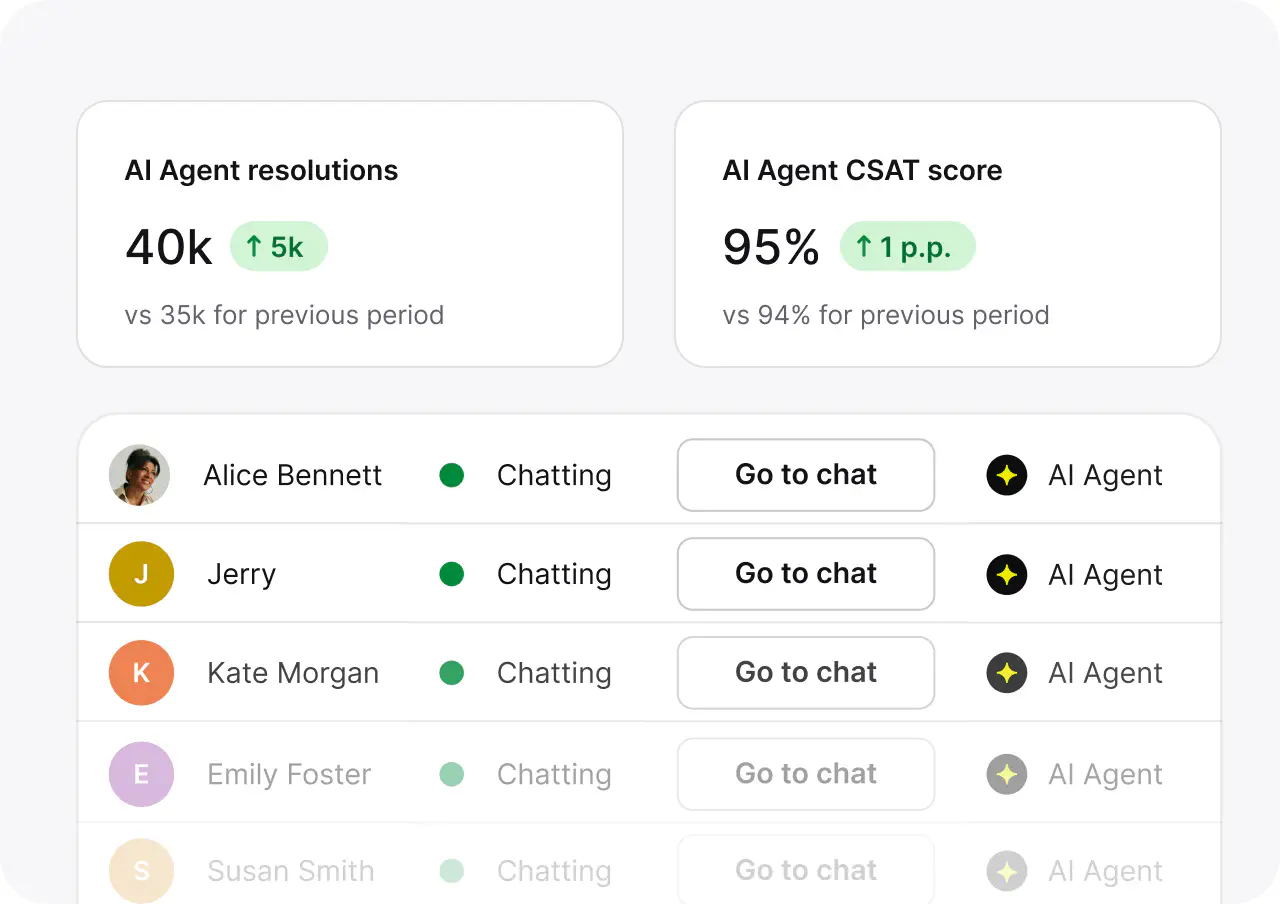
That counter is the number which becomes your bill. Multiply it by $0.99, then round up to the nearest 50-pack, and you have got your real monthly cost. Do that arithmetic during the trial, and not after it.
eesel for the AI half of the bill
If the thing you actually want out of HelpDesk.com is the AI, then that half is worth to price as its own purchase.
eesel's AI helpdesk teammate is a ready-to-work agent for the support queue rather than a feature bolted to a seat plan. It is one fixed monthly plan, from $299/month for 500 credits (1 credit per ticket or chat) with no seat fee, so hiring three more agents does not change the AI line at all, and a Black Friday spike draws on your monthly credits (or optional capped overage at $0.80 per extra credit) instead of multiplying up against a per-resolution rate.
It also joins the queue that you already run, including Zendesk, Freshdesk and Gorgias, so trying it out is not a migration.
The part which matters most on a metered plan: eesel simulates against your real historical tickets before it answers any live customer. You see the resolution rate and the volume on your own data first, so the bill becomes a number that you calculated rather than one which just arrives. After watching a lot of confident-sounding bots hand out wrong answers over the years, that dry run is the step I would not skip.

It is free to try with 100 credits and no card, and if you are still mid-comparison then the HelpDesk.com alternatives roundup prices nine options at real volume alongside it.
Frequently Asked Questions
How much does HelpDesk.com cost per user?
What is HelpDesk.com's pricing for a small team?
How much is one AI resolution on HelpDesk.com?
Does HelpDesk.com have a free plan?
Is HelpDesk.com pricing cheaper than Zendesk?
What is not included in HelpDesk.com's Essential plan?
What happens if I go over my AI resolution limit?
Is HelpDesk.com worth the money in 2026?


Article by
Kurnia Kharisma
Kurnia is a software engineer and writer at eesel AI with two years of SEO experience, writing about AI tools, helpdesk software, and customer support. He pairs a developer's understanding of how these products are built with search-driven research into what actually ranks and resonates with the people searching for them.