


No single best ticketing system exists. The reason is a boring one: the word covers four different products, and each of them bills you in a different way. Per agent seat, if it is a customer desk. An IT service desk bills per agent too, then quietly meters approvers on the side. MSP platforms count technicians, against client contracts. A dev tracker just bills every user. So the category comes first. Tool after.
Once you are inside a category, the ticket screen is rarely the thing that decides your renewal. Every desk here handles a ticket fine. What decides it is two price lists nobody puts on the pricing page: which plan unlocks the report you need, and what your vendor counts as a billable AI resolution. Take Freshdesk. The $0.49 lands the moment a customer opens a chat session, and whether the bot helped does not enter into it. Help Scout charges $0.75, but only if the customer never escalates. Zendesk, meanwhile, publishes no rate at all.
Already running a desk you mostly like? Then migration is usually the expensive answer. I work eesel's support queue, and the teams that jump the furthest are the ones who leave the desk where it is and put an AI layer over the top of it. eesel starts at $299 a month for 500 credits, 1 credit per ticket or chat. No seat fees. And it simulates against your real ticket history first, before it ever replies to a customer.
Who files the ticket decides everything
Most of my days are spent inside a support queue. So when somebody tells me they are shopping for a ticketing system, the single most useful question I have for them is not "what's your budget". It's "who sends you the ticket".
A customer sends one because a thing they bought is broken. An employee sends one because they need a laptop, or a password. A managed-service client sends one because they pay you a monthly retainer to keep their office running, and a teammate files one because your product has a bug. Four different jobs, in other words. The vendors have quietly split into four camps to serve them, which would be fine, except that all four camps use the same word on their homepage.
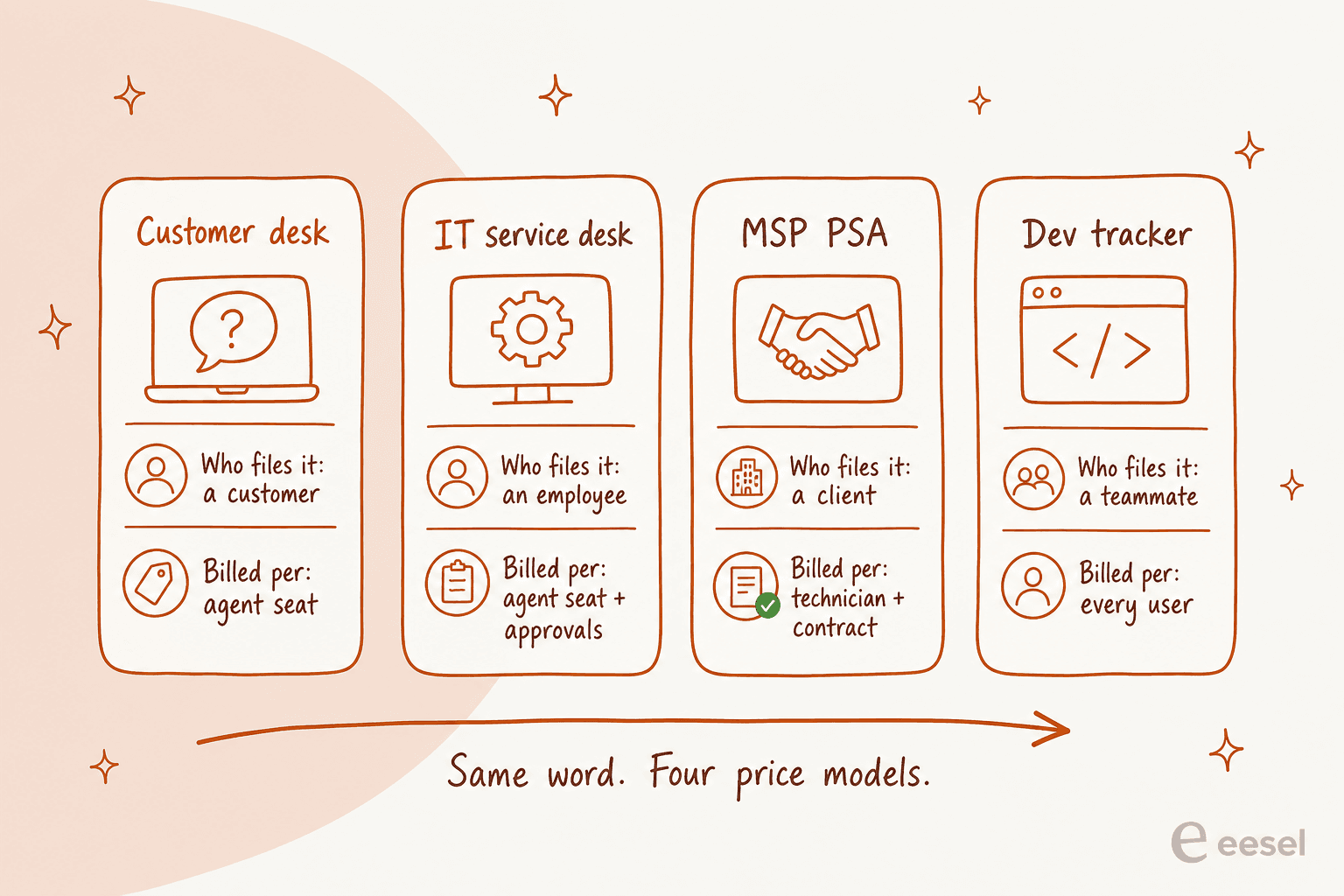
And the billing consequence of that is real. On Jira Service Management, email senders never need a licence, which means a 200-person company can run on 10 agent seats. One team over on r/atlassian ended up with two quotes for the same setup, because nobody in the room agreed on that point:
"What I think I need (for starters): $ 8500 / year
What the cloud engineer thinks I need (for starters): $ 40,750 / year
JSM Standard - 10 agents - annual cost $2000Confluence Standard - 10 users - annual cost $ 500Atlassian access - 200 users - $6.000 (this one hurts)JSM Standard - 200 agents - annual cost $25,750Confluence Standard - 200 users - annual cost $ 9000Atlassian access - 200 users - $6.000"u/LooselySubtle, r/atlassian, Reddit

A 4.8x gap, on identical software, caused entirely by how you define the word "agent". If there is one thing to take away from this piece, take that one.
How I picked these ten
Feature checklists were not how I scored these, since every desk on this list does ticketing competently anyway. What I looked at instead is four things I can actually verify from the vendors' own pages and their docs:
- The real entry price, taken off the live pricing page, annual in the cases where the vendor pushes annual.
- The AI meter, by which I mean the exact billable unit plus the published rate. The model name is not it.
- The reporting gate, so: the cheapest plan on which you are allowed to build your own report.
- The gotcha, which is the thing that bites teams around month three instead of week one.
Everything here comes from vendor pricing pages and vendor help centres, plus community threads on Reddit, on Capterra, and on the vendors' own forums. Where a number is not published I just say so, rather than reaching for some reseller blog's guess. This happens more often than you would expect, particularly with ServiceNow.
One note on eesel, since I work here. eesel is not on the numbered list, and that is deliberate on my part, because it is not a ticketing system at all. It is a layer that sits over the one you already run. Sticking it at number one in a roundup of desks would be dishonest, and you would spot it immediately anyway.
The 10 best ticketing systems in 2026, compared
| Tool | Best for | Who files it | Entry price | Custom reports from | Free tier | AI billable unit | AI rate | Uptime SLA |
|---|---|---|---|---|---|---|---|---|
| Zendesk | Big multi-channel queues | Customers | $19/agent/mo (Support Team) | $115/agent/mo | No | Verified resolution | Not published | 99.9%, Premier only |
| Freshdesk | Value multi-channel | Customers | $19/agent/mo (Growth) | $55/agent/mo | No | AI Agent session | $0.49 | None published |
| Zoho Desk | Tight budgets | Customers | $7/user/mo (Express) | $14/user/mo | Yes, 3 users | Not published | Not published | 99.9% |
| Help Scout | Small teams, email-first | Customers | $25/user/mo | No builder at any price | Yes, 5 users | AI resolution | $0.75 | None |
| Gorgias | Shopify stores | Customers | $40/mo (50 tickets) | Included on all plans | No | Automated interaction | $0.85 to $1.00 | Not published |
| Jira Service Management | Employee requests | Employees | $25/agent/mo (1-15) | Included | Yes, 3 agents | Assisted conversation | $0.30 | 99.9% on Premium |
| Freshservice | Mid-market IT | Employees | $19/agent/mo (Starter) | Growth and up | No | AI Agent session | Not published | Not published |
| ServiceNow | Large enterprise ITSM | Employees | Not published | Not published | No | Assist | Not published | Not published |
| Spiceworks | Free internal IT | Employees | $0 (up to 5 seats) | No builder | Yes, 5 seats | No AI product | n/a | Not published |
| Atera | MSPs billing clients | Clients | $129/tech/mo (MSP Pro) | Included | No | Bundled Copilot | $0 extra | 99.9%, top tier |
A few of those cells deserve a second look. Help Scout has no report builder on any plan, a thing its own docs confirm. ServiceNow publishes no dollar figure, anywhere. And Spiceworks ships no AI at all in 2026, which in a market this noisy almost reads as a feature.
Which ticketing system fits your queue?
Start with the person who sends you the ticket
Pick one. The shortlist changes completely.
- Under 5 agents, email-heavy: Help Scout ($25/user/mo) or Zoho Desk Express ($7/user/mo)
- Shopify or ecommerce: Gorgias, priced on tickets not seats, from $40/mo
- Multi-channel and growing: Freshdesk Growth at $19/agent/mo
- Enterprise scale, many brands: Zendesk Suite, budget $115/agent/mo for reporting
Check before you sign: what does the vendor count as a billable AI resolution?
- Already on Atlassian: Jira Service Management, free to 3 agents, $25/agent/mo after
- Mid-market, want a catalog: Freshservice Growth at $49/agent/mo (Starter has no catalog)
- Zero budget, under 5 techs: Spiceworks Cloud Help Desk, free but ad-supported
- Fortune 500 with a platform team: ServiceNow, and budget for the people to run it
Check before you sign: are approvers licensed separately? At ServiceNow they are.
- Want RMM and ticketing in one: Atera, $129/tech/mo annual on the MSP Pro plan
- Want live SLA enforcement: Syncro Team at $179/user/mo (Core cannot do it)
- Want everything in one price: HaloPSA at £69/agent/mo, onboarding quoted separately
Check before you sign: can the ticket carry the contract it bills against?
- Jira handles this natively, no service desk licence needed
- Adding Jira Service Management on top is for when non-engineers need a portal
- Do not buy a customer desk for internal bug tracking. The data model fights you
Check before you sign: does the request type actually need a portal, or just an issue?
Everyone says "resolution". Nobody counts it the same way
This is the part that costs teams real money, and somehow it barely gets covered.
Every desk on this list now bundles an AI agent, and each of them charges for it separately from the seat. At a glance the rates look comparable. They are not comparable, because the trigger for a billable event sits at a completely different point in the conversation at each vendor.
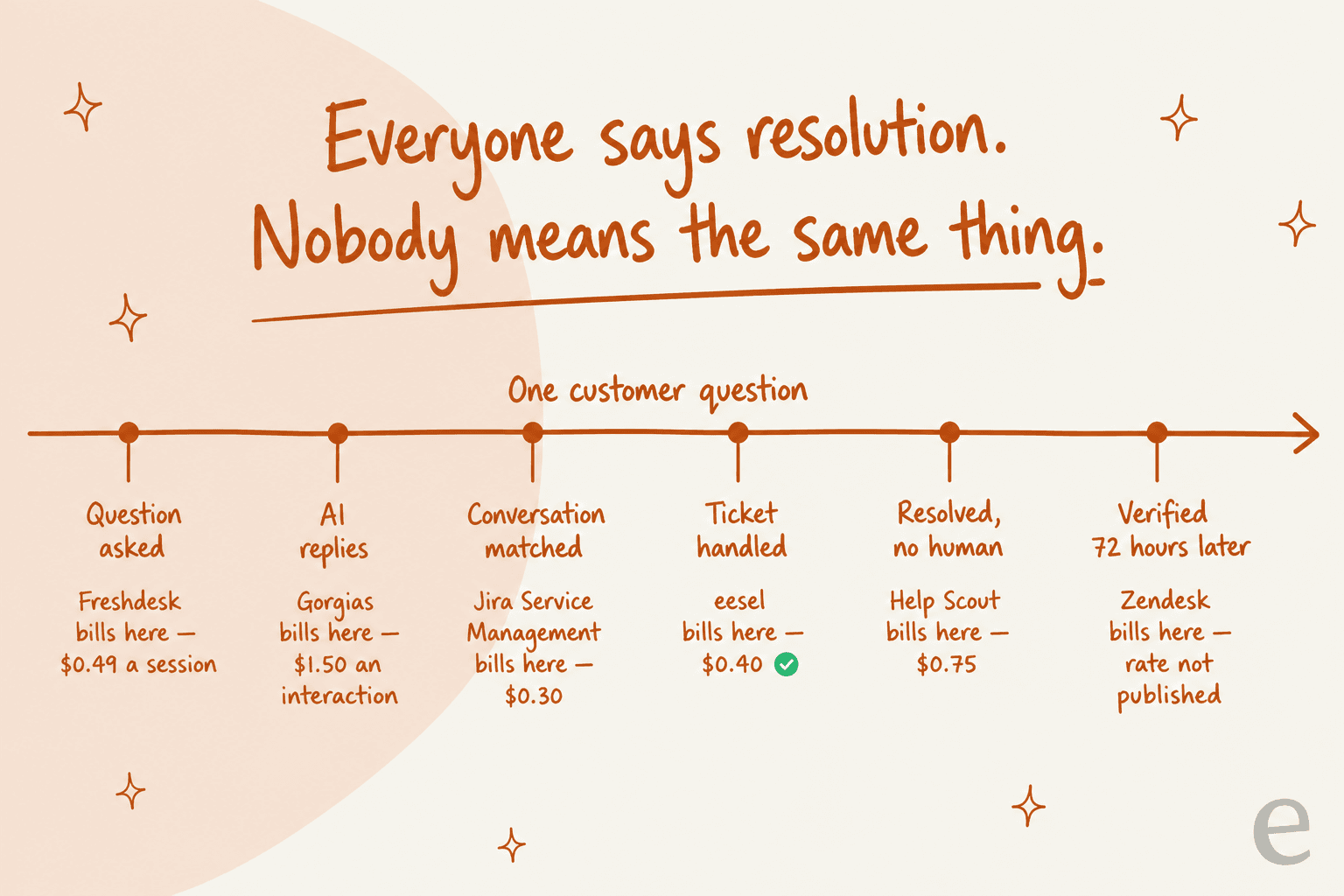
Walk it left to right. Freshworks defines a session as all interactions between an end user and the AI Agent inside a 24-hour window, which is to say it bills the attempt, never the outcome. Gorgias, for its part, bills $0.85 to $1.00 per automated interaction depending on the plan, with only a small step down on the larger tiers, per its pricing page. Then Jira Service Management, which counts an assisted conversation as any conversation matched to an intent, whether the agent resolves it or escalates it. An escalated ticket still bills there.
Help Scout sits on the other end of it. Its docs are unusually specific here: one resolution per conversation, maximum, and it does not count at all if the customer escalates, searches the knowledge base, asks more questions, or clicks "I still need help". That is the strictest definition on this list. At $0.75 it is also not the cheapest headline rate, which tells you something about what the definition itself is worth.
Zendesk has changed its definition twice now. An automated resolution counts after 72 hours of inactivity, provided AI evaluation confirms the response was relevant, and then in May 2026 that got split into three resolution tiers where only verified resolutions bill. A dollar rate is still not published. Customers noticed the first change:
"Complete trash lol, stuff I used to get free now counts as an AR. Most of the ARs are abandoned chats. There's no dispute resolution process. Complete scam. I used to like Zendesk but since trying the new bot and now this I have little good will left"
The grievance in there is not really about the price. It is about the definition. So ask every vendor to write theirs into the contract, and give our guide to AI resolution rate a read before you accept any headline deflection number.
Reporting is where the quoted price stops being real
The second invisible price list. Every desk demos beautifully, and the reason for that is simple, demos run on prebuilt dashboards. The question that actually matters: on which plan can you build a report that nobody built for you?
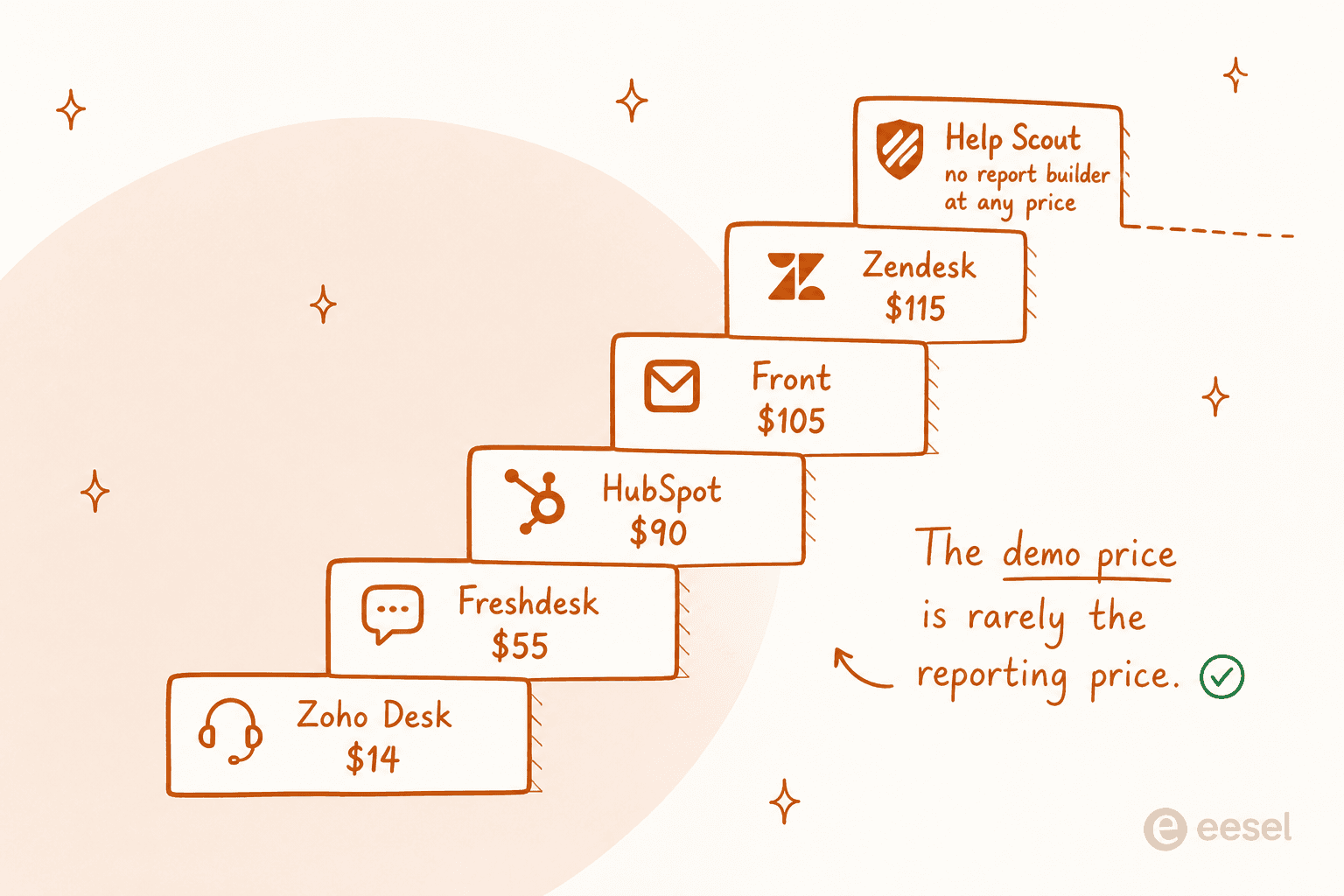
The answers sit further apart than the seat prices would suggest. Zendesk gates custom report building at Suite Professional, $115 per agent per month, a $60 step up from Suite Team. Freshdesk is blunt about it in its own docs, where the new report option is only available from Pro onwards, at $55. And Zoho Desk switches custom reports on at Standard, $14, capped at 50 reports, which makes it the cheapest real reporting here by a distance.
Help Scout is the honest outlier of the group. Asked directly whether you can build your own reports, the docs answer "Not in the app", then point you at the Inbox API, or Zapier, or some third-party BI tool. That is not a criticism. It is a design choice, made for teams who really do not want to build reports, and it only turns into a problem if you find that out in month four.
Two support leads describe what it looks like when the reporting layer defeats you:
"I have never found anything as complex as Zendesk explore.
I've worked with ThoughtSpot building dashboards, reports and exports but omg Zendesk, you are taking so much of my time!!!!!!!!
I have recently moved jobs where I worked with the platform Dixa and at my new job, I launched Zendesk - I have the most basic set up on Zendesk ever but the Explore setup is BREAKING ME."
"The reports and automations can be somewhat difficult to navigate. We ended up just exporting all of our tickets every month and creating our own reports through Power query in Excel."

A director of client care running a manual export every month is the true cost of a reporting gate, and none of it ever appears on the invoice. For more on what to measure once you can measure, see our SLA management guide.
1. Zendesk: best for big multi-channel queues
Best for: support orgs past 20 agents who run email, chat, voice and social out of one place, and have the budget to reach Suite Professional.

What it does well. For breadth, nothing on this list matches Zendesk. The ticket data model on its own is deeper than most competitors' whole product: six standard statuses, four ticket types, four priorities, plus custom statuses on every Suite plan with a ceiling of 100 ticket statuses per account. Regional hosting covers five regions, and the app marketplace means whatever you need probably exists already.
Where it bites. Three places. There is the $115 reporting gate covered above, first of all. Then hosting: with the Data Center Location add-on not activated, Zendesk says it may move account data between regions without notice, and while the add-on is free on Professional and up, nobody switches it on for you. Third one, the 99.9% availability figure attaches only to Premier Support and covers five products, so Explore, Talk, WFM and QA are not covered.
The ticket lifecycle has some sharp edges too. New is a one-way door, tickets cannot be set to Closed manually, and when closing automations are off, tickets close 28 days after being solved under a rule that cannot be changed. We unpack the whole of it in our ticket lifecycle explainer.
Pricing. Support Team is $19/agent/mo annual, per the Zendesk pricing page. After that, Suite Team $55, Suite Professional $115, and Suite Enterprise is quote-only. Copilot comes as a $50/agent/mo add-on on top, which puts Professional plus Copilot at $165 per agent per month, before any AI consumption at all.
Verdict: buy Zendesk when you truly need the breadth, and budget for Suite Professional from day one instead of discovering the reporting gate later on. If you are on it already and only want the AI to work harder, look at Zendesk AI alternatives first, before you upgrade tiers.
2. Freshdesk: best value multi-channel desk
Best for: teams of 5 to 50 that want most of Zendesk's surface area, for roughly half of the price.

What it does well. On field configuration, Freshdesk is the most thoughtful desk on this list. It ships a "Required when closing the ticket" property, which forces disposition data out of an agent before they can close, and that is the single cheapest way to make your reporting trustworthy. Custom statuses arrive at Growth. The dependent field also hands you a three-level Category, Subcategory, Item hierarchy out of the box, per the ticket fields docs.
Where it bites. There is no live or real-time dashboard on any plan, something the per-plan analytics matrix confirms by omission. No uptime percentage gets published by Freshworks either, and no service-credit schedule for Freshdesk appears anywhere in its legal index. Then there is a real data-loss footgun: change a dropdown choice that is in use on existing tickets, or delete it, and the value of that field becomes null.
The AI meter is the other catch here. $0.49 a session sounds cheap, right up until you notice that what it bills is the 24-hour window and not the outcome.
Pricing. Growth is $19/agent/mo annual, then Pro $55 and Enterprise $89, all from the Freshdesk pricing page. Freddy AI Copilot costs $29/agent/mo and it is available on Pro and Enterprise only. AI Agent sessions: the first 500 come included, after that $49 per 100.
Verdict: the best price-to-capability ratio of any customer desk in 2026, so long as you can live without a live queue view. Our Freshdesk automation roundup covers what to bolt onto it, while Freshdesk bots covers what Freddy does natively.
3. Zoho Desk: best on a tight budget
Best for: cost-sensitive teams, above all the ones already sitting inside the Zoho suite, who still want real reporting out of it.
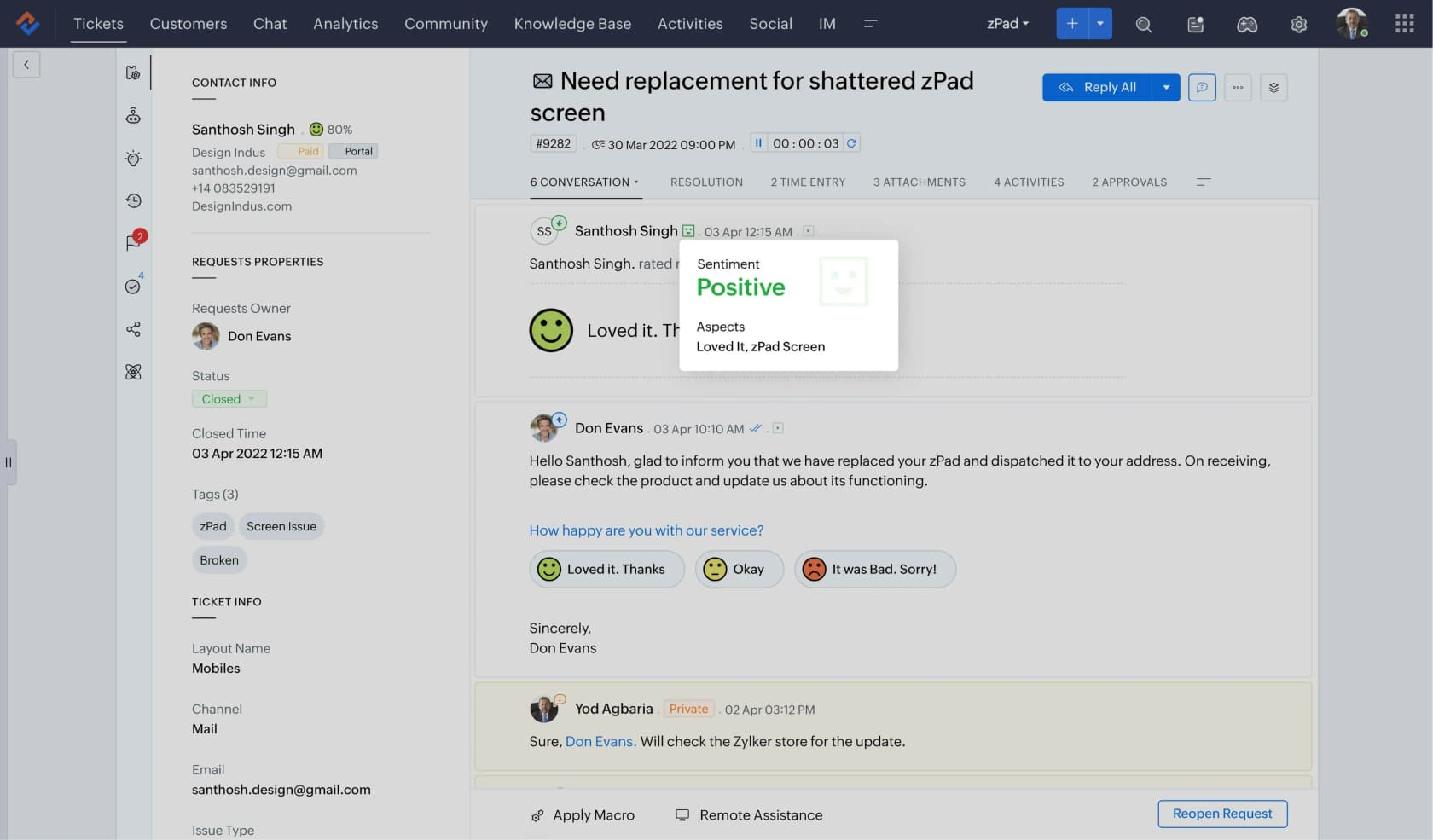
What it does well. Two things that nobody else on this list offers together. One is a real free forever tier, 3 user licences on email ticketing. The other is custom reports at $14 per user per month, one eighth of what Zendesk charges for the same capability. Zoho also runs its own data centres as primary and secondary city pairs across eight regions, and it commits to 99.9% monthly uptime, defined by them as roughly 43.8 minutes of allowable downtime in a month.
Where it bites. SLA dashboards are Professional and Enterprise only, which means on Standard you can set SLAs but you cannot report on whether you hit them, per the edition comparison. Scheduling a report so it emails itself is Enterprise-only as well. And the data centre gets assigned at signup, at the Zoho account level, with any migration handled through a manual email ticket.
Pricing. The Free Edition is $0 for 3 users. Then Express US$7/user/mo, Standard US$14, Professional US$23 and Enterprise US$40, all of them billed annually, per Zoho Desk pricing.
Verdict: when budget is the constraint and you still want numbers you can pull yourself, Zoho Desk Standard at $14 is the best-value pick in this whole roundup. Our Zoho Desk review digs into the places where Zia falls short of the marketing.
4. Help Scout: best for small teams who hate ticket jargon
Best for: teams under 15 that want a shared inbox behaving like email, and never want to explain "ticket status" to a customer.
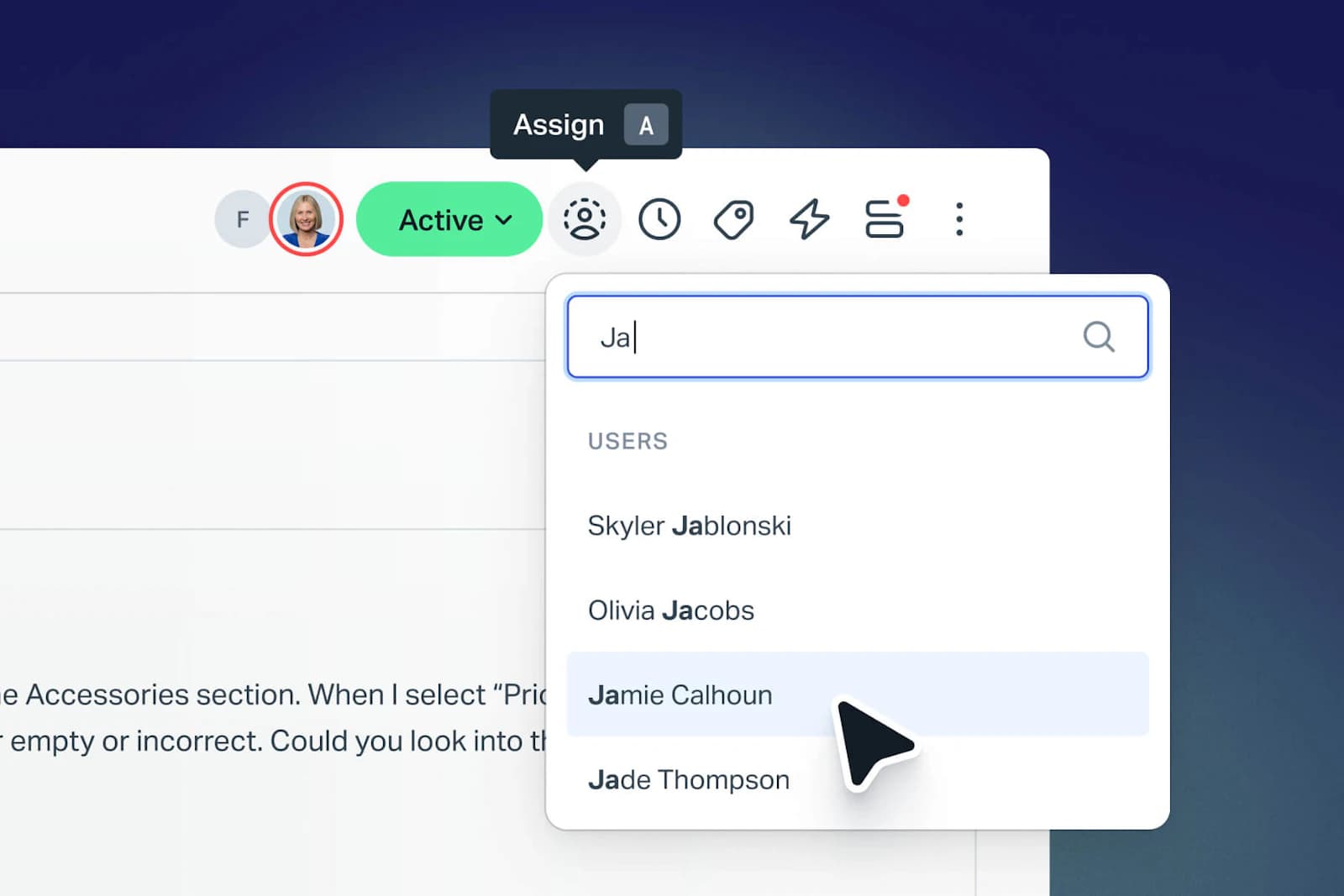
What it does well. Help Scout is the least ticket-shaped ticketing system here, and for the right team that is the entire point of it. The free plan covers 5 users and 100 contacts a month, so it is a real product and not a trial in disguise. Its AI billing is the most customer-friendly on this list too, and it ships two cost controls that almost nobody else bothers with: a monthly spend cap which auto-disables AI Answers for the rest of the cycle, and three months of free unlimited resolutions from account creation, per the pricing page.
Where it bites. The report builder does not exist. Not at any price. Reporting history runs 30 days on Free and 2 years on Standard, so the history is the real plan lever here. Help Scout is hosted only on AWS servers in the United States as well, with no EU or UK option, per its security docs, and no contractual uptime SLA appears in the terms of service.
Pricing. Free is $0 (5 users), Standard $25/user/mo, Plus $45, and Pro $75 which carries a 10-seat minimum plus demo-only signup, per the Help Scout pricing page. Extra inboxes cost $10/mo and extra Docs sites $20/mo. AI Answers, $0.75 per resolution.
Verdict: for a small team this is the nicest daily experience on the list, and it disqualifies itself immediately if you need EU data residency, or a report you designed yourself. See AI for Help Scout for what to layer on top of it.
5. Gorgias: best for Shopify and ecommerce queues
Best for: DTC and ecommerce teams where the queue is mostly "where is my order" and "can I return this".
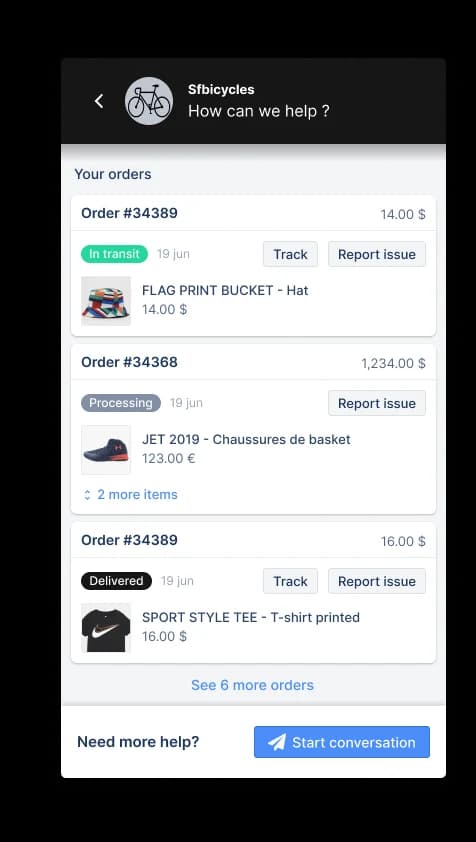
What it does well. Gorgias is the only desk here that is priced on tickets instead of agents, scaling from 50 up to 5,000 tickets a month, and seats do not get billed at all: 3 users on Starter, 500 on every plan above that. It is the outlier on reporting as well, since dashboards, custom dashboards, SLA reporting, satisfaction reporting, real-time monitoring and CSV export are all available on every plan. Coming off the last three sections, that is refreshing.
Where it bites. Two meters, and both of them move. Ticket overage runs $0.40 each on Starter and Basic, $0.36 on Pro and Advanced, per the Gorgias pricing page. Automated interactions sit at $0.85 to $1.00 depending on the plan, while the bundled AI Agent components form a fixed monthly floor of $30 to $477, depending on the plan. The Revenue report needs Pro or above and a connected Shopify store, so that is a jump from $77/mo to $471/mo.
Pricing. Starter $40/mo (monthly billing only, 50 tickets), Basic $77/mo annual (300 tickets), then Pro $471/mo (2,000) and Advanced $1,227/mo (5,000), with Enterprise custom. All of it from Gorgias pricing.
Verdict: if you sell on Shopify this is the right desk, and the ecommerce integrations pay for themselves. If you do not, then the ticket-based pricing becomes a tax on any busy month. Our Gorgias pricing breakdown works through the arithmetic of it, and Gorgias alternatives covers the exits.
6. Jira Service Management: best when the requester is an employee
Best for: companies that already run Atlassian, and where IT and engineering have to share one queue.
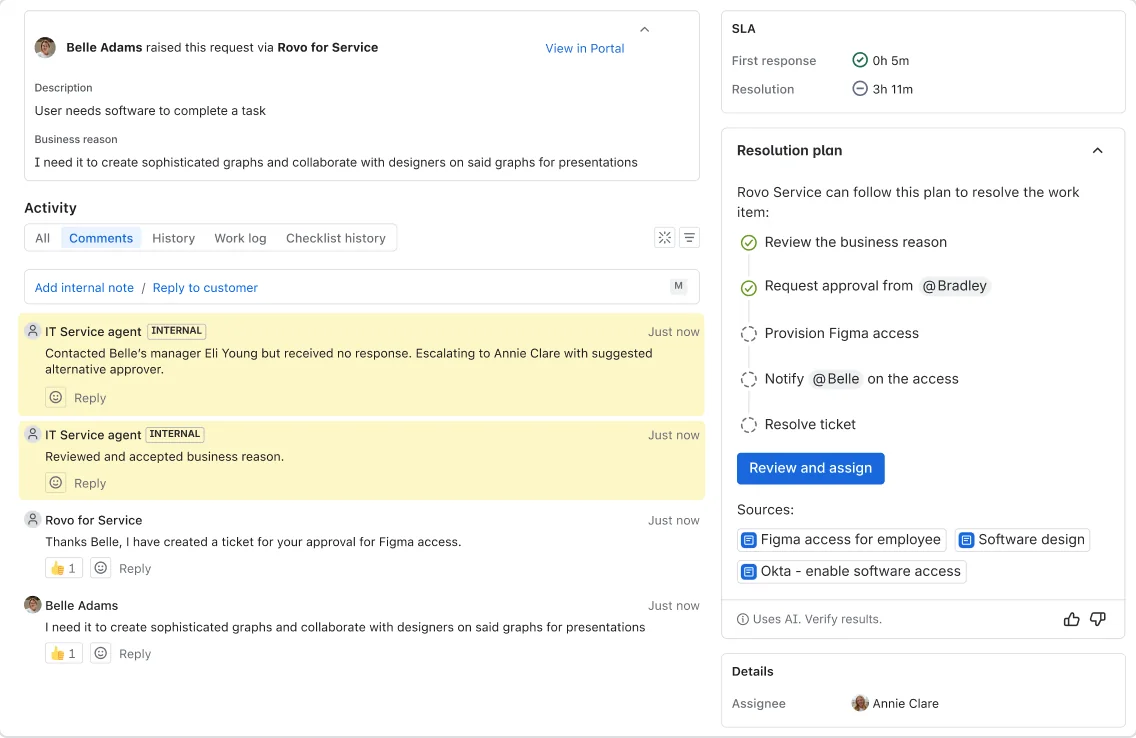
What it does well. It is free for 3 agents with unlimited customers, and under the free-requester model only the people actually working tickets need licences. The status-and-resolution split is the most rigorous here: status tracks where the work sits, resolution tracks how it ended, with values like Known error defined as a problem that has a documented root cause and a workaround, per Atlassian's statuses and resolutions docs.
Where it bites. More than anywhere else on this list, honestly. JSM is no longer sold standalone, and the page now sells Service Collection instead, bundling JSM, Customer Service Management, Assets and Rovo, none of which can be purchased separately. The pricing page also defaults to 75 agents and shows blended rates, so the "$20" you see there is not the list price. Every status you create then has to belong to one of three uncustomizable categories, To do, In progress or Done, which Atlassian says cannot be customized.
The sharpest gotcha of the lot is in email intake. Add a required field to a request type that is linked to an email address, and work items won't be created. No error. No bounce, just silence. A new SLA also applies retroactively to every relevant work item, open and closed alike, so switching one on rewrites your history.
Practitioners run into a catalog ceiling too, one that gets sold back to them as best practice:
"The answer that I got was like, "You shouldn't have more than 8-10 requests in your help center so if they need unique workflows then it shouldn't be a problem."
[...]
If feels like TDX allows me to model how our business processes work and JSM forces us to change our processes in order to adapt to the tool."
Pricing. Free for 3 agents. Standard is USD 25/agent/mo at 1 to 15 agents, and it drops to USD 18.75 once you are at 16 to 100, per Atlassian's licensing tables. Premium is USD 57.30 at 1 to 15. Enterprise stays annual-only and unpublished. Alongside all that, three AI meters run: Rovo credits bundled per seat, the virtual service agent from $0.30 per assisted conversation above 1,000 a month, plus Rovo Customer Service at a flat $1 per resolution.
Verdict: the obvious pick when you are already an Atlassian shop, and a strange one when you are not, since you inherit Jira's model whether you wanted it or not. Compare it head to head in our Zendesk vs JSM piece.
7. Freshservice: best mid-market IT service desk
Best for: internal IT teams of 5 to 50 that want ITSM structure, minus ServiceNow's implementation bill.
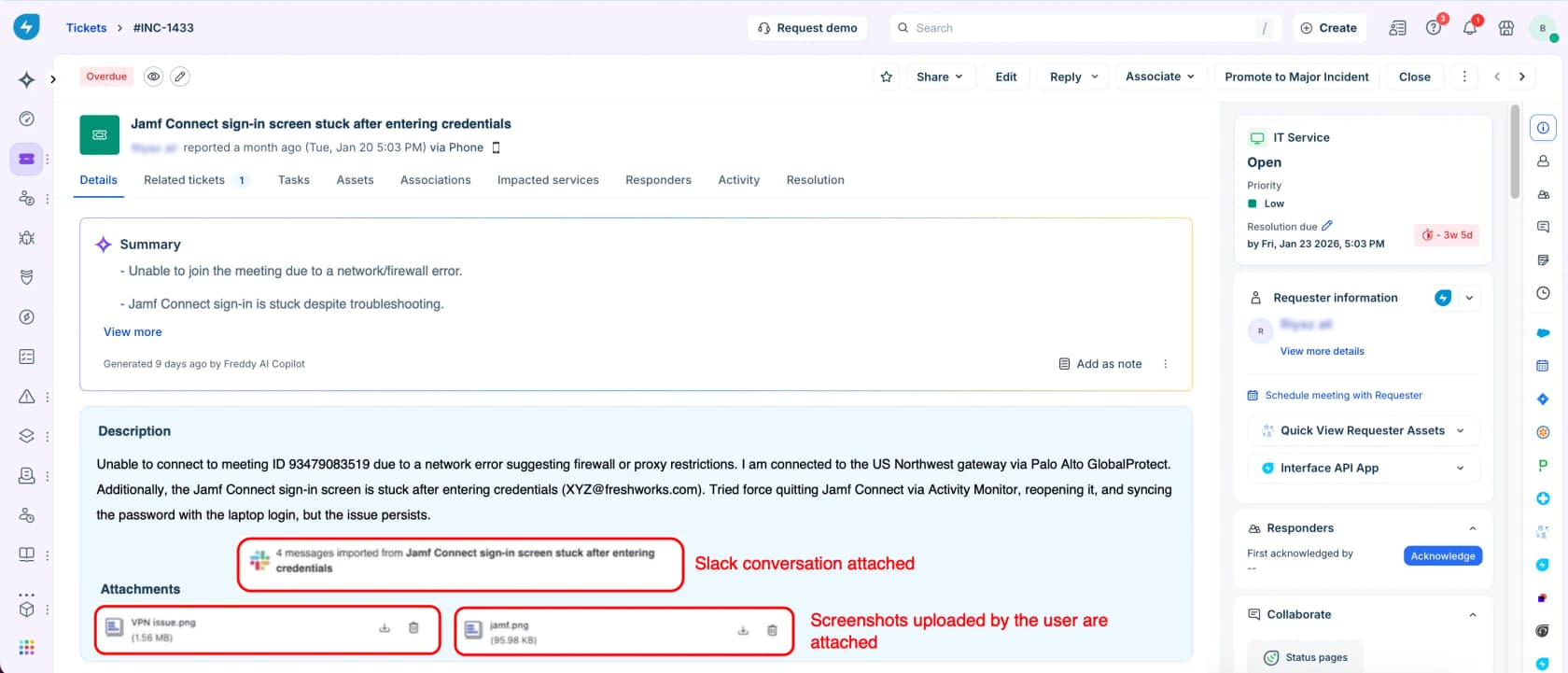
What it does well. Of the ITSM products I have looked at, Freshservice is the most usable one. Problem, change and release management all arrive together at Pro, and the workflow engine goes deep, with subflows, timer nodes and loops in it. Freshworks publishes a real benchmark as well: its 2025 Freshservice report covers more than 187 million tickets from 10,551 organizations across 118 countries, where IT teams using AI average 21.96 hours to resolution and 74.14% first contact resolution.
Where it bites. One gate dominates everything else here: the service catalog is not in Starter. A $19/agent/mo Freshservice account gets you incidents, knowledge and a portal, but there is no catalog, no service items, and therefore no catalog-driven service requests either. That whole chain begins at Growth, $49, a 158% step up. SLA management sits on the same side of that line. Freddy AI Agent (Classic) is Enterprise-only at 1,200 sessions per licence per year, and its overage rate is published nowhere, available only from your account manager, per the Freddy pricing FAQs.
One IT team, five months in, reported the outcome that nobody puts in a demo:
"Autoresolve is maybe 25% which is fine i guess. But our MTTR actually went UP. About 20% compared to where we were before. Tickets that dont autoresolve are sitting longer. I think what is happening is the handoff cost. Freddy tries, fails, agent picks it up but has to scroll thru the full back-and-forth before they can respond. Timed a few tickets, its like 2-3 extra minutes per ticket just reading the AI context... users who got autoresolved come back 2 days later w/ a follow up, new ticket because the original closed. Dup tickets are up like 15ish percent."
That right there is the handoff-cost problem, and it makes the strongest argument for AI escalation that hands over a summary instead of a full transcript.
Pricing. Starter $19/agent/mo annual ($29 monthly), Growth $49 ($59), Pro $99 ($119), with Enterprise custom, per Freshservice pricing. There is no free tier, only a 14-day trial. Freddy AI Copilot runs $29/agent/mo annual, on Pro and Enterprise.
Verdict: buy Growth and not Starter, otherwise you are buying a help desk and calling it a service desk. Our Freshservice vs ServiceNow comparison covers the tier above this one, while Freddy AI review covers the AI honestly.
8. ServiceNow: best for large enterprise service management
Best for: organisations that are big enough to staff a platform team, where the ticketing system is just one module inside a much larger workflow platform.
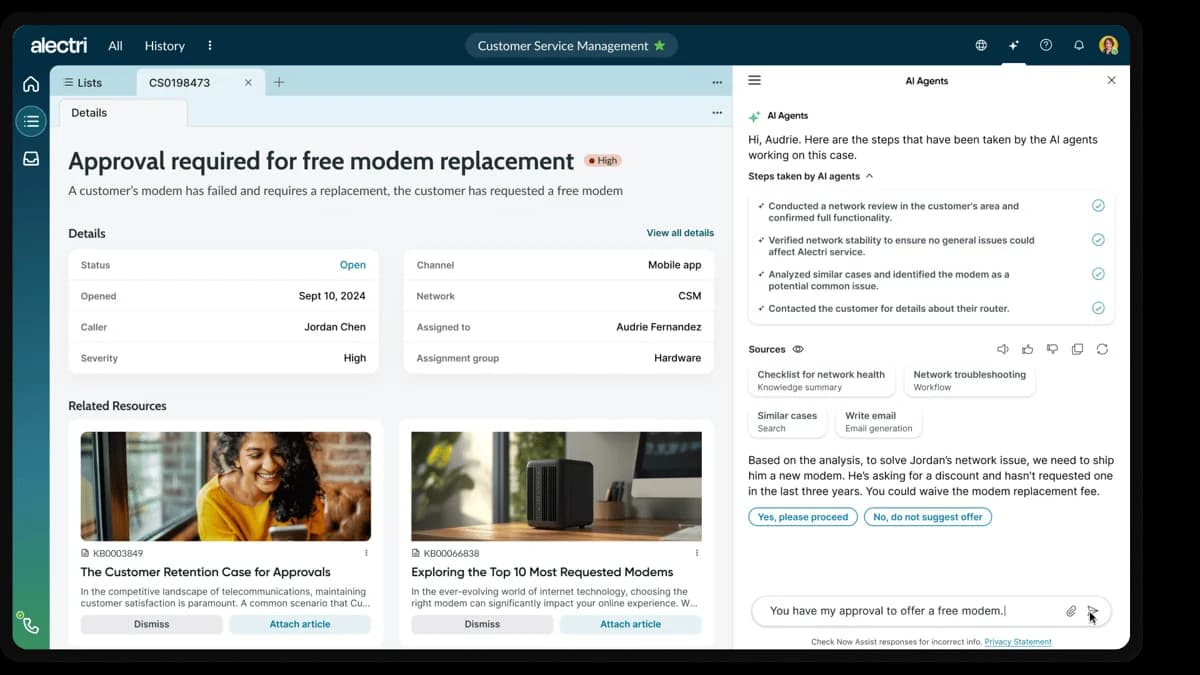
What it does well. At the very top of the market, it has no real peer. ServiceNow claims 85% of the Fortune 500 run on it, and the customer outcomes on its ITSM product page are big ones: EY at 75% fewer service tickets, Lion at 77% less resolution time. Then in April 2026 it replaced five legacy package tiers with three AI-native ones, Foundation, Advanced and Prime, and the assists rate card is properly public now.
Where it bites. Start with the price: zero dollar figures appear anywhere on any ServiceNow ITSM page. In the entire comparison matrix, the only quantitative values are App Engine Starter tables and Process Mining record limits. Licensing then runs per fulfiller, while approvers form a separately-metered third class called Business Stakeholder, so the people who only ever click approve become a line item of their own.
Then the AI meter. An incident summary costs 1 assist; a small agentic workflow costs 25, a medium one 50, and a large one 150, all of it drawn from the same pool, per the Now Assist overview. Sub-production instances burn that same pool too. The overage rate per assist is not published.
And then there is the staffing:
For reference, the company I work at has an honestly fantastic SNOW implementation that is great to use. […] We have no less than ten people whose full time job revolves around managing it. Three separate teams (cmdb, change management, snow core). It has taken us years to get the cmdb to a useful state. […] If you don't have at least one person whose full time job is managing snow, I imagine it would be completely useless.
That is the most pro-ServiceNow comment I found anywhere, and it doubles as the cost argument against it.
Pricing. Not published, at any tier. The autonomous AI capabilities, which include the L1 Service Desk AI Specialist and AI Agents for ITSM, are Prime-only.
Verdict: correct at the very top of the market, a mistake anywhere below it. If you cannot name the person whose full-time job is going to be the platform, then you are not ready. Read is ServiceNow AI good before you commit.
9. Spiceworks Cloud Help Desk: best free internal IT ticketing
Best for: internal IT teams of one to five people who need a queue today, and who have no budget line for it.
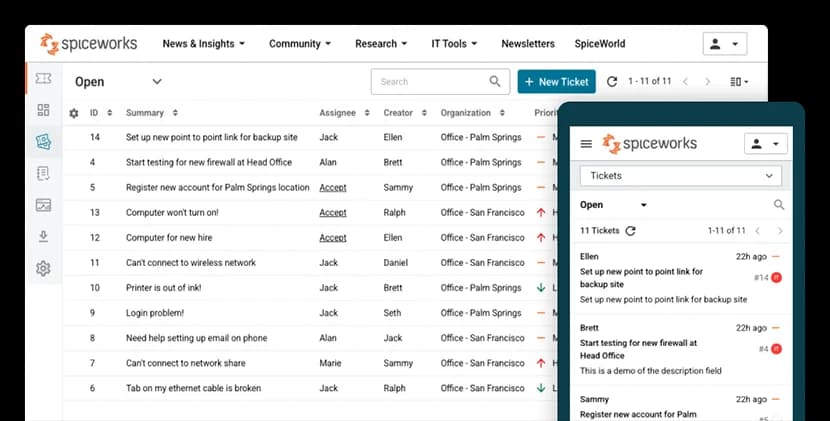
What it does well. It is free, it is still alive, and it has been shipping since 2006. The Core plan includes ticketing, incident tracking, alerts, an end user portal, custom attributes, unlimited end users and TOTP-based MFA. Ticket rules handle condition-then-action routing, while the Tickets Anywhere feature lets a tech act on a ticket straight out of an email reply. Capterra rates it 4.4 out of 5 across 586 reviews.
Where it bites. The free tier caps at 5 seats, and the wall there is a hard lockout rather than a nag: techs lose account access, end users can no longer submit tickets, the support email address goes inactive, per the Premium plan FAQ. The free plan is ad-supported by design as well. Neither plan has a report builder, SLA reporting or CSAT surveying. And the security posture rules out regulated data outright, since Spiceworks says its own team has access to the information in your tickets, and states plainly that it will not sign a HIPAA BAA.
There is also no AI here. Not a gated AI, not a metered one either. The plan comparison carries no AI row at all, and the 2026 release notes cover regex in ticket rules, plus export speed.
Pricing. Core is free for 1 to 5 seats. Premium runs $5 per seat per month annual, or $6 monthly, with unlimited seats. Worth to note that on upgrade, the first five seats become billable too.
Verdict: the right answer for a tiny IT team with no budget, and a poor one the moment you hit six technicians, or touch regulated data. Our free ticketing systems roundup covers the alternatives for when you outgrow it.
10. Atera: best for MSPs billing clients
Best for: managed service providers, and internal IT teams, who want RMM and ticketing on one bill, priced per technician instead of per endpoint.
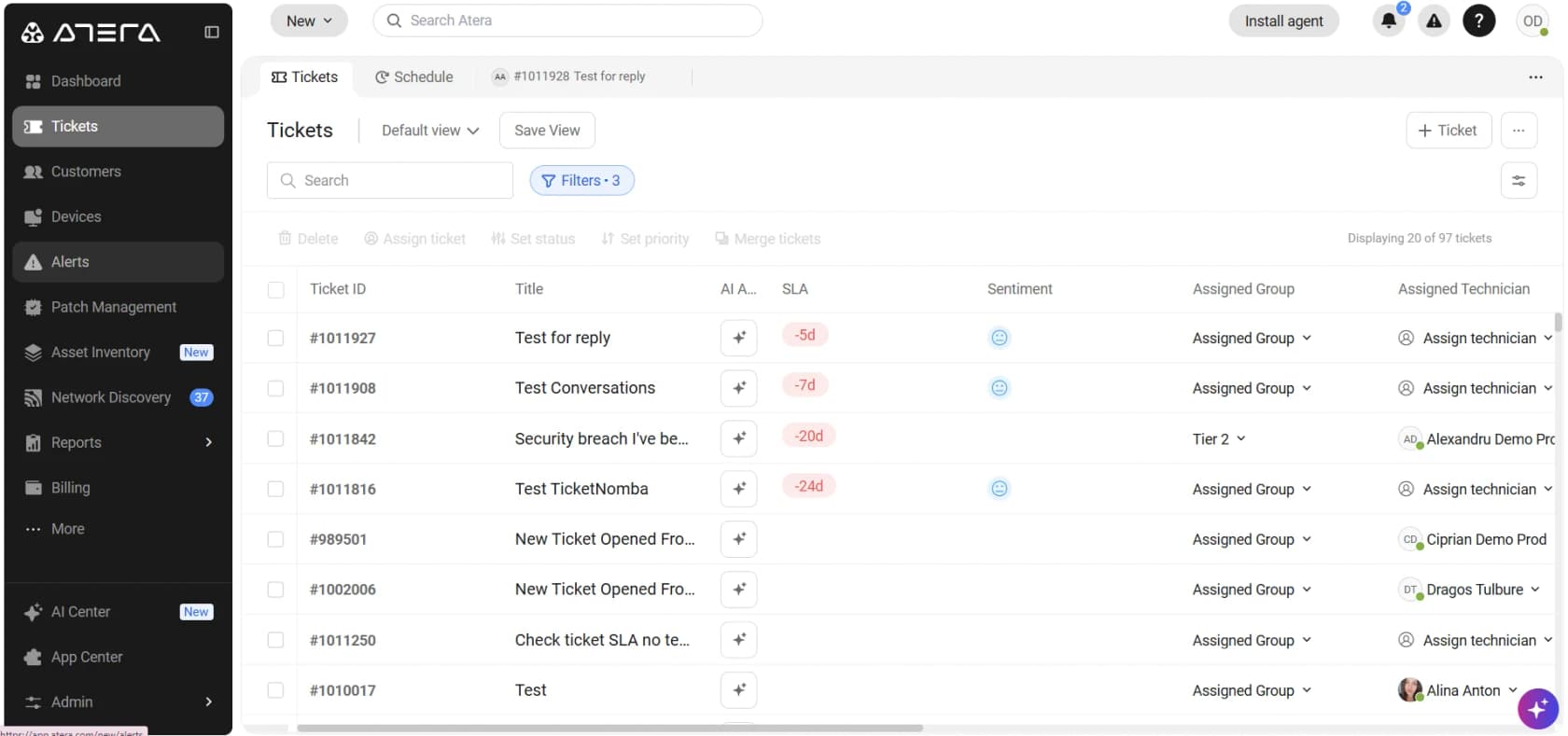
What it does well. Atera charges per technician rather than per device, with unlimited endpoints, and that is the single most MSP-friendly pricing decision on this list. AI Copilot comes bundled with every seat and carries no separate meter, while the ticket queue has an AI-generated Sentiment column which reads the latest comments in a conversation. Every plan includes ticketing, the service portal, patch management and 24/7 chat support.
Where it bites. Robin, which is the autonomous agent, gets sold separately from the base seat, and neither its billable unit nor its rate is published anywhere. It is a demo-gated product with big claims attached to it, including resolving 92% of technical issues autonomously on the MSP pricing page. Treat those as vendor marketing and not as benchmarks. The 99.9% uptime SLA is a top-tier gate too, rather than a standard commitment.
Two alternatives are worth pricing alongside it. Syncro runs Core at $129/user/mo annual and Team at $179, except real-time SLA enforcement and the live queue dashboard are both Team-only, which makes SLA automation effectively a $50/user/mo upgrade. HaloPSA has scrapped tiers entirely, £69 per agent per month with AI included and no add-ons, and the one catch there is that onboarding packages are required, at a bespoke cost.
Pricing. MSP plans: Pro $129/tech/mo annual, Growth $159, Power $209, and Superpower is quote-only, per Atera pricing. The IT Department plans: Professional $149, Expert $189, Master $219. No free plan at all, just a 30-day trial.
Verdict: the best-value PSA for a small MSP wanting one vendor for both monitoring and tickets. If SLA enforcement is the reason you are shopping in the first place, price Syncro Team and Halo before you decide. Our MSP ticketing guide goes deeper on all three.
What I would actually check before signing
Having watched a lot of teams do this badly, here is the short list I would carry into a sales call.
Ask what counts as a billable AI resolution, and get it in writing. Not the rate. The definition. An abandoned chat, an escalated conversation, a matched intent, each of them bills at some vendor on this list.
Ask which plan lets you build a report nobody built for you. Then price out that plan, and not the one from the demo.
Ask what happens to open tickets when nobody replies. One IT lead found that 90 of 200 open tickets were still waiting on silent customers, which means the open count was never really the backlog:
"I was going through our queue today and found 90 tickets where we responded, asked for more information from the customer but then never heard back from them. They just sit there inflating our numbers and that honestly doesn't look good for management. We have been called before for unresolved open tickets so this is a big deal."
Treat every deflection number as marketing until you can reproduce it. MetricNet's benchmarking database puts the average self-service completion rate for service desks worldwide at 10.4 percent, with a range that runs from zero to 55. Meanwhile Zendesk claims AI agents can automate up to 80% of interactions. Both of those numbers can be true at once, because they are measuring different things. Our ticket deflection guide explains the gap.
One sysadmin put the incentive problem better than any analyst I have read:
The scary part is how easy it is for these products to bullshit metrics for the executives.
Like, put a chatbot in front of the support portal? Wow, it handled 5000 issues this month! 5000 tickets that didn't hit our EXPENSIVE human help desk staff!
Now, only 1 of those interactions was useful and the other 4999 times people had to circumvent the bot to open a ticket, or just gave up and fucked off, but hard to track that, eh?
Finally, ask whether you actually need to migrate. For most of these problems migration is the most expensive answer available, and ticket history rarely ports over cleanly. One team found their custom fields came out of the export unlabelled, which is also the reason training AI on past tickets stalls afterwards. If the desk is fine and the queue is the problem, then fix the queue. Our guide on escalating to a human covers where to draw that line, and the IT helpdesk AI piece covers the internal version of it.
Try eesel on the ticketing system you already run
I work eesel's support queue, so let me be straight about what this is. eesel is not a ticketing system, and it will not replace any of the ten above. It is an AI layer that plugs into the desk you already run, trains itself on your past tickets and help centre, then handles the repetitive tier-1 volume before it ever reaches a person.

Three things make it fit this post in particular. First, the billing is one number, one credit per ticket or chat, from $299 a month for 500 credits, no seat fee, so it does not add a second definition of "resolution" on top of the one your desk already uses. Second, you can route a slice of the queue instead of all of it: 1,000 tickets a month with 200 sent to AI fits inside the 500-credit plan at $299 a month, per the eesel pricing page. And every rollout gets simulated against your historical tickets first, a default that exists because we have watched a confident bot invent answers. One customer, a Danish solar-energy provider, had its bot fabricate subscription claims that went to real customers when the knowledge base had no match. That is why confidence thresholds and simulation are defaults here and not features.
The results are ordinary rather than magical, which is rather the point. These figures come out of our own rollout data. Gridwise, a gig-economy driver-analytics app running on Zendesk, resolved 73% of tier-1 requests in its first month, after a 7-day trial. A German jewellery retailer doing about 1,000 tickets a month across Zendesk and Shopify measured 93% triage accuracy and 100% spam detection in its trial, and found that only 12% of drafts were sent as-is, at a 7% factual error rate. We publish the second half because it is the half telling you where to draw the line.
If your desk is fine and your queue is not, then that is the cheaper experiment to run. Try eesel free, or book a demo and we will run it against your own ticket history first.