


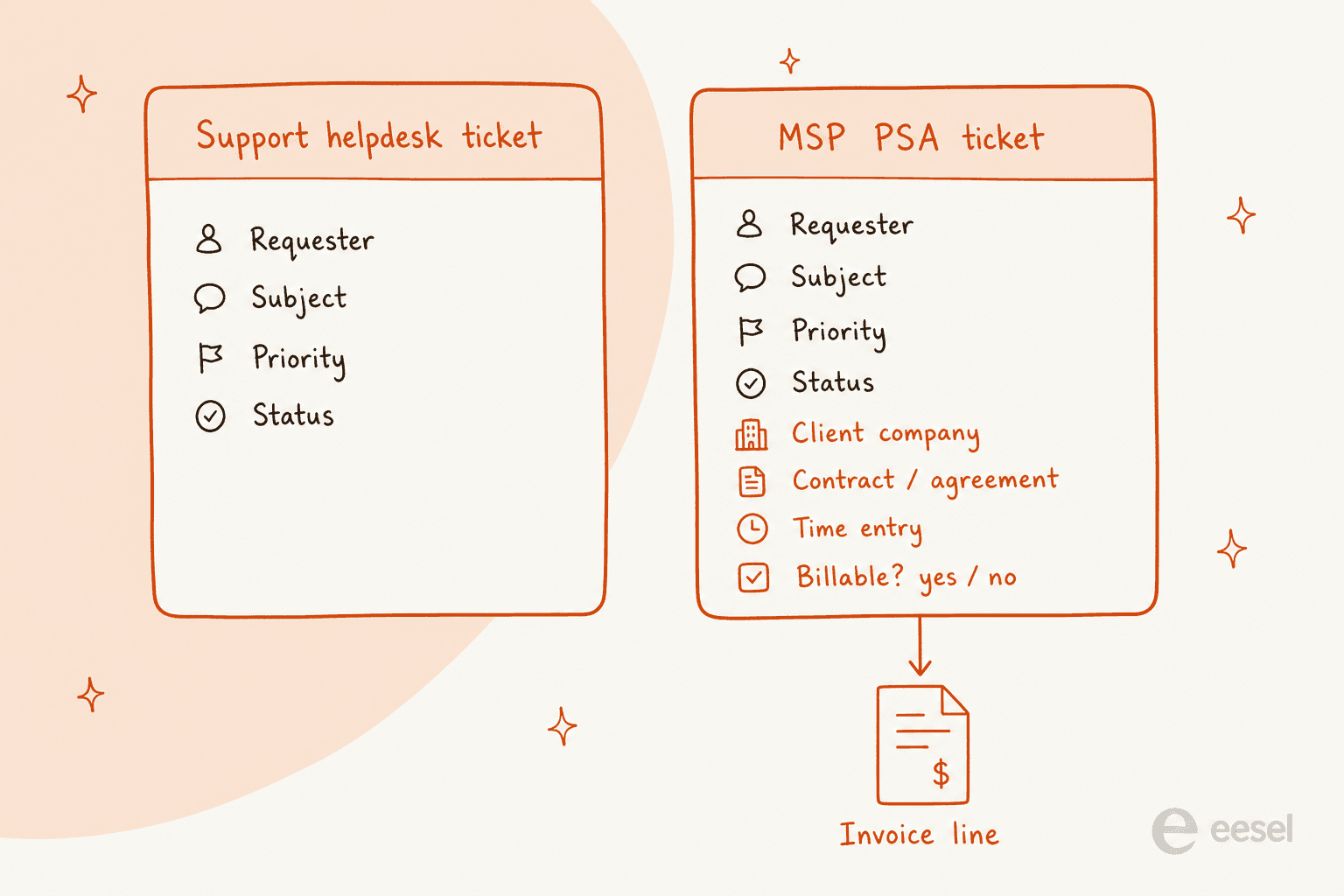
Every platform below handles the ticket list competently. In 2026 that part is table stakes, so it is worth starting somewhere else. An MSP ticketing system is a PSA, where every ticket carries a client, a contract, and a time entry, so closing the ticket also produces a billing line. Extra fields bolted onto a help desk will not get you there.
Three things actually differ, and the feature grid shows none of them. Start with the billing unit. Syncro and Atera charge per technician with unlimited endpoints, SuperOps and NinjaOne charge per endpoint, and as you grow those two shapes send your margin in opposite directions. Then there is what the entry tier withholds: ConnectWise Basic ships without a knowledge base or agreement management, and Syncro puts real-time SLA enforcement behind a $50 per user per month upgrade. The last one is whether the AI closes anything. Mostly it does not. PSA "AI" in 2026 drafts and summarises for a human.
Quick picks. HaloPSA if you want everything in one price and can absorb a real migration. Syncro for a small shop with a big device count, SuperOps for the inverse, few devices and many techs. ConnectWise or Autotask once you are big enough that the ecosystem matters more than the price tag.
On the AI layer, the honest framing. I build the AI agents that run on live support and IT queues at eesel, and one pattern keeps showing up: deflection lives at intake, not inside the PSA. Take InDebted, a 5-to-10 person IT team covering hundreds of employees on Jira Service Management. Running eesel as first responder deflects 15% of incoming issues today, with a path to 55% as it writes knowledge base articles from past tickets. Nobody replaced the ticketing system to get there.
What actually makes a ticketing system an MSP ticketing system
I have spent a lot of time inside the guts of ticket systems, wiring agents into them. The structural difference here is easy to state. A support ticket has a requester, a subject, a priority, a status. An MSP ticket carries all of that, and then a client company, an agreement, a time entry and a billable flag on top.
That last set is the whole ballgame. ConnectWise says it plainly on its own PSA product page: technicians enter and track time by the minute, billable and non-billable, and an "agreement tie-back" mechanism exists specifically to make sure all work is billable and accounted for. Over at Halo, Agreements, Quotations, and Sales Orders are listed as PSA modules its ITSM edition does not carry at all.
So the buying question is a boring one, and it has nothing to do with the queue view: how does this thing meter me, what does it refuse to do until I upgrade, and how much of my technicians' day does its automation actually give back. The answer usually comes down to ticket triage and prioritisation. If you are running an internal IT function rather than a client-billing business, you probably want the ITSM ticketing system comparison instead, since the contract machinery is dead weight for you, and an internal ticketing system or a plain automated ticketing system will cost you less.
First, a question the vendors will not ask you
Before the shortlist, the awkward one. r/msp is full of small MSPs who bought a PSA well before they needed one. The thresholds people actually give are lower than you would guess.
"if you're a one man shop, sure. two man, eh, three+ you need a PSA."

"you can manage without a PSA or even a ticketing system for maybe 50 users across up to five clients after that point, you are going to start missing things and you are going to start dropping the ball on your response time."
The strongest argument for buying one early has nothing to do with ticketing. It is margin visibility:
"you won't be able to know how profitable clients are individually until you have a real PSA, and that can totally ruin your business in the long run."
That is the honest frame. You buy a PSA to find out which clients are actually making you money, and the ticket queue comes along for the ride. Under three technicians and five clients, though, a cloud-based ticketing system or even an open-source ticketing system will hold you a while longer.
How I compared them
Four things, in this order:
- The billing unit and the real published number. The band, the minimum, the overage rate, never a "starts at". Where a vendor publishes nothing, I say so instead of guessing.
- What ticketing capability is gated. Four things reliably sit behind a tier: SLA automation rules, the knowledge base, contract billing, custom reporting. If you want the ground rules first, our SLA management guide and our notes on SLA best practices cover what a target should actually look like.
- What the automation actually does, read out of the product documentation rather than the marketing page. The interesting limits live here.
- Whether the AI resolves or only assists. A summariser and a deflector are different products. Vendors use the same word for both anyway.
I did not score on logo walls or analyst placement. Halo is a Challenger in the 2026 Gartner Magic Quadrant for ITSM Platforms. A real signal, that. It still will not tell you whether your SLA rules fire in time.
The 8 MSP ticketing systems at a glance
| Platform | Best for | Billing unit | Published price | Minimum | KB in entry tier | SLA automation in entry tier | AI name | AI resolves or assists | Self-serve trial |
|---|---|---|---|---|---|---|---|---|---|
| ConnectWise PSA | Larger MSPs already in the ecosystem | Quote | None published | Not published | No (Standard+) | Yes, SLA mgmt all tiers | ConnectWise AI Agents | Assists and routes | No, quote first |
| Datto Autotask PSA | MSPs standardising on Kaseya 365 | Quote, per user | None published | 3 or 50, both stated | Not published | Workflow rules, capped at 200 | Cooper Copilot | Assists only | No, quote first |
| HaloPSA | MSPs who want zero feature gates | Per agent | £69 per agent/mo annual | None published | Yes, everything included | Yes, included | Halo AI | Triage and drafts | Yes, 30 days |
| Syncro | Small MSPs with lots of endpoints | Per technician | $129 or $179 per user/mo | None published | Yes | No, Team tier only | None branded | Not an AI product | Yes, 14 days |
| Atera | MSPs betting on autonomous agents | Per technician | $129 to $209 per tech/mo | None published | Yes | Yes | Copilot and Robin | Robin auto-resolves | Yes, 30 days |
| SuperOps | Device-light, technician-heavy teams | Per endpoint | $1.50 to $1.20 per endpoint | 100 endpoints | Yes | Yes | Monica AI | Assists, autonomy soon | Yes, self-serve |
| NinjaOne | RMM-first shops needing light PSA | Per device, quote | $1.50 to $3.75 range only | Not published | Yes | Rules-based | Patch Intelligence AI | Patching, not tickets | Yes, 14 days |
| Pulseway | Newer MSPs leaving break-fix | Quote | None published | Not published | Not published | Not published | Pulseway Assist | Assists only | No, demo only |
Two notes on reading that table. Halo's £69 is the only currency figure its page renders without JavaScript, so there is no published US dollar price for Halo, and converting the pound figure into one is a mistake. NinjaOne's range, meanwhile, comes out of an FAQ answer. It is a band, not a rate card.
Work out what the billing unit does to your bill
This is the decision most MSPs get wrong, and features have nothing to do with it. Per-technician pricing means your bill grows when you hire. Win clients instead, and per-endpoint pricing is the one that grows. Two very different bets on how your business scales.
Plug your own shape in:
The crossover is the point. At three technicians and 300 endpoints, per-technician billing looks expensive. Hold the crew at three and take it to 3,000 endpoints and it looks like a bargain, while the per-endpoint model has quietly tripled. Model your headcount-to-endpoint ratio two years out, not today's, because switching later means moving contracts and historical time entries. Nobody does that twice.
1. ConnectWise PSA
Best for: established MSPs already buying RMM, remote access and BI from one vendor, who want a single database underneath all of it.
There is no screenshot in this section, which is a finding in itself rather than an oversight. Every ConnectWise PSA documentation path redirects to a partner login, so unlike the other seven there is no publicly viewable picture of the product you are being asked to buy.
What the ticketing actually does. ConnectWise calls it help desk for MSPs, and the service desk really is deep. Multi-channel intake through an Email Connector, intelligent dispatching against technician availability, automated escalations that flag and reassign high-priority tickets, plus SLA goals set per client or per ticket type with alerts when thresholds are at risk. Workflow automation is included from the Basic package up.
The naming has moved, and a lot of 2026 write-ups have it wrong. As of this writing, neither "Asio" nor "Sidekick" appears anywhere on ConnectWise's platform, PSA, pricing, or AI pages. The umbrella is ConnectWise Platform. The AI brand is ConnectWise AI Agents, four named agents in all: Service Desk, Triage, Data Analyst, Oversight. For a ticket queue the Triage Agent is the interesting one, because it learns from historical PSA data instead of asking you to hand-build every triage rule, which is the principle behind automated ticket triage generally and behind AI ticket classification in particular.
That rebrand churn is part of why long-time admins sound tired. From the Q4 2025 "which PSA should we switch to" thread on r/msp:
"I've been a Manage admin for almost eight years. Today when I logged in it is functionally exactly the same as it was on my first day as a T1 tech. I still don't know what Asio actually is."
"The workflow engine alone has profoundly changed how we operate. We've tied real efficiency gains and measurable revenue recovery directly to it, automating dispatch, ticket triage, rote tasks, and real process improvement, things that used to eat our team alive."
Pricing. Three named packages, Basic, Standard and Premium, and zero dollar figures anywhere on the site. Pricing is customised to your needs, ConnectWise says. Implementation and consulting are purchased separately, and on Basic they are not offered at all. AI Agents pricing, along with its metering unit, is undisclosed entirely.
The gating is worth reading before you assume Basic is a starting point. Basic has no knowledge base, no contract management (Agreements), no report writer, and no reporting and business analytics, and it caps project management at three. On Basic, ConnectWise Chat and Procurement are paid options rather than inclusions.
Pros
- The deepest agreement-to-invoice machinery of anything here. The Service Leadership Index profitability report is now in its 21st edition, which tells you how long this vendor has been selling to this exact channel.
- SLA management is included at every tier. Not every competitor can say that.
- Real ecosystem depth, since RMM, ScreenConnect, CPQ and the BI layer all share one data model.
Cons
- No published price, no self-serve trial, no anonymously readable documentation either (
docs.connectwise.comreturns a sign-in page). - Basic support runs weekdays 8:00AM to 5:00PM with no phone support of any kind, and inbound phone is Premium-support-only.
- The one that surprises new partners: every support tier requires a named ConnectWise administrator, and that contact must complete Administrator coursework before they can submit a support ticket.
My take: if you are already three products deep with ConnectWise, PSA is the right answer and the ecosystem gravity is real. Shopping from scratch is another matter. No price, no trial and no readable docs means your evaluation becomes a sales cycle, and that is a real cost. Everything ConnectWise publishes as a number, including the ConnectWise Platform claims of 40 to 60% faster task execution and 80%-plus fewer escalations, comes without methodology, so treat it as positioning.
2. Datto Autotask PSA
Best for: MSPs consolidating onto Kaseya 365, who want ticketing, RMM and documentation sitting on one contract.
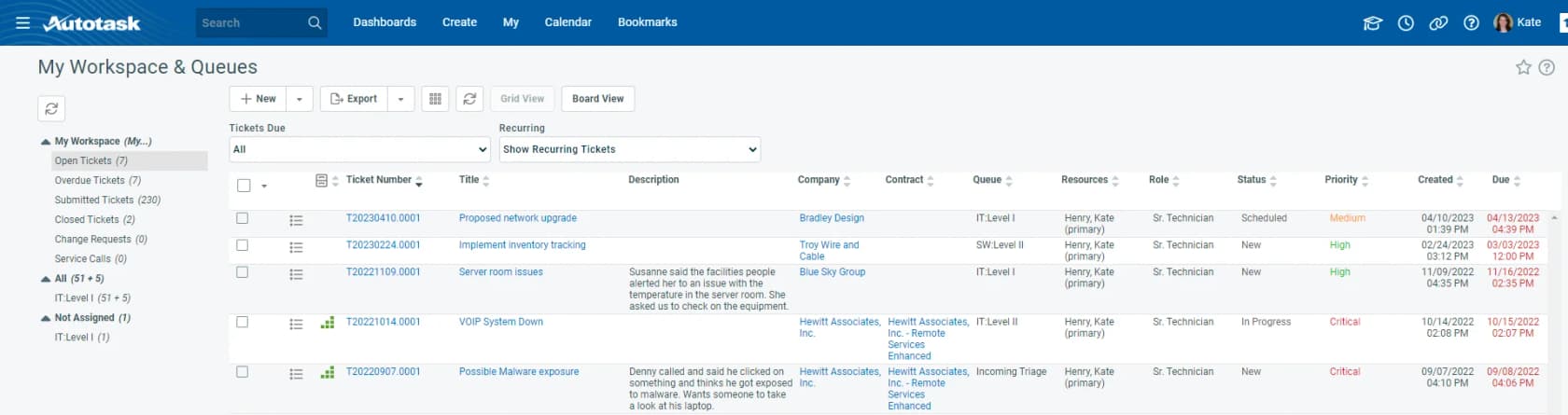
What the ticketing actually does. Autotask PSA is the other incumbent, and its service desk is configuration-rich: queues, ticket categories, statuses, workflow rules, a well-documented SLA engine. Four SLA events are defined, First Response, Resolution Plan, Waiting Customer and Resolved, and an admin maps each one to ticket statuses.
Two behaviours in the docs are worth knowing before you commit, since neither appears in any marketing copy. One: a ticket under an SLA can carry up to three separate deadlines at once. Two: Autotask back-fills SLA timestamps. If a technician jumps a ticket straight to complete with no First Response event recorded, the earlier events inherit the resolution timestamp, and your First Response metric then looks spotless for a process that never actually hit it. That is a reporting trap, not a bug, and it will flatter your SLA dashboard.
The workflow engine has hard ceilings too. The workflow rules documentation caps you at 200 active rules, says rules usually fire within five minutes rather than instantly, allows up to five to cascade in sequence, and states flatly that time-based rules will never trigger a second workflow rule. Designing a chained escalation ladder? That last constraint decides your architecture.
Pricing. Quote-gated, completely. No dollar figure exists for Autotask, Autotask Ultimate or Kaseya 365 Ops on any vendor page, and kaseya.com/pricing returns a 404. Kaseya 365 Ops is per user on a one-year term, bundles Autotask Ultimate with IT Glue Enterprise, and upgrading is all-or-nothing across every Autotask licence you hold. Two contradicting minimums are also live at once: the 365 Ops page says a minimum of three user licences, while the KaseyaOne help documentation says 50 are required for new Kaseya 365 purchases.
Pros
- Excellent public documentation. Everything above came out of Datto's own help centre, which is more than ConnectWise offers.
- Deep, mature ticket and SLA modelling, and it scales to large service desks.
- A tight loop with Datto RMM and IT Glue, assuming you are already there.
Cons
- Quote-only pricing, with a contradiction sitting in its own published minimums.
- The "all-inclusive, no hidden fees" claim explicitly excludes credit card and ACH processing fees. Those arrive on a separate invoice.
- The AI is assist-only. Kaseya Intelligence is the umbrella, Cooper Copilot is the in-product assistant, and it does triage routing, smart ticket summaries, a writing assistant, auto resolution notes. No deflection numbers are published anywhere, and the product's own disclaimer string tells technicians to review the text before using it.
My take: Autotask is a better-documented product than its reputation suggests, and the SLA engine is good once you understand the back-fill behaviour. The reason to hesitate is commercial rather than technical. Everything about the buying motion, the quote gate, the all-or-nothing upgrade, the contradictory minimums, is designed around a sales conversation instead of an evaluation.
3. HaloPSA
Best for: MSPs tired of feature grids, who want one price with nothing withheld.
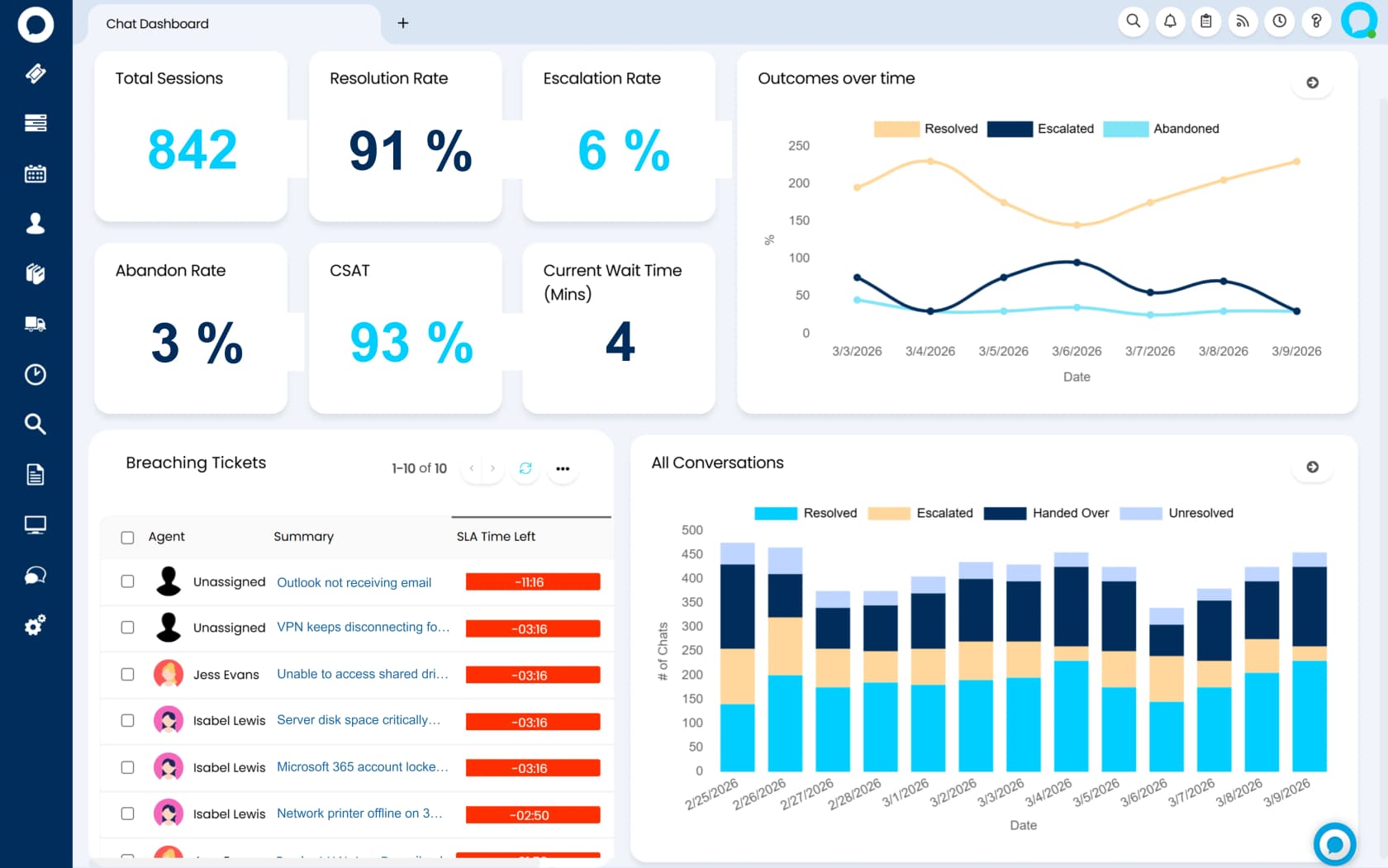
What the ticketing actually does. Halo has collapsed HaloITSM, HaloPSA and HaloCRM into a single platform at usehalo.com, and the PSA edition is now the Managed Services solution page. Watch the URLs if you are linking to it. usehalo.com/managed-service-providers is a hard 404, while the legacy HaloPSA guides site is still live and unmigrated, which is where the real documentation lives.
The ticketing is organised around ITIL processes rather than a flat queue. The docs cover incident management, including scheduled tickets and to-do lists, plus problem management and change management with approval processes. Inbound routing runs through email rules and notification types. SLAs are a first-class module, tracked automatically against every ticket, and the knowledge base sits inside the same licence instead of a tier above it.
The PSA side adds Agreements, Quotations, Sales Orders, Purchase Orders, Remote Support and a Service Catalogue the ITSM edition does not carry. Halo says it supports every billing model MSPs use: monthly recurring, per-device, per-user, block hours, fixed-fee project work, out-of-scope one-offs.
Pricing. One plan. £69 per agent per month billed annually, named and concurrent licences at the same rate, end users free. No tiers, no editions, no add-ons, and AI, CMDB, project management and reporting all come standard. At the calculator's default of 10 agents that is £690 a month, so £8,280 a year.
Two caveats. The £69 is the only figure the page renders server-side, so the US dollar price is effectively quote-gated, and inferring it by conversion will mislead you. Onboarding packages are also required with purchase at a bespoke, unpublished cost, the one real unknown in an otherwise transparent rate card.
Pros
- No feature gating, verified three separate ways on the pricing page. The cleanest commercial model in the category, by a distance.
- 250-plus integrations at no extra cost, three deployment options including on-premise, and coverage across ISO 27001, SOC 2 Type II, FedRAMP, IRAP and HIPAA.
- Halo names its displacement targets directly, and says it provides migration support from ConnectWise, Autotask and Kaseya BMS.
The best-case version of that migration comes from an MSP that ran ConnectWise for nearly 15 years, and the number is large:
"Moved from Manage to Halo on May 1st of 2024. Was on Manage for almost 15 years. Halo, in my opinion, is much more customizable. I saved $122k last year by moving away from CW. I also eliminated 4 apps (CPQ, Brightguage, Cloud Radial, and Smileback) because those features are built into Halo. Eliminating those plus MSPCFO cut $1100/month from my expenses."
Cons
- The mandatory onboarding cost is unpriced, so "one price, no surprises" carries an asterisk.
- Halo's service management page markets configuration as "build in the morning, go live by lunch", while its own MSP FAQ says most MSPs are fully live within four to six months. Both can be true. Only one of them is on the homepage.
- In the 2026 ITSM Platforms quadrant, Gartner has it as a Challenger rather than a Leader.
- The finance modules are the weak spot, consistently so, in the accounts of MSPs who have actually made the move.
That last point deserves receipts rather than my opinion, since it is the single most repeated theme in r/msp threads about moving off ConnectWise:
"Service board and working tickets is 100x better in Halo. Invoicing in halo is abysmal compared to connectwise. Integrations in halo are decent, but some need improvements. Customizability in halo is great. We are glad we moved, but invoicing in halo is killing us, tax rounding issues, we get errors Wi-Fi we send more that 150 invoices at a time, and PDF invoice templates can be finicky."
And on whether the migration pays back at all:
"I've spoken with three MSP owners who moved from CW PSA to Halo in the last two years. All of them were in the $2m to $5m revenue range. One of them raved about the change, saying it was the best thing ever. Two said that in hindsight they would have been better to invest the considerable time and money involved in this change elsewhere in their business."
For the unpriced onboarding, r/msp supplies the number Halo does not. An October 2025 thread is titled around a 4k startup cost for a single-user licence, and one migrating MSP in it reported using every second of the allotted time across three months.
My take: for most mid-sized MSPs this is the one I would shortlist first, precisely because the pricing model removes an entire class of argument. You will never have a conversation about whether the knowledge base is worth the upgrade. Budget honestly for the migration though, and treat the four-to-six month figure as the real number rather than the lunchtime one. One or two person shop? Take the warning from the same thread seriously:
"Don't do it. 1 man msp here, started the journey. Spend maybe 1500 and then quickly realised it's the wrong tool for very small companies or 1 man bands."
4. Syncro
Best for: small MSPs running a lot of devices off a small crew.
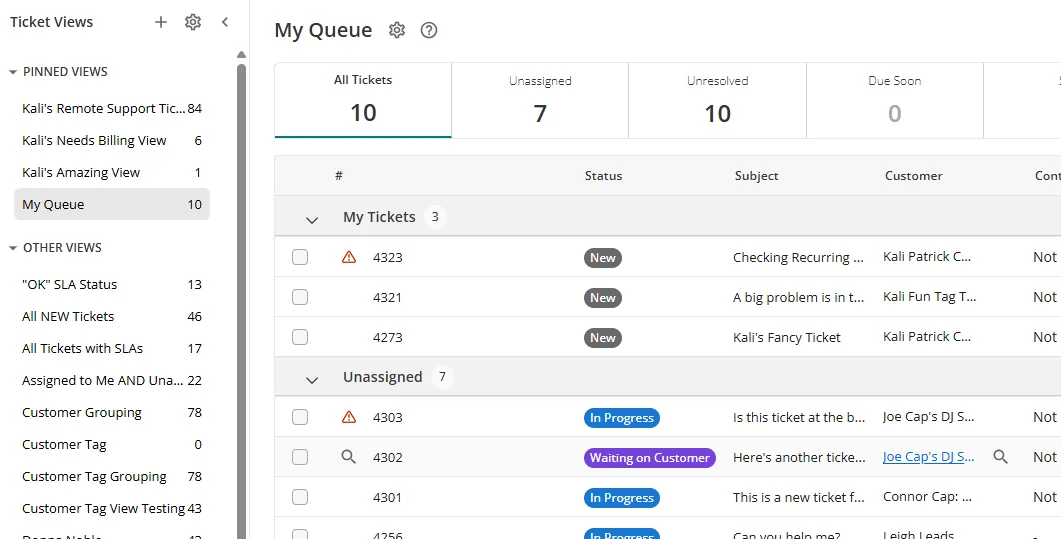
What the ticketing actually does. Syncro (now at syncrosecure.com, after rebranding to Syncro Secure) bundles RMM and PSA into every plan, and the PSA half is complete rather than token. Helpdesk and ticketing, estimates, invoicing and payments, recurring billing automation, a branded client portal, inventory, live chat, and customisable reports covering SLA attainment, ticket volume and asset status.
The commercial design is the story here. You pay per technician who uses Syncro, never per client or per endpoint, and managed endpoints stay unlimited on every plan. For an MSP adding clients faster than headcount, effective cost per endpoint falls continuously, which is the exact margin argument Syncro makes on the page. It is also why Syncro keeps turning up in shortlists for the ticketing system for small teams, next to the actually free options for small businesses.
Pricing. Published in full, no quote gate. Core is $129 per user per month billed annually ($159 monthly). Team is $179 annually ($209 monthly). Enterprise is a conversation. One published add-on only: Microsoft 365 Cloud Backup at $1.90 per user per month. Syncro's own worked example puts three technicians on annual Team at $6,444 a year.
Read the $50 gap between Core and Team carefully, because it is a ticketing decision rather than a security one. Real-Time Ticket Automations, the routing, escalation, and SLA enforcement rules, are Team-only, and so is the real-time ticket view metrics dashboard. Core gives you a queue. The SLA engine lives one tier up.
Pros
- A full published rate card, a 14-day trial with no credit card, no setup fees, SOC 2 Type II.
- Unlimited endpoints per technician, which is the friendliest model here for a growing book of clients.
- RMM plus PSA plus Splashtop remote access on one price, and billing automation comes included rather than sold separately.
Cons
- That SLA automation gate at Team is a real cost for anyone who assumed Core was the ticketing plan.
- No branded AI product at all. Everyone else in the category is shipping agents, and Syncro's ticketing automation stays deterministic.
- Mixed-tier teams are not self-serve, so running some techs on Core and others on Team means calling sales.
My take: for a one-to-five technician shop, Syncro is the best value on this list, provided you budget for Team rather than Core. Do the arithmetic honestly. Three techs on Team is $6,444 a year, and if your SLA rules matter, that is the price you should be comparing, not $4,644.
5. Atera
Best for: MSPs ready to bet on autonomous ticket resolution now, rather than in some future release.
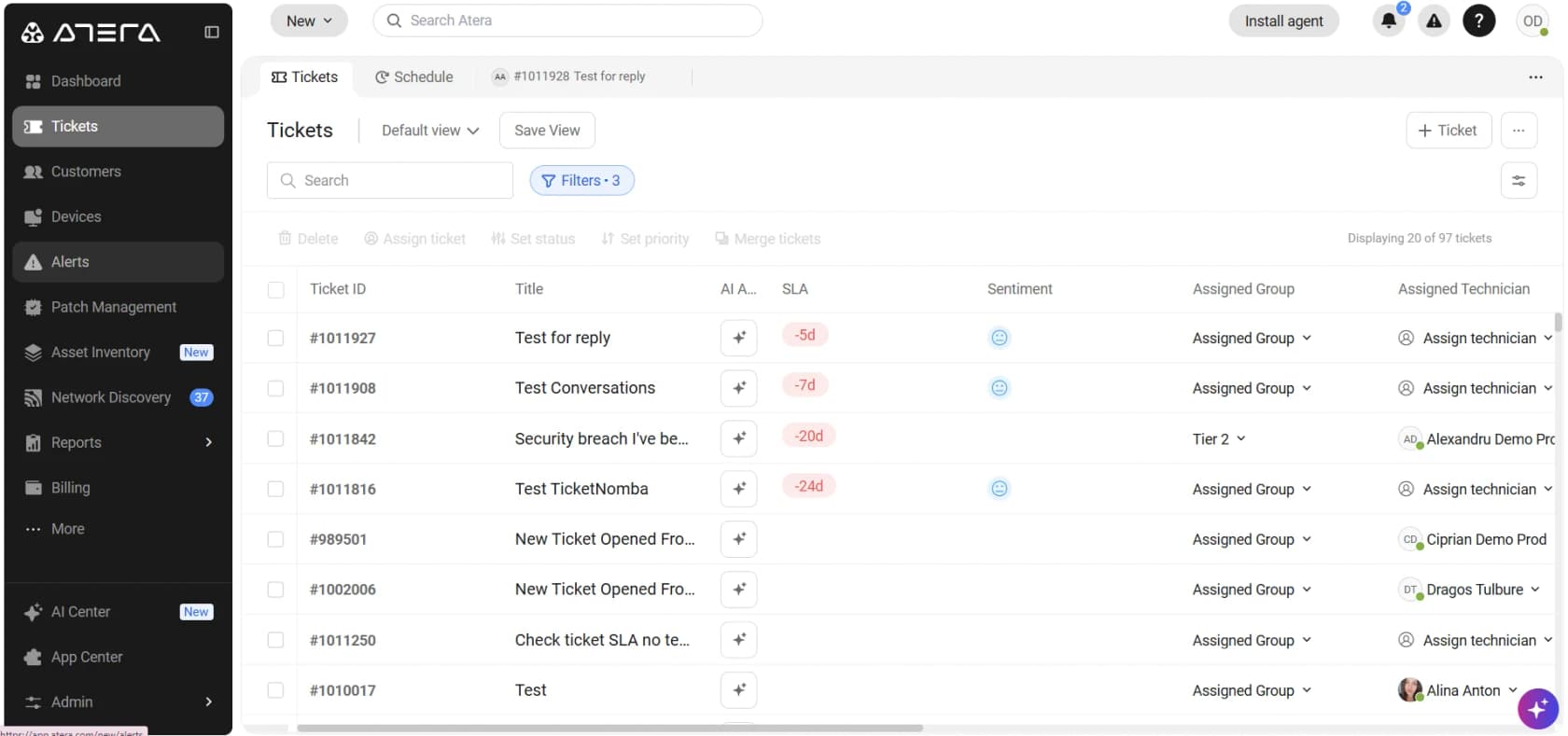
What the ticketing actually does. Atera is RMM plus ticketing plus remote access on a per-technician subscription with unlimited endpoints, and it has repositioned hard around AI. The technician-facing AI Copilot summarises tickets and generates scripts inside the console, included in every plan. Then there is Robin, the autonomous agent. It handles intake, takes approved actions on devices, network and cloud, then verifies and closes the ticket end to end, with governance and audit trails.
That last part matters for this comparison. Robin is one of the few things in this category described as actually closing a ticket, rather than drafting a reply for someone else to send, and that is the real dividing line in AI on IT support tickets. Whatever the vendor claims, judge it on resolution rate once it is live.
Pricing. Two published tracks. On the MSP rate card, Pro is $129, Growth $159 and Power $209 per technician per month on annual billing, with a Superpower tier at custom pricing. The IT department track runs higher, $149 to $219. Every plan includes the AI Copilot, ticketing and the service portal, IT automations, patch management.
The catch: AI features are metered add-ons on top of the seat price. The add-on grid carries per-technician, per-device and per-user line items, and Robin is sold as a separate paid capability rather than bundled into the base seat.
Pros
- Unlimited endpoints per technician, the same structural advantage Syncro has.
- Robin is the most concrete autonomous-resolution story on this list, and it ships today rather than wearing a "coming soon" label.
- A 30-day trial of the full Expert plan with no credit card, plus compliance reach including HIPAA BAA and a 99.9% uptime SLA on Enterprise.
Cons
- The AI you are buying it for sits outside the seat price. Budget the add-ons separately or the comparison is not honest.
- Entry cost stings a one or two technician shop, because per-tech pricing carries no small-team discount.
- Reviewers on G2 and Capterra keep raising the same two themes: real savings against Kaseya and ConnectWise, and scepticism that AI features are being added ahead of core fixes.
My take: if you actually believe in autonomous resolution, Atera is the most interesting bet here, and it is honest enough to sell Robin as a separate line instead of pretending it is free. Price the add-ons before you compare it to Syncro. At seat level the two are nearly identical, and the difference is entirely in what you switch on.
6. SuperOps
Best for: teams with a modest device count, and enough technicians that per-seat pricing starts to hurt.
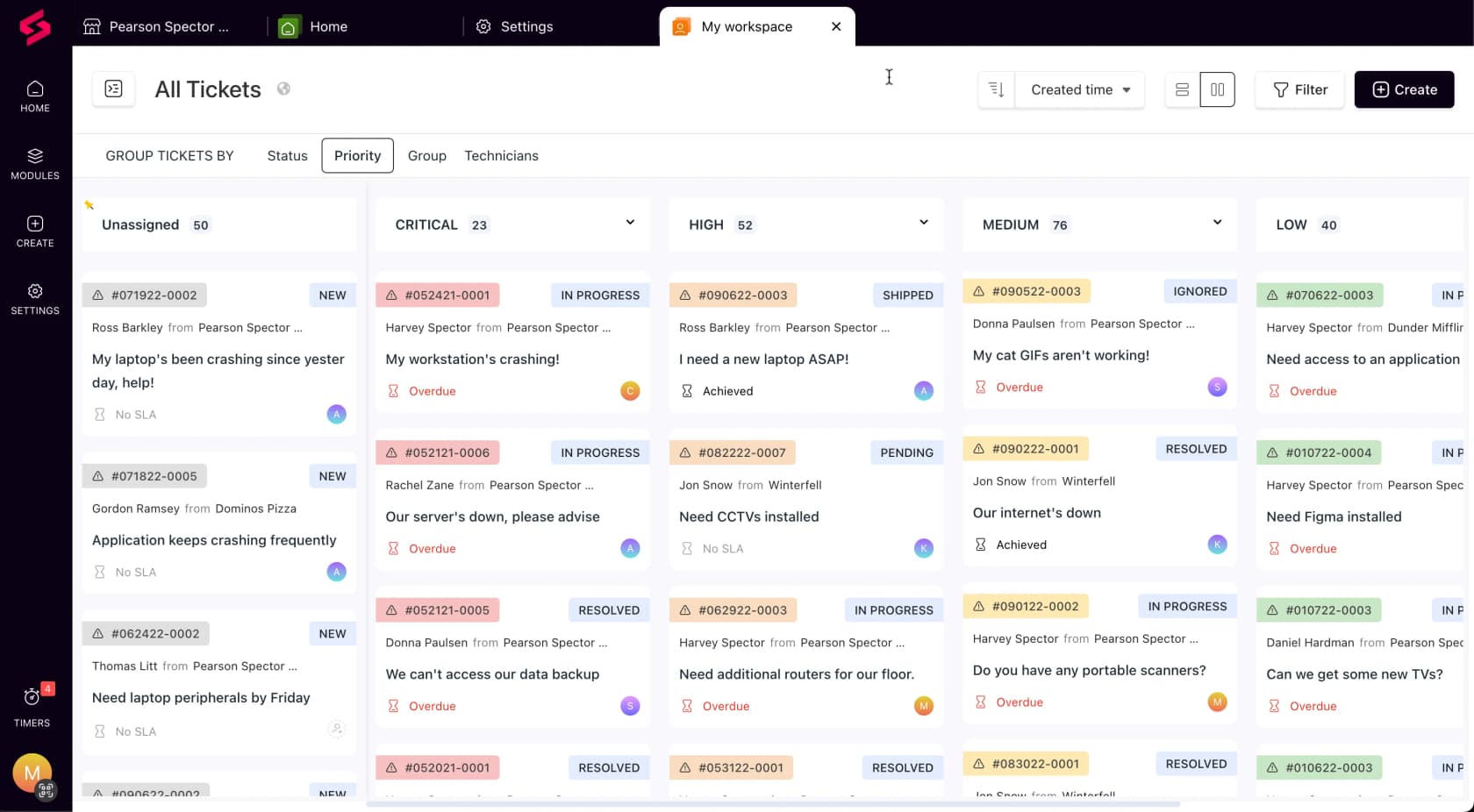
What the ticketing actually does. SuperOps splits into ITSuite for internal IT and MSPSuite for MSPs. The service desk lives at superops.com/psa-software/service-desk, and both /service-desk and /msp-service-desk 404, which is worth knowing if you go hunting for it. The design centre is context. Device details surface inside the ticket, so a technician is not alt-tabbing to the RMM to work out what they are looking at.
Automation is event and time triggers, firing when ticket conditions are missed or work has been idle too long, plus Unified Runbooks for turning SOPs into automated processes. Worklogs, time tracking and schedule sync are all first-class, aimed at making sure billable work never gets missed. Ticket summarisation feeding the worklog is the neatest version of this idea I have seen shipped. SLA management, project management, knowledge base, quoting and contract management all come in the box.
The AI is branded Monica and ships in three named levels. AI-Powered Assistance covers Smart Worklogs, ticket summarisation and an AI script generator. Ask Monica adds AI ticket deflection, recommended solutions, similar tickets. The Autonomous Agents, meaning the AI Patch Manager, AI Dispatcher Workforce and Pathfinder AI, are labelled coming soon on Monica's own page. Hold onto that detail if a sales deck implies autonomy ships today.
Pricing. Published, per endpoint, with a 100-device minimum. Prime is $1.50 at the minimum, then $1.40 for 101 to 500, $1.30 for 501 to 1,000, and $1.20 above that. Prime Plus adds Apple and Android MDM at $3.00, currently discounted to $2.50 on an early-bird offer, and its floor sits at 150 endpoints rather than 100. The calculator's own worked example puts 100 devices on Prime at $150 a month.
The overage rule is the one to catch. Devices above your committed number get billed at a flat rate, $1.50 on Prime and $3.00 on Prime Plus. So Prime Plus overage is charged at the pre-discount list rate, not your band rate and not the early-bird rate.
Pros
- Ticketing sits in the entry plan rather than an upsell, and so do project management and the client knowledge base.
- Per-endpoint billing removes the technician count as a cost lever, so adding seats is free.
- Self-serve signup with no sales gate, 100-plus integrations, and a 99.9% uptime SLA.
Cons
- The 100-endpoint floor makes it a poor fit for a very small book. Prime Plus quietly raises that to 150.
- The MSP pricing tab is client-side and will not render for anyone reading without JavaScript, so the figures above come off the IT tab.
- The most-advertised AI capability has not shipped yet.
My take: run the calculator above before you take a meeting. At a low endpoint-to-technician ratio SuperOps is excellent value, and quietly expensive at a high one. That single ratio should decide whether it belongs on your shortlist at all.
7. NinjaOne
Best for: shops that already chose NinjaOne for RMM, and want a serviceable ticket queue without buying a second product.
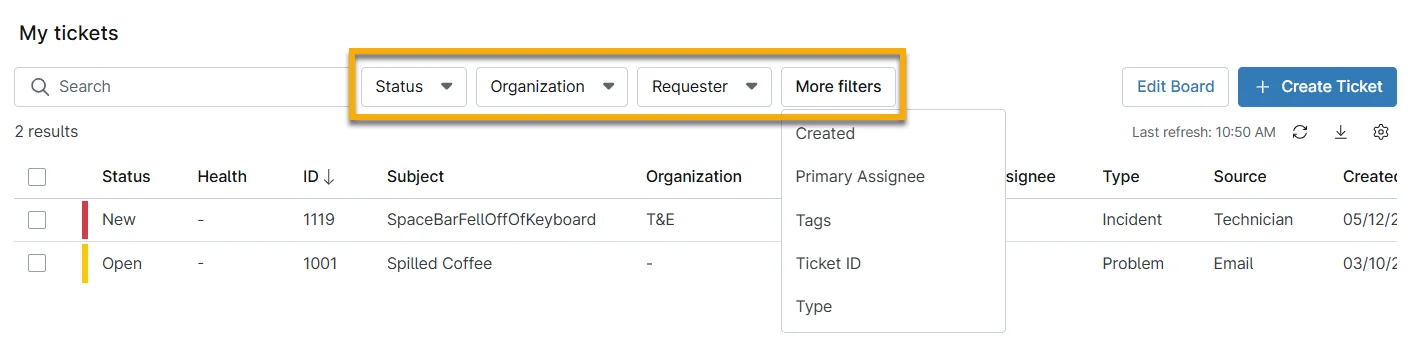
What the ticketing actually does. NinjaOne is honest about the positioning, in its own words. The MSP page describes its PSA as combining ticketing, documentation, asset management and time tracking in a "lightweight, efficient package", with up to three free PSA licences, and it notes that the RMM integrates with third-party PSA tools for a best-fit stack too. Read that as NinjaOne expecting some of you to keep another PSA.
The ticketing product itself is competent and deterministic. Response templates, condition-based ticket creation rules, event or time-based routing. Branded AI ticketing does not exist here at all. NinjaOne's named AI is Patch Intelligence AI, powering Autonomous Patch Management across 4,000-plus third-party apps, which is a real differentiator, just not one in the queue.
Pricing. A quote form rather than a rate card, and ticketing does not even appear as one of the "products of interest" checkboxes. One published figure exists, a band buried in the pricing FAQ:
NinjaOne starts as low as $1.50 USD per month at 10,000 endpoints, increasing to $3.75 USD at 50 or fewer endpoints; pricing varies by region and products purchased. This pricing is only applicable to customers on the commercial, non-FedRAMP instance.
Three qualifiers ride along with that range, which makes it a band and not a price. There is a 14-day free trial, no implementation fee, free unlimited support, all against a 60-day cancellation notice.
Pros
- Up to three free PSA licences, a real on-ramp for a small MSP already running the RMM.
- No implementation fee, and free unlimited support, both unusual in this category.
- The patching automation is the strongest in the roundup, and patch noise is a real source of ticket volume. Pair it with spam and noise filtering and you remove a decent slice of automated IT ticketing churn.
Cons
- The PSA is deliberately lightweight, by the vendor's own description of it.
- No AI in the ticket queue, which in 2026 reads as a live gap rather than a stylistic choice.
- Quote-gated, with a 60-day cancellation notice attached.
One r/msp operator puts the strongest version of that case:
"No, I ran my MSP with just under 400 Endpoints. I wasted an inordinate amount of time and energy evaluating PSA's. I simply priced my clients a fixed amount per device, the cost of the stack (Ninja One) + SentinelOne with a very decent margin. Separate SLA's for project work. This was very manageable for me. Also, too PSA's are a genuine pain in the but to properly onboard."
My take: already running NinjaOne? Take the free PSA licences and see whether the queue holds up. If you are choosing a ticketing system first, this is not the one, and NinjaOne more or less says so itself.
8. Pulseway
Best for: newer MSPs moving off break-fix, who want mobile-first RMM with ticketing attached.
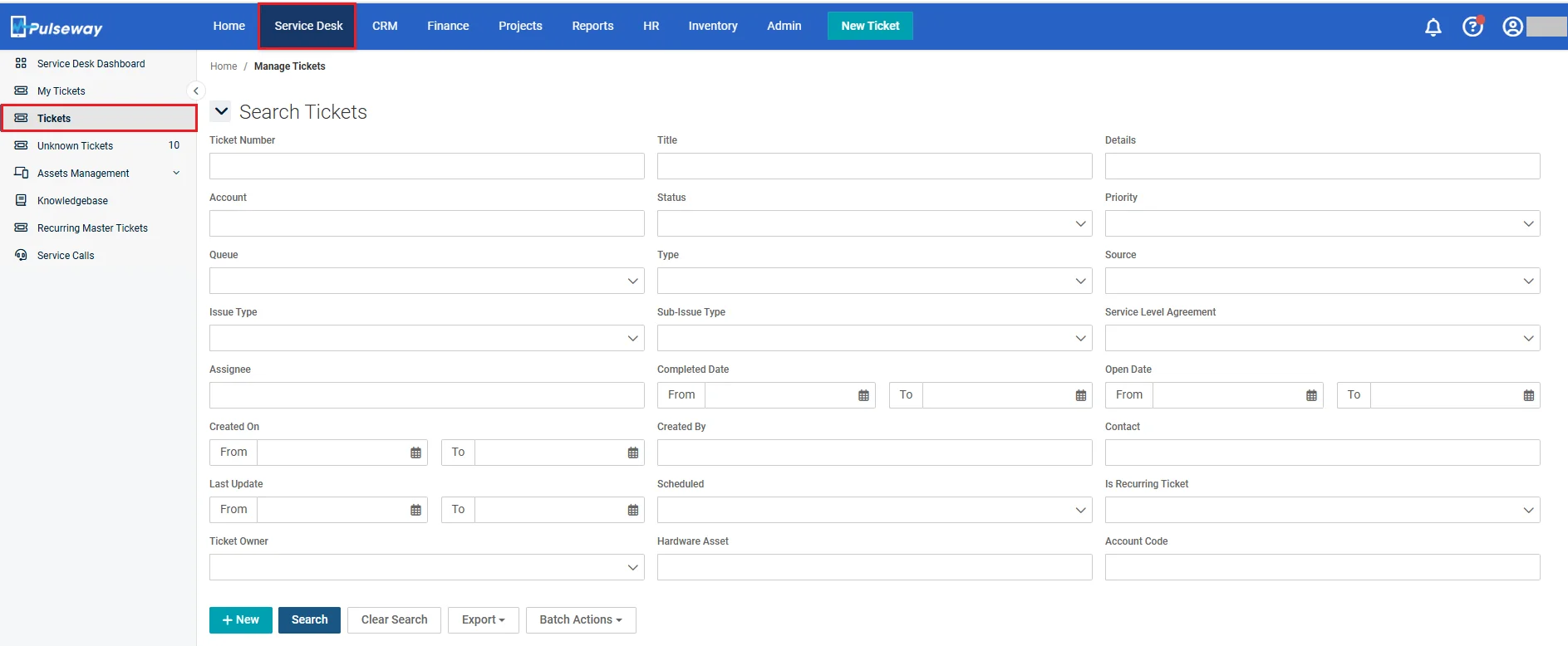
What the ticketing actually does. Pulseway's business management module covers service desk and ticketing, mobile app ticketing tied to the RMM, project management, inventory, HR, automated billing and invoicing. The mobile-first heritage is real, and it is the differentiator that matters. A technician closing tickets from a phone is a first-class path here rather than an afterthought.
Its own platform diagram is the most useful thing on the site. Monitoring, remote control, patch management and scripting sit in the core, while Ticketing sits under a section labelled add-ons, next to IT documentation. PSA cost is additive to RMM cost here, not included. Pulseway is now part of Kaseya, per the combined logo in its footer.
The AI is Pulseway Assist, built on a Microsoft Azure partnership, and it has exactly three named capabilities: Smart Ticket Summary, Smart Writing Assistant, Smart Resolution Summary. All three summarise or draft for a human technician. None of them resolve.
Pricing. Nothing published. pulseway.com/pricing returns a 200 and then redirects you to the homepage: no plan names, no figures, no stated billing unit. Pricing runs through a "spec up your requirements" demo flow.
Pros
- Best mobile experience in the roundup, by some distance.
- Aimed squarely at newer MSPs, onboarding content to match, and for a shop that has not built one yet it covers the same ground as a general-purpose IT help desk.
- 13,000-plus customers over 15 years, so this is hardly a new bet.
Cons
- Ticketing is an add-on to the core product, which makes the total cost harder to compare than anything else here.
- Zero pricing transparency. A pricing URL that redirects to the homepage is its own kind of answer.
- The AI is assist-only, and unpriced.
My take: worth a look if mobile ticket handling really is how your technicians work, which for field-heavy MSPs it is. Otherwise the combination of add-on ticketing and no published pricing makes it hard to place against Syncro or SuperOps without a sales call.
The thing every vendor's entry tier leaves out
Look across the eight and a pattern falls out. The entry tier always gives you a queue, email intake, SLA targets you can define, time tracking. What it withholds, over and over, is the automation that turns those into saved hours: SLA enforcement rules, contract billing, the knowledge base, custom reporting.
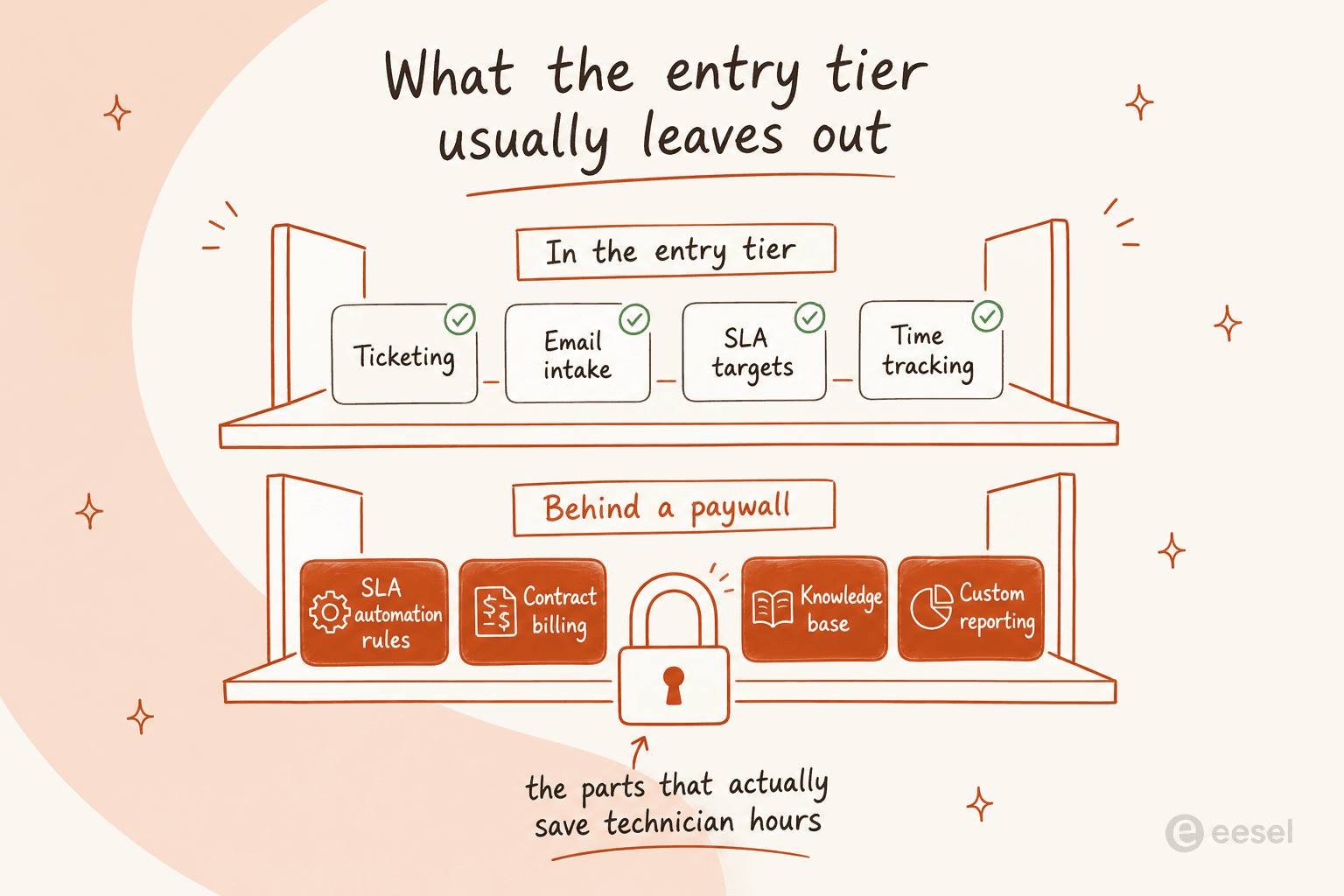
ConnectWise Basic has no knowledge base and no agreement management. Syncro Core has no real-time ticket automations. Halo is the exception, including everything, which is exactly why it is the easiest one to price honestly. When you compare quotes, compare the tier that has the automation, not the tier on the brochure.
Where AI actually earns its keep in an MSP queue
This is the thing I would push back on hardest in most 2026 MSP tooling conversations. Nearly every PSA now advertises AI, and nearly all of it is agent-assist: summarise this ticket, draft this reply, write this resolution note. Cooper Copilot assists. Pulseway Assist assists too. Monica's autonomous tier is unreleased. Only Atera's Robin and, partially, ConnectWise's Triage Agent claim to act on their own.
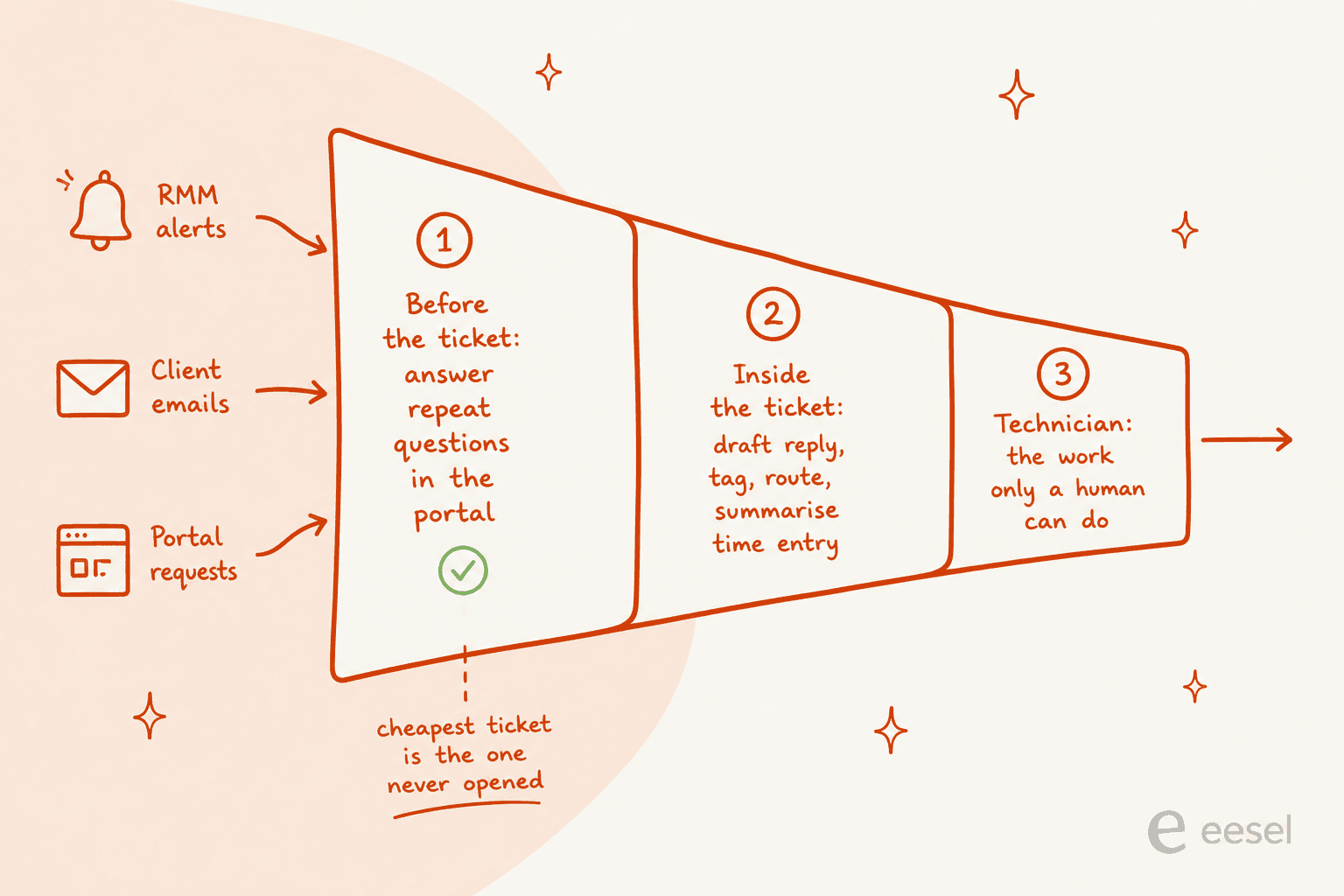
Agent-assist is useful, and I am not dismissing it. It saves minutes inside a ticket that already exists, though. The bigger number sits upstream.
An MSP hire watching tier 1 all day described the shape of it better than any vendor page has:
"It's literally just password resets, "help, my internet is slow", and printer problems. it's the same 10-15 issue types cycling constantly."
Those are answerable from documentation you already have. Most of them never need a technician at all, provided something answers them at the portal. We have written separately about access request automation and hardware request handling, which between them cover most of an MSP's tier-1 shape, plus the wider case for reducing ticket volume. That is ticket deflection rather than ticket assistance, and it is a different product decision from your PSA choice.
The objection to all of this is control. In the MSP world it is louder than anywhere else, because you are holding the keys to a dozen client environments rather than one. The top-voted reply in that same thread is a flat refusal:
"Nah I'm good keeping the keys to the kingdom away from any word salad generator."
I do not think that is unreasonable. It reads to me as an argument about scope, and the MSPs actually running agents in production answer it the same way:
"Does your Tier 1 tech have a playbook to delete things? Agentic AI can be taught ONLY what you want it to. We have it doing GSuite/M365 disables on security alerts and PW resets. If the alert/ticket does not match the AI ignores it.
We build specific agents for specific tasks. Our 365 AI does not perform hash/IP lookups."
The numbers people report are modest, and more trustworthy for it, I think. The only hard figure anyone in the sub publishes is 10% of chat tickets resolved outright, with workarounds reducing the priority of another 5%:
"AI troubleshooting resolves 10% of our chat tickets, offers workarounds to reduce the priority of 5%.
AI triage has helped us promote multiple people and not need to backfill roles. It's been a big game-changer for our team and clients."
That tracks with what we see. It also matches the objection we hear most on our own sales calls, where a CX lead at a DTC brand running roughly 7,000 tickets a month put it about as clearly as anyone has:
"The AI will never be able to answer 100% of the questions, but if it tries and just answers 'sorry I don't know this,' I cannot go and check all my 7,000 tickets to see if the AI actually made a good answer, then the point is a little bit gone. I need an AI who is only handling the tickets that it's confident to handle and all the other ones, leave them alone."
That is exactly right, and it is the bar. Another support lead we work with put the MSP version of it in five words: there are certain tickets they do not want going through AI at all. For a managed service provider carrying contractual SLAs per client, treat that as a requirement. Confidence-based routing and per-ticket-type exclusion are the two features that make AI safe on a client-facing queue, and any tool that cannot do both should not touch it.
If you want the mechanics rather than the pitch, we have written up AI to human handoff, how to prevent AI hallucinations in support, and how to measure containment rate against escalation quality.
Try eesel on the tickets your PSA was never going to deflect
I build these agents for a living, so my bias is obvious. The specific claim is narrow though, and I will keep it that way. eesel does not replace your PSA and does not integrate with ConnectWise, Autotask, or HaloPSA. It sits on the intake side of the queue you already run, the way an internal helpdesk AI does for an in-house IT team: email, your website or client portal, Slack, Microsoft Teams, and Jira Service Management if that is where your service desk lives.
It trains on your existing documentation and past tickets instead of asking you to build a decision tree. It runs on historical tickets first, so you see what it would have said before it says anything to a client. Confidence thresholds and ticket-type exclusions are configuration here, not a roadmap item. That is the same setup InDebted's IT team used to take a 5-to-10 person team supporting hundreds of employees from zero to 15% fully deflected on Jira, on a path to 55% as it turns resolved tickets into knowledge base articles.

Pricing is one fixed monthly price sized to ticket volume, from $299/month for 500 credits (1 credit per ticket or chat), with no per-seat fee. For an MSP that is the right shape, because your technician headcount and your ticket volume are not the same curve. Start with the AI helpdesk agent page if you want to see how it fits, and try eesel free from there.
So which MSP ticketing system should you actually pick
Compressed into four sentences: pick HaloPSA if you want one price with no feature gates and can absorb a real four-to-six month migration. Pick Syncro if you are small and device-heavy, and budget for Team rather than Core so the SLA automation actually turns on. Pick SuperOps when your endpoint-to-technician ratio is low, then re-run the numbers before you sign, because per-endpoint pricing punishes growth in a way per-seat pricing does not. Pick ConnectWise or Autotask if you are already deep in one of those ecosystems and the switching cost outweighs the price opacity.
Then, separately from that decision, work out what you are doing about the tier-1 volume, because that is where IT helpdesk AI in 2026 and service desk automation actually move a number. The best ticketing system in the world still opens a ticket for a password reset. A well-chosen PSA plus an AI layer at intake is meaningfully different economics from a PSA on its own.