What an AI internal helpdesk actually is
An internal helpdesk is just a support desk pointed inward: instead of customers, your "users" are employees, and instead of "where's my order," the tickets are "I'm locked out of Okta" and "can I get a Figma license." Most IT teams run this through a service desk like Jira Service Management, Freshservice, or ServiceNow, or sometimes just a shared inbox and a Slack channel that never stops pinging.
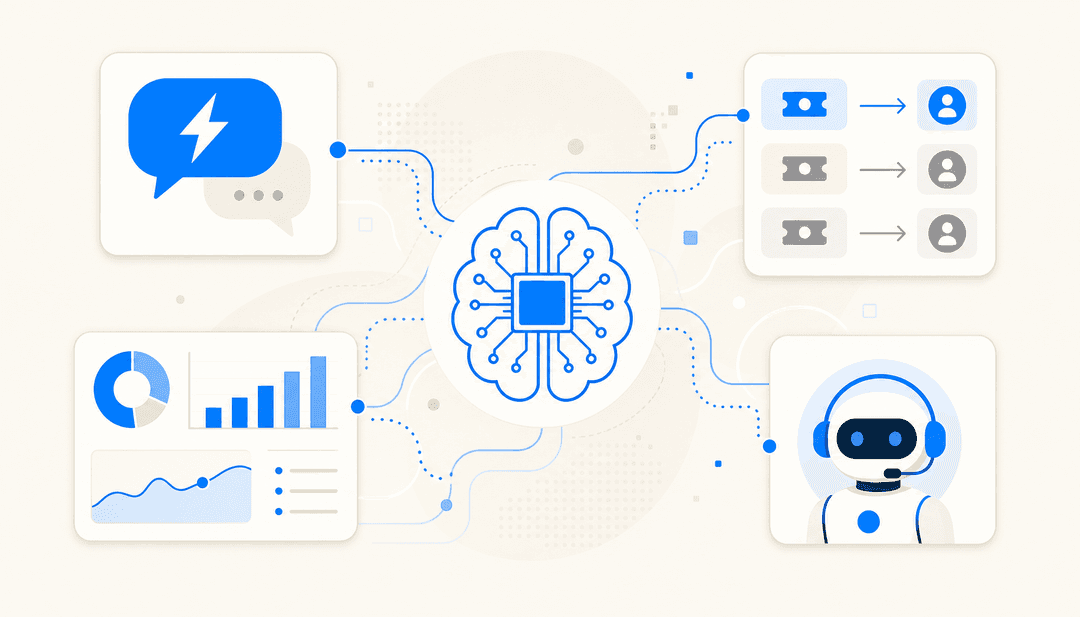
An AI internal helpdesk adds an agent on top of that. The distinction that matters: this is not a scripted chatbot with decision-tree buttons. A real AI agent reads the employee's actual question, searches your real knowledge, and writes an answer, or takes an action like opening a ticket. The difference between an AI agent and a rule-based chatbot is the difference between something that can handle "my laptop won't connect to the office wifi after the update" and something that makes the employee click through five menus to land on an article that doesn't quite fit.
The other defining trait is where the knowledge comes from. A customer-facing bot can lean on a polished public help center. Internal IT knowledge is messier: it's scattered across Confluence pages, Notion docs, old Slack threads, and the tribal knowledge in your two most senior engineers' heads. A useful AI internal helpdesk has to ingest that mess and the history of how tickets were actually solved, not just the docs someone remembered to write.
Why IT teams are actually reaching for this
Three pressures show up again and again when I talk to IT leads.
The queue is mostly repetitive. A huge share of internal IT tickets are the same handful of requests: resets, access, provisioning, "how do I." None of them need a senior engineer, but all of them interrupt one. Deflecting that tier-1 layer is the entire pitch, and it's why teams come looking for AI tools for internal support teams and ITSM automation in the first place.
Tribal knowledge keeps walking out the door. One support lead I worked with, at a public-sector IT services firm, was losing two senior agents that year and wanted to capture what they knew into the AI before they left. That's a real and underrated reason to do this: an AI internal helpdesk trained on your resolved tickets is, in effect, a backup of how your best people answer questions.
The answers already exist, they're just hard to find. The knowledge is usually sitting in your wiki; employees just can't find it fast enough to bother, so they file a ticket instead. This is exactly what Jason Loyola, Head of IT at InDebted, set up eesel to fix:
"We use it to be the first responder to our Helpdesk tickets in Jira. It essentially acts just like an agent would."
Jason Loyola, Head of IT, InDebted (case study)
That "first responder" framing is the right mental model. The AI takes the first pass on every ticket. Most of the time that's enough; when it isn't, a human picks up where the AI left off.
How an AI internal helpdesk actually works
Under the hood, the flow is the same on every decent platform, and it's worth understanding because the gaps between steps are where tools differ.
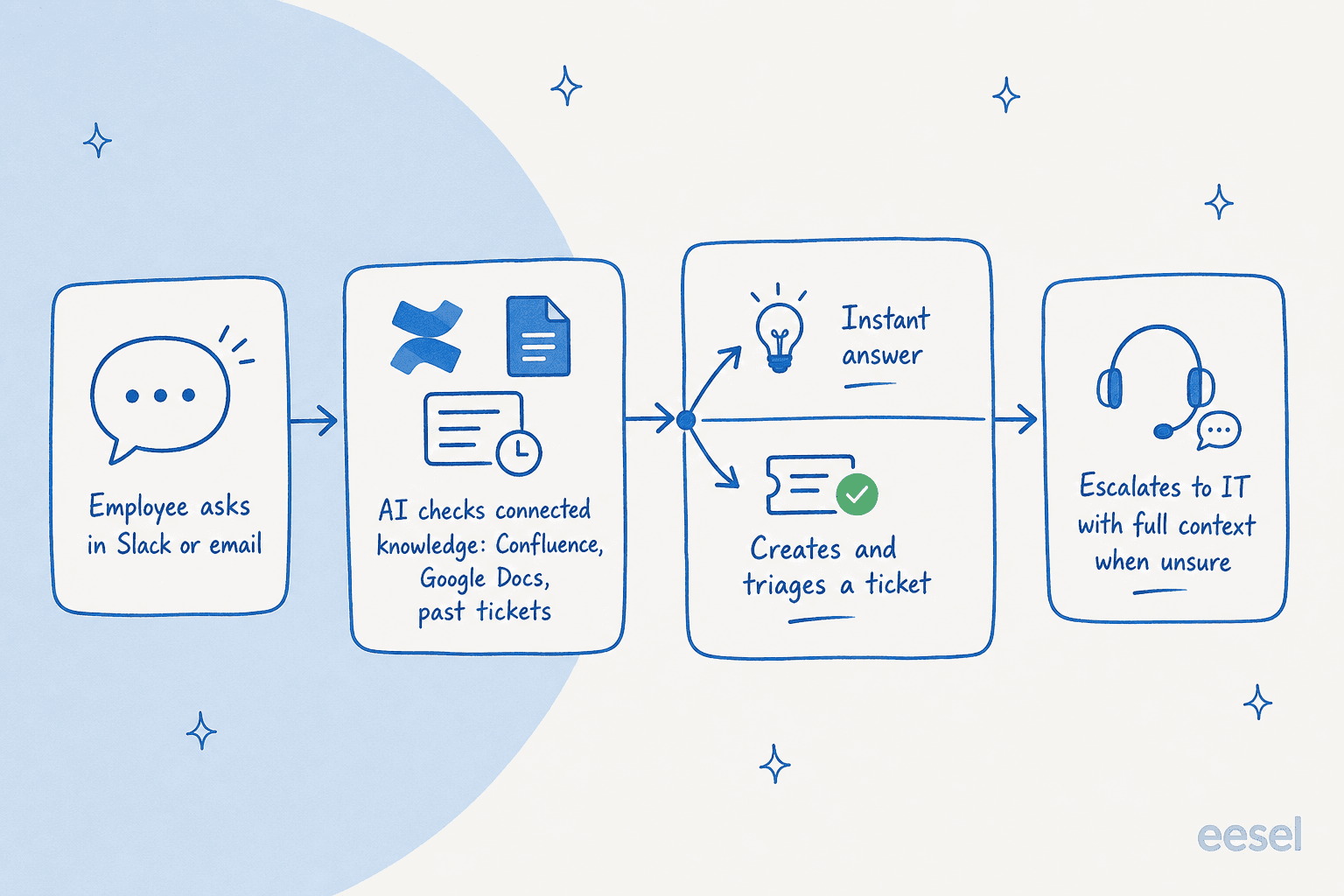
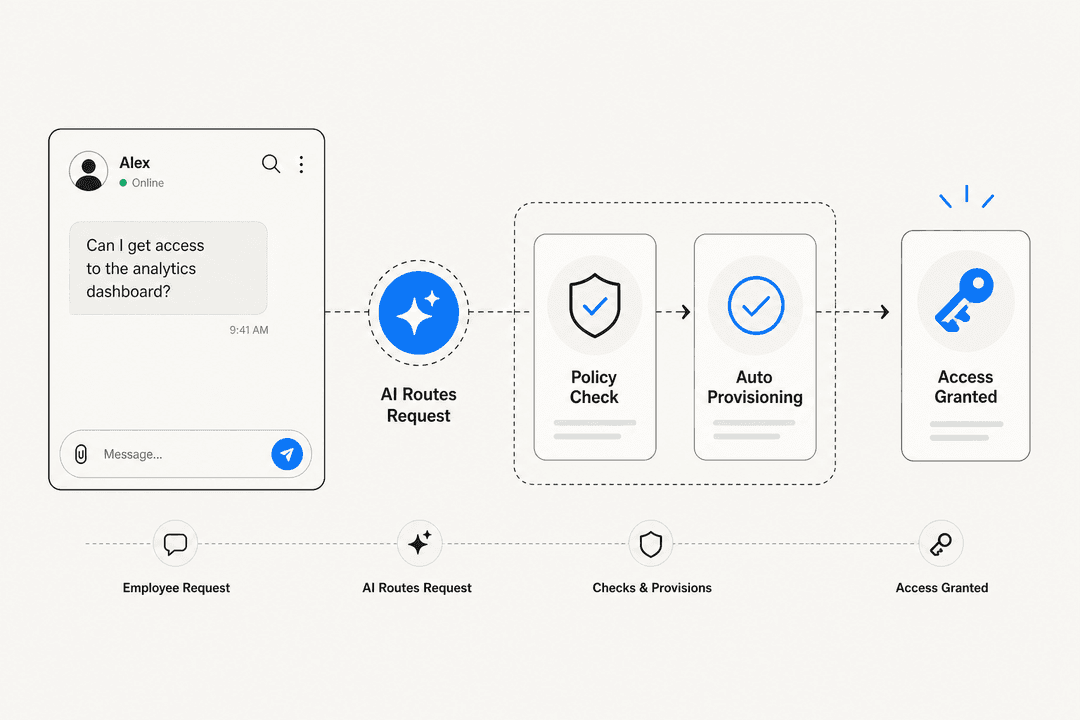
- An employee asks, usually in Slack or by raising a ticket. Meeting people in Slack matters more than it sounds: nobody wants to leave the channel they're already in to go log a formal request, so an AI agent that lives in Slack catches the questions that would otherwise become a tap on a colleague's shoulder.
- The AI searches your connected knowledge: your wiki, your docs, and crucially your history of resolved tickets. This is the step that separates a useful answer from a generic one.
- It either answers, or it acts. For a simple question it replies directly. For something that needs tracking, it can open and triage the ticket, tag it, and route it.
- It escalates what it can't handle, handing the human a ticket that's already categorized with the relevant docs attached, so nobody starts from scratch.
Here's that loop running inside Slack, which is where most internal IT questions actually start:
The reason I'd push you to care about step 2 specifically: an AI that only reads your help-center articles will confidently answer from docs that are out of date or written for the wrong audience. An AI that's also trained on how tickets were actually resolved picks up the real fix, the one a senior engineer typed into a ticket six months ago and never wrote up. That's the past-ticket training most teams underestimate.
What it can handle today, and what it can't
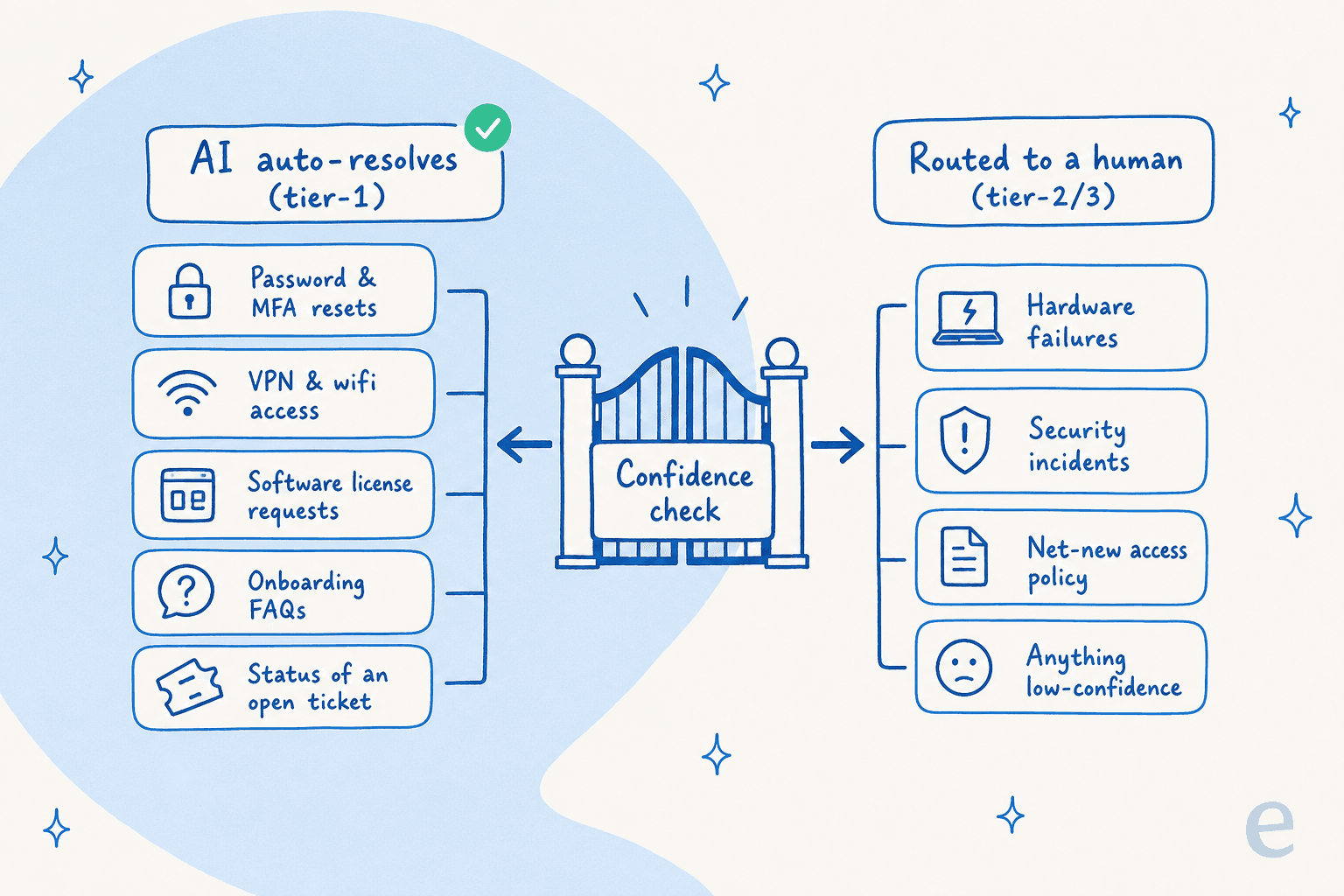
This is the part to be honest about. An AI internal helpdesk is excellent at high-volume, well-documented, low-stakes requests and bad at novel, ambiguous, or high-risk ones. The job is to draw that line deliberately rather than hoping the AI figures it out.
| Ticket type | Good fit for AI? | Why |
|---|---|---|
| Password / MFA resets | Strong | High volume, deterministic, well-documented |
| Software & license requests | Strong | Repetitive, policy-driven, easy to template |
| VPN / wifi / access "how-to" | Strong | Answer lives in the wiki; just needs surfacing |
| Onboarding & "where do I find X" | Strong | Pure knowledge retrieval, huge volume |
| Status of an open ticket | Strong | Lookup, no judgement required |
| Hardware failures | Weak | Needs physical diagnosis and a human |
| Security incidents | Avoid | High stakes; route to a person immediately |
| Net-new access policy decisions | Avoid | Requires judgement and accountability |
The control that makes this safe is confidence-based routing: the AI answers only the tickets it's sure about and silently leaves the rest alone. One CX lead running 7,000 tickets a month put the requirement better than I could: he didn't want an AI that says "sorry, I don't know" on everything it's unsure of, because then someone has to check all of them anyway. He wanted "an AI who is only handling the tickets that it's confident to handle and all the other ones, leave them alone." That's the whole design goal. An AI that knows what it doesn't know is worth far more than one that attempts everything.
The build-vs-buy question every IT lead hits
If you run an IT team, someone has probably said "we could just build this on the OpenAI API ourselves." It's true, you could. The question is whether you want to own it forever. An internal LLM tool isn't a weekend project; it's prompt tuning, a retrieval pipeline over your docs, connectors to Slack and Jira that break when those APIs change, evaluation, and a permanent maintenance burden that lands on the same team that's already underwater on tickets.
Karel at GENERAL BYTES made the call most teams land on once they've costed it out:
"We could try to write our own LLM application but we didn't want to invest our time into that. We wanted something that we would not have to maintain."
Karel, GENERAL BYTES (case study)
The buy case gets stronger when you factor in pricing models. A lot of ITSM and helpdesk tools charge per agent seat, so scaling your IT team scales your software bill. eesel deliberately went the other way: pricing is per ticket from $0.40, no per-seat fee, because charging by headcount punishes you for growing the team. If you're weighing this purely on numbers, the eesel piece on AI vs human agent cost lays out the math.
How to roll one out without burning trust
The fastest way to kill an internal AI rollout is to flip it to fully autonomous on day one, watch it give a confidently wrong answer, and have the whole team decide it's useless. Don't do that. Here's the sequence that actually sticks.
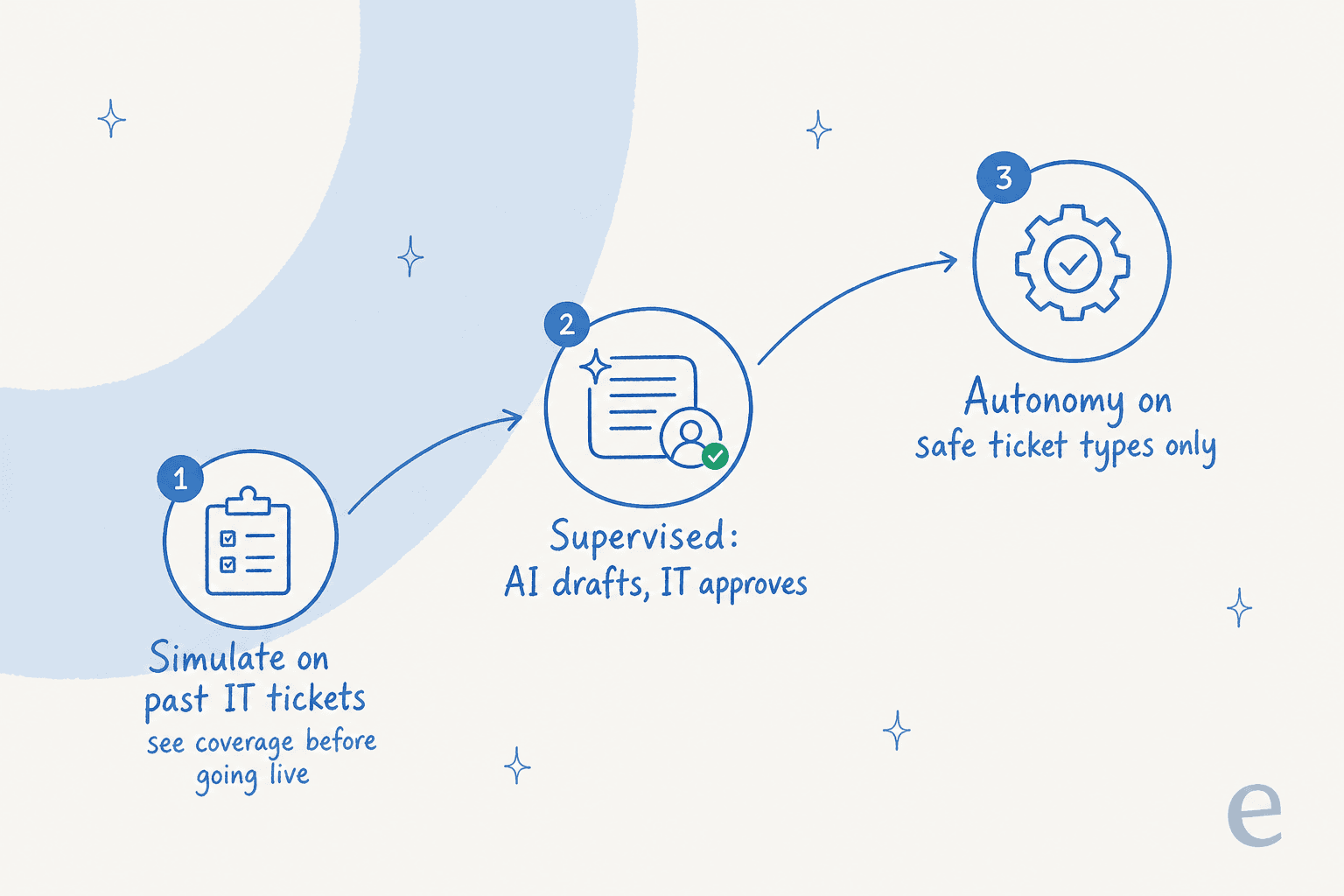
- Simulate before you go live. The single most valuable step. Run the AI against your last few thousand resolved tickets and look at the coverage report: which themes would it have answered, where the gaps are, what it would have gotten wrong. You fix the knowledge gaps before a single employee sees a response. This is also how you set a realistic expectation with leadership instead of guessing.
- Start in copilot mode. Let the AI draft replies for your IT agents to review and send. Your team gets faster, nobody's exposed to a bad auto-reply, and every correction your agents make teaches the system. Plenty of teams run this stage indefinitely and are happy.
- Grant autonomy by ticket type, not all at once. Turn on full auto-resolution for password resets first. Watch it for a week. Add license requests. Watch again. Expand the autonomy as the trust is earned, never ahead of it.
You configure all of this in plain language rather than a rules engine, which is the part that surprises people:

What to watch out for
A few things that bite IT teams specifically, beyond the hallucination point above:
- Knowledge written for the wrong audience. If your wiki is written by admins for admins, the AI will answer employees in admin-speak. One team I saw had this exact mismatch: their entire knowledge base was written for administrators, but the tickets came from end-users. Fix the source material, or the AI faithfully reproduces the confusion.
- Data residency and what the model learns from. IT and security teams are right to ask whether ticket data, which often contains PII, stays in their environment and whether it trains a public model. Get a straight answer before you connect anything. eesel keeps customer data out of model training and offers EU data residency; Simployer specifically needed "a turnkey solution for Confluence that met our GDPR requirements" with dedicated Slack bots, and that's a fair bar to hold any vendor to.
- The wiki you don't maintain. An AI internal helpdesk is a mirror of your documentation. If the docs rot, so do the answers. The upside: a good agent will flag the questions it couldn't answer, which is the best to-do list your documentation team will ever get.
Try eesel for your internal IT helpdesk
If you want an AI teammate for your internal IT desk, eesel is built for exactly this. It plugs into Slack and Jira Service Management in minutes, learns from your Confluence, Notion, and past tickets on day one, and lets you simulate against your real ticket history before it answers a single employee, so you see your coverage number before you commit. Pricing is per ticket with no per-seat fee, and you can keep it in copilot mode for as long as it takes your team to trust it.

It's free to try, no credit card, and you can point it at a corner of your IT queue this afternoon. If you're comparing options first, my roundups of AI tools for internal support teams and the best AI for Jira Service Management are honest places to start.
Frequently Asked Questions
What is an AI internal helpdesk?
How much does an AI internal helpdesk cost for an IT team?
Can an AI internal helpdesk integrate with Slack and Jira?
Will an AI helpdesk for IT teams hallucinate or give wrong answers?
Is an AI internal helpdesk a good alternative to ServiceNow or Freshservice?


Article by
Rama Adi Nugraha
Rama is a software engineer at eesel AI with two years of experience writing about B2B SaaS, AI tools, and customer support technology. Based in Bali, Indonesia, he brings a developer's perspective to product comparisons — cutting through marketing copy to what the integrations and APIs actually do.