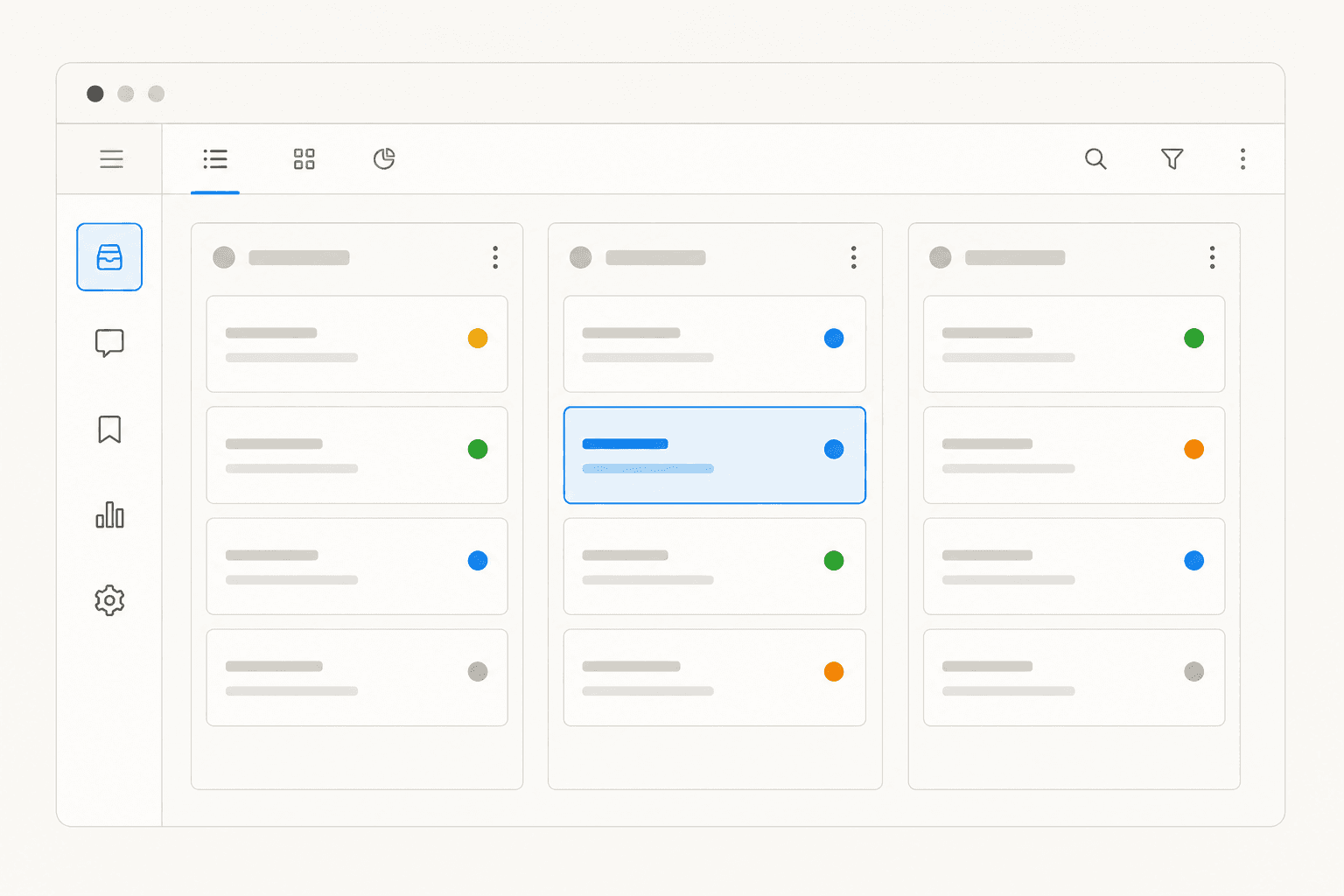
Every IT team deals with the same problem: requests pile up in email threads, Slack messages, and spreadsheets. Someone can't reset their password. Someone else needs access to a shared drive. A new hire is waiting on laptop provisioning. None of it is hard to solve - but without a system to track it, things slip. Response times drift. Employees get frustrated. The IT team spends more time answering "what happened to my ticket?" than actually fixing things.
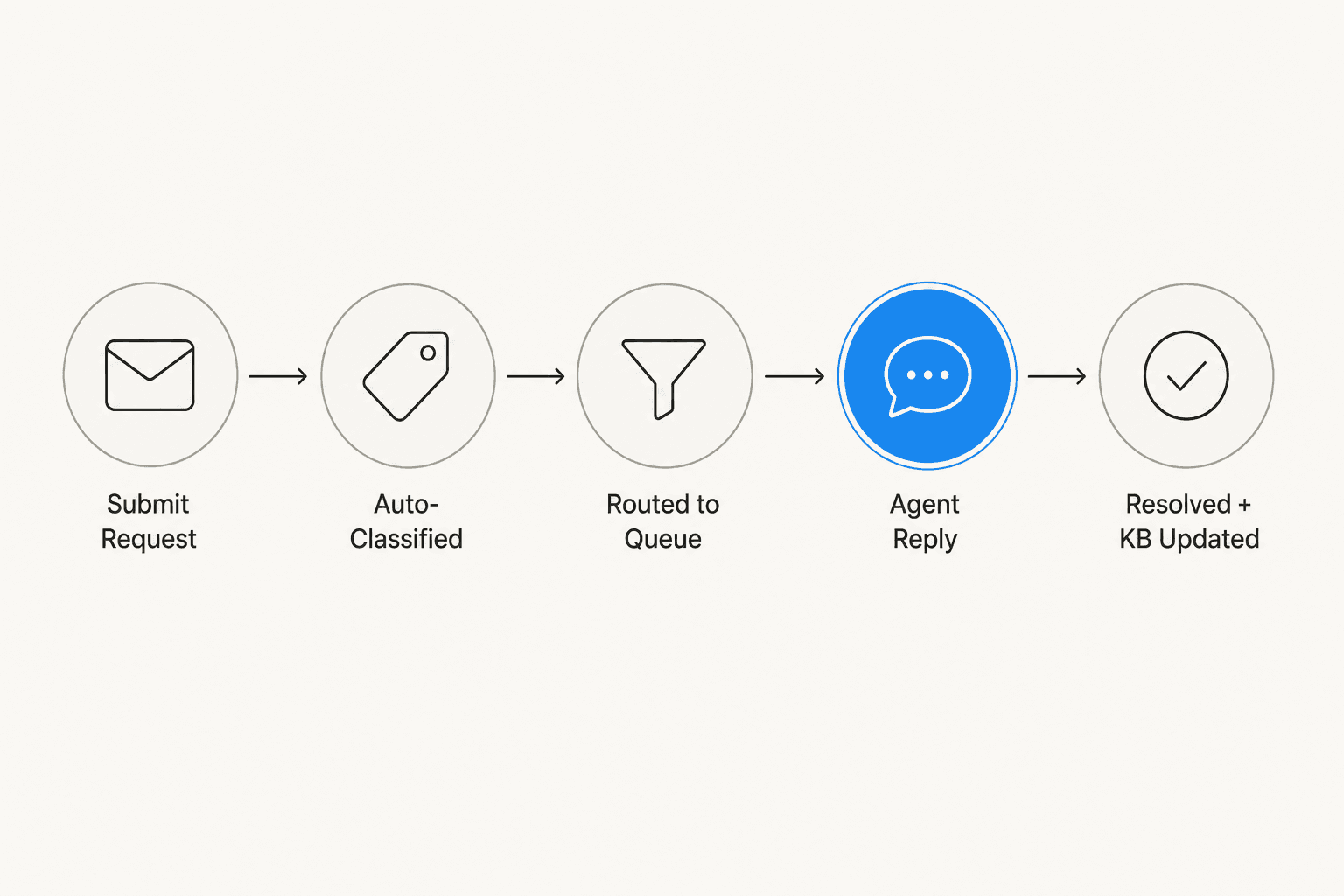
That's what internal helpdesk software is for. It gives IT teams a structured place to receive, route, and resolve employee requests - with SLAs, a knowledge base, and reporting so you can see what's working and what isn't.
This guide covers what internal helpdesk software actually does, what to look for when choosing one, and a detailed comparison of five strong options in 2026: Freshservice, Jira Service Management, ServiceNow, Zoho Desk, and HappyFox.
What is internal helpdesk software?
Internal helpdesk software is a system for managing IT support requests from employees inside your organization. Unlike customer support platforms (which handle external customers), an internal helpdesk is built around the needs of IT teams: structured ticketing, SLAs, asset tracking, change management, and a self-service portal where employees can find answers and submit requests.
You'll see it called different things - IT service desk, ITSM tool, employee helpdesk, service management software - but the core function is the same: take the chaos of untracked requests and give it structure.
Most internal helpdesk platforms follow the ITSM framework, which organizes IT operations into categories:
- Incident management - unplanned disruptions (the printer is broken, the VPN is down)
- Service requests - planned requests (new laptop, access to a tool, onboarding a new hire)
- Problem management - recurring issues with a root cause to investigate
- Change management - planned changes to IT infrastructure with approval workflows
Not every team needs all four categories. A 20-person startup using Jira Service Management's free tier is largely managing service requests and incidents. An enterprise running ServiceNow might have all four fully staffed, with a dedicated change advisory board and a CMDB of tens of thousands of assets. The right tool depends on where you are on that spectrum.
Key features to look for
Before comparing specific tools, here are the features that actually matter for an internal IT helpdesk.
Self-service portal. Employees should be able to find answers and submit requests without calling or messaging the IT team directly. A good portal has a searchable knowledge base and a structured form for new requests. Every hour an employee can self-serve is an hour the IT team doesn't spend on email. See the ITSM chatbot guide for how AI is changing self-service in internal support.
SLA management. An SLA defines how quickly the team commits to responding and resolving requests by category - password resets in 2 hours, hardware failures in 4 hours. Without SLAs, you can't measure performance or identify recurring bottlenecks.
Ticket routing and automation. Manually assigning every incoming ticket burns out IT managers. Routing rules automatically assign tickets by category, keyword, or requester's team. Automation handles the repeatable work: acknowledgement emails, SLA breach escalations, manager notifications for high-priority requests.
Knowledge base. A self-service portal is only as good as the articles it contains. Look for a platform where the knowledge base is editable, surfaced in ticket search, and can be linked when agents resolve common questions.
Asset management and CMDB. Knowing which laptop is assigned to whom, which software licenses are in use, and when warranties expire is foundational for IT. Most mid-tier ITSM tools include a basic CMDB or asset inventory.
Reporting. You need data: ticket volume by category, SLA compliance rate, average resolution time, agent workload. Without reporting you can't make a case for more headcount, more tooling, or process changes.
AI capabilities. More tools now include AI for ticket classification, reply drafting, and knowledge gap detection. Quality varies significantly. Evaluate based on what the AI actually does in practice, not what it's called in marketing copy. For a full breakdown, see best AI tools for ITSM in 2026.
Integrations. Internal helpdesks live alongside the rest of your stack: Slack, Teams, Jira, Confluence, your identity provider, your MDM tool. Integration depth matters - a tool that requires manual workarounds for basic connections will slow you down.
The 5 best internal helpdesk software options in 2026
Here's how the main options compare at a glance:
| Tool | G2 rating | Starting price | Free tier | Best for |
|---|---|---|---|---|
| Freshservice | 4.6/5 (1,311 reviews) | $19/agent/mo (annual) | No (14-day trial) | Mid-market IT, fast ITIL setup |
| Jira Service Management | 4.3/5 (975 reviews) | Free up to 3 agents | Yes (3 agents) | Atlassian ecosystem, DevOps-adjacent IT |
| ServiceNow | 4.5/5 (1,852 reviews) | Custom (enterprise only) | No | Large enterprise, Fortune 500 |
| Zoho Desk | 4.4/5 (7,567 reviews) | $14/agent/mo (annual) | Yes (3 users) | Budget-conscious teams, Zoho ecosystem |
| HappyFox | 4.5/5 (268 reviews) | $21/agent/mo (annual) | No (demo trial) | SMB/mid-market, value over complexity |
Freshservice
Freshservice is Freshworks's AI-powered ITSM platform, used by 74,000+ businesses including Databricks, RingCentral, and the University of Oxford. Its pitch is "ServiceOps" - proactive, AI-driven IT operations on a single platform. In practice, that means a clean, well-organized ITSM tool that most IT teams can have running within a week.
A Forrester TEI study puts the ROI at 356% in under six months, with 77% reduction in average resolution time and 66% ticket deflection from AI-powered self-service. G2's 1,311+ reviews confirm the broad picture: Freshservice's most consistent attribute is fast time-to-value from the day of signup.
Key features:
- Freddy AI Agent (Enterprise): autonomous ticket resolution via Slack, Teams, and email
- Freddy AI Copilot: reply suggester, ticket summarizer, incident report generator
- Built-in CMDB with hardware and software asset tracking (Growth tier and above)
- Change, problem, and release management (Pro tier and above)
- Enterprise Service Management: extends IT workflows to HR, Finance, and Facilities
- Agent Studio for building no-code AI agents
Pricing:
| Plan | Annual | Monthly |
|---|---|---|
| Starter | $19/agent/mo | $29/agent/mo |
| Growth | $49/agent/mo | $59/agent/mo |
| Pro | $99/agent/mo | $119/agent/mo |
| Enterprise | Custom | Custom |
Full ITSM - change, problem, and release management - requires Pro at $99/agent/month. AI automation features are largely Enterprise-only. A 14-day free trial includes the full feature set with no credit card required.
What users say:
"Freshservice's biggest strength, in my experience, is how effortlessly everything comes together in one clean, intuitive platform - its interface is easy to navigate, automation removes a ton of repetitive work, and the built-in asset management gives you clear visibility without feeling overwhelming."
Lucas B., IT Service Desk Analyst, Financial Services - Capterra, February 2026

The most consistent criticism across G2 and Reddit's r/sysadmin is reporting. The default dashboards cover ITIL basics (SLA compliance, ticket volume, resolution times), but custom or cross-functional analysis typically needs third-party BI tooling. AI pricing is also a growing frustration - Freddy being locked to Enterprise is showing up in reviews with increasing frequency.
"The least appealing aspect of Freshservice is that many of its advanced AI-powered features are locked behind higher-tier enterprise plans, making them inaccessible to smaller organizations."
Chandresh Y., AVP-IT, Financial Services - Capterra, March 2026
Best for: Mid-market IT departments (50-5,000 employees) that want fast ITIL setup, a clean UI, and solid asset management without months of configuration. Also good for MSPs. Not ideal if you need deep custom scripting or advanced AI without an Enterprise budget.
Jira Service Management
Jira Service Management (JSM) is Atlassian's ITSM platform, built on the same infrastructure as Jira Software. Trusted by 60,000+ customers, it pairs IT service management with native dev/ops integration - when a production issue creates an incident, it links directly to the relevant Jira issue. A Forrester TEI study puts the three-year ROI at 275%.
The differentiator is ecosystem depth. If your engineering team already lives in Jira and your documentation is in Confluence, JSM is the natural internal helpdesk - everything connects without integration work. Atlassian recently moved Assets (CMDB) to the Standard tier, which improved the value for mid-tier teams significantly.
Key features:
- AI-powered virtual service agent (Premium and Enterprise): 24/7 employee self-service with 1,000 conversations/month included
- Teamwork Graph: AI layer that draws context from Jira, Confluence, and third-party tools for smarter resolution suggestions
- Incident management with AIOps: alert grouping, AI incident creation, post-incident review generation
- Change management with AI risk scoring and approval workflows (Premium/Enterprise)
- Assets and CMDB from Standard tier (5,000 objects on Standard, 50,000 on Premium)
- 1,000+ Atlassian Marketplace apps for extensibility
Pricing:
| Plan | Monthly per agent | Free tier |
|---|---|---|
| Free | $0 | Up to 3 agents |
| Standard | $20/agent/mo | - |
| Premium | $51.42/agent/mo | - |
| Enterprise | Contact sales | - |
The free plan is usable for very small IT teams getting started. Standard at $20/agent is a reasonable entry for basic request management. The practical ITSM entry point - virtual service agent, change management, advanced incident management - is Premium at $51.42/agent/month.
What users say:
"It has transformed our IT help desk into a well-oiled machine. I love the intuitive portal that allows employees to easily submit requests, track their progress, and access helpful knowledge base articles. The automation features and customizable workflows have streamlined our processes and improved our response times significantly."
Jessica M., Logistics and Supply Chain - Software Advice, January 2025
The main criticism, consistent across G2, Reddit's r/sysadmin, and Capterra: setup complexity. JSM rewards teams with a dedicated Jira admin who builds clean workflows and permissions from the start. Without that structure, teams end up with a messy configuration that compounds over time. One r/sysadmin commenter described it directly: "It rewards good setup and punishes messy setup."
Best for: Teams embedded in the Atlassian stack (Jira Software + Confluence) and DevOps-adjacent IT organizations where incidents need to link to engineering issues. Also works for teams on a tight budget needing a free starting point. Not ideal for teams without a dedicated Jira admin, or for organizations with no existing Atlassian footprint.
ServiceNow
ServiceNow ITSM is the enterprise standard. 85% of the Fortune 500 run on it. It holds the Gartner Magic Quadrant Leader position for AI IT Service Management and G2's #1 ITSM ranking across nine categories in the Spring 2026 Grid Reports, based on 1,852 reviews with a 4.5/5 average.
ServiceNow connects incident, problem, change, and request management on a single AI platform built on 20 years of enterprise workflow data. The AI layer - Now Assist, Moveworks for ITSM, the L1 Service Desk AI Specialist - runs directly on the same data model as the workflows, giving it real-time access to CMDB, incident history, and change schedules without separate integrations.
Key features:
- Now Assist for ITSM: incident summarization, solution suggestions, response drafting (included in all three tiers)
- Moveworks for ITSM: conversational AI that resolves common employee requests autonomously (all tiers)
- L1 Service Desk AI Specialist: autonomous end-to-end ticket handling with no human handoff needed (Prime tier only)
- Incident, problem, change, and request management with full ITIL compliance
- CMDB with real dependency mapping for change impact assessment
- AI Voice Agents for phone-based employee support (Advanced and Prime)
- EmployeeWorks: self-service portal accessible via Teams, Slack, mobile, and browser
Pricing:
ServiceNow doesn't publish prices. Based on third-party market intelligence, enterprise contracts typically run:
| Tier | Estimated per fulfiller/month |
|---|---|
| ITSM Foundation | $100-$140 |
| ITSM Advanced | $140-$175 |
| ITSM Prime | $175-$200+ |
A 200-agent organization can expect $20,000-$28,000/month - or $240,000-$336,000/year. Average implementation time is 5 months. Average ROI timeline is 13 months.
What users say:
"I like how ServiceNow ITSM keeps everything organized in one place, so teams don't waste time jumping between different tools. Its workflows and automation make incident handling smoother, faster, and more consistent from one case to the next."
Youssef B., Senior IT & Business Management, Enterprise - G2, May 2026

The consistent criticism: complexity and cost. The platform "can feel heavy and somewhat slow" for complex workflows, and setup requires dedicated expertise. Reviewers consistently note it's "over-engineered for a simple use case" and that the cost is "hard to justify for smaller organizations."
"High licensing and implementation costs, a steep learning curve that often requires dedicated expertise, and a complex user interface... For smaller organizations, the return on investment can be hard to measure."
Kandukuru B., Consultant, Mid-Market - G2, April 2026
Best for: Large enterprises (1,000+ employees, 50+ IT staff) that need a fully compliant, deeply integrated ITSM platform and can invest in a multi-month implementation. Not a realistic fit for teams without a ServiceNow specialist on staff or an IT budget in the seven-figure range.
Zoho Desk
Zoho Desk is trusted by 125,000+ businesses serving 33 million people daily. It started as a customer-facing help desk, and that shows in its omnichannel inbox design - email, chat, social, phone all funnel into one view. But its pricing tiers, permanent free plan, and Zoho ecosystem depth also make it a workable option for internal IT teams, particularly those already running Zoho CRM or Zoho Analytics.
With 4.4/5 on G2 from 7,567 reviews - the largest review corpus of any tool in this comparison - it's the most battle-tested by volume. The dominant signal: strong value for money at pricing that consistently undercuts Zendesk and Freshdesk at comparable feature tiers.
Key features:
- Zia AI (Enterprise): autonomous AI agents via Zia Agent Studio, sentiment analysis, answer bot in 29 languages, ticket field predictions, anomaly detection
- Generative AI via OpenAI or DeepSeek: available from Standard tier with a customer-supplied API key - covers sentiment analysis, conversation summarization, smart reply suggestions in 35 languages
- Blueprint process automation: structured, multi-step ticket workflows with mandatory steps and conditional transitions (Professional and above)
- SLA management with automated escalations (all plans)
- Guided Conversations: low-code flow builder for automated self-service interactions (Enterprise)
- Multi-department support: up to 10 departments on Professional, 50 on Enterprise
- 360+ integrations including the full Zoho ecosystem, Slack, Jira, and Salesforce
Pricing:
| Plan | Annual | Monthly | Agents |
|---|---|---|---|
| Free | $0 | $0 | 3 users |
| Express | $7/agent/mo | $9/agent/mo | Up to 5 |
| Standard | $14/agent/mo | $20/agent/mo | Unlimited |
| Professional | $23/agent/mo | $35/agent/mo | Unlimited |
| Enterprise | $40/agent/mo | $50/agent/mo | Unlimited |
The free plan (3 users) includes email ticketing and a private knowledge base with no trial expiry. Professional at $23/agent/month is the practical entry for full automation and multi-department setup. Zia AI requires Enterprise at $40/agent/month.
What users say:
"One of the strongest aspects of Zoho Desk is the UI/UX. The interface is relatively clean and easy to navigate once the initial setup is completed. Features like ticket prioritization, automation rules, SLAs, and department organization help reduce manual work significantly... From a pricing and ROI perspective, Zoho Desk offers a strong value proposition compared to many enterprise support platforms."
Heber B., Software Developer, Small Business - G2 review
Community sentiment is more mixed. The interface is consistently described as "dated" or "cluttered" compared to more modern tools. Performance issues appear periodically - tickets taking 30-40 seconds to load during outages - and Zoho's communication during those incidents draws criticism from enterprise users in their own community forums. One r/Zoho commenter summed up the broader perception: "I have always said Zoho covers all you need, but it's never the 'best' at anything."
Blueprint, however, is a genuine differentiator. Teams with structured, multi-step resolution workflows - escalation paths with mandatory approval steps - consistently praise it as something competitors can't match.
Best for: Budget-focused teams (especially those already in the Zoho ecosystem), small businesses that want the free plan for 3 users, and teams that benefit from Blueprint workflow automation. Not ideal if you need a modern UI out of the box, robust third-party integrations, or fully autonomous AI resolution.
HappyFox
HappyFox is a full-stack support platform with a dedicated Service Desk product for IT and internal operations. It holds a 4.5/5 on G2 - rated higher than Zendesk and Salesforce Service Cloud on ease of use and implementation speed - and a Forrester TEI report puts the ROI at 401% for power users. Notable customers include 3M, Harvard, Dartmouth University, Callaway Golf, and Cloudera.
HappyFox's pitch to IT teams is lower total cost of ownership and faster time-to-value. Dartmouth University uses it specifically for facilities management and asset/service requests. PCMag describes it as the recommendation for "IT help desk beginners" - teams just starting with a formal helpdesk tool who want an uncomplicated interface.
Key features:
- Assist AI: AI-powered internal support assistant covering employee onboarding and offboarding workflows
- HappyFox Autopilot: AI agents that automate repetitive support tasks end-to-end
- Smart Rules: workflow automation for ticket routing, SLA escalations, and auto-assignment
- SLA management (all plans)
- IT Service Desk: incident management, service requests, and asset management
- Task management and asset tracking (Pro and above)
- Multi-brand support for teams managing multiple service desks (Team and above)
- SSO via GSuite, SAML, and Azure AD (all plans)
Pricing:
HappyFox offers two pricing tracks:
Agent-based (annual billing):
| Plan | Annual |
|---|---|
| Basic | $21/agent/mo (up to 5 agents) |
| Team | $39/agent/mo |
| Pro | $89/agent/mo |
| Enterprise PRO | Contact sales |
Unlimited agents (flat monthly, annual billing only):
| Plan | Annual |
|---|---|
| Growth | $1,599/mo (20,000 tickets/year) |
| Scale | $3,199/mo (150,000 tickets/year) |
| Scale Plus | $4,799/mo (300,000 tickets/year) |
No permanent free tier. Nonprofit and educational organizations receive a 10% discount on annual plans.
What users say:
"Ease of use, scalability, price, support, integrations, and tools which make sense. [...] Earlier this year we took on a larger client, requiring us to build out our SLA process - something HappyFox does outstanding with their SLA features and Smart Rules."
Kevin L., Head of Operations, Computer Software - Capterra, October 2021
The recurring criticism is reporting depth and form flexibility. Multiple reviewers note that analytics are limited and hard to customize. The most specific limitation: no conditional or dependent field logic in ticket forms - a blocker for IT teams that want to build multi-step request workflows with fields that change based on previous answers. The r/sysadmin community is lukewarm on HappyFox for internal IT specifically - one representative comment drew the distinction directly: "Our customer service department has used HappyFox for a few years now and they love it. Personally, I prefer something more robust for our IT helpdesk."
Best for: SMBs and mid-market teams processing under 20,000 tickets/year that want a Zendesk-level feature set at a fraction of the cost. Good for IT and internal ops teams that need quick setup without a dedicated platform admin. Not the right fit for mature IT organizations needing deep CMDB, complex form logic, or enterprise-grade change management.
How to choose internal helpdesk software
There's no single right answer - what works for a 15-person startup's IT team is different from what an enterprise IT organization with 200 staff needs. The decision usually comes down to five factors.
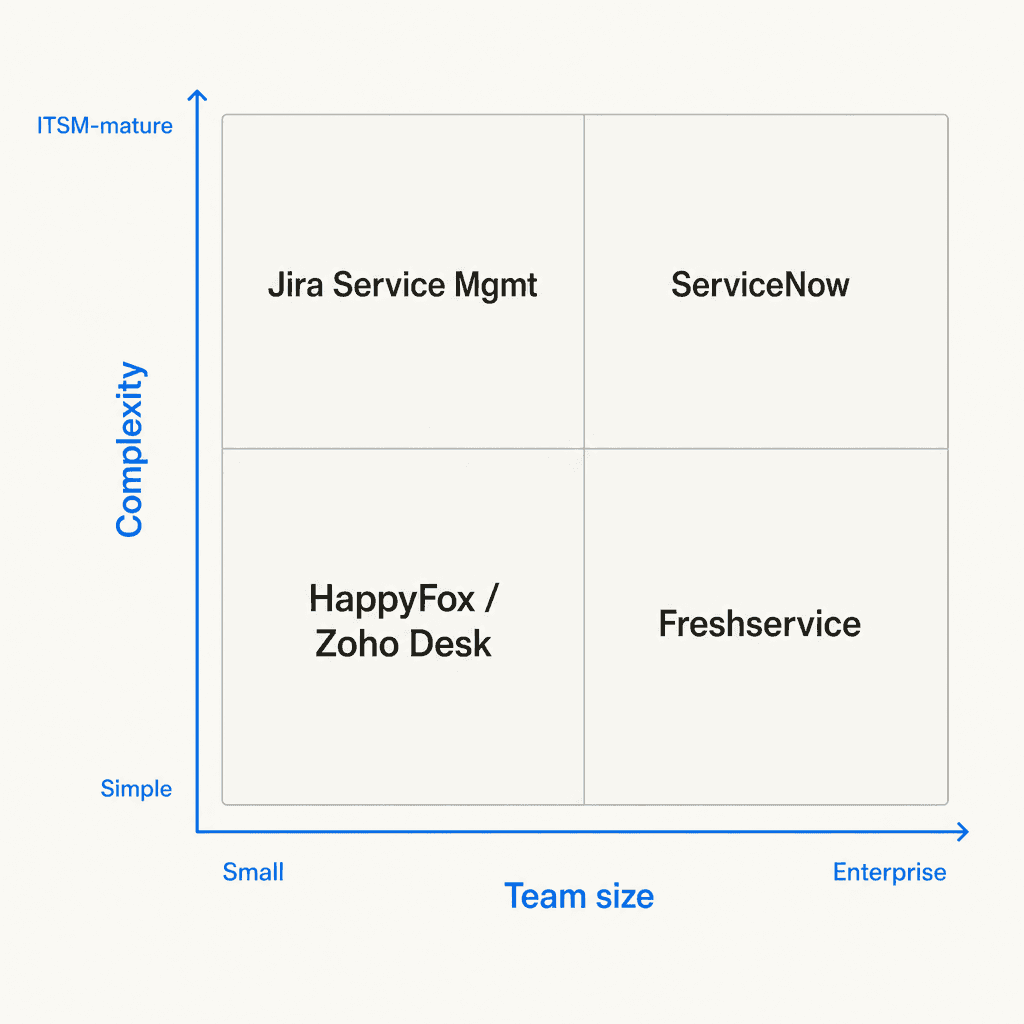
Team size and ticket volume. Small teams (under 10 IT staff, a few hundred tickets/month) often do well with Zoho Desk's free tier or HappyFox Basic. Mid-market teams (20-100 IT staff) typically land on Freshservice or Jira Service Management. Large enterprises almost always end up in ServiceNow territory, with Freshservice as a credible alternative for organizations that want something less cumbersome to implement.
Your existing stack. If you're already running Jira Software and Confluence, Jira Service Management is the lowest-friction choice - integrations are built in, and your team doesn't need to learn a new admin UI. If you're in the Zoho ecosystem (Zoho CRM, Zoho Analytics), Zoho Desk's native connections are a meaningful advantage. If you're starting fresh with no existing ITSM footprint, Freshservice or HappyFox are easier entry points.
ITIL maturity. If you're starting from email-only, you probably don't need change management or a full CMDB yet. Zoho Desk Professional or Freshservice Starter are simpler entry points than the full ServiceNow or JSM Premium stack. As the team grows and ITIL processes formalize, you can upgrade - all these platforms scale upward.
AI priorities. AI-powered features vary significantly across tiers:
- Freshservice's Freddy AI is largely Enterprise-only - budget for it or expect manual work at lower tiers
- Jira SM's virtual service agent requires Premium ($51.42/agent/month) - Standard has limited AI
- ServiceNow includes Now Assist at all three tiers, which is one of the few to bundle AI in Foundation
- Zoho Desk's Zia AI requires Enterprise ($40/agent/month)
- HappyFox's Assist AI and Autopilot are available but lightly reviewed as of 2026
For deeper AI integration - where the AI actively handles tier-1 tickets rather than just suggesting replies - a purpose-built AI layer like eesel AI is worth considering alongside your core helpdesk tool.
Budget. The honest comparison: Zoho Desk gives you the most features for the lowest per-agent price. Freshservice and Jira SM are competitive at $19-$51/agent/month. HappyFox's unlimited-agents track is worth evaluating for high-volume teams. ServiceNow is a different budget category entirely - start there only if you have enterprise infrastructure requirements and an implementation budget to match. For a detailed breakdown, see the best ITSM automation tools in 2026.
eesel AI for your internal helpdesk
Whatever internal helpdesk software you're running - Jira Service Management, Freshservice, Zendesk, or something else - eesel AI works as an AI layer on top of it, handling first responses and resolving common requests before a human agent has to touch them.
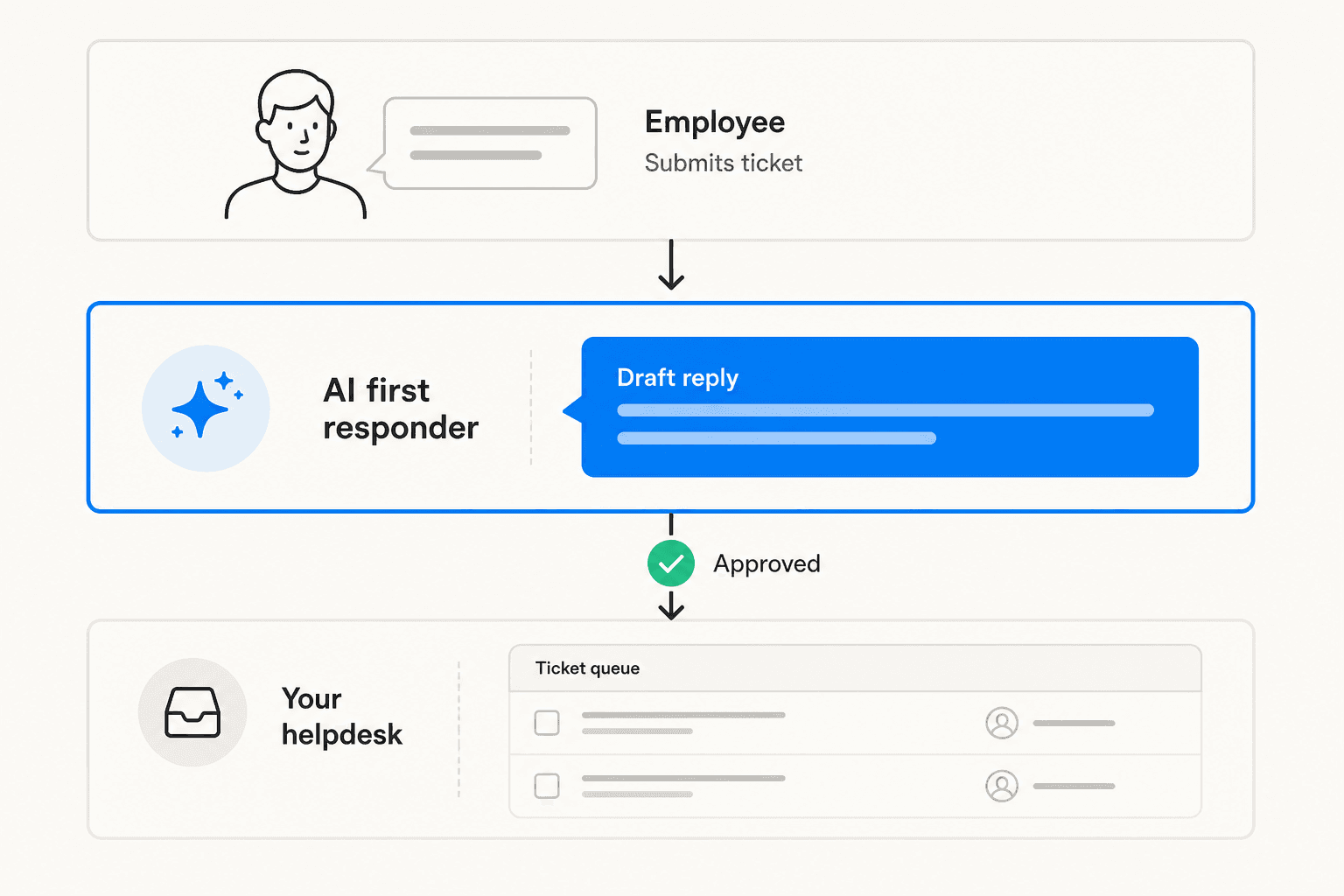
eesel isn't a replacement for your helpdesk. It connects to your existing tool, reads your past tickets and knowledge base, and learns how your team resolves requests. When a new ticket comes in - a password reset, a software access request, an onboarding question - eesel drafts the reply and either sends it automatically or puts it in front of the agent for a one-click approve.
The InDebted IT team uses eesel inside Jira Service Management: "We use it to be the first responder to our helpdesk tickets in Jira. It essentially acts just like an agent would," said Jason Loyola, Head of IT at InDebted. Gridwise's IT team resolved 73% of tier-1 requests in the first month. Global Payments reported up to 80% time savings finding answers across documentation.
Before going live, eesel runs a simulation against your historical tickets - it scores its own accuracy by category (billing, SSO, access requests, onboarding), shows where coverage gaps are, and lets you fill them before any employee gets an AI-drafted reply. It's how teams avoid shipping an AI that confidently answers the wrong thing.
eesel charges $0.40 per resolved ticket - no platform fee, no per-seat licenses. Light tasks (simple lookups, dashboard queries) are free. You can set a monthly spend cap so it never exceeds your budget. The free trial starts at $50 of usage with no credit card required, and you can connect it to your existing helpdesk in under 15 minutes.