Picture this: it's 3 AM, a monitoring alert fires, and your on-call engineer gets paged. Before they can even start diagnosing the problem, they spend 10-15 minutes creating a Slack channel, hunting down who owns the affected service, and assembling the response team. That "assembly tax" happens before a single line of troubleshooting occurs - and it's just one of the invisible costs of manual incident management.
New Relic's 2024 Observability Forecast, a survey of 1,700 IT professionals across 16 countries, puts the average cost of IT outages at $1.9 million per hour, with a median outage lasting 77 hours. IT teams spend roughly 30% of their working week dealing with service interruptions. According to Atlassian's 2025 State of AI in Incident Management Report, 63% of organizations are already using AI for incident response, and adoption grew 21% year-over-year. The rest are falling further behind with each outage that takes hours longer than it should.
This guide covers what automated IT incident management is, how the 7-phase lifecycle maps to automation, nine specific approaches that eliminate manual toil, and a concrete 12-week roadmap for getting there.
What is IT incident management?
Within the ITSM (IT Service Management) framework, an incident is any unplanned interruption or reduction in the quality of an IT service. Incident management is the process that handles every stage of that disruption - from detection through resolution and post-incident review. The goal is to restore normal service operation as quickly as possible while minimizing the business impact.
Three related terms are worth distinguishing before going further:
- Incident management covers the full lifecycle, including pre-incident planning, the active response, and the post-incident review.
- Incident response is the subset of activities focused on containing and resolving the active incident.
- Problem management focuses on identifying root causes to prevent recurrence. If a payment gateway fails three times in a month, incident management handles each individual outage; problem management investigates and fixes the underlying cause.
ITIL (IT Infrastructure Library) provides the most widely adopted framework for structuring incident management. Automated incident management - sometimes called AIM - means replacing manual processes at each stage with workflows, triggers, and rules that execute in real time.
The incident management lifecycle
Exalate's guide to automated incident management maps the lifecycle into seven phases. Knowing where automation can replace manual work in each phase is the starting point for any implementation.
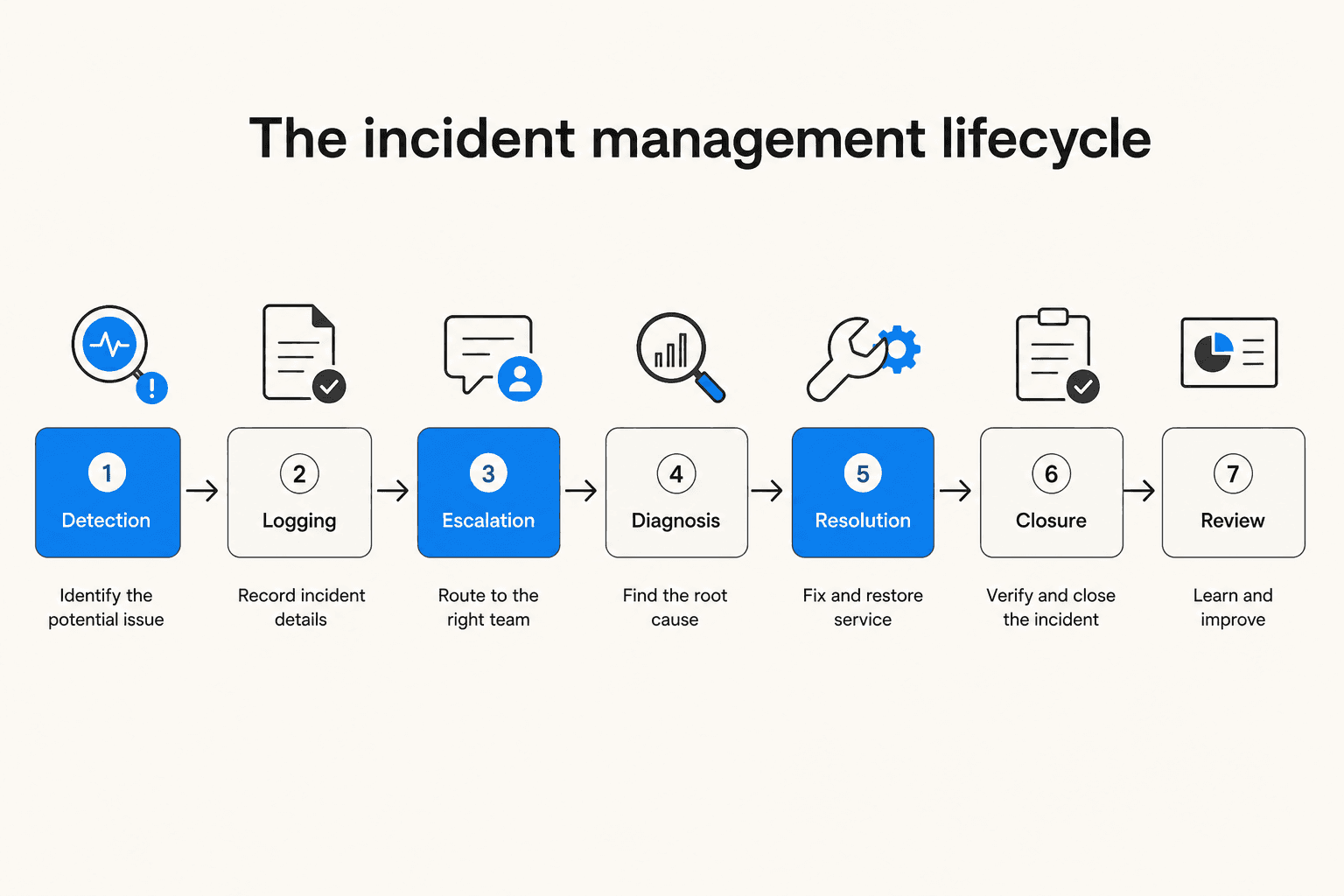
Phase 1: Detection. Monitoring tools identify anomalies before users report them. Modern detection combines threshold-based alerts (CPU usage exceeds 90%), anomaly detection (traffic deviates from baseline), and correlation rules that group related alerts into a single incident to reduce noise. Without automation, many teams find out about outages from customers before their own monitoring catches it - Splunk's research found this happens to 41% of tech executives.
Phase 2: Logging and categorization. The incident gets recorded in an ITSM platform with timestamp, user impact, and symptoms. AI auto-classification tags incidents based on keywords, affected services, or historical patterns. Without this, a human has to read each ticket, decide its category and priority, and manually route it - work that scales linearly with ticket volume.
Phase 3: Escalation and notification. Based on severity, urgency, and number of users affected, the ticket routes to the right team. Time-based rules ensure unacknowledged incidents escalate automatically. This is where the 10-15 minute assembly tax lives in manual environments, and where automation pays off fastest.
Phase 4: Investigation and diagnosis. Automated diagnostic tools pull relevant data from multiple systems - recent deployment logs, configuration changes, dependency maps - to pre-assemble an incident context package for the responder. Rather than a blank canvas, the engineer arrives at a pre-staged investigation.
Phase 5: Resolution and recovery. Some incidents can be resolved entirely through automation: restarting services, rolling back deployments, scaling infrastructure, clearing caches. For novel problems, automation handles data collection while humans focus on the fix itself.
Phase 6: Closure and validation. After resolution, the status updates automatically and the ticket closes. Automated synthetic checks confirm the service is actually restored before closure, preventing the frustrating "resolved but still broken" scenario.
Phase 7: Post-incident review. For major incidents, an AI can automatically generate a summary covering detection time, severity, affected users, and MTTR - reducing the 60-90 minute post-mortem reconstruction to 15-20 minutes of review. That recovery time feeds forward into machine learning models that improve future automated responses.
The business case for automation
The ROI math on automated IT incident management is not subtle.
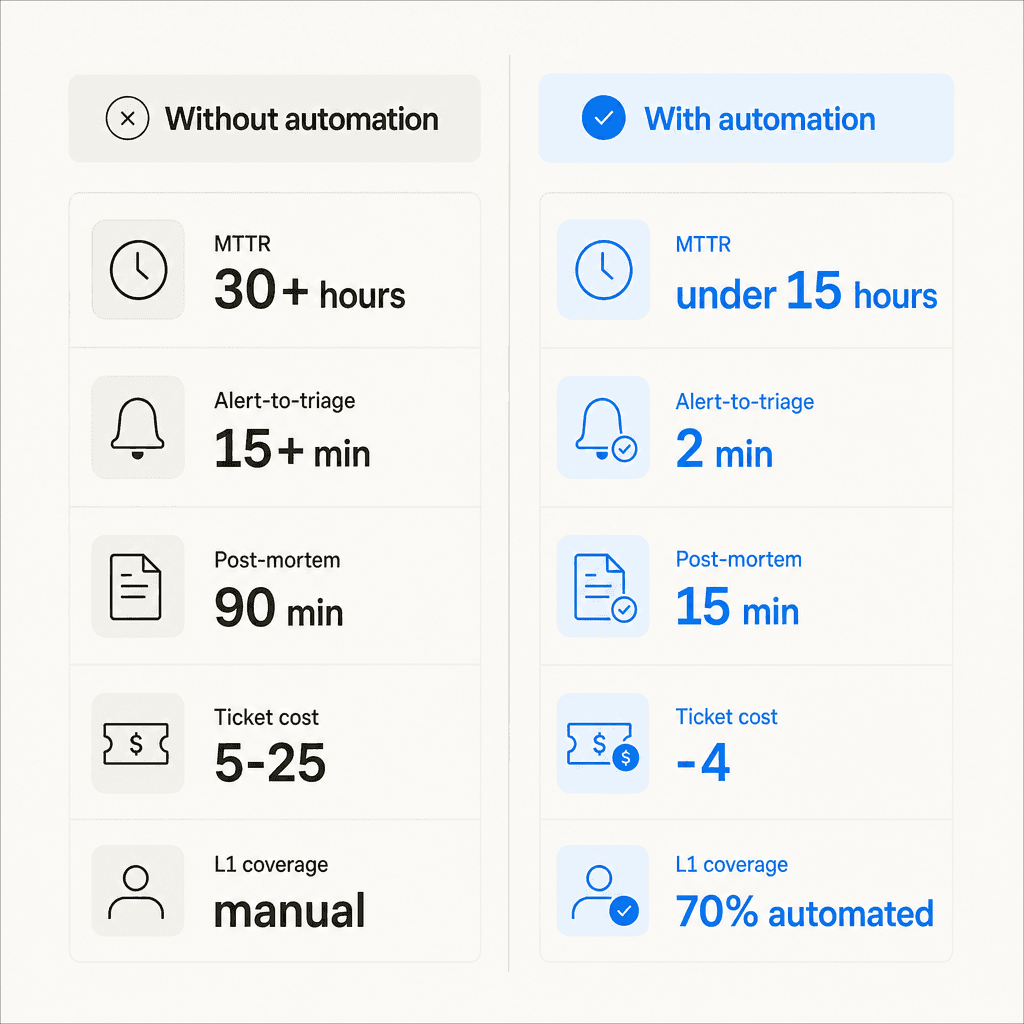
Gartner's benchmark puts average IT downtime at $5,600 per minute, roughly $336,000 per hour. Research from Moveworks cited by the Service Desk Institute shows companies without AI average MTTR exceeding 30 hours; those using AI average under 15 hours. A GB Advisors case study of a global financial institution put a finer point on it: MTTR dropped from 6.5 hours to 2.1 hours after deployment, a 68% reduction, while cost per ticket fell 43% and CSAT improved from 82% to 92%.
On ticket economics specifically, Gartner estimates that live agent tickets cost $15-25 each, while automated self-service reduces that to $2-4. Rezolve.ai's research suggests the best AI-driven systems can resolve up to 70% of tickets autonomously, and GB Advisors reports that up to 70% of a service desk agent's time goes to low-value repetitive work - exactly the work automation displaces.
The team health case is real too. GetDX notes that on-call engineers aren't just losing sleep - they're spending their best cognitive hours on coordination work that adds no diagnostic value. Analyst burnout drives an average 18-month tenure in mid-market security teams; organizations using AI report extending that to roughly 36 months.
"Automation also ensures consistent handling. The same playbook runs at 3 AM on a Sunday just as effectively as at 10 AM on a Tuesday. Human performance varies with fatigue, stress, and workload. Automation doesn't."
Nine automation approaches
Automation in IT incident management isn't a single thing - it's a set of specific techniques applied at different points in the lifecycle. Here's what each one actually does.
1. Alert triage and noise reduction. AI groups related alerts based on shared attributes (timing, affected components, error patterns) into a single incident rather than flooding the on-call queue. Mid-market teams commonly deal with 4,000+ weekly alerts; without grouping, that's thousands of individual pages. A PE portfolio tech company using AI-driven alert management reduced false positive triage from 15 hours per week to 2 hours, an estimated $280,000 in annual savings.
2. Intelligent routing and escalation. AI analyzes previous tickets and resolution times to predict which team handles a new issue best, and routes it automatically. Time-based rules escalate unacknowledged incidents to the next tier without manual follow-up. GetDX reports that this alone typically reduces MTTA (Mean Time to Acknowledgment) by 50-70%.
3. Automated ticket creation and classification. ITSM tools with AI capabilities automatically label new incidents, assign priority levels, and route them based on historical data and keyword classification. This eliminates the manual triage step that, at high volumes, consumes hours of human time each day.
4. Runbook-based auto-remediation. For known incident types, runbook automation executes predefined remediation steps: server restarts, failover triggers, cache clearing, configuration rollbacks, auto-scaling, and deployment rollbacks. Rezolve.ai estimates up to 80% of routine IT tasks can be automated this way. The key is starting with low-risk actions (service restarts) and expanding to higher-risk ones (rollbacks) with approval workflows.
5. ChatOps integration. Bots inside Slack or Microsoft Teams create incident channels automatically, run common diagnostic commands, and provide real-time status updates to responders. The assembly tax drops from 10-15 minutes to near zero. ChatOps integration was the top feature requested by practitioners in recent SRE community discussions about enterprise incident tooling.
6. AI-generated incident summaries. During an active incident, AI automatically summarizes related tickets, alerts, and system data into a concise context package for the response team. Engineers arrive at an investigation with a pre-assembled timeline rather than starting from scratch. Post-incident, this same capability reduces post-mortem documentation from 60-90 minutes to 15-20 minutes.
7. Root cause analysis automation. After resolution, AI examines incident records, logs, and historical patterns to identify recurring causes. A study of 100,000 cloud incidents showed a 49.7% improvement in root cause identification when AI was applied to the analysis. This feeds forward into fewer repeated incidents over time.
8. Cross-platform integration. When incidents span teams using different ITSM platforms - support team in Zendesk, dev team in Jira, infrastructure in ServiceNow - bidirectional integration tools sync incident data in real time. Without this, teams working the same incident from different systems see different state, and coordination becomes the bottleneck.
9. Predictive monitoring via AIOps. Rather than relying on static thresholds, AIOps platforms learn from historical data to identify patterns humans would miss - predicting capacity exhaustion, hardware failures, or change-induced incidents before they affect users. For DevOps teams specifically, this moves incident management from reactive firefighting to proactive prevention. Our guide to AI for DevOps support covers this angle in more depth.
The business case: what to tell your CTO
One of the most common blockers for incident automation is executive buy-in. A Reddit thread on the topic with 10+ comments shows this is a consistent friction point. The framing that tends to work is downtime cost translated to revenue impact.
Incident.io's ROI model for a 100-person engineering organization illustrates the math: a moderate scenario (37.5% MTTR reduction, 127 hours/year of engineering time reclaimed) produces around $216,000 in annual benefit against roughly $54,000 in platform costs - a net $162,000 gain. The conservative scenario still yields $90,000-$110,000 net. The downtime cost formula for a SaaS business is straightforward: annual revenue divided by 8,760 hours, multiplied by the percentage of customers affected per outage.
Favor used incident.io to reduce MTTR by 37% by eliminating manual coordination overhead. Buffer saw a 70% reduction in critical incidents. These are representative, not outliers - the consistent direction across case studies is 30-70% MTTR improvement.
The other lever worth quantifying for budget approval: live-agent ticket cost versus automated ticket cost. At Gartner's benchmarks, an IT team handling 2,000 tickets per month at $20 each is spending $40,000 per month on ticket handling alone. If automation resolves half of those at $3 each, the monthly savings pay for most mid-market incident automation platforms several times over.
A 12-week implementation roadmap
GetDX recommends a three-phase approach that avoids the most common failure mode: trying to automate everything at once, getting tangled in edge cases, and abandoning the project before the ROI materializes.
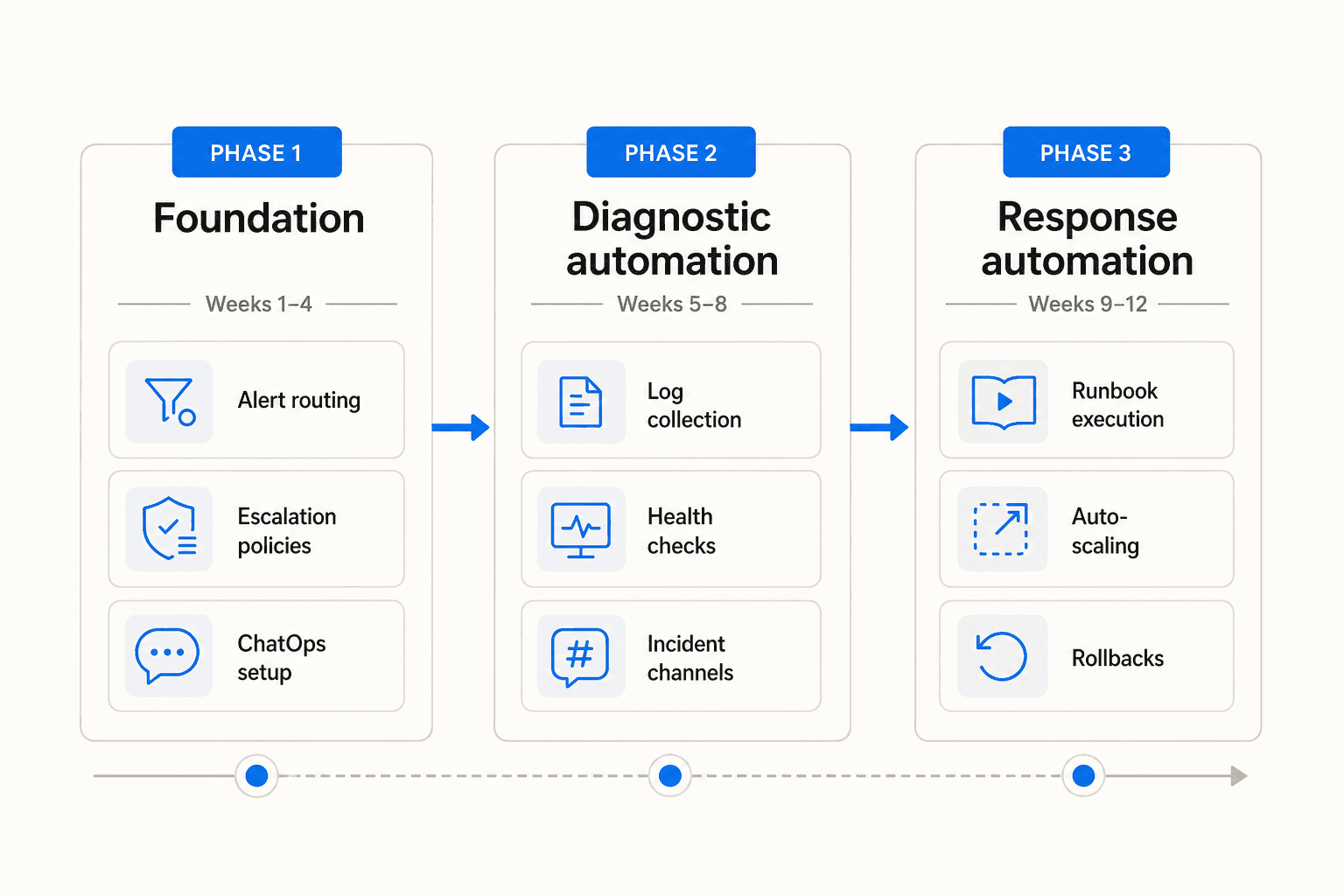
Phase 1 - Foundation (weeks 1-4)
Document current processes and measure baseline MTTR before touching any tooling. Without this baseline, you cannot demonstrate ROI later. Then implement intelligent alert routing, set up automated escalation policies with time-based rules, and create basic ChatOps integration so incident channels and notifications stop being manual. This phase eliminates the assembly tax and sets up the plumbing that everything else runs through.
Phase 2 - Diagnostic automation (weeks 5-8)
Build automated log collection and health check dashboards. Deploy ChatOps bots to run common diagnostic commands. Implement automated incident channel creation with pre-populated context (affected service, recent deployments, alert history). The goal is that by the time a human joins an active incident, the system has already assembled the relevant data.
Phase 3 - Response automation (weeks 9-12)
Start with low-risk auto-remediation actions only: service restarts for known failure patterns, scaling triggers for load-based thresholds. Add approval workflows for higher-risk actions like rollbacks. Convert manual runbooks into executable automation. By this point, your team should have 4-6 weeks of data on how the Phase 1 and Phase 2 automation performs, which informs which runbooks are safe to automate and which need human oversight.
For L1 helpdesk automation specifically - the ticket-resolution layer where users report password issues, access requests, and common IT questions - a simulation-first approach works well. Test the AI against historical tickets before routing any live traffic. Identify gap areas (where the knowledge base needs to be updated before the agent can handle a category reliably), fill them, and only then enable autonomous response on those categories.
Metrics to track
86% of organizations use MTTR as their primary performance indicator, and it's the right anchor. But the full picture requires tracking a set of related metrics.
| Metric | What it measures | Best-in-class benchmark |
|---|---|---|
| MTTR (Mean Time to Resolution) | Time from incident open to fully resolved | Under 4 hours (HDI) |
| MTTA (Mean Time to Acknowledgment) | Time from alert to first human response | Under 5 minutes with escalation automation |
| MTTD (Mean Time to Detection) | How quickly monitoring identifies incidents | Minutes for automated monitoring vs 17-18 hours for human error-caused incidents (Splunk) |
| Automation coverage rate | Percentage of tickets resolved without human intervention | 20-50% for mature teams; 40%+ is best-in-class |
| Cost per ticket | Handling cost per incident | $2-4 automated vs $15-25 live agent (Gartner) |
| First contact resolution (FCR) | Percentage resolved in the initial interaction | 60%+ for best-in-class service desks |
| SLA compliance rate | Percentage of tickets resolved within agreed timelines | 95%+ target |
Our chatbot analytics guide covers the measurement framework in more detail, including how to instrument these metrics from a helpdesk AI deployment.
Common mistakes to avoid
Skipping the baseline. Teams that don't measure MTTR before implementing automation have no way to demonstrate ROI afterward. The executive who approved the budget will ask. Take two weeks to document current performance before changing anything.
Treating all tickets as the same. Not every incident benefits from automation equally. Start with high-volume, predictable ticket types where you have good historical data. A password reset is a great automation candidate; a multi-region database failover is not - at least not without carefully designed runbooks and approval gates.
Alert fatigue from poor tuning. Ironically, poorly configured automation can generate more noise than it eliminates. Automating alert creation without also automating alert grouping and noise reduction creates a firehose that engineers start ignoring. The r/devops community's skepticism about AI-washing is partly a reaction to this - vendors who promise AI-powered incident management but deliver poorly tuned alert forwarding through a GPT wrapper. Regular threshold tuning based on false positive rates is essential maintenance, not a one-time setup.
Automating before your knowledge base is ready. An AI agent is only as good as the knowledge it can draw on. If your resolution procedures are locked in tribal knowledge or outdated wiki pages, the agent will confidently apply the wrong fix or escalate everything because it has nothing to work from. Audit and update your knowledge base before enabling autonomous responses. eesel's KB Auto-Updater skill can help close this loop continuously - it identifies knowledge gaps from conversation patterns and drafts articles from resolved tickets.
Forgetting post-mortems. Teams under pressure often skip post-incident reviews for "minor" incidents. Over time this means recurring incidents never get addressed at the problem-management layer, automation keeps resolving the same ticket types indefinitely instead of eliminating the root cause, and the feedback loop that improves the AI's performance never closes. Even a 15-minute async review preserves the learning.
eesel for IT incident management
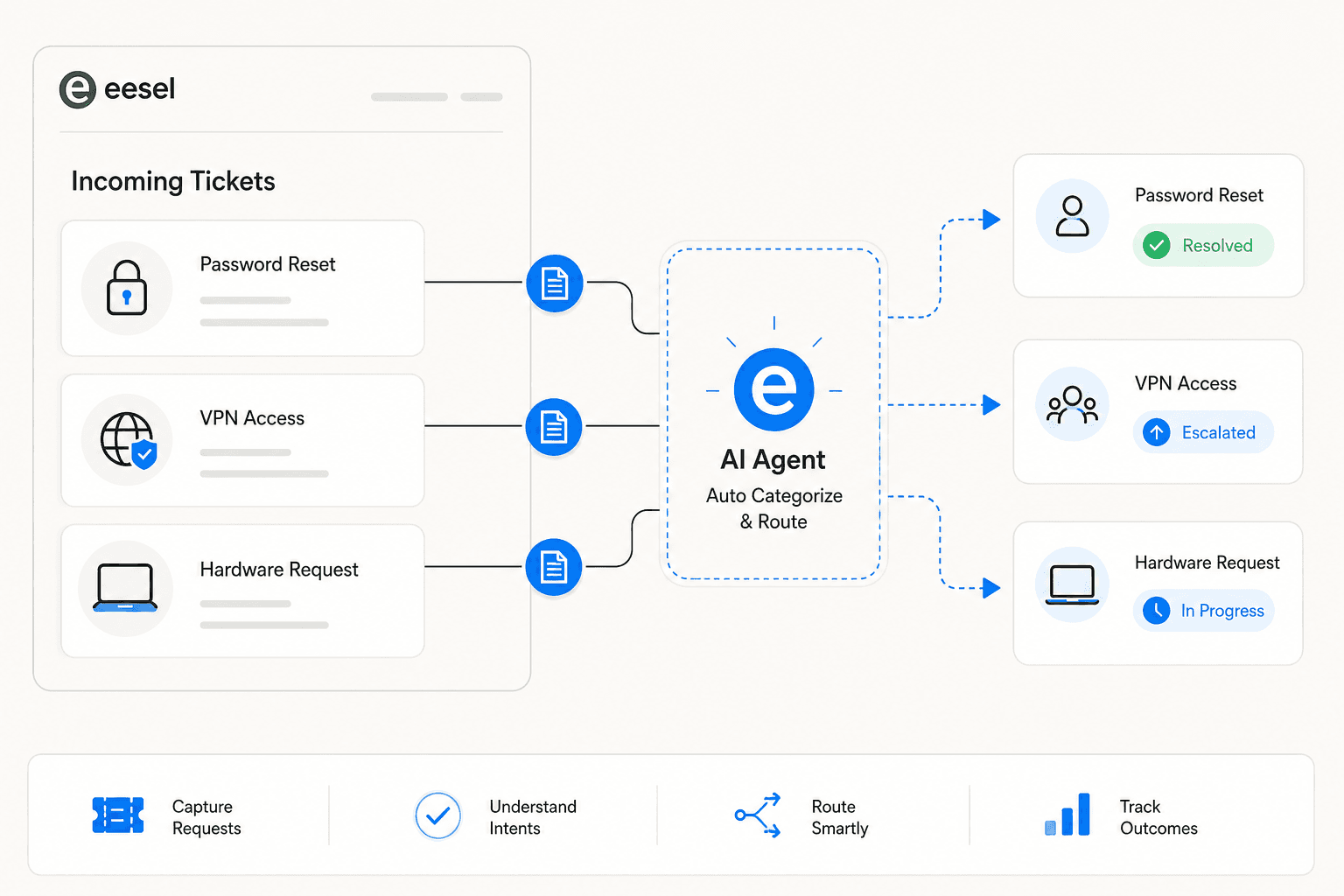
eesel is an AI teammate designed to act as the first responder for IT helpdesk tickets. It connects to your existing helpdesk (Zendesk, Freshdesk, Jira, HubSpot, Help Scout), indexes your historical tickets and knowledge base on day one, and starts triaging and resolving tickets at $0.40 each - no platform fee, no per-seat cost.
The simulation-first approach means you test the agent on historical tickets before exposing it to live traffic. It surfaces knowledge gap areas (for example: "14 tickets asked about SSO configuration this month, but your docs only cover basic login"), you fill the gaps, and then you enable autonomous response on those categories. Jason Loyola, Head of IT at InDebted, describes the result: "We use it to be the first responder to our Helpdesk tickets in Jira. It essentially acts just like an agent would."
For internal IT teams specifically, eesel also handles the Slack layer - answering employee questions about VPN setup, access requests, equipment policies, and common IT issues directly in Slack before they become tickets. See the Slack integration page for how that's configured.
Pricing is usage-based with no minimum:
| Monthly tickets routed to eesel | Cost |
|---|---|
| 100 | $40 |
| 500 | $200 |
| 1,000 | $400 |
| 2,500 | $1,000 |
Annual commit (minimum $300/month) gets you a 25% discount. Enterprise ($1,000/month flat fee) includes SSO, HIPAA, dedicated support, and higher knowledge base limits. Full pricing at eesel.ai/pricing.
The IT helpdesk implementation guide walks through the full setup process - from knowledge base audit through simulation to phased rollout. Our AI helpdesk implementation guide and best Freshservice alternatives roundup cover the broader ITSM tooling decision if you're also evaluating platforms. If the cost question is the blocker, AI vs hiring support agents has the year-one cost breakdown.
You can test it free - $50 in usage at signup, no credit card required. Start at eesel.ai/ai-helpdesk-agent.