How we picked
Before getting into the tools, here's the lens we used. We've spent the last few months hands-on with each of these (or, in two cases, with as much of each as their sales teams would let us see in a demo). The dimensions that actually mattered when we lined them up:
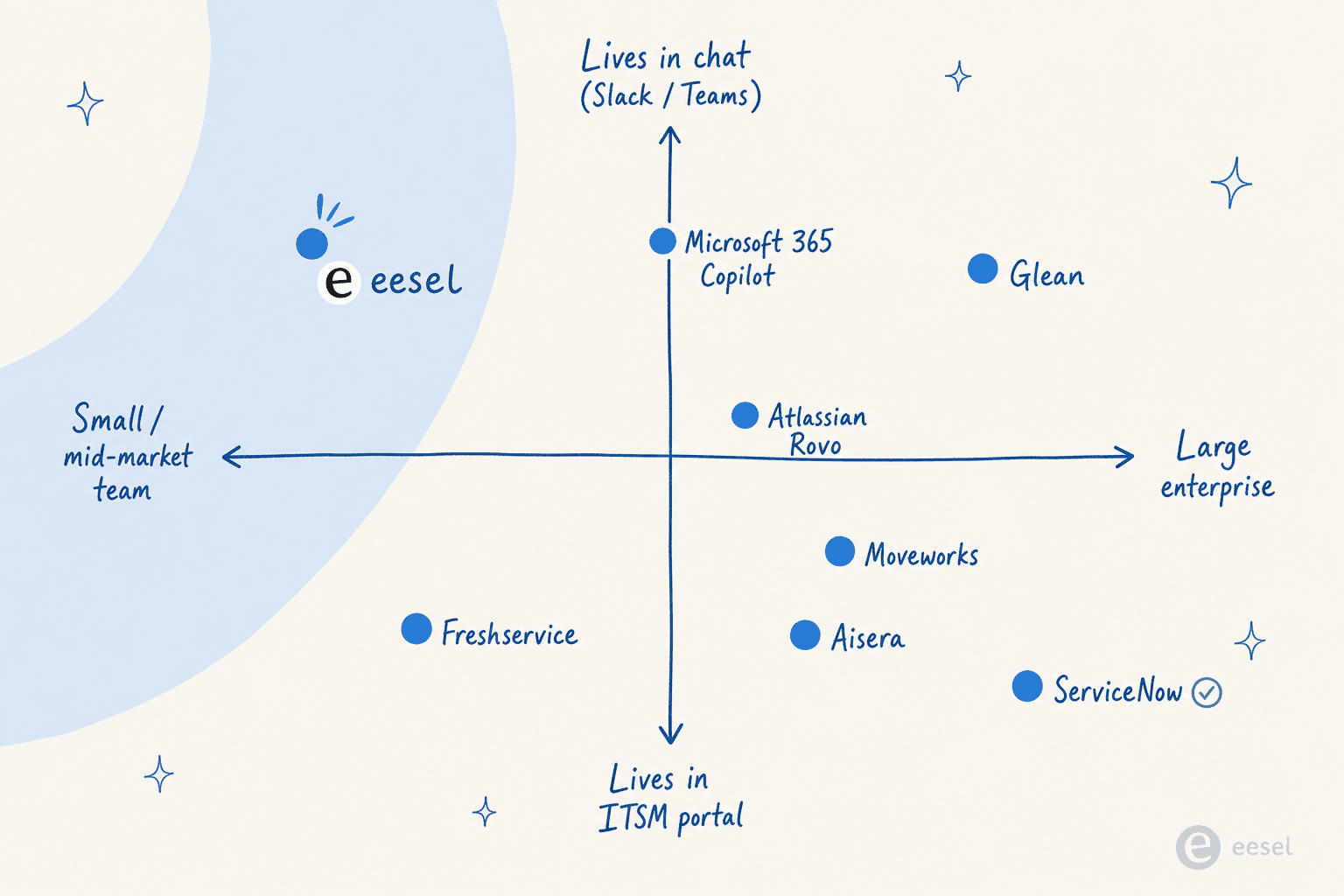
- Does it live where employees already are? Internal support runs in Slack and Teams. A bot that forces employees to open a separate portal is a bot that quietly gets bypassed. An r/sysadmin operator running internal IT AI in production put it well: if the AI doesn't live in your chat tool and doesn't integrate with your identity provider, it's "just a useless chatbot creating tickets".
- Can you simulate it before going live? A confidently-wrong AI is worse than no AI. The same r/sysadmin thread is full of stories about bots that told users to "reset your modem" on a site-wide network outage. The tools that let you replay against past tickets before going live are the ones that don't blow up in production.
- What does it actually cost? Not the sticker, the all-in. A "great" tool that requires a $130,000 contract minimum and 8-week implementation is a different product than one you can spin up over a Tuesday afternoon. For internal teams under ~2,000 employees, the enterprise quote-based options are usually a bad fit no matter how shiny the demos are.
- How honest is the deflection number? Every vendor will quote you 70–80% deflection. The real range, when you cross-check vendor claims against customer ones, lands somewhere between 20% and 75% depending on the org and the knowledge base quality. We've leaned into the customer numbers, not the marketing pages.
- What does the AI do when it's not sure? Citation, escalation with full context, no hallucinated answers from thin knowledge - these are the boring things that separate a real internal support AI from a chatbot demo.
Ratings are pulled from the public review platforms (G2, Gartner Peer Insights, Reddit) on 2026-06-11; pricing is current as of the same date.
The 8 best AI for internal support teams in 2026
1. eesel
Best for: internal teams (10–5,000 employees) who want AI in their existing stack without a six-figure procurement cycle.
eesel is the tool we'd actually reach for at most companies. Its pitch is "hire AI teammates" - autonomous AI agents that live inside the apps you already use (Slack, Microsoft Teams, Zendesk, Freshdesk, Jira Service Management, Confluence, Notion, Google Drive, and 100+ others) rather than forcing employees into a new portal.
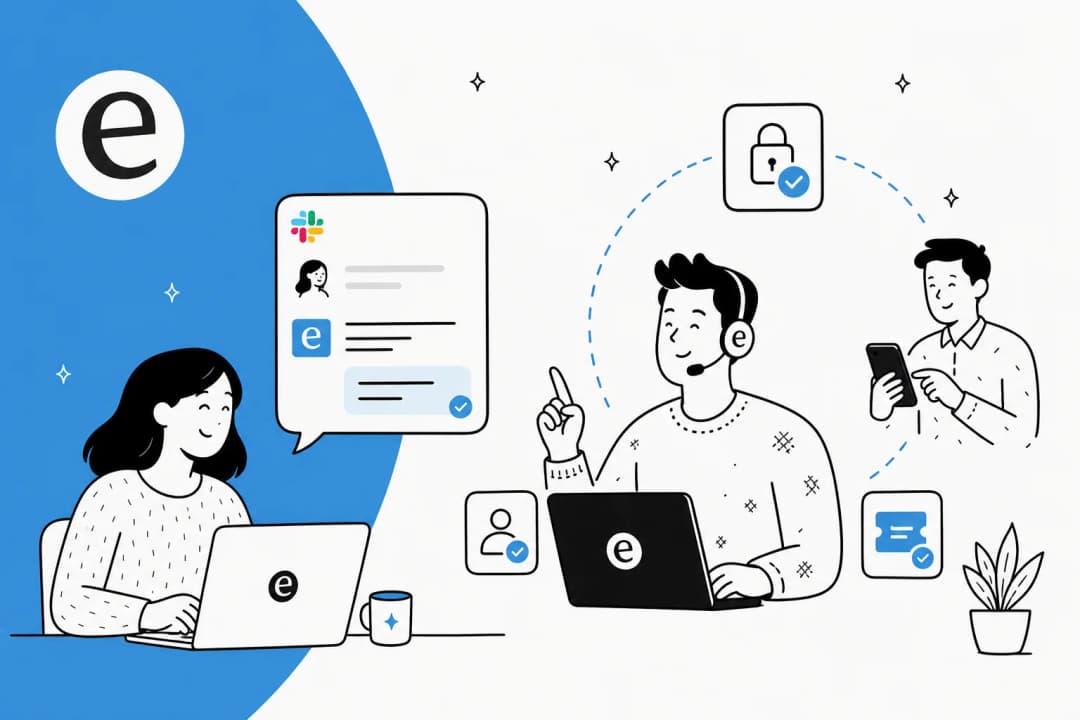
For internal support specifically, the use case looks like this: an employee asks "how do I get access to the new Looker workspace?" in your internal Slack. eesel reads the question, searches your Confluence, your past Jira tickets, and your IT runbook, drafts the answer, cites the source, and either resolves it autonomously or escalates to an IT engineer with the full context attached. InDebted runs eesel as a first responder to its Helpdesk tickets in Jira; BitGo uses it as an internal Slack AI teammate for documentation Q&A.
What it's great at
- Lives where employees already are. Slack, Teams, email, Jira, Zendesk, Freshdesk, Intercom, Front, Help Scout - pick your stack, eesel installs into it as a native app rather than a separate destination.
- Set up in under an hour. Ecosa reports ≤1 hour to fully integrate eesel with their Zendesk; no professional services engagement, no eight-week implementation.
- Simulation on past tickets. Before going live, you can replay eesel against your historical tickets and see exactly which it would have resolved, which it would have escalated, and where the knowledge gaps are. The other tools on this list either don't have this or gate it behind a sales engineer.
- Knowledge-gap detection. When eesel doesn't have a confident answer, it surfaces the topic and drafts a new KB article to fill the gap. Internal support teams are almost always blocked by stale documentation; this turns that blocker into a feature.
- Multi-source knowledge. Confluence, Notion, Google Docs, SharePoint, past tickets, macros, CSVs - pull from everything at once, with permissions inherited from the source app.
- Plain-language briefing. No prompt engineering, no rules editor. You tell eesel "handle the access request queue, but anything that touches production secrets, loop in security" and that's the instruction.
What it isn't great at
- It's not an ITSM platform. If you need full asset management, CMDB, and change-management workflows, eesel is the AI layer that sits on top - you'd still want Freshservice, Jira Service Management, or ServiceNow underneath.
- It's still a relatively young brand in enterprise procurement compared to ServiceNow or Moveworks. If your buyer requires a Gartner Magic Quadrant placement to sign, this is a friction point.
Pricing
| Item | Cost |
|---|---|
| Free trial | $50 of usage + 2 free blog generations, no card required |
| Resolved task (one ticket, full thread) | $0.40 |
| Light task (dashboard Q&A) | Free |
| Annual commit ($300+/mo) | 25% discount |
| Enterprise | $1,000/mo platform fee + usage |
The pricing model is the part most internal support buyers underrate. With no seats and no platform fee on self-serve, a 500-person internal IT team with 1,000 tickets/month pays $400. Compare that to Moveworks' typical mid-market quote (six figures annually) and the rip-and-replace math falls apart.
Our take: for the vast majority of internal support teams (under 5,000 employees), eesel is the right starting point. Most teams will get more value from a tool that ships in an hour and proves itself on real tickets than from spending six months evaluating an enterprise contract. Start with the $50 free trial.
2. Moveworks
Best for: Fortune-500 IT and employee-support orgs (5,000+ employees) already standardised on ServiceNow.
Moveworks is the original enterprise internal-support AI and still the most credible enterprise reference list. It was acquired by ServiceNow for ~$2.85B (deal closed December 15, 2025) and now sits as the AI front door for ServiceNow's Now Assist / EmployeeWorks agentic portfolio.
The proof points are real: Amadeus reduced support-team calls by 44% in under a year and gave back 16,000+ hours/month globally, CVS Health reports 50% reduction in live agent chats in under 30 days, and Moveworks claims 350+ organizations, 10% of the Fortune 500, and 6M+ employees on the platform. It's named a Challenger in the 2025 Gartner Magic Quadrant for AI Applications in ITSM.
What it's great at
- Enterprise scale. The reasoning engine orchestrates across 100+ enterprise systems - ServiceNow, Workday, Salesforce, Okta, Active Directory, SharePoint, Slack, Teams - and routes by individual permissions. This is where the multi-million-dollar deal earns its keep.
- Strong references in regulated industries. Compliance posture covers ISO 27001, SOC 2, HIPAA, GDPR, and FedRAMP, which is rare in this category.
- End-to-end task automation. Not just answers - actual provisioning, password resets, software requests, and ticket creation, with a marketplace of 1,000+ pre-built agents.
What it isn't great at
- Cost and contract minimums. Vendr's marketplace data shows a median ACV of ~$130,000 across 31 purchases, with per-employee pricing of $15–$45/year. Unthread reports a typical 3-year TCO of $1.5M–$3.5M for a 5,000-employee org including implementation. There is no free tier, no trial, no published pricing.
- Implementation effort, disputed. Gartner's published pull-quote on the Moveworks page reads: "It's not easy to set and requires a lot of leg work for it to start providing results." Some reviewers counter that ServiceNow-mature shops can deploy in ~2 months - time-to-value depends heavily on existing stack maturity.
- Acquisition anxiety. Customers are nervous. One r/servicenow Moveworks customer wrote: "I'm a current customer of Moveworks and slightly nervous that quality and support will drop. Curious if others are feeling the same / debating moving to another vendor?" Another r/sysadmin user worried the EmployeeWorks rebrand is "Moveworks-with-a-ServiceNow-logo" rather than new capability.
- Edge-case accuracy. A real customer report from r/sysadmin on the autonomous responses:
"Is this why we put in a ticket for network outage at a site and we got a bullet point reply that told us to 'reset your modem', 'restart the network', and 'limit streaming services'? ... No the massive site does not have a modem and it's not a working method to restart the network." - u/Coldsmoke888 on r/sysadmin, Feb 2026
Pricing
| Item | Cost (third-party, not published) |
|---|---|
| Pricing model | Per total employee headcount, flat annual fee, unlimited usage |
| Per-employee band, 1,000–5,000 employees | $20–$40 per employee/year |
| Per-employee band, 10,000+ employees | $15–$30 per employee/year |
| Median deal size | $130,080/year (Vendr) |
| Implementation | $50,000–$200,000+ over 8–16 weeks |
| 3-year TCO (5,000-employee org) | $1.5M–$3.5M |
Our take: if you have 5,000+ employees, already run ServiceNow, and your CIO has the budget approved, Moveworks remains the safe enterprise pick - the references are real, the scale is real, and ServiceNow has a track record of investing in what it buys. For anyone smaller, the math doesn't work and it never did.
3. ServiceNow Now Assist
Best for: orgs already running ServiceNow ITSM at scale that want their AI consolidated in the same platform.
ServiceNow ITSM is the gravity well of enterprise IT service management - they claim 85% of the Fortune 500 run on ServiceNow. Now Assist is its generative/agentic AI layer, sitting natively across the Virtual Agent, AI Search, case summarization, and a growing set of autonomous AI Agents. Big-name customer outcomes on their page: Lion's 77% reduction in resolution time, USI's 47% MTTR drop with AI, and Ernst & Young's 75% reduction in service ticket volume.
What it's great at
- Native to ServiceNow's data model. If you already have years of incident, change, and CMDB data in ServiceNow, Now Assist is the AI that knows the most about your tickets.
- Comprehensive enterprise feature set. Omnichannel Virtual Agent (Teams, Slack, portal, voice, email), generative AI Search across the KB, automatic incident summarization, and a roadmap toward Autonomous Service Operations.
- Strong analyst recognition. Gartner Magic Quadrant Leader in AI ITSM and G2's #1 in nine ITSM categories.
What it isn't great at
- Pricing opacity and renewal creep. ServiceNow doesn't publish list pricing. Now Assist is sold as a Pro Plus / Enterprise Plus add-on with a premium UpperEdge describes as "upwards of 60%" over the underlying license. One r/servicenow partner reports a 5-year contract growing from $200k toward $1.8M on renewal.
- Deflection underdelivers in the field. The top complaint on r/servicenow about Now Assist is that it's "a slightly smarter virtual agent that still kicks most things to a human", failing on tier-1 password resets and access requests where Moveworks shines.
- KB garbage-in, garbage-out. Defenders attribute most AI failures to messy KB and CMDB data - which is true, and also means the AI buy is a glorified knowledge-cleanup project for a lot of shops.
- Licensing complexity drives walkaways. Customers are walking from Now Assist because the model is "too complicated to understand or too expensive," even considering a second platform on top of ServiceNow to avoid it.
Pricing
| Tier | Cost (third-party estimate) |
|---|---|
| ITSM Standard | ~$100/fulfiller/mo (NowTribe) |
| ITSM Pro | ~$160+/fulfiller/mo |
| ITSM Pro Plus (Now Assist included) | ~60% premium over Pro |
| Enterprise | Quote only |
| Volume deal (1,000+ users) | $50–$75/user/mo possible |
| Reported minimum to start | ~$30k contract |
| Average contract size | ~$130,080/year (NowTribe) |
Our take: if you already run ServiceNow ITSM and are already spending into the six figures, Now Assist is the path of least resistance for adding AI to internal support - it lives inside the data and workflows your team already uses. If you don't, this is not where you start a fresh internal-support AI program.
4. Freshservice Freddy AI
Best for: mid-market IT teams already on Freshservice Enterprise.
Freshservice is Freshworks' AI-powered ITSM platform, with the AI layer branded Freddy AI. Headline claims from their Benchmark Report 2025: 356% ROI in under 6 months, 98% CSAT, 66% AI-powered ticket deflection, 77% decrease in resolution time. Customer logo wall includes Trainline, ITV, Carrefour, Databricks, New Balance, Seagate, University of Oxford, HelloFresh, and Marvel.
Freddy AI splits into three named products: Freddy AI Agent (the autonomous, employee-facing bot), Freddy AI Copilot (agent-assist inside the workspace), and Freddy AI Insights (analytics for leaders).
What it's great at
- Clean UI and fast time-to-value for sub-500-employee orgs. Reviewers consistently call out that Freshservice "gets the job done" and offers good base pricing relative to ServiceNow (r/Freshservice).
- Decent self-service / autonomous resolution layer. Freddy AI Agent handles password resets, status lookups, and routine requests across chat, messaging, and email channels.
- Built into the ITSM platform. No separate AI product to evaluate - it's all one Freshworks contract.
What it isn't great at
- Freddy AI is Enterprise-only. Look at the pricing page - Freddy AI Agent and Copilot are gated to the Enterprise tier, which is quote-only. Starter/Growth/Pro customers can't even buy it as an add-on.
- Session-based billing on top of per-agent. Freddy AI Agent is billed by session (any 24-hour interaction window for a unique user). Each Enterprise license includes 1,200 sessions/year; overage packs are quote-based. Pricing is tied to agents, not employees, which scales poorly for big organisations.
- Real-world MTTR regressions. One 600-person org reported on r/Freshservice that tier-1 MTTR rose ~20% and duplicate tickets rose ~15% five months after enabling Freddy - handoff overhead made things worse, not better.
- AI perceived as stagnant. Community pull-quotes call it "advanced automation, not cutting-edge ML" and "abysmal" at deflection, with no learning loop from unhelpful ratings.
- Teams ServiceBot setup friction. The Microsoft Teams ServiceBot + Freddy SharePoint integration demands very broad ("read all site collections") permissions that block security sign-off in many orgs.
Pricing
| Plan | Price (billed annually) | Freddy AI included? |
|---|---|---|
| Starter | $19/agent/month | No |
| Growth | $49/agent/month | No |
| Pro | $99/agent/month | No |
| Enterprise | Custom quote | Yes (1,200 sessions/year/license) |
Our take: if you're already on Freshservice Enterprise, give Freddy a real pilot - but run it against your past tickets first and watch your MTTR carefully in month 4–5. If you're not on Freshservice today, this isn't the AI you'd buy a new ITSM for; our best AI for Freshservice guide covers the alternatives.
5. Atlassian Rovo
Best for: teams whose primary knowledge lives in Confluence and Jira.
Atlassian Intelligence is the umbrella for AI in Atlassian's cloud products; the user-facing product is Rovo - search, chat, and agents grounded in the Atlassian "Teamwork Graph." It's the obvious pick if your internal support knowledge already lives in Confluence and your IT tickets already live in Jira Service Management.
What it's great at
- Bundled into paid Confluence plans. Rovo Search, Chat, and Agents are automatically included in Confluence Standard ($5.42/user/mo), Premium ($10.44/user/mo), and Enterprise - no separate AI subscription fee. Most Atlassian shops already have it without knowing.
- Deep Atlassian context. Rovo cross-references Confluence pages and Jira ticket history when it answers; the "Teamwork Graph" maps people, projects, content, and goals.
- Permission-aware. Rovo only surfaces content a user already has access to - so a contractor asking about an HR policy doesn't accidentally get exec comp data.
- Knowledge cards and definitions. Inline jargon/acronym resolution and team/project knowledge cards are genuinely useful for new hires drowning in internal jargon.
- 100+ third-party connectors. Slack, Teams, Google Drive, SharePoint, Notion, GitHub, Salesforce, Zendesk all index in.
What it isn't great at
- No native Slack or Teams bot. This is the headline limitation for internal-support buyers. Rovo lives inside Atlassian products and a Chrome browser extension; employees who spend their day in Slack or Teams have to context-switch to Atlassian (or chat.rovo.com) to use it. Rovo can read Slack/Teams content as a source - it just doesn't live there.
- Credit caps are tight on Standard. 25 credits/user/month sounds fine until you realise that Deep Research, agent-driven status reports, and chat drafting all consume credits. A 50-person team will hit the ceiling and need Premium (70 credits) or Enterprise (150 credits).
- Free plan gets nothing. Rovo is absent from Confluence Free entirely. Small teams (<10 users) on free plans have no access.
- Confluence-first indexing. Third-party connectors work, but answer quality is strongest when knowledge lives in Confluence. Heterogeneous knowledge bases get uneven results.
- Atlassian-hosted LLM (no third-party data transfer) is Enterprise-only. Standard and Premium default to multi-LLM routing including OpenAI and Anthropic - a no-go for some compliance-heavy orgs.
- Hallucination risk acknowledged. Atlassian's own trust docs warn that Rovo answers "may not accurately reflect the content they are based on". Standard caveat, but worth surfacing.
Pricing
| Plan | Price | Rovo included | Rovo credits |
|---|---|---|---|
| Free | $0 (up to 10 users) | No | - |
| Standard | ~$5.42/user/mo | Yes | 25/user/mo + 100 indexed objects/user |
| Premium | ~$10.44/user/mo | Yes | 70/user/mo + 250 indexed objects/user |
| Enterprise | Contact sales | Yes | 150/user/mo + 625 indexed objects/user |
Our take: if your internal support knowledge already lives in Confluence and your team is fine asking questions inside Confluence or via the Rovo Chrome extension, Rovo is essentially free with your existing plan and worth turning on tomorrow. If your team lives in Slack or Teams, layer something on top that brings answers to the chat tool - eesel does this natively over Confluence. More on the trade-off in our best AI for Confluence review.
6. Glean
Best for: large enterprises (1,000+ employees) consolidating knowledge across many SaaS tools, where IT internal support is one of several teams onboarded.
Glean is the horizontal enterprise "Work AI" platform - a single layer that unifies enterprise search, an AI assistant, and AI agents on top of every tool a company runs on, with permissions and governance baked in. It's positioned across departments - engineering, sales, support, HR - and internal IT support is a strong slice of that.
Customer stats on the homepage: Booking.com made it their first AI platform adopted company-wide (14k employees); Zillow reports 1.5+ hours saved weekly per user, 80% adoption, 3.4k+ agents built; Ericsson trained 20k+ employees and built 2.7k+ agents; GCash hit 90%+ adoption in some teams.
What it's great at
- Permission-aware enterprise search. Glean inherits permissions from every source app - Confluence space restrictions, Google Drive folder ACLs, Salesforce object permissions - so users only see what they're allowed to see in answers.
- Strong customer references. The Webflow Director of IT testimonial sums up the category well: "I looked at and tried out tools that said they could handle enterprise search... nothing worked. So, I was skeptical at first. However, Glean quickly proved that my skepticism was invalid."
- Native Slack, Teams, mobile, and web. Genuine omnichannel - the AI shows up where employees ask questions, not in a single portal.
- Strong compliance posture. SOC 2 Type II, ISO 27001, ISO 42001, GDPR, TX-RAMP Level 2, HIPAA on the homepage; runs in a single-tenant cloud (customer's own environment).
- Agent platform, not just search. Glean Agents build, deploy, and observe agents at scale - Ericsson's 2.7k+ and Zillow's 3.4k+ aren't pilots, they're production fleets.
What it isn't great at
- No public pricing. Glean's pricing page has zero numbers - only a "Get a Demo" button. Third-party secondary sources have historically cited rough figures in the ~$40–$50/user/month range, but Glean doesn't confirm this anywhere and treats every deal as a custom enterprise quote.
- Built for enterprise scale. Single-tenant cloud deployment, seat minimums, enterprise contracts - this is not a "spin up over lunch" buy. If you're a 50-person internal IT team, you'll be politely declined by the demo team or quoted out of range.
- Token-efficiency narrative is the new pitch, but unverifiable. Glean leans hard on "reduces token waste and lowers the cost to scale AI" - useful framing if you're paying for an LLM stack already, but customers can't independently verify the savings claims without a real deployment.
Pricing
| Item | Cost |
|---|---|
| Public pricing | None - demo-gated, custom enterprise quote |
| Secondary-source estimate (not Glean-confirmed) | ~$40–$50/user/month with seat minimums |
| Free tier | None |
| Free trial | None |
Our take: if you're a 1,000+ employee enterprise where IT support is one of several teams that want an AI layer across the same set of SaaS tools, Glean is in the natural shortlist. If IT support is your only use case, you're paying for a horizontal platform's capabilities you won't use - a focused tool like eesel or Moveworks is a better starting point.
7. Microsoft 365 Copilot
Best for: Microsoft-first orgs that want general AI productivity inside Teams, Word, and Outlook, with internal support as one workflow among many.
Microsoft 365 Copilot is the AI assistant embedded across the Microsoft 365 suite - Word, Excel, PowerPoint, Teams, Outlook - plus Copilot Studio for building custom agents on top of it. The pitch is enterprise-grade security and privacy with deep context across the Microsoft surface.
It's listed here because it shows up in every internal-support evaluation we've sat in on - but with a caveat. Microsoft 365 Copilot is a general-purpose productivity AI, not an internal helpdesk agent specifically. You can build internal support workflows on top of Copilot Studio, but you're doing the integration and KB work yourself.
What it's great at
- Deep Microsoft 365 context. It reads your emails, your Teams meetings, your SharePoint docs, your OneDrive - Microsoft's pitch is that this contextual depth is unavailable to standalone competitors.
- Already in the procurement basket for M365 customers. No new vendor to onboard, no new security review.
- Customisation via Copilot Studio. Build custom agents connected to your business data and workflows; integrates with Power Apps for task automation.
- Voice and mobile. Voice input/output across mobile, desktop, and web on Enterprise.
What it isn't great at
- Adoption reality gap. Microsoft and Forrester project 116% ROI and 8+ hours saved per user/month for large enterprises. But only 35.8% of eligible users actually use Copilot once deployed. The change-management problem is bigger than the technology problem.
- Ecosystem lock-in is the whole pitch - and the limitation. One review summarises it well: "Copilot shines when embedded in the Microsoft 365 ecosystem. However, whether it's actually worth using depends heavily on which Microsoft products you already pay for." Outside M365, ChatGPT Plus offers more features at the same $20/month price.
- Data handling limitations matter for IT support. Microsoft's own answers forum flags that Copilot can't read images or convert them to text and struggles with datasets over 150 rows. Session degradation kicks in after 20–30 exchanges. For long internal-support troubleshooting threads, these constraints bite.
- Not a real ticket-handler out of the box. Drafting Teams replies, summarising chats, and answering "what is my company's PTO policy" - yes. Resolving "I can't log into Salesforce because my account is locked" end-to-end with provisioning - no, not without Copilot Studio build effort that takes weeks to months.
- GitHub Copilot quality decline is a brand drag. Positive sentiment on GitHub Copilot dropped to 60% from 70%, with developers reporting measurable suggestion-quality decline. The Microsoft Copilot brand is taking some of this heat.
Pricing
| Tier | Cost | Best for |
|---|---|---|
| Microsoft Copilot (Free) | $0 | Personal web/mobile chat; no app integrations |
| Microsoft 365 Personal | $99.99/year | Individuals in Word, Excel, PowerPoint, Outlook |
| Microsoft 365 Copilot Chat | Included | Eligible M365 orgs; web-grounded chat + select integrations |
| Microsoft 365 Copilot Business | $18–21/user/mo | ≤300 users; Work IQ grounding, custom agents |
| Microsoft 365 Copilot Enterprise | $30/user/mo | Unlimited users; full AI search, voice, model choice |
Our take: for a Microsoft-first org, Copilot Chat is essentially free with your existing M365 plan and worth turning on for the productivity gains. For real internal-support deflection, layer something that actually handles tickets end-to-end on top - Copilot Studio is the build-it-yourself path; eesel and Moveworks are the buy-it path.
8. Aisera
Best for: Fortune-500 enterprises consolidating IT, HR, customer service, and finance support onto one agent platform.
Aisera is the enterprise "AI Service Experience" platform that competes with Moveworks at the very high end. Where Moveworks anchors on IT support, Aisera is built cross-functional from day one - a Universal Agent orchestrating Domain Agents across IT, HR, Customer Service, Finance, and Procurement. It was acquired by Automation Anywhere in November 2025, so its packaging is shifting toward Automation Anywhere's Agentic Automation platform.
Customer references include Adobe, Cisco, Nokia, Workday, Zoom, Dave, McAfee, Gilead Sciences, S&P Global, Instacart, BNSF Railway, NJ Transit, and the City & County of Denver. Headline outcomes from Aisera: NJ Transit 60% agent productivity lift via internal AI agent "Travis" on Microsoft Teams; OmniTRAX auto-resolved 70% of tickets; LifeScan auto-resolves 65% of incoming support with $2.2M support cost savings; BDO Canada 72% productivity gain.
What it's great at
- Cross-functional scope from day one. IT + HR + CX + Finance + Procurement on one platform, with a Universal Agent orchestrating across them. This is the architecture difference vs Freshservice (which splits IT and CX across Freshservice and Freshdesk).
- Open-standards orchestration. Aisera Unify is built on A2A, MCP, and AGNTCY for integrating third-party agents - useful for organisations not wanting to lock into a single vendor's agent ecosystem.
- LLM flexibility. Supports AiseraLLM (proprietary), domain LLMs, and BYO foundational models (OpenAI, Claude, Google) with OpenTelemetry observability.
- Enterprise security and governance. SOC 2, GDPR, ISO 27001, CSA STAR Level 1, CCPA, HIPAA, plus their TRAPS framework (Trusted, Responsible, Auditable, Private, Secure).
- Analyst recognition. Positioned in Gartner MQ for AI Applications in ITSM and IDC MarketScape for Conversational AI.
What it isn't great at
- No public pricing, no free tier, no trial. Both /pricing and /demo return 404. Buying motion is contact-sales / annual contract scoped per use case and per ticket/employee/conversation volume.
- Enterprise-only by design. The customer reference list is Fortune-500-scale; for a 50–500-seat IT team, Aisera is too heavy a buy, similar to Moveworks. The platform's strength is consolidation across business functions, which is a moot point if you only need internal IT.
- Acquisition uncertainty. Automation Anywhere's bundling means the packaging you evaluate today may not be the packaging you renew into. Watch the acquisition landing page for ongoing changes.
Pricing
| Item | Cost |
|---|---|
| Public pricing | None - /pricing returns 404 |
| Pricing model | Annual contract, scoped per use case and volume |
| Free tier / trial | None |
Our take: if you're a Fortune-500 buyer scoping a single AI platform across IT, HR, customer service, and finance, Aisera belongs in your shortlist next to Moveworks and ServiceNow Now Assist. For everyone else, this is too much platform for the problem.
How AI for internal support actually works
The category sounds magical in vendor pitches - "autonomous AI teammates" - and like an obvious fraud on Reddit. The truth is more boring and more useful. Most of these tools follow the same shape:
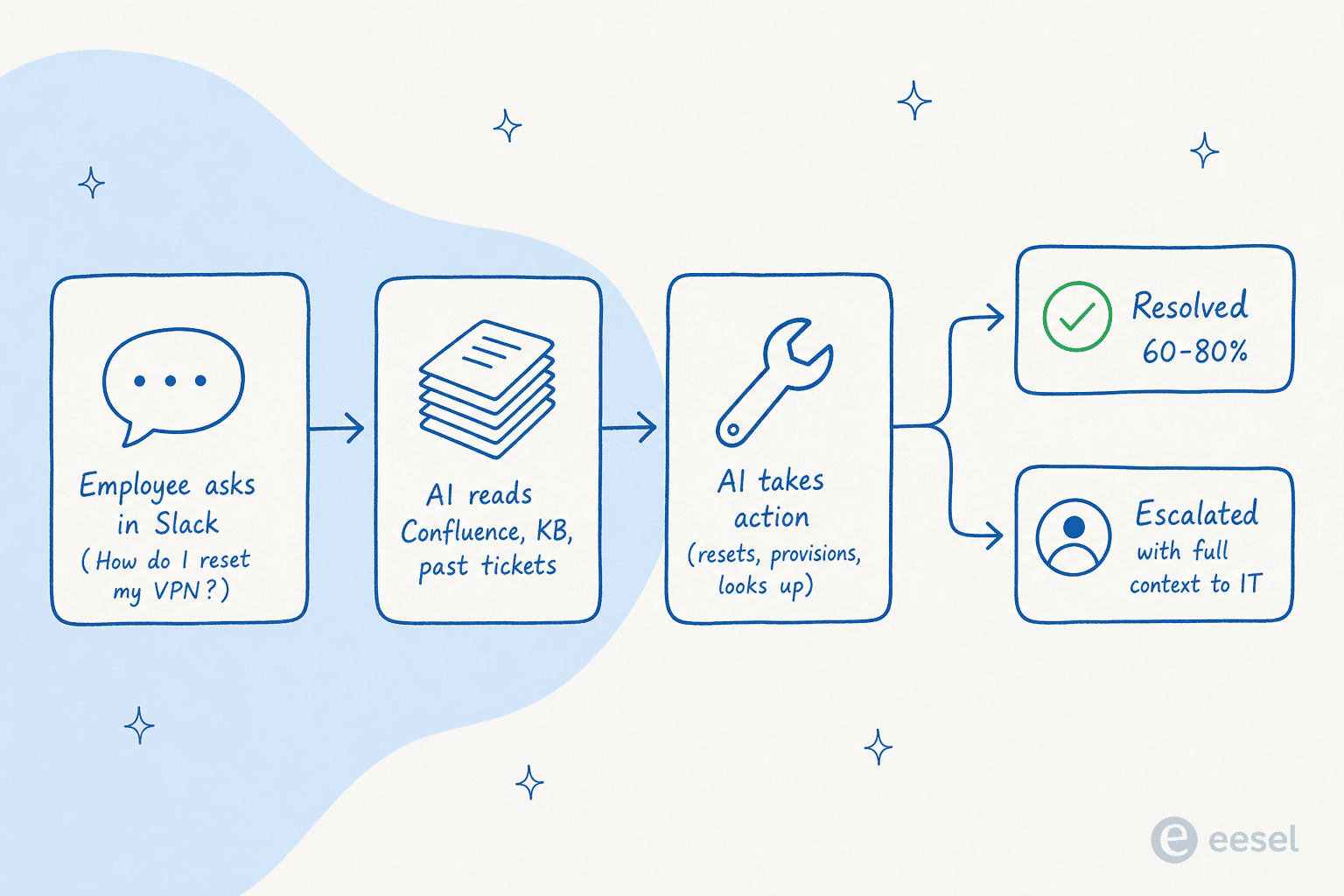
- An employee asks a question in the channel they already use - Slack, Teams, the IT portal, or email.
- The AI grounds the answer in your existing knowledge: Confluence pages, Notion docs, SharePoint, Google Drive, past Jira/ServiceNow/Freshservice tickets, and macros.
- The AI takes the action it can resolve - password reset, software provisioning, group access, status lookup - or drafts a reply and either sends it (autonomous) or hands it to a human to approve (assist mode).
- Anything ambiguous gets escalated with the full context - what the employee asked, what the AI tried, which KB articles it looked at, why it wasn't sure - instead of a fresh ticket the human has to re-investigate from scratch.
The shape is similar across tools; the differences live in three places: where the AI is allowed to live (chat vs portal), how much you trust it to act autonomously vs draft for review, and whether you can simulate it against past tickets before going live. That third one is the make-or-break in our experience - a confidently-wrong AI on day one will torch user trust fast.
What internal support deflection actually looks like
Every vendor on this list will tell you they get 70–80% deflection. Cross-checked against real customer numbers and the realities of internal support tickets, the band is much wider.
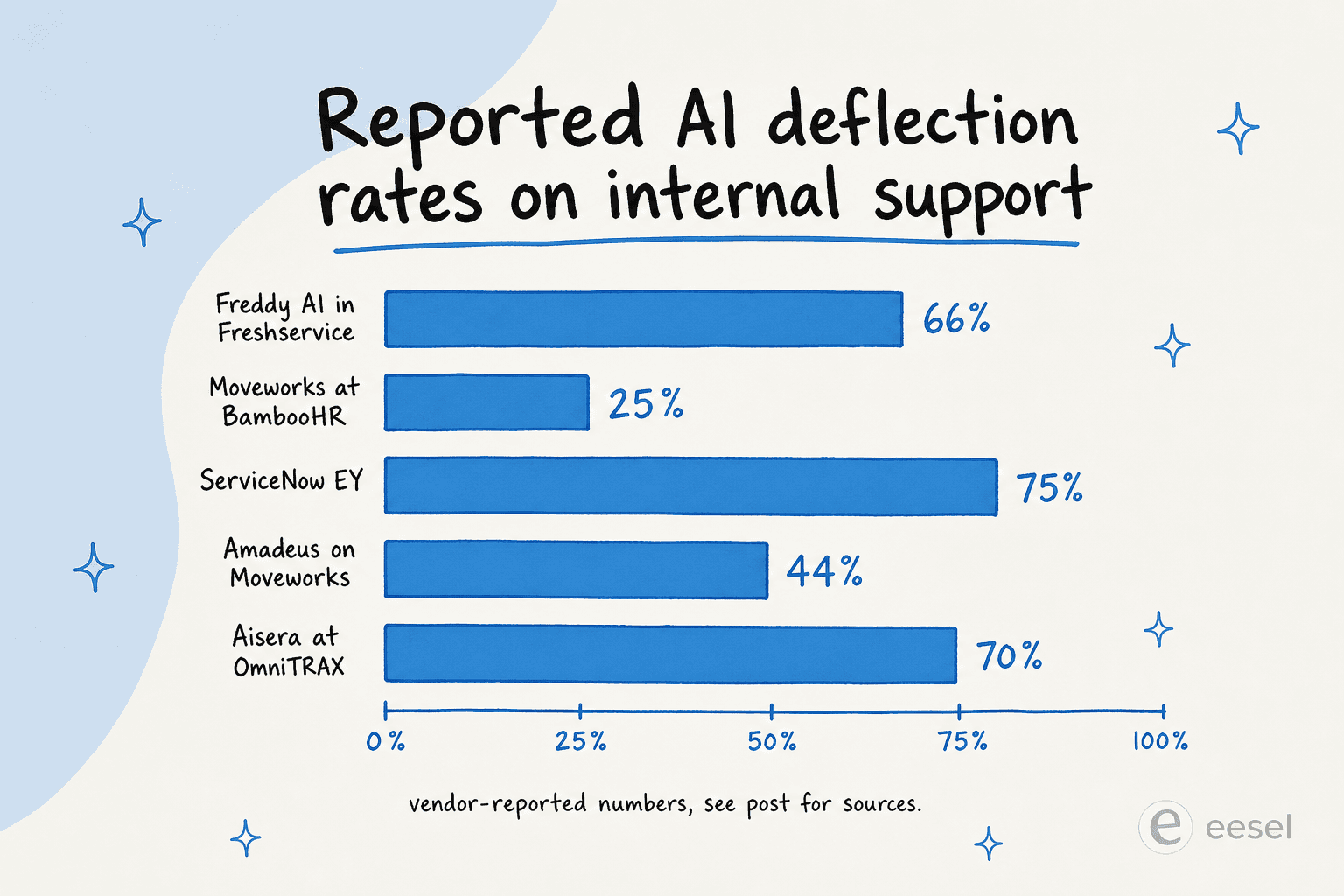
A few notes on reading the chart:
- Freshservice's 66% is a vendor benchmark report, not a specific customer; treat as aspirational.
- Moveworks at BambooHR (20–30%) is the lower end of their public numbers and probably the more honest one - note that Amadeus reports 44% reduction in support-team calls on the same vendor, in the same year, with much higher implementation maturity.
- ServiceNow at EY (75%) is the marquee customer reference; cross-check the r/servicenow sentiment before assuming you'll hit it.
- Aisera at OmniTRAX (70%) is a strong customer reference; not all Aisera deployments hit it.
The number that actually matters is the one your knowledge base can sustain. If your Confluence is six months out of date and half your runbooks live in someone's notes/ folder, no vendor on this list will hit 70% deflection in month one. The honest internal-support AI buy is partly a glorified knowledge-base cleanup - and that's a feature, not a bug, because the cleanup pays back regardless of which AI ships on top of it.
What to look for when buying
If you skim past the demos, six things actually matter:
- Native chat presence. Does the AI live as a real Slack and Microsoft Teams app, not just an iframe? An r/sysadmin operator: "if it requires a portal switch, employees route around it".
- Identity provider integration. Entra/Okta/Active Directory wiring is what separates "answer about your laptop policy" from "actually reset your password and unlock your account."
- Pre-launch simulation. Can you run the AI against your last 90 days of tickets before going live? If yes, you'll catch the "reset your modem" misfires before they hit a VP. If no, expect to discover them in production.
- Citation and source attribution. Every AI answer should cite the KB article or ticket it came from. This is how you maintain trust and catch hallucinations on the way out, not after.
- Honest cost model. Per-employee headcount pricing scales worst for big orgs but at least it's predictable. Per-seat pricing on the IT team is the right model when only IT uses the AI. Per-task (eesel's model) is the only model that scales to "we route 200 of 1,000 tickets to the AI."
- Permission inheritance. A contractor asking the AI about benefits shouldn't get exec comp data because the AI didn't honour the source app's ACLs. Every tool on this list claims this; some are better at it than others.
Try eesel

If you've read this far and your shortlist is "we need AI for internal support but we're not a Fortune 500 buying ServiceNow," eesel is the easiest place to start. It plugs into Slack, Teams, Confluence, Jira Service Management, Freshdesk, Zendesk, and 100+ other apps you already use, goes live in under an hour, and costs $0.40 per resolved task with no seat fees, no platform fee on self-serve, and no monthly minimum. You can simulate it against your past tickets before it touches a live employee, and the $50 free trial is enough to handle around 125 real internal tickets end-to-end with no credit card required.
The pitch isn't that eesel is the only AI for internal support. The pitch is that for most teams under 5,000 employees, it's the one you can prove works on your real tickets in an afternoon - and that's almost always more valuable than a six-month enterprise procurement cycle.
Frequently asked questions
What is the best AI for internal support teams in 2026?
How much does AI for internal support cost in 2026?
What AI for internal IT support works inside Slack or Microsoft Teams?
Will AI for internal support replace my IT helpdesk team?
What about Freshservice Freddy AI for internal IT?
Can I use AI for internal support without buying a new helpdesk?
Is there a free AI for internal support I can try?
What happens if the AI gets an internal support ticket wrong?


Article by
Riellvriany Indriawan
Riell is a designer and writer at eesel AI with about two years of experience researching CX platforms, AI chatbots, and helpdesk software. She combines her design background with a sharp eye for how these tools actually look and feel in practice — making her comparisons unusually visual and user-focused.