Why people want AI on top of Confluence
Confluence is where a huge number of companies keep their institutional memory: runbooks, policies, project specs, onboarding docs. The problem is the same one every wiki has. The answer is in there somewhere, but finding it means knowing the right keyword, the right space, and trusting that the page was updated this decade. So people stop searching and just ask a colleague in Slack instead, which is exactly the repetitive-question loop a good knowledge base is supposed to kill.
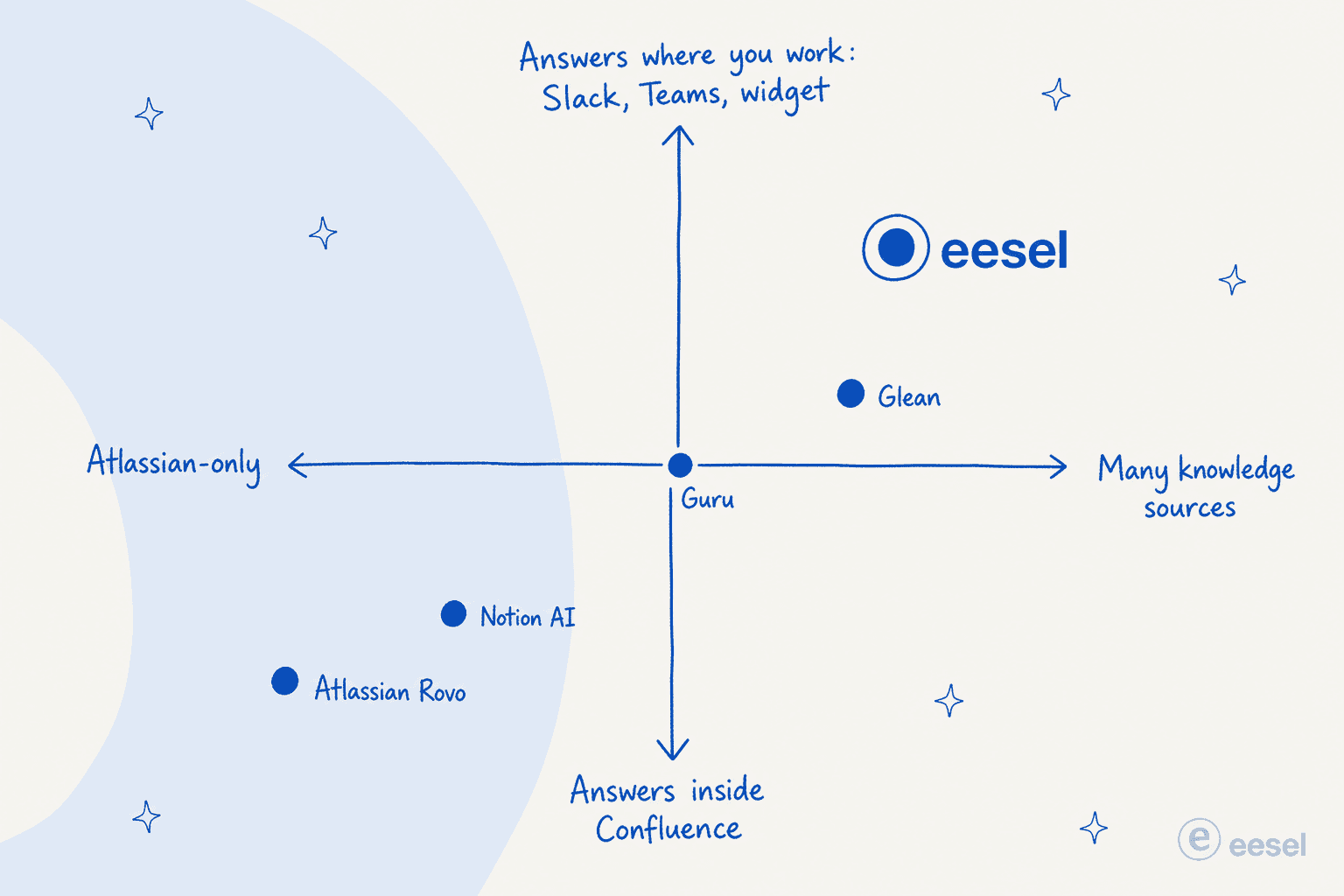
AI promises to fix that by letting anyone ask a plain-language question and get a sourced answer pulled straight from the docs. The interesting part, after digging into every option, is that the tools split cleanly by where the answer shows up and how many sources it can see. That distinction matters more than any single feature, so here is the lay of the land before we get into the list.
What we looked for
We judged each tool on the things that actually decide whether AI on your wiki gets used or quietly abandoned:
- Knowledge coverage. Can it read only Confluence, or also Slack, Google Drive, Jira and your helpdesk? Most real companies have knowledge in more than one place.
- Where it answers. Native Atlassian UI only, or also Slack, Microsoft Teams, and a web chat widget? An AI that makes you switch apps to use it loses to the colleague you can just DM.
- Permission awareness. Does the AI respect who can see what, so it never surfaces a restricted doc in an answer?
- Citations. Every answer should link back to the source page, so people can verify instead of blindly trusting.
- Pricing honesty. Per-seat, per-credit, or usage-based, and what it actually costs once a real team uses it daily.
- Setup effort. Days, or a sales cycle and an implementation project.
Here is how the seven stack up before we go deep on each.
The 7 best AI tools for Confluence at a glance
| Tool | Best for | Knowledge sources | Where you ask | Starting price | Free option | Security |
|---|---|---|---|---|---|---|
| eesel AI | Confluence answers in Slack, Teams and your helpdesk | Confluence + 100+ (Slack, Drive, Jira, Zendesk) | Slack, Teams, web widget, helpdesk | Usage-based, no per-seat fee | $50 trial credit | SOC 2 Type II, GDPR |
| Atlassian Rovo | All-Atlassian teams who want AI included | Atlassian-native + 100+ connectors | Confluence, Jira, browser, chat.rovo.com | Included in Standard (~$5.42/user/mo) | No (Free plan excluded) | Atlassian Guard, no LLM training |
| Glean | Large enterprises wanting org-wide search | 100+ connectors incl. Confluence | Web app, Slack, browser | ~$45-50/user/mo (reported) | No | SOC 2, ISO 27001, GDPR, TX-RAMP |
| Guru | Governed, verified internal knowledge | 100+ sources incl. Confluence | Slack, Teams, browser, MCP | Custom (historical ~$25/seat) | No | SOC 2, access controls, audit logs |
| Notion AI | Teams ready to move off Confluence | Notion workspace + connected apps | Inside Notion | $20/user/mo (Business) | Trial only | SOC 2, GDPR, HIPAA available |
| Slite | A self-maintaining wiki with cross-tool Ask | Slite docs + Slack, Drive, Jira (Pro) | Slite app, Slack (Pro) | $10/user/mo (Basic) | 14-day trial | SOC 2 Type II, HIPAA (Ent.), GDPR |
| Tettra | Small Slack-first teams cutting repeat questions | Tettra wiki + Google Docs | Slack | $8/user/mo (10-user min) | 30-day trial | SOC 2; SSO/SCIM add-ons |
A quick note on reading this table: the price column hides a lot. Rovo looks cheapest because it is "included," but that price buys a small credit pool, not unlimited AI. And the enterprise tools (Glean, Guru) don't publish numbers at all, which is its own signal. More on that as we go.
1. eesel AI
Best for: teams whose knowledge spans Confluence and other tools, who want AI answers inside Slack, Teams, a web widget, or their helpdesk, not in yet another app.

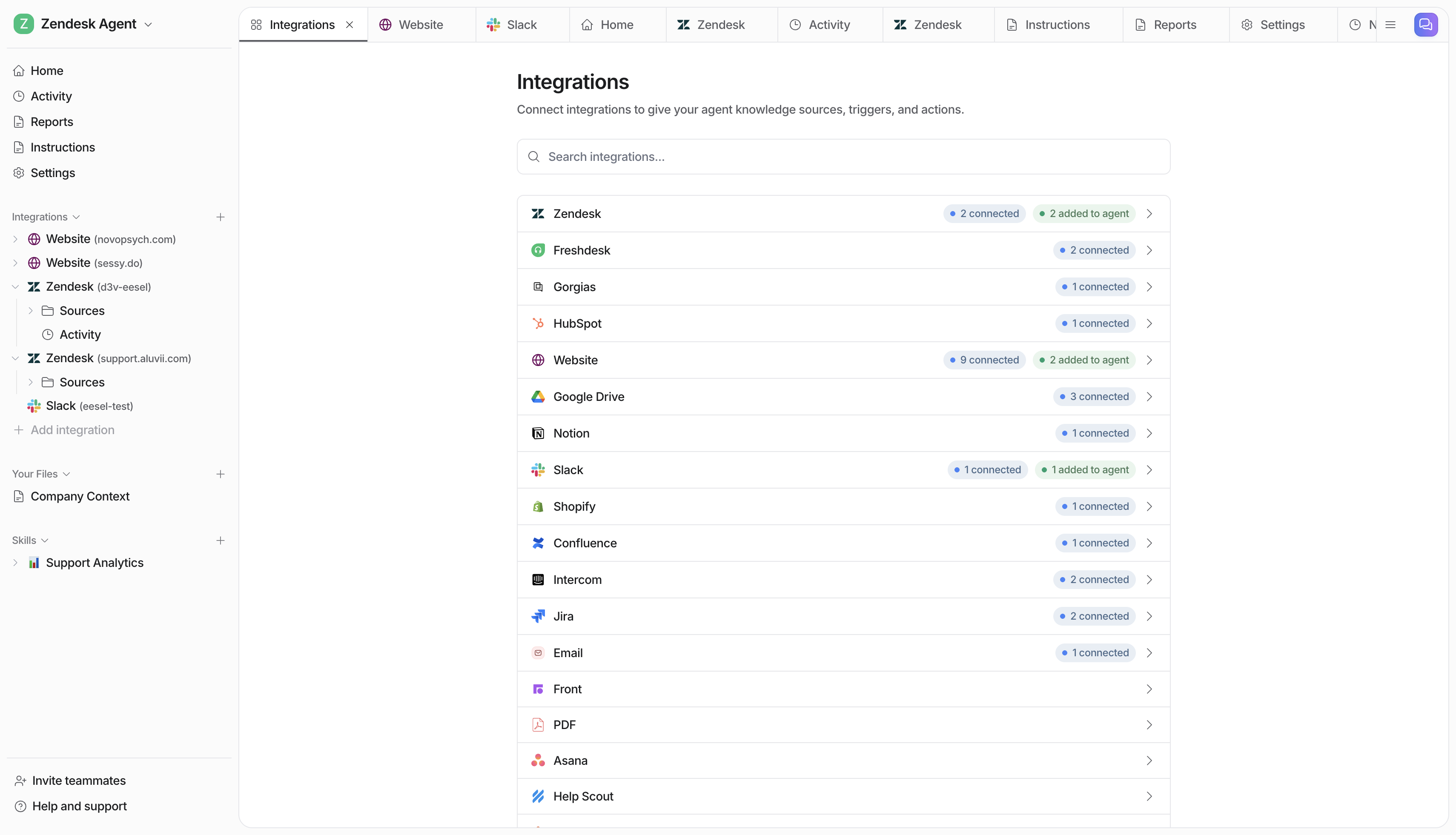
We'll put our own tool first and be upfront about why it fits this list. eesel AI isn't a Confluence add-on. It's an AI layer that connects to Confluence as one knowledge source among 100+ others, then answers questions wherever your team already works. That framing is the whole point: most companies don't keep everything in Confluence. The deployment guide is in Confluence, the latest decision is in Slack, the spec is in Google Drive, and the customer context is in Zendesk.
What it does. You point eesel at your sources, including your Confluence spaces, and it learns from that history. From day one it can answer employee questions in Slack or Microsoft Teams, reply to support tickets in your helpdesk, or run as a chat widget on an internal portal. You brief it in plain language, the way you'd brief a new hire, with rules like which questions to escalate and what tone to use. BitGo, for example, runs eesel as an internal Slack teammate for documentation Q&A.
Pros.
- Reads Confluence plus Slack, Drive, Jira, Zendesk and dozens more, so answers aren't limited to one silo.
- Answers in Slack, Teams, a web widget, and inside helpdesks, meeting people where they already are.
- Permission-aware, with citations on every answer so staff can click through to the source.
- Usage-based pricing with no per-seat fee, so you don't pay for an AI seat for every employee who rarely uses it.
Cons.
- It's a separate product to set up, not a toggle inside Confluence (though setup is self-serve and takes minutes, not a sales cycle).
- It's strongest as an answer-and-action layer; if you want a place to author and store docs, you still keep Confluence (or a wiki) underneath it.
Pricing. eesel is usage-based: you pay roughly $0.40 per ticket or chat handled, with no per-seat charges and no platform fee on self-serve plans. There's a $50 trial credit to start, and agents pause at a spend cap you set, so costs stay predictable. For a team where only part of the company asks the wiki questions, paying per answer instead of per employee usually works out far cheaper than a per-seat tool.
Our take: if your knowledge already lives entirely inside Atlassian and you never leave it, Rovo is the simpler call. But for the more common case, where docs are scattered and people ask questions in Slack, eesel is the tool we'd reach for, because it brings Confluence answers to where the questions actually get asked. It's also why we'd put it ahead of the heavier enterprise platforms below for most mid-market teams.
2. Atlassian Rovo (Confluence's built-in AI)
Best for: teams whose knowledge is genuinely all-Atlassian, who want AI that's already paid for and respects existing permissions out of the box.
Rovo is the user-facing name for Atlassian Intelligence, and it's the default answer to "does Confluence have AI." It has three modes that matter here: Rovo Search (enterprise search across Atlassian apps and 100+ connectors), Rovo Chat (conversational answers grounded in your content, with cited sources), and Rovo Agents (pre-built and custom agents for recurring tasks). The engine underneath is Atlassian's Teamwork Graph, which is what lets it read both a Confluence page and the related Jira ticket to answer a question.
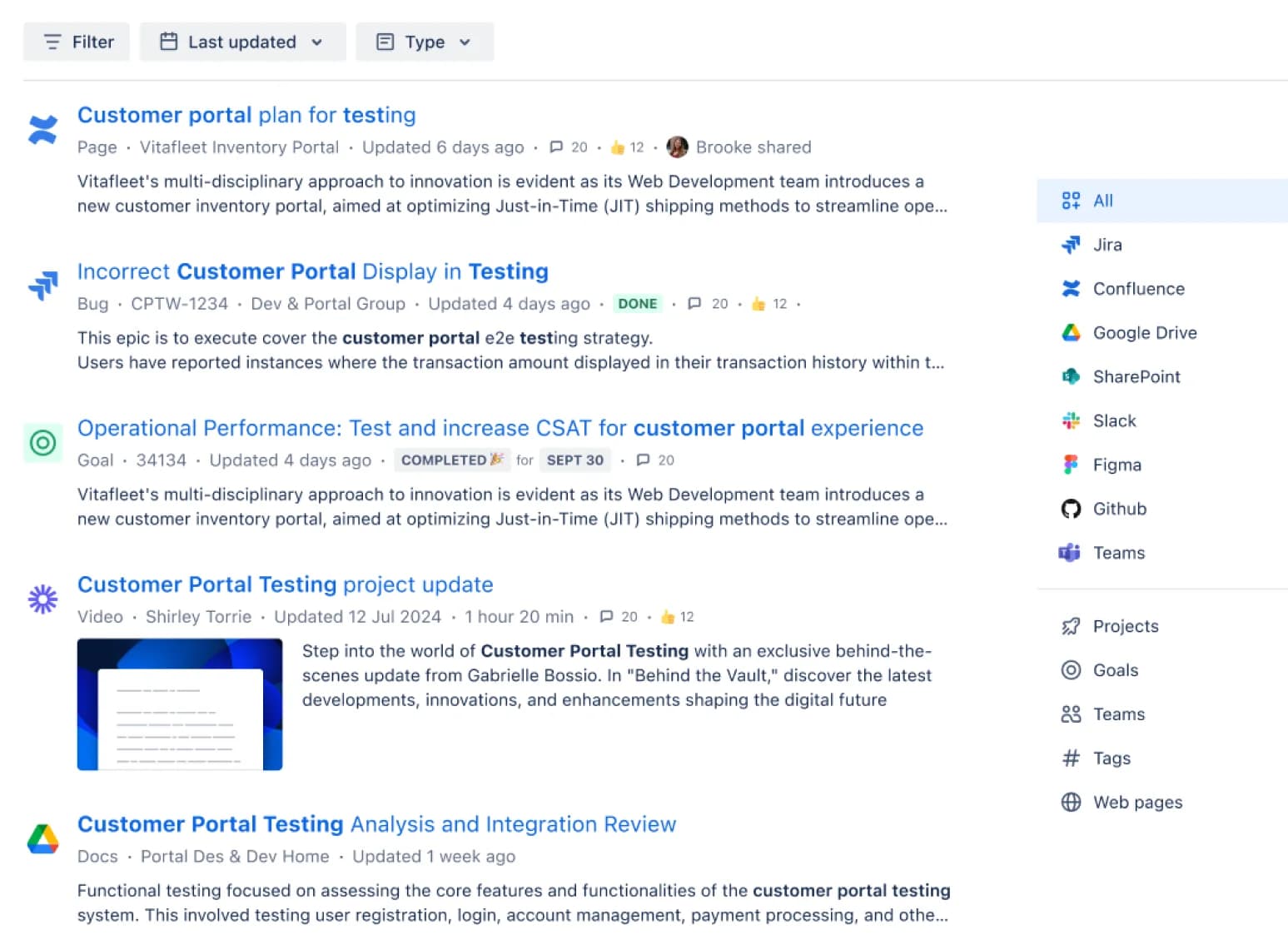
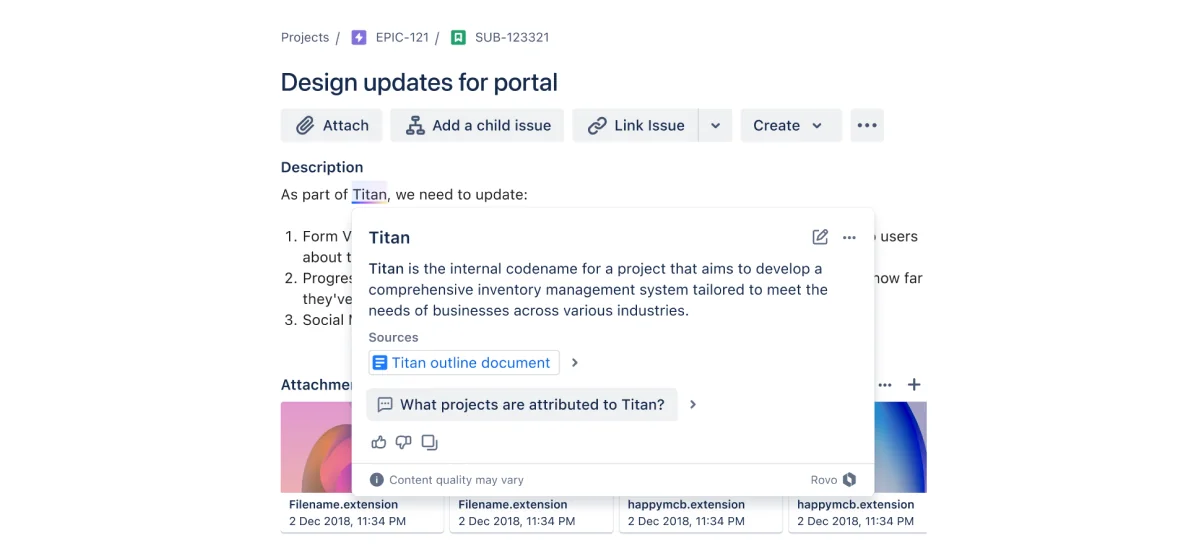
One genuinely nice touch is Definitions: hover an unfamiliar project codename or acronym and Rovo explains it inline, with sources, drawing on your company knowledge.
Pros.
- Included at no extra cost in Confluence Standard, Premium and Enterprise, so there's no separate AI vendor to evaluate.
- Permission-aware by design: it only answers from content the user can already see.
- Deep, native context across Confluence, Jira and Bitbucket, which standalone tools can't match inside the Atlassian world.
Cons.
- The credit model is the real cost. Standard gives 25 Rovo credits per user per month, and substantive actions burn through them fast. One admin on Atlassian's own community forum watched a single Bitbucket PR review eat 965 of 2,000 Rovo Dev credits, and an Atlassian PM agreed the math was rough.
- No native Slack or Teams bot. Rovo answers inside Atlassian or a browser extension, so Slack-first teams have to leave their chat tool.
- It can hallucinate, which Atlassian itself flags, and it stumbles on cross-tool reasoning.
The Slack/Teams gap is the one that bites repeatedly in practice. As one Jira admin put it while piloting Rovo:
"Did you figure out how to connect the Rovo agent to Teams/Slack? I'm pilotting this right now, can only get Rovo added as an app to Teams..."

Pricing. Rovo is bundled into paid Confluence Cloud plans: Standard at around $5.42/user/month (25 credits), Premium at around $10.44/user/month (70 credits), and Enterprise (150 credits, custom pricing). The Free plan gets nothing. Because every AI action spends credits and overage is billed per credit, "included" is not the same as "unlimited", a distinction we dig into in our Rovo credit usage breakdown and the wider Atlassian Intelligence cost guide.
Our take: if your team is deep in the Atlassian ecosystem and your questions are mostly "summarise this page" or "what's the status of this ticket", Rovo is a no-brainer because it's already there. Just go in clear-eyed about the credit ceiling and the fact that it won't come to Slack. For the full picture of what it can and can't do, see our honest Rovo review and our take on Atlassian's AI assistant for Jira and Confluence.
3. Glean
Best for: large enterprises that want one permission-aware search box across every tool, and have the budget and seat count to match.
Glean is the heavyweight of enterprise AI search. It connects to 100+ systems including Confluence, Jira, Slack and Google Drive, builds a permission-aware knowledge graph, and layers an assistant and agent builder on top. It rates around 4.7/5 on G2 (156+ reviews) and 4.4/5 on Gartner Peer Insights, with users consistently praising fast unified search.
Pros.
- Genuinely broad connector coverage with strict per-document permission handling.
- Strong unified search across the full stack, not just Confluence.
- An agent builder and assistant for teams that want to go beyond search.
Cons.
- Pricing is opaque and steep. Reported figures land around $45-50/user/month plus a roughly $15 AI add-on, with a reported ~100-seat ($60k/year) floor, which prices out most mid-market teams.
- Several users report that answer accuracy is "okay but not great" at scale.
That accuracy-versus-cost tension comes through clearly from a 200-person company eight months in:
"we've been using Glean for about 8 months now and while it's decent, we're running into some limitations... The search accuracy is okay but not great, and honestly the pricing is getting pretty steep as we scale."
Pricing. Not publicly listed; everything starts with a sales call. Triangulated third-party figures put it at the enterprise end with a six-figure annual floor. Our Glean pricing guide and Glean reviews dig into what teams actually pay.
Our take: Glean is a strong, serious product if you're a large enterprise standardising on one search layer and the budget isn't the deciding factor. For a team of 50 that mostly wants Confluence answers in Slack, it's overkill, and the seat floor alone rules it out.
4. Guru
Best for: teams that want trusted, verified answers, where someone owns each piece of knowledge and keeps it current.
Guru takes a different angle: instead of just searching your docs, it adds a governance layer on top. Every card has a verifier and a verification interval, and stale content gets auto-flagged. It connects to Confluence (and 100+ other sources), answers with citations that inherit source permissions, and delivers those answers in Slack, Teams, a browser extension, and via an MCP server for tools like Claude. It's well-loved, with a 4.7/5 G2 rating across 2,300+ reviews.
Pros.
- The verification system is the standout: reviewers trust Guru's answers because a human owns each one.
- Answers live in Slack and Teams, not just a separate app.
- Strong fit for support, IT and compliance-heavy teams.
Cons.
- It's enterprise-only now, with no public pricing and no free tier, so you can't just try it.
- The verification loop creates real admin overhead; without a dedicated knowledge owner, content drifts.
- Search degrades in large, poorly tagged knowledge bases.
A support leader captures the appeal:
"This tool replaces Notion as our internal support process and how-to Wiki for our team and serves as a trusted source for the support team's centralized collective knowledge."
Dana G., Director of Support and Partner Training, GetApp
Pricing. Guru's pricing page publishes no numbers today; historical data put self-serve around $25/seat/month with a 10-seat minimum, and SSO is gated behind Enterprise. Our Guru pricing guide and Guru AI review cover the details.
Our take: Guru is excellent if knowledge accuracy is a regulatory or trust issue and you're willing to staff the governance it asks for. If you'd rather the AI just read your existing Confluence and Slack history without a verification program around it, a layered tool is less work.
5. Notion AI
Best for: teams already weighing a move off Confluence to an AI-native workspace.
Notion AI isn't a Confluence add-on; it's the AI layer of a rival workspace, and it shows up here because a lot of teams shopping for Confluence AI are quietly asking whether they should just switch. Notion AI answers questions against your workspace, generates and edits content, runs an agent for multi-step work, and even lets you pick between Claude and GPT models. Its reputation turned a corner in late 2025, with one widely-shared thread titled "Notion AI is finally worth the upgrade."
Pros.
- Contextual AI that's tightly woven into where your docs and databases already live (if that's Notion).
- AI meeting notes and the database-editing agent are standout, frequently-praised features.
- Model choice between Claude and GPT is a nice flexibility.
Cons.
- It only helps if your knowledge is in Notion; it's not a way to add AI to Confluence.
- Full AI requires the Business plan at $20/user/month, and the jump from cheaper tiers is the top complaint.
- Users report the AI doesn't reliably index every database row, a real gap for data-heavy work.
Pricing. Full Notion AI is bundled into the Business plan at $20/user/month (annual); Free and Plus only get a trial. See our Notion pricing and Notion AI review for the full math, and our brutally honest Notion review for the platform overall.
Our take: Notion AI is a strong reason to consider Notion, but it's the wrong tool if you're staying on Confluence. If a migration is genuinely on the table, weigh it properly; if not, a layer that reads your existing Confluence is the more direct fix.
6. Slite
Best for: mid-size teams that want a simpler, self-maintaining wiki with AI search baked in across connected tools.
Slite positions itself as a "self-maintaining knowledge base." Its AI feature, "Ask," answers plain-language questions from verified docs with citations, and on the Pro plan it expands to search across Slack, Jira, Google Drive and more. The Slite Agent goes further, fact-checking docs and proposing fixes so the wiki stays current. One CTO described it as "like Perplexity for your team knowledge."
Pros.
- AI Q&A is native and included on every paid plan, no bolt-on needed.
- The self-maintaining angle (the agent flags stale or contradictory docs) is a genuine differentiator.
- Cross-tool Ask on Pro pulls answers from Slack, Drive and Jira together.
Cons.
- Like Notion, it's an alternative destination for your docs, not a way to AI-enable Confluence in place.
- The Basic plan caps Ask at 30 questions per user per month, which is tight for daily use.
- The Pro agent runs on an opaque credit model (50 credits/seat/month).
Pricing. Basic is $10/user/month (Ask limited to Slite docs); Pro is $20/user/month (cross-tool Ask, the agent, AI answers in Slack); Enterprise is custom. There's a 14-day trial. It carries SOC 2 Type II on all plans, with HIPAA on Enterprise.
Our take: Slite is a lovely tool if you want a clean, low-maintenance wiki and you're open to moving your docs there. As "AI for Confluence" specifically, it only fits if you're willing to migrate, the same caveat as Notion.
7. Tettra
Best for: small, Slack-first teams (roughly 10 to 250 people) drowning in repetitive questions.
Tettra is a focused, Slack-native knowledge base with an AI bot named Kai that answers questions directly in Slack channels. Its smartest trick: when Kai can't answer, it routes the question to the right subject-matter expert, who answers once, and that answer feeds back into the wiki forever. It serves 20,000+ organisations and rates 4.6/5 on G2 across ~160 reviews.
Pros.
- Kai answers right in Slack, and the gap-routing loop genuinely reduces repeat questions over time.
- Easy to use, with low onboarding friction for non-technical teams.
- Content-freshness tools (verification schedules, stale-page reports) are praised as useful, not box-checking.
Cons.
- It's Slack-only for AI Q&A; the Microsoft Teams integration is effectively dead.
- The editor is basic compared to Confluence or Notion, and search slows in large knowledge bases.
- No free tier, a hard 10-user minimum, and SSO/SCIM are paid add-ons.
A Techstars team summed up the payoff: "We've been able to reduce the amount of time people spend answering questions. When people are able to find answers themselves, it saves us time."
Pricing. The Scaling plan is $8/user/month (annual) with a 10-user minimum, so roughly $80/month floor; Enterprise is custom. A 30-day trial is available.
Our take: Tettra is a great little tool for a small Slack-first team that wants its own AI wiki. But if your docs are already in Confluence, or any of your team is on Teams, it's the wrong fit, and you'd be migrating content for no good reason.
How a layered AI answer engine actually works
The four tools that fit "AI on top of your existing Confluence" without a migration (eesel, Rovo, Glean, Guru) all share the same basic machinery, and it's worth understanding because it explains the trade-offs above.
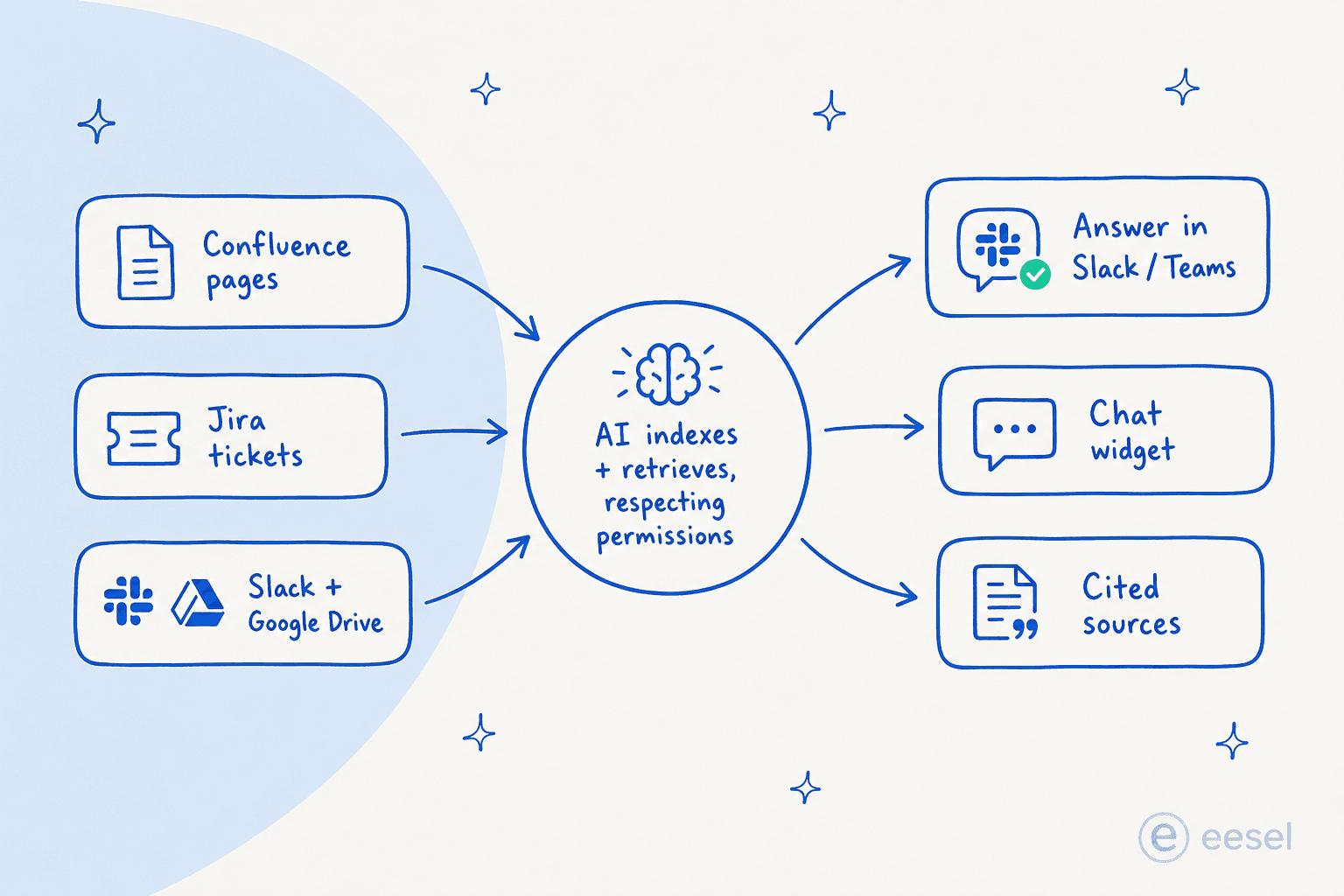
The engine connects to your sources (Confluence pages, Jira tickets, Slack threads, Drive files), indexes them while preserving who can see what, then uses retrieval-augmented generation to find the relevant passages and compose an answer with citations. The differences that matter aren't in the retrieval, they're in the edges: how many sources it can reach, and where it delivers the answer.
Rovo's edges are Atlassian-shaped: deep inside the ecosystem, shallow outside it, and answers only appear in Atlassian surfaces. A layered tool like eesel deliberately widens both edges, reading many sources and delivering answers in Slack, Teams, a widget, or your helpdesk. If your reality is "knowledge everywhere, questions asked in Slack," that's the shape that fits, and it's the same reason these tools rank well for internal support teams and AI help desks.
How to choose the right one
Cutting through it, the decision usually comes down to three questions.
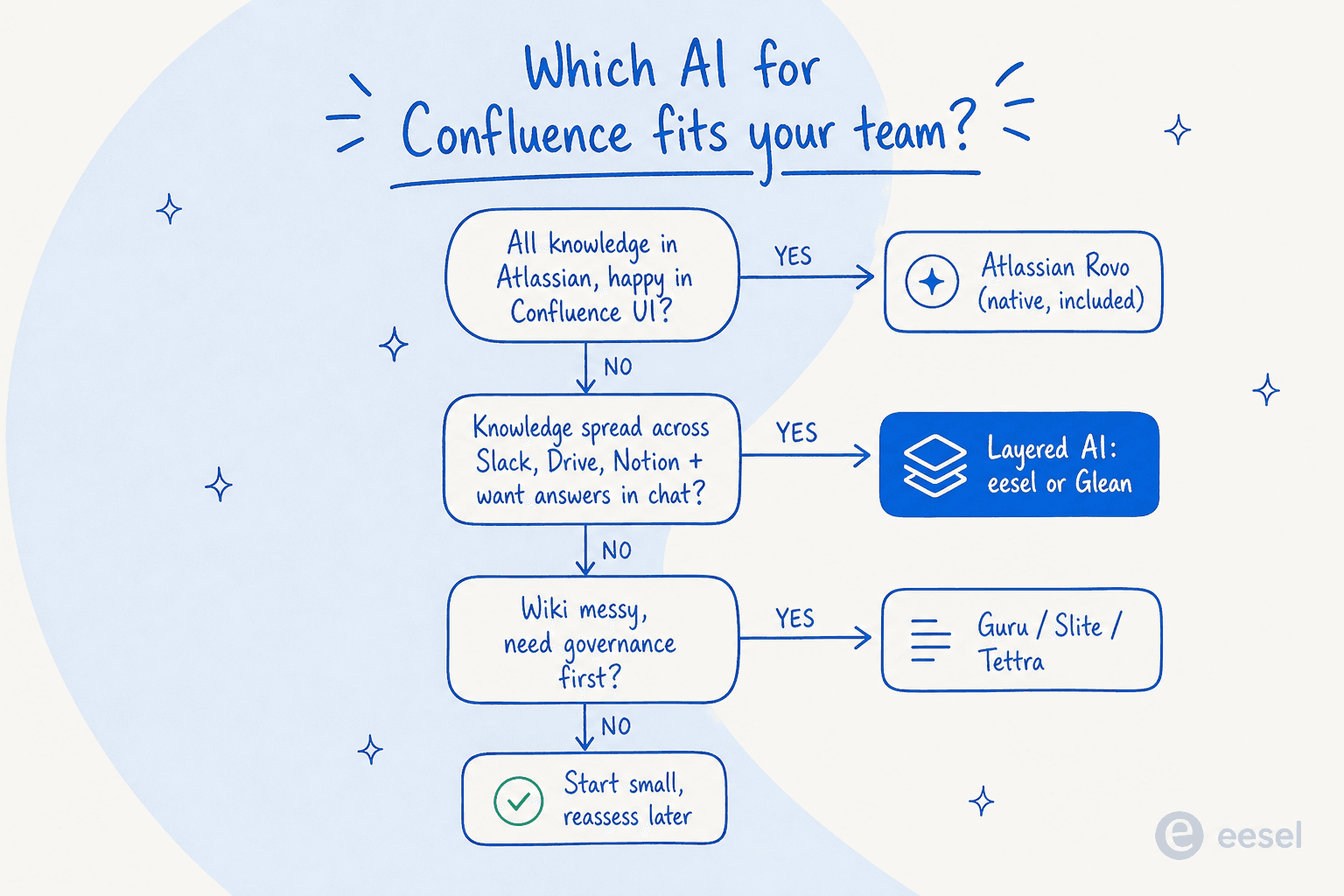
- Is all your knowledge in Atlassian, and is your team happy working inside Confluence? Start with Rovo. It's included, permission-aware, and good at in-product tasks. Watch the credits.
- Is your knowledge spread across Slack, Drive, Notion and helpdesks, and do people ask questions in chat? A layered tool fits: eesel AI for most teams, Glean if you're a large enterprise with the budget.
- Is your wiki a mess and you want governance or a fresh start? Guru adds a verification layer over your sources; Slite, Tettra and Notion are AI-native wikis worth a closer look at the alternatives if you're open to migrating.
The honest meta-point: "best AI for Confluence" is really a question about your whole knowledge setup, not just Confluence. The tools that win are the ones that match where your information lives and where your people ask. For most teams that isn't a single tool inside one app, which is exactly why a layer that spans sources tends to beat a native add-on in day-to-day use.
Try eesel AI
If your team's knowledge lives in Confluence and a handful of other places, and the questions land in Slack, Teams or your helpdesk, that's exactly what eesel AI is built for. It connects to Confluence alongside 100+ other sources, answers with citations wherever your team works, and runs on usage-based pricing with no per-seat fee, so you're paying for answers, not for an AI seat on every employee's account.

You can connect your Confluence space and have it answering questions in minutes, with a $50 trial credit and no card required. Try eesel or see the pricing for yourself.
Frequently Asked Questions
What is the best AI for Confluence?
Does Confluence have built-in AI?
How much does AI for Confluence cost?
Can I get AI answers from Confluence inside Slack or Microsoft Teams?
Is Confluence AI safe with sensitive documents?


Article by
Riellvriany Indriawan
Riell is a designer and writer at eesel AI with about two years of experience researching CX platforms, AI chatbots, and helpdesk software. She combines her design background with a sharp eye for how these tools actually look and feel in practice — making her comparisons unusually visual and user-focused.