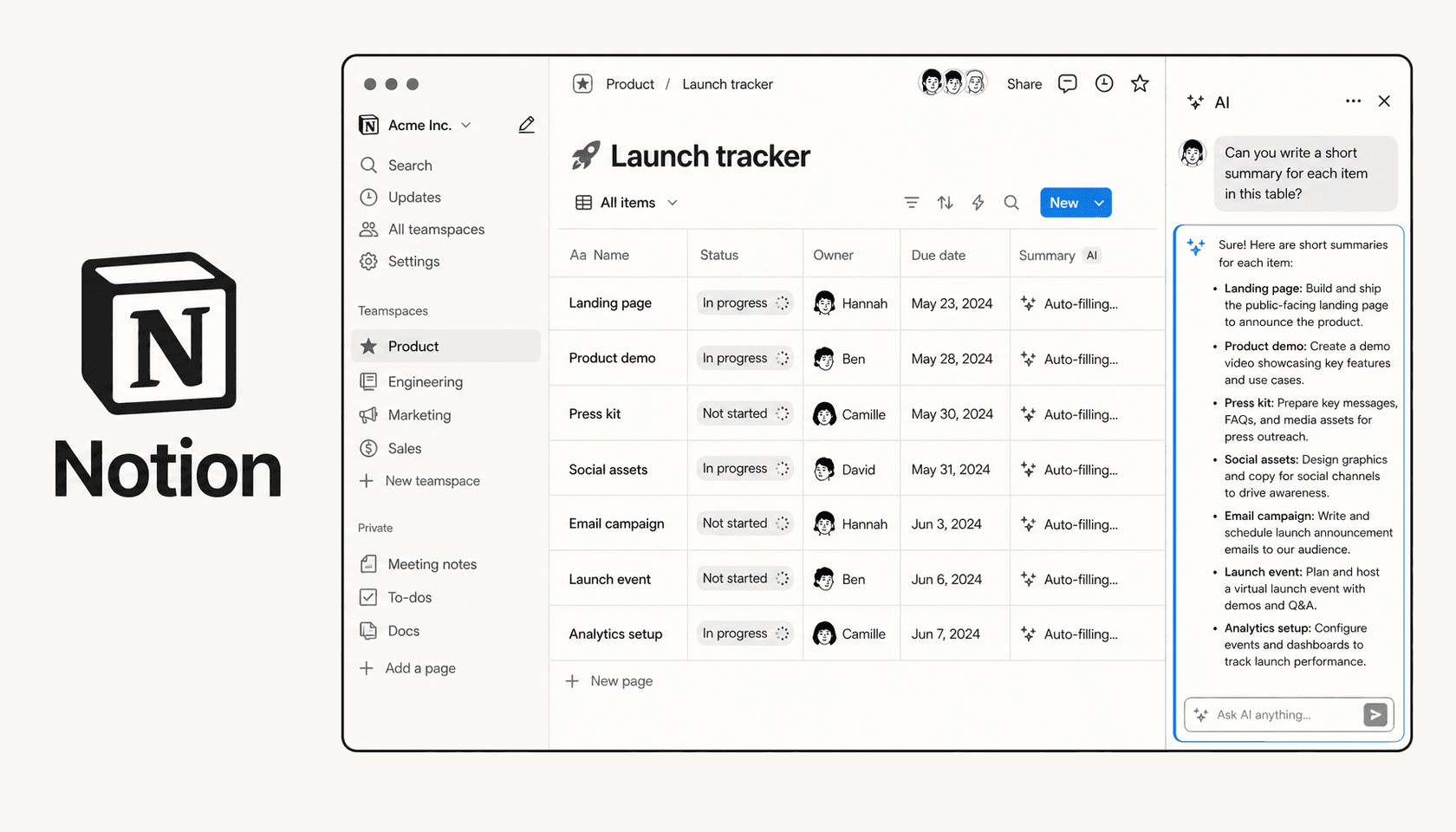
Notion AI is the umbrella name for every AI feature inside Notion: agents, search, writing, database tools, image generation, and the standalone Notion Mail inbox. In September 2025, Notion released version 3.0, rebuilt around autonomous agents capable of multi-step work lasting over 20 minutes. By February 2026, they shipped Custom Agents -- team-wide bots that run on schedules and triggers. By April 2026, those agents became 35-50% cheaper to run, gained access to private Slack channels, and picked up Salesforce and Box connectors.
So the product has moved fast. The question is whether it's moved in a direction that's actually useful to you -- or whether Notion AI is increasingly a feature you pay a premium for on a platform you'd be using anyway.
This review covers the full picture as of May 2026: what each AI feature actually does, what the pricing table looks like at every tier, what real users say in reviews, and a straight answer on who should use it and who shouldn't.
The UI at a glance
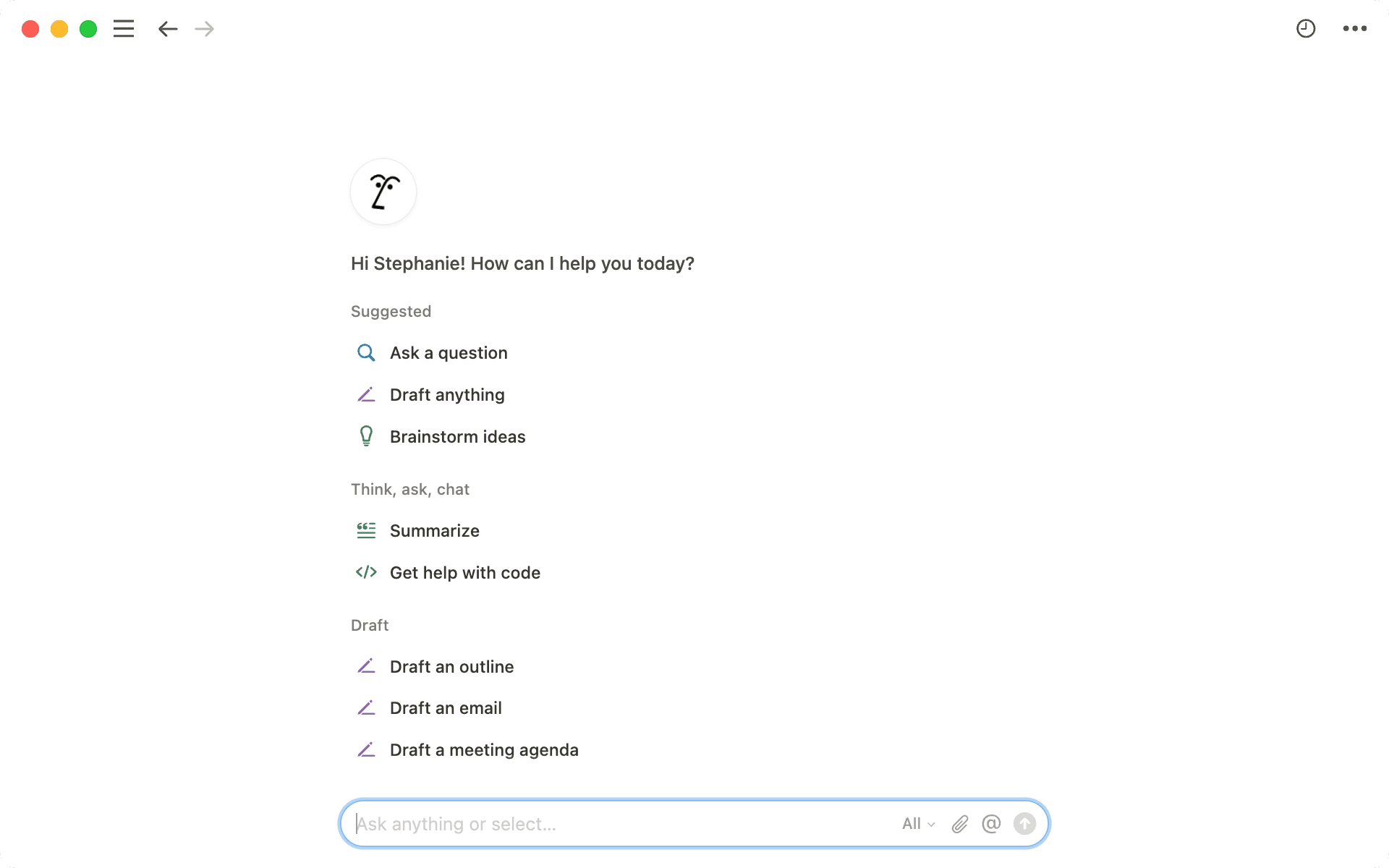
Notion AI lives in three places inside the product. The circular face icon in the bottom-right corner of any page opens a floating chat window. The search bar in the left sidebar -- expanded -- becomes a full-page AI interface. And on the desktop app, Shift + Cmd + J (Mac) or Shift + Ctrl + J (Windows) pulls it up instantly from anywhere in your workspace.
The chat interface feels closer to a context-aware assistant than a generic LLM prompt box. When you ask a question, it searches your Notion pages, databases, and connected apps simultaneously, then returns an answer with cited sources. The source citations are clickable links back to the specific pages consulted -- useful for auditing whether the AI got it right.
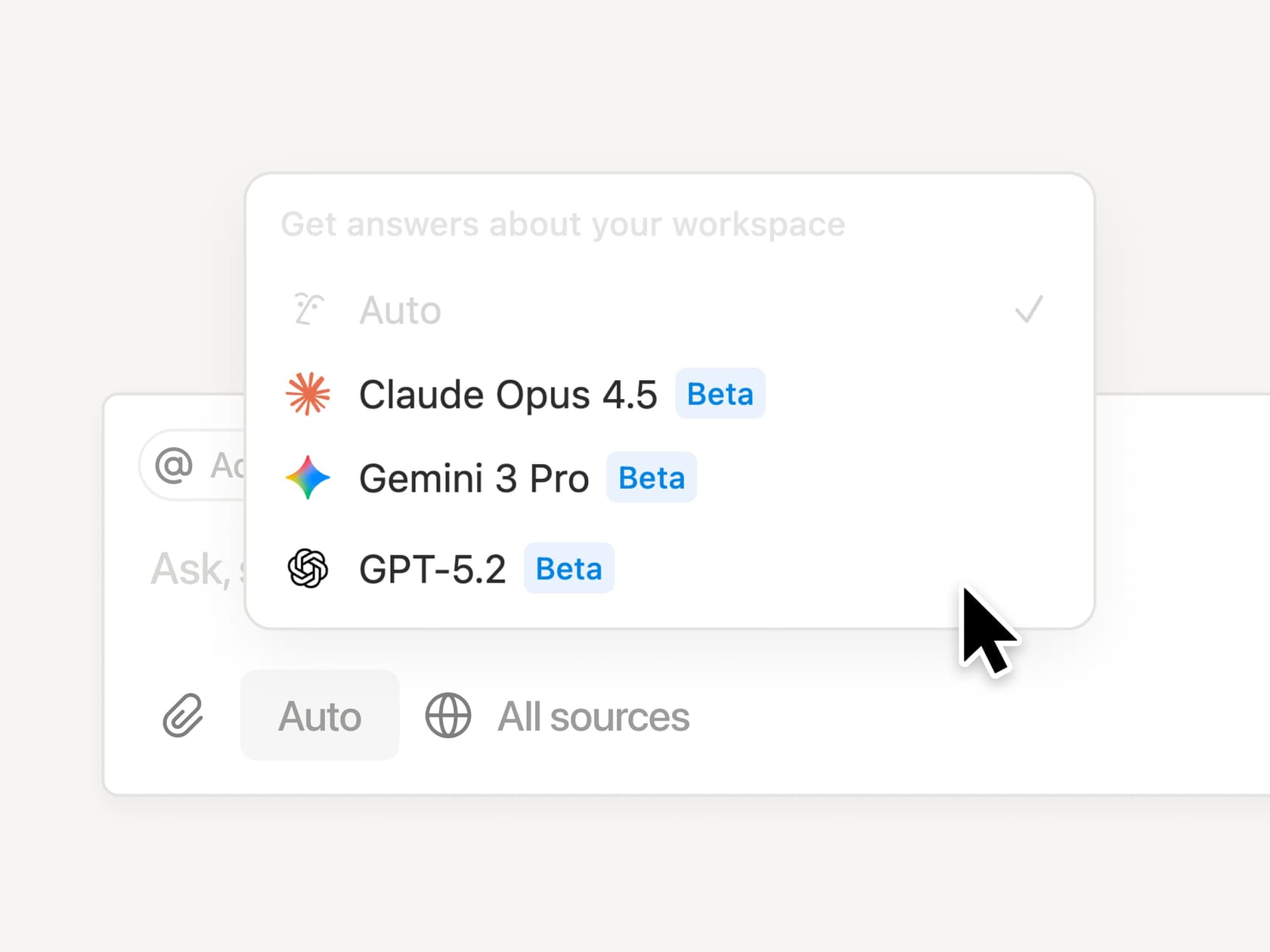
You can also @ mention specific pages, databases, or people to narrow the search scope before the AI runs. And since January 2026, you can manually choose your LLM -- GPT-5.2, Claude Opus 4.5, Gemini 3, or "Auto" mode which picks for you.
What's new in 2026
Notion has shipped three major updates since the September 2025 agent launch.
January 2026 (Notion 3.2): Mobile AI got significantly better. AI Meeting Notes now transcribes in the background on iOS and Android even when you lock your screen. The Notion Agent -- previously desktop-only -- became fully functional on mobile. Enterprise admins got a new AI analytics dashboard showing which features are driving adoption across their workspace.
February 2026 (Notion 3.3): Custom Agents launched. Unlike the personal Notion Agent (which you direct task by task), Custom Agents run autonomously on schedules or event-based triggers. They can be shared across teams, have their own model selection, and connect to MCP integrations including Linear, HubSpot, Figma, and Slack. Custom Agents were free through May 3, 2026, and started consuming Notion credits on May 4, 2026.
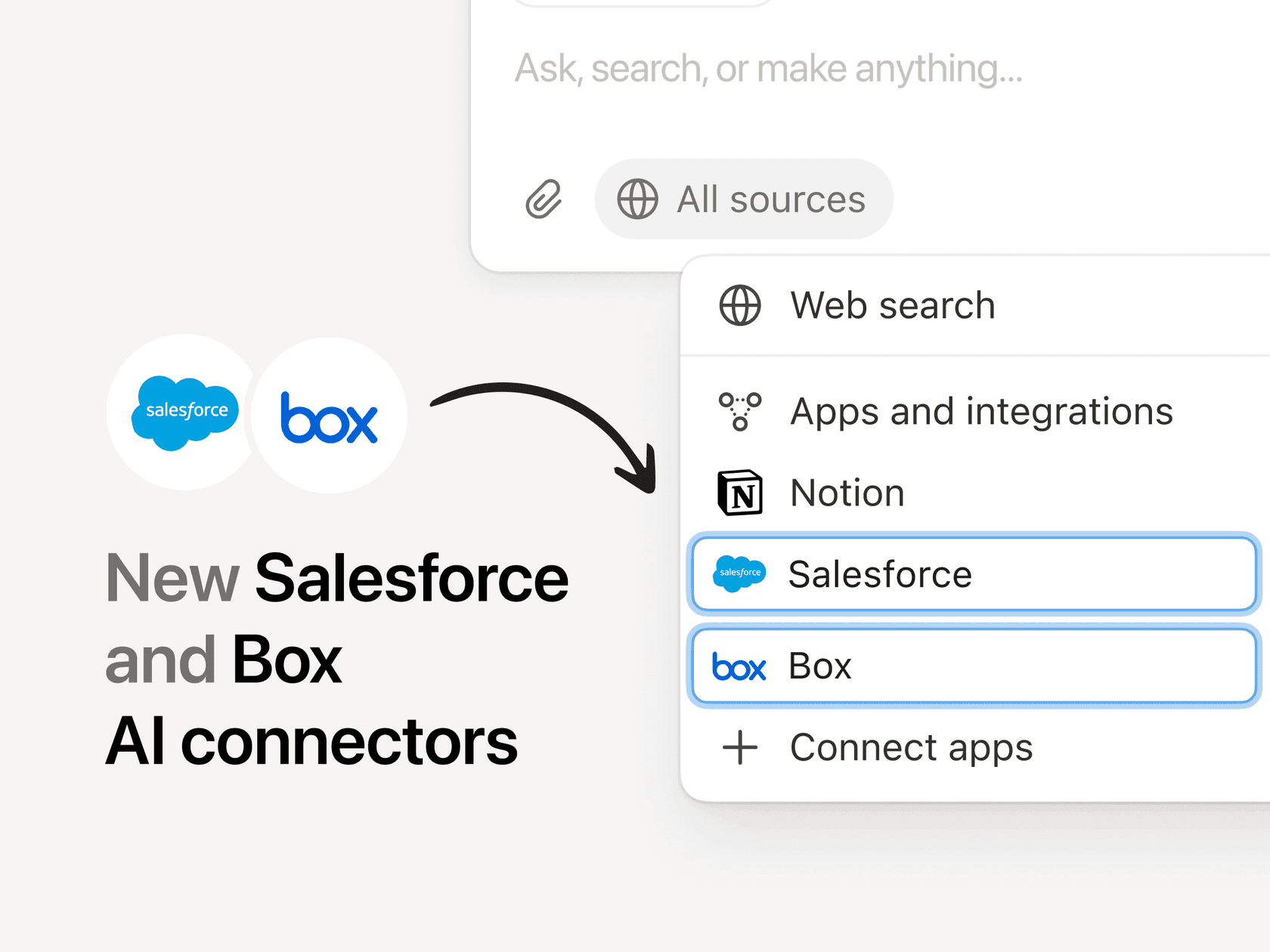
April 2026 (Notion 3.4): Custom Agents became 35-50% cheaper to run. New lightweight models (GPT-5.4 Mini, GPT-5.4 Nano, Haiku 4.5, MiniMax M2.5) can reduce per-run credit consumption by up to 10x. The Notion Agent gained Skills -- saved repeatable workflows the agent can execute on command. Voice input was added via a microphone button. Salesforce and Box connectors launched, and agents gained access to private Slack channels.
Notion Agent: the personal AI assistant

The Notion Agent is included in Business and Enterprise plans. It's designed for "busywork that takes you away from your real work" -- tasks like compiling customer feedback from Slack, email, and Notion into an actionable doc, converting meeting notes into polished proposals, identifying gaps in documentation, or generating personalized onboarding plans for new hires.
The practical limits: agents run for up to 20 minutes per session and can work across hundreds of database pages simultaneously. They can search across Notion, connected apps (Slack, Google Drive, GitHub, Jira, etc.), and the live web. They maintain context via a memory page -- a Notion page you designate that stores instructions for how the agent should work, what information it should reference first, and how it should format responses.
You can also give your agent a custom name and persona (Notion lets you pick "accessories" for it), which reads more like a product novelty than a functional feature. The practical differentiator is the memory system -- the ability to define standing instructions that persist across every session.
What it's good at: multi-step tasks inside the Notion ecosystem that would normally require clicking between several pages and databases. Turning a messy meeting transcript into a structured action tracker, for example, or pulling customer feedback from three different Notion databases and summarizing it into a weekly report.
What it's not good at: tasks that require reliable action outside the Notion ecosystem. The agent can search Slack channels, but it can't reply to a Slack message. It can surface a Jira ticket, but it can't assign it or change its status. The depth of "action" is still largely read-and-synthesize rather than write-and-execute across external tools.
Custom Agents: autonomous team bots
Custom Agents are the more interesting product development in early 2026. Where the personal Notion Agent requires someone to actively direct it, Custom Agents run in the background without prompting.
The build process is designed to be fast. You describe what you want the agent to do in plain language, set a trigger (a Slack mention, a new database row, a weekly schedule), connect the relevant sources (Notion pages, Slack channels, Gmail, Calendar, MCP integrations), and set permissions. Activity logs record every run so changes are visible and reversible.
Ramp is the most cited case study for Custom Agents in production. The fintech company runs over 300 active custom agents daily, including a "Product Q&A Oracle" that answers questions in Slack using Notion docs as its knowledge base, a "Sales Feedback Categorizer" that routes inbound feedback to the roadmap, and a "Referral Bonus Roy" that identifies eligible customers and handles the workflow to completion. Their Head of Ops reports 70% reduction in productivity-tool costs after consolidating into Notion, and teams moving 3x faster.
The Ramp numbers are real and impressive. Worth noting that Ramp is also a Notion customer of significant scale -- this is a marquee case study, not a median user experience. For smaller teams just getting started with agents, the credit-based billing model (which just went live on May 4, 2026) will require some monitoring. The new credits dashboard helps with that.

Enterprise Search: finding things across your entire stack
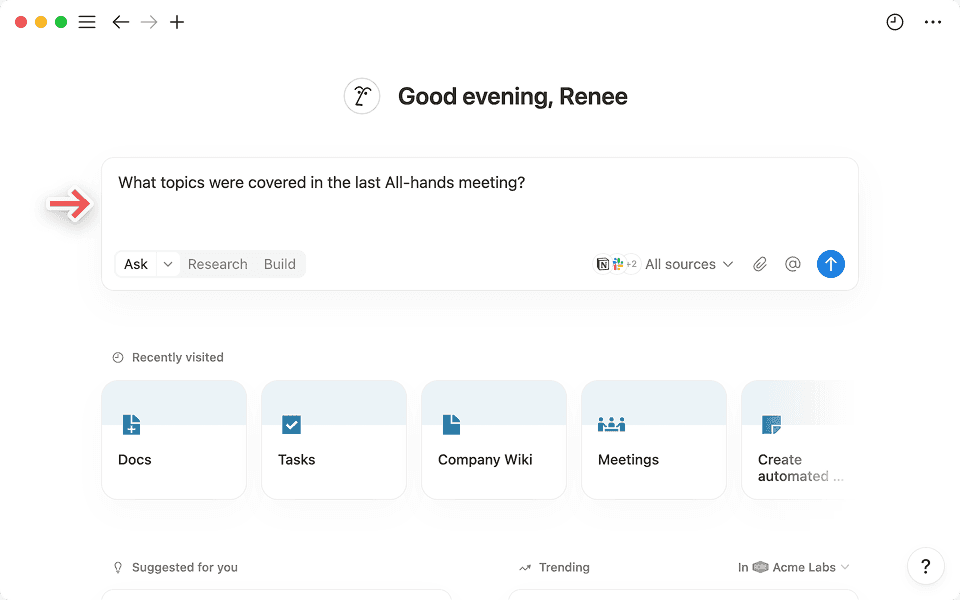
Enterprise Search is the feature that positions Notion as a unified intelligence layer rather than just a note-taking app. It's included in Business and Enterprise plans (in beta).
The interface lives as a search bar on the Notion homepage. You type a question, the AI searches simultaneously across your Notion workspace and connected tools, and returns an AI-generated overview alongside a breakdown of every source it consulted. Results can be filtered by source type (Notion vs. Slack vs. GitHub), author, or teamspace.
The connector list as of May 2026 includes: Slack, Google Drive, GitHub, Jira, Microsoft Teams, OneDrive, SharePoint, Salesforce, and Box -- the latter two added in April 2026. Notion has committed to maintaining each connector's existing permission structure, so users only see content they already have access to in the originating app.
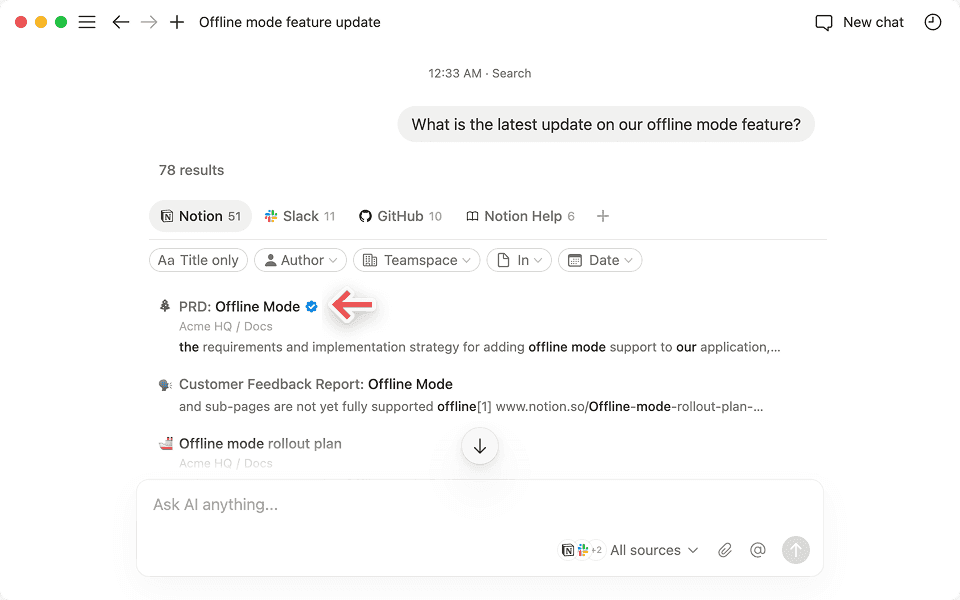
One distinctive feature: pages marked as "verified" (a Business+ plan feature) appear with a blue checkmark in search results and AI citations. Admins can verify pages to flag them as authoritative -- useful when you have both a current policy doc and an outdated one with similar content.
The honest limitation: Enterprise Search is better for knowledge retrieval than for action. It can tell you what a Slack thread concluded, but it can't write a follow-up message in that thread. Teams whose "search problem" is finding things in their own Notion docs will find it solves the problem well. Teams who need AI to take action in their support tools, CRM, or code repositories will find the read-only nature of most connectors to be a hard constraint.
Research Mode: the deep-work analyst
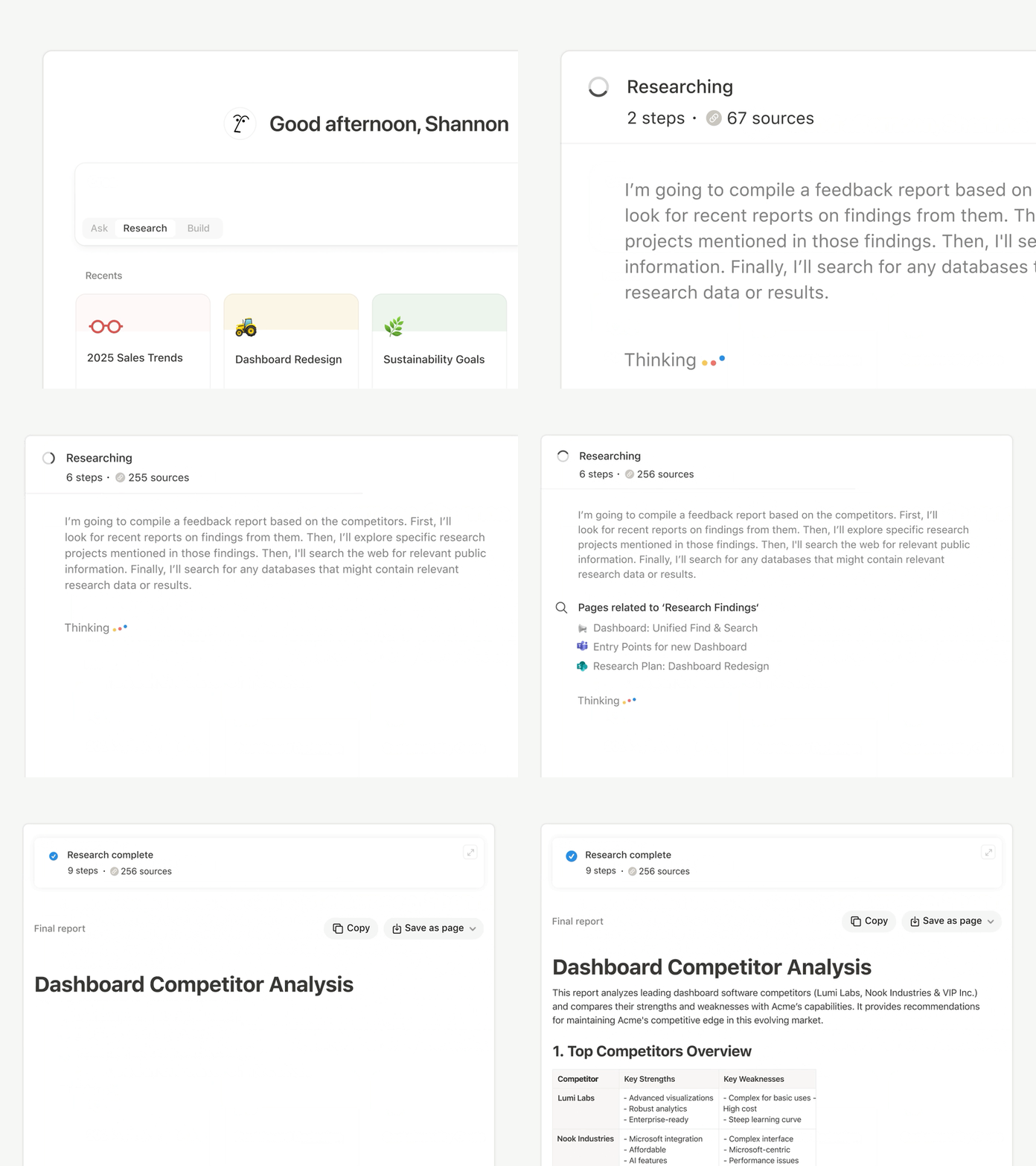
Research Mode is what distinguishes Notion AI from a basic chat layer. Instead of a single-pass search, it runs iterative multi-step searches, following leads across internal docs, connected tools, and the live web until it has a complete picture. Sessions run for up to five minutes in the background while you continue other work.
The output is a cited report -- every claim links back to a specific source. You can toggle web search on or off: on for external context like competitor activity or industry trends, off to restrict findings to internal workspace data only. You can also upload PDFs, product specs, or whiteboard snapshots to be incorporated into the research output.
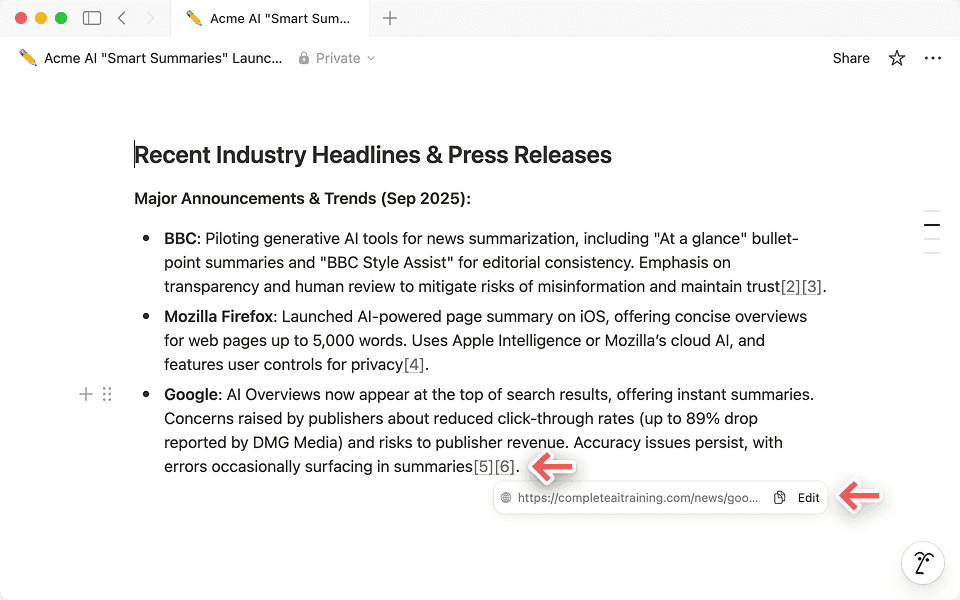
Practical use cases that actually work well: drafting PRDs by pulling together customer feedback, feature requests, and OKRs from multiple Notion databases; preparing for customer calls by pulling account history, recent feedback, and competitor context; synthesizing user research from multiple interview databases into a theme summary.
The plan gating is notable. Research Mode is "limited trial" on Business and full-access on Enterprise only. For teams that want deep research to be a regular part of their workflow -- not just a trial feature -- that means Enterprise pricing.
AI Autofill: databases that fill themselves
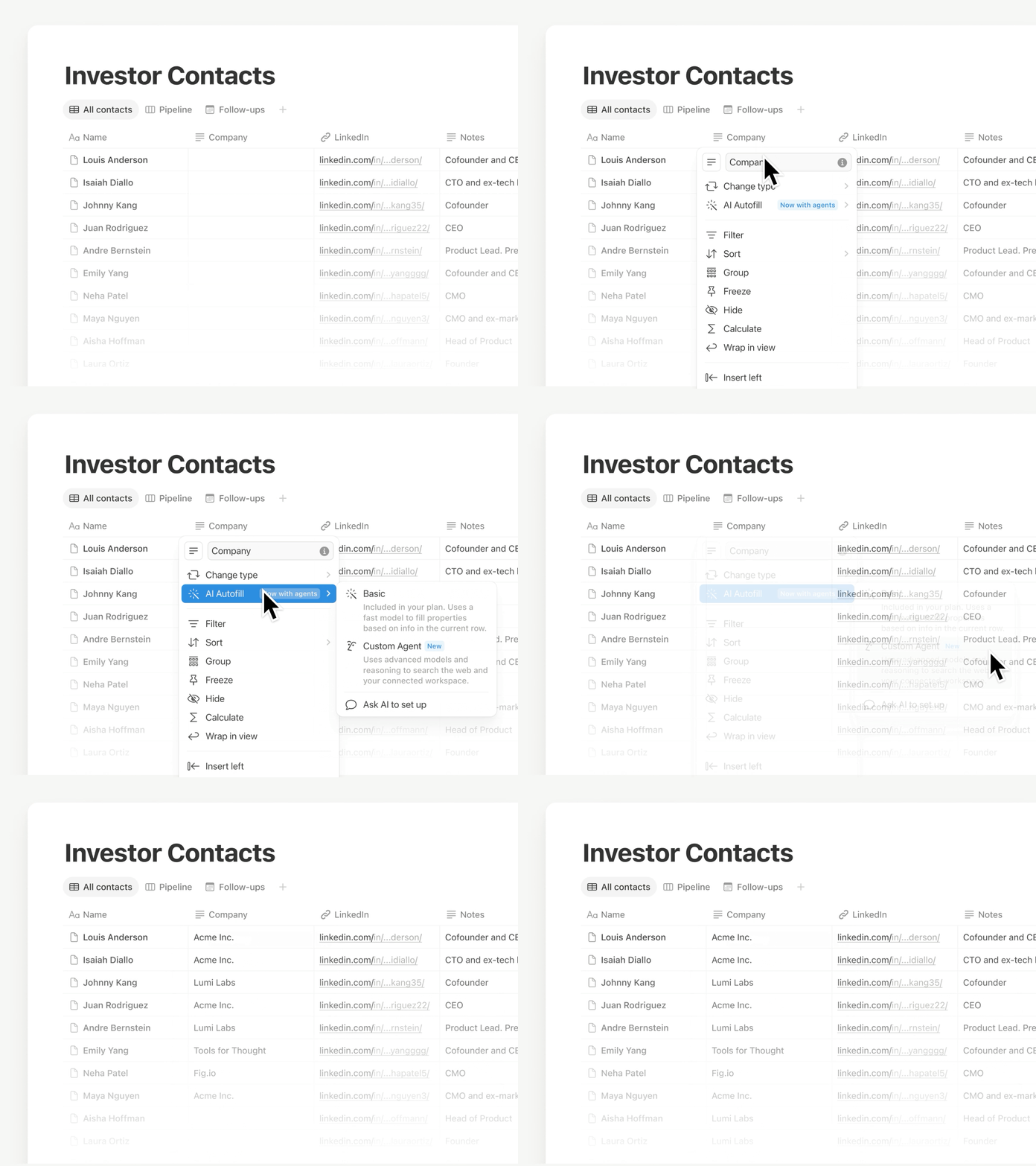
AI Autofill lets you define a property on a database -- a category, a summary field, a sentiment score, an extracted entity -- and have it populated automatically for every row, including rows added in the future. As of April 2026, Autofill is powered by Custom Agents, which means it runs continuously as a background process rather than requiring manual triggers.
The practical value: if you have a database of customer feedback, you can add a "Sentiment" property that Autofill keeps current automatically. If you have a database of sales calls, a "Key objections" property can be auto-extracted from every note. For teams that already live in Notion databases, this removes a significant category of copy-paste work.
The limitation: this also means Autofill now consumes Notion credits. Teams that rely heavily on Autofill across large databases should check the credits dashboard and test their per-run costs before the free trial period ended.
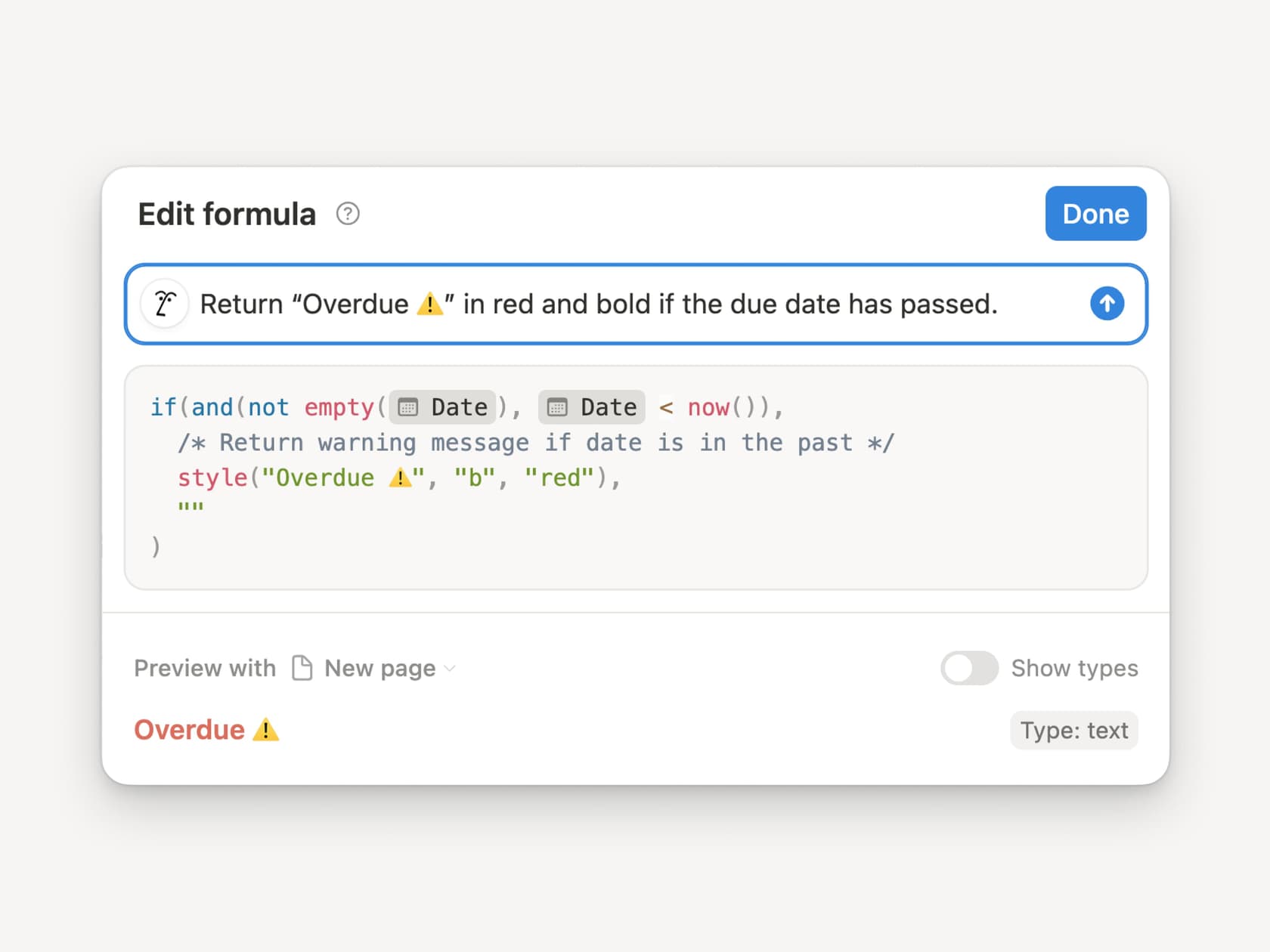
AI-generated formulas are a related feature worth mentioning. You describe the formula logic you want in plain English, and Notion AI generates the corresponding Notion formula. This doesn't sound impressive until you've actually tried writing a complex Notion formula from scratch -- the syntax is non-obvious enough that the AI save is real.
AI Meeting Notes: the meeting-to-action pipeline
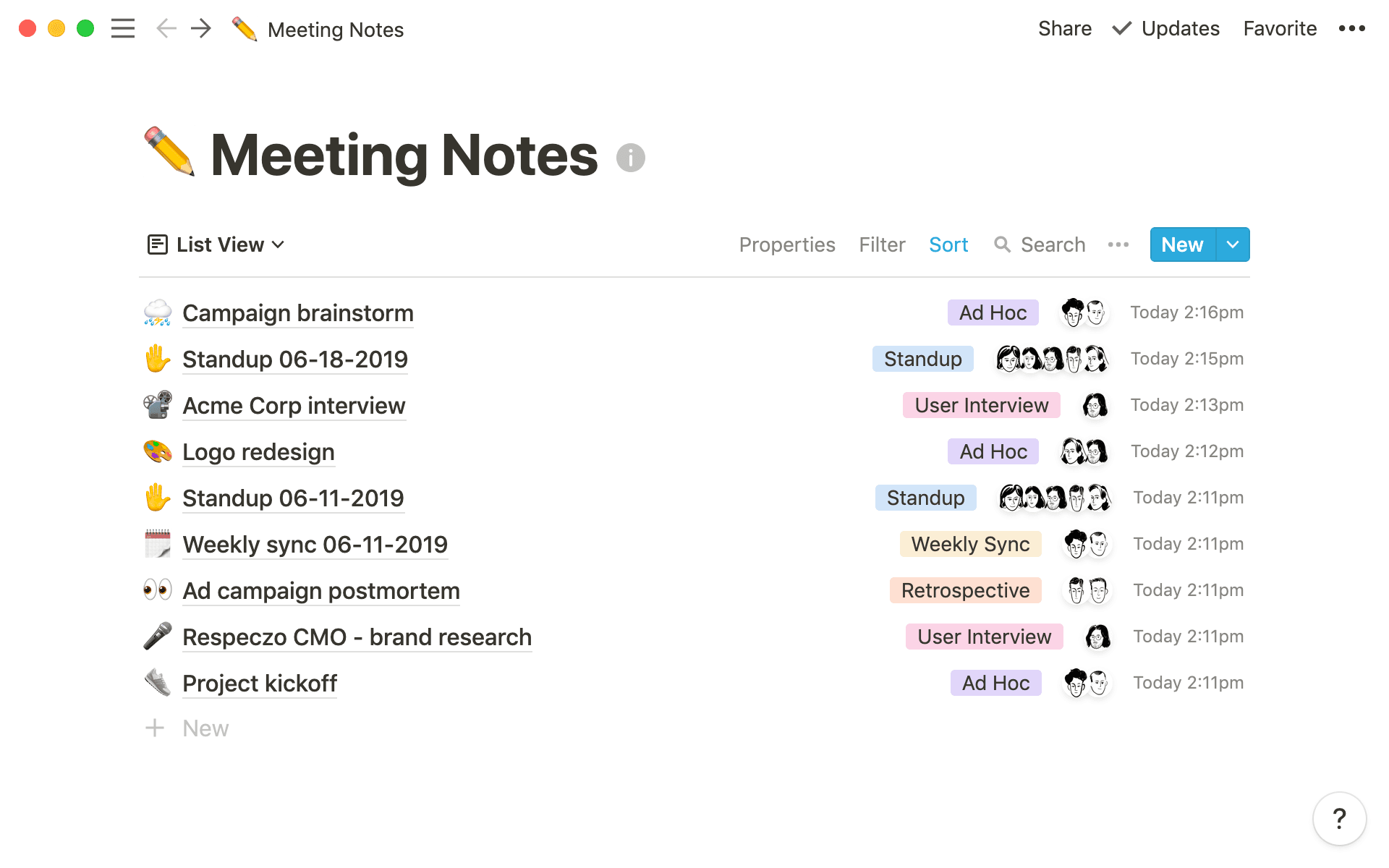
AI Meeting Notes transcribes meetings in real-time on both desktop and mobile, then generates a summary, extracts action items as a to-do list, and saves everything directly into a Notion page. Since January 2026, mobile transcription runs in the background even when you lock your screen or switch to another app.
The integration with Notion's project management layer is where the differentiation is clearest. Meeting summaries live inside the same workspace as your databases, tasks, and docs, so following up on an action item is a matter of tagging the right person in the right database row rather than copying text between apps.
The catch: AI Meeting Notes is available only on Business and Enterprise plans. Free and Plus users get a limited trial. Enterprise admins also get auto-deletion scheduling for transcripts to meet data retention policies.
Notion Mail: the AI inbox
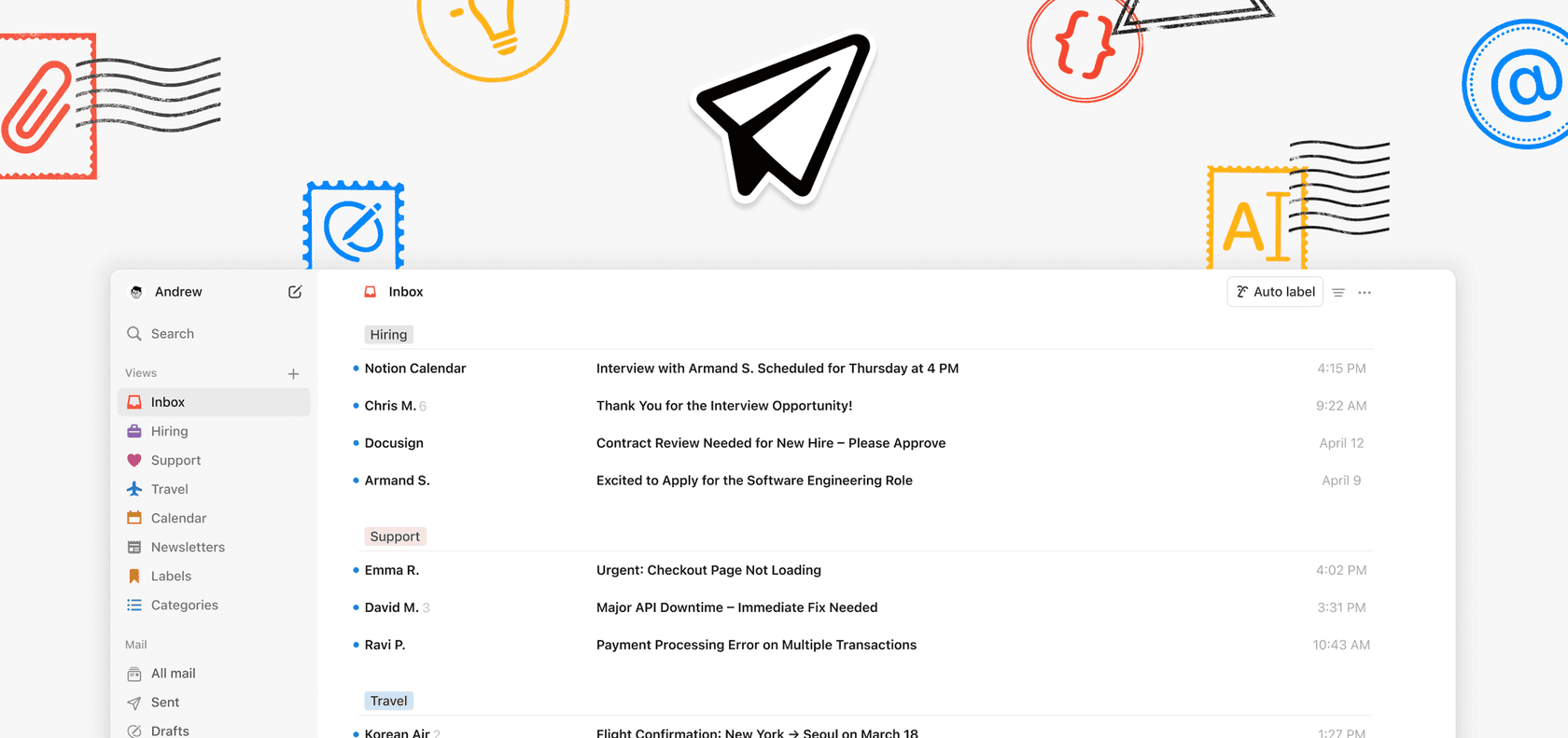
Notion Mail is an AI-first email client, available on web and MacOS (iOS in progress as of this writing). It currently requires a Gmail connection to sync.
The AI layer handles inbox organization: you tell Notion what matters to you, and it auto-labels incoming emails, sorts them into custom views you define, and surfaces the ones that need replies. The editor uses Notion's familiar slash-command interface, so you can use headings, callouts, and blocks inside email drafts. Built-in calendar integration lets you insert scheduling links directly from the compose window.
The honest assessment: Notion Mail is early. The Gmail-only requirement limits it for teams that use Outlook or Google Workspace alongside other providers. The AI labeling and custom views are genuinely useful, but comparable to what you'd get from a well-configured Gmail filter set or a dedicated email client. The differentiation Notion is betting on is depth of integration with the rest of the Notion workspace -- an email thread becoming a Notion page, a meeting scheduled from an email appearing in your Notion calendar. That integration promise is partially delivered today and still in progress.
Writing and content tools
The foundational writing layer -- drafting, editing, summarizing, translating, improving tone -- was Notion AI's original feature set and remains the most polished part of the product.
You can ask Notion AI to draft a document from a prompt, match the voice or style of an existing doc (referenced with @), generate an outline for a project, translate an entire page, or create new content inspired by existing templates. It can analyze uploaded PDFs and images, summarize key points, and suggest action items.
The quality tracks the underlying model choice. On Claude Opus 4.5, the writing feels better-calibrated for nuance and tone; on GPT-5.2, the output is slightly more generic but responds faster to structured prompts. The ability to switch models mid-task (with persistent context) is a practical feature that most competing AI writing tools don't offer.
One well-documented complaint: as Onyeka E. put it on G2, "Notion AI stands out to me with its capability to understand context and brand voice, responding intelligently and contextually... Notion AI really reduces the time spent on repetitive tasks." The same reviewer's negative feedback: the AI plan costs more than the base Pro plan, which leads to a category of users who find the writing features valuable but balk at the add-on pricing.
Pricing: the full table
This is the information most reviewers soft-pedal. Here's what every plan actually costs and includes as of May 2026, sourced from the Notion pricing page:
| Plan | Price | AI features included |
|---|---|---|
| Free | $0/member/month | Trial of Notion AI Core (chat, generate, autofill); trial of AI Meeting Notes; trial of Notion Agent |
| Plus | $10/member/month (annual) | Same trial access as Free; unlimited collaborative blocks; unlimited file uploads; custom forms/sites |
| Business | $20/member/month (annual) | Notion Agent (full access); AI Meeting Notes (full access); Enterprise Search (beta); Research Mode (limited trial); Custom Agents (requires credits); SAML SSO; granular database permissions |
| Enterprise | Custom pricing | Everything in Business; Research Mode (full access); zero data retention with LLM providers; SCIM user provisioning; audit log; advanced security; customer success manager |
| Custom Agents | $10 per 1,000 Notion credits/month | Available as add-on for Business and Enterprise; credit costs reduced 35-50% in April 2026 with new lightweight model options |
A few notes on what's not obvious from the table:
- "Trial" means limited-use, not time-limited. You can use the trial features but will hit a cap and be asked to upgrade.
- The AI add-on pricing that existed in prior years (the standalone $8-10/user/month for AI Core) still exists for teams on older plans, but new Business plan signups get AI features bundled in the $20/seat price.
- Research Mode being "limited trial" on Business is meaningful. If deep cross-source research is a regular workflow, Business plan users will find themselves hitting the cap.
- Data retention: Free, Plus, and Business plans get 30-day retention on AI-processed data. Enterprise gets zero data retention with LLM providers -- a material difference for regulated industries.
What AI connectors actually cover
The connector list matters for enterprise search decisions. As of May 2026, Notion's AI Connectors cover:
- Slack (team conversations and DMs)
- Google Drive (Docs, Sheets, Slides)
- GitHub (codebase and pull requests)
- Jira (tickets and project updates)
- Microsoft Teams (chat and channels)
- OneDrive and SharePoint (documents)
- Salesforce (accounts and opportunities -- beta, added April 2026)
- Box (proposals and contracts -- beta, added April 2026)
What's not there: Zendesk, Freshdesk, Gorgias, HubSpot CRM records, Salesforce Service Cloud, Intercom data. Notion's connector list is tilted toward engineering and internal communication tools rather than customer-facing helpdesk tools. For teams where the knowledge that matters most lives in support tickets or CRM records, Enterprise Search won't solve the core retrieval problem.
Community sentiment: what real users say
Notion holds a 4.6/5 on G2 across 11,434 reviews. The AI-specific feedback divides pretty consistently into three camps.
The first camp finds it genuinely useful for knowledge management:
"I also love Notion AI -- it's my first stop whenever I have a question to ask, since likely the question has already been answered inside of a doc."
Jiahao H., Deployment Strategist (Capterra)

"And when connected with Notion AI, it gets a lot easier to connect the dots on the knowledge in my second brain folder. It's my daily copilot."
Tulio S., Owner (G2)

The second camp has problems with the pricing model:
"I'd like if the Notion AI plan could be part of the Pro plan. I'm currently on the Pro plan, but Notion AI isn't included, and I have to pay extra. The extra is actually way more expensive than the Pro plan I subscribed to."
Onyeka E., Human Resources Administrator (G2)
"Also, I think more of the baseline AI functions should be included in the paid seats as opposed to as an exorbitant add on."
Verified Reviewer, Strategy and Operations (Capterra)
"Les credits Notion IA ne sont pas suffisants pour ne serait-ce qu'une semaine d'essai." ("The Notion AI credits are not enough for even a week's trial.")
Marie Christine G., Assistant RH (Capterra)
The third camp -- smaller but consistently present -- doesn't want AI in their workspace at all:
"I just wish I could opt out of the AI aspect... I feel less secure with the AI hovering over my shoulder. What I don't like about Notion is that it's pivoted to AI, and I'm just trying to take notes on meetings and keep my tasks organized."
Verified Reviewer, Prior Authorization Specialist (Capterra)
"I have found the addition of AI to the app to be kind of annoying, especially when a note-taking banner would automatically pop up every time I started a Zoom call."
Stephanie P., American accent coach (Capterra)
The intrusiveness complaints are worth taking seriously. Notion has been progressively integrating AI into surfaces that previously had nothing to do with AI -- the auto-trigger for meeting transcription when Zoom starts being the most cited example. For users who want Notion as a straightforward docs and databases tool, the AI layer can feel less like a feature and more like a constant ambient presence that has to be actively dismissed.
Pros and cons
| Pros | Cons |
|---|---|
| AI search is deeply integrated with workspace context | AI Agent and Meeting Notes locked to Business ($20/seat/month) |
| Model choice (GPT-5.2, Claude Opus 4.5, Gemini 3) with persistent context switching | Research Mode (full access) limited to Enterprise |
| Custom Agents connect to MCP tools including HubSpot, Linear, Figma | Credits billing for Custom Agents adds variable cost unpredictability |
| AI Autofill runs continuously on databases (not just on-demand) | Connector list missing major helpdesk tools (Zendesk, Freshdesk, Gorgias) |
| 300+ agents in production at Ramp with real productivity numbers | "Trial" access on lower plans means you hit caps before seeing real value |
| 50%+ adoption rate among paying customers as of late 2025 | AI surfaces are intrusive for users who don't want them |
| Enterprise: zero data retention with LLM providers | Mail requires Gmail; iOS not yet available |
How it compares
Notion AI is a strong choice for teams that live in Notion and want AI to work within that context. The depth of workspace integration -- agents that can create database pages, autofill properties, and pull from connected tools simultaneously -- is genuinely ahead of what most standalone AI tools can do when inserted into a Notion-based workflow.
Where it falls short is breadth of context. If your team's institutional knowledge is spread across Zendesk tickets, Slack, a Notion wiki, and a Jira board, Notion AI can reach Slack and Jira but not Zendesk. Tools like eesel AI are built specifically for that cross-platform knowledge problem -- connecting AI to your full tool stack, including Zendesk, Freshdesk, Google Drive, Slack, and your Notion workspace in one view. If you want to understand the tradeoffs in more depth, the eesel blog on Notion AI limitations covers the gaps in detail.
The other gap is customer-facing use. Notion AI excels at internal knowledge work. It is not a customer support automation tool. Teams that need AI to handle tickets, route customer questions, or respond in a helpdesk interface need something purpose-built for that workflow rather than adapting Notion's internal-facing agents to that purpose.
For teams comparing AI writing tools, Notion AI vs. Rytr is a useful comparison if writing quality is the primary driver, and the best Copy.ai alternatives roundup covers the broader writing-tool landscape including how Notion AI stacks up against dedicated writing platforms.
The verdict
Notion AI in 2026 is the best AI layer available if Notion is already your team's operating system. The agents are real and getting better. The Enterprise Search is genuinely useful for internal knowledge retrieval. The model selection is a practical differentiator. The Ramp case study isn't marketing fluff -- teams that fully commit to Notion as their workspace and build agents around it do see real productivity gains.
The pricing structure is where it breaks down for many users. Business at $20/seat is the floor to get any meaningful AI features, and Custom Agent credits add variable cost on top. Research Mode being a limited trial on Business and full-access only on Enterprise is a real constraint for teams that want deep research to be a regular workflow. The community complaints about AI add-ons costing more than the base plan are legitimate -- Notion's pricing model asks users to pay for AI at a rate that surprises people who came for the notes app.
Good fit for: mid-size and enterprise teams already on Notion, with engineers and product managers who will actually build and use agents; companies with most of their knowledge inside Notion, Google Drive, Slack, and GitHub; orgs that can justify $20/seat and are comfortable with credit-based billing for agents.
Not a good fit for: teams that need customer-facing AI for tickets and support; organizations whose critical knowledge lives in Salesforce Service Cloud, Zendesk, or Freshdesk rather than internal docs; small teams or individuals who find the pricing hard to justify relative to a standalone AI writing tool; users who want Notion to stay a clean notes app without AI ambient features.
If you're evaluating Notion AI specifically for customer support knowledge management -- answering questions from your help center or routing support requests -- the Notion AI for databases guide and the broader AI productivity tools comparison are worth reading before committing.
Notion AI pricing and features verified from the Notion pricing page and release notes as of May 7, 2026. G2 ratings from g2.com/products/notion/reviews (11,434 reviews, 4.6/5 aggregate). User quotes from Capterra and G2, cited with direct permalinks.
Frequently Asked Questions
What is Notion AI?
Is Notion AI free?
How does Notion AI connect to external tools like Slack and Google Drive?
What are Notion credits and how do I avoid unexpected charges?
Is Notion AI good for customer support teams?


Article by
Kurnia Kharisma Agung Samiadjie
Kurnia is a software engineer and writer at eesel AI with two years of SEO experience, writing about AI tools, helpdesk software, and customer support. He pairs a developer's understanding of how these products are built with search-driven research into what actually ranks and resonates with the people searching for them.