Notion has become the default workspace for teams that want flexibility without drowning in disconnected tools. It works as a document hub, project manager, wiki, and database system all at once. But once teams start using it for everything, they quickly hit a ceiling. You can store information easily, but acting on that information still takes manual work.
That's where AI comes in. The right AI tool can turn your Notion workspace from a static knowledge repository into an active system that helps you get work done faster. Whether you want to query your docs with natural language, automate meeting notes, or connect Notion to the rest of your tech stack, there's an AI solution for you.
We've tested and ranked the seven best AI tools that integrate with Notion, from native features to powerful third-party solutions. Let's break it down.
What is Notion AI?
Notion AI is the native AI assistant built directly into your Notion workspace. It's included with Notion's Business plan and offers a range of capabilities designed to help you work faster within the platform.
Here's what you get:
- AI writing assistance for generating and editing docs, autofilling databases, and translating content
- Q&A across your workspace to find answers from your pages and connected apps
- AI Meeting Notes that automatically transcribe meetings and create summaries
- Enterprise Search that pulls information from Slack, GitHub, Google Drive, and other connected tools
- Notion Agent that completes complex, multi-step tasks using context from your workspace
- Custom Agents for automating recurring workflows (available for an additional $10 per 1,000 credits)
Notion AI is seamless because it lives where you already work. There's no setup, no integration to configure, and no context switching. If your team already lives in Notion and wants basic AI assistance for writing, summarizing, and searching, the native AI gets the job done.
But there are limitations. Notion AI actions are confined to your Notion workspace. It can't write data to external systems, and it isn't designed for complex calculations or data analysis (there's a 1,000-row limit). If you need AI that works across your entire tech stack or takes actions in other tools, you'll need to look beyond the native features.
How we evaluated these tools
We looked at several factors to determine which AI tools deserve a spot on this list:
- Integration quality with Notion How well does the tool connect to your workspace? Is it a native integration, API-based, or a replacement?
- Feature depth and AI capabilities What can the AI actually do? Is it limited to search, or can it take actions and automate workflows?
- Pricing transparency Are the costs clear upfront, or do you need to contact sales for basic information?
- Ease of setup Can you get started in minutes, or does it require technical expertise?
- Use case fit Which teams and workflows is this tool actually designed for?
Comparison table
| Tool | Best for | Notion integration | Starting price | Key strength |
|---|---|---|---|---|
| eesel AI | Knowledge management & support | Knowledge source | $299/month | AI teammate that learns your docs |
| Notion AI | Native workspace AI | Built-in | $20/member/month | Seamless, no setup required |
| Dust | Cross-platform agents | Connection | $29/user/month | Works across entire tech stack |
| Fellow | Meeting notes | Export/sync | $7/user/month | Purpose-built for meetings |
| Coda AI | Power users & formulas | Import/replace | $10/Doc Maker/month | Powerful calculations & automations |
| n8n | Technical teams | API workflows | $20/month | Unlimited custom automations |
| Mem | Personal knowledge | Import/replace | Free tier available | AI-native note-taking |
The 7 best AI tools for Notion
1. eesel AI
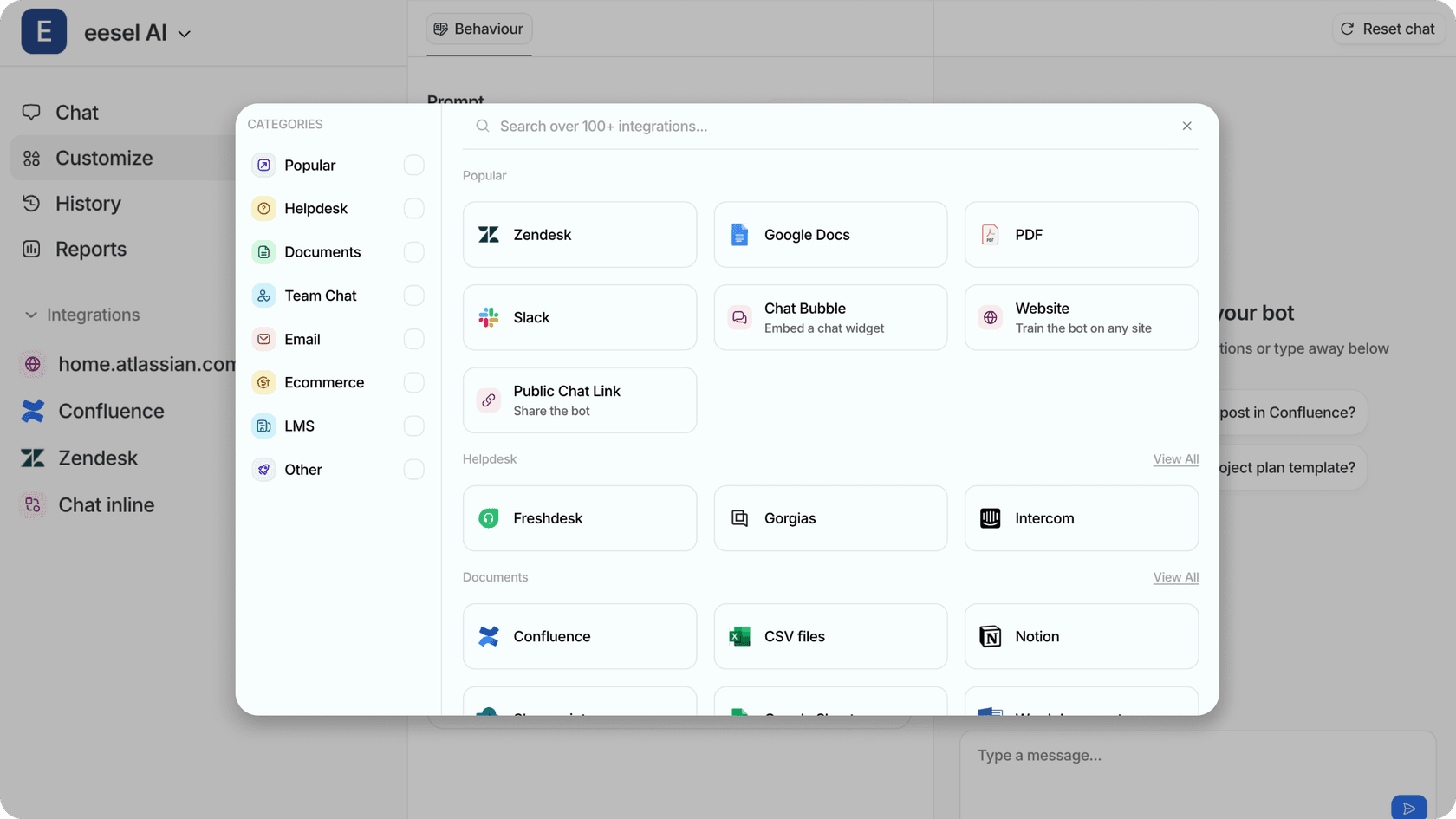
If your team uses Notion as a knowledge base and you want AI-powered access to that information, eesel AI is worth serious consideration. We've built an AI teammate that connects to Notion (along with 100+ other integrations) and answers employee questions with cited responses.
Here's how it works. You connect eesel AI to your Notion workspace, and it learns from your pages, docs, and databases. From there, employees can ask questions in Slack, Microsoft Teams, or through a chat interface. The AI provides answers based on your actual Notion content, with links back to the source pages.
Key features:
- Train on Notion pages, Google Docs, Confluence, PDFs, and help centers
- AI Internal Chat that answers employee questions with citations
- Works in Slack, Microsoft Teams, and help desks like Zendesk
- Continuous learning from corrections and updates
- Up to 81% autonomous resolution for mature deployments
Pros:
- Quick setup learns your docs in minutes, not weeks
- Natural language queries employees ask questions how they naturally speak
- Cited answers every response includes links to source documents
- Progressive rollout start with drafts, level up to autonomous responses
Cons:
- Focused on knowledge Q&A rather than content generation
- Higher starting price point than some alternatives
Pricing: Team plan starts at $299/month ($239/month annually) for up to 3 bots and 1,000 interactions. Business plan at $799/month includes unlimited bots and AI Agent capabilities. See full pricing.
Best for: Teams using Notion as a knowledge base who want AI-powered access for employees or customers. Particularly strong for customer support teams wanting to deflect tickets with knowledge. Learn more about our Notion integration.
2. Notion AI
Notion AI is the obvious starting point for most teams because it's already there. If you're on Notion's Business plan, you have access to AI features without any additional setup or integration work.
The AI can help you write faster, find information across your workspace, and even automate some of your meeting documentation. The Q&A feature is particularly useful you can ask questions about your workspace content and get answers without manually searching through pages.
Key features:
- AI writing and editing within any Notion page
- Q&A across your workspace and connected apps
- AI Meeting Notes with automatic transcription
- Enterprise Search across Slack, GitHub, Google Drive
- Notion Agent for complex multi-step tasks
- Custom Agents for workflow automation
Pros:
- Seamless integration no setup required
- Works with all your existing Notion content
- Included in Business plan at no extra cost
- No context switching AI lives where you work
Cons:
- Limited to Notion workspace can't interact with external tools
- Not designed for complex calculations or data analysis
- 1,000-row limit for database operations
Pricing: Included in Business plan at $20/member/month ($16/month annually). Also available as a limited trial on Free and Plus plans. See full pricing.
Best for: Teams already committed to Notion who want basic AI assistance without additional tools or complexity.
3. Dust
Dust takes a different approach. Instead of being confined to one workspace, Dust provides cross-platform AI agents that can work across your entire tool stack. This includes Notion, but also extends to Salesforce, Slack, GitHub, Snowflake, and dozens of other tools.
The key differentiator is that Dust agents can take actions, not just retrieve information. You can create custom agents that automate workflows spanning multiple platforms. For example, an agent could read a customer request in Slack, look up relevant information in Notion, check the CRM in Salesforce, and then draft a response.
Key features:
- Cross-platform AI agents that work across your entire tool stack
- Connections to Notion, GitHub, Google Drive, Slack, Zendesk, and more
- Custom agents that can execute actions across tools
- Enterprise-grade security with SOC2 and zero data retention
- API access for programmatic usage
Pros:
- Only AI tool that truly works across your entire tech stack
- Agents can take actions, not just answer questions
- Strong privacy and security credentials
- 14-day free trial to test capabilities
Cons:
- Higher price point at $29/user/month
- More complex setup than native Notion AI
- Requires 100+ users for Enterprise features
Pricing: Pro plan at $29/user/month. Enterprise plan is custom pricing for 100+ users with SSO and priority support. See full pricing.
Best for: Teams needing AI that spans multiple platforms beyond Notion, especially organizations with complex tech stacks.
4. Fellow
Fellow is purpose-built for meeting management, and its Notion integration is designed specifically for that use case. If your team generates a lot of meeting notes and you want them organized in Notion, Fellow handles the workflow end-to-end.
The AI meeting assistant joins your calls (on Zoom, Google Meet, or Microsoft Teams), transcribes the conversation, and extracts action items. You can then export meeting notes directly to Notion pages or sync action items to Notion databases. Each item carries context like date, participants, and linked agenda.

Key features:
- AI meeting transcription and summaries in 99 languages
- Automatic action item extraction
- Export meeting notes to Notion pages
- Sync action items to Notion databases
- CRM integration with Salesforce and HubSpot (Business plan+)
Pros:
- Purpose-built for meetings does one thing really well
- Clean, direct Notion export
- Supports all major video conferencing platforms
- Free tier available for small teams
Cons:
- Narrow focus only handles meeting-related workflows
- Limited AI capabilities outside of meeting context
- User limits on lower-tier plans
Pricing: Free plan with 5 AI notes lifetime. Team plan at $7/user/month (annual) or $11/month-to-month. Business plan at $15/user/month (annual). See full pricing.
Best for: Teams wanting to centralize meeting notes and action items in Notion without manual copy-paste.
5. Coda AI
Coda isn't technically a Notion integration it's more of a replacement. But if you're hitting the limits of what Notion can do, especially around formulas and automation, Coda is worth considering as an alternative workspace with built-in AI.
Coda combines docs, spreadsheets, and apps into one platform with powerful formulas that go beyond Notion's capabilities. The AI features include writing assistance, insights from your data, and automation of repetitive tasks. With 600+ Packs (integrations), Coda often has deeper two-way sync with external tools than Notion.
Key features:
- Powerful spreadsheet-like formulas with programming capabilities
- AI writing, insights, and automation
- 600+ Packs with deep two-way integrations
- Native AI included for Doc Makers
- Only Doc Makers pay Editors are free
Pros:
- More powerful calculations and automation than Notion
- Deep integrations with two-way sync
- Unique pricing model where only creators pay
- AI included without additional fees
Cons:
- Requires migration from Notion
- AI still limited to Coda workspace
- Steeper learning curve for formula-based workflows
Pricing: Pro plan at $10/Doc Maker/month ($8 annual). Team plan at $30/Doc Maker/month ($24 annual). Editors and viewers are always free. See full pricing.
Best for: Teams outgrowing Notion's formula and automation capabilities, especially operations and technical teams.
6. n8n
n8n is an open-source workflow automation platform that gives technical teams unlimited flexibility for connecting AI to Notion. Unlike the other tools on this list, n8n isn't a pre-built solution it's a platform for building custom workflows.
With n8n's visual workflow builder, you can create automations that trigger from Notion events, send data to AI services like OpenAI, and write results back to Notion. The platform supports 400+ integrations and includes code steps for JavaScript and Python when you need custom logic.
Key features:
- Visual workflow builder with 400+ integrations
- Full Notion API support via dedicated node
- AI Workflow Builder for creating AI-powered automations
- Self-hosted option available
- Code steps in JavaScript and Python
Pros:
- Unlimited flexibility for custom workflows
- Fair pricing pay per execution, not per step
- Open source with self-hosted option
- Can create complex multi-step AI + Notion automations
Cons:
- Requires technical expertise to set up
- Steeper learning curve than no-code alternatives
- Self-hosted option requires infrastructure management
Pricing: Starter plan at $20/month (annual). Pro plan at $50/month (annual). Business plan at $800/month (annual). Self-hosted Community Edition is free. See full pricing.
Best for: Technical teams wanting custom AI-Notion workflows and organizations needing self-hosted automation.
7. Mem
Mem is an AI-native notes app that serves as an alternative to Notion rather than an integration. If you're an individual user or small team looking for AI-first note-taking, Mem offers a different approach to knowledge management.
Instead of manually organizing your notes into folders and hierarchies, Mem uses AI to automatically organize and surface relevant information. You capture notes quickly, and the system handles the rest. The AI can recall information contextually and even generate content based on your existing notes.
Key features:
- AI-powered auto-organization of notes
- Contextual search and recall
- Fast capture with AI assistance
- Built for AI from the ground up
Pros:
- AI-native architecture no retrofitted features
- Excellent for personal knowledge management
- Minimal manual organization required
- Free tier available
Cons:
- Less robust for team collaboration than Notion
- Primarily an alternative, not an integration
- Limited enterprise features
Pricing: Free tier available. Pro plan pricing requires login to view. See Mem.
Best for: Individuals wanting AI-first note-taking as an alternative to Notion's more manual organization.
Choosing the right AI tool for your Notion setup
With seven solid options, how do you pick the right one? Here's a simple framework based on your primary use case:
For knowledge management and support: eesel AI is purpose-built for turning your Notion workspace into an AI-powered knowledge base. If employees or customers are asking the same questions repeatedly, this is your solution.
For native workspace AI: Notion AI is the obvious choice if you want seamless AI without adding new tools. It's not the most powerful option, but it's the easiest.
For cross-platform agents: Dust is the only tool that truly works across your entire tech stack. If you need AI that can act in Salesforce, Slack, GitHub, and Notion, this is it.
For meeting notes: Fellow is purpose-built for this workflow. If meeting documentation is your main pain point, start here.
For power users: Coda offers more powerful formulas and automation than Notion. If you're hitting limits with calculations and workflows, consider migrating.
For technical teams: n8n gives you unlimited flexibility to build exactly what you need. Just be prepared to invest setup time.
For personal use: Mem is a lighter, AI-first alternative to Notion for individual knowledge management.
Considerations beyond use case include team size, budget, technical expertise, and your existing tool stack. The right choice depends on which of these factors matters most to your situation.
Getting started with AI-powered knowledge management
Adding AI to your Notion workspace isn't just about having fancy new features. It's about making your knowledge accessible and actionable. When employees can get answers from your docs in seconds instead of hunting through pages, productivity jumps. When customers can self-serve from your knowledge base, support volume drops.
The best place to start is with a specific use case. Pick one problem maybe it's onboarding new employees, or deflecting common support tickets and test an AI solution there. Measure the results, refine your approach, and expand from there.
If knowledge management is your focus, we've built eesel AI specifically for this challenge. Our AI teammate connects to Notion and other knowledge sources, learns your content, and provides cited answers to questions. Teams see up to 81% autonomous resolution rates once the AI is trained on their docs.
You can try eesel AI free for 7 days and see how it works with your Notion workspace. No credit card required. If you have questions about setup or want to discuss your specific use case, book a demo and we'll walk you through it.