What I actually looked for
I work on the support side at eesel, so I spend my days watching AI try to resolve real tickets, and I have opinions about what separates a tool that demos well from one that survives a Monday morning queue. A few months back I sat in on a call with a support lead at a public-sector IT services firm who was about to lose two senior agents that year. His whole reason for shopping wasn't deflection rates or dashboards. It was: can I capture what these two people know before they walk out the door? That is the real job of AI in IT support, and most tools quietly fail at it.
That experience shapes how I judge these tools, because eesel has spent the last few years putting AI agents on live support and IT queues, across thousands of real tickets. We've watched a confident-sounding bot give a wrong answer to a frustrated employee, which is exactly why every rollout now gets simulated against historical tickets before it ever replies to a human. So I weighted four things heavily:
- How it learns. Does it train on your resolved tickets and tribal knowledge, or just scrape your help center and hope?
- Control before autonomy. Can you scope what it answers, route low-confidence cases to a human, and prove it works before going live?
- Where it lives. Employees ask for IT help in Slack and Teams, not a portal they have to remember. Does the AI meet them there?
- What it really costs. Per employee, per agent seat, or per ticket resolved? The unit decides whether the bill scales with your team or with your results.
If you want the wider category context first, our overview of AI for IT service management is a good primer before you start comparing vendors.
The 7 best AI tools for IT support at a glance
Here's the shortlist side by side. "Native Slack/Teams" means employees can ask for help directly in chat, not just inside a web portal.
| Tool | Best for | How it's billed | Starting price | Native Slack/Teams | Deployment |
|---|---|---|---|---|---|
| eesel AI | Teams adding AI over an existing helpdesk | Per ticket resolved | $0.40 / ticket, no per-seat fee | Yes | Layer over your stack |
| Moveworks | Large enterprises consolidating IT + HR | Per employee (quote-only) | ~$15-45 / employee / yr (third-party) | Yes | Standalone front door |
| Aisera | Fortune-500 cross-functional automation | Per use case / volume (quote-only) | Quote-only | Yes | Alongside your system of record |
| ServiceNow Now Assist | Shops already standardised on ServiceNow | Per fulfiller seat + GenAI add-on | ~$100+/seat/mo + ~60% Pro Plus premium | Yes | Platform-native |
| Freshservice Freddy | Mid-market Freshworks customers | Per agent + AI sessions | $19-99 / agent / mo (AI on Enterprise) | Yes (with setup) | Platform-native |
| Atlassian Rovo | Heavy Jira + Confluence shops | Bundled into paid plans + credits | From ~$5.42 / user / mo | No native bot | Platform-native (Cloud) |
| Glean | Enterprise-wide knowledge search | Per seat + add-ons (quote-only) | ~$40-50 / user / mo (third-party) | Yes | Standalone enterprise |
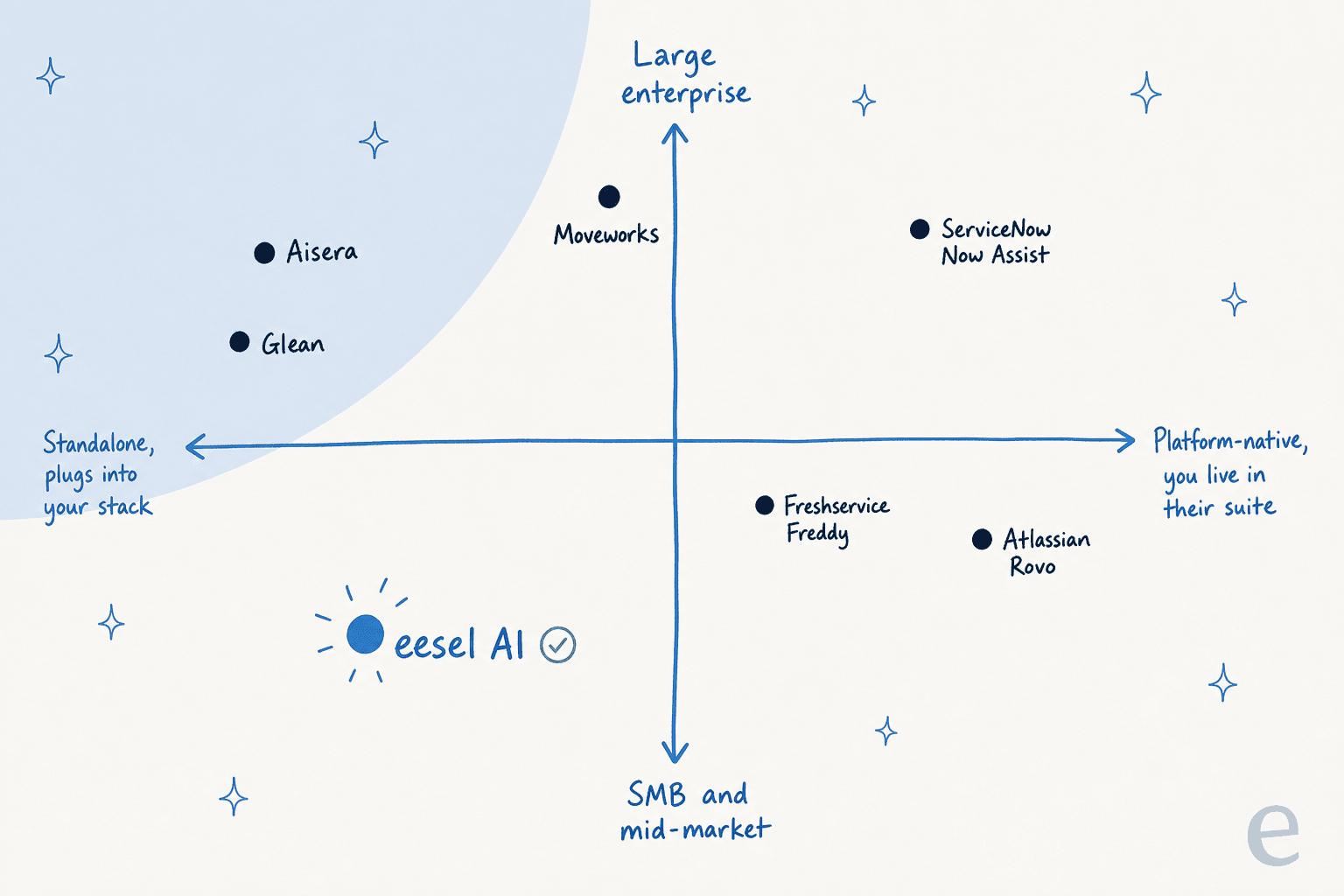
One pattern jumps out when you plot these tools on where they sit and who they're for. The enterprise suites cluster in the top-right, where you commit to the whole platform; the lighter, layer-on-top options sit on the left, where you keep the helpdesk you have.
How AI actually resolves an IT ticket
Before the list, it helps to know what's happening under the hood, because the marketing makes every tool sound identical. The mechanics are simple, and the quality lives in one step: the confidence check.
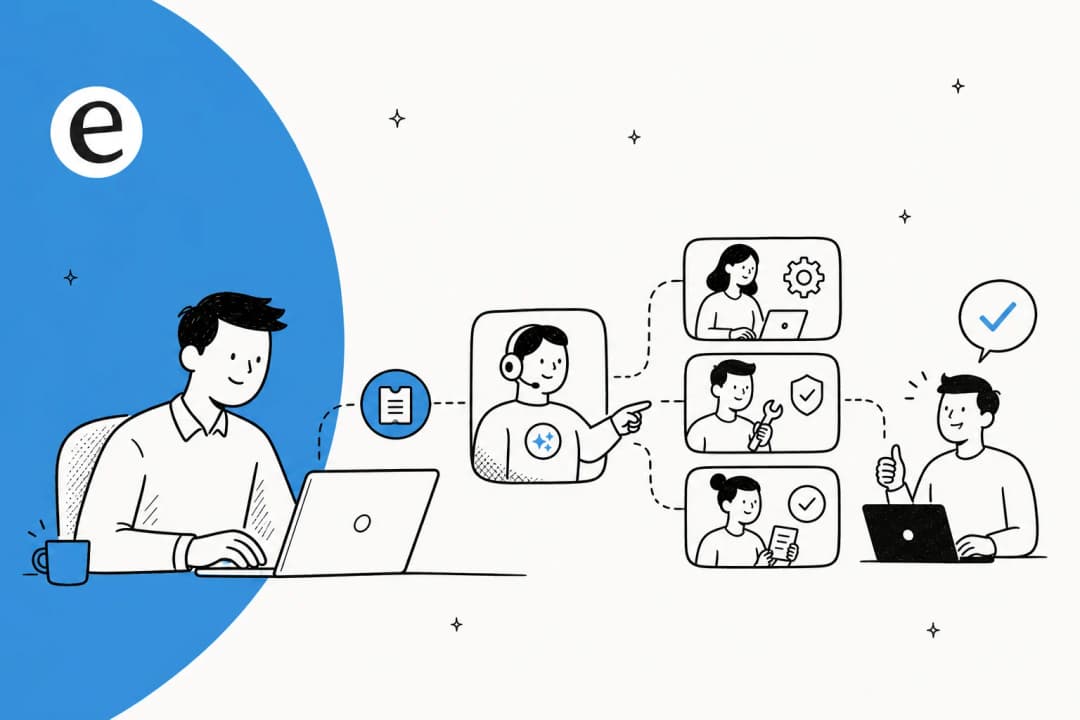
An employee asks a question wherever they already are. The AI reads the relevant context: your knowledge base, past tickets, and in the better tools, the actions it's allowed to take (resetting a password, provisioning a license). Then it decides whether it's confident enough to act. The tools worth paying for are honest about what they don't know: high-confidence requests get auto-resolved, and anything shaky gets handed to a human with a drafted answer and full context attached, instead of a confident guess.
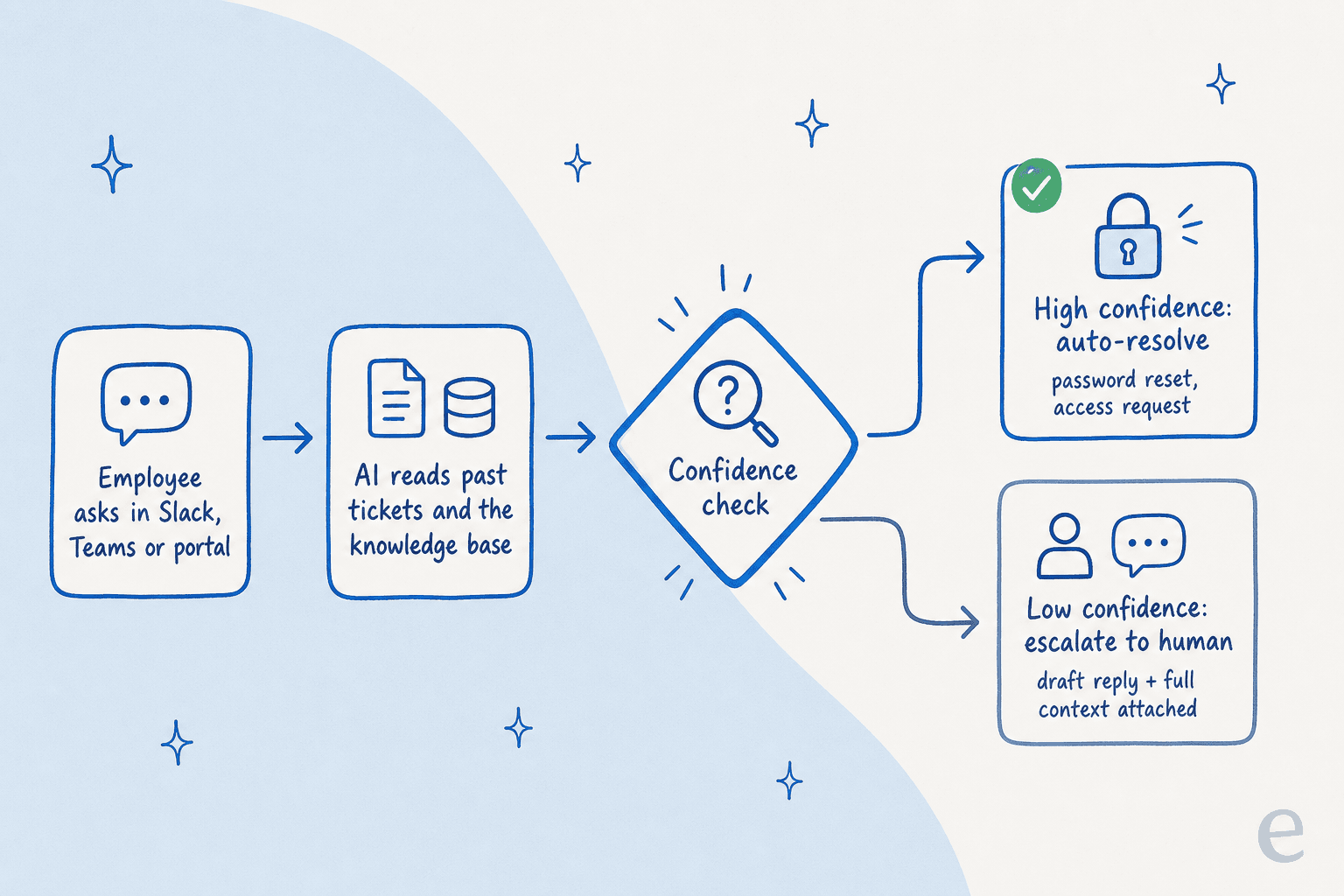
That confidence step is the whole ballgame. A DTC supplements CX lead I came across put the philosophy better than any vendor deck: "The AI will never be able to answer 100% of the questions. I need an AI who is only handling the tickets that it's confident to handle, and all the other ones, leave them alone." Tools that ignore this are how you get the "did you try turning it off and on again" replies that erode trust in week one. If you want to go deeper, our guide on preventing AI hallucinations covers the controls that keep this in check.
1. eesel AI
Best for: IT and support teams that want autonomous AI over their existing service desk and chat tools, without a platform migration or a per-seat bill.
I'll be upfront that this is the tool I work on, so read the verdict critically. But the reason I'd reach for eesel first for IT support is the same reason customers do: it doesn't ask you to move. It plugs into the helpdesk you already run, plus Slack, Teams, Confluence, and Google Docs, then trains on your historical tickets and docs so years of resolved issues become usable knowledge on day one. That's the "capture the senior agent's knowledge" problem from earlier, solved without a six-month project.
Features
- Learns from your past tickets and docs, not just a help-center scrape, so it answers the way your team actually does.
- Simulation mode replays the agent against thousands of your historical tickets, so you see coverage and accuracy before it goes live.
- Confidence-based routing and granular scoping: start with drafts only, then grant autonomy on the ticket types it's proven on.
- Custom actions to resolve, not just reply: trigger a password reset or system access request, look up an order, or escalate cleanly.

Pros
- Goes live in minutes over an existing stack, no rip-and-replace.
- Per-ticket pricing with no per-seat fee, so cost tracks results, not headcount.
- Self-serve and transparent; you can test the whole thing on a free trial before talking to anyone.
Cons
- It's an AI layer, not a full ITSM system of record, so if you have no helpdesk at all you'll still want one underneath.
- SOC 2 is in progress rather than certified (GDPR, EU data residency, and HIPAA/BAA are available on Enterprise), so the most compliance-locked buyers should check the current status.
Pricing
Usage-based from $0.40 per ticket, with a free trial ($50 of usage, no card). No platform fee, no per-seat fee, no minimum on the self-serve plan; an annual commit takes 25% off, and Enterprise adds a $1,000/month platform fee for SSO, higher limits, and a dedicated engineer.
| Tickets / month | Monthly cost |
|---|---|
| 100 | $40 |
| 500 | $200 |
| 1,000 | $400 |
| 2,500 | $1,000 |
Verdict
Our take: If you already have a helpdesk and you want AI on the IT queue this week, this is where I'd start. A real example of how fast it pays off: at Gridwise, eesel resolved 73% of tier-1 requests in the first month, with results showing during a 7-day trial. The buyers who skip it are large orgs that specifically want a single new system of record for IT, HR, and facilities all at once; that's the enterprise-suite job below.
2. Moveworks
Best for: Large enterprises (thousands of employees) consolidating IT, HR, and finance support behind one chat front door.
Moveworks is the original "AI front door for the enterprise," and it's genuinely strong at it. Employees ask in Slack or Teams and its Reasoning Engine plans and executes across 100+ business systems. The proof points are real: Amadeus cut support calls 44% and gave back over 16,000 hours a month, and CVS Health reported a 50% reduction in live agent chats within 30 days. It's a Challenger in Gartner's 2025 Magic Quadrant for AI in ITSM.
The big 2026 caveat: ServiceNow acquired Moveworks for ~$2.85B, with the deal closing in December 2025. Current customers on Reddit are openly nervous about roadmap velocity and whether the "EmployeeWorks" rebrand is just Moveworks with a ServiceNow logo.
Pros
- Best-in-class agentic automation across many enterprise systems.
- Strong, named outcomes at Fortune-500 scale; 350+ organisations and 6M+ employees.
- Enterprise security depth: ISO 27001, SOC 2, HIPAA, GDPR, and FedRAMP.
Cons
- Priced on total employee headcount, so you pay for people who never open a ticket.
- Squarely enterprise-only; a poor fit for SMB and most mid-market teams.
- Accuracy on complex tickets gets criticised; one r/sysadmin operator described a generic "reset your modem" reply to a site-wide network outage.
Pricing
Quote-only, billed on headcount as a flat annual fee. Third-party data points: AWS Marketplace lists $150 per user/year for a mid-size band, while Vendr puts the median deal around $130,000 a year, with implementation adding $50k-$200k+.
Verdict
Our take: A safe pick if you're a large enterprise already leaning into ServiceNow's ecosystem and want HR plus IT under one assistant. Everyone else will find the headcount pricing and enterprise floor hard to justify; for those teams, our Aisera vs Moveworks comparison is a useful next read.
3. Aisera
Best for: Fortune-500-scale organisations automating IT, HR, finance, and customer service on one cross-functional platform.
Aisera is the other enterprise heavyweight, and like Moveworks it's cross-functional from day one. Its Universal Agent orchestrates domain agents across IT, HR, and finance, with an LLM gateway that lets you bring OpenAI, Claude, Google, or its own model. The customer numbers are concrete: LifeScan auto-resolves 65% of incoming requests for $2.2M in savings, and OmniTRAX auto-resolved 70% of tickets. Founded in 2017, it reached a $1.6B valuation, and in November 2025 it was acquired by Automation Anywhere.
Pros
- Genuinely cross-functional; one agent platform for the whole company, not just CX.
- Model-flexible with strong governance (its TRAPS framework, plus SOC 2, ISO 27001, HIPAA).
- Deploys alongside your existing system of record rather than replacing it.
Cons
- No public pricing, no free tier; both
/pricingand/demoreturn 404, so it's a sales-led buy. - Overkill (and over-budget) for a CX-only or sub-500-seat IT team.
- Another tool now absorbed into a larger automation parent, so weigh roadmap stability.
Pricing
Quote-only, scoped per use case and per ticket / employee / conversation volume. Expect annual enterprise contracts; there's no self-serve path. Our Aisera pricing breakdown collects what the secondary sources report.
Verdict
Our take: Shortlist Aisera if you're a large enterprise consolidating IT and HR and finance, and you value LLM choice. If you only need to automate the IT or support queue, it's a heavy buy; check the Aisera reviews before committing to the sales cycle.
4. ServiceNow Now Assist
Best for: Enterprises already standardised on ServiceNow that want the GenAI layer inside the platform they run.
If you already live in ServiceNow, Now Assist is the native AI layer: virtual agent, incident summarisation, AI search, and agentic resolution embedded straight into the ITSM workflow. The platform's pedigree is unmatched, with ServiceNow claiming 85% of the Fortune 500 as customers and outcomes like EY's 75% reduction in ticket volume. For a shop with mature data and a ServiceNow team, that depth is hard to beat.
The honest catch is that Now Assist is the most-criticised AI on this list for under-delivering relative to price. One widely-shared r/servicenow thread is literally titled "Gave Now Assist 3 months and I am not sure what it's doing," and the recurring complaint is "a slightly smarter virtual agent that still kicks most things to a human."
Pros
- Deeply integrated into the market-leading ITSM platform; one data model for everything.
- Gartner Magic Quadrant Leader with strong predictive routing and analytics.
- If your CMDB and knowledge base are clean, the agentic resolution is powerful.
Cons
- Now Assist is a Pro Plus add-on at roughly a 60% premium over your existing license, kept private to avoid sticker shock.
- Deflection underdelivers on tier-1 basics like password resets, per repeated customer reports.
- Pricing opacity and renewal creep; one partner reported a 5-year deal ballooning from $200k toward $1.8M.
Pricing
Quote-only and per fulfiller seat. Third-party estimates put ITSM Pro around $160+/user/month, with Now Assist layered on as a ~60% premium via the Pro Plus SKU. Average contracts land around $124k-$130k a year.
Verdict
Our take: The right call if you're already committed to ServiceNow and have the data hygiene (and budget) to make it sing. If the add-on math makes you wince, you're not alone, and our list of cheaper ServiceNow alternatives exists for exactly that reaction.
5. Freshservice Freddy AI
Best for: Mid-market teams already on Freshworks that want a cleaner, cheaper ITSM than ServiceNow.
Freshservice is the friendly mid-market ITSM, and its Freddy AI layer splits into three: an autonomous Agent for self-service, a Copilot for agent assist, and Insights for leaders. Freshworks cites a 66% ticket deflection and 77% faster resolution with AI, and the platform genuinely is faster to stand up than the enterprise suites for sub-500-employee orgs.
Where it stumbles is the AI itself. Real users on r/Freshservice are blunt: one post is titled "Added Freddy AI 5 months ago and our tier-1 MTTR went up", with agents spending extra time reading AI context. Others call deflection "abysmal" and note there's no learning loop from unhelpful ratings.
Pros
- Clean UI and fast time-to-value for smaller IT teams.
- Reasonable base ITSM pricing relative to ServiceNow.
- Freddy bundles self-service, agent-assist, and analytics in one place.
Cons
- Freddy is effectively an Enterprise-only add-on, priced per agent not per outcome, with no choice of LLM.
- AI quality is seen as "advanced automation, not cutting-edge"; some teams saw MTTR rise after enabling it.
- Setup friction, especially the broad permissions the Teams/SharePoint integration demands.
Pricing
ITSM tiers run $19 (Starter), $49 (Growth), and $99 (Pro) per agent/month, billed annually, with Enterprise quote-only. Freddy AI Agent is billed by session (Enterprise includes 1,200 sessions/year); overage and Copilot per-agent pricing aren't published.
Verdict
Our take: A solid ITSM for mid-market Freshworks fans, but the AI is the weak link. If you like Freshservice but want better AI on top, that's a classic case for layering a tool like eesel over it rather than paying up to Enterprise for Freddy. Our best AI for Freshservice guide goes deeper.
6. Atlassian Rovo
Best for: Organisations deep in the Atlassian stack (Jira, Confluence, Jira Service Management) who want AI Q&A over their own knowledge.
Rovo is Atlassian's AI layer, and its killer trait is context: it reads both Confluence pages and Jira ticket history through the Teamwork Graph, so answers cite real sources and respect existing permissions automatically. For Jira Service Management shops, the best part is the price: Rovo is now bundled into paid Confluence and Jira Cloud plans at no extra subscription, just credit caps.
The dealbreaker for IT support specifically: there's no native Slack or Microsoft Teams bot. Employees have to ask inside an Atlassian product, the browser extension, or chat.rovo.com. If your IT requests come through Slack, that's a real friction point. Atlassian's own trust docs also caution that Rovo answers "may not accurately reflect the content they are based on."
Pros
- Included in paid Confluence and Jira plans, so no separate AI bill.
- Excellent cross-tool context for Jira + Confluence; answers cite their sources.
- Permission-aware retrieval; sensitive content stays gated in AI answers.
Cons
- No native Slack/Teams bot, the single biggest gap for chat-first IT teams.
- Standard plan's 25 credits/user/month is a thin allowance for active use.
- Cloud-only for the full feature set, and shallow on non-Atlassian knowledge sources.
Pricing
Bundled. Confluence Standard is $5.42/user/month and includes Rovo with 25 credits/user/month; Premium ($10.44) bumps that to 70 credits, and Enterprise to 150. There's no Rovo on the Free plan. See our review of Jira Service Management's AI for the full picture.
Verdict
Our take: A no-brainer to try if you're already paying for Confluence and Jira, since it's effectively free. But if employees ask for IT help in Slack, Rovo won't meet them there, and you'll want something that does. Teams hitting that wall often look at Jira Service Management alternatives.
7. Glean
Best for: Large enterprises that want one permission-aware AI search and assistant layer across every department, IT included.
Glean isn't an ITSM tool, it's "Work AI" enterprise search, but it earns a spot because so many IT teams use it as the answer engine over their scattered knowledge. It indexes 100+ sources (Confluence, Jira, Slack, Drive, Salesforce) with permissions baked in, and the ratings are excellent: ~4.7 on G2 and 4.4 on Gartner Peer Insights. The IT leaders quoted are credible too; Webflow's Director of IT & Business Tech said he was skeptical going in, and "Glean quickly proved that my skepticism was invalid."
The honest limitation is that retrieval accuracy can plateau as you scale, and the pricing climbs with it. A first-party complaint from a 200-person company eight months in sums it up:
"The search accuracy is okay but not great, and honestly the pricing is getting pretty steep as we scale. We need something that can actually understand context and not just do basic keyword matching."
r/AI_Agents user, Glean alternatives thread (April 2026)

Pros
- Best-in-class enterprise search across a huge connector library.
- Heavy on governance: SOC 2 Type II, ISO 27001, ISO 42001, HIPAA, GDPR, TX-RAMP.
- Lives where employees work, including Slack and Teams.
Cons
- It's search and assistant, not a ticketing/resolution system; you still need a helpdesk.
- Accuracy can degrade at scale (stale connectors, flat source-ranking).
- Opaque pricing with a reported
100-seat floor ($60k/year), so SMBs need not apply.
Pricing
Quote-only. Third-party sources triangulate roughly $40-50/user/month for the search license plus ~$15/user/month for the Work AI add-on, with a ~100-seat minimum. Glean publishes no public rate; our Glean pricing page tracks the estimates.
Verdict
Our take: A great enterprise knowledge layer, and a fair complement to a real IT agent rather than a replacement for one. If you mainly need IT tickets resolved (not just answers found), pair it with a resolution tool or look at Glean alternatives.
What these tools actually cost
If you only remember one thing from this roundup, make it the billing unit, because it quietly decides your bill for years. The enterprise suites mostly charge by headcount or seat, which means you pay whether or not those people ever open a ticket. The platform-native AIs add a premium on top of a license you already buy. And a per-resolution model only charges when the AI actually does the work.
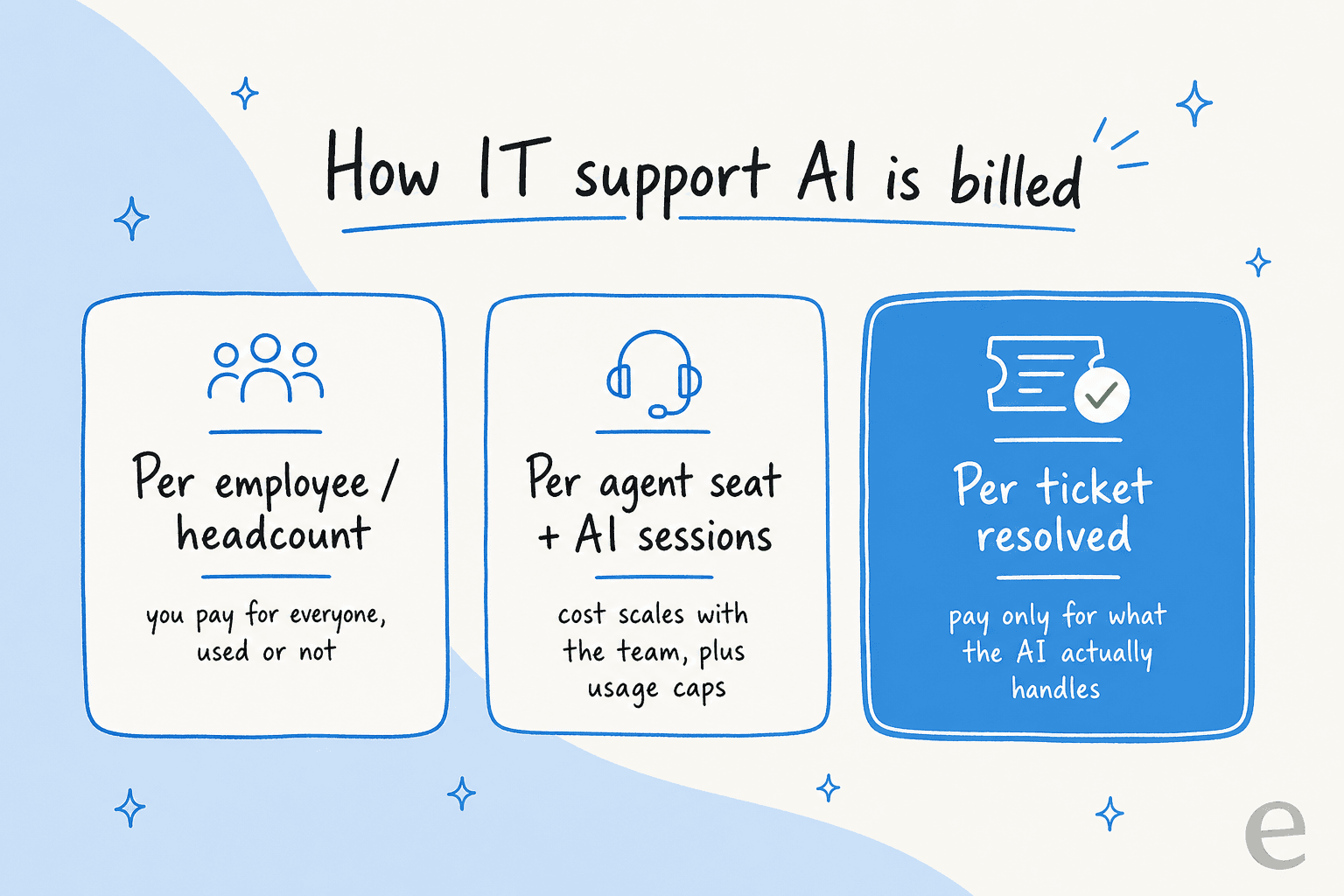
Here's the worked version. A 2,000-employee company on Moveworks-style headcount pricing at ~$25/employee/year is looking at ~$50,000 a year before implementation, regardless of usage. If that same company's IT team actually fields 1,500 tickets a month that AI could touch, a per-ticket model at $0.40 would run about $600 a month, or ~$7,200 a year, and only for tickets the AI handled. The gap is the entire argument for usage-based pricing, and it's why I'd always pin down the unit before the feature list. Our breakdown of AI vs human agent cost has more of this math.
Try eesel for IT support
If your IT team already runs a helpdesk and lives in Slack or Teams, eesel AI is built for exactly your situation: it works like a new hire that plugs into your existing tools in a few minutes, learns from your past tickets and docs on day one, and starts deflecting the repetitive tier-1 volume (password resets, access requests, "how do I" questions) so your humans handle the hard stuff.

The two things I'd point an IT buyer to: the simulation mode, which replays the agent against your real ticket history so you can prove accuracy before going live, and the per-ticket pricing that means you only pay for what it resolves. One customer summed up the build-vs-buy logic neatly: "We could try to write our own LLM application but we didn't want to invest our time into that. We wanted something that we would not have to maintain." You can try it free, no credit card, and see your own coverage before you commit.
Frequently Asked Questions
What is the best AI for IT support in 2026?
How much does AI for IT support cost?
Can AI handle tier-1 IT tickets like password resets?
How do I stop an AI IT agent from giving wrong answers?
Does AI for IT support work inside Slack and Microsoft Teams?


Article by
Riellvriany Indriawan
Riell is a designer and writer at eesel AI with about two years of experience researching CX platforms, AI chatbots, and helpdesk software. She combines her design background with a sharp eye for how these tools actually look and feel in practice — making her comparisons unusually visual and user-focused.