Why Freshservice teams go looking for more AI
Freshservice is a genuinely good ITSM platform for small and mid-sized teams, and the praise is consistent: clean UI, fast time-to-value, sensible base pricing next to ServiceNow. One sysadmin summed up the general mood:
"FreshService IMO is pretty damn good, it for sure gets the job done, the pricing is pretty good. Overall no major complaints."

The AI story is where it gets complicated. Freddy AI is split into three products, and the autonomous, ticket-deflecting one (Freddy AI Agent) is reserved for the top pricing tier. Freshworks itself lists "Freddy AI included" only on the Enterprise plan badge. On top of that, the autonomous agent is billed per session, defined in the pricing FAQ as "any interaction a unique user has with an AI Agent within a 24-hour period," with Enterprise licenses including 1,200 sessions per year.
That combination (gated to Enterprise, then metered on top) is the recurring complaint. A Freshservice user on Reddit put it bluntly:
"I do like the UI of Freshservice seems easy to use. The freddy AI is an add on so expensive for what it can do and only available at enterprise."
And the perception that the AI itself isn't keeping pace shows up again and again. From a thread titled "Anyone moved off Freshservice recently?":
"The AI feels like its lagging behind what others have. No real innovation or updates... pricing creeping up as more teams get added, workflows getting messy once you go beyond basic stuff."
None of this means Freshservice is the wrong helpdesk. It means the AI layer is the part worth shopping around for. We dig into the gaps in detail in our Freshservice AI limitations guide, but the practical question is: native, or layer-on?
Native AI vs a layer-on agent: the choice that actually matters
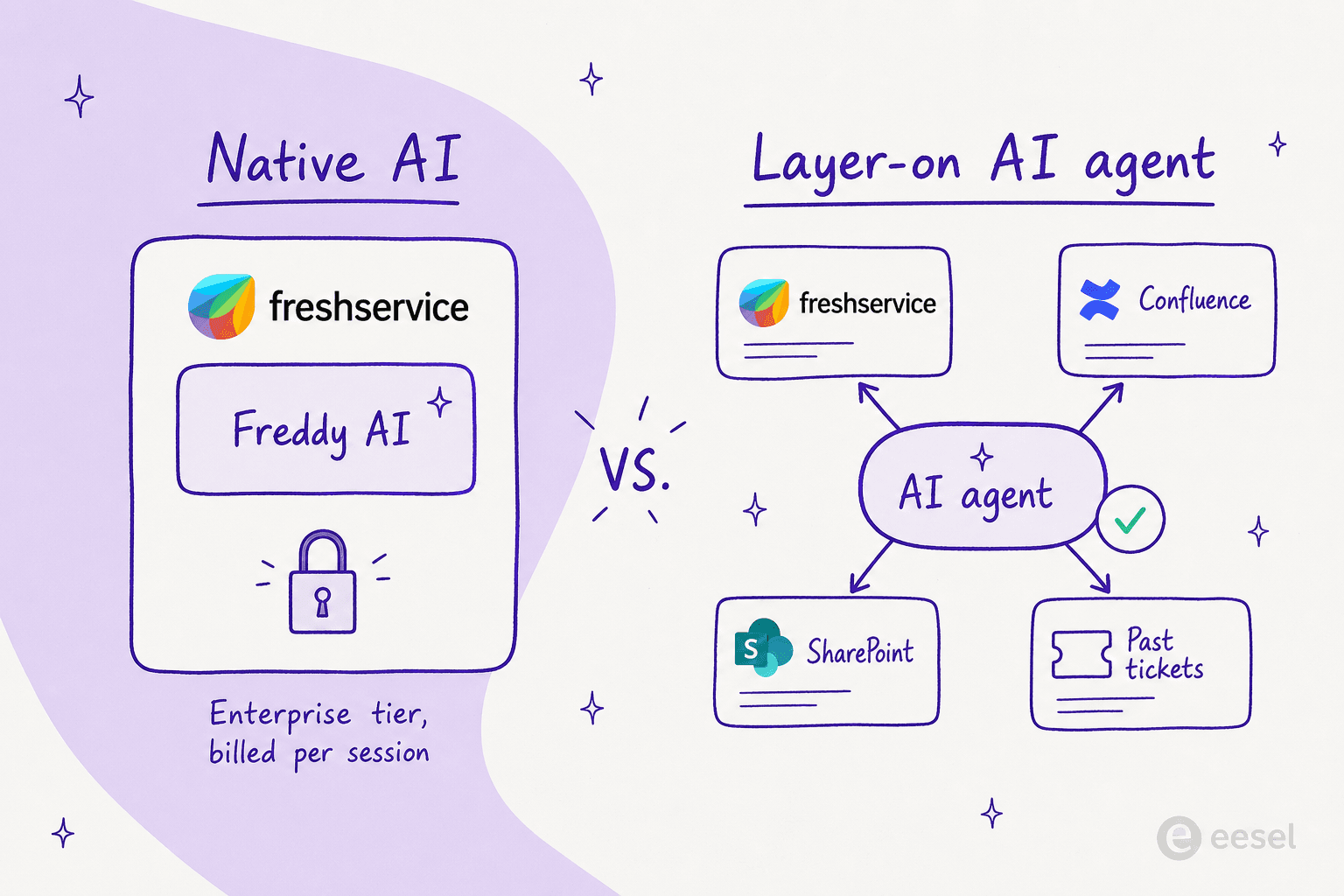
This is the fork in the road. Freddy AI lives inside Freshservice: it's tied to the Freshworks ecosystem, billed on Freshworks' terms, and limited to the knowledge you've put in Freshservice. A layer-on agent connects to Freshservice through the API or the Freshworks Marketplace and reads across all the places your answers actually live, like Confluence, SharePoint, Google Drive, and your historical tickets.
One Freshservice user explained why they reached for a third-party tool rather than turning on Freddy:
"Freddy AI has the same limitations as every AI tool built by ITSM vendors. It's mainly tight to the Freshworks ecosystem, plus has limited human in the loop validation along with the fact that you don't have the ability to choose which LLMs you want to use. Also, its pricing is tied to the agents not the employees."
That's the lens we used to pick the tools below.
How we picked, and what to look for
We tried to keep this honest and practical. For each tool we looked at:
- Knowledge reach: can it answer from sources beyond Freshservice, or only from the Freshservice knowledge base?
- Billing model: per agent, per session, per employee, or per resolution? The unit decides whether costs scale with your team or with the value you get.
- Setup and testability: can you test it on real tickets before committing, or is it a months-long enterprise rollout?
- Handoff quality: when the AI can't resolve something, does the human agent get clean context or a mess to untangle?
That last point matters more than it sounds. One 600-person org shared what happened five months after enabling Freddy:
"Autoresolve is maybe 25% which is fine i guess. But our MTTR actually went UP. About 20% compared to where we were before... I think what is happening is the handoff cost. Freddy tries, fails, agent picks it up but has to scroll thru the full back-and-forth before they can respond... Dup tickets are up like 15ish percent."
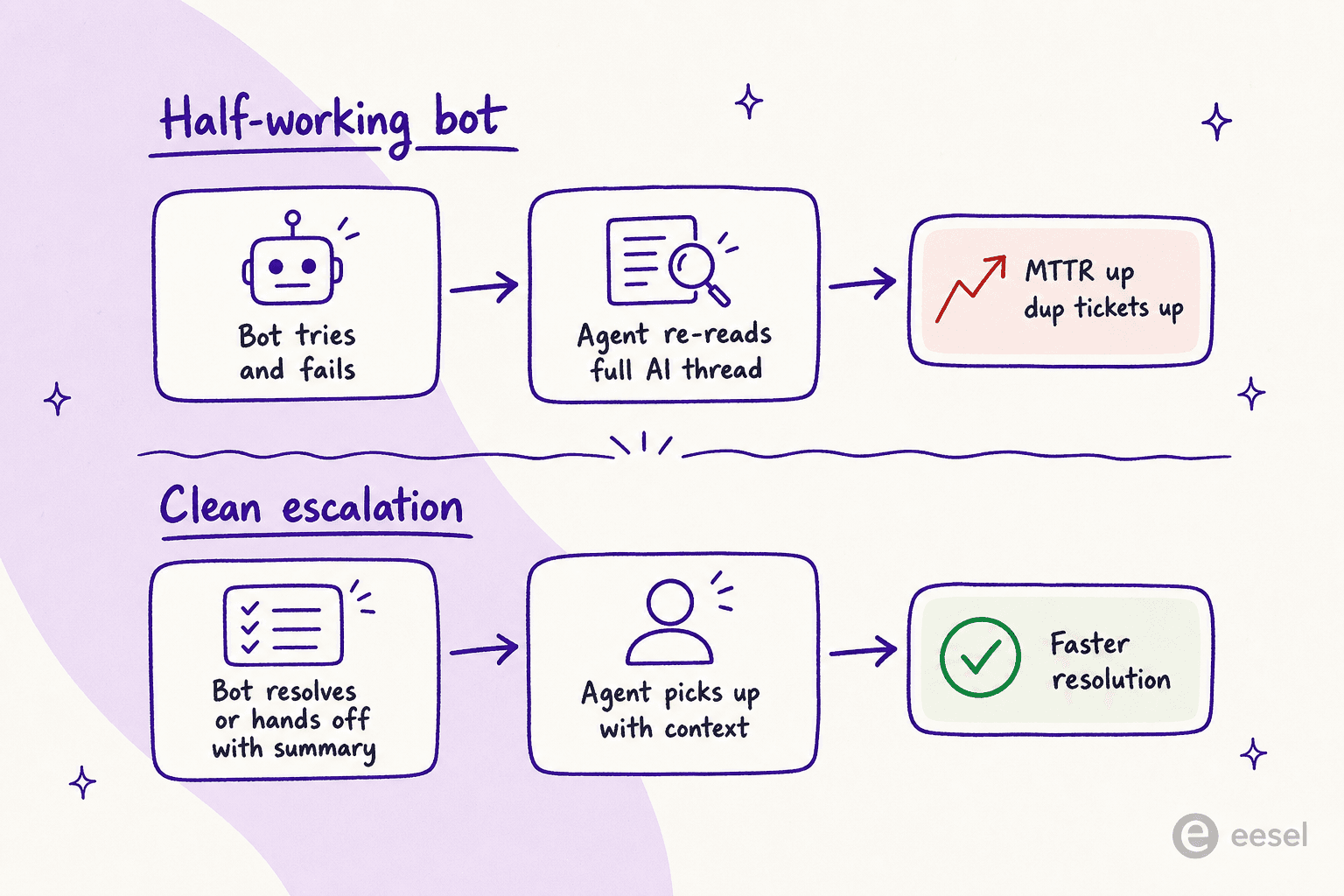
A half-working bot can make your service desk slower, not faster. So "deflection rate" alone is the wrong thing to chase. What you want is high-confidence resolution plus a clean escalation when the AI bows out. Our support ticket deflection guide covers how to measure this properly.
The 6 best AI tools for Freshservice at a glance
| Tool | Best for | Type | Works with Freshservice | Billing model | Free trial | Deploy time | Security |
|---|---|---|---|---|---|---|---|
| eesel AI | Autonomous AI without per-agent fees | Layer-on AI agent | Via API / Marketplace + knowledge sources | Fixed monthly, 1 credit per ticket, no seats | Yes (100 free credits, no card) | Minutes to days (self-serve) | SOC 2, GDPR |
| Freddy AI | Teams already on Freshservice Enterprise | Native | Built in | Per agent seat + per AI session | No (paid plans only) | Low (but Enterprise-gated) | Inherits Freshservice |
| Aisera | Large enterprises unifying IT + HR + CX | Enterprise agent platform | Native connector | Custom enterprise quote | No | Weeks to months | SOC 2, ISO 27001, HIPAA |
| Moveworks | Big ServiceNow-leaning enterprises | Enterprise AI assistant | Dedicated integration | Per employee / year | No | 8 to 16 weeks | SOC 2, ISO 27001, FedRAMP Ready |
| Kore.ai | Teams that want to build custom automations | Conversational AI platform | Native connector + actions | Custom enterprise quote | Limited | Weeks (build-it-yourself) | SOC 2, ISO 27001, HIPAA |
| Glean | AI search across every internal app | Work AI / enterprise search | Native connector | Per seat, enterprise quote | No | Weeks (single-tenant) | SOC 2 Type II, ISO 27001 |
Now the detail on each.
1. eesel AI
Best for: teams that want autonomous AI on top of Freshservice without paying per agent or upgrading to Enterprise.
eesel is an AI agent platform that plugs into the tools you already use rather than asking you to adopt a new interface. Instead of being boxed into one helpdesk, it connects to your knowledge wherever it lives (past tickets, Confluence, Google Docs, SharePoint, and 100+ other sources) and then drafts replies, resolves routine requests, and escalates the edge cases with context attached. The pitch is that briefing an agent feels like onboarding a teammate: you give it plain-language instructions, no prompt engineering required.

The two things that set it apart for a Freshservice team are pricing and testability. eesel has one fixed monthly price (from $299/month for 500 credits, 1 credit per ticket or chat) with no per-seat fees, so your bill is predictable and doesn't depend on how many agents you've hired. And before anything goes live, you can run a simulation on your real historical tickets to see the projected resolution rate and cost, which is the opposite of the "turn it on and hope" experience the MTTR thread above describes.

What's good:
- Reads knowledge from across your stack, not just the Freshservice KB.
- One fixed monthly price with no seat fees, and optional overage with a cap you set so costs never surprise you.
- Simulation mode lets you test on real tickets before going live.
- Self-serve setup measured in minutes, not a months-long rollout.
Where it falls short:
- It's a layer-on agent, so you're running it alongside Freshservice rather than as a native Freshworks feature.
- Very small teams with a tiny ticket volume may not need this much firepower.
Pricing: one fixed monthly price, from $299/month for 500 credits (1 credit per ticket or chat), no per-agent fees, no platform fee. There's a free plan with 100 credits and no card required, two months free if you pay a year upfront, and optional add-ons such as SSO from $199/month. See the full eesel pricing page.
Our take: for most Freshservice teams that aren't on Enterprise (or don't want to be), this is the pick. The fixed monthly price and simulation remove the two biggest risks of helpdesk AI: runaway cost and going live blind. If you've been priced out of Freddy's autonomous agent, start here.
2. Freddy AI (Freshservice's native AI)
Best for: teams already on Freshservice Enterprise who want native AI with zero integration work.
Freddy AI is the built-in option, and the no-integration convenience is real. It's split into three products: Freddy AI Agent (the autonomous, employee-facing bot), Freddy AI Copilot (agent-assist with suggested replies, ticket summaries, and translation inside the workspace), and Freddy AI Insights (proactive analytics for leaders, including SLA-breach alerts with root-cause analysis).
Freshworks markets strong outcomes for the platform overall: 356% ROI in under six months, 98% employee CSAT, and 66% ticket deflection (from its Benchmark Report 2025 and a Forrester TEI study). The Copilot side, in particular, gets genuine praise from agents who use it to draft and summarize.
The catch is the two-part gate we covered earlier: the autonomous Freddy AI Agent is Enterprise-only and billed per session on top of that. And the community view of the AI's quality is mixed. One sysadmin was blunt about deflection:
"the AI is abysmal for incident deflection and offers zero insight into why users found it unhelpful when they rate it and it also doesn't learn from users rating an interaction as unhelpful."
There's also a setup wrinkle worth flagging: enabling the Teams ServiceBot with SharePoint knowledge can require very broad permissions, which has blocked security sign-off for some teams. A Freshservice admin reported it "requires 'Read files in all site collections' on an Application level to function."
What's good:
- Native, so no separate integration to maintain.
- Freddy AI Copilot is a solid in-workspace assistant for drafting and summarizing.
- Insights surfaces useful proactive SLA and CSAT alerts.
Where it falls short:
- The autonomous agent is gated to the Enterprise plan.
- Session-based billing on top of seat costs makes spend hard to predict.
- Tied to the Freshworks ecosystem with no choice of LLM, and limited learning from negative feedback.
Pricing: Freshservice ITSM is $19 (Starter), $49 (Growth), and $99 (Pro) per agent per month billed annually, with Enterprise quote-based. The autonomous Freddy AI Agent is billed per session, with Enterprise bundling 1,200 sessions per license per year. We break the math down in our Freshservice Freddy AI pricing guide.
Our take: if you're already paying for Freshservice Enterprise, Freddy Copilot is worth switching on for your agents day one. But if the autonomous agent is what you're after and you're not on Enterprise, the session pricing and the deflection complaints make it hard to recommend over a layer-on tool. Our full Freshservice Copilot guide has the deeper read.
3. Aisera
Best for: large enterprises consolidating IT, HR, and customer service onto a single agent platform.
Aisera is an enterprise AI Service Experience platform with a native Freshservice integration. Unlike Freddy, it's cross-functional from day one: a "Universal Agent" orchestrates domain agents across IT, HR, finance, and customer service, with an LLM gateway that supports its own AiseraLLM, foundation models like OpenAI and Claude, or your own. It's positioned in the Gartner Magic Quadrant for AI Applications in ITSM, and its customer list (Adobe, Cisco, Nokia, Workday) skews very much toward the Fortune 500.
The published outcomes are strong where it fits: OmniTRAX auto-resolved 70% of tickets, and LifeScan reports auto-resolving 65% of incoming requests for $2.2M in support savings. One thing to factor in: Aisera was acquired by Automation Anywhere in November 2025, so its go-to-market is increasingly bundled into that platform.
What's good:
- Genuinely cross-functional (IT + HR + CX + finance) on one platform.
- LLM flexibility, including bring-your-own models.
- Strong enterprise compliance posture (SOC 2, ISO 27001, HIPAA).
Where it falls short:
- No public pricing, no free trial, and a heavy enterprise sales motion.
- Overkill for a 50 to 500-seat IT team.
- Post-acquisition direction adds some uncertainty.
Pricing: not published. Aisera is contact-sales, annual-contract, scoped per use case and volume. There's no free tier or per-seat rate.
Our take: if you're a 5,000-plus-employee org unifying IT, HR, and CX, Aisera belongs on your shortlist alongside ServiceNow and Moveworks. For a typical mid-market Freshservice team, it's more platform (and more procurement) than you need.
4. Moveworks
Best for: large, ServiceNow-leaning enterprises that want an employee-facing AI assistant across IT and HR.
Moveworks is the name most people think of first for "AI for the IT helpdesk." It's an agentic assistant that lets employees resolve IT and HR requests in natural language through Slack or Teams, powered by a proprietary Reasoning Engine over 100-plus enterprise systems. It does have a dedicated Freshservice integration that lets employees take ticketing actions and receive updates inside the assistant.
Two big caveats. First, it's expensive and enterprise-only: third-party procurement data (Vendr) puts it around $15 to $45 per employee per year with a median annual contract near $130,000, plus a separate six-figure implementation that typically runs 8 to 16 weeks. Second, Moveworks was acquired by ServiceNow for about $2.85B, closing December 2025, and is being folded into ServiceNow's portfolio. That has existing customers nervous:
"Thoughts on ServiceNow buying Moveworks? I'm a current customer of Moveworks and slightly nervous that quality and support will drop."
When it fits the profile, the results are real. A retail data analyst on Gartner Peer Insights reported "over 80% bot first rate and resolving over 40% of customer issues from the bot." But another Gartner reviewer captured the common frustration: "It's not easy to set and requires a lot of leg work for it to start providing results."
What's good:
- Mature employee-support assistant with deep system reach.
- Excellent fit if you're already heavy on ServiceNow and Microsoft.
- Strong compliance, including FedRAMP Ready for public sector.
Where it falls short:
- Per-employee pricing scales with headcount, not value, and lands in six figures.
- Long, services-heavy implementation.
- Freshservice is a non-ServiceNow backend, so post-acquisition investment in that integration is uncertain.
Pricing: enterprise, quote-based, billed per total employee headcount. Third-party reports range from $15 to $45 per employee per year (Vendr) up to $100 to $200 in smaller, services-heavy deals, with implementation a separate line item.
Our take: a powerful tool for the right enterprise, but the per-employee model and the ServiceNow acquisition make it a hard sell for a Freshservice-first shop. If you're seriously weighing it, our Freshservice vs ServiceNow comparison is worth a read first.
5. Kore.ai
Best for: teams with developer resources who want to build custom ITSM automations and dialogs.
Kore.ai is a conversational AI and agent platform with a properly deep Freshservice connection: there's a Freshservice connector for search plus Freshservice ITSM action templates you can wire into dialog tasks. Its AI for IT offering explicitly names Freshservice alongside ServiceNow and Ivanti for hardware requests and asset management.
The trade-off is that Kore.ai is more of a build-it-yourself platform than a turnkey agent. That's a strength if you have the engineering time to design dialog flows and a weakness if you just want resolution out of the box. It's a developer's tool more than an IT admin's tool.
What's good:
- Deep Freshservice action templates for building real ticketing automations.
- Highly customizable across channels and use cases.
- Enterprise compliance (SOC 2, ISO 27001, HIPAA).
Where it falls short:
- Steeper build curve; you're designing flows, not just briefing an agent.
- Pricing is quote-based and aimed at larger deployments.
- Less "turn it on and resolve tickets," more "construct the experience."
Pricing: custom, enterprise, contact-sales. Not published as a simple per-seat rate.
Our take: if you have a team that wants to own and tune a custom conversational layer over Freshservice, Kore.ai gives you the building blocks. If you want resolution without the build, it's more tool than you're looking for.
6. Glean
Best for: companies that want AI search and answers across Freshservice plus every other internal app.
Glean approaches the problem from a different angle. It's a Work AI platform built on enterprise search, with a native Freshservice connector that indexes your tickets and knowledge alongside 100-plus other sources. Rather than primarily deflecting tickets, it gives employees a permission-aware assistant that can answer questions and surface knowledge from across the whole company, which is a great fit for the internal-employee-support side of an IT desk.
Glean's strengths are its knowledge-base reach and its security model: it runs in a single-tenant cloud, inherits source permissions strictly, and carries SOC 2 Type II and ISO 27001. Customers report serious scale, with Zillow running 3,400-plus agents on it.
What's good:
- Best-in-class enterprise search that spans Freshservice and the rest of your stack.
- Strict, permission-aware retrieval and single-tenant deployment.
- Strong for internal employee questions and knowledge discovery.
Where it falls short:
- It's a knowledge and search platform first; pure ticket auto-resolution is not its core job.
- Enterprise per-seat pricing and a heavier rollout.
- Likely more than you need if your only goal is deflecting Tier-1 IT tickets.
Pricing: enterprise, per-seat, quote-based. No free trial.
Our take: if your problem is "employees can't find answers across our tools," Glean is excellent. If your problem is "we want to auto-resolve IT tickets in Freshservice," it's a complement to a resolution agent rather than a replacement for one.
What you'll actually pay
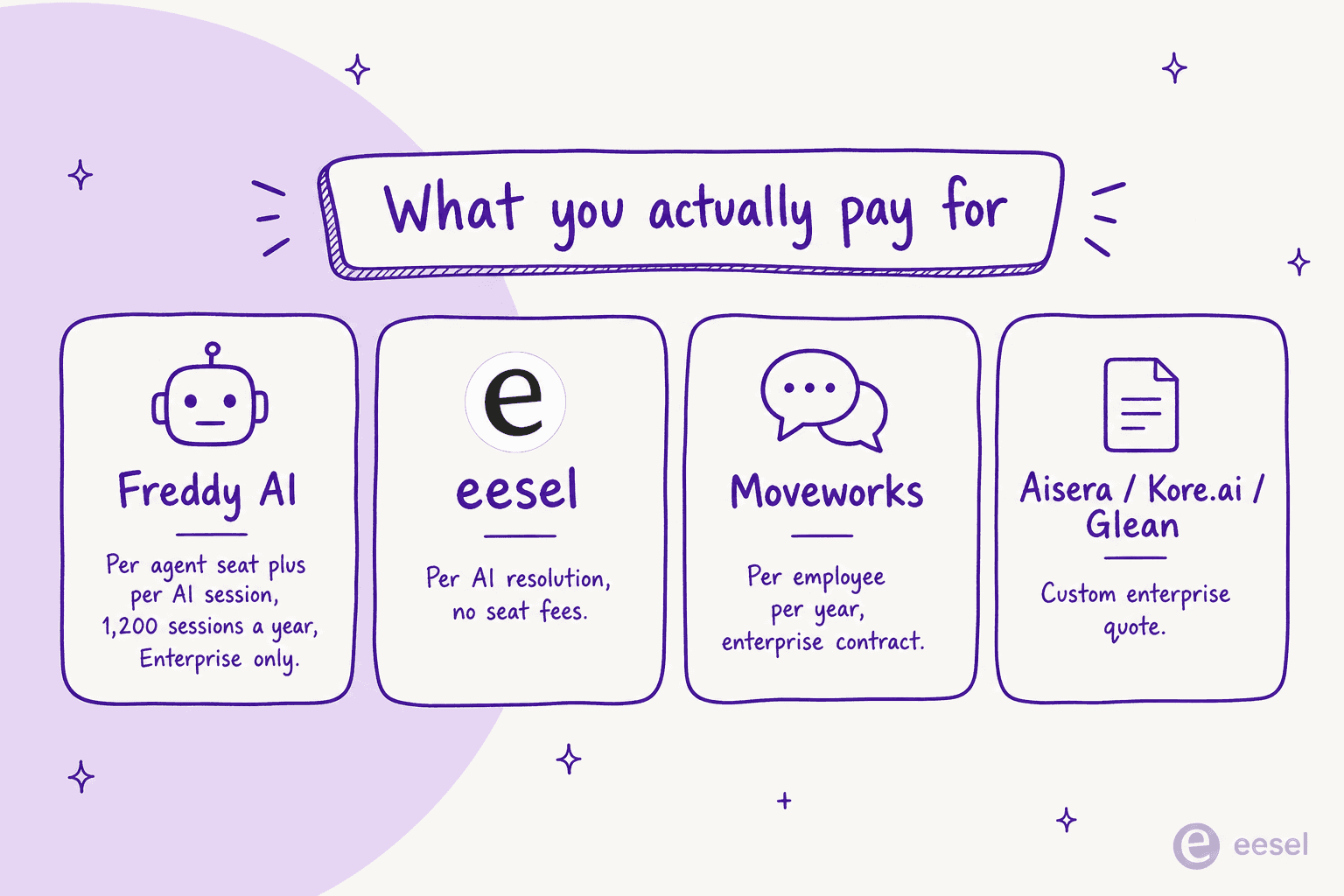
Sticker prices are the wrong thing to compare here, because every tool bills on a different unit. That's the single most important thing to get straight before you sign anything.
Here's a worked example. Say you're a 40-agent IT team handling 8,000 internal tickets a month, and you want to deflect the routine half.
- Freddy AI means upgrading every one of those 40 agents to Enterprise (custom, but materially above the $99 Pro rate), then paying per session on top. With 1,200 bundled sessions per license per year, a high-volume desk will burn through the included allotment and into overage.
- Moveworks would bill on your total employee headcount, not just the 40 agents, so a 2,000-person company is looking at a six-figure annual contract plus implementation.
- eesel uses 1 credit per ticket or chat on a fixed monthly plan, with optional overage capped at a level you set. Deflecting 4,000 tickets a month fits the 5,000-credit plan at $1,899/month, a number you can predict, and it doesn't change when you add agents.
The pattern is consistent: per-agent and per-employee models charge you for the size of your team, while per-resolution charges you for the value delivered. For a deeper breakdown, see our Freshservice AI cost guide and how much AI can actually save in support.
How to choose
A quick decision guide based on where you are:
- On Freshservice Enterprise already, want zero setup: turn on Freddy AI Copilot for your agents, and test the autonomous agent against your session budget. Read the Freshservice Freddy AI review first.
- Not on Enterprise, or watching cost: start with eesel. The fixed monthly price and real-ticket simulation are built for exactly this situation.
- Large enterprise unifying IT + HR + CX: look at Aisera, or Moveworks if you're ServiceNow-leaning.
- Have developers and want a custom build: Kore.ai.
- Main pain is finding answers across tools: Glean, ideally alongside a resolution agent.
If you're still deciding whether Freshservice is even the right ITSM platform, our Freshservice alternatives, Freshservice vs Jira Service Management, and best AI for Jira Service Management guides cover the neighbouring options.
Try eesel
If you want autonomous AI working on your Freshservice tickets without upgrading to Enterprise or signing a six-figure enterprise contract, eesel is the most direct path. It connects to your knowledge wherever it lives, resolves and triages tickets automatically, and has one fixed monthly price with no per-seat fees.
The differentiator worth trying for yourself is the simulation: connect your historical tickets and eesel will show you the projected resolution rate and cost before you turn anything on, so you're never going live blind. You can start free with the free plan (100 credits, no card required). It's the lowest-risk way to find out what AI can actually do for your service desk.
Frequently Asked Questions
What is the best AI for Freshservice?
How much does Freddy AI cost in Freshservice?
Is there a free AI for Freshservice?
Can I add AI to Freshservice without upgrading to Enterprise?
What should I look for in an AI tool for an IT service desk?


Article by
Riellvriany Indriawan
Riell is a designer and writer at eesel AI with about two years of experience researching CX platforms, AI chatbots, and helpdesk software. She combines her design background with a sharp eye for how these tools actually look and feel in practice — making her comparisons unusually visual and user-focused.