

Freshservice now has two agent generations: Freddy AI Agent Classic and AI Agent Studio. An older guide that treats every AI agent as Enterprise-only misses the current Studio offer. As checked September 8, 2026, eligible Growth, Pro, and Enterprise customers can access Studio promotionally through September 30, 2026. Confirm what follows that date before committing.
For IT support, evaluate the whole request: the answer, the permission to perform an action, and the handover when the employee still needs help. A suggested fix is not proof that access was granted or an incident resolved.
If you are comparing an eesel teammate, eesel CLI lets you inspect its knowledge and test runbook-based answers from a terminal or coding agent. That is a separate evaluation, not a command-line interface for Freddy or proof of a built-in Freshservice connector.
What does “Freshservice AI agent” mean now?
Freshworks' Classic overview describes an employee-facing agent for common questions and service requests. Its channels include Slack, Microsoft Teams, email, and the support portal. Classic is available with Enterprise.
The newer Studio overview describes specialized agents that answer questions and call workflows. It includes prebuilt IT and HR agents, with knowledge and actions configured for the work they handle.
Those distinctions matter more than whether a page calls the product “autonomous.” Before comparing features, identify the generation, channel, and workflow in your account.
| Product | Who uses its output? | What to evaluate |
|---|---|---|
| Freddy AI Agent Classic | Employees seeking help | Answers, conversation context, and incident handover |
| AI Agent Studio | Employees using configured agents | Knowledge, workflows, permissions, and channel deployment |
| Freddy AI Copilot | Human service-desk agents | Whether assistance reduces work after review |
| Freddy AI Insights | Service leaders | Whether reported patterns help investigate real issues |
The Freshservice pricing page lists Classic and Insights with Enterprise, and Copilot as a paid add-on for Pro and Enterprise. Do not treat these as one interchangeable feature or buy Copilot expecting it to deploy an employee-facing agent. The Copilot guide covers that different workflow.
What Classic and Studio can do
Classic supports conversational self-service. Its feature documentation describes multi-turn conversations on Slack and Teams, citations, screenshot-based questions, and creating an incident with conversation history when further help is needed.
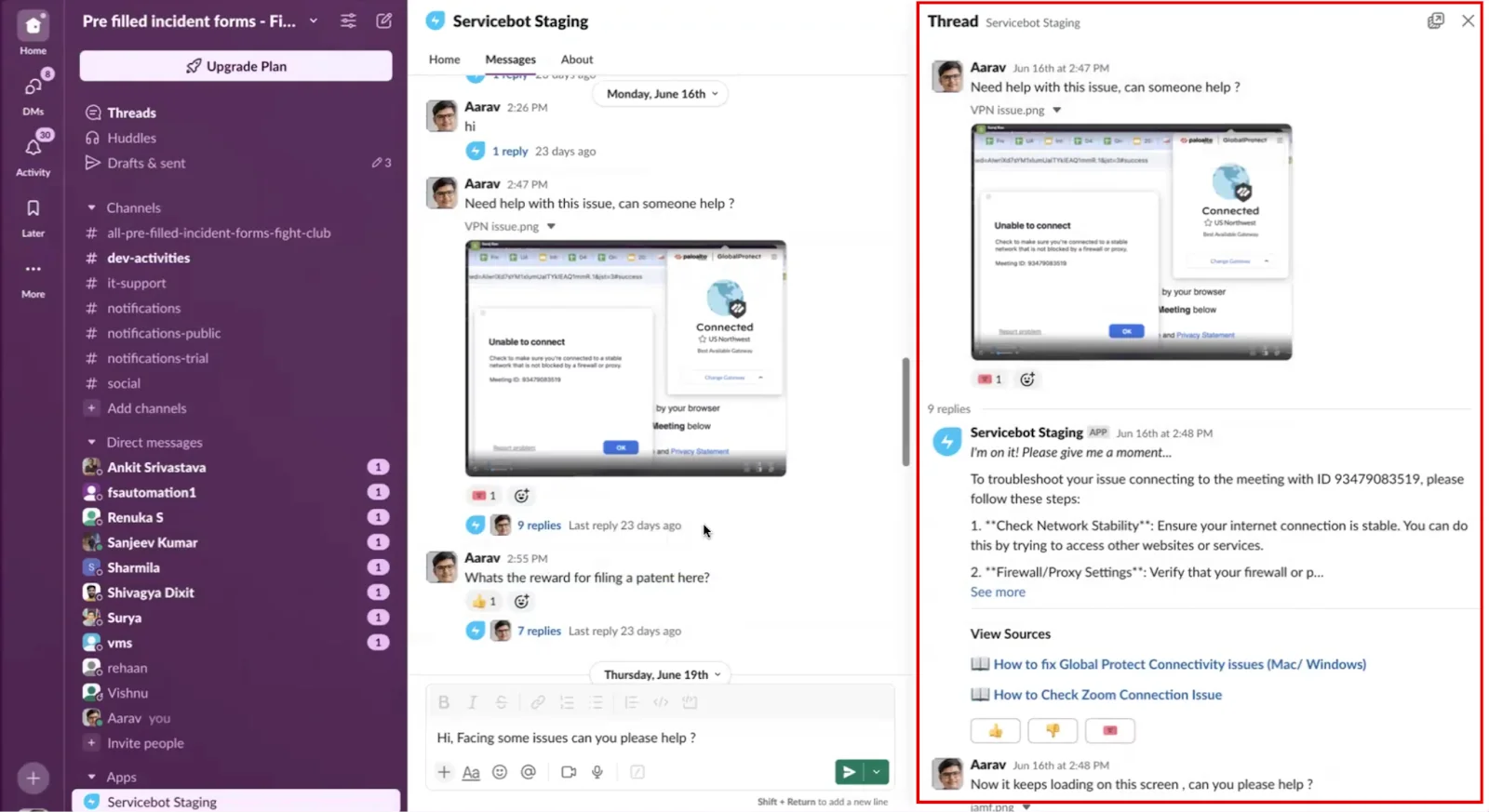
Freshworks' Classic Servicebot example, from its feature documentation. It shows a screenshot-based support conversation and linked sources, not the newer Studio builder.
Studio adds a configurable agent-and-workflow approach. The Studio FAQ describes a no-code builder, multiple specialized agents, and actions through connected enterprise applications. It reports 30 out-of-the-box integrations at launch. Availability still depends on the particular workflow and connection you configure.
I would separate three tests for a software-access request:
- Can the agent explain the approved request process?
- Can it identify the employee and obtain the required approval?
- Does the permitted workflow actually grant access and report the result accurately?
The first test is knowledge retrieval. The other two involve identity, policy, and system changes. An answer that says “your access is ready” fails if the action never completed.
This distinction is useful across employee support, not only Freshservice. The closer a task gets to changing access or employee records, the less useful a text-only demo becomes as evidence.
Set up a pilot without confusing the two generations
For Classic, the documented route starts in Admin settings under Freddy. Slack and Teams require the relevant ServiceBot installation; the support portal can be configured directly. Check the channel-specific instructions rather than copying an old screenshot's labels.
For Studio, decide who may manage agents and which work the first agent will handle. Freshworks' August 2026 documentation includes an important access caveat: users granted Studio access can see all AI agent conversation logs across the workspace, because those logs do not currently have separate role-based restrictions. Review that visibility before inviting people to administer an HR or IT pilot. Studio documentation
Choose which agent runs on each channel
Freshworks allows Classic and Studio to coexist in the same account. However, its deployment guide says a channel can host only one agent at a time. An active deployment can therefore disable the competing generation's channel controls.
That is not necessarily a setup error. Record which agent owns Slack, Teams, or the portal before changing deployment. For multiple Slack workspaces, check ownership at the individual workspace level.
My recommendation is to pilot one request type in a clearly assigned channel. Tell the service desk how to identify pilot conversations and where to report failures. Avoid changing knowledge, instructions, and channel ownership simultaneously; otherwise it becomes harder to tell which change caused a different result.
Verify source processing, not just connection status
Studio lists files, URLs, the Freshservice knowledge base, service catalog, and external connectors among its knowledge sources. It also recommends bulk scenario testing before deployment. A blanket claim that Freshservice AI cannot read documents is not a sound description of Studio.
Older Classic limits are more specific. Its solution-article processing supports the first 50 inline images and first five attachments per article, up to 5 MB per attachment. Its warning about PDF, DOCX, and XLSX interpretation appears in that Classic context. Do not project it onto every Studio source.
For either generation, test a question whose answer is in the exact document you connected. Then change one relevant fact, such as the employee's device or operating system. Correctly citing an article for the wrong device is still a wrong answer.
Freshservice AI agent pricing and availability
The public ITSM pricing page lists these annual-billing subscription rates as of September 8, 2026:
| Plan | Price per agent/month | AI buying consideration |
|---|---|---|
| Starter | $19 | Do not assume Studio access |
| Growth | $49 | Eligible Studio promotional access |
| Pro | $99 | Eligible Studio promotional access; Copilot add-on listed |
| Enterprise | Custom quote | Classic included; eligible Studio promotional access; Copilot add-on listed |
The Studio promotion ends September 30, 2026. The Studio FAQ says later pricing and packaging will be shared closer to the end. It also excludes MSP mode. Treat the promotion as a dated evaluation opportunity, not a permanent free tier.
Classic's allowance is different: each Enterprise license includes 1,200 sessions annually, prorated for shorter billing cycles. Freshworks defines a session around one unique user's interactions in a 24-hour period. Verify overage terms with the vendor rather than borrowing Freshdesk's session-pack price.
Before comparing costs, request the actual terms for your product generation and billing cycle. The Freshservice AI cost guide offers related context, but your current quote determines what you will pay.
How to judge whether the pilot helped
I would avoid choosing an AI agent from a headline deflection percentage alone. Measure comparable requests and inspect the ones that return to your team. A conversation marked resolved may still leave an employee unable to work.
| Check | Evidence to collect |
|---|---|
| Correct answer | Response matches the applicable runbook |
| Completed action | The destination system records the expected change |
| Useful handover | A human receives the issue, attempts, and remaining question |
| Employee outcome | The employee can complete the task or gets appropriate help |
| Review burden | Time spent checking and correcting responses |
| Access boundaries | Restricted content and actions stay unavailable |
These are proposed evaluation criteria, not measured Freshservice results. Write expectations before running the examples. Include an unavailable application, an expired approval, and a follow-up that says the first fix failed.
If a failure repeats, identify whether the cause is stale knowledge, missing permissions, a failed workflow, or poor reasoning. Rephrasing the prompt cannot repair a revoked credential. Adding more articles cannot prove that a workflow executed.
Evaluate IT support answers through eesel CLI
An eesel teammate offers another way to handle support work using approved company knowledge. The CLI is useful when the person evaluating that teammate already works in Claude Code, Codex, Cursor, or scripts.
You operate the same eesel agent and workspace from the CLI and dashboard. You can inspect setup, upload a runbook, send test messages, and review activity. Structured output lets a coding agent compare answers with expected behavior instead of guessing from screenshots. The CLI reference documents those operations.

The eesel dashboard shown with a Zendesk-connected example. This is the workspace interface, not evidence of a Freshservice connector.
Confirm the integration separately
eesel's integration documentation lists supported connections and distinguishes sources, triggers, and actions. This guide does not establish a built-in Freshservice connector. Do not substitute freshservice into a Freshdesk command and assume it works.
You can evaluate runbook-based answers without connecting Freshservice. If the eventual workflow needs Freshservice ticket lookups or changes, confirm the supported connection with eesel first. A custom API route needs separate setup and verification.
eesel's Network Access supports allowlisted API domains and authentication headers stored outside the chat. That is a mechanism for building API access, not proof that a Freshservice workflow has already been implemented. Review endpoints, permissions, credential handling, and failure behavior before enabling it.
Test one runbook
Use Node.js 18.17 or newer and an existing test agent. Replace TEST_AGENT_ID with its real ID. These commands inspect the account and setup:
npx @eesel/cli login
npx @eesel/cli whoami
npx @eesel/cli agents
npx @eesel/cli --agent TEST_AGENT_ID status
npx @eesel/cli --agent TEST_AGENT_ID integrations
npx @eesel/cli --agent TEST_AGENT_ID instructions
npx @eesel/cli --agent TEST_AGENT_ID automations
Review existing automations and keep unwanted actions off or behind approval. A separate test conversation does not change the agent's permissions. For custom API testing, use test credentials with narrowly limited permissions rather than relying on a prompt to prevent writes.
Choose an approved, non-sensitive runbook and save it locally as it-support-runbook.txt. Check that it is appropriate for the test agent to access, then upload it:
npx @eesel/cli --agent TEST_AGENT_ID files upload ./it-support-runbook.txt
npx @eesel/cli --agent TEST_AGENT_ID new --name "vpn-runbook-review"
npx @eesel/cli --agent TEST_AGENT_ID chat "Fictional IT support test. A managed laptop can reach public websites but its VPN connection fails. Use it-support-runbook.txt to draft the next troubleshooting reply here. Identify missing details and do not change any system or create a ticket."
Check that the upload succeeded before assessing the answer. The expected next step depends on your actual runbook; this example does not prescribe a universal VPN fix or report a result from a test I performed.
Test the follow-up and handover
Continue the same conversation with a changed situation:
npx @eesel/cli --agent TEST_AGENT_ID chat "Same fictional employee: I tried the relevant steps you suggested and the VPN still fails. Draft a handover summary with the known facts, attempted steps, and remaining questions. Do not claim a ticket was created or a technician assigned."
npx @eesel/cli --agent TEST_AGENT_ID activity
npx @eesel/cli --agent TEST_AGENT_ID approvals
The second chat retains the conversation context. Inspect whether it distinguishes facts supplied by the employee from assumptions and avoids asking them to repeat completed steps.
A coding agent can review those outputs with a narrow instruction: “Compare the answer with the uploaded runbook. Flag unsupported fixes, missing diagnostic questions, and invented completed actions. Do not edit settings or approve anything.” A human should review the findings before changing the teammate's instructions.
Chat can invoke tools and run billable work. Keep the initial test small. npx @eesel/cli billing shows read-only workspace billing state, not a forecast of a Freshservice deployment. Current eesel pricing is credit-based, from $299/month for 500 credits, with 1 credit per ticket or chat regardless of outcome; it is not a per-successful-resolution charge.
Prove delivery before expanding
The terminal test establishes how the eesel teammate answers supplied context. It does not establish that a Freshservice ticket was created, a Slack message reached the intended person, or an access request completed.
After confirming the required integration, test the actual channel and destination with authorized test data. Inspect both the agent's activity and the destination system. A held approval is not a completed action, and an API allowlist alone does not validate a workflow.
Choose the agent around the work you need
For Freshservice-native automation, compare Classic and Studio against the channels, actions, and plan terms available to your account. Do not dismiss Studio using restrictions from Classic documentation.
For an eesel evaluation, start with the knowledge and response behavior you can inspect through eesel CLI, then verify the required integration and real-world delivery. Try eesel with one approved runbook and a small set of IT questions before planning a wider rollout.
Frequently Asked Questions
What is the Freshservice AI agent?
Freshservice has Freddy AI Agent Classic and the newer AI Agent Studio. Classic provides employee self-service; Studio lets teams configure specialized agents, knowledge, and workflows. These are distinct from Freddy AI Copilot, which assists human agents.
Is the Freshservice AI agent Enterprise-only?
Classic is included with Enterprise. As checked September 8, 2026, Freshworks offers Studio promotionally to eligible Growth, Pro, and Enterprise customers through September 30, 2026. Do not assume that offer is permanent. Check the pricing guide and your current contract.
How are Freshservice AI Agent Classic sessions counted?
Freshworks defines a session around a unique user’s interactions within 24 hours. Each Enterprise license includes 1,200 Classic sessions annually, with prorating for shorter billing cycles. Do not automatically apply Classic allowances to Studio. See Freshservice AI costs.
Can Freshservice AI Agent Studio use files and external knowledge?
Yes. Current Studio documentation lists files, URLs, the knowledge base, service catalog, and external connectors. Older Classic multimodal limits should not be treated as universal Studio restrictions. Review the exact source and workflow in your agent setup.
Can I run Classic and Studio together?
Freshworks documents coexistence in the same account, but a given channel can host only one active agent. Plan channel ownership before deployment so a Studio pilot does not conflict with Classic. The setup guide provides related context.
How does eesel CLI help evaluate an alternative?
It lets a person, script, or coding agent operate the same eesel teammate available in the dashboard. You can inspect sources, upload an approved runbook, test a conversation, and review activity. It does not administer Freddy. Start with the CLI documentation.
Does eesel CLI provide a built-in Freshservice integration?
This guide does not establish a built-in Freshservice connector. Freshdesk support is not proof of Freshservice support. Confirm the integration required for your workflow; custom API access needs separate configuration, permissions, and testing. Read eesel’s Network Access documentation before planning an API-based workflow.