
IT teams are under constant pressure to do more with less. Ticket volumes keep growing, employee expectations are rising, and the tools meant to help often create more work than they save. Freshservice's Freddy AI aims to change that equation by embedding AI directly into the ITSM platform.
But what exactly can Freddy AI do? And is it the right fit for your team? Here is a breakdown of the features, pricing, and real-world performance to help you decide.
What is Freddy AI?
Freddy AI is Freshservice's native AI layer, built directly into the ITSM platform rather than bolted on as a third-party integration. It operates across three distinct pillars designed to address different pain points in IT service delivery.
The three components work together: Freddy AI Agent handles frontline employee requests through conversational interfaces, Freddy AI Copilot assists human agents with real-time suggestions and automation, and Freddy AI Insights provides proactive analytics for service leaders.
This structure means you're not buying separate tools or managing multiple vendors. Everything lives inside Freshservice, which has advantages for data consistency and workflow integration. The trade-off is that Freddy AI only sees what Freshservice sees. If your critical knowledge lives in external systems, the AI's effectiveness may be limited.
Freddy AI Agent features for 24/7 employee self-service
Freddy AI Agent is the conversational component designed to deflect routine requests before they reach human agents. It operates across multiple channels where employees already work.
Multi-channel availability
The agent functions within Slack, Microsoft Teams, email, and the self-service portal. This matters because employees don't want to learn a new interface just to get help. They can ask questions in the tools they already use daily.
Conversational capabilities
Freddy AI Agent supports 40+ languages and maintains context across multi-turn conversations. The "formless conversations" feature captures intent without forcing users through rigid form structures. This sounds small, but it significantly improves the user experience. Instead of clicking through dropdown menus, employees describe their problem naturally.
Enterprise search
The agent can search across multiple knowledge sources: Freshservice's Knowledge Base, Microsoft SharePoint, Google Drive, and Confluence. This helps employees find answers even when documentation is scattered across different systems.
Image support
Users can upload images, and the AI extracts insights to aid resolution. This is useful for hardware issues where a photo communicates more than a text description.

Real-world impact: According to UserEvidence research, 67% of Freddy AI Agent users report reduced agent workload, and 45% see increased ticket deflection. One customer reported deflecting 65% of tickets and saving 200 hours per month.
Freddy AI Copilot features for real-time agent assistance
While Freddy AI Agent focuses on employee self-service, Freddy AI Copilot targets the agent experience. It provides real-time assistance to help human agents resolve tickets faster and with better quality.
Response assistance
The Reply Suggester analyzes ticket context and generates relevant responses agents can use with one click. The Multilingual Reply Suggester extends this to global teams, and the Writing Assistant improves tone, clarity, and grammar. These features are particularly valuable for newer agents who haven't yet internalized the company's voice.
Summarization tools
Long ticket threads are a time sink. The Ticket Summarizer creates concise summaries of detailed conversations. The Resolution Notes Generator drafts notes for auditability and handoffs. The Post Incident Report Generator produces structured reports after major incidents. These tools reduce the administrative overhead that consumes agent time.
Resolution assistance
The Similar Incident Suggester surfaces historical tickets with similar context, helping agents find proven solutions faster. Intelligent Related Changes highlights change requests connected to the current ticket, providing context that might otherwise be missed.
Ticket and knowledge assistance
The Field Autofill Suggester recommends field values to reduce manual data entry. The Help Article Generator creates draft knowledge articles from ticket context, helping teams build their knowledge base organically. Knowledge Content Recommendations suggest relevant articles during troubleshooting.
User feedback: According to UserEvidence surveys, summarization is the most valued feature at 71%, followed by response suggestions at 61%. Users report 30-40% boosts in agent productivity and 80-90% reductions in first response time.
Freddy AI Insights features for proactive analytics
Freddy AI Insights targets service leaders who need visibility into team performance without spending hours building reports. It monitors service desk metrics and surfaces actionable intelligence automatically.
Proactive insights with root cause analysis
Instead of waiting for someone to run a report, Freddy AI continuously monitors key metrics and flags significant changes. When it detects an anomaly, like a spike in resolution time or SLA violations, it generates an insight card color-coded by urgency (red for high, amber for medium, yellow for low).
The root cause analysis goes deeper, showing visual tree maps of contributing factors. For example, it might reveal that 80% of SLA violations come from the Hardware category, pointing you toward specific fixes rather than general concern.
Conversational analytics
Leaders can ask questions in plain English through a prompt box. "Show me the weekly trend of tickets" generates charts without requiring report-building skills. This democratizes data access, though it has limitations: custom fields and negative queries (like "is not") aren't supported.
Supported metrics and insight types
Freddy AI Insights tracks standard service desk metrics: total incoming tickets, resolution SLA violations, first response SLA violations, average resolution time, average response time, and survey scores.
Insight types include:
- Majority: Highlights dominant values (e.g., "80% of violations are from Hardware")
- Outliers: Detects unusually large or small values
- Trend Change: Spots spikes and falls in metrics
- Longest Increase/Decrease: Finds sustained growth or drop periods
- Recent Change: Compares current data to previous periods
- Overall Trend: Tracks upward or downward movement over time

Freshservice Freddy AI pricing and availability
Understanding what Freddy AI costs requires parsing Freshservice's plan structure, because AI capabilities are tied to specific tiers rather than sold separately.
| Plan | Price (Annual) | Freddy AI Agent | Freddy AI Copilot | Freddy AI Insights |
|---|---|---|---|---|
| Starter | $19/agent/month | Not available | Not available | Not available |
| Growth | $49/agent/month | Not available | Not available | Not available |
| Pro | $99/agent/month | Not available | Add-on (Beta) | Not available |
| Enterprise | Custom pricing | Included (1,200 sessions/year) | Add-on (Beta) | Included |
Session limits explained
Each Enterprise license includes 1,200 Freddy AI Agent sessions per year. A session counts as any interaction a unique user has with the agent within a 24-hour period. Sessions reset at the start of each billing cycle. If you exceed the limit, the agent continues operating but additional sessions are charged.
Important considerations
Many Copilot features remain in Beta status. The Pro plan requires a Copilot add-on (pricing not publicly disclosed on the main page). Insights requires manual enablement by an admin and can take up to 24 hours to activate after setup.
Real-world impact and user feedback
Freshworks and third-party research provide concrete metrics on Freddy AI's effectiveness.
Survey results from UserEvidence:
- 67% report reduced agent workload
- 45% report increased ticket deflection
- 63% value 24/7 support availability
- 69% chose Freddy AI for easy implementation
Customer-reported outcomes:
- Five9: 65% ticket deflection, 200 hours saved monthly
- Large financial services company: 80-90% reduction in first response time (from 2-4 hours to 30 seconds)
- Multiple customers: 30-40% boost in agent productivity
- Food products company: 30% reduction in average response time, 25% increase in first contact resolution
Most valued features:
- Summarization: 71%
- Response suggestions: 61%
- Actionable knowledge base responses: 60%
Because of the Freddy AI virtual bot, we could deflect 65% of the tickets. Copilot is helping us be consistent and accurate with the resolution description. It saves 200 hours per month.
UserEvidence
Limitations to consider before implementing Freddy AI
No tool is perfect, and Freddy AI has specific constraints that matter for certain use cases.
Ecosystem limitations
Freddy AI operates entirely within the Freshworks ecosystem. It cannot see data in external systems unless those systems are connected through specific integrations. If the root cause of a support issue lives in a product guide on Google Docs or a discussion in Slack, Freddy AI won't connect those dots. The "root cause" it identifies may be a symptom rather than the true source.
Setup complexity
Getting started with Freddy AI Insights requires admin configuration, permission assignments, and up to 24 hours of processing time before insights appear. This friction contrasts with modern SaaS tools that deliver value in minutes.
No simulation mode
There's no way to test Freddy AI on historical data before going live. You enable it in your production environment and hope for the best. This makes it difficult to forecast ROI or justify the Enterprise plan upgrade cost.
Plan restrictions
The full Freddy AI suite requires an Enterprise plan. Teams on Starter or Growth plans cannot access AI capabilities at all. Even on Pro, Copilot requires an additional add-on purchase.
Feature maturity
Many Copilot features carry Beta labels. While this doesn't necessarily mean they're unstable, it indicates ongoing development and potential changes.
Exploring alternatives when Freddy AI isn't enough
Freddy AI makes sense for teams already committed to Freshservice who want native AI without managing additional vendors. But it's not the right fit for every organization.
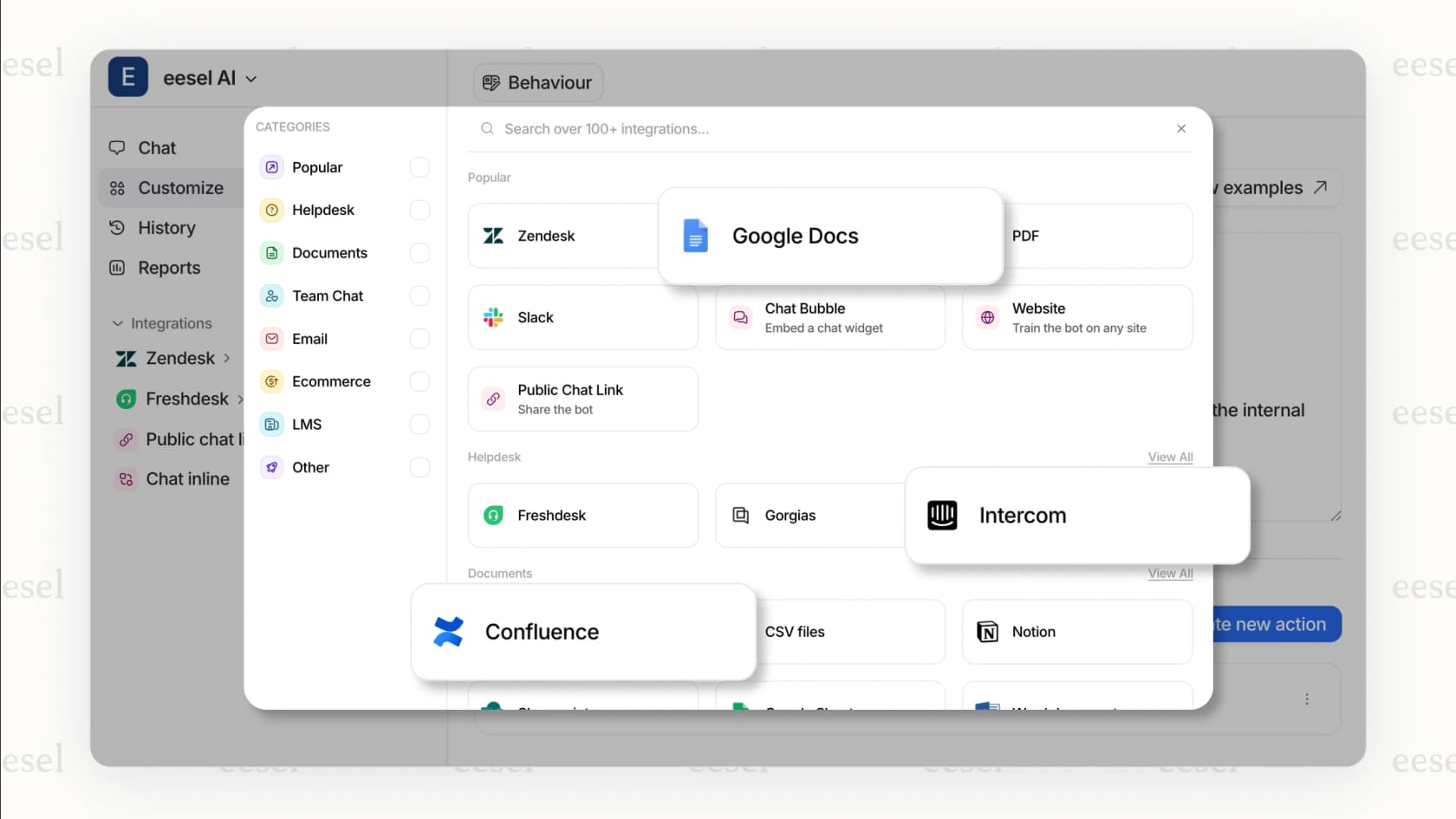
Teams using multiple tools across their stack may find Freddy AI's ecosystem limitations constraining. If your knowledge lives in Confluence, Google Docs, Notion, and Slack, you need AI that can see across all of them, not just what's in Freshservice.
This is where we take a different approach at eesel AI. Rather than locking AI inside a single platform, we connect to Freshservice plus dozens of other knowledge sources your team actually uses, including Confluence, Google Docs, Notion, and Slack. Our simulation mode lets you test on thousands of historical tickets before going live, so you know exactly what to expect. And we prioritize self-serve setup that delivers value in minutes, not days.
The right choice depends on your specific context. If you're all-in on Freshservice and your knowledge is already centralized there, Freddy AI's native integration is a genuine advantage. If your data is distributed across multiple tools and you need AI that can see the full picture, a cross-platform AI solution may serve you better.