What ticket deflection actually means for an IT team
Deflection is one of those metrics everyone quotes and few define the same way, so it's worth pinning down before we touch any settings.
Ticket deflection is the percentage of incoming requests that get resolved without a human agent, usually because a self-service layer answered the question or completed the task first. Someone needs their VPN reset, asks in Slack, the AI walks them through it, and no ticket lands in the queue. That's a deflected request.
It's not the same as resolution. Resolution counts any ticket that gets closed, including the hundreds your team worked by hand. Deflection only counts the ones that never needed you. The distinction matters because a bot that "answers" everything but spawns a wave of confused follow-ups isn't deflecting anything, it's just moving the work downstream.
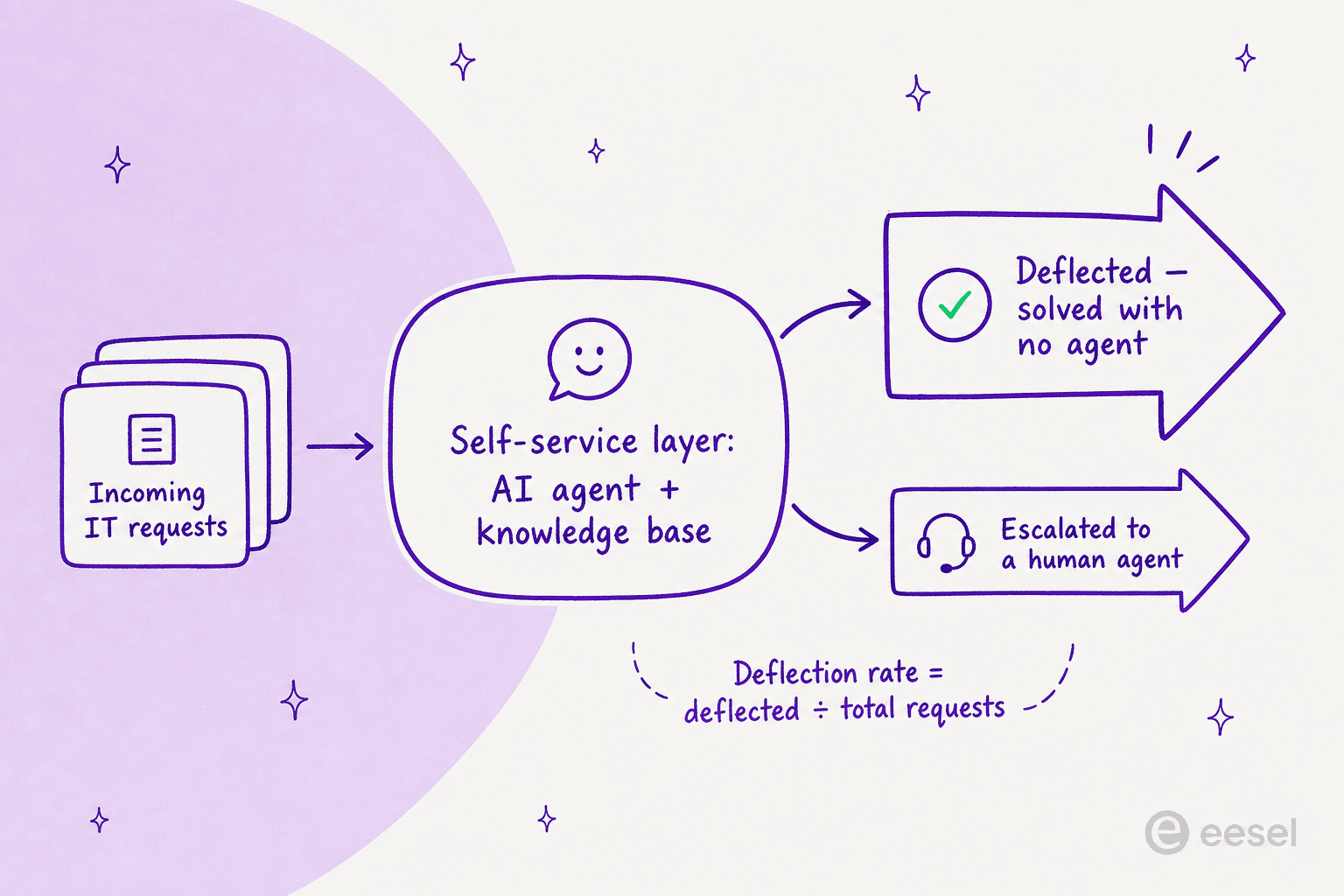
The math is simple: deflection rate = requests resolved by self-service ÷ total requests. The hard part is the quality bar underneath it. A deflected request has to be actually solved, and the ones that aren't have to escalate cleanly to a person with full context. Get that wrong and your headline deflection number rises while your team quietly drowns. This is the same trade-off we dig into in our support ticket deflection guide, and it's the lens to keep on everything below.
How Freshservice approaches ticket deflection
Freshservice is Freshworks' AI-powered ITSM platform, and its entire deflection story runs through one product: the Freddy AI Agent. Freshworks describes it as AI that resolves repetitive queries and goes "live in minutes," and on the Freshservice homepage the company cites 66% ticket deflection with AI-powered self-service, alongside a 77% drop in average resolution time and a 356% ROI figure from a Forrester TEI study.
The Freddy AI Agent is the autonomous, employee-facing tier, the bot that intercepts a request and tries to resolve it before it becomes a ticket. It draws on your knowledge sources to answer common questions and can auto-create service requests from a conversation, no rigid forms required. Behind it sit two more Freddy products that don't deflect directly but shape the experience: Freddy AI Copilot, the agent-assist layer that drafts replies and summarizes tickets, and Freddy AI Insights, the analytics layer for service leaders.
Deflection in Freshservice happens across four channels, all powered by that one agent:
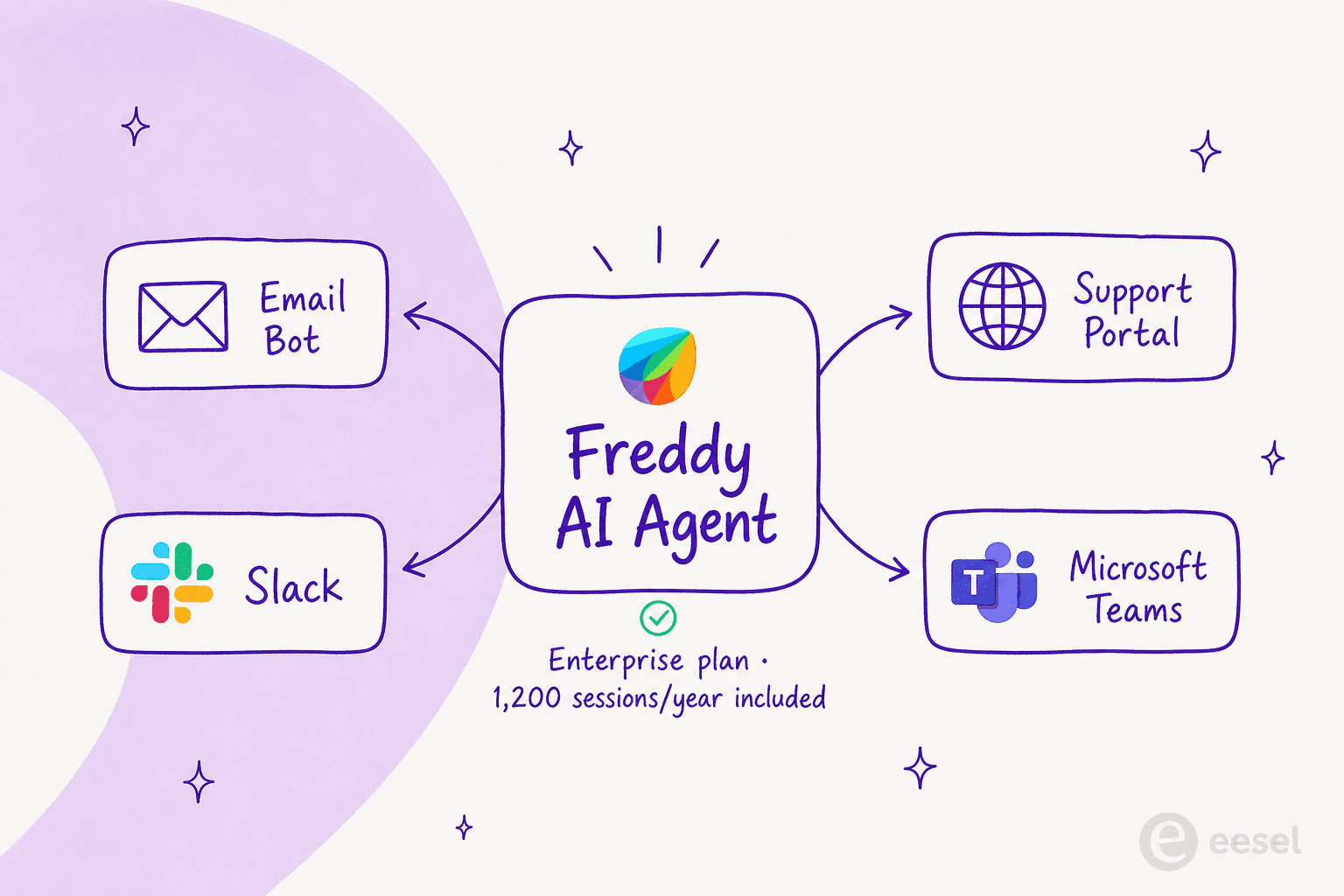
- Support portal: conversational self-service that replaces traditional KB search for requesters.
- Email bot: auto-responds to simple email queries with relevant help articles.
- Slack and Microsoft Teams: first-line answers and service requests inside the tools employees already live in, via the ServiceBot integration.
- Microsoft 365 Copilot: surfaces service intelligence inside the M365 experience.
On paper it's a complete picture: meet employees where they are, answer from your knowledge base, and only escalate what the AI can't handle. The catch, as always, is in the setup and the fine print.
How to set up ticket deflection in Freshservice, step by step
Turning Freddy on is an admin task, and the steps shift slightly depending on the channel you're deploying to. Here's the path.
Step 1: confirm you're on the right plan
This is the first wall most teams hit. The Freddy AI Agent is only available on the Freshservice Enterprise plan, per the official setup docs. The lower tiers (Starter, Growth, Pro) don't include the autonomous agent, so if deflection is your goal, you're effectively committing to the top tier. We'll get to what that costs in a moment.
Step 2: enable Freddy in global settings
Once you're on Enterprise, head to Admin > Global Settings and search for Freddy.
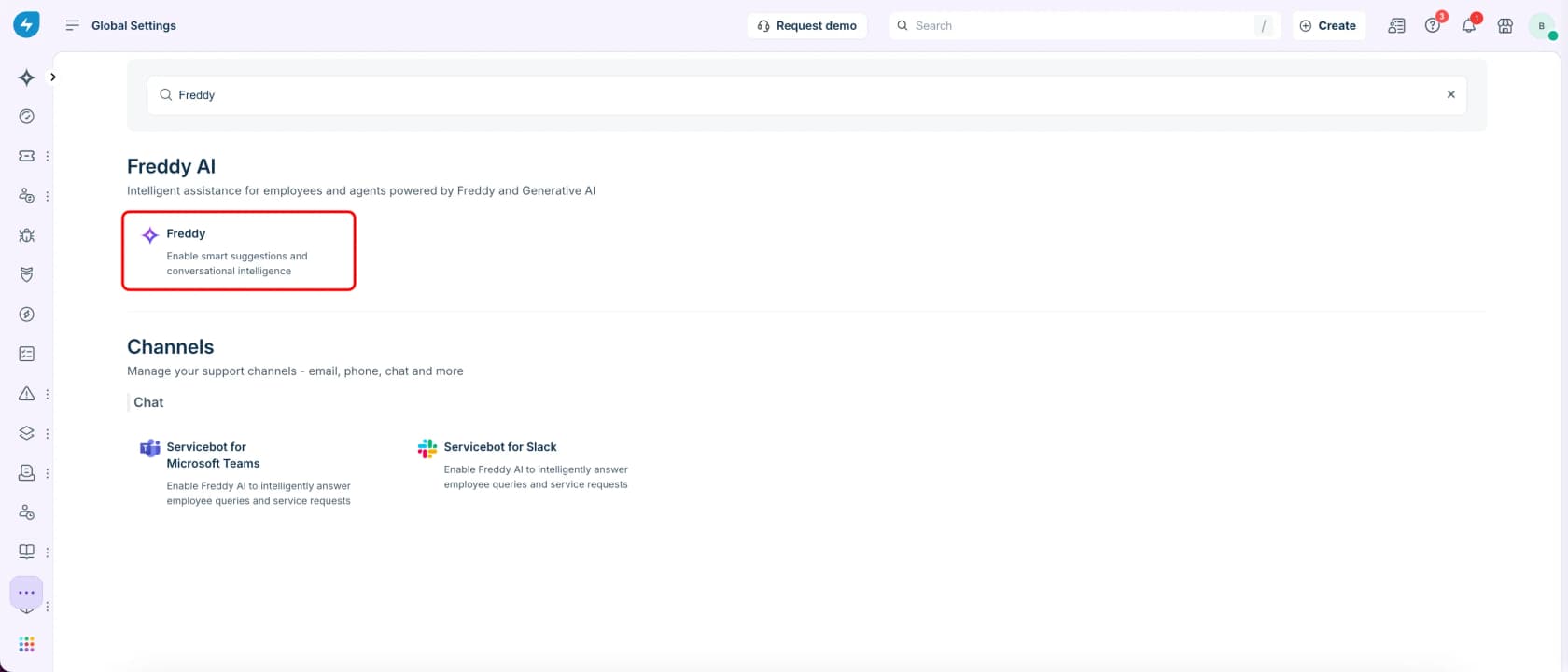
Select the Freddy card, then use the per-channel toggles to switch the agent on for each surface you want it to deflect from. You can see the email bot and support portal toggles here, plus the Slack and Teams options that need ServiceBot installed first.
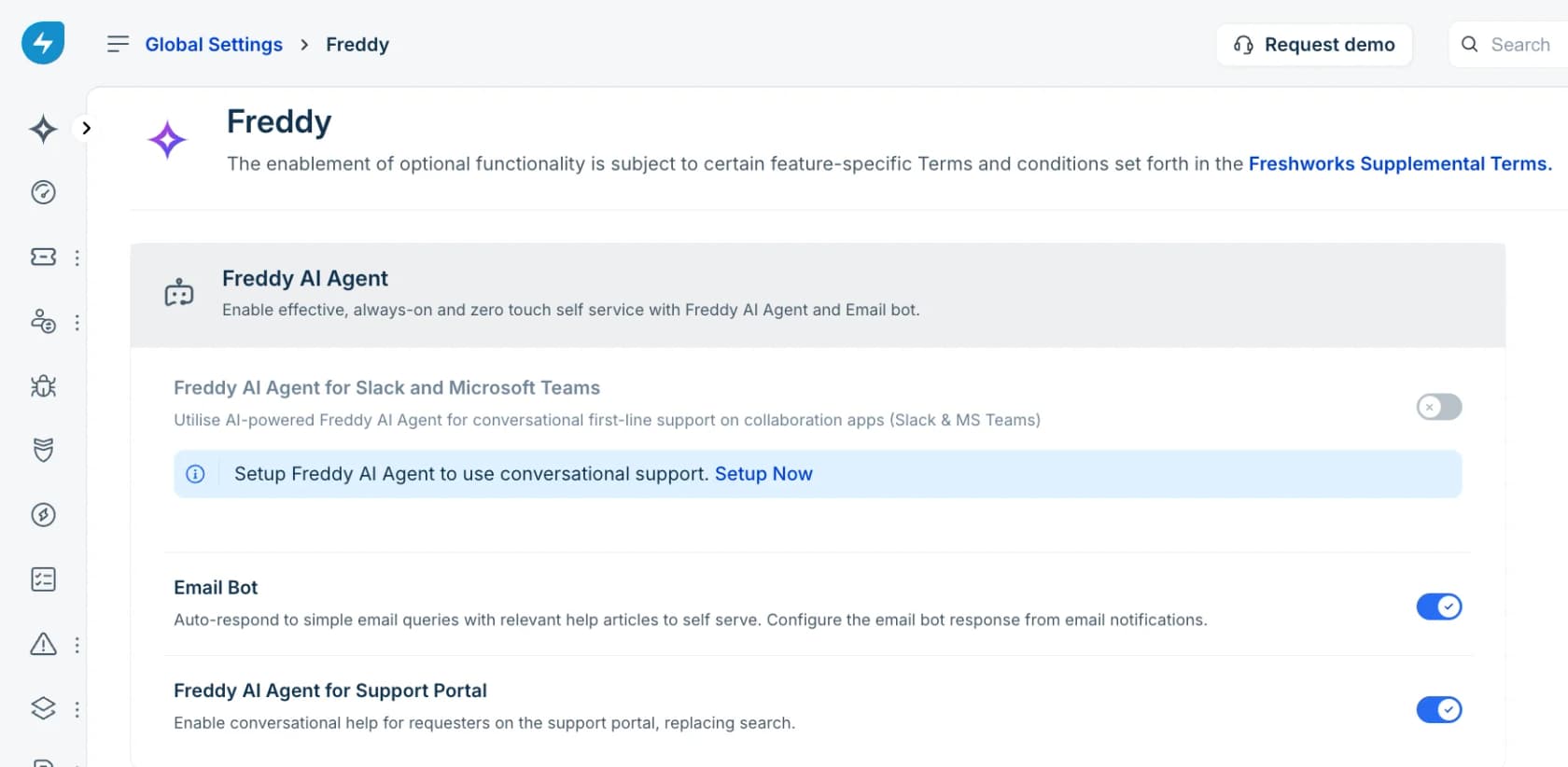
For Slack and Microsoft Teams, you have to install ServiceBot for that platform before Freddy can be configured there. The support portal and email bot don't need it.
Step 3: connect and prepare your knowledge sources
Deflection is only as good as what the AI can read. Freddy's Enterprise Search can pull from your Freshservice knowledge base, Microsoft SharePoint, Google Drive, and Confluence. This is where the knowledge base does the heavy lifting, and it's worth knowing the processing constraints up front:
- Freddy processes only the first 50 inline images in a solution article and the first 5 attachments (up to 5 MB each).
- An article can take anywhere from 1 to 24 hours to finish processing.
- It can interpret image-based content inside articles but cannot read .pdf, .docx, or .xlsx files.
That last point trips up a lot of IT teams whose runbooks live in Word and PDF. If your source of truth is a pile of documents Freddy can't parse, your deflection rate is capped before you start.
Step 4: set up handoff and track usage
When self-resolution fails, Freddy's "seamless agent handoff" turns the conversation into an incident, passing the full chat history (including uploaded screenshots) to the assigned agent. Then watch the numbers: the Freddy AI Agent overview report in the Analytics module tracks usage and performance, which is your feedback loop for what's actually being deflected.
What deflection looks like in practice (and where the gap shows)
This is the part the marketing pages skip. Setting Freddy up is straightforward; getting it to hit anything near that 66% number is a different story, and Freshservice's own user community is candid about it.
The sharpest warning comes from an IT lead at a 600-person org who turned Freddy on and measured the results five months later:
"Autoresolve is maybe 25% which is fine i guess. But our MTTR actually went UP. About 20% compared to where we were before... Freddy tries, fails, agent picks it up but has to scroll thru the full back-and-forth before they can respond... users who got autoresolved come back 2 days later w/ a follow up, new ticket because the original closed. Dup tickets are up like 15ish percent."
u/Time_Beautiful2460, r/Freshservice

That's the deflection trap in one post: a ~25% autoresolve rate that raised average resolution time, because every failed attempt added handoff overhead and every shaky "resolution" came back as a duplicate. The headline number went up; the team got slower.
Others are blunter about the AI's ceiling. One sysadmin evaluating Freshservice put it this way:
"the AI is abysmal for incident deflection and offers zero insight into why users found it unhelpful when they rate it and it also doesn't learn from users rating an interaction as unhelpful."
u/howzer22x, r/sysadmin
The "doesn't learn" complaint is the one to sit with. A deflection engine that can't improve from the thumbs-down ratings it collects will plateau wherever your initial knowledge base puts it. None of this means Freshservice is a bad service desk, plenty of mid-size teams genuinely like it for its clean UI and fast setup. It means the deflection number is earned, not switched on, and the limitations of Freshservice's AI are real enough that you should plan around them.
The pricing and session model worth knowing before you commit
Deflection in Freshservice has a cost structure that catches teams off guard, so let's lay it out properly. Here are the four ITSM tiers (billed annually):
| Plan | Price | Freddy AI Agent | Best for |
|---|---|---|---|
| Starter | $19/agent/month | Not included | First service desk, leaving shared inboxes |
| Growth | $49/agent/month | Not included | Foundational ITSM practices |
| Pro | $99/agent/month | Not included | Unifying service across functions |
| Enterprise | Custom quote | Included | AI-driven, enterprise-wide service |
The structural catch is in the right-hand column: the autonomous Freddy AI Agent is bundled only into Enterprise. On every other tier it's an add-on or simply unavailable, which is why deflection effectively means buying the top plan. Freshservice's own community has been vocal here:
"I do like the UI of Freshservice seems easy to use. The freddy AI is an add on so expensive for what it can do and only available at enterprise."
Then there's the billable unit. The Freddy AI Agent is metered in sessions, where a session is any interaction a unique user has with the agent within a 24-hour period. Each Enterprise license includes 1,200 sessions per year, with session packs and overage priced on request (Freshworks doesn't publish those figures). For a busy IT org, 1,200 sessions is not a lot, and the model bills you on the metric you can't directly control.
The deeper objection users raise is what the price is tied to:
"Freddy AI has the same limitations as every AI tool built by ITSM vendors. It's mainly tight to the Freshworks ecosystem, plus has limited human in the loop validation along with the fact that you don't have the ability to choose which LLMs you want to use. Also, its pricing is tied to the agents not the employees."
u/chris_la33, r/Freshservice
For the full picture, our Freshservice pricing breakdown and enterprise pricing guide walk through every line item. The short version: deflection here is an Enterprise-tier, per-agent, per-session commitment, and you should model the cost against the agent hours you'd actually save before signing.
How to actually raise your deflection rate
Whatever tool you run, the levers that move deflection are the same. The bot is maybe 20% of the outcome; the other 80% is everything around it. Here's where to spend your energy.
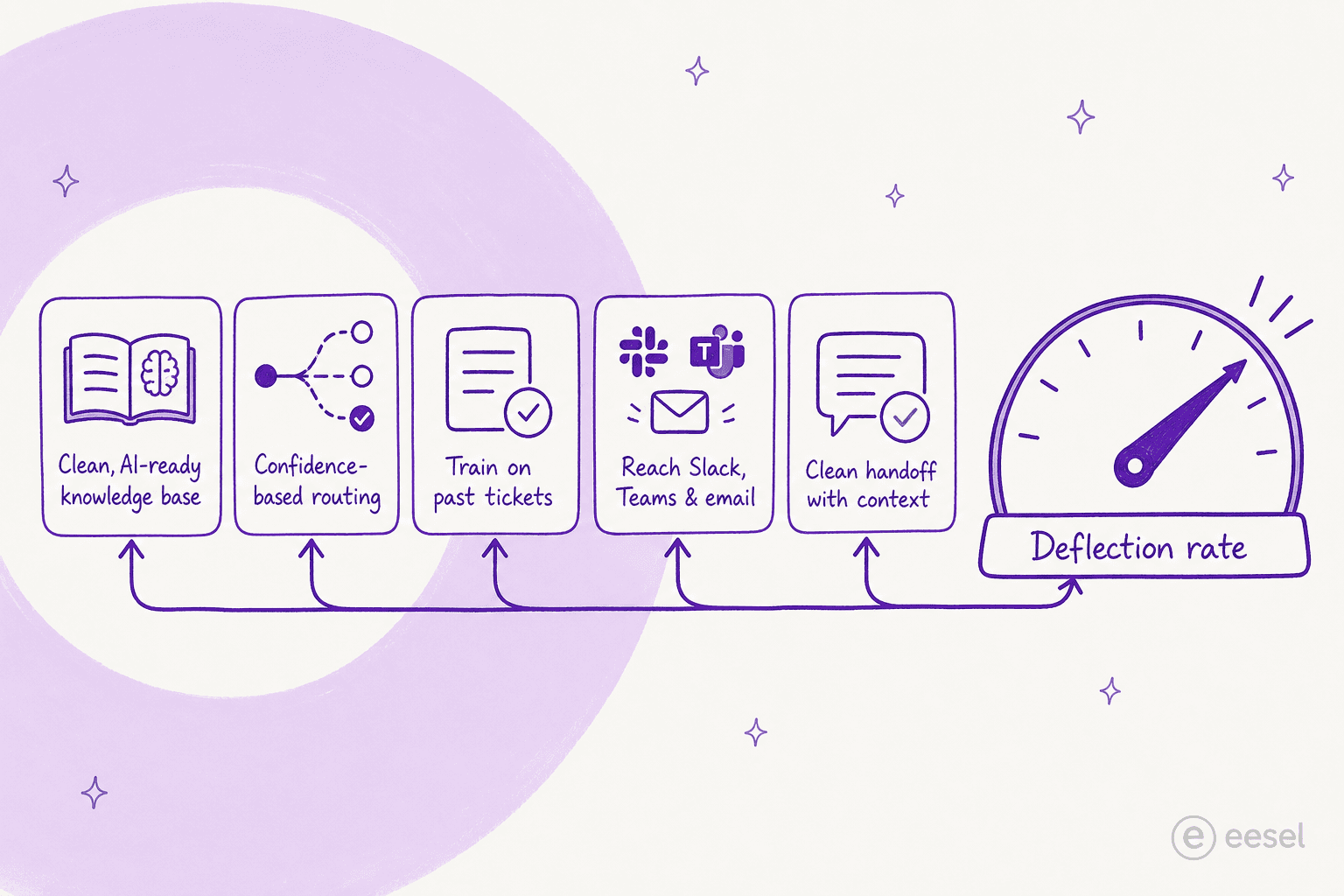
1. Fix the knowledge base first. This is the single biggest lever, and it's why the Word-and-PDF problem above matters so much. If your answers aren't written down in a format the AI can read, no amount of tuning saves you. Audit your articles, fill the gaps your ticket history reveals, and keep them current. Our AI knowledge base guide covers what "AI-ready" actually means.
2. Route only what the AI is confident about. This is the lever most teams skip and the one that separates real deflection from the duplicate-ticket trap. Instead of forcing the bot to attempt every request, let it handle only the questions it's sure of and leave the rest untouched for a human. A CX lead at a DTC supplements brand running ~7,000 tickets a month put the whole problem to our team in one line: the AI "will never be able to answer 100% of the questions," and a bot that just replies "sorry I don't know this" is useless because "I cannot go and check all my 7,000 tickets to see if the AI actually made a good answer." What they wanted was an AI "who is only handling the tickets that it's confident to handle and all the other ones, leave them alone." That's confidence-based routing, and it's the exact control the Freshservice users above kept asking for.
3. Train on your past tickets. Your historical tickets are the best possible training data, they contain the exact questions your employees ask and the exact answers that worked. A deflection engine that learns from them starts far higher than one working from a thin KB. This is also where the "doesn't learn from feedback" complaint about Freddy bites hardest.
4. Meet people in the channel they already use. Self-service only deflects if people use it. Answering inside Slack and Teams, where employees already ask their questions, deflects far more than a portal nobody visits.
5. Make escalation clean. When the AI hands off, the agent should get the full context instantly, not have to re-read a failed back-and-forth (the exact thing that drove that 20% MTTR rise). Clean escalation is what keeps a high deflection rate from turning into hidden rework.
Try eesel for Freshservice ticket deflection
If the Freshservice limits above sound familiar, the Enterprise-only gating, the session caps, the AI that can't learn from feedback, this is exactly the gap eesel is built to close. eesel is an AI agent that lives inside the tools your team already uses, including Freshservice, Jira Service Management, Slack, and Microsoft Teams, and handles first-line IT requests autonomously.

Two things make the deflection math work differently. First, eesel trains on your own historical tickets and lets you run a simulation against past requests before it ever replies to a real one, so you see your projected deflection rate up front instead of discovering it five months in. Second, it uses confidence-based routing: you decide exactly which requests it's allowed to handle, and it leaves the rest for a human, which is the single control the Freshservice users above kept asking for.
It's already doing this work in real IT helpdesks. Jason Loyola, Head of IT at InDebted, runs eesel as the first responder on his Jira Service Management queue, deflecting tickets on the way to a 55% target, and pricing is usage-based (per task, not per agent or per session), so the cost tracks what you actually deflect. You can connect it and test it on your own tickets in minutes, no Enterprise contract required.
Frequently Asked Questions
What is ticket deflection in Freshservice?
Does Freshservice really deflect 66% of tickets?
How much does Freshservice ticket deflection cost?
How do I improve my Freshservice deflection rate?
What is the difference between ticket deflection and ticket resolution?


Article by
Alicia Kirana Utomo
Kira is a writer at eesel AI with a Computer Science background and over a year of hands-on experience evaluating AI-powered customer service tools. She focuses on breaking down how helpdesk platforms and AI agents actually work so that support teams can make better buying decisions.