What is Freshservice AI?
Freshservice is Freshworks' AI-powered IT service management (ITSM) platform: an IT helpdesk that also handles asset management, operations, and increasingly HR and facilities requests through enterprise service management. "Freshservice AI" isn't a separate SKU you buy, it's the Freddy AI brand applied across all of that.
Freshworks describes Freddy as "people-first AI" that "goes live in minutes to resolve repetitive queries, provide resolution assistance, and alert on performance." For an IT team, that translates into three jobs: deflecting routine requests (password resets, status lookups) before they reach a human, helping agents resolve the tickets that do land, and surfacing trends to whoever owns the service desk.
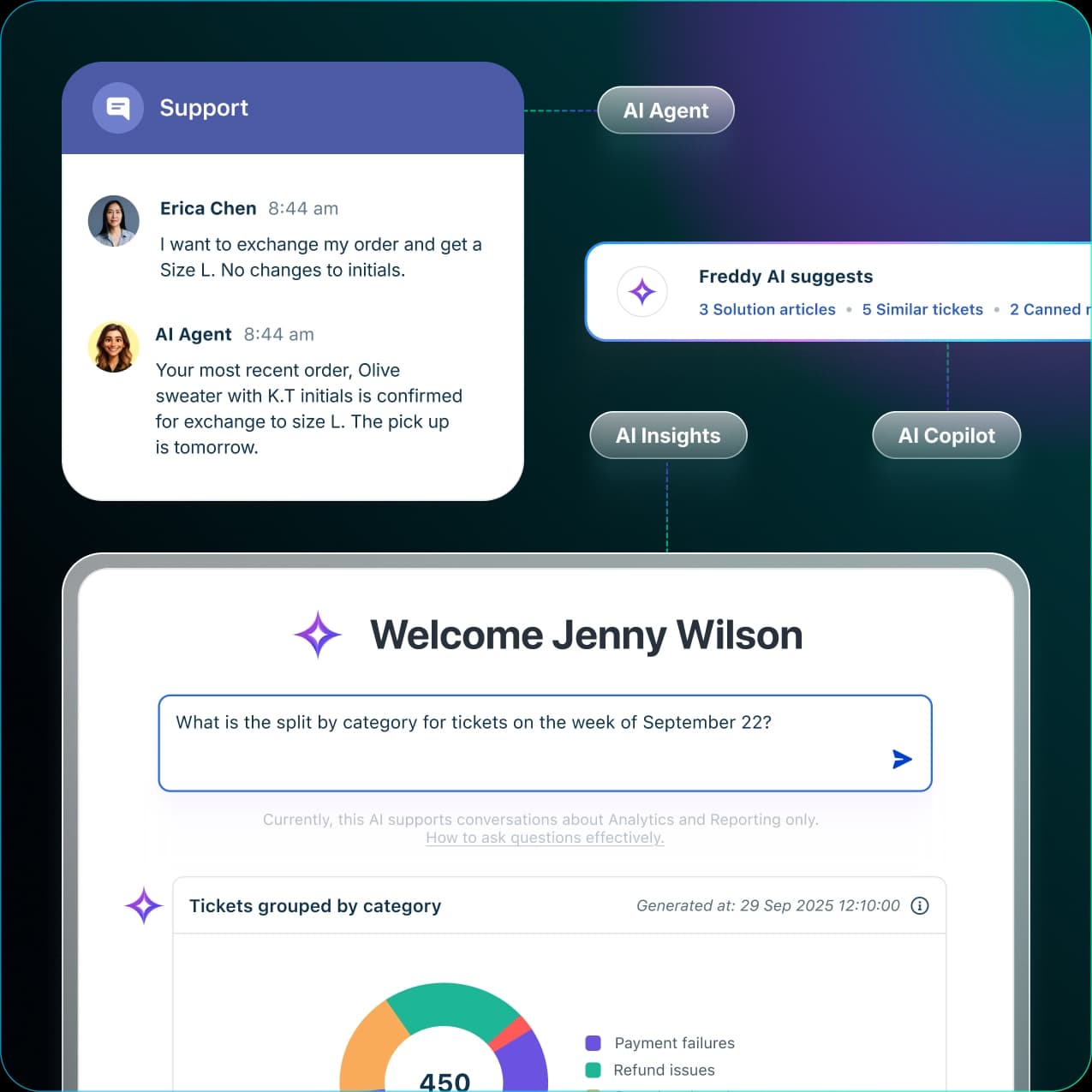
One thing worth getting straight up front: Freddy's canonical marketing page is framed around customer support (refunds, Shopify, CSAT), but the same three-product architecture and the AI Agent Studio apply to Freshservice ITSM. So when you read "resolves up to 80% of queries," picture an employee asking "how do I get VPN access?" in Slack, not a shopper chasing a refund.
The three faces of Freddy AI
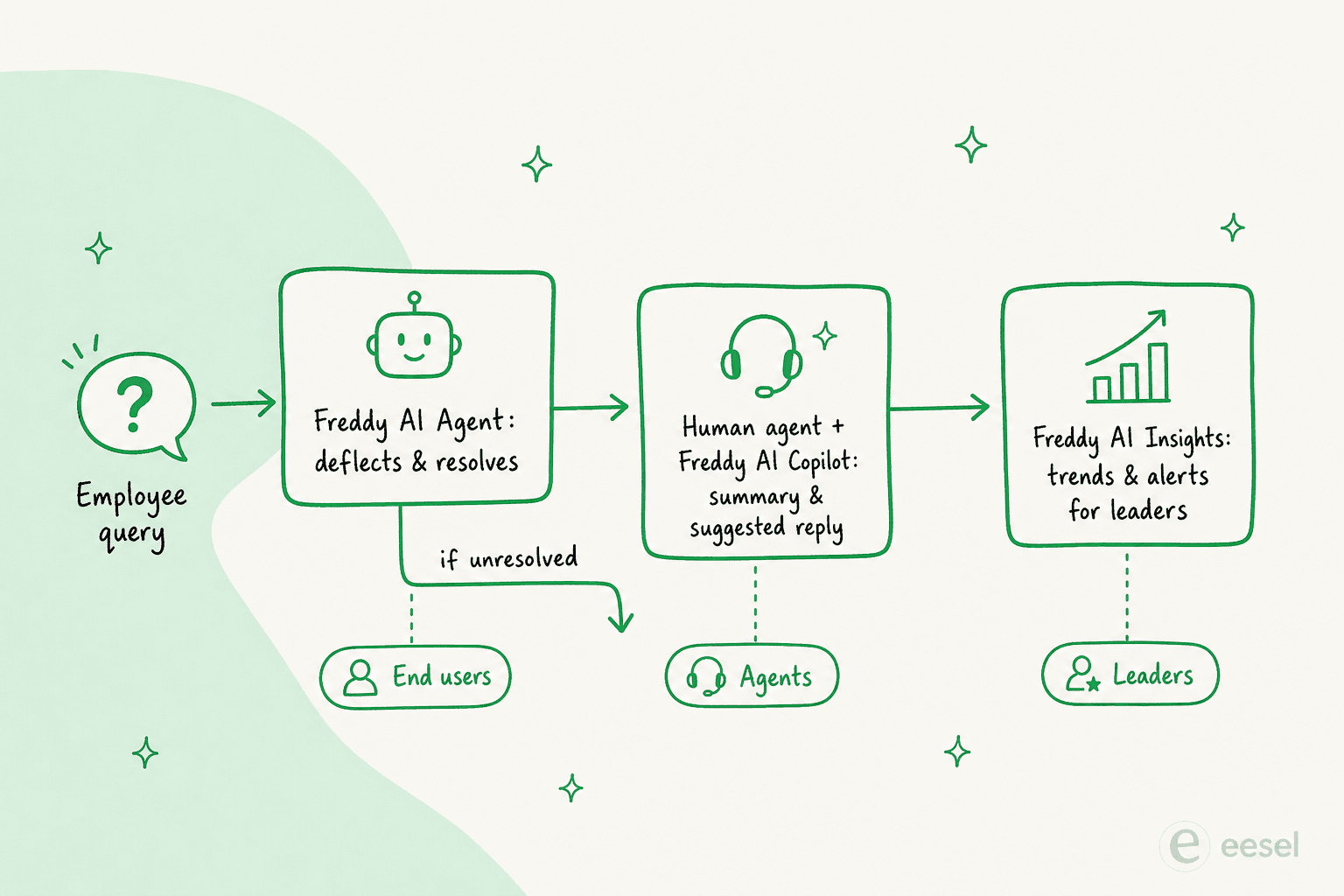
The cleanest way to understand Freshservice AI is to stop treating "Freddy" as one thing. It's three products aimed at three different audiences, and they're priced and gated differently.
Freddy AI Agent
This is the autonomous, employee-facing bot, the tier Freshworks describes as "AI that acts, not just responds." Freddy AI Agent handles conversational self-service across chat, messaging apps, and email: it answers questions, auto-creates service requests from the conversation, cites its sources, and hands off to a human when it can't resolve something. You build agents in the no-code AI Agent Studio, or launch pre-built ones.
In practice it looks like this: an employee posts a problem in Slack, and ServiceBot (the Freddy AI Agent surface for Slack and Teams) replies with step-by-step troubleshooting plus the knowledge articles it pulled from.
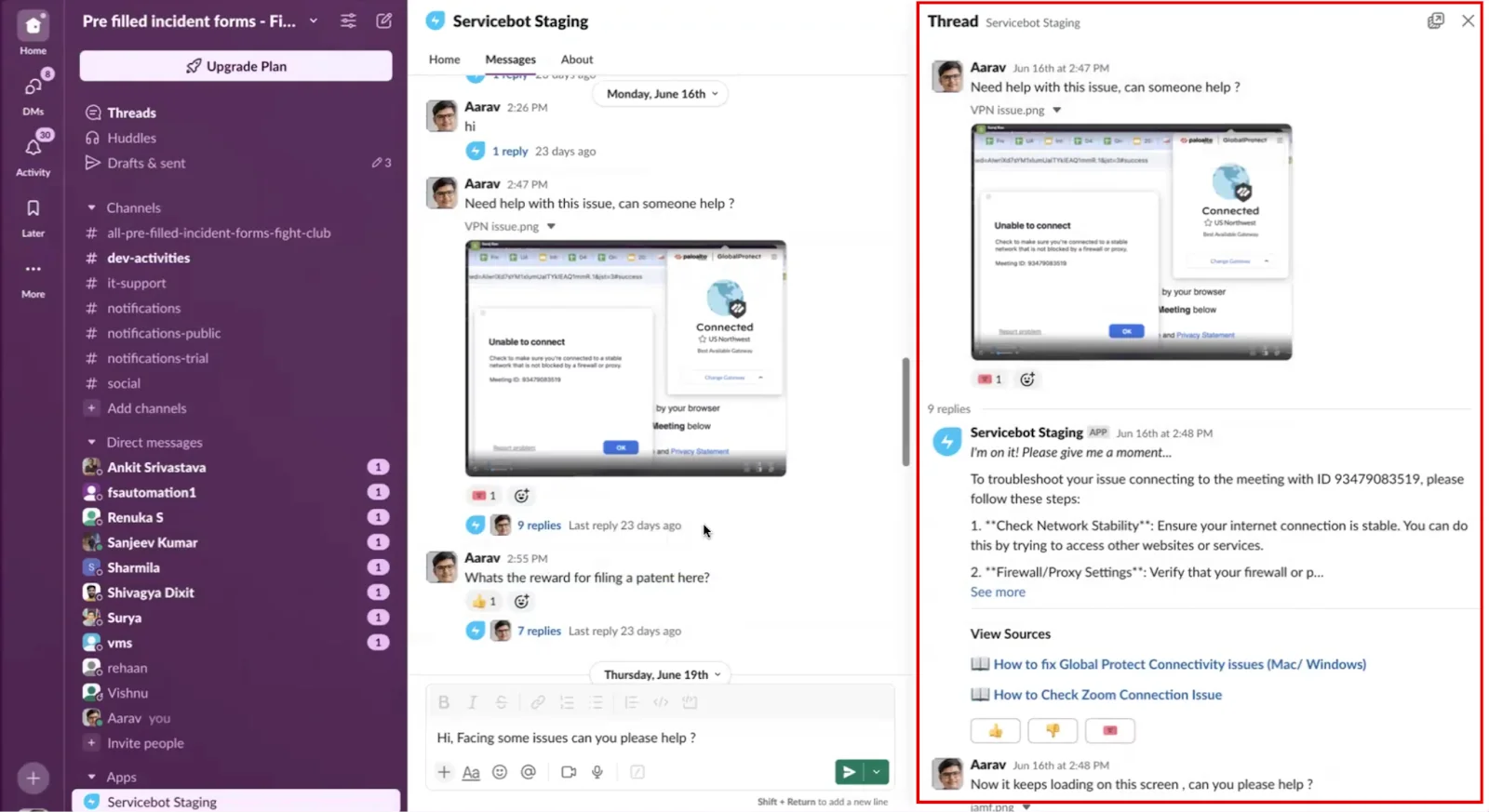
The citations and grounding are the genuinely good part here, every answer can show its work, which is exactly what you want when an employee is about to follow IT instructions. The honest caveat: the agent only reads from a defined set of knowledge sources (Freshservice Knowledge Base, SharePoint, Google Drive, Confluence), and the quality of its answers is capped by how good those articles are.
Freddy AI Copilot
Freddy AI Copilot is the agent-assist tier, "AI that has your back," living inside the agent workspace with what Freshworks calls "zero context-switching." It drafts suggested replies, summarizes long ticket threads, generates resolution notes and post-incident reports, and translates messages in real time.
The summary feature is the one IT agents actually feel. When a ticket arrives with a Slack thread and a couple of user-uploaded screenshots attached, Copilot condenses the whole back-and-forth into a few bullets so the agent isn't scrolling to reconstruct what happened.
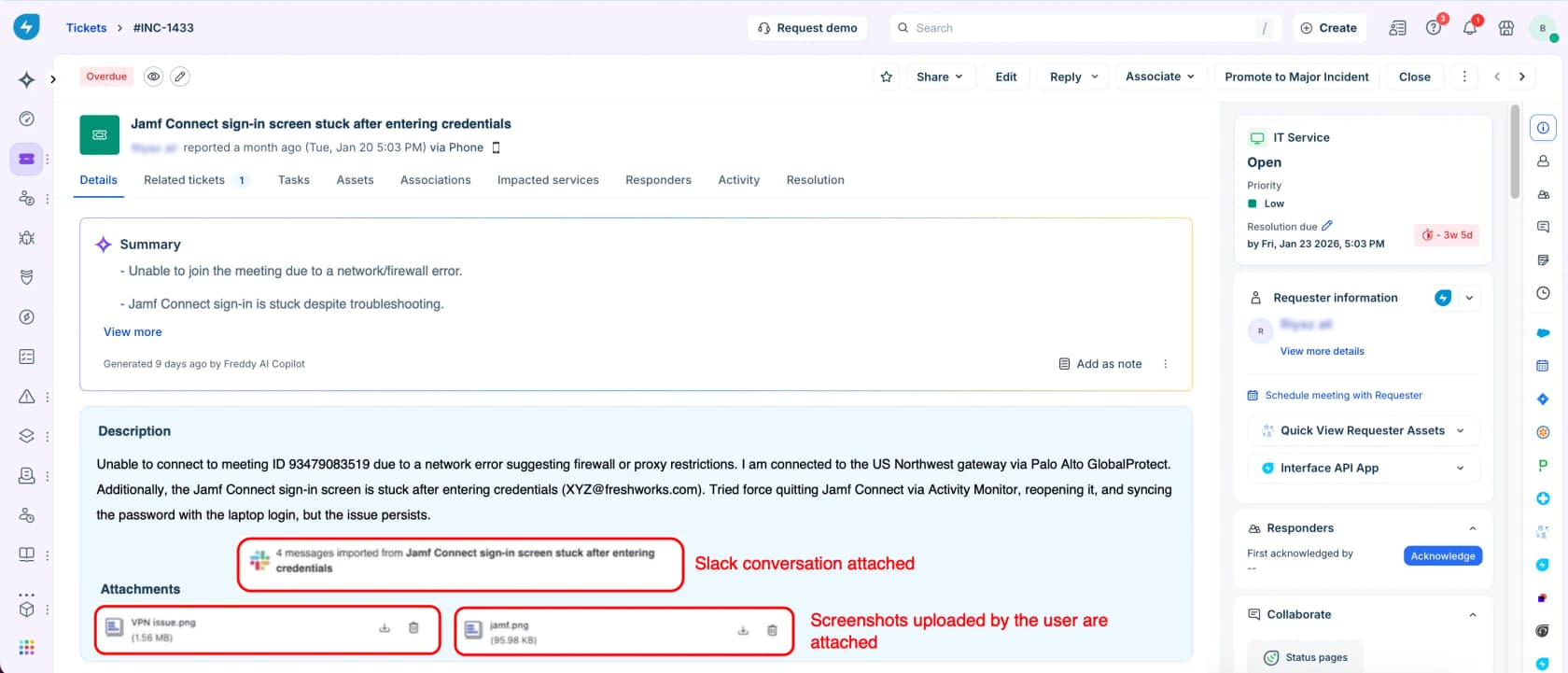
Copilot is usually sold as a per-agent add-on, and here's the first pricing snag: the exact per-agent Copilot dollar price isn't published anywhere on the pricing page. You get the feature list, not the number, which means budgeting requires a sales call.
Freddy AI Insights
Freddy AI Insights is the analytics tier for leaders. Instead of static dashboards, it sends proactive alerts with root-cause analysis ("CSAT dipped," "SLA breaches spiking"), spots trends, and lets you query your data conversationally, the "Welcome Jenny Wilson, tickets grouped by category" view in the screenshot above is Insights doing its thing.
The SLA-breach monitoring is the standout for ITSM specifically, since breach management is where service desks live or die. Just know that, like the rest of Freddy, the polished version is an Enterprise-tier feature.
How Freddy AI Agent knows anything: knowledge sources
Freddy AI Agent is only as smart as what you feed it. Through what Freshservice calls Enterprise Search, the agent can draw on your internal Knowledge Base, SharePoint, Google Drive, and Confluence. That's a solid spread, but the processing constraints are where teams trip up:
- It processes only the first 50 inline images and first 5 attachments (up to 5 MB each) in a solution article.
- An article can take anywhere from 1 hour to ~24 hours to finish processing.
- Freddy can interpret images embedded in articles, but can't read .pdf, .docx, or .xlsx files.
That last one bites hard if your runbooks live in PDFs and Word docs, which, for a lot of IT teams, they do. One user on r/Freshservice got far better results only after routing knowledge-base article creation through an external LLM to get clean, inline-styled HTML that survived Freshservice's formatting handling. The lesson: your knowledge base is the real lever on whether Freshservice AI works, and getting good content in can be clunkier than it should be.
Setting up Freshservice AI
Enablement happens in the admin settings, and it's refreshingly quick once you're on the right plan. The catch is that Freddy AI Agent requires the Enterprise plan to begin with.
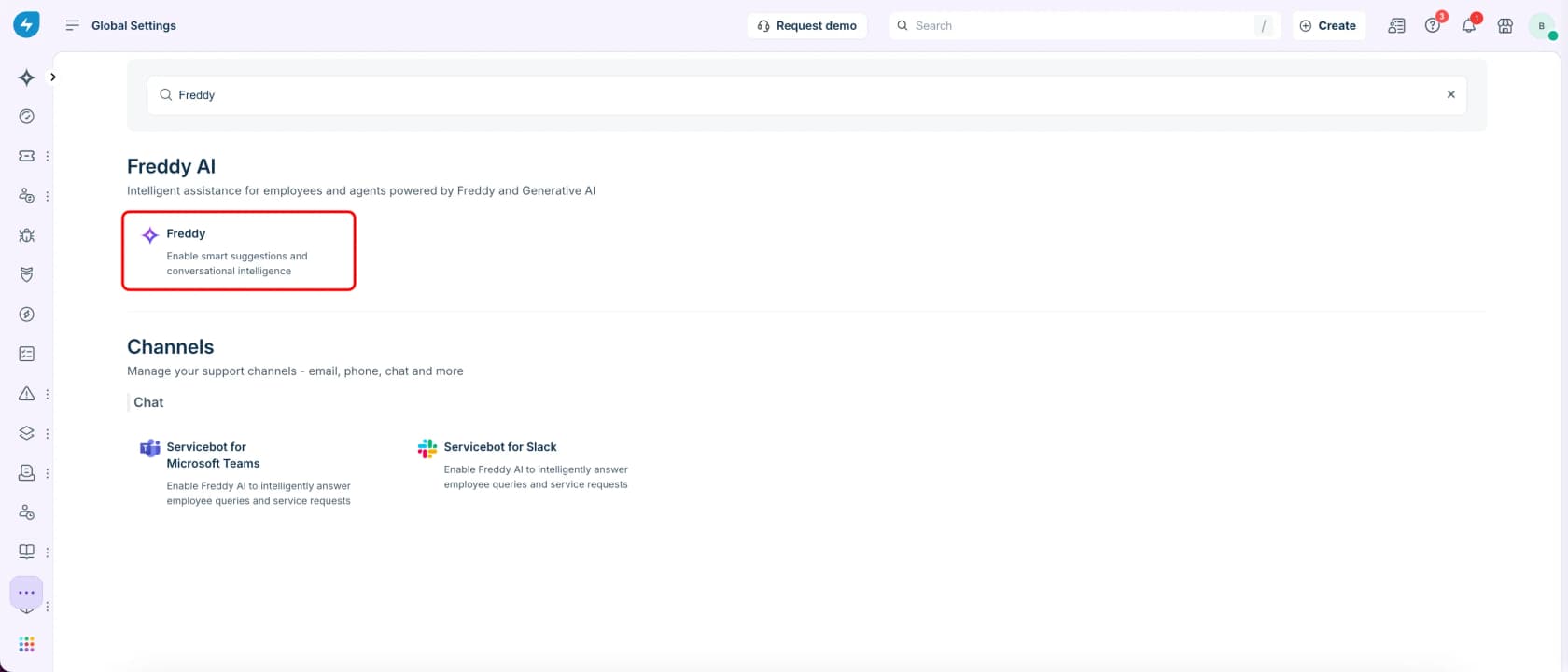
The flow: go to Admin > Global Settings, search for "Freddy," and you'll land on the Freddy AI configuration card alongside the ServiceBot options for Microsoft Teams and Slack.
From there you toggle Freddy AI Agent on per channel, Slack and Teams, Email Bot, and the support portal each have their own switch.
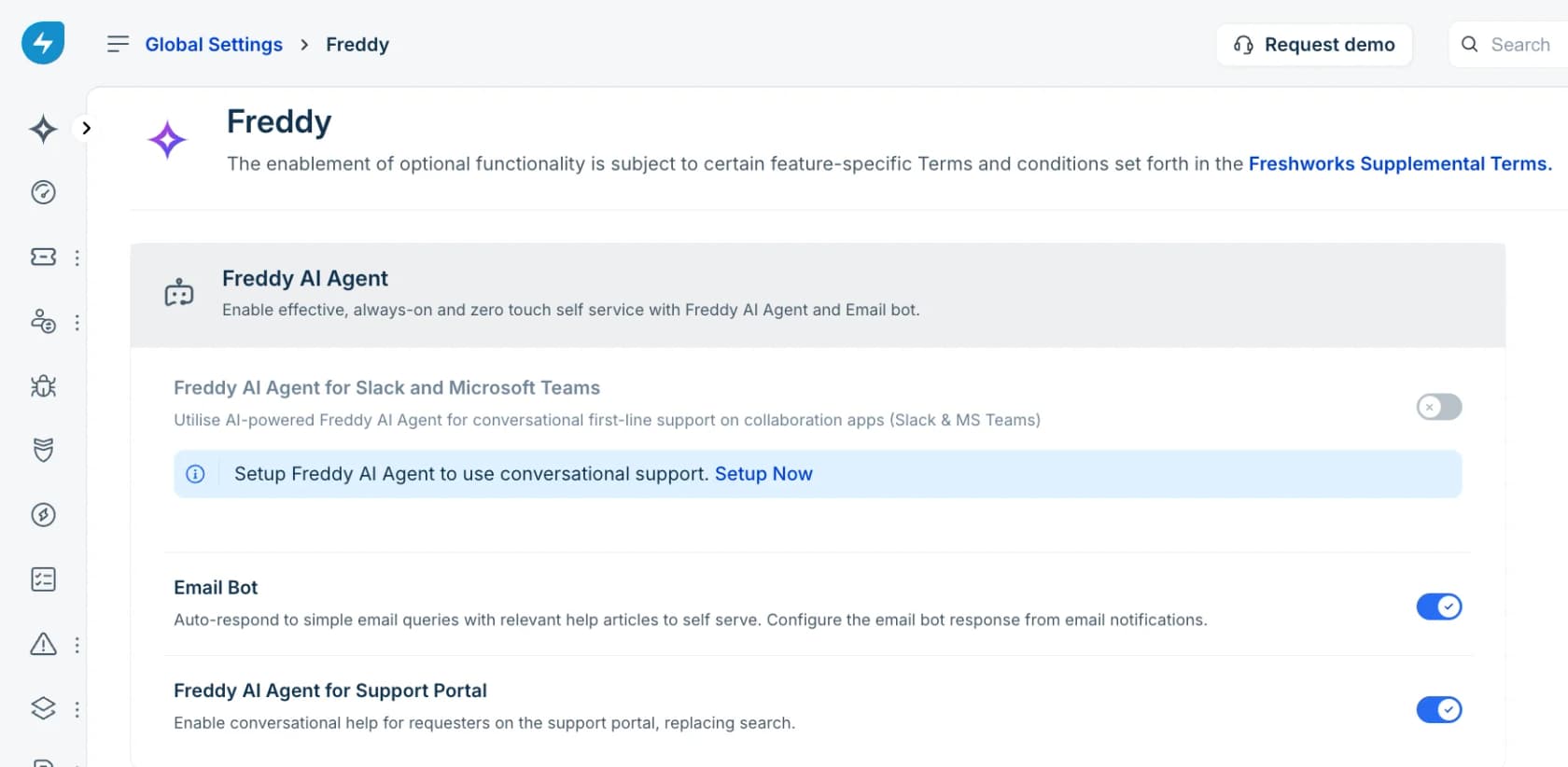
For Slack and Microsoft Teams you have to install ServiceBot first, and this is where one real-world snag shows up: the Teams ServiceBot/SharePoint integration asks for very broad permissions ("Read files in all site collections"), which has been enough to stall rollouts at the security-review stage. If your security team gatekeeps SharePoint access tightly, budget time for that conversation.
What Freshservice AI costs: the session model
Here's the part that confuses everyone. Freddy AI Agent isn't priced per agent or per ticket, it's priced by session.
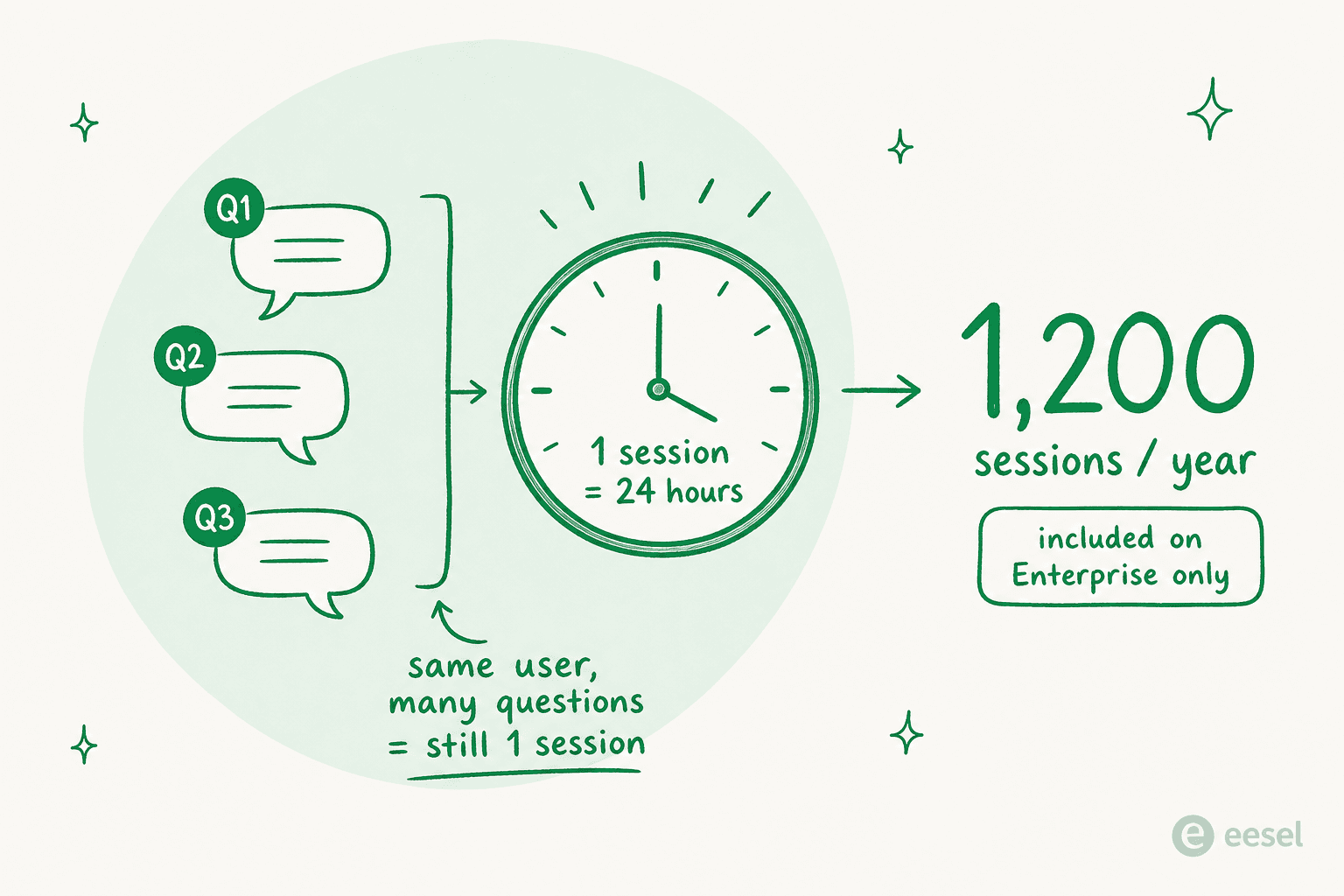
Freshworks defines a session as "any interaction a unique user has with an AI Agent within a 24-hour period." So if one employee asks Freddy five questions across a morning, that's still a single billable session. Each Freshservice Enterprise license includes 1,200 Freddy AI Agent sessions per year (prorated for shorter cycles), and session-pack or overage costs are quote-based, not published.
The underlying ITSM tiers are public, at least:
| Plan | Price (billed annually) | Who it's for | Freddy AI |
|---|---|---|---|
| Starter | $19/agent/month | First service desk, moving off shared inboxes | Add-on / overage |
| Growth | $49/agent/month | Building foundational ITSM practices | Add-on / overage |
| Pro | $99/agent/month | Unifying service management across functions | Add-on / overage |
| Enterprise | Custom quote | Mature IT orgs driving strategic impact | Included (1,200 sessions/yr) |
On top of the per-agent price, watch for the other metered units: occasional-agent Day Passes (from $3), IT asset units sold in packs of 500, and orchestration transactions for workflow actions. As one r/sysadmin user put it while evaluating an upgrade quote, the pricing has a habit of "creeping up as more teams get added." For the full breakdown, our Freshservice Freddy AI pricing and Freshservice AI cost guides go deeper.
Legacy Virtual Agent vs the new GenAI Freddy
If you enabled Freddy before October 18, 2024, you were on the legacy Virtual Agent, which was deprecated on May 21, 2025. The new GenAI-powered Freddy AI Agent is a real step up, and Freshworks lays the difference out plainly:
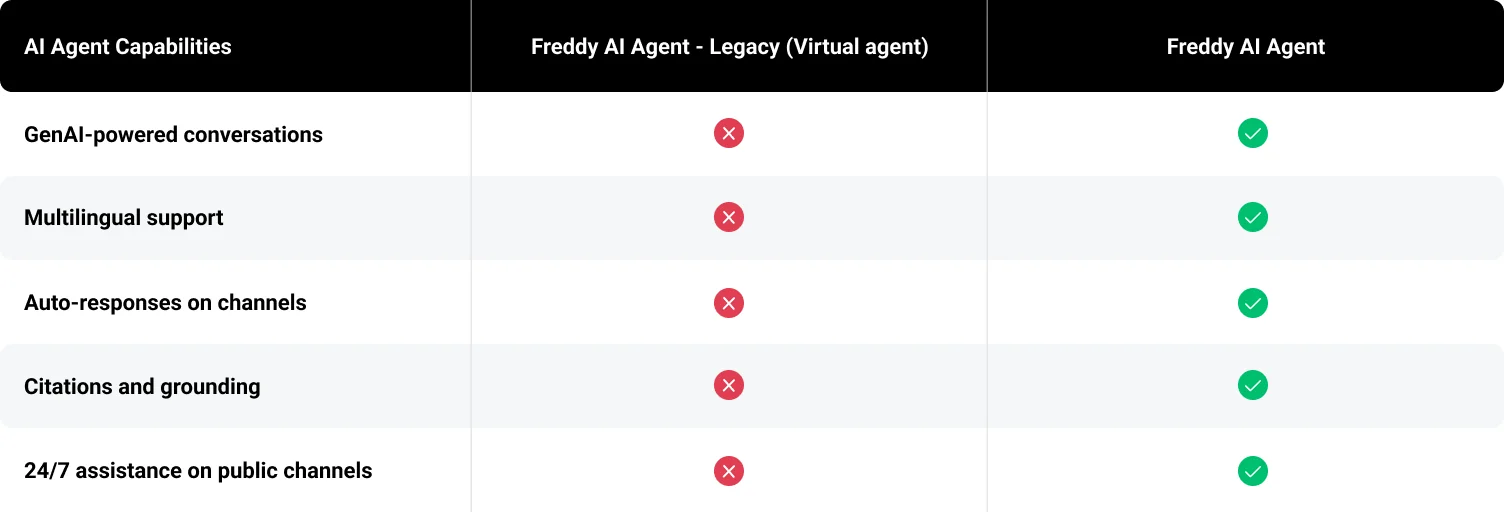
So if your impression of Freshservice AI is from the old intent-and-flow Virtual Agent, it's worth a fresh look, the GenAI version genuinely handles free-form questions and multiple languages in a way the old one couldn't. The feature comparison is real progress, even if, as we'll see, sentiment hasn't fully caught up.
What real users actually say
This is where the marketing and the lived experience diverge, and it's worth listening to before you commit. Freshservice gets genuine love for being clean and fast to stand up: on r/sysadmin, the consensus on the core product is positive.
"FreshService IMO is pretty damn good, it for sure gets the job done, the pricing is pretty good. Overall no major complaints."

Freddy specifically gets a cooler reception. The recurring theme is that the AI feels like automation, not intelligence:
"the AI is abysmal for incident deflection and offers zero insight into why users found it unhelpful when they rate it and it also doesn't learn from users rating an interaction as unhelpful. Reporting isn't real time and is very clunky."
And the lock-in complaints are consistent. One commenter explaining why they layered a third-party tool on top of Freshservice instead:
"Freddy AI has the same limitations as every AI tool built by ITSM vendors. It's mainly tight to the Freshworks ecosystem... you don't have the ability to choose which LLMs you want to use. Also, its pricing is tied to the agents not the employees."
The counterintuitive part: AI can make resolution times worse
The most useful thing we found wasn't in any marketing deck. A 600-person org with a four-person IT team shared what happened five months after turning Freddy on, and it's the opposite of the brochure:
"Autoresolve is maybe 25% which is fine i guess. But our MTTR actually went UP. About 20%... Freddy tries, fails, agent picks it up but has to scroll thru the full back-and-forth before they can respond... users who got autoresolved come back 2 days later w/ a follow up, new ticket because the original closed. Dup tickets are up like 15ish percent."
This is the trap nobody warns you about: a deflection bot that fails gracelessly can cost you more time than no bot at all, because every failed attempt becomes context an agent has to read before they can even start.
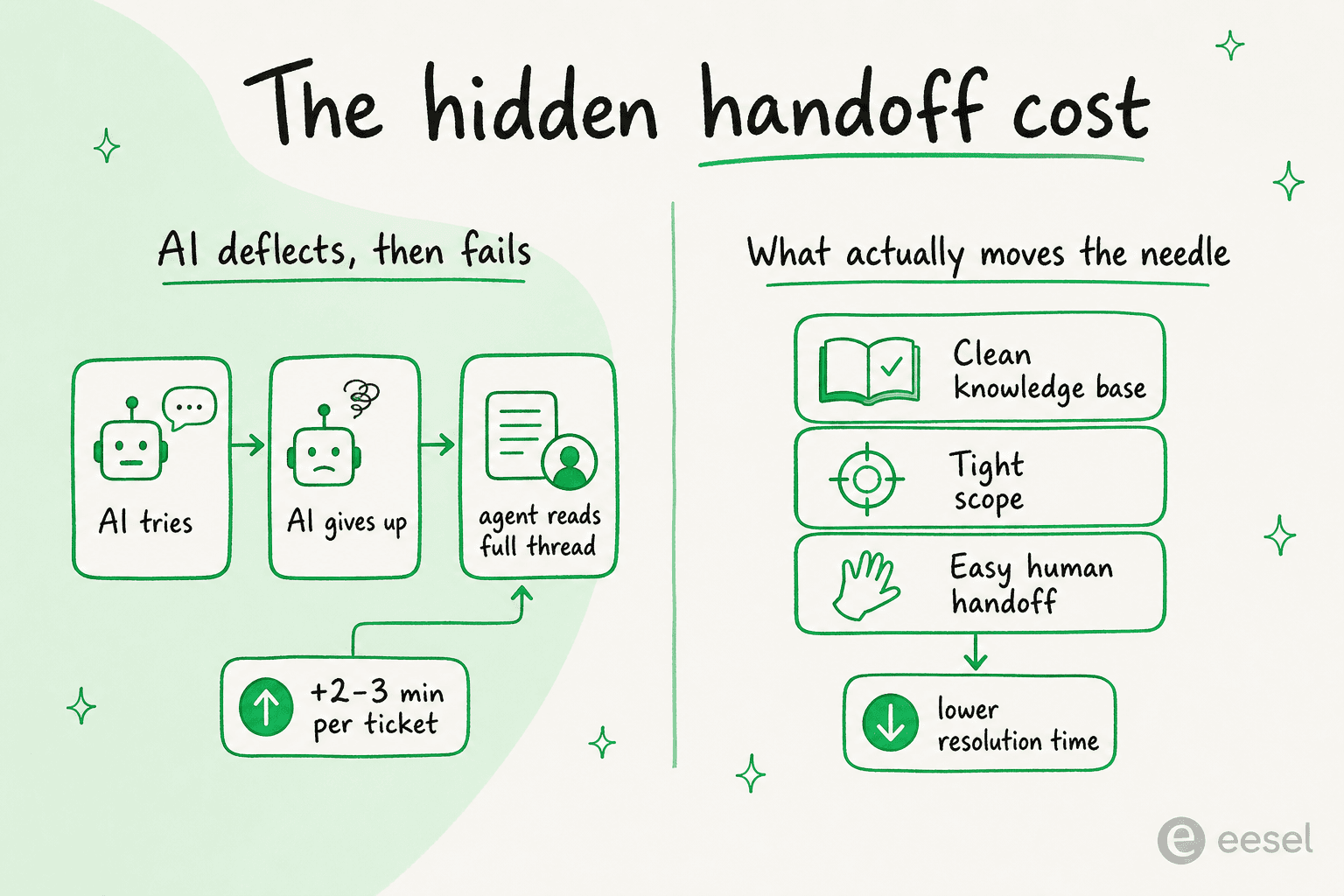
The fix isn't "don't use AI," it's "don't deploy a black box." The teams that win with AI deflection are the ones that scope it tightly, keep the knowledge base clean, and make the handoff seamless. Which is a neat segue, because that's exactly the gap a tool like eesel is built to close.
Where Freshservice AI falls short
Pulling the threads together, here's the honest scorecard. Freshservice AI is good if you're an Enterprise customer with a clean knowledge base and you live inside the Freshworks ecosystem. The friction points are real, though:
- It's gated to Enterprise. Freddy AI Agent is bundled into the top tier and an expensive add-on below it, so smaller teams pay a premium for the AI that's supposed to save them money. See our take on Freshservice's AI limitations.
- No model choice. You're locked to Freshworks' models with no ability to bring your own LLM.
- Hard to test before you trust. There's no real way to simulate Freddy against your historical tickets to see what it would have done before you flip it on for real users, which is exactly how you end up with the MTTR surprise above.
- Knowledge ingestion is fussy. No PDF/DOCX/XLSX reading, slow processing, and formatting that strips on paste.
If those land for you, it's worth looking at the wider field in the best AI for Freshservice and AI for ITSM tools compared, or the Freshservice vs ServiceNow and Freshservice vs HaloITSM head-to-heads.
Try eesel for AI that works with the helpdesk you already have
If the recurring complaints about Freshservice AI, no model choice, gated behind Enterprise, no way to test before you trust it, sound like dealbreakers, that's the exact problem eesel AI was built for. eesel is a model-agnostic AI layer that sits on top of the helpdesk and chat tools you already run, including Freshdesk, Zendesk, Slack, Confluence, and 100+ others, so your IT team can deploy autonomous self-service without ripping anything out.

The one differentiator that addresses the MTTR trap head-on: eesel lets you simulate the AI against your past tickets before it ever talks to a real employee, so you see your projected resolution rate and exactly where it would hand off, no guessing, no five-months-later regret. You brief it in plain language, it answers workplace questions right inside Slack, and pricing is usage-based with no per-seat fees. It's a popular pick for internal support teams who want Freddy's deflection without Freddy's lock-in.
You can try eesel free, or check the pricing to see how usage-based stacks up against per-session billing.
Frequently Asked Questions
What is Freshservice AI?
How much does Freshservice AI cost?
Is Freddy AI only available on the Enterprise plan?
Does Freshservice AI work in Slack and Microsoft Teams?
What are the best Freshservice AI alternatives?


Article by
Riellvriany Indriawan
Riell is a designer and writer at eesel AI with about two years of experience researching CX platforms, AI chatbots, and helpdesk software. She combines her design background with a sharp eye for how these tools actually look and feel in practice — making her comparisons unusually visual and user-focused.