What to look for in an AI helpdesk for small teams
Before the list, three things worth locking in:
Per-seat pricing and AI billing are two separate line items. Almost every modern helpdesk splits the platform subscription from AI usage. Zoho Desk's $7/agent/month Express plan looks appealing - but Zia AI features are nearly all gated behind the $40/agent/month Enterprise tier. HubSpot's Starter is $7/seat, but the Breeze Customer Agent (the autonomous resolver) is Professional-only at $90/seat. When you see a low entry price, check which tier actually unlocks usable AI.
AI resolution billing compounds fast. Gorgias charges $0.90–$1.00 per AI-resolved conversation on top of the plan fee. HubSpot charges $0.45 per resolved conversation on Professional/Enterprise. Freshdesk gives 500 free sessions, then $49 per 100. At 60% AI resolution on 1,000 tickets/month, that's 600 × $0.90 = $540/month in AI fees alone on the Gorgias plan. Run the math before you commit.
Free tiers are genuinely viable for bootstrapping. Freshdesk's free tier covers 2 agents for 6 months. Zoho Desk offers 3 agents free forever. HubSpot's free plan is 2 users with basic ticketing. Tidio has 50 Lyro AI conversations free. A 2-person team can legitimately run on these while validating whether paid AI is worth it.
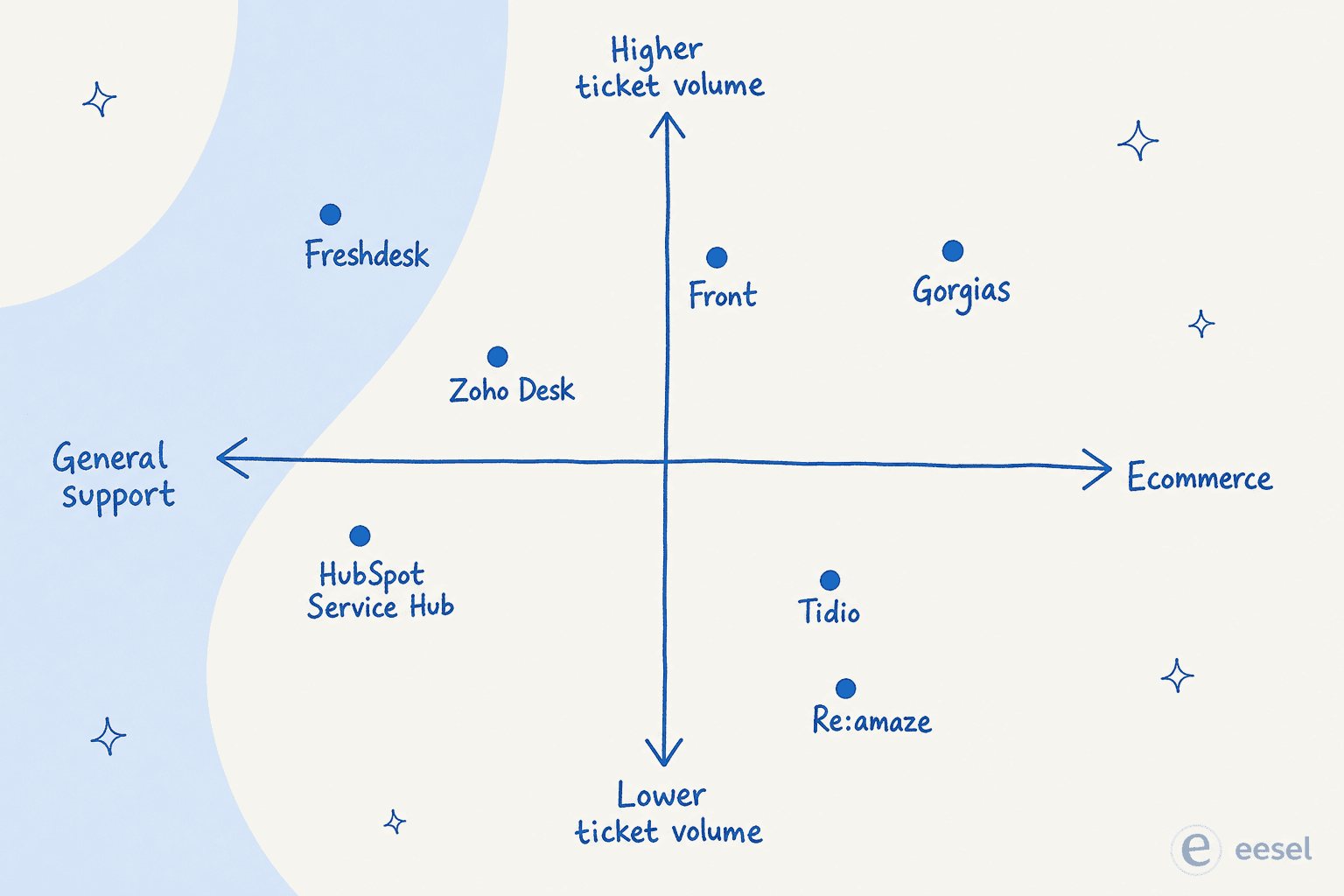
Here's how the seven tools compare at a glance:
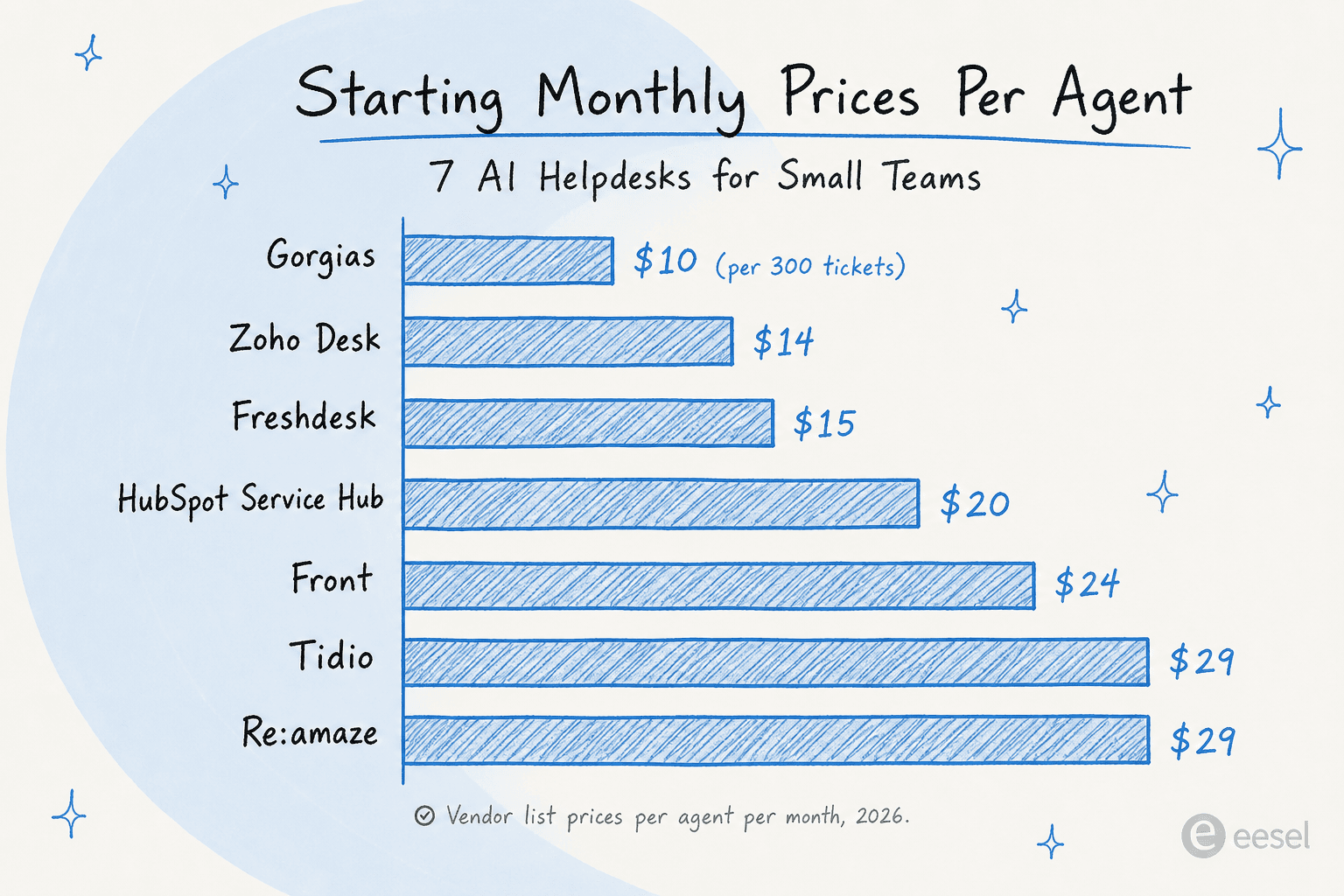
| Tool | Free plan | Starting price | AI billing model | Best for |
|---|---|---|---|---|
| Freshdesk | 2 agents, 6 months | $19/agent/mo (annual) | $49 per 100 AI sessions | General support |
| Zoho Desk | 3 agents, forever | $7/agent/mo | AI gated to Enterprise ($40/agent/mo) | Budget / Zoho ecosystem |
| HubSpot Service Hub | 2 users, forever | $7/seat/mo (Starter) | $0.45/resolution (Pro+ only) | CRM-first teams |
| Tidio | 50 AI convos | $24.17/mo | $0.50/convo (paid plans) | Live chat, ecommerce SMBs |
| Gorgias | None | $10/mo (50 tickets) | $0.90–$1.00/resolved convo | Shopify ecommerce |
| Front | None | $25/seat/mo | $0.05/conversation | Multi-channel operations |
| Re:amaze | None | $59 flat/mo (unlimited agents) | $0.85/resolution | Low-volume flat-rate teams |
1. Freshdesk
Best for: General customer support teams wanting reliable AI without complexity or surprise billing
Freshdesk is the default starting point for small support teams. Over 74,000 businesses use it - from bootstrapped SaaS companies to Tata Digital and Bridgestone - and it earns that position because the platform handles email, chat, phone, social, and self-service without feeling like enterprise software.
The thing that separates it at this price point: Freddy AI is a three-part suite rather than a single chatbot. The AI Agent handles autonomous ticket resolution (up to 80% of queries, under 2 minutes average resolution time). The AI Copilot assists agents in real time with reply suggestions, conversation summaries, and live translation. AI Insights surfaces CSAT trends and SLA breach alerts proactively. The AI Agent runs 50+ prebuilt agentic workflows and integrates with Shopify, Stripe, and PayPal - meaning it can pull order data and process refunds inside a ticket, not just draft replies. For alternatives that work alongside Freshdesk, see our best AI automation apps for Freshdesk guide.
"Deployed on multiple teams with no pushback."
Bryce Young, Hired (Freshworks)
The one thing to watch: the 500 free Freddy AI sessions on Growth/Pro plans are a one-time allocation, not monthly. After that, additional sessions cost $49 per 100. At 300 tickets/month with 60% AI resolution, you exhaust the free allocation in roughly 2.8 months and land at ~$90/month in session fees.
Key AI features:
- Freddy AI Agent - 50+ prebuilt agentic workflows, no-code AI Agent Studio, Shopify/Stripe/PayPal integrations
- Freddy AI Copilot - real-time reply suggestions, summaries, and live translation
- Freddy AI Insights - CSAT trends and proactive SLA breach detection
- Freddy AI Trust - PII masking, risky content detection, audit trails
- Freshdesk automation rules for routing and SLA enforcement
Pros:
- Free plan (2 agents, 6 months) lets you properly test before paying
- 500 free Freddy AI sessions on paid plans - meaningful runway before per-session billing
- Freddy Copilot available at most tiers so agents get AI assist even without full autonomous resolution
- Strongest proof base of enterprise-grade AI reliability in this list
Cons:
- Freddy AI session overages ($49/100) add up quickly on higher volumes
- Shopify App Store rating is only 3.0/5 from 61 reviews - mixed signals on the native ecommerce integration
- Freddy AI Copilot is a separate paid add-on beyond the base plan fee
Pricing:
| Plan | Annual price | AI access |
|---|---|---|
| Growth | $19/agent/mo | 500 free Freddy AI Email Agent sessions |
| Pro | $55/agent/mo | 5,000 free sessions + AI Copilot add-on |
| Enterprise | $89/agent/mo | Advanced security, routing, and analytics |
| Freddy AI overage | $49 per 100 sessions | Beyond the free allocation |
Full detail at freshdesk.com/pricing. See our Freshdesk pricing guide for the full cost model including Freddy AI Copilot per-agent fees.
Our take: Freshdesk is the safest entry point for any small support team that isn't ecommerce-native. The AI is genuinely capable, the free plan is real, and the pricing doesn't punish you until you're at meaningful volume. If your tickets are mostly order-related Shopify questions, read on.
2. Zoho Desk
Best for: Budget-conscious teams already in the Zoho ecosystem, or anyone needing a free-forever plan for up to 3 agents
Zoho Desk serves 125,000+ businesses and earns consistent praise as the most affordable alternative to Zendesk. The community verdict:
"Almost everything that Zendesk does at like half the cost."

The pricing map is real: the free-forever plan covers 3 agents with functional ticketing, and paid plans start at $7/agent/month. It integrates with 360+ apps and connects natively to the full Zoho suite (CRM, SalesIQ, Cliq), which matters if your team is already Zoho-standardized.
Where Zoho Desk disappoints is AI. Zia, Zoho's proprietary AI, handles answer bots, sentiment analysis, auto-tagging, reply suggestions, and anomaly detection - but every meaningful Zia feature is gated behind the Enterprise tier at $40/agent/month. The $7 Express and $14 Standard plans include basic routing and Blueprint workflow automation, which are genuinely useful for structured processes, but those are automation rules - not AI. The community verdict on Zia quality is mixed: G2 shows only 27 reviews for Zoho Zia at 4.0/5, and Reddit threads include "a trainwreck of unhelpful responses." Teams frequently use the native ChatGPT integration (Standard+, BYO API key) to compensate. See our Zoho Desk AI review for the detailed assessment.
The other real friction: learning curve. G2 shows 112 reviews tagged "learning curve" and 68 tagged "Complexity" - among the highest signals in this comparison. Ease-of-Setup sits at 7.8/10. For a 2-person team that wants to be operational in an afternoon, this matters. The Zoho Desk Zia Agents guide covers what you actually get at each tier.
Key AI features:
- Zia Answer Bot - KB-grounded chatbot, 29 languages (Enterprise only)
- Zia agent reply suggestions and ticket summaries (Enterprise only)
- Zia auto-tagging and sentiment analysis (Enterprise only)
- Blueprint automation - drag-and-drop structured process automation (Professional+)
- ChatGPT integration as alternate AI backend (Standard+, BYO API key)
Pros:
- Free-forever plan for up to 3 agents - the only tool here with no time limit on the free tier
- Most affordable entry price: Express at $7/agent/month
- Blueprint automation is genuinely powerful even on lower tiers - praised as "a game changer" for structured workflows
- Native integration depth in the Zoho ecosystem is best-in-class if you're already there
Cons:
- All meaningful AI gated behind Enterprise ($40/agent/month)
- 112 G2 reviews tagged "learning curve" - highest complexity signal in this list
- Zia quality is polarized in the community; ChatGPT/n8n workarounds are common
- Quality of Support rating on G2 is 7.6/10, below Freshdesk at 8.8/10
Pricing:
| Plan | Annual price | AI access |
|---|---|---|
| Free | $0 (3 agents max) | Basic routing only |
| Express | $7/agent/mo | None beyond routing |
| Standard | $14/agent/mo | ChatGPT integration (BYO key) |
| Professional | $23/agent/mo | Blueprint automation |
| Enterprise | $40/agent/mo | Full Zia AI suite |
Full plan detail at zoho.com/desk/pricing.html. See our Zoho Desk pricing guide for the fine print.
Our take: Pick Zoho Desk if you need a free-forever plan for a tiny team or you're deeply committed to the Zoho ecosystem. Skip it if your priority is accessible AI - the good stuff is gated behind a tier that makes Freshdesk more competitive on capability per dollar.
3. HubSpot Service Hub
Best for: Teams that run on HubSpot's CRM and want support, marketing, and sales in one unified system
HubSpot Service Hub is customer service software built on top of HubSpot's Smart CRM - and that integration is the entire differentiation. Every support ticket lands with full customer context from marketing, sales, and CRM history in one view. You're not pulling order data manually; it's already in the thread.
Breeze Customer Agent - HubSpot's autonomous AI - already resolves 65% of conversations across 8,000+ customers and cuts resolution time by 39%. HubSpot reports a 57% increase in ticket close rate after 6 months on Service Hub. Those are vendor-cited numbers, but the magnitude is consistent with what Professional-tier users describe in community threads.
The pricing picture is where things get complicated. The Starter plan at $7/seat/month looks like a steal - but Breeze Customer Agent (the autonomous AI resolver) is Professional-only, at $90/seat/month. The Starter→Professional jump is one of the starkest in this list, frequently described in r/hubspot threads as $17,500+/year for larger teams. Since April 2026, Customer Agent billing moved to outcome-based at $0.45 per resolved conversation - more predictable than the previous flat model and with a 28-day unlimited free trial on Professional seats.
Breeze Assistant (summaries, reply drafts, KB feedback) is included on every tier including free. If you're a 2–3 person team that doesn't need autonomous resolution, Starter's AI copilot plus CRM context is a functional combination. See our HubSpot Service Hub AI review for the full cost analysis.
Key AI features:
- Breeze Assistant - AI reply drafts, thread summaries, CRM context; included on all tiers
- Breeze Customer Agent - autonomous support across chat, email, voice, and social; $0.45/resolution (Pro+)
- Knowledge Base Agent (Beta) - auto-converts resolved tickets into self-service articles
- Data Agent - answers questions from CRM data at $0.10/answer (Starter+)
- AI-powered KB feedback loop surfacing content gaps from ticket patterns
Pros:
- CRM integration is unmatched - every ticket has full customer history from day one
- Outcome-based billing means you only pay when the AI actually resolves the conversation
- Breeze Assistant is genuinely useful for agent assist even on the free tier
- 6,000+ integration partners and 2,000+ custom integrations
Cons:
- Autonomous AI resolution requires Professional at $90/seat/month - a $83/seat jump from Starter
- HubSpot Credits billing is a recurring source of "bill shock" in the community - no default spend cap
- Breeze quality is data-dependent; poor CRM hygiene produces hallucinated KB articles
- Mandatory $1,500 Professional onboarding fee adds to real first-year cost
Pricing:
| Plan | Annual price | AI included |
|---|---|---|
| Free | $0 (2 users) | Breeze Assistant (basic) |
| Starter | $7/seat/mo | Breeze Assistant |
| Professional | $90/seat/mo | Breeze Customer Agent ($0.45/resolution) + 3,000 credits |
| Enterprise | $150/seat/mo | Everything + 5,000 credits/month |
Full pricing at hubspot.com/pricing/service. See our HubSpot Service Hub alternatives guide if the Professional jump doesn't fit the budget.
Our take: If your team already runs on HubSpot and can absorb Professional pricing, the CRM-integrated AI is a genuine advantage no other tool here replicates. For teams shopping purely on helpdesk merit, the Starter→Pro price cliff makes Freshdesk the better value unless CRM unification is a core requirement.
4. Tidio
Best for: Small ecommerce and SaaS businesses where live chat is the primary support channel
Tidio built its reputation by doing live chat well first and expanding from there. The result: the chat widget is exceptional (4.8/5 on Shopify App Store from 1,300+ reviews), the AI is grounded and transparent about its behavior, and the helpdesk features are functional but secondary.
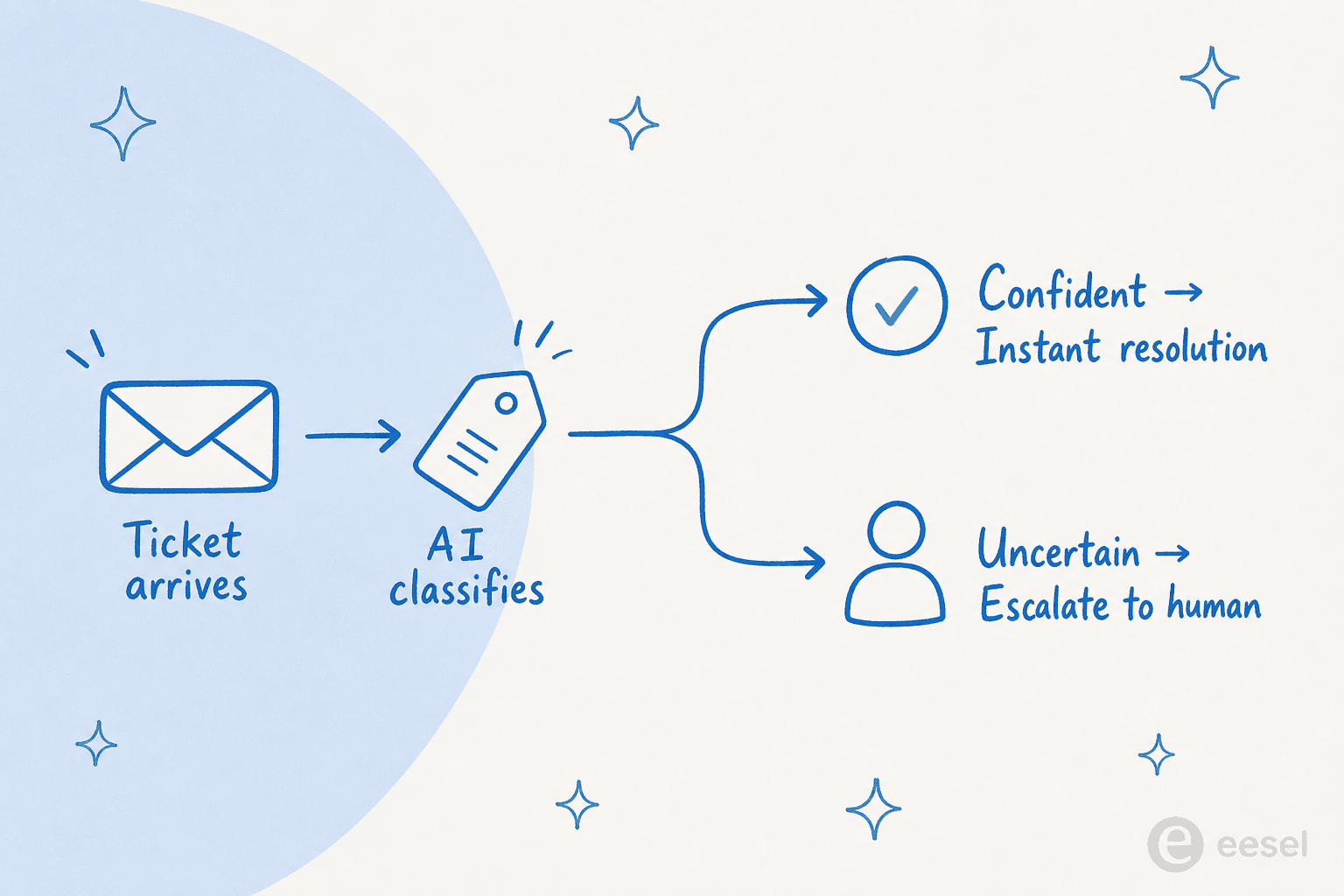
Lyro, Tidio's AI agent, runs on Anthropic's Claude and claims a 67% average resolution rate - the highest explicit resolution rate claim in this comparison - with a money-back guarantee if you land below 50%. The key distinction from competitors: Lyro trains on the specific data you provide (FAQ uploads, website scraping, Zendesk article imports) and stays within those guardrails. It doesn't hallucinate outside your content because it can't. Bella Sante generated $66K+ in revenue attributed to Lyro. Suitor reported a 97% decrease in response time. Specific outcomes, not vague efficiency metrics.
The pricing model needs careful reading. Three separate billing counters (Lyro conversations, Flows visitors, live chat conversations) make cost projection complex, and the Growth → Plus jump from $49.17/month to $749/month is the steepest tier cliff in this comparison. See our Tidio pricing guide for the full per-conversation cost model before committing.
Key AI features:
- Lyro AI Agent - Claude-powered; 67% avg. resolution rate; trains on your FAQs, site, and KB imports
- Lyro Smart Actions - order updates, lead qualification, backend tasks; supports MCP
- Lyro Guidance - customizable brand voice, tone, and escalation rules
- Flows - no-code visual builder for proactive automations (cart abandonment, FAQ shortcuts, discount offers)
- Product Recommendations - AI-driven real-time shopper guidance
Pros:
- 67% resolution rate with a money-back guarantee if it drops below 50%
- Best live chat widget in this comparison (4.8/5 Shopify App Store)
- Lyro stays grounded in your data - consistently praised for not hallucinating
- Free plan with 50 Lyro conversations lets you test AI quality before paying
Cons:
- Three separate billing counters make cost projection complex
- Growth → Plus is a $700/month jump - one of the largest tier cliffs here
- Full helpdesk / ticketing is functional but less mature than Freshdesk
- Live support and dedicated CSM only at Plus ($749/month+)
Pricing:
| Plan | Annual price | Lyro AI conversations |
|---|---|---|
| Free | $0/month | 50 (lifetime) |
| Starter | $24.17/month | 100/month |
| Growth | from $49.17/month | 250–2,000/month |
| Plus | from $749/month | Custom |
7-day free trial on all paid plans, no credit card required.
Our take: Tidio is the pick when live chat is your primary support surface - especially for Shopify stores and SaaS products where real-time engagement drives retention. The Lyro resolution guarantee is unique. Less compelling as a primary ticketing system. See our best Tidio alternatives if you need a heavier helpdesk alongside it.
5. Gorgias
Best for: Shopify ecommerce brands where support is inseparable from order management
Gorgias is the default for Shopify support. It powers 40% of the top 1,500 Shopify brands, serves 17,000+ merchants, and holds a 4.6/5 rating on G2 from 560+ reviews - the highest review count in this comparison. The reason for its dominance isn't the helpdesk features; it's that Shopify order data, customer history, and product catalog appear natively inside every ticket, and the AI Agent can act on that data - not just respond to it.
Gorgias's AI Agent handles order tracking, returns, refunds, subscription edits, and discount code generation - fully autonomously. Orthofeet hit 56% automation in under 2 months. Pepper generated a 19.2x ROI on AI-driven sales conversations. The community consensus: Gorgias is worth it if 40%+ of your tickets require direct Shopify actions - refunds, cancellations, order edits. At that point, no other tool here comes close.
The cost trade-off is real. Gorgias prices by ticket volume - unlimited agents on every plan, which is unusual and genuinely helpful for teams with fluctuating agent counts. But the AI Agent add-on at $0.90–$1.00 per resolved conversation adds significantly. At 60% resolution on 300 tickets/month, that's $162–$180/month in AI fees on top of the $60 Basic plan fee. Read our Gorgias AI pricing guide for the full cost model at your volume.
Key AI features:
- AI Agent (Support mode) - handles WISMO, returns, refunds, subscription edits, discount codes autonomously
- AI Agent (Shopping Assistant mode) - proactive product recommendations and pre-purchase guidance
- Chat Campaigns - discount delivery triggered by URL, behavior, or cart state
- Revenue attribution - measures revenue generated per support conversation
- Deep Shopify integration - multi-store, order timeline, checkout chat, adaptive discounts
Pros:
- 4.6/5 on G2 from 560+ reviews - most-reviewed helpdesk in this comparison
- Unlimited agents on every plan - no per-seat fees for fluctuating teams
- Shopify integration is best-in-class - "no other tool pulls Shopify order data as cleanly" (consistent community view)
- AI Agent takes order actions (not just replies) - genuine deflection, not FAQ answering
Cons:
- No free plan; Starter at $10/month covers only 50 tickets - barely enough to evaluate
- AI Agent billing ($0.90–$1.00/resolution) adds significantly to cost at scale
- Ecommerce-native by design - over-specified if your support isn't Shopify-centric
- Pro plan at $360/month for 2,000 tickets is expensive relative to Freshdesk Pro at $55/agent
Pricing:
| Plan | Monthly price | Tickets included |
|---|---|---|
| Starter | $10 | 50 |
| Basic | $60 | 300 |
| Pro | $360 | 2,000 |
| Advanced | $900 | 5,000 |
| AI Agent add-on | $0.90–$1.00/resolution | All plans |
Annual billing saves up to 16% (2 months free). Full breakdown in our Gorgias review.
Our take: For Shopify brands, Gorgias is the answer - the AI Agent drives genuine revenue alongside cost savings, and the ecommerce data integration depth is what this category is measured against. For teams without a heavy Shopify dependency, Freshdesk or Tidio will give you more AI per dollar.
6. Front
Best for: Operations-heavy teams where customer requests route across multiple internal departments
Front is positioned differently from every other tool here. The homepage says it plainly: "AI for simple support is everywhere. Complex customer operations demand Front." The 9,300+ companies using it skew toward professional services, logistics, financial services, and B2B tech - contexts where a support ticket isn't "where's my order?" but involves coordination across legal, ops, or product teams.
Front AI claims to resolve up to 70% of requests - including complex multi-step ones that most support AI escalates immediately. Branch's CTO reported a 40% productivity improvement after switching from Zendesk. The platform earns multiple G2 Winter 2026 badges including High Performer, Momentum Leader, and Easiest to Use in Enterprise.
For small teams, the Starter plan ($25/seat/month, up to 10 seats) is a reasonable entry point with AI Topics and basic automation. The Front AI Autopilot - the fully autonomous AI agent - is available as a $0.05/conversation add-on on all plans, making it the cheapest per-resolution AI billing in this list. AI Copilot ($20/seat/month add-on, included in Enterprise) assists with complex requests in real time.
The practical limit for small teams: Starter supports only a single channel type - email OR Front Chat OR SMS, not all three. Omnichannel requires Professional at $65/seat/month. See our Front vs Hiver comparison for an adjacent alternative.
Key AI features:
- Autopilot - autonomous omnichannel AI agent; $0.05/conversation on all plans
- AI Copilot - real-time agent assist ($20/seat/month add-on; included in Enterprise)
- Smart QA - AI-powered quality scorecards ($20/seat/month add-on; Enterprise included)
- Smart CSAT - inferred satisfaction without surveys ($10/seat/month add-on; Enterprise included)
- AI Topics - automatic conversation categorization (all plans)
Pros:
- Best tool for multi-team, cross-department customer operations
- Autopilot at $0.05/conversation is the cheapest autonomous AI billing in this comparison
- 160+ integrations for connecting every channel and backend tool
- Multiple G2 Winter 2026 awards including Momentum Leader (Enterprise)
Cons:
- Starter supports only one channel type - not true omnichannel without Professional ($65/seat/mo)
- AI Copilot and Smart QA are add-ons on Starter and Professional ($20/seat/month each)
- Over-specified for FAQ-heavy or simple ecommerce support teams
- No free plan; 14-day trial is Professional-tier features only
Pricing:
| Plan | Annual price | Seat limit | AI bundled |
|---|---|---|---|
| Starter | $25/seat/mo | 10 seats | AI Topics; Copilot/QA as add-ons |
| Professional | $65/seat/mo | 50 seats | Autopilot $0.05/convo add-on |
| Enterprise | $105/seat/mo | Unlimited | AI Copilot, Smart QA, Smart CSAT included |
Full breakdown at front.com/pricing.
Our take: Front is the right pick when the complexity of operations, not ticket volume, is the real problem. For straightforward FAQ-heavy support, Freshdesk or Tidio are less restrictive at comparable or lower price points.
7. Re:amaze
Best for: Small teams needing a flat-rate all-in-one helpdesk with the best per-person value in this list
Re:amaze is the dark horse of this list. Acquired by GoDaddy in 2021 and operating as a standalone brand, it targets small-to-mid ecommerce teams that want every support channel - email, chat, social, SMS, VoIP, video calls, push notifications - in a single inbox without the complexity of per-seat billing math.
The standout: the Starter plan is $59/month flat for unlimited team members, capped at 500 conversations/month. For a 5-person team, that's $11.80/person - cheaper than every comparable per-seat tool in this comparison with real helpdesk functionality. Built Bar reported a 5–6x speed increase using Re:amaze. Printful scaled from 1 to 30 operators on the platform without switching tools. Pipsnacks cited seeing order history inside conversations without leaving the support view.
The AI features - Re:amaze AI Agent (currently in Beta) - include autonomous 24/7 response, reply drafting, conversation summaries, and sentiment analysis. The $0.85/resolution overage billing is transparent and straightforward. The platform also ships first-party co-browsing (Peek) and in-chat video calls at the Plus tier - features most competitors require enterprise-tier pricing or paid add-ons to unlock.
Key AI features:
- Re:amaze AI Agent (Beta) - autonomous 24/7 responder trained on business data
- AI reply drafting - pre-writes agent responses for quick review and send
- AI conversation summaries - catch up on long threads quickly
- AI-powered FAQ article generation from resolved tickets
- Sentiment analysis on incoming conversations
Pros:
- Starter plan: $59 flat/month for unlimited agents - best per-person value in this list for teams of 3+
- All channels included (email, chat, social, SMS, VoIP, push notifications, video)
- First-party Peek co-browsing and in-chat video on Plus - no add-on required
- Ecommerce order context natively surfaced in every conversation
- 14-day free trial, no credit card required
Cons:
- AI Agent is still in Beta - less proven than Freshdesk's Freddy or Tidio's Lyro
- G2 reviews were inaccessible for this comparison - limited independent community sentiment
- Shopify integration is less deep than Gorgias
- GoDaddy ownership raises questions about long-term roadmap vs. specialist players
Pricing:
| Plan | Monthly price | Agents | Conversation limit |
|---|---|---|---|
| Starter | $59 flat | Unlimited | 500/month |
| Basic | $29/seat ($26.10 annual) | Unlimited | 5 AI resolutions/user/month |
| Pro | $49/seat ($44.10 annual) | Unlimited | 10 AI resolutions/user/month |
| Plus | $69/seat ($62.10 annual) | Unlimited | 20 AI resolutions/user/month; co-browse + video |
| AI overage | $0.85/resolution | All plans | Beyond included AI resolutions |
Our take: Re:amaze is the best option for small teams (3+ people) with modest ticket volume where per-person cost matters more than cutting-edge AI. If the Starter plan's 500 conversation cap fits your volume, the economics are hard to beat. For AI-first ticket deflection as the primary goal, lean Freshdesk or Tidio. See our best helpdesk software for small business guide for additional options.
Try eesel
If you read through this list and thought "I'm mostly happy with my current helpdesk - I just need better AI on top of it," that's what eesel was built for.
eesel integrates directly with Freshdesk, Zendesk, Front, and 100+ other tools. It reads your existing tickets and knowledge base, trains on your support history in minutes, and resolves conversations autonomously at $0.40 per resolved ticket - no seat fees, no platform minimum, no migration.
For a 3-person team resolving 300 tickets/month with 60% AI resolution: $72/month in eesel billing. Compare that to Freshdesk Pro's $49/100-session overage for the same 180 AI resolutions ($88), or HubSpot Professional at $90/seat just to unlock autonomous AI. You keep your existing workflows, reports, and routing rules intact.

eesel also fills the AI gap when your helpdesk doesn't offer autonomous resolution at your price tier - like Zoho Desk at Standard/Professional, or HubSpot at Starter. You get AI deflection without jumping tiers or switching tools.
Try eesel - $50 credit, no card required. Compatible with Freshdesk, Zendesk, Front, Slack, and 100+ tools. For specific platform integrations, see our guides to the best AI for Zoho Desk, best AI for Freshdesk, and best AI for Gorgias.
Frequently Asked Questions
What is the best AI helpdesk tool for small teams?
Freshdesk is the best overall starting point for most small teams - free plan for 2 agents, paid plans from $19/agent/month, and Freddy AI that resolves up to 80% of queries autonomously. For Shopify ecommerce brands, Gorgias is the stronger pick. For CRM-first teams already on HubSpot, HubSpot Service Hub fits best. You can also add eesel as an AI layer on top of any existing helpdesk for $0.40 per resolved ticket - no seat upgrade required.
Are there free AI helpdesk tools for small businesses?
Yes - Freshdesk's free plan covers up to 2 agents for 6 months with basic AI access, Zoho Desk offers a free-forever plan for up to 3 users, and HubSpot Service Hub's free tier includes ticketing for 2 users. Tidio has a free plan with 50 Lyro AI conversations. None of the free tiers include full autonomous AI at scale, but they're real starting points. See our guide to the cheapest AI apps for helpdesk for budget-focused options.
How much does an AI helpdesk cost per month for small teams?
Seat fees range from $7 to $105 per agent per month on AI-capable plans. But the real cost driver is AI billing on top: Freshdesk charges $49 per 100 Freddy AI sessions beyond the free 500; HubSpot charges $0.45 per resolved conversation (Professional only at $90/seat); Gorgias's AI Agent costs $0.90–$1.00 per resolved conversation. A 3-person team handling 500 tickets/month with 60% AI resolution might pay $60–$200/month in AI fees on top of seat cost. See the best AI helpdesk software guide for full cost breakdowns.
What AI features should I look for in a helpdesk for a small team?
The four features that move the needle for small teams: (1) AI ticket deflection - the AI handles repetitive questions autonomously; (2) reply suggestions / AI copilot - helps agents draft faster when AI can't fully resolve; (3) auto-tagging and routing - sends tickets to the right person without manual triage; (4) knowledge base integration - the AI answers from your existing docs, reducing hallucinations. Read more in our guide to AI helpdesk agents.
Can I add AI to my existing helpdesk without switching platforms?
Yes. If you're on Freshdesk, Zendesk, Front, or similar, you can add eesel as an AI layer on top - it integrates with your existing helpdesk, reads your tickets and knowledge base, and resolves conversations autonomously at $0.40 per ticket. No seat upgrade, no migration. This is often cheaper than upgrading to the AI tier on your current platform. See also our guide to AI automation apps for Freshdesk.


Article by
Rama Adi Nugraha
Rama is a software engineer at eesel AI with two years of experience writing about B2B SaaS, AI tools, and customer support technology. Based in Bali, Indonesia, he brings a developer's perspective to product comparisons — cutting through marketing copy to what the integrations and APIs actually do.