

Calling ServiceNow a ticketing system undersells what you are buying. It is one base table called task, with six different record types inheriting from it. Almost every confusing thing about the product traces back to that single design choice. Incident, problem, change, plus the three-part request chain all share the same fields, which is why an SLA you build once works everywhere, and also why "closed" quietly means something different depending on which table you happen to be standing in.
ServiceNow prints no price, and the money question still has a specific answer. You pay per fulfiller, the people who actually work the queue. Requesters raising tickets are not counted, which is a real advantage. Approvers, though, are metered separately. And the moment you add the HR portal, billing switches to counting every active user on the instance. A ServiceNow Certified Technical Architect puts the gap between those two models at $780,000 over three years.
Newest thing worth knowing. On July 23, 2026 ServiceNow quietly published its assists rate card as a public legal document. An incident summary costs 1 assist. One autonomous agent run costs 25 to 150. Same pool, same meter. So if you are buying the top tier for the autonomous AI, that ratio is your real budget. There is a calculator further down to play with it.
What a ServiceNow ticketing system actually is
Start at the bottom. The bottom explains everything above it.
Every ticket in ServiceNow lives in a table that extends a single parent. The company's own docs are blunt about it: the Task table "is a base class that provides fields for the core ITSM applications such as Incident, Problem, and Change Management. All applications that extend the Task table share these fields in common."
You cannot write to task directly. Try, and a Task Interceptor stops you and makes you pick a child table first. The field sys_class_name then records which child you picked. Forever.
Here is the whole family with the exact table names, since the table name is what decides behaviour:
| Prefix | Table | What it is | You get one when |
|---|---|---|---|
TASK | task | The base class | Never, it is the parent |
INC | incident | An unplanned interruption | Something broke |
REQ | sc_request | Container for one checkout | A user submitted a cart |
RITM | sc_req_item | One per catalog item ordered | Per item in that cart |
SCTASK | sc_task | The fulfilment work itself | Per step the flow defines |
PRB | problem | The cause of repeating incidents | The same incident keeps coming back |
CHG | change_request | An authorized change to the estate | Fixing it means changing something |
The prefixes are not hardcoded either. They sit as rows in the sys_number table under System Definition, and any admin can change them, per ServiceNow's record numbering docs. Coming from a flat tool like Zendesk, this is the first real difference you feel: the record type is a schema decision here, not a dropdown on a form.
The payoff from all that inheritance is real, and it deserves proper credit before I start poking holes. Approvals, assignment rules, SLAs, inactivity monitors and flows all run on anything extending task, so you build them once. That is the part a smaller help desk tool cannot match, and it is what separates a platform from an automated ticketing system. Reviewers notice it too.
"Keeping requests, incidents, and changes connected is the core of this platform, which I really appreciate. Plus, finding related knowledge without leaving the ticket open. And lastly, bringing different IT tools together through integrations."

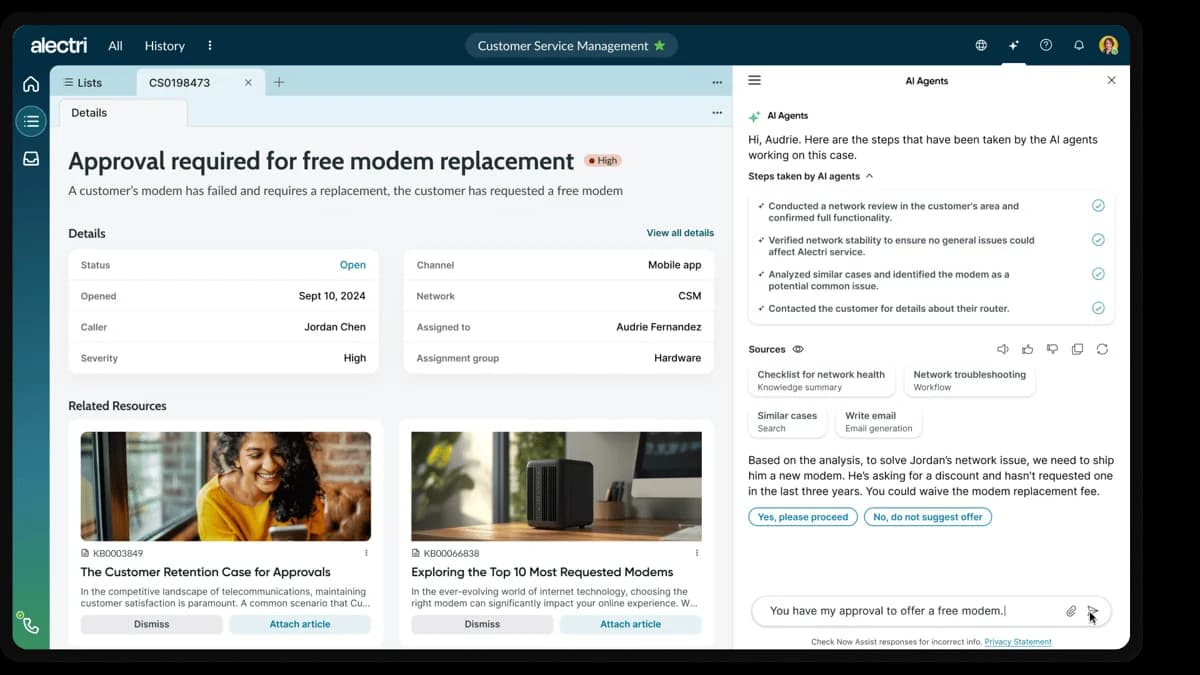
This is what a record looks like once you are inside one. Notice the fields doing the routing work, Assigned to and Assignment group, both inherited straight from task:
One request, three ticket numbers
Day one goes wrong here, for almost everyone.
Someone asks for a laptop. In a normal ticketing system that is one ticket, and in most internal ticketing systems it stays one ticket right through to delivery. ServiceNow makes it three record types, because Request Management deliberately models the ask, the item and the work as separate things:
- REQ on
sc_request, the cart-level container. One checkout gives one REQ. - RITM on
sc_req_item, one per catalog item. A laptop and a monitor in the same checkout means one REQ carrying two RITMs. - SCTASK on
sc_task, the fulfilment work itself, minted by the RITM's flow. Procure it, image it, then ship it: three SCTASKs off a single RITM.
So one person asking for one thing can easily produce five records across three number series, with three separate places to go and check a status. Not a bug. That is the cart and item and work separation, built on purpose. It is also, reliably, the thing new agents trip over:
"At times, especially as a beginner, it may be hard to navigate with all the various levels of a customer ticket--Interactions, Requests, RITMs, SCTasks etc. And then there's the occasional what seems like a bug."

The catalog items generating most of this volume are the boring ones. Access requests are the single biggest category and the most worth automating. Kit and equipment asks come a close second, and our guide to hardware requests covers those separately.
A trap worth knowing if you are the one building the catalog: variables live only on sc_req_item. ServiceNow puts it plainly, "Variables are not supported for extended tables." Everything the user typed into the catalog form therefore sits on the RITM, and getting it across to the SCTASK, where the fulfiller can actually see it, is a deliberate act of configuration. If your fulfillers keep asking "what size monitor did they want," that is the reason.
The incident lifecycle, state by state
Incidents are the simpler half. The state model is published in full.
| State | Value | ServiceNow's description |
|---|---|---|
| New | 1 | "Incident is logged but not yet investigated." |
| In Progress | 2 | "Incident is assigned and is being investigated." |
| On Hold | 3 | "The responsibility for the incident shifts temporarily to another entity." |
| Resolved | 6 | "A satisfactory fix is provided for the incident." |
| Closed | 7 | "Incident is marked Closed after it is in the Resolved state for a specific duration." |
| Canceled | 8 | "Incident was triaged but found to be a duplicate incident, an unnecessary incident, or not an incident at all." |
You read that correctly, there is no 4 and no 5. Those are burned holes, left behind by the pre-Helsinki model, which carried three separate waiting states where there is now one On Hold. ServiceNow's own knowledge article KB0564465 publishes the mapping and tells you exactly what breaks: "if you had a workflow that triggered on state 5, you must modify your workflow to trigger on state 3, reason 2."
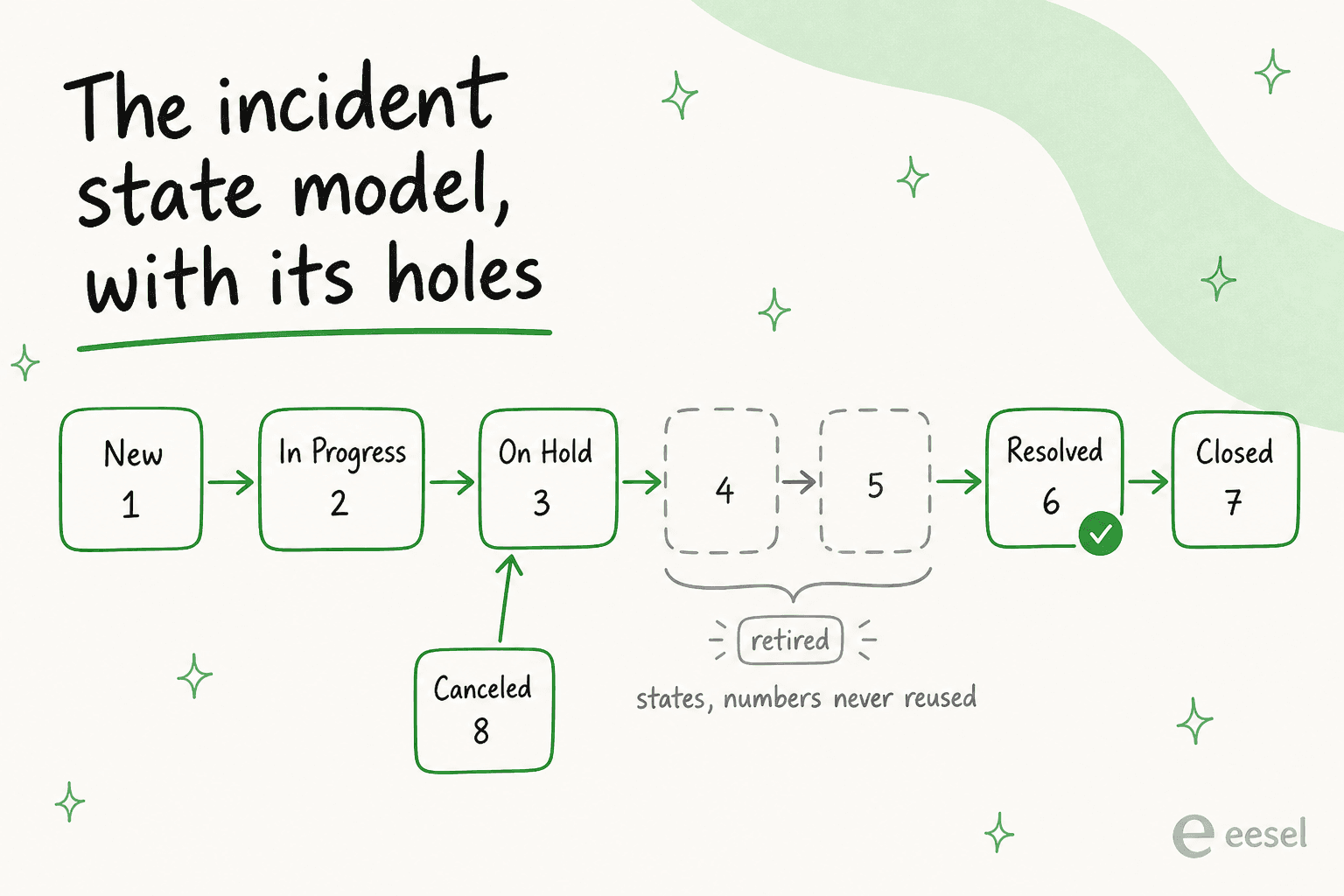
Now the part that surprised me most in the docs. ServiceNow recommends against installing the modern state model on upgraded instances. Meaning plenty of long-lived production instances still run the old five-state shape underneath a modern interface. Any report or workflow written against a raw state number is release-dependent, so that is a real question to ask before you inherit somebody else's instance.
Three behaviours that catch people out
Priority is not an agent's decision. It gets computed from a 3x3 grid of Impact and Urgency, and the field ships read-only. ServiceNow says so directly on the priority lookup rules page: "Individual incident responders cannot change the priority lookup rules." A P3 that everybody agrees should be a P1 becomes a conversation with an admin, not a dropdown.
Auto-close is a scheduled job, not a timer on the record. Two consequences follow from that. First, the audit trail lies, because "it assigns the name of the administrator, who is logged in when the Autoclose Incidents job runs, to the Updated by field." Second, an inactivity monitor "resets this auto-close clock each time it triggers," so an instance running both features quietly accumulates Resolved incidents that never close, and nothing surfaces the conflict. The fix, per ServiceNow's docs, is a Reset Condition of [Incident state] [is not] [Resolved].
Closing a parent does not close its children. Resolving does. Closing does not. Put a hundred children under a network-outage parent, and closing the parent leaves a hundred Resolved records sitting there waiting on individual callers, per the parent-child sync table. That asymmetry is a common contributor to a ticket backlog that looks worse on a dashboard than it actually is.
How tickets actually get routed
Routing runs on two inherited fields, assigned_to and assignment_group, which is why it behaves the same on every record type. Assignment rules set them automatically whenever conditions match.
One rule about those rules deserves a poster. From the assignment rules docs: "Assignment rules cannot overwrite existing assignments (including assignments set by a default value or a previously run assignment rule)." A helpful field default on assignment_group, then, silently disables every routing rule you write afterwards. And when several rules match, only the lowest order value runs. Ever.
There is a permission trap too, and it looks like a bug the first time you hit it: a user holding the itil role cannot assign an incident to a group carrying the admin or security_admin role, nor to any group whose parent carries them.
For a deeper read on getting this layer right, our guide to AI ticket routing goes further than I can here, while the companion piece on tagging tickets with AI covers the classification half. The wider category view sits in our guide to automated IT ticketing.
SLAs, and the field that does nothing
ServiceNow's Service Level Management is strong, and a single task can carry several SLAs at once, each one tracked on its own task_sla record. Reviewers rate it:
"The SLA tracking feature is another aspect I like, as it helps our team assess the performance of the person resolving issues."
Two things are worth knowing before you design your agreements.
First. The SLA / OLA / Underpinning contract distinction that every ITIL course spends an hour on is, inside the product, just a label. ServiceNow's note on the Type field runs one sentence: "Type is used for reporting purposes only." Same engine, same conditions, identical maths. The Response versus Resolution Target field is the same story, existing "for filtering, searching, and reporting purposes only."
Second, days are not business days. The docs spell the trap out: "The number of days specified in this field is converted to 24-hour blocks. If the Schedule field identifies a schedule with eight-hour days, a duration of 1 Day sets the SLA to breach three business days later." Reasonable design. Also a very easy way to ship an SLA that misfires for a year before anybody notices.
Worth knowing as well: on a modern instance, Breached is not a task_sla stage at all. The stages are In progress, Cancelled, Paused and Completed. Breached survives only "for systems either using the 2010 SLA engine, or running in compatibility mode," and yet the visual timer widget still shows it, so the two vocabularies disagree. Build SLA reporting on top of that, and the mismatch will find you.
Self-service, and what the Virtual Agent really deflects
Self-service is where the ticket volume story lives, and where the tiers start to matter.
Full Virtual Agent is capable. ServiceNow ships pre-built ITSM topics that do real work. Check IT Ticket Status lists a user's active tickets with stage and last update. Escalate IT Ticket raises urgency one level, with a mandatory justification. There are topics for conference room booking and assigned equipment as well. Deflection itself is defined tightly, as "when a user asks a question or makes a request that doesn't result in a ticket or human assistance."
Virtual Agent Lite, which is what lower-tier customers get, is a different animal. Two topics ship with it, Check Ticket Status and Report an Issue. No NLU at all, only keyword matching. You cannot add topics or channels. And critically, it has no analytics dashboard, so there is no supported way to measure how much it deflected. Evaluating deflection on Lite means evaluating something you cannot measure, which is worth knowing before you line it up against any service desk chatbot that does report a resolution rate. Teams who hit that wall usually end up looking at Virtual Agent alternatives.
One more constraint bites in production. Handing off to a human requires a human. "At least one live agent must be available when transferring from Virtual Agent, otherwise the end user is presented with a no agents available message and their conversation isn't transferred." No documented ticket fallback exists in that path, which is exactly the moment a good AI handoff design matters most.
Email intake has its own version of the problem. Forward classification beats the watermark, so ServiceNow "classifies any email that meets these criteria as a forward, even if the message contains a watermark or record number that otherwise classifies it as a reply." In plain terms, forwarding an email thread into ServiceNow always creates a duplicate ticket.
What a ServiceNow ticketing system costs in 2026
Now the part everybody actually came for.
ServiceNow prints no price, which is why our ServiceNow pricing guide exists at all. I checked the ITSM pricing page again on the day of writing. Three packages, Foundation, Advanced and Prime. One button reading "Get Custom Quote." No currency symbol anywhere on the page. The only numbers in the whole comparison matrix are capacity limits for App Engine Starter tables and Process Mining records.
Since April 9, 2026 the old Standard, Pro, Pro Plus, Enterprise and Enterprise Plus tiers are gone, with legacy SKUs reaching end of sale on July 1, 2026. Foundation, Advanced and Prime is now the only structure a new buyer ever sees.
| ITSM Foundation | ITSM Advanced | ITSM Prime | |
|---|---|---|---|
| Positioning | Task-based, always-on support | Agentic workflows beside your team | AI Specialists managing workflows independently |
| Service desk core | Catalog and Request Management, Incident Management, Asset Management and CMDB | Adds Major Incident, On-Call, Change, Problem | Inherits all |
| AI layer | Virtual Agent, Now Assist Foundation, Moveworks Foundation | Adds AI Voice Agents, Now Assist Advanced | Adds L1 Service Desk AI Specialist, AI Agents for ITSM, DEX agent |
| Data / platform | Workflow Data Fabric | Adds Platform Analytics Advanced, Process Mining | Adds DevOps Change Velocity |
| App Engine Starter | 10 tables | 25 tables | 50 tables |
| Price | Get Custom Quote | Get Custom Quote | Get Custom Quote |
Read the AI row twice. It is the whole packaging in one line. The AI that actually closes a ticket without a human is Prime-only. Foundation and Advanced get assistive AI instead: summaries, drafts, a chatbot. A ServiceNow MVP writing on the community says the same thing about custom builds, that Prime "is the only tier that lets you build net-new custom AI skills and AI agents on the platform." So AI Agent Studio is a top-tier feature rather than a platform one, and the fuller cost picture lives in our ServiceNow AI pricing breakdown.
The split shows up in ServiceNow's own marketplace, where the L1 IT Service Desk AI Specialist sits next to the persona filter naming Fulfiller as its own licensed class:

Who you actually pay for
This is the one fact that makes "how much does ServiceNow cost" answerable at all. For ITSM, you are billed on the Fulfiller role. A ServiceNow employee writing the licensing guide defines it as "your core service desk agents, case managers, and workflow owners. Anyone actively working and resolving records," counted as active users who logged in within the past 365 days.
Requesters, meaning the employees raising the tickets, are not counted. A real advantage over per-seat tools, and the same shape of saving that makes Jira Service Management cheaper than plain Jira for a support use case.
Then the two exceptions arrive.
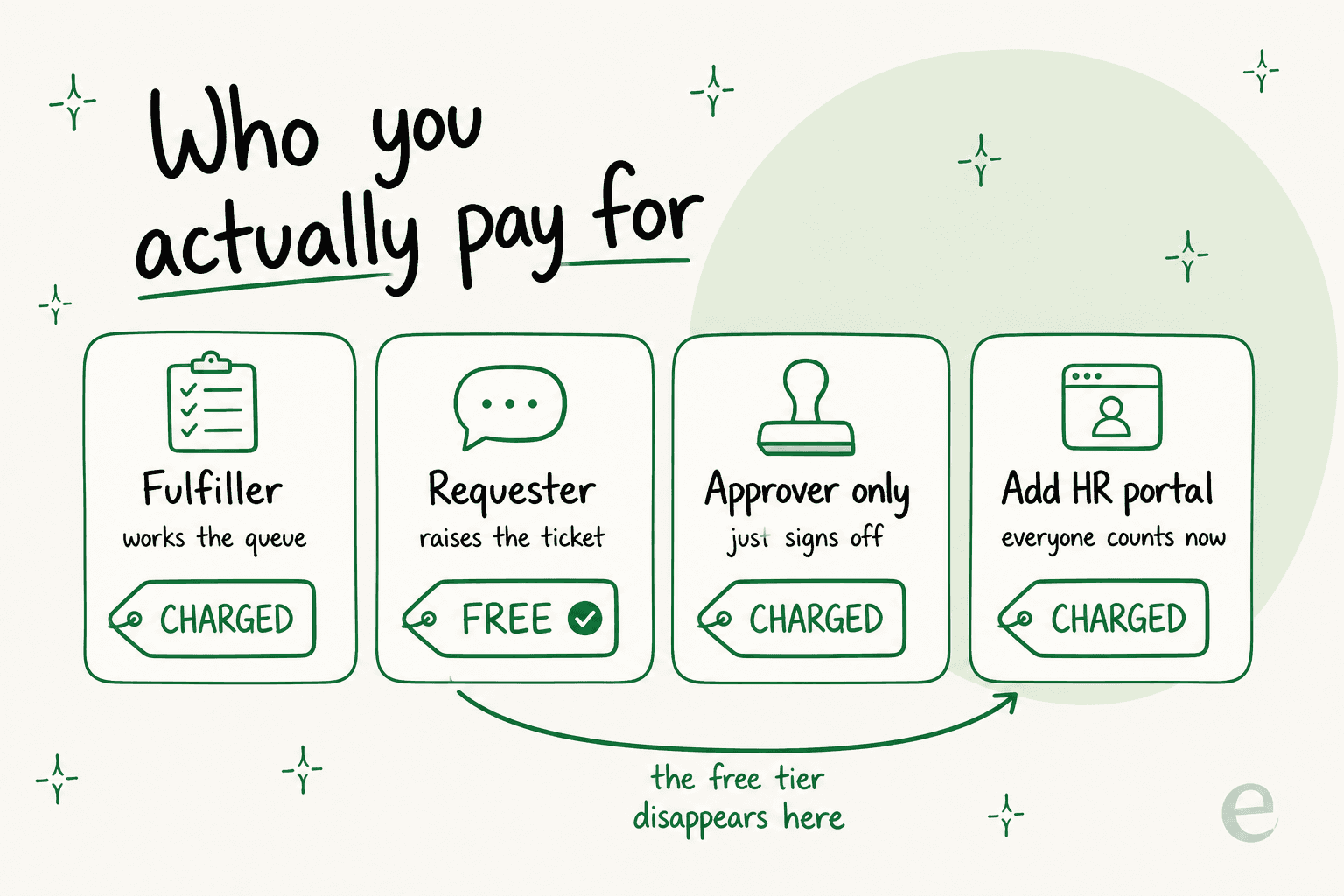
A manager who only approves things counts as a separately metered Business Stakeholder, not a free user. And some products bill on the Unrestricted User model, where every active user on the instance counts. HRSD and Employee Center Pro are both in that group. So the requesters-are-free saving evaporates the day you buy the good portal, or the day HR wants in.
The size of that decision is not small. A ServiceNow Certified Technical Architect, writing publicly:
"In the world of ServiceNow platform governance, one decision stands above the rest in terms of financial impact: choosing between the Fulfiller (Named User) and the Unrestricted User model. As a ServiceNow Certified Technical Architect (CTA), I've seen this single choice result in a $780,000 variance in spend over a standard 3-year contract."
Then a ServiceNow employee turns up in the comments to correct the popular misreading of the alternative:
"One quick correction though: Unrestricted Users (UU) aren't actually flat fee. They're still user-based. The "unrestricted" part means unlimited roles within the module, but if the customer's sys_user table grows, they're buying more UU licenses."
Two more traps from the same architect, neither of which appears on any pricing page. Licensing is per instance, so separate North America and EMEA instances double the bill. And he puts ghost users at "20-25% of ServiceNow licenses" in large enterprises, set against an annual uplift of 7 to 12%. Our license types guide walks the full set if you happen to be mid-negotiation.
The assists meter, now public
Here is the new thing. On July 23, 2026, ServiceNow published the Now Assist Overview as a legal document, and the per-action rate card came with it. Until eight days before I wrote this, none of those numbers were public.
An assist is "a unit used to measure usage of Now Assist skills via performed skill actions," and it is consumed "whether in production or sub-production instances." Entitlements pool at the account level and reset on your purchase anniversary rather than a calendar year. Exceed them, and "ServiceNow may invoice Customer for the excess usage."
The spread, across three orders of magnitude, is the story:
| Action | Assists |
|---|---|
| Search Q&A answer card | 0 |
| Knowledge or form search | 0.5 |
| Incident, case or change summarization | 1 |
| Resolution note generation | 1 |
| Sentiment analysis | 1 |
| Incident assist with follow-ups | 5 |
| Now Assist panel conversation | 5 |
| Virtual Agent topic, end to end | 10 |
| Ticket actions: create, comment, close, reopen | 10 |
| Knowledge article generation | 10 |
| Agentic workflow, small (under 4 tools) | 25 |
| Suggested resolution steps | 25 |
| Agentic workflow, medium (5 to 8 tools) | 50 |
| Agentic workflow, large (9 to 20 tools) | 150 |
| Work notes analysis | 250 |
| Article optimization | 1,000 |
| App generation | 2,500 |
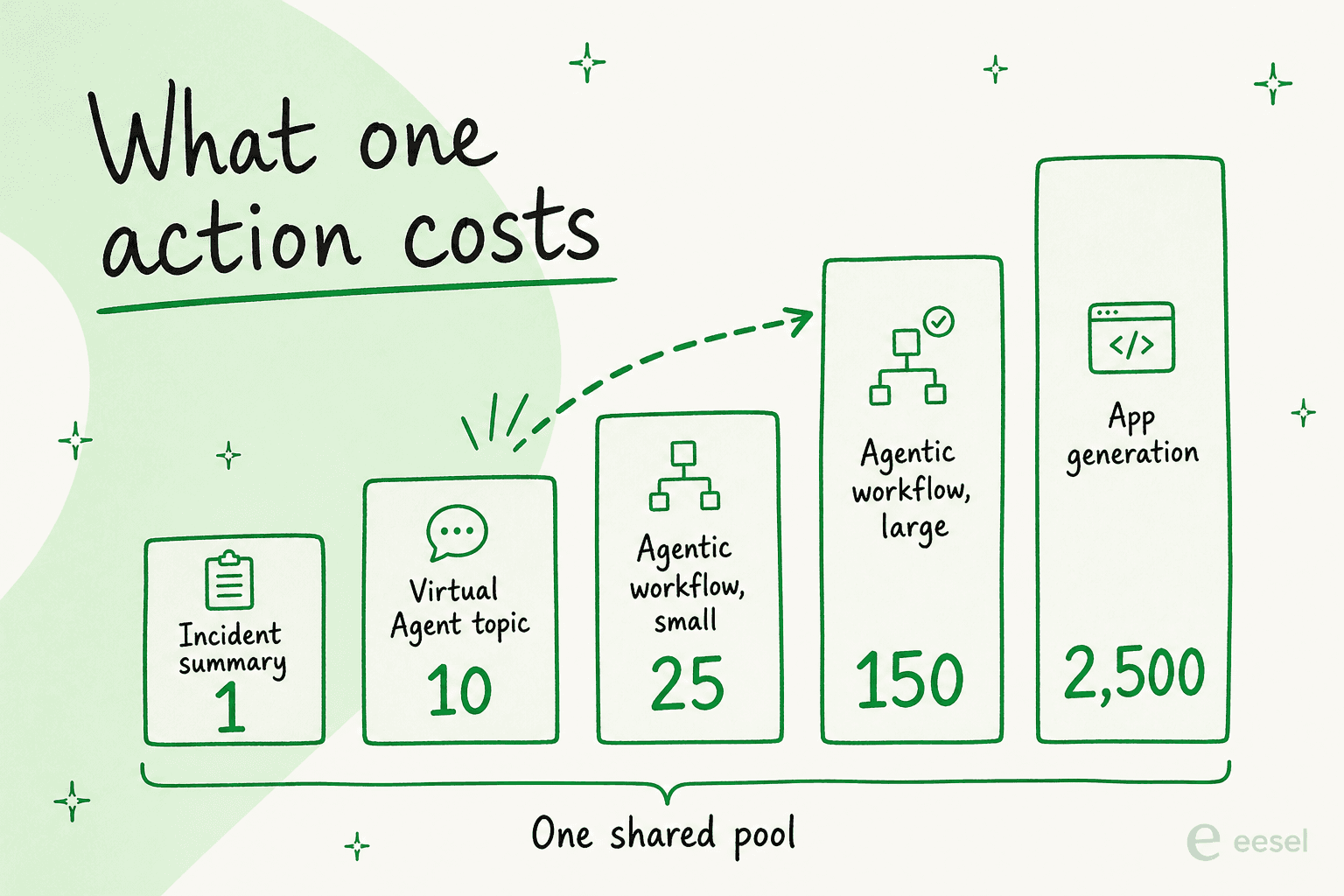
An "agentic workflow" ends on completion, on 20 actions, or after one hour of inactivity. Anything past those 20 actions starts a new billable workflow. So one ticket can cost you two.
The line I keep coming back to comes from a ServiceNow practitioner guide: "The surprise for most teams is that the heaviest consumption is not users typing prompts. It is automation running in the background." It names four sources of silent burn. Virtual Agent falling back to Now Assist on an unmatched topic, workspace summarization firing on case open, custom Skill Kit skills, and sub-production instances. ServiceNow shipped kill switches and spike alerts in June 2026 to contain all of it, with a documented instruction not to disable the notifications because "Sub-prod environments also consume assists!"
ServiceNow publishes no pool size for the new tiers, so plug your own numbers in against the last allocation it did publish: 6,000 assists per fulfiller per year, under the legacy Pro Plus model.
Move the autonomous-agent slider from 5% to 15% and watch what happens. That one move is the whole difference between assistive AI and the autonomous AI you bought Prime for. It is also why I would want a written assist forecast during the contract conversation, not after it.
What people actually say about working in it
I want to be fair here. It is easy to build a hatchet job out of a search for complaints.
The corpus does not support one. ServiceNow ITSM sits at 4.5 out of 5 across 1,915 reviews on G2, 70% of those at five stars and, notably, zero percent at one star. Capterra has it at 4.5 across 352 reviews. Nobody serious argues that the incident, change and CMDB model is wrong.
What they say is that it is heavy. G2's own tag counts put Ease of Use as the top praised attribute at 168 mentions, with Learning Curve (72), Expensive (60) and Complexity (56) sitting right behind it. That tension is the honest summary of the product.
On the day-to-day experience:
"There's a lot of clicks which takes a long time"
On the ramp, from a developer who still gave it 4.5 out of 5:
"ServiceNow IT Service Management is huge, and when I started as a developer, it took months to really understand how everything connects like tables, scripts, workflows, ACLs. The documentation exists but is scattered, and half the time, you end up finding answers in community forums instead of official docs."
And the sharpest metaphor in the entire set, from an implementation that clearly went badly:
"Imagine you go to a car dealer to buy a new car. You pay the money and you get the keys. When you get outside to pick your new car you see a bunch of parts in a pile. So if you want to drive your car you need to put it together."
The counterweight, and I think it is the truest thing anyone in the set said: most people's opinion of ServiceNow is really an opinion of somebody's implementation of it. One Hacker News commenter put it as "a well managed instance can fly," and blamed most bad experiences on customers "slugging along horrible code and poorly designed LCNC apps." That matches what I see. The platform is rarely the problem. The 400-field form somebody built on top of it usually is.
Where it fits, and where I would not use it
ServiceNow is the right call when tickets are not the point. If what you need is incidents linked to a CMDB, change management with real CAB authorization, problem records outliving the incidents that spawned them, plus one workflow engine spanning IT and HR support and facilities, nothing in the mid-market touches it. Head to head against Freshservice, that breadth is the whole argument. At that scale it is worth the money.
I would not buy it to run a queue. If tickets in, tickets out is the whole job, you will pay enterprise platform pricing for a fraction of the platform, and the expensive ticketing tool complaint writes itself. One Hacker News commenter described a CIO doing exactly that: replacing an existing tracker for two queues only, no CMDB and no change management, at "128k/ year." If that is the shape of your need, our small team roundup or the open source options are the honest answer.
The third case is the interesting one, and it is where most readers of this post actually sit. ServiceNow is already installed, it is not going anywhere, and the queue is still growing. Ripping it out is not on the table. Adding a Prime tier so an AI specialist can close tier-one tickets is a budget conversation with an unpublished meter attached to it. That leaves one lever, the same one every IT helpdesk AI project eventually lands on: deflection at intake.
Try eesel in front of your ServiceNow queue
Let me be straight about what I am and am not offering here. The honest version is more useful anyway.
eesel is not a ServiceNow plugin. There is no ServiceNow integration on our integrations page, and I would rather say so here than let you find out halfway through a trial.
What eesel does is sit one step earlier, on the channels where IT questions actually start. It answers in Slack, in Microsoft Teams and over email, before anybody opens a form. The knowledge it answers from is documentation you already wrote, wherever that lives today: Confluence, Google Docs, Notion, a help center.
I build the agents that do this, so the mechanism matters to me. The agent searches your actual documentation, answers when it has grounds to, and stays quiet when it does not. That last part is the whole game. Having watched a confident-sounding bot give wrong answers on a live queue, we now simulate every rollout against historical tickets before it ever touches a real person, and anything below the confidence bar escalates rather than guessing.
The number I would point at is not ours. InDebted's Head of IT, Jason Loyola, runs eesel as first responder on their internal IT desk, and the results are public: 15% of incoming issues fully deflected today, 55% the target as knowledge gets written back from resolved tickets. His own description of the setup: "It essentially acts just like an agent would."

Two more limits, since you should know them before trying it. It will not fix a documentation problem. If the answer to "how do I get a new laptop" is written down nowhere in your internal knowledge base, no AI is going to invent it. And it is a layer, not a replacement, so your incident and change and CMDB model stays exactly where it is. Pricing runs per ticket handled rather than per seat, which at least means the bill does not climb every time IT hires.
You can try it free and point it at the questions your service desk answers fifty times a month, then see how many of them ever needed a ticket at all.
Frequently Asked Questions
What is a ServiceNow ticketing system?
task table. Incidents, requests, problems and changes all inherit the same fields, which is why one SLA or flow works across all of them. For a wider view of the category, see our guide to ITSM ticketing systems.