Most IT teams hit a breaking point somewhere around 20-30 employees. Before that, shoulder taps and Slack messages work well enough. After it, requests start disappearing.
Someone messages IT about a VPN issue on a Tuesday afternoon. The IT person sees it, gets pulled into something else, and comes back to it Thursday. By then the employee has given up and asked a colleague. The original message is now buried under 200 other Slack notifications, and there's no record that the issue was ever raised, let alone resolved.
Multiply that by an HR team, a facilities team, and a finance department handling their own queues the same way, and you have a coordination problem that spreadsheets and chat notifications can't fix. An internal ticketing system is the specific tool built for this.
What is an internal ticketing system?
An internal ticketing system is software that converts employee requests into structured, trackable work items. When someone on your team needs help - a broken laptop, a payroll question, an access request, a facilities issue - they submit a request through the system, which creates a "ticket" with a clear owner, status, priority, and complete history. That ticket then moves through a defined workflow until the issue is closed and the employee is updated.
The word "internal" matters. These systems handle requests from employees, not customers. The audience, the metrics, and the workflows differ from customer-facing support in ways that affect which tools are appropriate: instead of measuring customer satisfaction scores, you're tracking SLA compliance, mean time to resolution, and self-service deflection rate. Instead of integrating with a CRM, you're connecting to Active Directory, Confluence, HR systems, and internal knowledge bases.
How an internal ticketing system works
Every ticket follows the same six-step lifecycle, regardless of which tool you use.
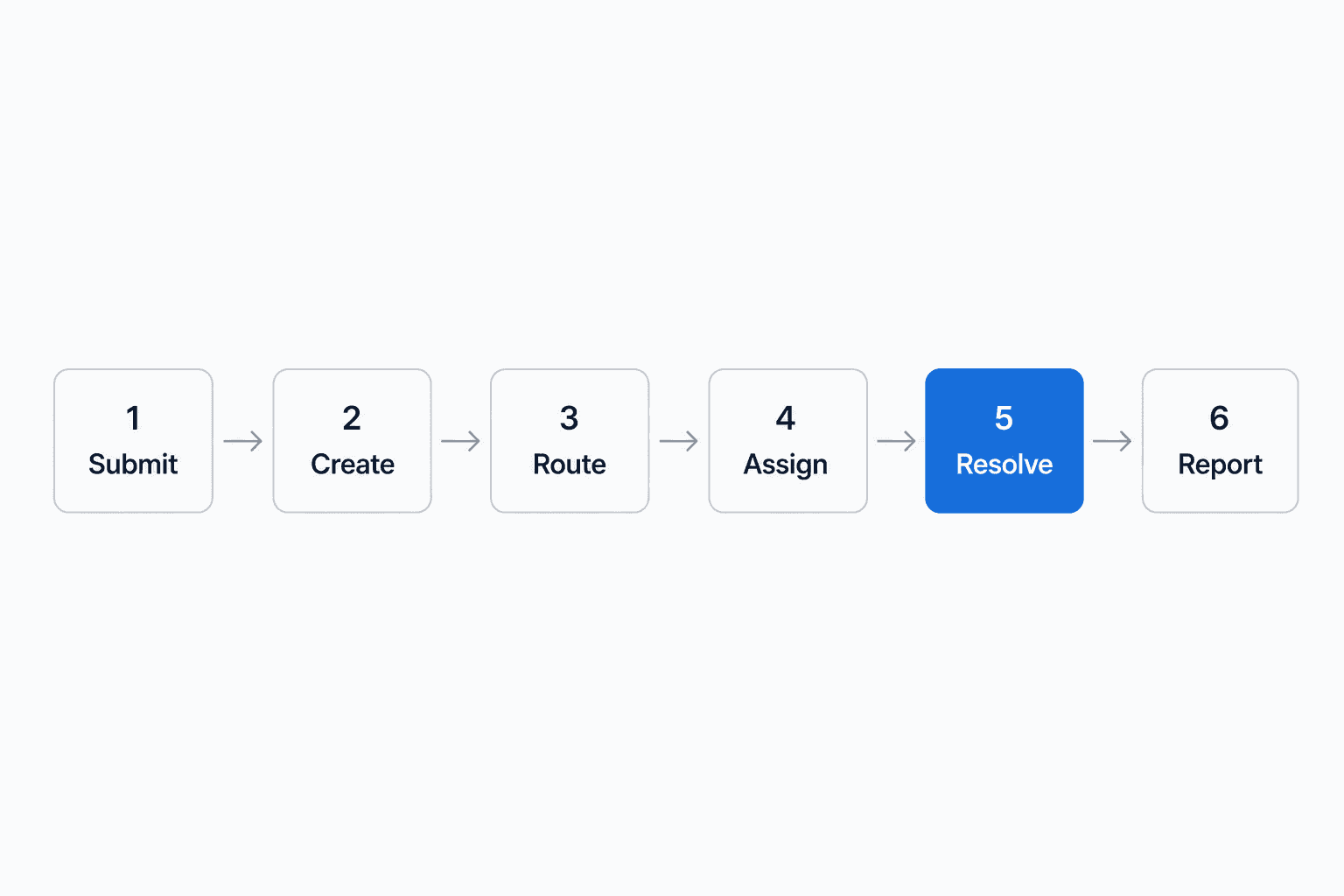
Submit. An employee raises a request through whatever intake channel the system supports - a web portal, an email address, a Slack command, or a chat widget. The channel matters less than having a single system behind it.
Create. The system converts the raw message into a ticket with metadata: request type, urgency level, requester identity, attachments, and a timestamp. This is the moment a conversation becomes a trackable work item rather than an ephemeral chat thread.
Route. Automated rules send the ticket to the right queue, team, or individual based on category, keywords, or department. Without automated routing, someone has to manually read and redirect every incoming request. That scales to roughly 30-40 tickets per day before it becomes a full-time job.
Assign. An agent picks up or is assigned the ticket. Complex requests trigger approval chains or multi-team handoffs. Automated reminders fire if the ticket sits idle past a defined threshold.
Resolve. The owner investigates, works the issue, updates the employee on progress, and closes the ticket when the problem is fixed. Featurebase notes that the most common frustration with internal support isn't slow resolution - it's silence. Visible ticket status and a closed-loop resolution address this directly.
Report. Managers review ticket data: backlog size, resolution times, recurring themes, and team performance. Hiver's Travelist case study shows this reporting capability powering 30+ internal dashboards and enabling data-driven staffing decisions.
Key benefits
The benefits stack in a predictable order: first you stop losing requests, then you gain visibility, then you can actually improve things.
| Benefit | What it fixes | Evidence |
|---|---|---|
| No more lost requests | Requests buried in email/Slack | Every submission gets a ticket ID, an owner, and a visible status |
| Faster resolution | Manual triage bottlenecks | One IT firm cut resolution time 40% in 8 weeks by automating routing |
| Time reclaimed | Manual coordination overhead | Travelist recovered 160+ hours per month previously spent on spreadsheet tracking and status updates |
| SLA compliance | Deadline accountability | Travelist maintained a 4-hour SLA for time-sensitive updates with automatic alerts before deadlines are missed |
| Self-service deflection | Repeat questions overloading staff | A knowledge base connected to the system deflects password resets, policy questions, and onboarding steps before they enter the queue |
| Manager visibility | Workload invisible until it explodes | Backlog, resolution times, and team performance visible without auditing anyone's inbox |
| Process consistency | Response quality varies by agent | Travelist introduced 20 reusable response templates post-adoption, reducing back-and-forth and standardizing handling of common request types |
Must-have features
Eight features appear in every serious implementation guide, and the absence of any one of them is typically why a ticketing rollout fails.
Centralized request intake. Every channel - email, portal, Slack, a web form - feeds into one system. If requests can bypass it through back-channel messages, the queue will never be reliable.
Automated ticket routing. Rules-based routing by category, keyword, or department. Hiver and Featurebase both treat this as load-bearing: without it, someone manually triages every incoming request, which doesn't scale.
Categorization and prioritization. Tags, priority levels, and escalation rules so support teams work the right things first. Knowing a ticket is "IT / hardware / priority high" on arrival means it reaches the right person immediately.
Knowledge base and self-service. Deflects low-value requests before they touch the queue. Password resets, onboarding questions, and policy lookups have documented answers. A connected knowledge base routes employees there automatically.
Workflow automation. Approvals, reminders, follow-ups, and status changes without manual intervention. The goal is removing unnecessary friction from the support process, not automating everything.
Reporting and SLA management. Analytics covering backlog, resolution times, and recurring issue categories. SLA tracking sets clear expectations for both support teams and employees, and surfaces bottlenecks before they escalate.
Team collaboration tools. Internal comments, handoff notes, and clean context transfer when tickets move between teams. Much of internal support is cross-functional; collaboration tools prevent context loss.
A user-friendly interface and mobile access. If submitting a ticket feels harder than sending a Slack message, employees will send the Slack message. Ease of submission directly determines adoption, which determines whether the system actually works.
Who uses internal ticketing systems?
The same pattern repeats across departments: requests that previously fell through the cracks get a permanent, tracked home.
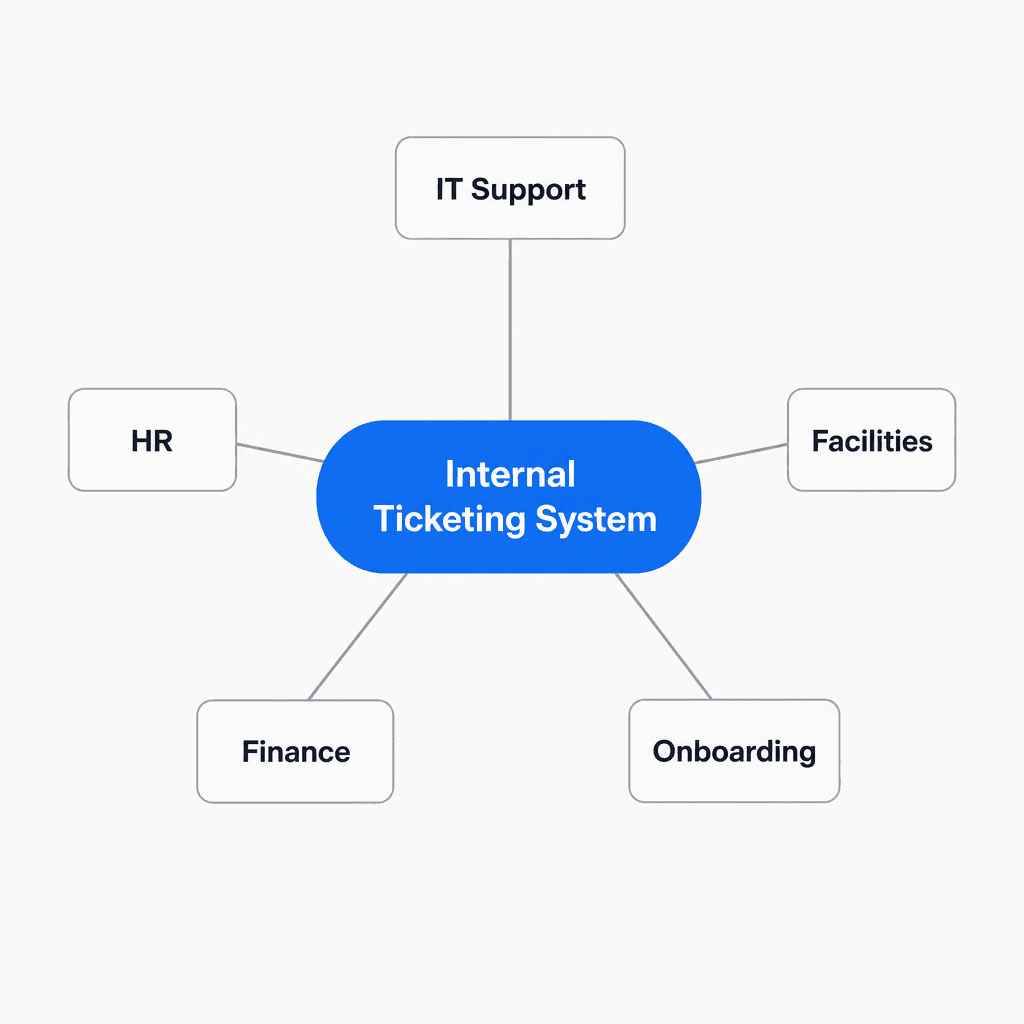
IT support is the original use case. IT teams need a log for every request - for audits, recurring issue identification, and compliance. Ad-hoc chat-based support doesn't generate that log. For teams in regulated industries, documented request history isn't optional. The AI for DevOps support use case extends this further, using ticketing as the backbone for incident management.
HR / People Operations handles requests that unfold over weeks: payroll clarifications, benefits enrollment, immigration paperwork, and policy questions. Small HR teams manage this by proximity, but it breaks down when teams grow or go remote. Ticketing keeps long-running cases organized, ownership explicit, and history accessible when the same request resurfaces six weeks later.
Facilities and operations receive requests from everywhere - email, calls, hallway conversations. Hiver's guide cites a social housing organization managing 20+ buildings and 100+ staff where the core requirement was "one place for tickets" so maintenance requests could be tracked through completion, not reconstructed later.
Finance handles reimbursements, invoice questions, expense disputes, and purchase approvals. These carry implied urgency and require an audit trail from submission to closure.
Onboarding and offboarding are where ticketing's value is most visible. Onboarding touches IT (account provisioning), Operations (hardware), and HR (forms, policies) simultaneously. Without a structured workflow, steps get missed. Featurebase calls multi-team coordination the exact scenario where ad-hoc email handling fails most visibly.
Internal vs. external ticketing systems
Most ticketing software can be configured for either use case, but the priorities are different enough that using the wrong tool creates friction. Tools built primarily for enterprise customer support often have the wrong default metrics and routing logic for internal use - TOPdesk makes the case that customer-service tools applied to internal IT create misaligned workflows and the wrong KPIs.
| Internal ticketing | External (customer) ticketing | |
|---|---|---|
| Who submits | Employees | Customers |
| Volume pattern | Lower volume, more complex requests | Higher volume, more repetitive |
| Key metrics | SLA compliance, MTTR, self-service deflection | CSAT, first-response time, NPS |
| Integrations | Active Directory, HR systems, internal knowledge bases | CRM, e-commerce, billing platforms |
| Privacy sensitivity | High - HR, finance, and personnel data | Medium - customer PII |
| AI opportunity | Knowledge-grounded answers to procedural questions | High-volume deflection of repetitive queries |
Signs you need one
The most reliable signal is a growing volume of requests with no clear ownership. From the practitioners in r/sysadmin and r/ITManagers:
"Our company is growing fast and we're drowning in email chains for everything from HR requests to facilities issues to IT tickets. Right now it's all scattered."

"Simple requests made over email and Teams can get lost in the weeds; a ticket gives you a reminder of the issue."
Five signs it's time to add structure:
- Requests disappear. Someone submits something, hears nothing, follows up days later. The support team has no record of the original request.
- No accountability. When a ticket takes two weeks instead of two days, there's no way to see where it stalled or who dropped it.
- The same questions keep coming. IT answers the same VPN setup question 15 times a week. There's no mechanism to route employees to a documented answer first.
- Response quality varies. Support comes from whoever happens to be available, with no routing or specialization. Response time and quality are functions of luck.
- You can't report on support workload. Management asks how busy IT is, and the honest answer is "unclear."
The DM-vs-tickets debate is worth noting here:
"One of the biggest debates we see: Allow DMs (easy for users, chaos for IT) vs. Force tickets/requests in a structured way (less chaos, more complaints)."
The "no ticket, no service" policy works but creates friction. The better answer is making tickets easy enough that employees prefer them - which is where Slack-native intake and AI-assisted resolution change the calculus.
Where AI fits in
Most ticketing tools now include some form of AI. Most practitioners remain skeptical. The gap between vendor claims and real value comes down to one question: what does the AI actually know?
"ChatGPT or Gemini isn't going to have the [internal] data..."
"There's also no reason to think that AI will help with this at all. What you want is automation. The ticket has 'reset my password' in it? It [should just] reset the password."
Both critiques are right. A generic LLM wrapped in a chat interface can't answer "How do I request a new laptop?" without access to your actual procurement policy. Without your specific runbooks and documentation, the AI defaults to generic answers that don't resolve anything. The AI has to be grounded in internal knowledge to be useful.
The effective model works like this:
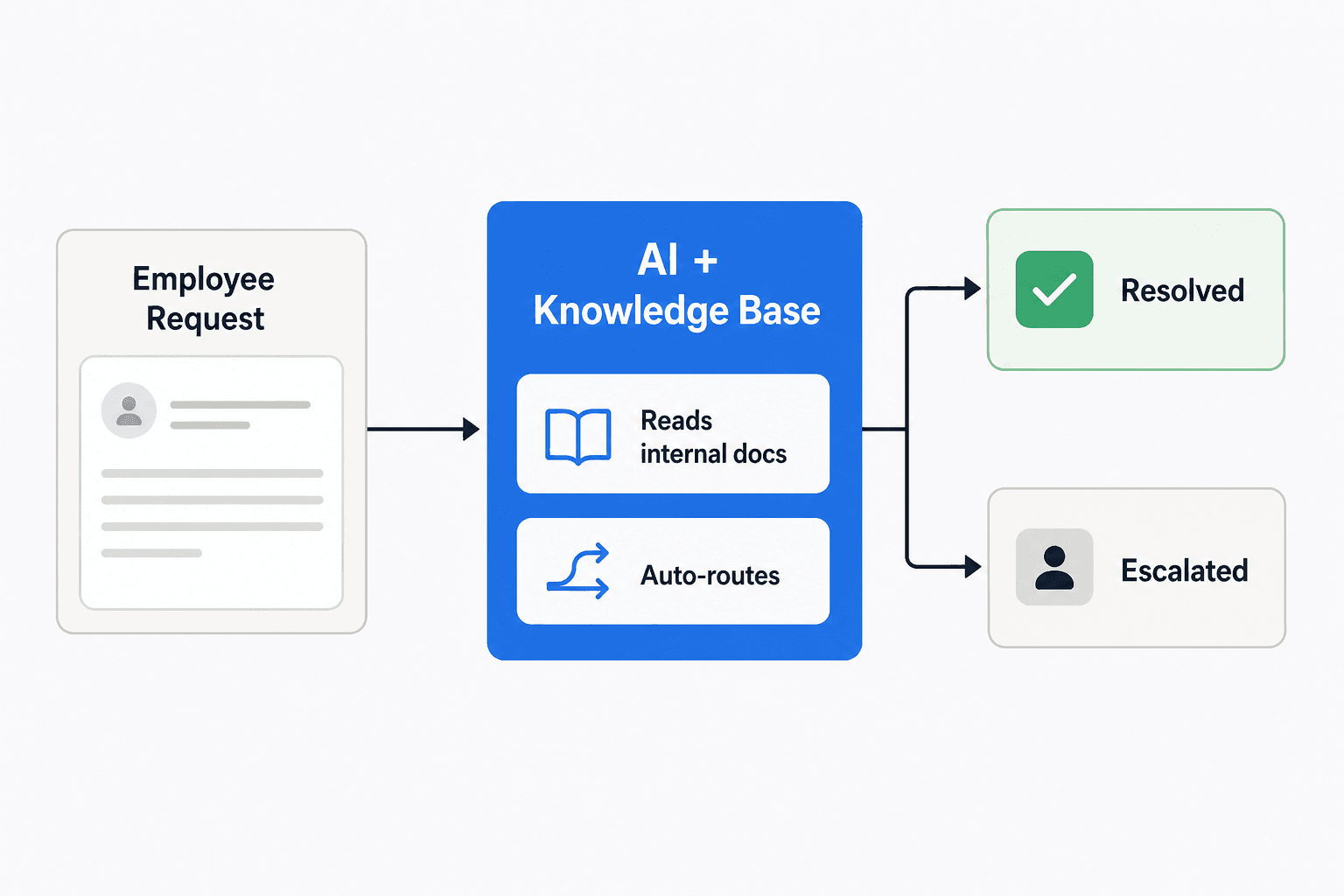
The AI acts as first responder on incoming tickets, reading from your connected knowledge sources (Confluence pages, Notion docs, Google Drive, past resolved tickets) and either resolving the ticket outright or surfacing the relevant documentation so a human can respond faster. The key distinction from generic AI tools: it knows your actual policies, your actual runbooks, and your actual ticket history.
InDebted - a consumer debt recovery company with a 5-10 person IT team serving 250+ employees across five markets - runs this model with eesel AI connected to Jira Service Management and Confluence. Their Head of IT, Jason Loyola, describes it: "We use it to be the first responder to our Helpdesk tickets in Jira. It essentially acts just like an agent would."
At current training levels, their eesel agent deflects 15% of incoming Jira tickets automatically. Once it finishes training on their full archive of past resolved tickets (which it converts into new KB articles automatically), they project 55% deflection. For a small IT team, the difference between answering 100% of tickets manually and answering 45% of them manually is significant capacity freed for higher-priority work.
The Slack angle matters because that's where the adoption problem typically lives. Employees prefer sending a Slack message to opening a portal. If the ticketing system meets them in Slack - where a message to a bot creates a ticket and an AI responds directly in the thread - the "no ticket, no service" enforcement becomes unnecessary.
For teams already using Jira, this pairs well with the Atlassian AI ticket assistant or Atlassian Intelligence automation rules - eesel connects to Jira the same way an agent does and works alongside whatever native automation you already have in place.
Try eesel
eesel AI connects to your existing ticketing system - Jira, Zendesk, Freshdesk, and others - and acts as a knowledge-grounded first responder on internal support tickets. It learns from Confluence pages, Notion docs, Google Drive, and past resolved tickets, then handles incoming requests the same way a trained agent would: looking up the relevant documentation, drafting a response, and escalating anything it can't confidently resolve.
Pricing is per task - there's no platform fee, no per-seat charge, and no monthly minimum.
| Task type | Examples | Price |
|---|---|---|
| Light | Dashboard questions, simple lookups | Free |
| Regular | Support ticket, chat session | $0.40 each |
| Heavy | Blog post drafts | $4.00 each |
Support ticket volume examples:
| Tickets per month | Monthly cost |
|---|---|
| 100 | $40 |
| 500 | $200 |
| 1,000 | $400 |
| 2,500 | $1,000 |
Annual commit (min $300/month billed annually) saves 25%. Enterprise plans at $1,000/month flat include SSO, HIPAA, BAA, a dedicated solutions engineer, and a dedicated account manager.
The free trial includes $50 in usage with every feature unlocked - no credit card required. Start your free trial or read the chatbot analytics guide to understand which metrics to track once you're up and running.