


What "AI for HR support" actually covers
"AI for HR support" gets used as a catch-all for two very different products, and mixing them up is the fastest way to buy the wrong one. The first is an HR service desk: a full case-management system, the HR equivalent of an ITSM platform, with tracked cases, SLAs, approval chains, and integrations into your HRIS (Workday, SAP SuccessFactors, and similar).
The second is a conversational AI layer that answers questions from a knowledge base, usually deployed straight into Slack or Microsoft Teams, with no case-tracking system underneath it at all.
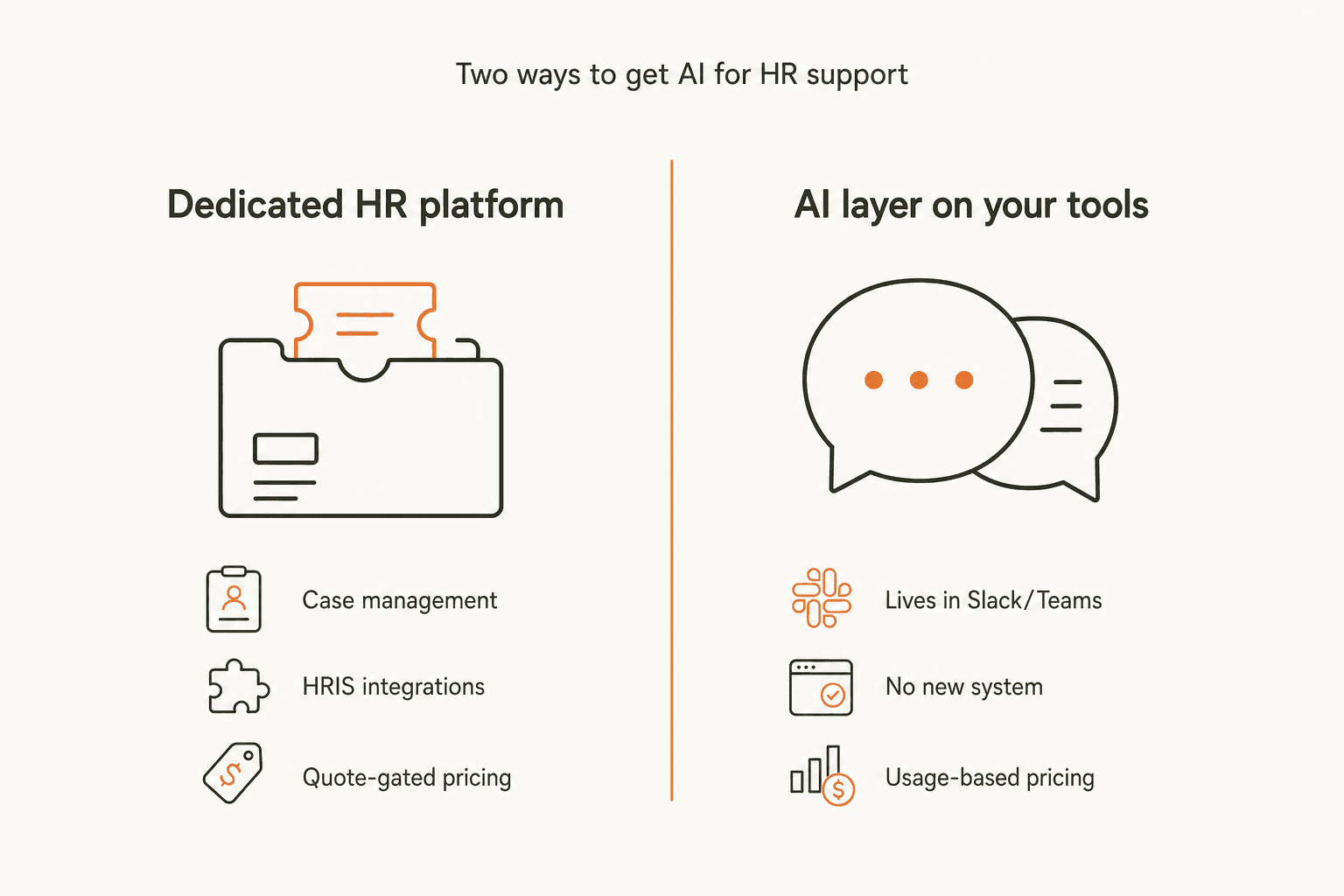
Both are legitimate answers to "how do I automate HR support," but they answer different questions. A 40-person startup with an overloaded HR generalist usually just needs the repetitive questions off their plate, fast, without six weeks of implementation. A 4,000-person enterprise with a dedicated People Ops team running dozens of distinct workflows (onboarding, transfers, leave of absence, exit interviews, each with its own approval chain) needs the case-management layer, because "who approved this" and "how long did it take" become compliance questions, not just annoyances.
The tools in this roundup split cleanly along that line. eesel AI and Guru are the AI-layer camp. Moveworks, Leena AI, ServiceNow HR Service Delivery, Zendesk Employee Service, Freshservice, and Resolve (formerly Espressive Barista) are the dedicated-platform camp. Knowing which camp you actually need before you start comparing feature lists saves most of the wasted demo calls.
How I evaluated these tools
I looked at five things, in roughly this order:
- What it actually resolves versus what it just answers. A tool that can look up a policy is table stakes. A tool that can trigger the actual HR workflow (start onboarding, submit a leave request, generate an employment letter) is doing more work for the employee and for HR, and it's the same distinction that matters in any deflection rate conversation.
- Pricing transparency. Can you see a real number without a sales call, and does the billing unit make sense (per ticket, per agent, per employee)?
- HRIS and knowledge-source integrations. Does it connect to Workday, SAP SuccessFactors, or your existing docs (Confluence, Notion, SharePoint), or is it an island?
- Escalation and sensitive-topic handling. Does it know to route harassment complaints, comp disputes, and leave-of-absence cases to a human instead of guessing?
- Time to value. Minutes, weeks, or a "contact sales for a timeline" answer?
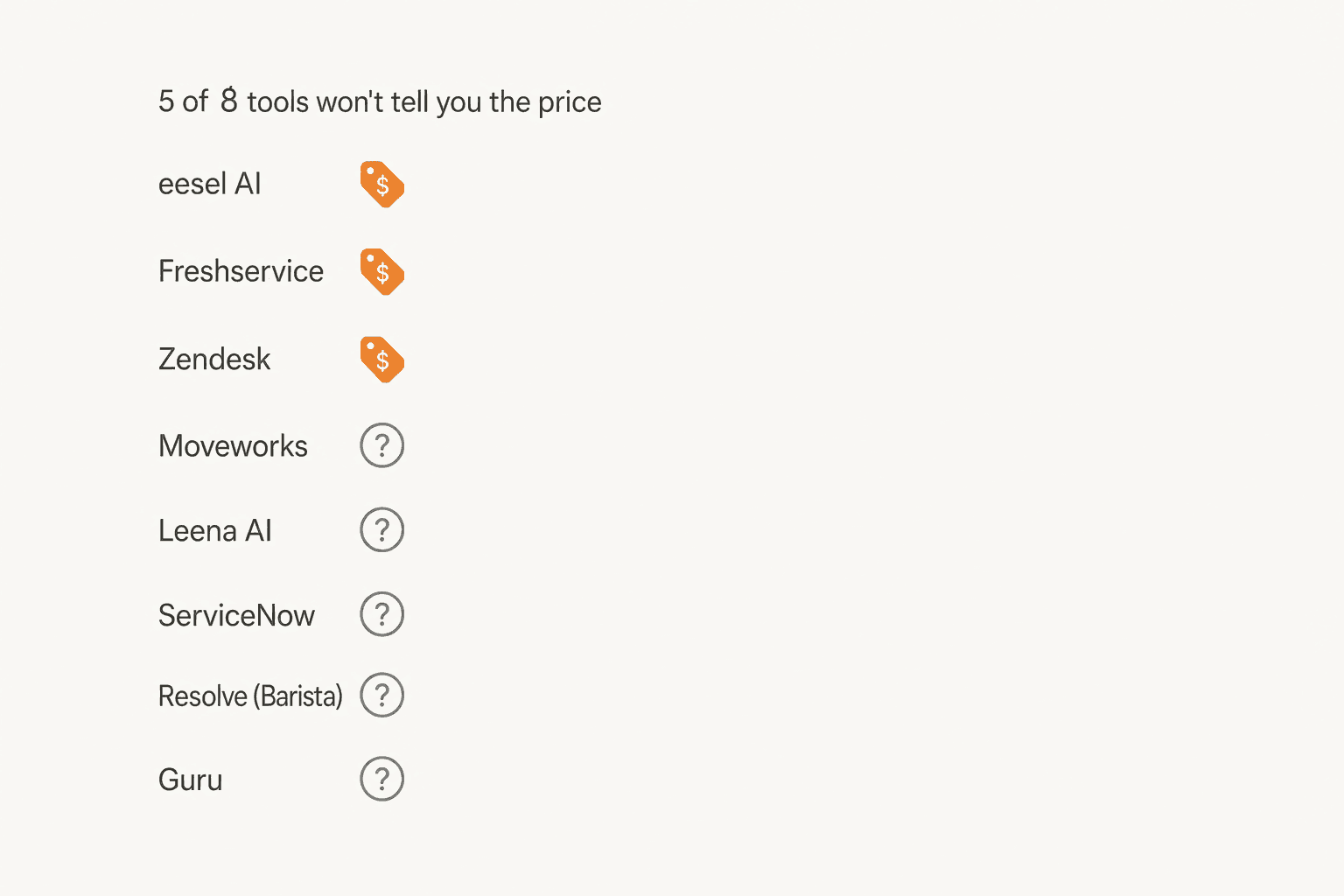
One thing worth flagging up front: five of the eight tools below never publish a price, which shapes how you should read every pricing claim in this post. Vendor ROI numbers ("256% ROI," "70%+ tickets auto-resolved") are self-reported and unaudited unless I say otherwise, so treat them as a starting point for your own evaluation, not a guarantee.
The best AI for HR support at a glance
| Tool | Best for | Pricing model | Starting price | Public pricing | HRIS integrations named | Slack/Teams | Security/compliance mentioned |
|---|---|---|---|---|---|---|---|
| eesel AI | Adding AI to Slack/Teams for HR + IT | 1 credit per ticket or chat | From $299/mo (500 credits) | Yes | Via knowledge sources (Confluence, Notion, SharePoint, Google Drive) | Native, both | SSO and MFA (add-ons), HIPAA (Enterprise) |
| Moveworks | Enterprise hire-to-retire automation | Quote-gated | Contact sales | No | Workday, SAP SuccessFactors | Yes, via chat apps | Not published |
| Leena AI | Dedicated HR-only agentic assistant | Quote-gated | Contact sales | No | Workday, SAP SuccessFactors, ServiceNow, Oracle, AD | Yes, per user reviews | Not published |
| ServiceNow HRSD | Orgs already on the ServiceNow platform | Quote-gated | Contact sales | No | ServiceNow-native | Not published | Platform-level only |
| Zendesk Employee Service | Teams already on Zendesk for support | Per agent/month | $29/agent/mo | Yes | Workday | Unified across email, Slack, Teams | Not detailed for this track |
| Freshservice | IT teams extending ITSM into HR | Per agent/month | $19/agent/mo | Yes | Oracle HCM (contractor onboarding) | Slack confirmed; Teams available | Not detailed for this track |
| Guru | HR knowledge search, not ticketing | Custom/tailored | Contact sales | No | BambooHR, Gusto, Culture Amp, Lever | Native, both | SSO, DLP, audit trails |
| Resolve (Barista/RITA) | Zero-ticket IT + HR automation at scale | Quote-gated | Contact sales | No | Workday (historical) | Not published | Not published |
The 8 best AI tools for HR support in 2026
1. eesel AI
Best for: teams that want AI answering HR and IT questions inside Slack or Teams without standing up a whole new system.
eesel AI isn't a dedicated HR platform, and it doesn't pretend to be. It's an AI layer that plugs into the tools your company already has and answers questions from whatever it's connected to: Confluence, Notion, SharePoint, Google Drive, and your existing helpdesk. For HR specifically, it's built to "answer employee policy questions, onboarding queries, and benefits questions automatically" right where employees already ask them: a Slack DM, a Teams channel, an @mention.
Features. Deployed as a native Slack AI Agent or a Microsoft Teams AI Agent that reads channels, responds to DMs, and gets @mentioned like a colleague. It indexes SharePoint, Confluence, Notion, Google Drive, and your ticketing tools automatically, so answers stay current without manual re-training. It also handles IT tier-1 requests from the same knowledge sources as a full AI helpdesk agent, and supports 80+ languages for distributed teams.
Pros. Public, flat pricing. No per-seat fee. Deploys in minutes once connected. Works across HR and IT from the same knowledge base, so you're not buying two tools.
Cons. No native HRIS connector (it reads documents, not a Workday or SAP SuccessFactors database directly) and no dedicated case-management layer, so anything requiring formal approval chains or compliance-grade audit trails belongs on a heavier platform.
Pricing. Credit-based and public: 1 credit covers a ticket or chat, however long, and questions asked in the eesel dashboard are mostly free. One fixed monthly price, sized to volume. No platform fee, no per-seat charge. The free plan includes 100 credits with no credit card, and paying a year upfront gets two months free. SSO and MFA (from $199/month), and priority support (from $299/month) are optional add-ons, while HIPAA with a signed BAA comes with the Enterprise plan.
| Tickets or chats per month | Plan |
|---|---|
| Up to 100 | Free |
| Up to 500 | $299 / mo |
| Up to 1,000 | $499 / mo |
| Up to 2,500 | $999 / mo |
| Up to 5,000 | $1,899 / mo |
Verdict: the tool I'd start with if your HR requests are mostly repetitive questions and you'd rather see the exact price today than book a demo to find out.
2. Moveworks
Best for: large enterprises that want one conversational AI covering the full hire-to-retire lifecycle across HR, IT, and finance.
Moveworks positions itself as "The AI Assistant Platform That Gets Work Done," and its HR product covers a wide surface area: recruitment and onboarding (direct-deposit setup, policy lookups, employment verification letters), career development (goal setting, learning enrollment), employee engagement (time-off booking, sentiment surveys, recognition), and compliance (handbook acknowledgments, HR case tracking).
Features. Deploys through Slack, Teams, web, mobile, and intranets in 100+ languages, functioning as a kind of employee self-service portal without the portal. Agent Studio lets teams build custom agents on top of 1,000+ pre-built ones. Integrates with Workday and SAP SuccessFactors as systems of record, plus Enterprise Search across 50+ connected systems.
Pros. Broadest single-product feature surface in this list. Named integrations with the two biggest HRIS platforms. A Procore case study cites a 20% reduction in HR support load.
Cons. Fully quote-gated; the only public number is a Forrester-commissioned claim of "256% ROI and $11.5M savings over 3 years," which is a vendor-sponsored study, not an independent benchmark. Deployment is pitched as "weeks, not months" rather than a fixed timeline.
Pricing. No public tiers. Moveworks directs buyers to "connect with a Moveworks expert" for a custom quote.
Verdict: worth a call if you're already enterprise-scale and want HR, IT, and finance support unified under one AI assistant, but budget for a sales cycle before you see a number.
3. Leena AI
Best for: teams that want an AI assistant built specifically around HR, not HR bolted onto a general IT platform.
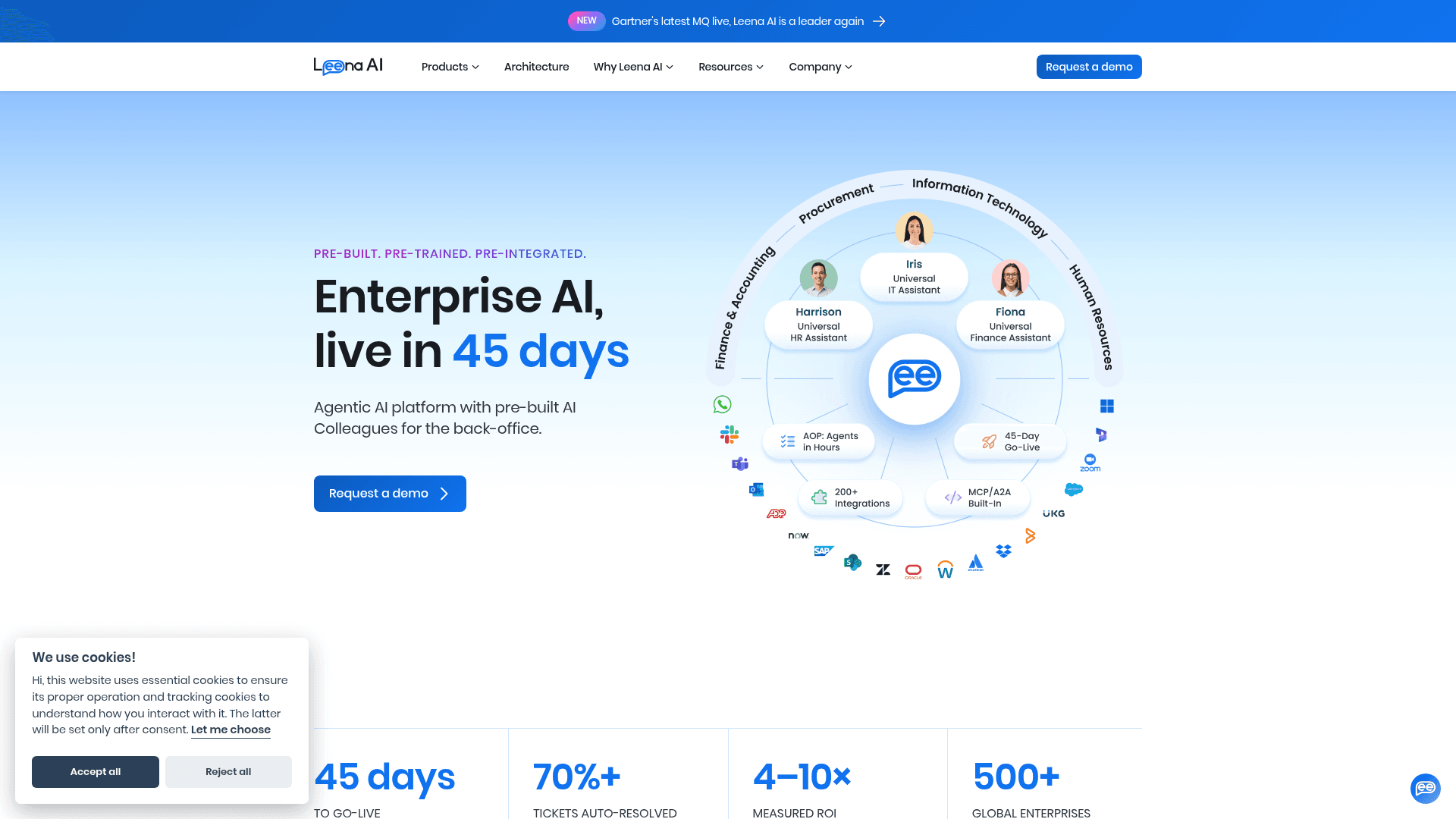
Leena AI's HR persona, called Harrison, is pitched as a "Universal HR Assistant" that resolves employee queries across 11 distinct HR functions from day one: leave and attendance, benefits, payroll questions, reimbursement claims, onboarding, performance-cycle guidance, employment letters, and exit-process inquiries among them.
Features. Connects to Workday, SAP and SAP SuccessFactors, ServiceNow, Oracle, and Active Directory, with 200+ enterprise integrations advertised in total. A Knowledge Studio, Leena AI's version of knowledge management software, grounds answers in SharePoint, Confluence, Google Drive, and Box, and an AOP Studio lets non-technical teams build process automations in plain English. Generates employment documents in under 10 seconds and claims voice support in 100+ languages.
Pros. The narrowest, most HR-specific feature set of the enterprise platforms here, which shows in the breadth of named HR-specific workflows. A 45-day go-live target is at least a stated number, unlike most competitors.
Cons. Fully quote-gated, no free trial, and the headline metrics (70%+ ticket auto-resolution, 4-10x ROI, "$1M-$10M+" in annual savings) are self-reported by Leena AI, not independently audited.
Pricing. No fixed tiers. Leena AI's own pricing page states quotes are "tailored to your organisation's specific needs," scaled by employee count and modules selected.
Verdict: a strong shortlist pick if HR, not IT, is actually your primary use case and you have the budget for an enterprise deployment.
4. ServiceNow HR Service Delivery (Now Assist)
Best for: organizations already running the ServiceNow platform for IT that want HR on the same system.
ServiceNow HR Service Delivery centralizes HR requests and employee-lifecycle cases into a single system, and ships with Now Assist for HRSD, ServiceNow's generative-AI layer for HR. The feature list reads like a checklist of what a mature HR case system needs: case summarization, AI-drafted resolution notes, knowledge-article generation from resolved cases, AI-drafted chat and email responses, onboarding and offboarding plan generation, and sentiment analysis on case interactions.
Features. A Virtual Agent handles employee self-service and is explicitly designed to redirect sensitive topics like harassment or misconduct to a human rather than attempt an AI answer, the same escalation logic behind good AI chat escalation. Knowledge Graph functionality is a form of knowledge retrieval that ties resolved cases back into a searchable knowledge base, and an Employee Center portal gives staff a single place to submit and track requests.
Pros. The escalation design (routing sensitive cases to humans by default) is the most explicit safety behavior described by any vendor in this list. Deep case-management maturity if you're already on the ServiceNow platform.
Cons. Quote-gated with no public pricing at all; ServiceNow's own pricing page requires contacting sales. Realistically only worth evaluating if HR is one module inside a larger ServiceNow rollout, not a standalone buy.
Pricing. No public figures. Contact ServiceNow sales for a custom quote.
Verdict: the safe, expensive choice if IT already trusts ServiceNow, and a strange first purchase if HR is starting from scratch.
5. Zendesk Employee Service
Best for: teams that already run Zendesk for customer support and want the same platform for internal HR requests.
Zendesk's Employee Service Suite is the same underlying Zendesk Resolution Platform as its customer-facing product, one of the names that shows up in most roundups of the best AI helpdesk software, repositioned for internal departments: HR, IT, Finance, and Legal. Employees submit requests (equipment, offboarding, benefits questions) through a self-service catalog, and Zendesk's AI Agents and Agent Copilot handle routine ones directly, including Zendesk's own example of answering how many vacation days an employee has left.
Features. Workday integration pulls read-only employee data directly into a ticket. Approvals workflows handle sign-off chains for compliance-sensitive requests. Task Lists give admins pre-built checklists (a new-hire checklist, for instance) that surface inside the relevant ticket. Unified ticketing spans email, Slack, and Teams.
Pros. If HR shares a desk with IT, the built-in IT Asset Management module tracks equipment in the same system. Zendesk's own case studies cite a 73% AI resolution rate and 86% faster resolution time for Hoag Health, and a 212% increase in HR team productivity for Dutch Bros.
Cons. Those case-study numbers are Zendesk's own published customer stories, not independent benchmarks. This Employee Service pricing track is separate from (and cheaper than) Zendesk's customer-service Suite, which can cause confusion if you're already a Zendesk customer comparing quotes.
Pricing. Suite Team at $29/agent/month (AI Agents, knowledge base, email support), Suite Growth at $59 (adds IT Asset Management, service catalog, SLAs), Suite Professional at $99 (adds Admin Copilot and skills-based routing), and Suite Enterprise at custom pricing, all billed annually per agent.
Verdict: the path of least resistance if you're already paying for Zendesk and don't want to run a second platform for internal requests.
6. Freshservice
Best for: IT teams that want to extend their existing service desk into HR rather than buying a separate HR tool.
Freshservice is Freshworks' ITSM platform, and its Enterprise Service Management (ESM) layer extends the same automated workflows to HR, Facilities, and Finance. The most convincing evidence here isn't a case study about someone else, it's Freshworks' own internal HR team, which processed over 13,606 employee requests a year through the system: 8,434 via automated email-to-ticket routing across 211 specific request types, plus a Slackbot that converts informal Slack DMs into trackable tickets.
Features. Freddy AI Agents autonomously resolve leave, payroll, and benefits requests end to end. Freddy AI Copilot drafts replies, summarizes tickets, and writes help articles. A self-service document system cut Freshworks' own HR letter processing time by 93%, from 20-30 minutes down to about 2. A Slackbot converting informal DMs into tickets works a lot like the service desk chatbot pattern IT teams already know. Automated workflows also handle a recognition program (518 award requests a year) and contractor onboarding, which auto-creates employee profiles in Oracle HCM.
Pros. The internal-dogfooding case study is unusually specific and verifiable, with real request counts rather than a vague percentage. Public, tiered pricing that scales with team size.
Cons. Freddy AI's exact allotment (1,200 sessions/year per license on Enterprise) suggests you'll want to model your actual query volume against the plan before committing, since AI usage isn't unlimited even at the top tier.
Pricing. Starter at $19/agent/month, Growth at $49, Pro at $99, Enterprise at custom pricing (bundles Freddy AI with 1,200 sessions/year per license), all billed annually. Day passes for occasional agents start at $3.
Verdict: a sensible pick if IT already owns your service desk and HR is willing to live inside the same ticketing system rather than a separate one.
7. Guru
Best for: HR teams that want employees to self-serve accurate answers, without needing a ticketing system underneath.
Guru bills itself as "The Governed Knowledge Layer for Enterprise AI." Rather than case management, it centralizes HR policy and benefits information into verified "Knowledge Cards" and serves cited AI answers inside Slack, Teams, and Chrome, aimed at cutting down the number of times HR has to answer the same question twice.
Features. Knowledge Cards are drafted, verified, and kept current, with Guru's own copy citing automation that moved verification coverage from 60% to 100% of assessed content, the kind of upkeep most knowledge management tools struggle with. Role-based access control means the AI only surfaces what a given employee is permissioned to see, backed by enterprise SSO, DLP, and full audit trails. Integrates with BambooHR, Gusto, Culture Amp, and Lever, plus general HRIS sync.
Pros. The permission-aware design is a genuine differentiator for HR content specifically, where different employees legitimately need to see different policy tiers. Strong security posture for a knowledge tool.
Cons. No ticketing or case tracking at all, so anything requiring a formal record of the request (a leave-of-absence approval, for instance) needs a separate system alongside it. Pricing is entirely custom, with Guru explicitly stating it's "not just a per-seat tool."
Pricing. No public tiers. Guru scales investment by "organization's scale, knowledge complexity, and AI maturity," with a discounted nonprofit program called Guru for Good. Real numbers require a sales call.
Verdict: worth a look if your actual problem is "HR keeps re-answering the same policy question," not "we need to track HR cases."
8. Resolve (formerly Espressive Barista)
Best for: enterprises chasing "zero ticket" IT and HR automation who don't mind that the product they're evaluating recently changed hands.
Here's the part most 2026 roundups miss: Espressive Barista is no longer a standalone product. In September 2025, Resolve acquired Espressive to fold its conversational AI into Resolve's "Zero Ticket IT" platform, and espressive.com now redirects entirely to resolve.io. The virtual agent itself has been rebranded RITA. (One correction worth making here: Espressive and Ivanti only ever had a 2022 technology partnership, not an acquisition, so if you've seen it described as "part of Ivanti," that's out of date.)
Features. A chat-based Virtual Agent answers HR policy questions and can trigger workflows directly (onboarding, transfers, leave of absence, offboarding) rather than just answering. A Dexcom case study on Resolve's site cites 96% of request emails deflected and 90% of tickets deflected using RITA for combined IT and HR service delivery.
Pros. The underlying conversational AI is mature (it predates the acquisition by years), and the deflection numbers, while vendor-sourced, are specific rather than vague.
Cons. The rebrand means less public information is currently available than for the other tools here; there's no dedicated pricing page, and community reviews under the old "Espressive" or "Barista" names may not reflect the current product.
Pricing. No public pricing. Resolve's site offers only a "Contact Us" form and demo booking.
Verdict: put this on your list if "zero ticket" automation is the specific pitch you're chasing, but go in aware you're evaluating a product mid-rebrand, and confirm directly with Resolve what's changed since the acquisition.
Which one actually fits your team?
The honest answer to "which is the best AI for HR support" is usually "it depends on what's already broken." Whether you call it an HR help desk or an HR helpdesk AI, pick the option below that matches your actual situation, not the one with the flashiest demo.
<div class="hr-ai-picker">
  <style>
    .hr-ai-picker { border: 1px solid #e8ded0; border-radius: 12px; padding: 24px; background: #fff; font-family: inherit; color: #474739; }
    .hr-ai-picker h4 { margin: 0 0 14px; font-size: 1.05rem; color: #474739; }
    .hr-ai-picker label { display: block; padding: 12px 14px; margin-bottom: 8px; border: 1px solid #e8ded0; border-radius: 8px; cursor: pointer; transition: border-color .15s ease, background .15s ease; }
    .hr-ai-picker label:hover { border-color: #D9822B; }
    .hr-ai-picker input[type="radio"] { accent-color: #D9822B; margin-right: 8px; }
    .hr-ai-picker .result { display: none; margin-top: 14px; padding: 14px 16px; border-radius: 8px; background: #F5E4CE; border-left: 3px solid #D9822B; font-size: .95rem; line-height: 1.5; }
    #hr-opt-1:checked ~ .result-1,
    #hr-opt-2:checked ~ .result-2,
    #hr-opt-3:checked ~ .result-3,
    #hr-opt-4:checked ~ .result-4 { display: block; }
  </style>
  <h4>What does your team need most right now?</h4>
  <label for="hr-opt-1">
    <input type="radio" name="hr-need" id="hr-opt-1" checked>
    We just want repetitive HR/IT questions answered inside Slack or Teams
  </label>
  <label for="hr-opt-2">
    <input type="radio" name="hr-need" id="hr-opt-2">
    We need full HR case management with approval chains
  </label>
  <label for="hr-opt-3">
    <input type="radio" name="hr-need" id="hr-opt-3">
    We already pay for Zendesk or Freshservice and want to reuse it
  </label>
  <label for="hr-opt-4">
    <input type="radio" name="hr-need" id="hr-opt-4">
    We just want HR policy answers to stop being re-asked constantly
  </label>
  <div class="result result-1"><strong>Start with eesel AI.</strong> It connects to your existing HR docs and answers questions right in Slack or Teams, live in minutes, from $299 a month for 500 credits, with no sales call needed to see the price.</div>
  <div class="result result-2"><strong>Look at Moveworks, Leena AI, or ServiceNow HR Service Delivery.</strong> All three ship formal case tracking, HRIS integration, and audit trails, but expect a sales cycle and a quote-gated price.</div>
  <div class="result result-3"><strong>Check the employee-service track on the platform you already own.</strong> Zendesk Employee Service starts at $29/agent/month; Freshservice starts at $19/agent/month. Both reuse infrastructure you're already paying for.</div>
  <div class="result result-4"><strong>Guru is built for exactly this.</strong> It's a knowledge layer, not a ticketing system, so it fixes the "same question, tenth time" problem without adding a new case-management tool.</div>
</div>
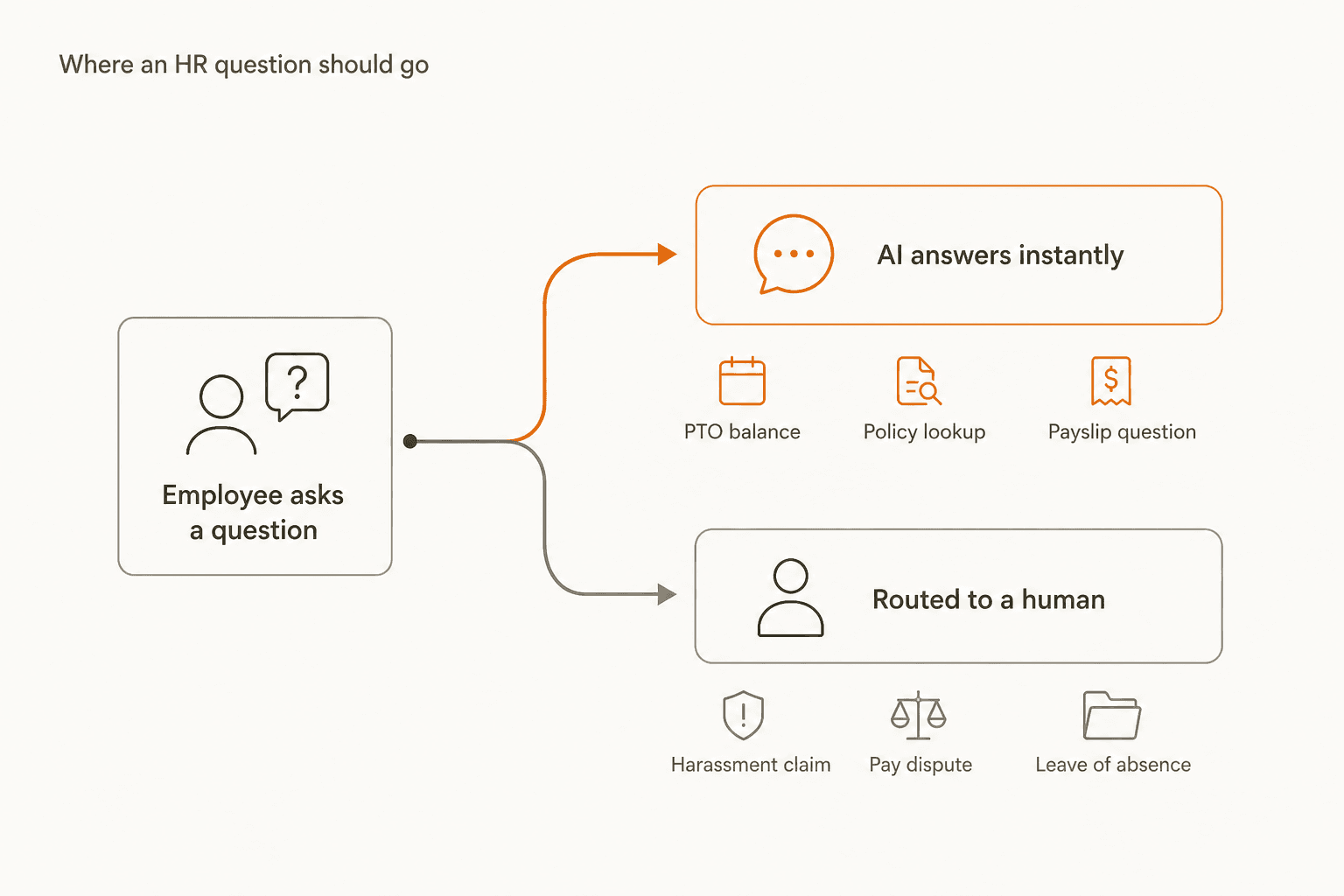
Whichever tool you land on, the routing logic above matters more than the tool choice itself, and it's the same logic behind good support metrics generally: measure resolution, not just volume handled. AI should own the high-volume, low-sensitivity tier, PTO balances, policy lookups, payslip questions, and a human should own anything touching an employee-relations case, a pay dispute, or a leave of absence. ServiceNow's Virtual Agent builds that split in by default; with a lighter tool like eesel AI or Guru, you set the boundary yourself by scoping what the AI is connected to and trained to answer.
Put an AI teammate for HR and IT questions in Slack
I keep coming back to the same pattern across the customer support queues I've watched eesel run for years: the tickets that eat the most agent time aren't the hard ones, they're the repetitive ones nobody got around to automating. HR inboxes look identical. If your team's HR questions mostly arrive as Slack DMs asking about PTO balances, parental leave policy, or "when does open enrollment start," you don't need a new case-management system to fix that, you need something that already knows your handbook and can answer inside the channel where the question was asked.
eesel AI reads your Confluence, Notion, SharePoint, or Google Drive HR docs and joins Slack or Teams as a real AI Agent, not a bot bolted onto a sidebar. It handles the same repetitive tier-1 work for IT (password resets, access requests) from the same knowledge base, so you're automating two departments' worth of tedious questions from one setup. Pricing is public: from $299 a month for 500 credits, no per-seat fee, and a free plan with 100 credits to see your own real deflection rate before committing to anything.

If you're an HR or People Ops team of one, or an IT team fielding both tickets, try eesel AI before you book a demo with a quote-gated platform. You'll know within a free trial's worth of usage whether an AI layer is enough, or whether you actually need the heavier case-management tools further up this list.