


What "small team" actually changes about the decision
I work the support queue every day, so let me be blunt about what changes when the team is small. You don't have an admin whose whole job is the helpdesk. You don't have budget for a three-month implementation. And every seat you add is a real percentage of your headcount, so per-seat pricing hurts in a way it never does for a 60-person team.
That flips the usual buying advice. The enterprise checklist obsesses over custom roles, audit logs, and workflow depth. A small team should optimize for three things instead:
- Time-to-value. Can one person set it up in an afternoon, without a solutions engineer? If onboarding needs a kickoff call, it's built for someone else.
- Pricing that doesn't punish growth. A tool that's cheap at three seats and brutal at eight is a trap. Watch whether you're billed per agent, per ticket, or per resolution, because those three numbers behave completely differently as you scale.
- AI that clears the repeat questions. The thing drowning a small team isn't hard tickets, it's the flood of easy ones. This is the one lever that actually gives you your time back, and it's where most of the difference between these tools now lives.
That last point matters more every month. Here's how the eight tools sort along the two axes a small team feels most: how they charge, and how much of the queue their AI can take off your hands.
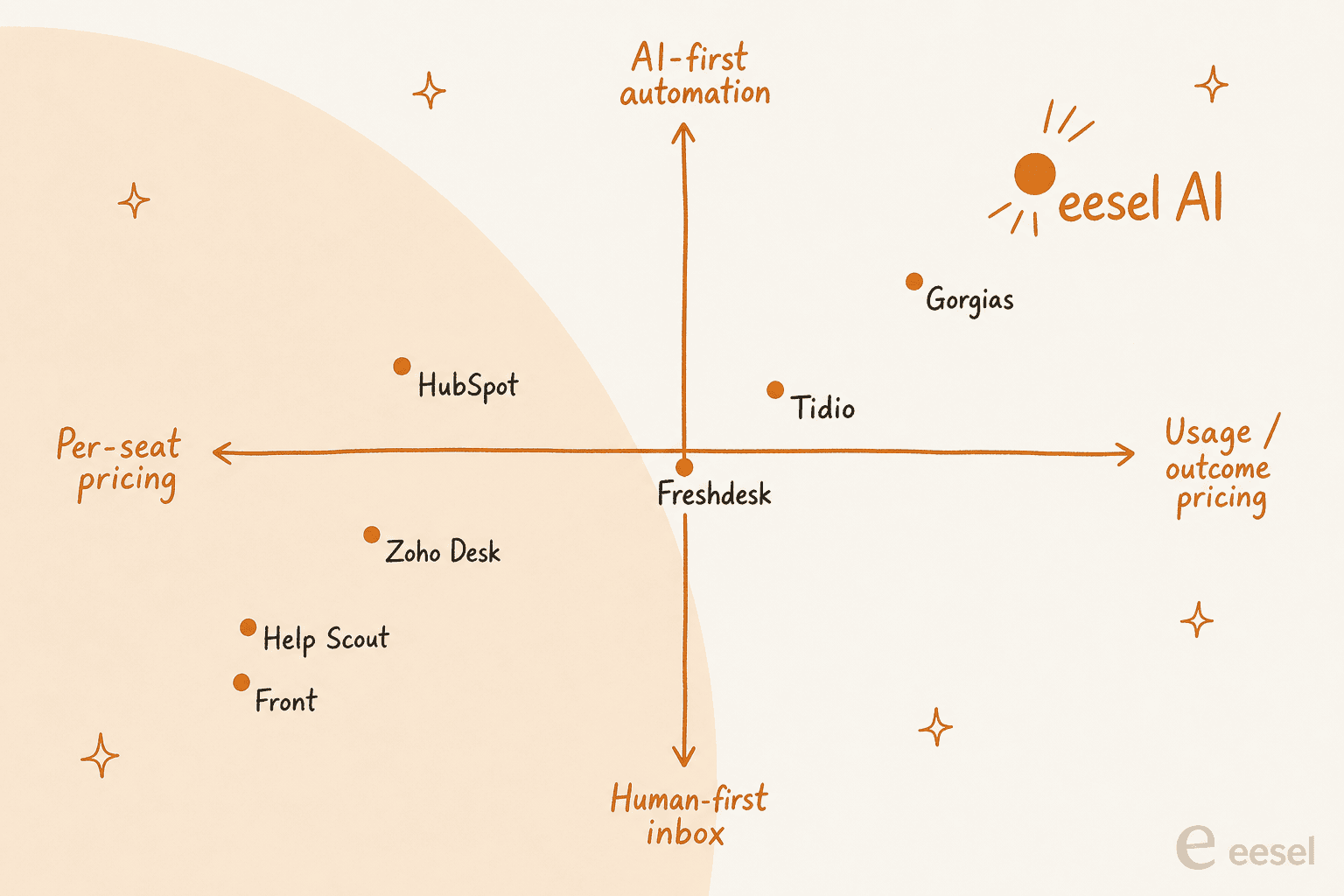
The pain is real and it's specific. One small e-commerce support team, running on a helpdesk with a basic AI bot, put it plainly when we spoke to them:
"It really relieves our small support team from being over ran by questions that can be easily answered by a simple AI."
That's the whole game for a lean team: get the "where's my order" questions off your plate so you can spend attention on the tickets that need a human.
The 8 best customer service software for small teams at a glance
| Tool | Best for | Starting price | How it bills | Built-in AI | Free tier |
|---|---|---|---|---|---|
| eesel AI | AI on your existing helpdesk | From $299/mo (500 credits) | 1 credit per ticket, no seat fee | AI agent + copilot, trains on past tickets | 100 free credits |
| Help Scout | Simple human-first inbox | $25 / user / mo | Per user | AI drafts + assist | Trial only |
| Freshdesk | Free start that scales | $19 / agent / mo | Per agent + AI sessions | Freddy AI (session-based) | Free Program (2 agents, 6 months) |
| Zoho Desk | Tightest budget | $7 / user / mo | Per user | Zia + bring-your-own GenAI | Yes (up to 3) |
| Gorgias | Small Shopify teams | $40 / mo | Per ticket + resolution | AI Agent on every plan | Trial only |
| Front | Collaborative shared inbox | $25 / seat / mo | Per seat (+ AI add-on) | AI add-ons | Trial only |
| Tidio | Live chat + AI for small shops | $29 / mo | Per plan + AI conversations | Lyro AI agent | Yes (limited) |
| HubSpot Service Hub | Teams already on HubSpot | $0 / $7 / seat | Per seat | Breeze / Customer Agent | Yes (up to 2) |
One thing this table hides, and it's the single most important thing for a small team, is that the two ways of charging behave very differently as you grow.
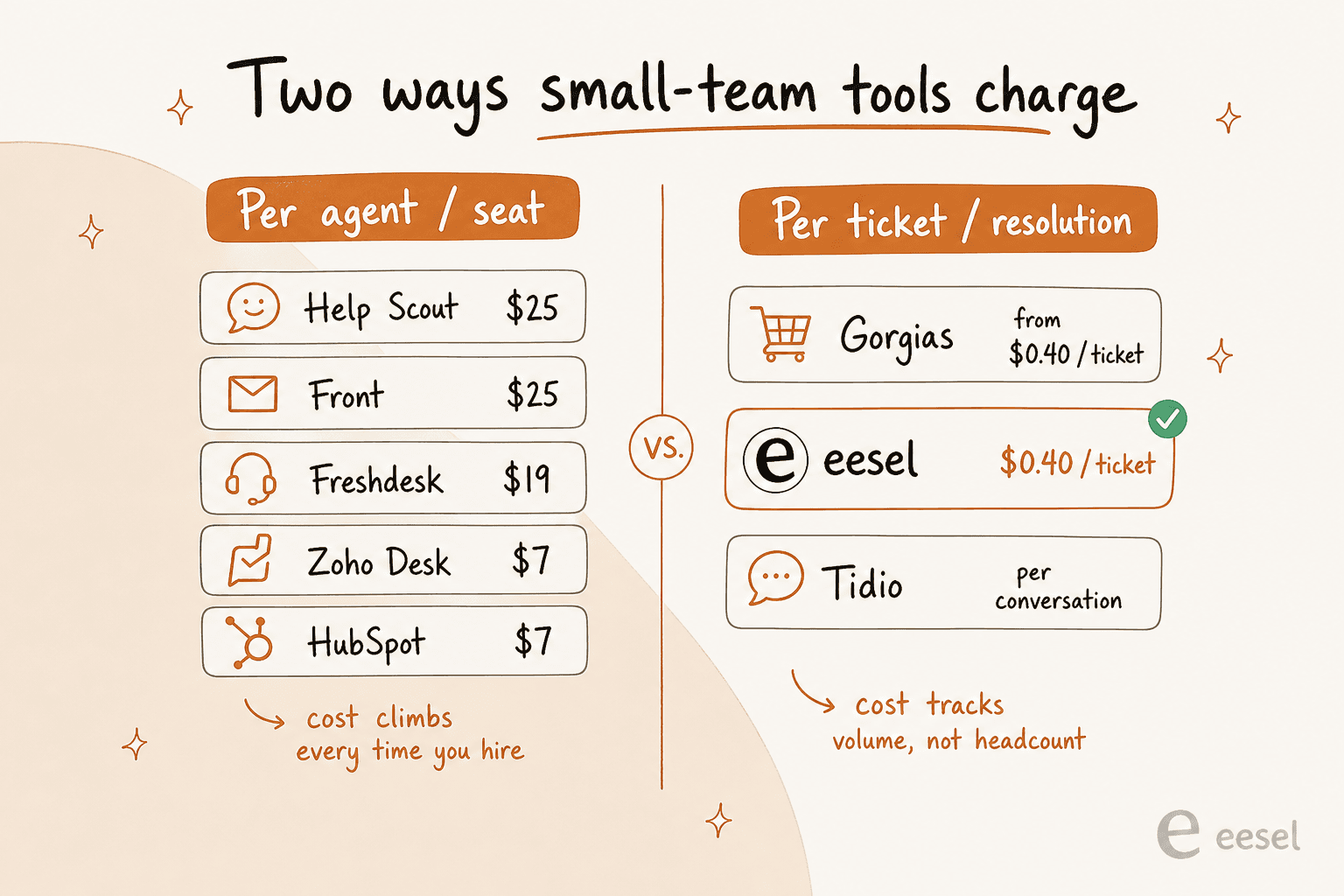
Per-seat pricing (Help Scout, Front, Zoho Desk, Freshdesk, HubSpot) is predictable but climbs every time you hire, so your support cost is tied to headcount rather than to how well you're deflecting tickets. Per-ticket or per-resolution pricing (Gorgias) and credit plans sized to volume (eesel) track your actual volume, which usually favors a small, efficient team. Keep that in mind as you read the eight picks below.
1. eesel AI: best for small teams that want AI on their existing helpdesk
Most tools on this list ask you to move into their world. eesel AI goes the other way: it's an AI layer that plugs into the helpdesk you already run, whether that's Zendesk, Freshdesk, Gorgias, Front, Help Scout, or HubSpot through its native integrations. For a small team, that "no rip-and-replace" bit is the whole appeal: you keep your inbox and just bolt on the automation.
I'll be honest about where the first-hand authority here comes from, because it's the thing an AI-written roundup can't fake. We've spent years putting AI agents on live support queues, and we've watched confident-sounding bots quietly give wrong answers, which is exactly why every eesel rollout gets simulated against your historical tickets before it ever touches a customer. You see the answers it would have sent, on your real past tickets, before you flip anything live.
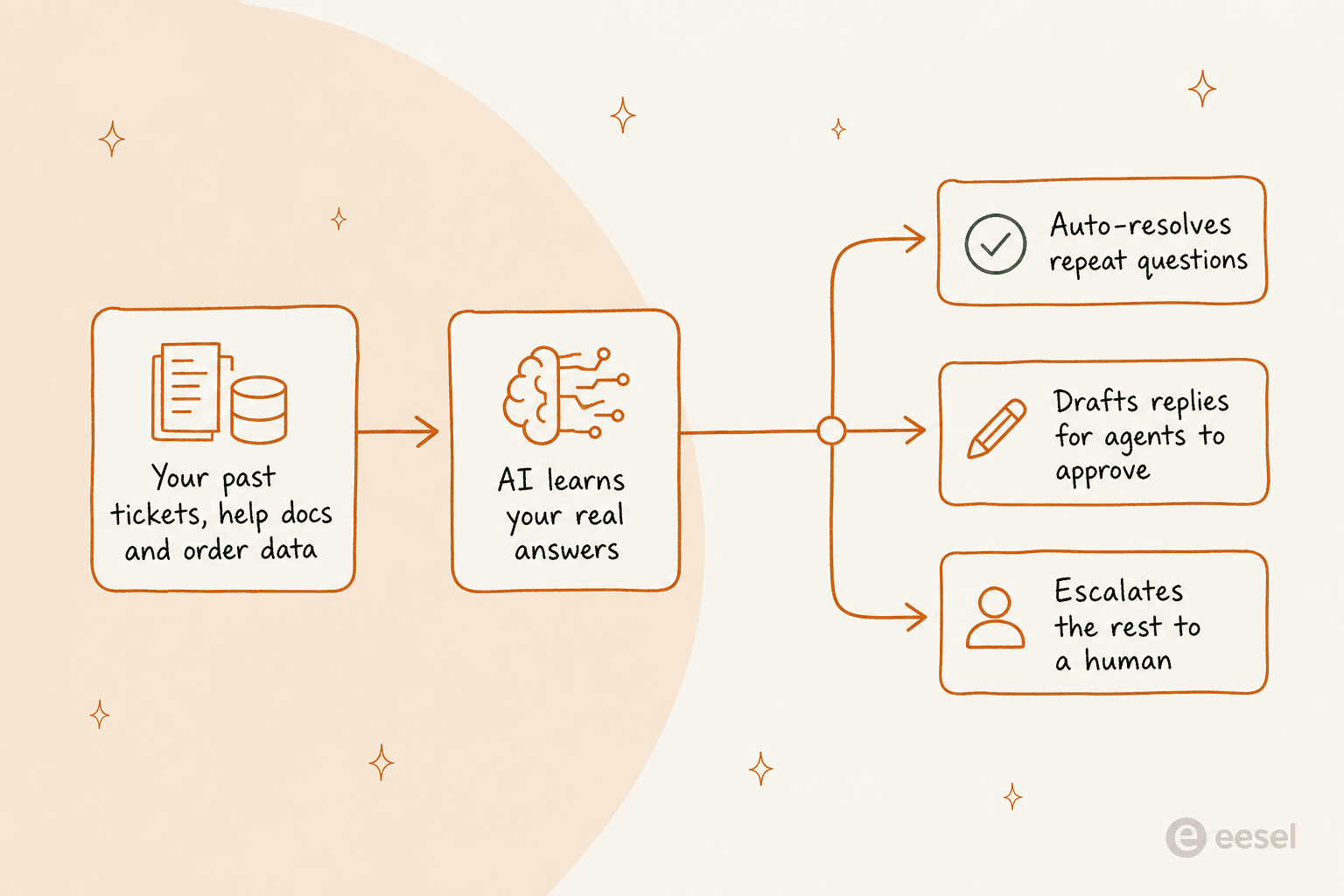
Here's the shape of how it actually works once it's connected:
Best for: small teams drowning in repetitive tickets who don't want to switch helpdesks or hire an admin to run the AI.
What stands out. It trains on your own past tickets and help docs, so the answers sound like your team, not a generic FAQ bot. Crucially, you control scope: you can let the AI agent auto-resolve only the ticket types it's confident on and leave everything else for a human, which is the objection I hear most from support leads who've been burned before. A DTC supplements CX lead we spoke to summed up the whole philosophy:
"The AI will never be able to answer 100% of the questions. I need an AI who is only handling the tickets that it's confident to handle, and all the other ones, leave them alone."
That confidence-based control is the difference between AI you actually trust in front of customers and a bot you switch off after a week. On real traffic it adds up: Gridwise reported that eesel resolved 73% of their tier-1 requests in the first month.
Pricing is where it fits small teams best: one fixed monthly price from $299 for 500 credits, no per-seat fee, no platform fee, plus 100 free credits to start with no credit card. Because credits are counted per ticket instead of per agent, adding a teammate doesn't add to the bill, and you can move up or down a plan any time.
Pricing: starts at $299/month for 500 credits (1 credit per ticket or chat; most dashboard questions are free). Pay a year upfront and get two months free. SSO and MFA (from $199/month) and priority support (from $299/month) are optional add-ons.
Where it isn't the fit. eesel is an AI and automation layer, not a standalone ticketing inbox. If you don't yet have a helpdesk at all, you'll pair it with one of the tools below (or use its own chat widget), rather than replacing your whole stack with it.
Our take: for a small team whose main problem is volume, this is the highest-leverage pick on the list precisely because it doesn't force a migration. You get the AI win without the switching cost. If you're weighing it against building your own on the OpenAI API, one team that did the math told us they "didn't want to invest our time into that. We wanted something we would not have to maintain."
2. Help Scout: best for a simple, human-first shared inbox
Help Scout has been the go-to for small teams who want support to feel personal rather than corporate. There's no ticket-number coldness, just a clean shared inbox, a knowledge base, and live chat, all designed so a customer never feels like they're talking to a machine.
Best for: small teams (SaaS, services, non-profits) who value a warm, human tone and want minimal setup.
What stands out. It's easy to use, the knowledge base is solid, and the newer AI features (AI drafts, an inbox assistant) help without taking over. It's the tool I'd hand a non-technical founder and expect them to be productive the same day.
Pricing: Standard is $25/user/month, Plus $45, and Pro $75 (billed annually, roughly 16% off monthly). There's no free plan anymore, just a trial. AI drafts are unlimited on Plus and up.
Where it bites. Per-user pricing means a five-person team on Plus is already $225/month, and the AI is helpful rather than a heavy-lifting autonomous agent. If your problem is raw ticket volume, you may still want an AI layer on top.
Our take: the best choice when the quality of small-team conversations matters more than aggressive automation. If you later need to deflect volume, keep it and add an AI agent rather than switching away.
3. Freshdesk: best free start that scales
Freshdesk is the safe, grown-up pick. It has a free program (up to 2 agents for 6 months) a small team can actually start on, a clean ticketing experience, and a clear upgrade path if you grow into omnichannel and heavier automation.
Best for: small teams that want a proven, full-featured helpdesk they won't outgrow.
What stands out. The free program covers small teams getting started, and the paid tiers add real ticketing depth, automations, and the Freddy AI agent. It's a comfortable middle-of-the-road choice that rarely surprises you.
Pricing: free to start (the Free Program covers up to 2 agents for 6 months), then Growth at $19/agent/month, Pro at $55, and Enterprise at $89 (billed annually). The Freddy AI Agent includes your first 500 sessions, then costs $49 per 100 sessions, which is worth modeling before you lean on it.
Where it bites. That session-based AI pricing can get unpredictable at volume, and small teams sometimes find the interface busier than a Help Scout. If Freddy's costs climb, plenty of teams look at Freshdesk alternatives or a per-ticket AI layer instead.
Our take: the strongest "start free, grow into it" option here. Just keep an eye on the Freddy session meter as your volume rises.
4. Zoho Desk: best for the tightest budget
If cost is the deciding factor, Zoho Desk is tough to beat. It's a legitimately capable helpdesk at a price that looks like a rounding error next to the enterprise tools, especially if you already live in the Zoho ecosystem.
Best for: budget-conscious small teams and anyone already using Zoho CRM or Zoho One.
What stands out. Multichannel ticketing, workflows, and a knowledge base start at $7/user/month. Its Zia AI handles sentiment and reply suggestions, and you can connect your own OpenAI key for generative features from the Standard plan up.
Pricing: a free tier for up to three agents, then Express $7/user/month, Standard $14, and Professional $23 (billed annually), with Enterprise above that. Genuinely the cheapest real helpdesk on this list.
Where it bites. The value comes with a learning curve, the UI feels more utilitarian than Help Scout, and the best AI needs configuration (and, for generative features, your own API key). Some teams weigh it against other Zoho Desk alternatives for a smoother experience.
Our take: unmatched on price. If your team is comfortable trading a little polish for a lot of savings, Zoho's reviews back up the value.
5. Gorgias: best for small Shopify and ecommerce teams
Gorgias is built for one job and does it well: ecommerce support. It connects deeply to Shopify, so an agent can see and edit orders, issue refunds, and manage subscriptions without leaving the ticket. For a small store, that context is a real time-saver.
Best for: small Shopify and ecommerce teams who live in order data.
What stands out. The Shopify integration is the deepest of any tool here, and there's an AI Agent on every plan that you pay for only when it resolves a conversation. For "where's my order" and refund questions, that's exactly the repetitive volume a small store wants gone.
Pricing: Starter is $40/month (50 tickets, helpdesk $10 + AI Agent $30), Basic is $77/month billed annually (300 tickets). Past your included tickets, it's $0.40 per ticket and $1.00 per automated AI interaction on Starter ($0.90 on Basic). Notably, Gorgias bills by tickets and resolutions, not per agent, so adding staff doesn't raise the base price.
Where it bites. It's ecommerce-first, so it's overkill for a SaaS or internal-IT team, and the ticket caps mean a busy month can push you into a higher tier fast. Teams that hit those caps often compare Gorgias alternatives or run a cheaper per-ticket AI on top.
Our take: if you're a small Shopify brand, start here. Just watch the ticket allowance, because that's where the Gorgias bill grows.
6. Front: best for a collaborative shared inbox
Front blends the feel of email with the structure of a helpdesk. It's the tool for teams who reply from shared addresses (support@, sales@, ops@) and need to collaborate on messages, assign owners, and comment internally without CC chaos.
Best for: small teams who work out of shared inboxes and value collaboration over ticket workflows.
What stands out. It feels like a familiar email client, so adoption is fast, and the internal commenting and assignment features are excellent for a team that hands work back and forth. AI features are available as add-ons.
Pricing: Starter is $25/seat/month (up to 10 seats), Professional $65/seat (up to 50), and Enterprise $105/seat, all billed annually. AI is a paid add-on rather than baked in.
Where it bites. Per-seat pricing climbs quickly (a five-seat Professional team is $325/month), the AI costs extra, and the shared-inbox model is less structured than a true ticketing system if you need heavy automation. Some teams compare Front alternatives once they outgrow the seat model.
Our take: the best experience for collaborative, email-heavy teams. If you need serious AI deflection, budget for the add-on or layer one on.
7. Tidio: best for live chat plus AI on a small store
Tidio leads with live chat and its Lyro AI agent, making it a natural fit for small online stores that want to catch and convert website visitors as well as answer support questions.
Best for: small ecommerce and website-first teams who want chat plus an AI agent without a big helpdesk.
What stands out. Quick to install on a website, a friendly chat widget, and the Lyro AI agent that can handle repetitive questions. There's a free plan to test the waters, which small teams appreciate.
Pricing: a limited free plan, then paid plans from around $29/month, with Lyro AI conversations billed separately by usage. Higher tiers scale up for more volume and seats.
Where it bites. The Lyro conversation limits can get pricey as volume grows, and it's more of a chat-and-bot tool than a full multichannel helpdesk. Teams comparing depth often look at Tidio alternatives.
Our take: a strong, low-friction pick for a small store whose support lives in the website chat widget. Model the Lyro usage before you commit.
8. HubSpot Service Hub: best if you're already on HubSpot
If your marketing and sales already run on HubSpot, Service Hub keeps everything on one customer record. For a small team, the free tier is a real way to start, and the tie-in with the HubSpot CRM is the main reason to choose it.
Best for: small teams already invested in HubSpot who want support on the same platform.
What stands out. A free tier (up to two users), a shared inbox, ticketing, and the Breeze AI features. The single customer view across marketing, sales, and support is a real advantage if you're already a HubSpot shop.
Pricing: Free for up to 2 users, Starter from $7/month/seat, then Professional and Enterprise jump substantially (Professional lands around $100/seat) where the real helpdesk and AI power lives.
Where it bites. The gap between Starter and Professional is steep, so the affordable tiers are light on the AI and automation a busy small team wants. If you're not already on HubSpot, the pull is much weaker, and the HubSpot AI pricing climbs fast at the Professional tier.
Our take: an easy yes if you already live in HubSpot, a harder sell if you don't. The free tier is a fine place to start regardless.
How much should a small team actually pay?
Sticker prices lie a little, so here's a concrete way to think about it. Say you're a three-person team handling 700 tickets a week.
On a per-seat tool, you're paying for three agents no matter how many tickets come in. On Help Scout Plus that's about $135/month; on Front Professional, closer to $195. Add an AI add-on and it's more. Those numbers don't move when your queue is quiet, and they jump the day you hire a fourth person.
On a volume-based model, the math follows volume. One Shopify homeware brand doing roughly 700 tickets a week told us their support was landing around $1.07 per ticket on a per-conversation plan. An AI layer that resolves even half of those repetitive questions changes that equation fast, because you're paying for ticket volume rather than chairs. That's the core reason I nudge small teams toward volume-based AI support: your cost scales with how much work actually shows up, not with how many people you employ.
The honest summary: if your volume is low and steady, a cheap per-seat tool like Zoho Desk is fine. If your volume is spiky or you're trying to grow support without growing headcount, usage pricing wins, and it's why comparing the true cost matters more than comparing sticker prices.
Try eesel
If the theme of this list is "clear the repeat questions without hiring," that's exactly what eesel AI is built to do for a small team. It plugs into the helpdesk you already use, trains on your past tickets and help docs, and lets you decide precisely which ticket types it's allowed to answer, so you get automation without handing customers to a bot you don't trust.

Because it starts free with 100 credits and then runs from $299 a month with no per-seat and no platform fee, a small team can start without any upfront spend, and a fintech customer running eesel over Confluence reported up to 80% time savings on answers and onboarding. You can test it on your own historical tickets first, so you see the results before a single customer does. It's free to try with 100 credits and no credit card.