12 customer service tips that actually work in 2026

Riellvriany Indriawan

Katelin Teen
Last edited July 6, 2026

What separates great customer service from the rest
I have spent a lot of hours in support queues, and the teams that feel effortless to deal with are rarely the ones with the biggest headcount. They are the ones with the tightest system: clear routing, good docs, fast first replies, and a ruthless sense of what a human should and should not be doing.
That last part is where most teams leak time. At eesel we have spent the last few years putting AI agents on live support queues, from a lender running a fully automated Zendesk agent on 100,000+ tickets a month to smaller teams shipping results inside a 7-day trial. The pattern is always the same: a huge chunk of the volume is repetitive, and every hour an experienced agent spends resetting passwords is an hour they are not spending on the ticket that actually needed them.
So these tips split into two halves. The first is craft, how to handle a single ticket well. The second is leverage, how to stop drowning so the craft has room to happen.
The customer service tips that actually work
None of these are theory. They are the habits I see separate the teams customers rave about from the ones they tolerate.
1. Answer the question they actually asked
The fastest way to annoy someone is to reply to the question you wish they had asked. A customer writes "why was I charged twice?" and gets a cheerful three-paragraph tour of the billing settings page. They did not want a tour. They wanted to know about the second charge.
Read the message twice. Answer the real question in the first line, then add context. If there are genuinely two questions buried in one email, answer both and number them so nothing gets dropped.
2. Never leave dead air
Silence is what turns a small problem into an angry one. If you cannot resolve something in the moment, say so fast: "I have got this, I am checking with our billing team and will have an answer by end of day." A holding reply that sets a real expectation beats a perfect reply that lands six hours late.
This is also the easiest win to automate. An AI agent for live chat or email can acknowledge instantly, answer if it is confident, and hand over cleanly if it is not, so nobody sits staring at an empty inbox.
3. Route tickets by type, not by arrival order
First-come-first-served feels fair and works terribly. A two-second "where is my order" ticket should not sit behind a gnarly integration bug just because it arrived later. Sort your queue by what each ticket actually needs.
In practice, almost every queue splits into three buckets, and knowing the rough shares changes how you staff it.
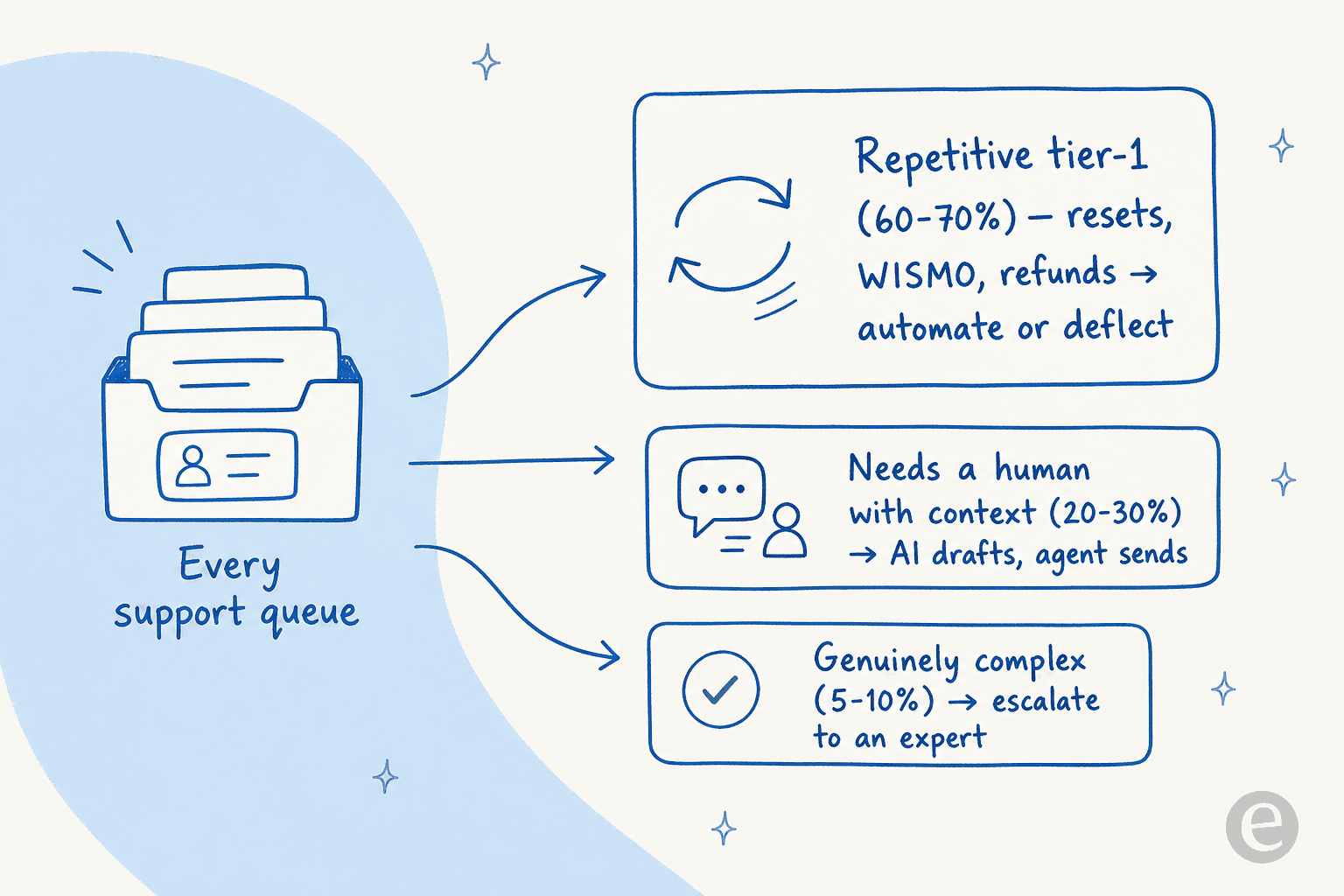
The repetitive bucket should mostly be automated or deflected. The middle bucket is where an AI copilot drafts and a human sends. The small complex bucket is what your best people are for. Good ticket triage is what makes that split real instead of aspirational.
4. Keep a knowledge base that is actually alive
A knowledge base is the highest-leverage asset a support team owns, and the most neglected. Every good answer you write once can deflect the same question a thousand times, but only if the article exists, is findable, and is not quietly out of date.
The trick is to close the loop: when a ticket reveals a gap, write or update the article before you close it. eesel's AI knowledge base chatbot approach even flags the topics customers keep asking about that your docs do not cover, so you know exactly what to write next.
5. Write replies humans want to read
Tone is not fluff, it is the difference between a customer feeling handled and feeling helped. A reply that lands has a shape: a fast acknowledgment, the actual answer up front, plain language, one clear next step, and a warm close that sounds like a person.
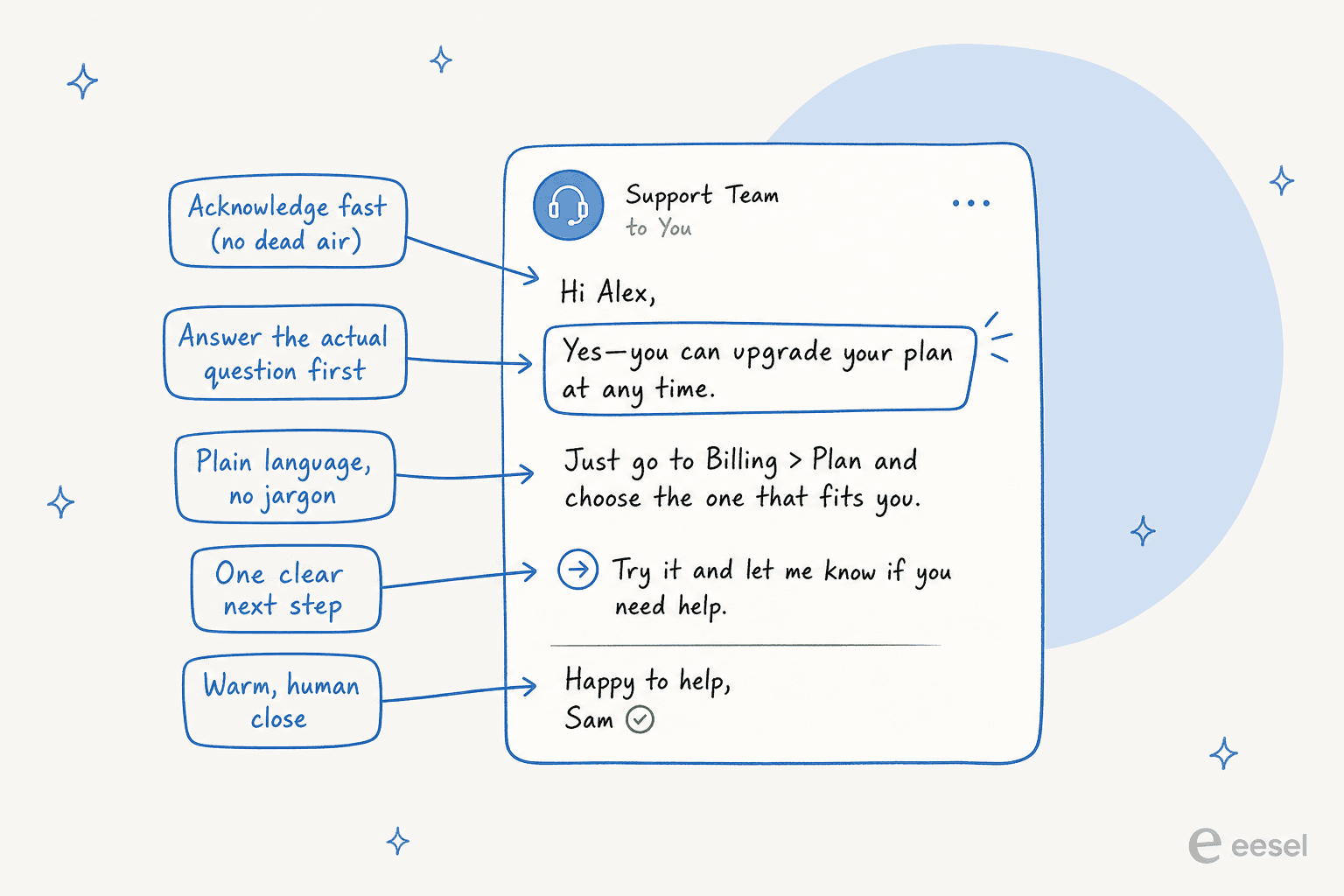
Cut the jargon and the corporate hedging. "As per our policy" helps no one. Macros and templates are fine for the skeleton, but leave room to make each reply feel written for that person. If you are leaning on canned responses, our take on customer service chatbot examples shows how to keep them from sounding robotic.
6. Let customers help themselves
Most people would rather find the answer than talk to you, and that is a good thing. A strong help center, a searchable FAQ, and a customer service chatbot on your site let the easy questions resolve without ever hitting your queue.
This is where a company we work with put it best:
"As a fast-growing startup with a small team, our customers far outnumber our employees. It's crucial that we have robust self-service solutions as well as tools to supercharge the efficiency of our client-facing teams."
Jon Miron, Director of Support & Operations, Yellowdig
Self-service is not about pushing customers away. It is about giving them the fastest path to an answer, which is usually the one that does not involve waiting for a reply.
7. Automate the repetitive tier-1, protect humans for the hard stuff
This is the tip that unlocks all the others. If your team is buried in password resets and order-status checks, they have no time left for craft. Handing that repetitive layer to an AI helpdesk agent is what buys the room back.
The fear here is always the same: what if the AI answers wrong? The honest answer is that it can, which is why the setup matters more than the model. We simulate every rollout against a customer's real past tickets before it goes live, so you can see exactly what it would have said and where it would have stayed quiet. On one deployment that discipline meant eesel resolved 73% of tier-1 requests in the first month, with the rest routed cleanly to a person.

If you are weighing whether to build this yourself or buy it, we wrote up the build vs buy trade-off honestly, including the cases where building your own makes sense.
8. Close the loop, every time
A ticket is not done when you send the reply. It is done when you have confirmed the fix worked and captured why it happened. A quick "did that sort it out?" catches the half-solved problems that would otherwise come back as an angrier second ticket.
The bigger payoff is the pattern. If forty people ask the same thing this month, that is not forty tickets, it is one missing feature, one confusing checkout step, or one bad help article. Running support ticket analysis on the themes turns your queue into a roadmap instead of a treadmill.
9. Measure the few metrics that matter
It is easy to drown in dashboards. In practice, four numbers tell you almost everything about whether your service is working.
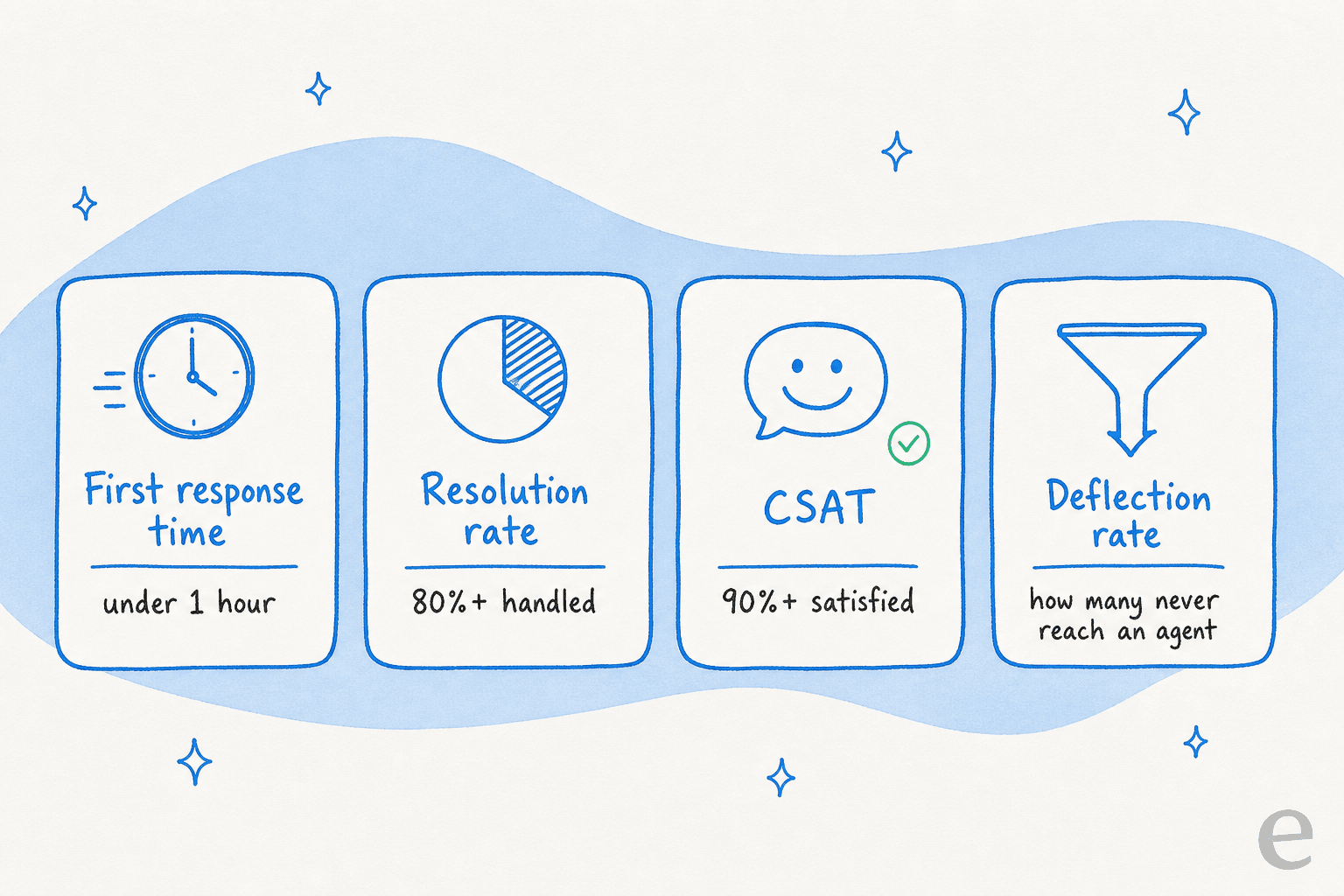
Watch the trend, not the daily wobble. A first response time creeping up week over week is a staffing or routing problem you can fix before customers start complaining. If you want the fuller list and how they interact, our guide to AI customer service metrics breaks it down, and the reporting inside eesel surfaces most of these automatically.

10. Coach with real tickets, not hypotheticals
Onboarding a new agent on made-up scenarios teaches them how to handle problems they will never see. Coach on your actual past tickets instead: the weird refund edge case, the one integration that always confuses people, the phrasing that calms an upset customer.
This applies to your AI too. The tools worth using learn from your solved tickets, not just your help-center articles, so their answers sound like your team rather than a generic bot. Every correction an agent makes should make the next answer better.
11. Match the channel to the moment
A customer mid-checkout wants live chat, not a "we will reply within 24 hours" email. Someone reporting a billing error is fine with email but wants a paper trail. Meeting people on the right channel is half of feeling responsive, and consolidating those channels into one queue is what keeps a small team from missing messages scattered across five inboxes.
12. Be honest when you cannot help
The most trust-building thing a support team can do is admit a limit. If something is a known bug, say so and give a timeline. If it is genuinely not possible, say that too, kindly, and offer the nearest workaround. Customers forgive a clear "no" far faster than a vague "let me look into that" that never lands. The same honesty is why we would rather have our AI say "let me get a human" than confidently guess.
Where AI fits into your customer service
Notice that AI never replaced the craft in that list, it made room for it. The repetitive layer gets handled automatically, first responses stop being a bottleneck, and your agents get their time back for the tickets a human should own.
The reason we built eesel this way is that most "AI customer service" either over-promises full autonomy on day one or under-delivers as a glorified FAQ search. The middle path, an agent that drafts under supervision, earns autonomy on the easy stuff, and hands off cleanly when it is unsure, is what actually survives contact with a real queue.
It also plugs into the helpdesk you already use, Zendesk, Freshdesk, Gorgias, Help Scout, Front, so the tips above do not require ripping out your stack. You keep your queue, your docs, and your workflows, and the AI layer sits on top.
Try eesel for customer service
If the tip that landed hardest was number seven, getting repetitive tier-1 volume off your team's plate, that is exactly what eesel does. It learns from your past tickets and help docs on day one, drafts or auto-sends replies inside your existing helpdesk, and lets you simulate the whole thing against your real ticket history before a single customer sees it. Pricing is a fixed monthly plan from $299/month for 500 credits (1 credit per ticket) with no per-seat fees, so it scales with your volume rather than your headcount.
You can connect it and run a simulation in a few minutes, no credit card, and see what it would have handled on your own tickets. Try eesel free.