Why this question is harder than it looks
Here's the uncomfortable thing I learned early: an AI helpdesk that demos beautifully can quietly fall apart in production.
We've watched a confident-sounding bot give a customer a wrong answer with total conviction, because the underlying tool had no way to say "I'm not sure about this one." That single experience is why I now treat "how does it behave when it doesn't know" as more important than any feature on the spec sheet. It's also why the rest of this post is organized around behavior under pressure, not feature counts.
Most buyer guides hand you a table of checkmarks. That's fine for a first filter, but checkmarks lie. Two tools can both claim "knowledge base integration" and "automated replies," and one of them will resolve 70% of your tier-1 tickets while the other annoys your customers into asking for a human on message one. The difference is in the parts you can't see on a feature grid.

So let me walk you through the eight things I'd actually look at, and what "good" looks like for each.
1. Can it answer from all your knowledge?
The first question isn't "how smart is the AI." It's "what does it know." An AI helpdesk is only ever as good as the knowledge it can reach, and most of yours is scattered: a help center, a Notion wiki, old Google Docs, a few thousand resolved tickets that contain the real answers your team learned the hard way.
What to look for is a tool that ingests all of it and keeps it in sync. A snapshot import that goes stale the moment you update a doc is a trap. One eesel customer on Reddit put their finger on exactly why this matters: the value was that "the info you get from the bot is always updated in real-time as the docs are, instead of having to ask someone."
The other half of this is training on your past tickets. That's consistently the most-requested capability I hear about, because your ticket history is where the tone, the edge cases, and the "we actually do it this way" answers live. If a tool can only read your published articles, it's missing the better half of your knowledge. (If you're starting from a messy knowledge base, my guide on how to train AI on your knowledge base covers where to begin, and the best AI knowledge base tools post compares the storage side.)
What good looks like: every source connected, real-time sync, and training on historical tickets, not just help-center articles.
2. Does it know when to escalate?
This is the one I'd put at the top if I had to pick a single criterion. An AI that tries to answer everything is more dangerous than no AI at all.
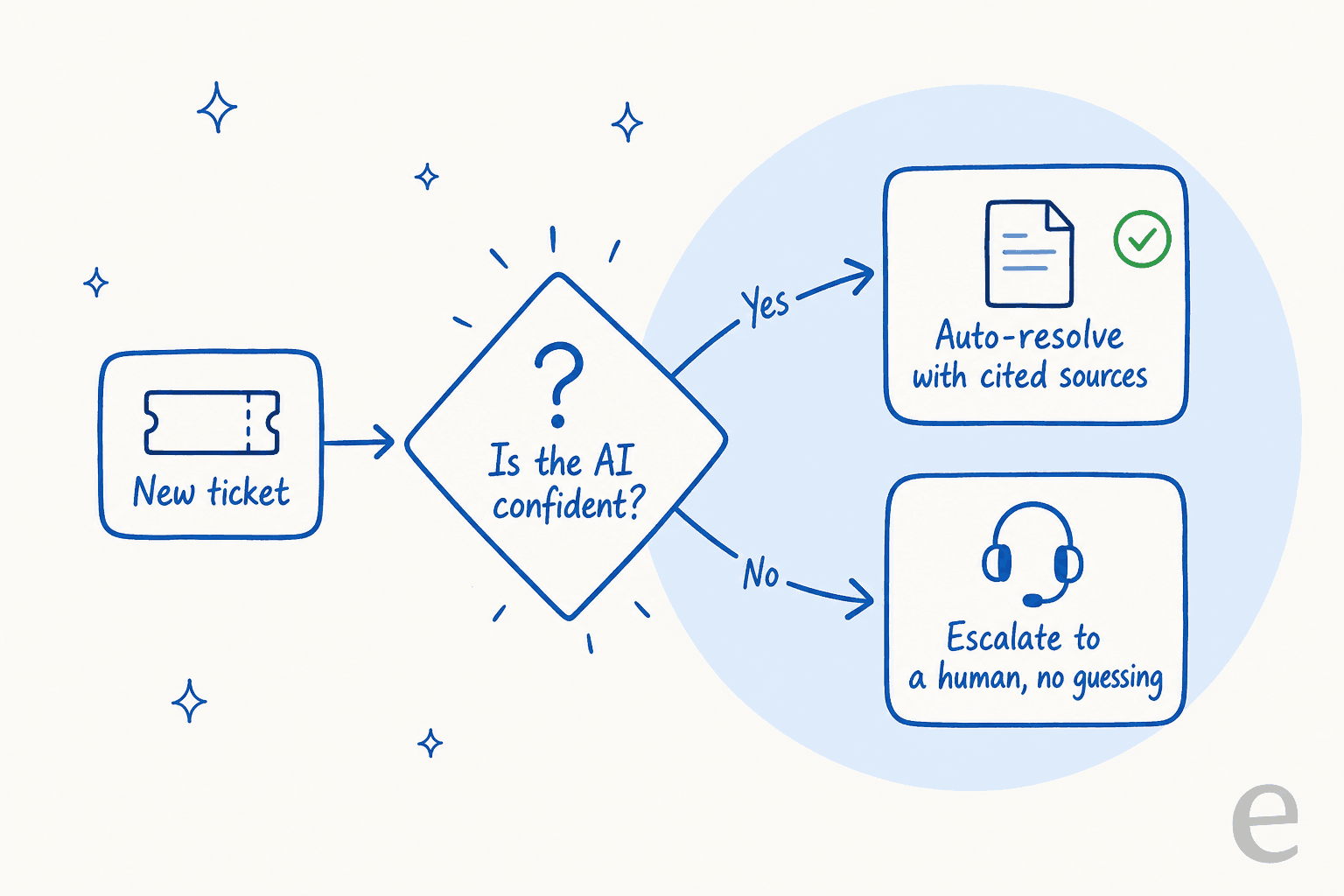
The behavior you want is confidence-based routing: the agent answers the tickets it's genuinely sure about, and for everything else, it hands off to a human without inventing something. It sounds obvious. It's also the feature most tools quietly lack, and it's the one that loses deals when buyers realize it's missing.
I hear the same worry from support leads constantly, and one CX lead at a DTC supplements brand running around 7,000 tickets a month said it better than I could: the AI will never answer 100% of questions, but if it just blurts out "sorry, I don't know" on everything it's unsure about, you can't go back and audit thousands of tickets to check it. What you actually need is an agent that handles only what it's confident about and leaves the rest alone. That's the whole game.
When it's done right, you get something like what one support lead at an SMS platform wrote on G2:
"It answers confidently but not too confidently, and training it has been super easy."
Kellen Brown, Textla (G2 review)

What good looks like: you set the confidence threshold, low-confidence tickets route to a human or to a clean escalation flow, and the AI never bluffs. If a vendor can't explain how their tool decides not to answer, that's your answer.
3. Can you test it before it touches a real customer?
Would you let a new hire reply to 5,000 customers on day one with zero review? No. So why would you do that with an AI?
The capability that separates a serious tool from a toy is simulation: the ability to run the agent against your historical tickets and see exactly how it would have responded, what it would have resolved, and where it would have gone wrong, all before a single live customer is involved. This is the thing I wish every team demanded, because it turns "we think it'll work" into a real forecast with numbers attached.

A good simulation tells you your projected resolution rate, surfaces the gaps in your knowledge base before they become bad answers, and lets you tune the agent in private. When we've run this for teams, the numbers are concrete enough to act on: one gig-economy analytics app on Zendesk saw results inside a 7-day trial and went on to resolve 73% of tier-1 requests in month one.
"In the first month, eesel is resolving 73% of our tier 1 requests... Our team implemented and achieved results quickly during our 7-day trial."
Kim Simpson, Gridwise (G2 review)
What good looks like: a simulation or dry-run mode over your own tickets, with a projected resolution rate you can trust before you commit.
4. Does every answer cite its sources?
When the AI answers a customer, can you and the customer see where the answer came from? Citations aren't a nice-to-have. They're how you build trust in the system and how you debug it when something goes wrong.
This matters most in regulated or high-stakes spaces, where a confidently wrong answer isn't just embarrassing, it's a liability. The fix is a tool that always shows its working: every reply links back to the specific doc or article it drew from, and you can set hard guardrails on which sources it's allowed to use. If a tool answers from "general knowledge" when your knowledge base has no match, that's where hallucinations in support creep in.
What good looks like: transparent, clickable citations on every answer, plus the ability to restrict the agent to approved sources only. No citation, no trust.
5. Can you control what it touches?
Buyers don't want a magic box that auto-replies to everything from day one. The most common request I hear is for control: the ability to keep certain ticket types away from the AI entirely, to start in a draft-for-review mode, and to dial up autonomy only as confidence builds.
Look for a human-in-the-loop trust ramp. A good tool lets you start with the AI drafting replies for your agents to approve (a copilot setup), then graduate to semi-autonomous, then fully autonomous, on your timeline. And the briefing should be plain language, not a brittle decision tree. You should be able to tell the agent "don't promise delivery dates" or "always offer the self-serve return flow first" in a sentence and have it stick.

The control question also covers learning: when your team rejects or edits a draft, does that feedback actually train the agent? You want a tight loop where correcting the AI once changes its behavior, not a black box that keeps making the same mistake.
What good looks like: ticket-type exclusions, a draft-mode-to-autonomous ramp, plain-language instructions, and a feedback loop you can see.
6. Does it live inside your current helpdesk?
Here's a question that quietly saves you months: does the AI work with the helpdesk you already have, or does it want you to switch platforms?
I'd push hard toward the layer-on-top approach. Your team already knows Zendesk, or Freshdesk, or Gorgias, or Help Scout. Your tickets, macros, and history live there. A tool that adds AI inside those tools means setup takes minutes and your agents keep their existing workflow. A tool that demands a migration means a quarter-long project, retraining, and the risk of losing ticket history along the way.
The breadth of integrations matters too, and not just helpdesks. The best setups also reach your knowledge tools (Confluence, Notion, Google Drive) and your commerce stack (Shopify, WooCommerce) so the agent can actually do things, like look up an order, not just talk about them. One CTO of a sleep brand told us they chose eesel specifically because they could link their CSVs, Zendesk, and Google Docs as sources and make the most of documentation that was scattered everywhere.
What good looks like: native integration with your existing helpdesk, broad knowledge and commerce connectors, and a setup measured in minutes, not migrations. (If you're weighing a switch anyway, my best AI helpdesk software roundup compares the platforms head to head.)
7. What are you actually paying for?
Pricing is where I see the most buyers get quietly burned, because the sticker price tells you almost nothing. The real question is: what's the billable unit?
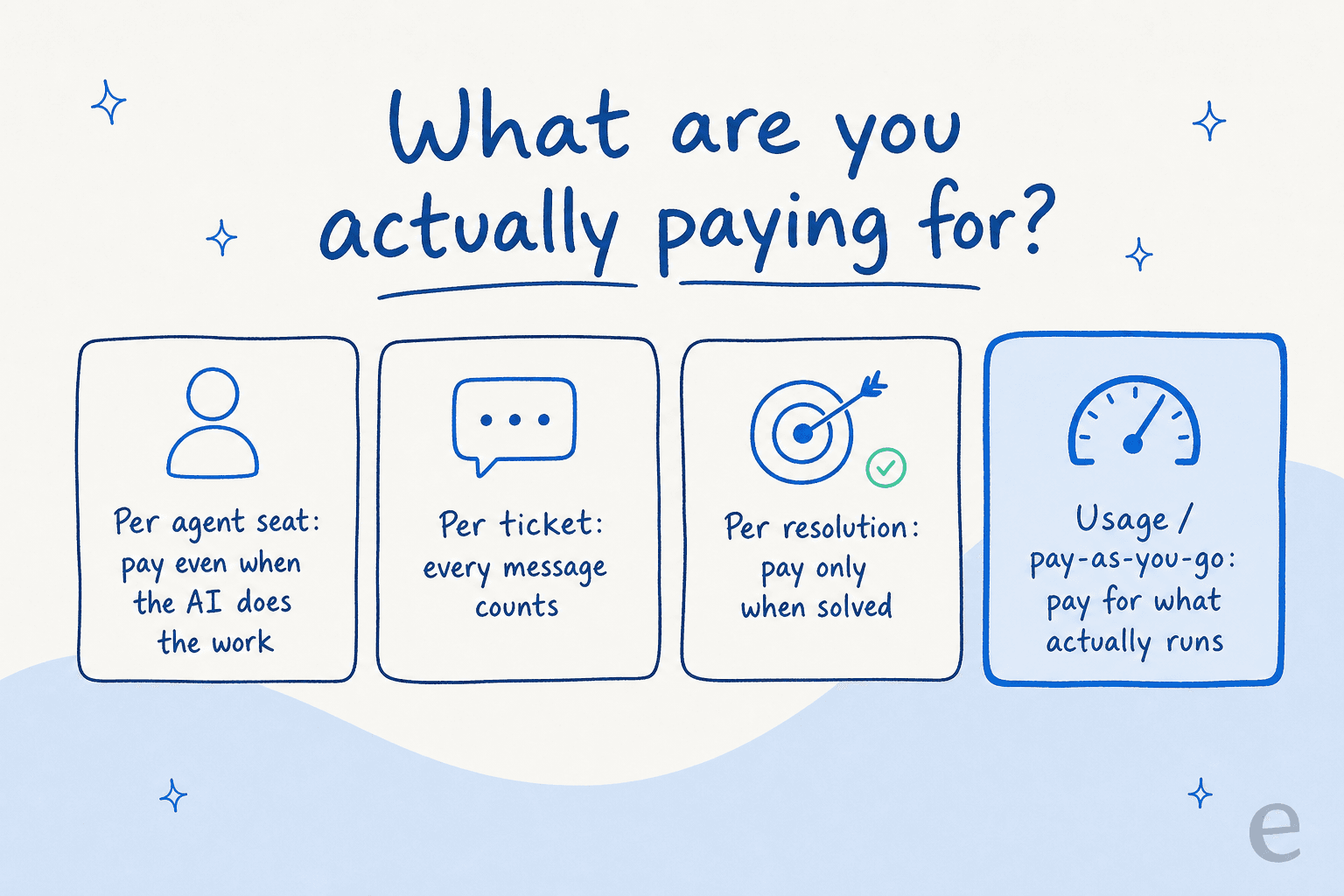
There are roughly four models out there, and they are not the same:
- Per agent seat - you pay for human seats even though the AI is doing the work. Odd incentive.
- Per ticket - every inbound counts, including spam and the ones the AI couldn't touch.
- Per resolution - you pay only when the AI actually solves something. Fairer, but watch how "resolution" is defined.
- Usage / pay-as-you-go - you pay for what runs, no seats, no minimums.
The trap is the tools that gate their best features behind a higher tier, or that charge per-seat and per-resolution. I'm biased toward transparent, usage-based pricing because it aligns the vendor's incentive with yours: they only make money when the AI is useful. For reference, here's how eesel's pay-as-you-go pricing scales on support tickets:
| Tickets per month | Monthly cost |
|---|---|
| 100 | $40 |
| 500 | $200 |
| 1,000 | $400 |
| 2,500 | $1,000 |
No platform fee, no per-seat fee, no monthly minimum, and each task covers a whole ticket or chat session no matter how many messages go back and forth. If you want to go deeper on the math, I broke down AI agent vs human agent cost and the cheapest AI apps for helpdesk separately.
What good looks like: a billing unit you understand in one sentence, no surprise per-seat fees, and predictable cost as volume grows.
8. Will it pass your security review?
This is the one that kills deals late if you don't check it early. For a lot of teams, security isn't a soft preference, it's a hard gate, and I've watched perfectly good evaluations stall in week three because the tool couldn't produce a SOC 2 report.
The list to run through depends on your industry, but the usual suspects are SOC 2 Type II, GDPR and EU data residency, HIPAA and a signed BAA for healthcare, PII redaction so card numbers and passwords don't leak into the model, and a flat promise that your data is never used to train anyone's model. eesel covers SOC 2 Type II, EU data residency, and zero model training on customer data as standard, with HIPAA and a BAA available on Enterprise. One EU HR-compliance customer needed a turnkey Confluence and Slack setup that met GDPR with EU data residency, and that was the deciding factor for them.
What good looks like: the certifications your buyer requires, in writing, plus clear answers on where data lives and whether it trains a model. Ask in week one, not week three.
A quick scorecard you can steal
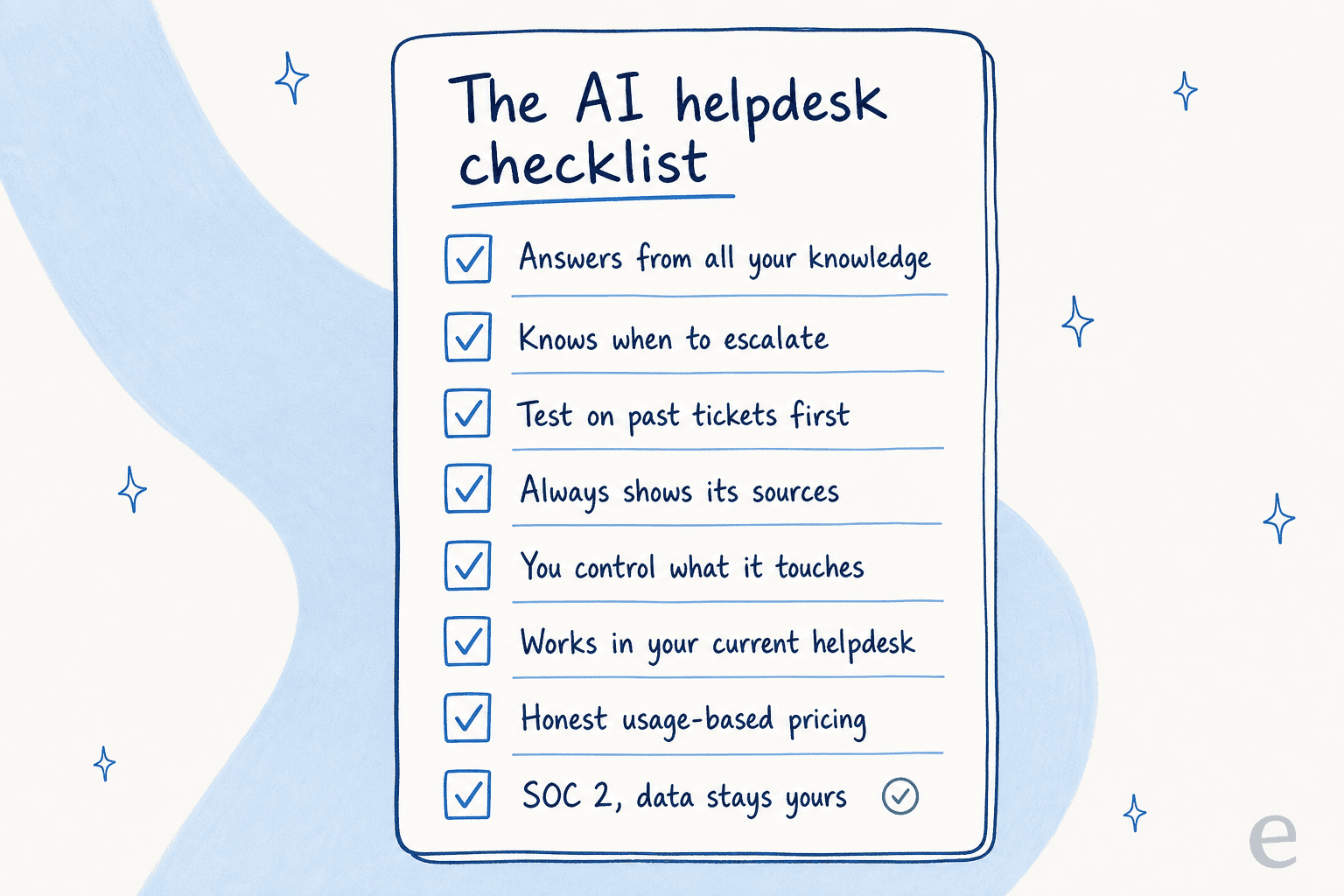
If you want the whole thing on one screen, here it is. Print it, paste it into your evaluation doc, score each tool out of the eight.
| What to check | The question to ask the vendor |
|---|---|
| Knowledge | Can it train on our past tickets and stay in sync, not just read help articles? |
| Confidence routing | How does it decide not to answer, and where does it escalate? |
| Testing | Can we simulate it on our historical tickets before going live? |
| Citations | Does every answer link to its source, and can we restrict sources? |
| Control | Can we exclude ticket types and start in draft mode? |
| Integration | Does it run inside our current helpdesk, or require a migration? |
| Pricing | What's the billable unit, and are there per-seat fees? |
| Security | SOC 2, data residency, PII redaction, no model training? |
The honest truth is that no tool aces all eight for every team. A simple rule-based chatbot might be fine if your queries are dead simple and low-volume. But if you're running real support volume, I'd refuse to shortlist anything that can't do confidence routing and let you test on your own tickets first. Those two are the floor.
Try eesel
I built eesel to be the AI helpdesk that passes its own checklist. You point it at your existing Zendesk, Freshdesk, Gorgias or Help Scout, connect your knowledge sources and past tickets, and brief it in plain English. Before it touches a live customer, you simulate it on thousands of your historical tickets to see your projected resolution rate, and it only ever answers what it's confident about, with citations, escalating the rest to your team.

It's usage-based with no per-seat fees, free to start with no credit card, and it sets up in minutes rather than a quarter-long migration. If you're working through the eight checks above, the fastest way to see how a tool scores is to run it against your own tickets. You can try eesel and have a simulation running this afternoon.
Frequently Asked Questions
What should I look for in an AI helpdesk?
How much does an AI helpdesk cost?
Can an AI helpdesk work with my existing tools like Zendesk or Freshdesk?
How do I stop an AI helpdesk from giving wrong answers?
Is an AI helpdesk secure enough for sensitive customer data?


Article by
Alicia Kirana Utomo
Kira is a writer at eesel AI with a Computer Science background and over a year of hands-on experience evaluating AI-powered customer service tools. She focuses on breaking down how helpdesk platforms and AI agents actually work so that support teams can make better buying decisions.